


Creating a pitch deck seems like it should be easy. After all, it’s just a few slides about your business, and you already have all the data you need. The truth is, a winning pitch deck is a delicate balance of visual formatting, key data points, and strategic delivery.
The key to fitting that all into a few slides? The right software. Even with the perfect pitch deck template, you need a single source of truth to tie all your data together. In this article, we’ll go through everything you need to know to craft a strong pitch deck and show you how using AI with a solution like monday CRM can help you turn workflows and data into decks that get results.
Try monday CRMWhat is a pitch deck template, and why do you need one?
A pitch deck is a visual presentation that’s given to investors, stakeholders, or partners to summarize a business plan. You might use a pitch deck to share an idea for a new business, ask for funding when launching a startup, or if you want to launch a new product or service within a company.
Pitch deck templates help individuals and teams streamline the pitching process. While pitch decks shouldn’t be that long, since you’re trying to convey your ideas concisely, they do have specific elements that you don’t want to miss when you’re in front of investors.
A pitch deck template ensures you have all the key elements you need to structure a compelling presentation.
8 core elements to structure a pitch deck
Before jumping straight into searching for pitch deck templates, it’s important to understand the basic structure of a pitch deck. When you’re looking for the right template for your pitch, you’ll have an easier time discerning the content and slides you need from the ones that are going to clutter your presentation with too many details.
- Cover slide: Your cover slide should include the name of your company or project and, if relevant, a brief description or tagline for your presentation.
- Introduction: Outline who you are and what you’re going to present, such as your company’s mission, your unique value proposition, and a description of your product or service.
- Problem statement: Describe the problem in the market that your company or project intends to solve and back it up with illustrations, statistics, or data that solidifies a need for a solution.
- Solution: Next, you need a clear pitch on why your team is the best option to solve the previously stated problem, while demonstrating how your product or service addresses it.
- Proof of progress: You want to show potential investors your progress to date, including current traction and milestones, such as previous rounds of funding, client case studies with your company, or existing partnerships.
- Team: It’s important to introduce team members and describe who they are, their relevant industry experience, and why they’re essential to your company.
- Financial projections: In this part of your pitch, you want to show forecasts and predictions of expected revenue based on real data and accurate models.
- Call to action: Finally, it’s important to include a clear call to action for your audience so they understand what you need, whether that’s funding, a partnership, or something else entirely.
Pitch decks can cover plenty of other slides, including more details on market research, your business model, competitor research, and your go-to-market strategy. When looking for a pitch deck template, it’s important to come with an understanding of the slides that are most valuable to your business and that will provide all the context needed to land naturally at your final ask.
Choosing the right templates by industry and need
Pitch decks aren’t a one-size-fits-all solution. Two related startups might need different decks based on the VCs or investors they’re pitching to, even if they’re in the same field. Similarly, the template a startup uses to pitch investors won’t work for a real estate developer. It’s important to find a framework that fits both your industry’s priorities and your audience’s expectations.
VC-focused frameworks
If you’re after venture capital, look for VC-specific templates, such as a Sequoia Capital pitch deck template or a Y Combinator pitch deck template. It’s important to fit the template you use to your audience or specific VC since each might emphasize different data, such as market size or brand storytelling.
Real estate pitch deck
Real estate pitch decks should be more visual to show essentials like property renderings, location maps, and charts with comparative sales data. These pitch decks are more focused on ROI projections and market analysis.
Consulting firm templates
Pitch deck templates for consulting firms need to focus on credibility, so find a template that includes slides for case studies, your team’s expertise, and your firm’s unique methodology that drives proven results.
SaaS-specific templates
SaaS pitches need to highlight data like recurring revenue, customer acquisition costs, churn rates, and product roadmaps. A SaaS pitch deck template should be optimized to tell the story behind the data of subscription-based business models.
Creative and agency decks
Creative pitches should include a lot of visual storytelling. Look for a template with enough space to give your past projects room to shine, while keeping essential business details front and center but concise.
Platform showdown: Canva, Google Slides, or PowerPoint?
When you hear the words “pitch deck,” it can be tempting to run to your preferred slides or design platform of choice, but before defaulting to your usual suspects, consider the benefits and drawbacks of each design platform or pitch deck software. In the table below, we’ll give you a quick overview of how and when to use each platform.
| Platform | Use case | Strengths | Limitations |
|---|---|---|---|
| Canva | Non-designers who want polished visuals quickly | Drag-and-drop interface, extensive template library, built-in design assets, brand kit features | Limited animation options, can feel template-heavy, requires internet connection |
| Google Slides | Collaborative teams and remote presentations | Real-time collaboration, cloud-based access anywhere, seamless sharing, integrates with Google Workspace | Basic design capabilities, fewer templates, limited offline functionality |
| PowerPoint | Professional presentations requiring advanced features | Robust animation and transition tools, extensive formatting control, works offline, industry standard | Steeper learning curve, collaboration requires OneDrive/SharePoint, can be expensive |
| Figma | Designers who need complete creative control | Professional-grade design tools, component libraries, collaborative editing, prototyping capabilities | Not presentation-focused, steeper learning curve, requires export for presenting |
| Notion | Teams building interactive, document-style pitches | All-in-one workspace, embed-rich content, easy updates, great for internal collaboration | Non-traditional pitch format, limited presentation mode, may not suit investor expectations |
For those who prioritize design flexibility, Canva offers an accessible middle ground with thousands of customizable templates and intuitive controls. Figma takes creative freedom further, giving you professional-grade design tools and complete control over every element for a custom deck that stands out from template-heavy competitors.
Google Slides is often the go-to choice since multiple people can edit simultaneously, comment on slides, and access the deck from anywhere. Still, pitch deck solutions like those that are integrated into CRM software offer a great alternative since they can pull data from your existing platform to build a personalized presentation based on reliable information.
Dazzle investors with these key pitch deck slides
We’ve already covered the core slides and details you should cover in your pitch deck, but if you really want to stand out to investors, there are a few different slides you should consider including in your presentation. The goal with these slides is not to inundate your audience with numbers and vanity metrics, but rather tell a compelling story about your company using hard data.
Map your market edge with a competition slide
Investors are going to be wondering why they should fund your venture rather than someone else’s. If you’re in a field with heavy competition, it’s critical to address this in your pitch deck with at least one slide that outlines how you stand out from your competitors, differences in strategies, and solutions you provide that your competitor doesn’t.
Turn financial projections into narratives
Another slide to integrate into your presentation is a deeper look at your company’s finances, but letting data tell the story of your progress. For example, instead of showing a revenue chart climbing upward, explain what drove each spike. Was it a new product launch, a key partnership, or an expansion into a new market? Build a narrative out of the reason to help investors understand the logic behind the numbers so that they’re not just looking at charts on a screen.
Show traction with a customer testimonial slide
Social proof can be incredibly persuasive. Include a slide with specific quotes from satisfied customers, notable clients, or case study results that demonstrate real-world impact. A testimonial like “This solution reduced our processing time by 60%” paired with the customer’s logo carries more weight than generic claims about your product’s effectiveness.
Modern design trends: Moving from static slides to interactive stories
Creating a pitch deck on Google Slides or PowerPoint may be the way to go for more traditional presentations, but modern decks include new design trends that make pitches feel more personalized and interactive. Here are a few ways to grab attention with the design of your pitch deck.
Embedded videos and demos
Why describe your product when you can show it in action? Embed videos into your slides of product demos, customer case studies and testimonials, or explainer animations to visually communicate your value propositions more effectively than static screenshots or text descriptions.
Guide attention with animations
A pitch deck isn’t the place to add aggressive PowerPoint animated transitions, but tasteful animations can add a unique touch to a presentation by controlling the narrative and drawing your audience’s attention to specific data. For example, slowly reveal data points one at a time to not overwhelm viewers or use animations to build charts as you’re explaining them.
Design for scrolling
If your deck is going to be viewed outside of a presentation, make sure it’s optimized for scrolling and not just clicking. Some design platforms, like Canva, support vertical scrolling on presentations so that they feel more natural when viewed digitally. This format works especially well for decks that will be reviewed asynchronously, allowing investors to move through your pitch at their own pace while maintaining visual continuity.
Make your deck easy to track and share
Your pitch deck should live online, meaning you share a link with viewers rather than send it as an attachment. Web-based presentations are easier to track, so you can see who’s viewed your deck, which slides they spend the most time on, and how many times it was shared. This data can help early-stage companies follow up more effectively and understand which parts of a deck resonate most with audiences.
Manage the pitch lifecycle with monday CRM
You might find it helpful to create your pitch deck on a platform like Google Slides or Canva, but you still need a platform to act as a single source of truth and manage all your company data. With a solution like monday CRM, startup founders and business owners can centralize their most critical data and gain insights into business processes that can be used to build persuasive pitch decks.
Aside from being a single source of truth for organizations, monday CRM also uses advanced AI technology to make it easier to tailor pitch decks and make sense of data that may otherwise get overlooked. The CRM’s automations are also helpful when it comes to communicating with multiple investors, scheduling meetings, and following up.
Let’s take a more detailed look at some of monday CRM’s features that can help founders and startups build stronger pitch decks.
Centralize deck version control

Team members can easily communicate and collaborate all in one platform, so that you can avoid siloed data and flipping back and forth between different programs. Keep track of different deck versions, integrate feedback, and track and auto-summarize important conversations with AI so that you’re always on top of the latest updates.
Personalize slides with AI-driven data

There’s more than one way to gather and visualize data in monday CRM. Generate smart reports with AI or let AI create dashboards with the exact widgets you need to track performance and customer adoptions. Charts like revenue growth timelines, customer acquisition funnels, and pipeline conversion rates can then be used directly in your pitch deck so that the real data from your CRM tells the story of your business’s purpose and potential.
AI automations work behind the scenes
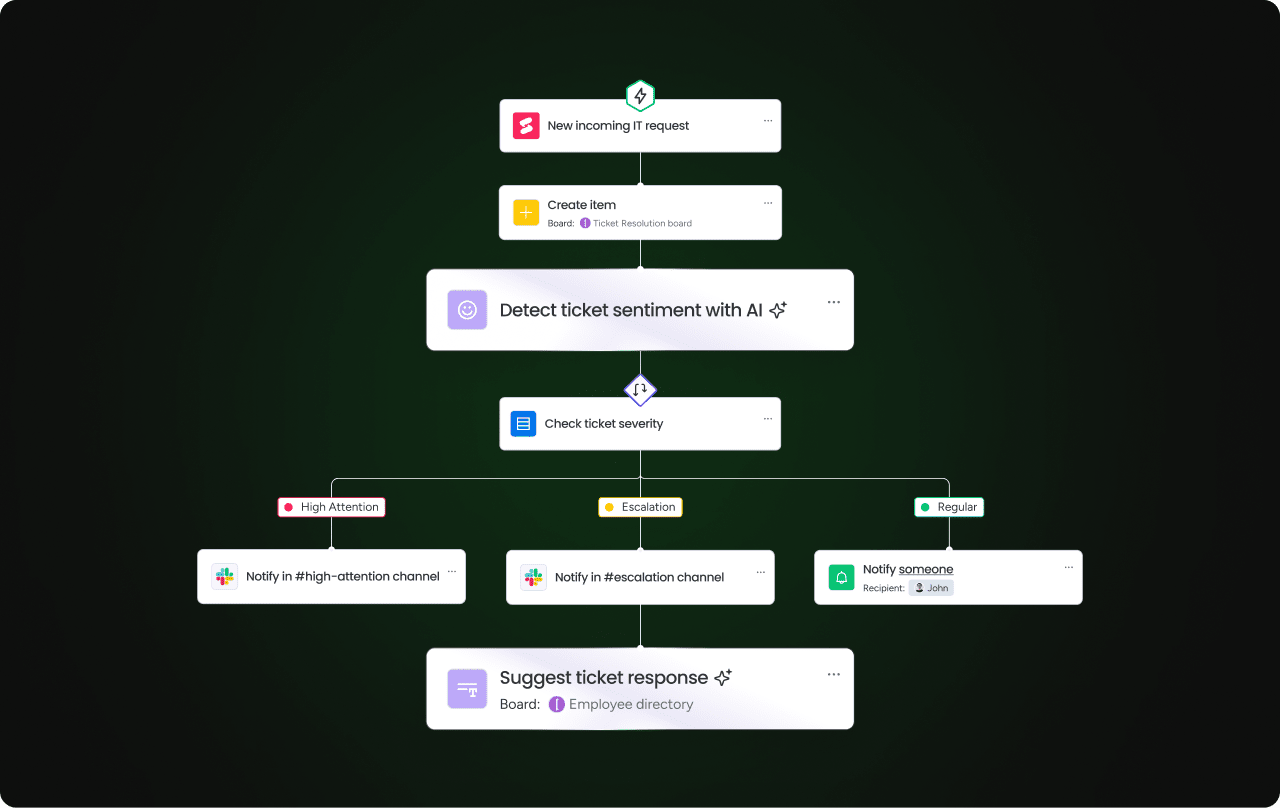
With monday CRM’s AI workflow automations, you don’t need to worry about sending follow-ups after sending over a pitch deck. The platform can instantly craft personalized messages and send them at the best time. Additionally, the platform’s AI can summarize investor feedback, flag high-priority leads based on engagement, and automatically update your pipeline as you move through conversations with potential backers.
Sync data with third-party integrations

Your deck is only as strong as your data. Teams can integrate over 200 third-party apps with monday CRM so that workflows sync and data flows automatically. All your customer messages and information exist in one platform, making it simpler to derive reliable, real-time insights to present to investors.
Try monday CRM7 expert tips for crafting a memorable pitch deck
Don’t be too wordy. Highlight just the most important information. Most investors are only going to look at your deck for a couple of minutes, so make sure the most important information jumps out at them.
1. Avoid clutter on your slides
Messy slides make your deck feel complicated and overwhelming. Don’t add too many visuals or too much information on each slide, and stay away from complex jargon so that your deck can be understood by anyone who sees it.
2. Highlight your value proposition
You want this to stand out so that investors can clearly see what makes your startup different from the hundreds of others that cross their desks. Make sure to put any data and stories that show why you’re different front and center.
3. Include your contact details
Don’t assume that because you emailed your deck to someone, they’ll be able to contact you. Investors may pass decks around between colleagues, and your initial email will get lost between hands, so always make sure your contact details are clearly stated on a slide.
4. Avoid repetition
Your pitch deck should have around 10 slides and take around 20 minutes to present, so the information on every slide should include new information. If you’re repeating yourself, then your presentation can be shortened.
5. Make your first and last slide memorable
When presenting your deck, these are the slides that are likely going to be on screen the longest while you speak about your company. Make sure they include a one-liner about your company, a reminder of your call to action, or a company buzzword to stay memorable.
6. Show a clear business model
Investors need to have a simple understanding of how your business generates revenue. Make sure your deck is focused on your existing revenue streams and a broad overview of your business model.
7. Always be authentic
On average, investors spend around 2 and a half minutes looking at a deck before deciding to move forward or not. Practice your pitch in front of others before big presentations to make sure you come across as authentic, trustworthy, and that your points are getting across clearly and quickly.
Final checklist: Preparing your deck for a presentation in 2026
Whether you’re using a pitch deck template to organize all your data or you’re building a deck from scratch, there are core components you want to make sure you’re not missing. The checklist below is a great reminder of all the elements you need to include before sending or presenting your pitch deck.
Content essentials
- Cover slide with company name and tagline
- Clear problem statement backed by data
- Your solution and unique value proposition
- Market size and opportunity
- Business model and revenue streams
- Traction metrics and key milestones
- Competition analysis showing your differentiation
- Team introductions with relevant experience
- Financial projections with realistic assumptions
- Specific funding ask and use of funds
- Contact information on the final slide
Design and format
- Consistent branding (colors, fonts, logo placement)
- High-quality visuals and graphics
- Readable font sizes (minimum 30pt)
- One key message per slide
- Text is limited and concise
- Charts and data visualizations
- Slide numbers for easy reference
Technical preparation
- Deck works on multiple devices and screen sizes
- All links and embedded media function properly
- Exported as PDF for email sharing
- File size under 10MB for easy sending
- Animations load correctly
- Backup copy saved in multiple locations
Pre-presentation review
- No typos or grammatical errors
- All data is current and accurate
- Presentation runs under 20 minutes
- Practice delivery at least twice
- Prepare answers for common investor questions
- Tested presentation equipment and setup
The best pitch deck? A combination of tools and strategy
Building a winning pitch deck in 2026 requires compelling storytelling, accurate data, and modern design principles tailored to your audience. Success comes from keeping presentations clear and visually engaging while highlighting what makes your opportunity unique. Integrate a platform like monday CRM to elevate your pitch by centralizing data, automating investor follow-ups, and generating real-time insights that turn interest into funding commitments.
Try monday CRMFAQs
What is the best way to design a competition slide to stand out to VCs?
The best tips for designing a competitor slide that stands out are using a visual comparison matrix that positions your company against key competitors across critical factors like pricing, features, or technology. Highlight your unique advantages with data-backed claims rather than generic statements, and make sure to focus on what makes you unique, like patents, partnerships, or proprietary technology.
How can I use AI to speed up the pitch deck creation process?
AI tools can draft initial slide copy, generate data visualizations, and suggest design layouts based on your content. It can also refine personalized messaging based on your audience, while platforms like Canva’s Magic Design can create visual elements quickly. Always make sure to double-check and personalize AI content to make sure your presentation comes across authentically, and your brand’s voice is still present.
Why should I connect my pitch deck to a platform like monday CRM?
Connecting your deck to a CRM ensures all data is current, accurate, and pulled directly from your business operations. This eliminates manual updates and reduces errors. CRMs also help track investor interactions, automate follow-ups, and provide real-time insights that strengthen your pitch with credible, up-to-date metrics.
What are the key differences between a sales pitch deck and an investor pitch deck?
Sales decks focus on solving immediate customer problems and pitching products or services to sell to customers. They cover detailed product features, pricing, and implementation timelines. Investor decks emphasize market opportunity, scalability, financial projections, and team credibility. While sales decks close deals, investor decks secure funding by demonstrating long-term business potential and return on investment.
How do I make my pitch deck template mobile-friendly for busy executives?
To make sure your pitch deck template is optimized for executives, optimize for vertical scrolling, use larger font sizes (minimum 30pt), and ensure high contrast between text and backgrounds. Keep slides simple with one key message each, minimize animations that may not load on mobile, and test your deck on multiple devices before sharing.
