



Too many sales teams still start the day the same way: hunting through LinkedIn, company sites, and old spreadsheets just to build a list worth calling. That’s not pipeline creation. It’s admin work dressed up as prospecting, and it eats time your reps should spend in real conversations. Lead sourcing platforms change that by pulling verified contacts, filling in company details, and sending fresh records where your team can actually work them. Instead of asking reps to research every name by hand, these platforms help you find people who fit your ICP, spot buying signals sooner, and keep lead flow moving without the usual copy and paste routine.
This article covers what sales prospecting platforms do, which 9 platforms are worth a serious look in 2026, and which features matter if you care about adoption, reporting, and conversion. We will also break down how AI is changing prospecting, what to check before you buy, and where a connected system like monday CRM fits once sourcing turns into active pipeline. Let’s start with what these platforms are actually built to do.
Try monday CRMWhat are lead sourcing tools?
Manual prospecting drains a sales team fast. Digging through profiles, cross-referencing websites, and copying data into spreadsheets eats up time and kills momentum before the day even begins.
Lead sourcing platforms take that repetitive work off your reps’ plates, freeing them to focus on the conversations that move deals forward.
Instead of forcing reps to research everything by hand, these platforms pull verified contact details and company information from trusted databases automatically. Ideal prospects appear before a single email is sent. A list that might take four hours to assemble manually can be built in minutes.
The real advantage emerges after you’ve built that first list. Lead sourcing platforms handle lead enrichment, score prospects based on buying intent, and send verified records straight into your CRM. What used to feel like slow research becomes a repeatable system that gives reps more time to actually sell.
9 best lead sourcing platforms for sales teams
No two teams source leads the same way. Some teams need massive contact databases. Others care more about uncovering anonymous website visitors or scaling outbound without adding more manual work. Start with your biggest pipeline bottleneck, then find a platform that fits how your team actually works.
We compared the 9 platforms revenue teams review most often. Use this quick-reference guide to scan pricing, core strengths, and the scenarios where each one performs best.
| Platform | Use case | Key capability | Starting price* |
|---|---|---|---|
| monday CRM | Revenue teams needing a connected lead sourcing and CRM system | AI lead enrichment, no-code workflows, 500+ integrations | From $9/seat/month |
| Cognism | Teams wanting accurate B2B contact data | Contact enrichment, prospecting workspace | Custom pricing |
| Apollo.io | Outbound-heavy sales teams | 275M+ contact database, sequencing, intent data | Free plan available |
| ZoomInfo | Enterprise teams needing deep B2B data | Buyer intent signals, org charts, data enrichment | Custom pricing |
| LinkedIn Sales Navigator | Social selling and relationship-based prospecting | Advanced lead filters, CRM sync, InMail | From $99/seat/month |
| Leadfeeder | Teams wanting to identify anonymous website visitors | Website visitor identification, CRM integration | Free plan available |
| UpLead | Teams prioritizing data accuracy | 95%+ data accuracy guarantee, real-time email verification | From $99/month |
| Hunter | Teams focused on email finding and domain search | Domain search, email verification, bulk finding | Free plan available |
| LeadFuze | Teams automating list-building with AI | AI-powered list building, automation | From $147/month |
Prices may vary based on plan, billing cycle, or region. Verify current pricing on each vendor’s website.
Sourcing prospects is just the start. The next phase, qualifying, routing, and working raw leads, is what determines whether pipeline actually converts.
1. monday CRM
Best for: Revenue teams needing a connected lead sourcing and CRM system
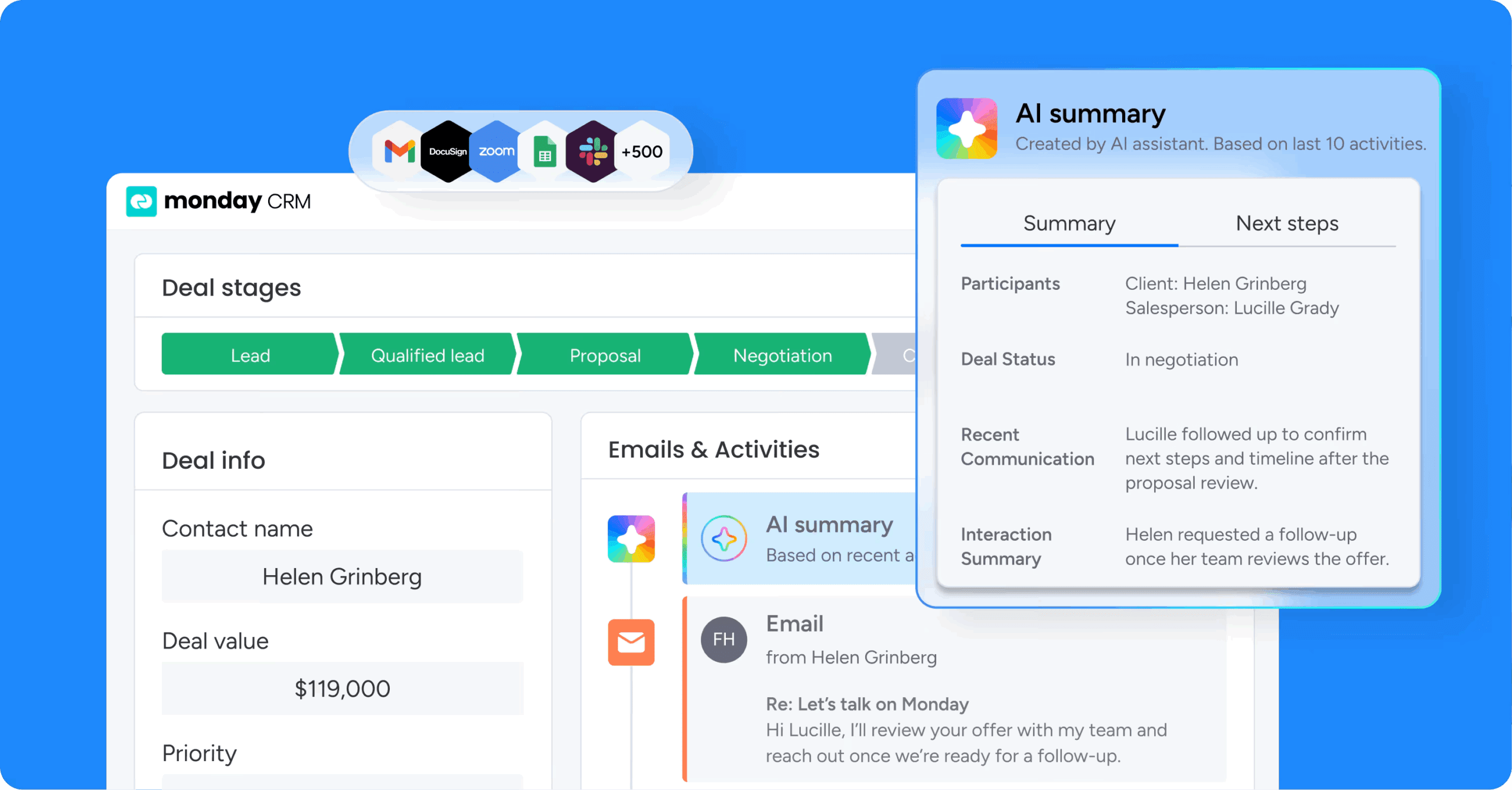
monday CRM does more than house lead records. It keeps them moving. It’s built for revenue teams that want one system for pre-sale and post-sale work. Lead capture, enrichment, outreach, deal stages, and reporting live in a single workspace that stays organized as your process evolves.
Use case
Sales leaders who need visibility from first touch through closed-won use monday CRM to connect lead sourcing platforms with day-to-day revenue execution.
Key features
- AI agents that work leads while your team sells: Deploy autonomous AI agents to research prospects, qualify leads, and draft personalized outreach, removing hours of manual work from your team’s day.
- Crunchbase enrichment: Auto-enrich lead data using Crunchbase’s database, so reps start with real company context instead of manual research.
- AI email help inside Emails & Activities: Use AI to assist with composing emails, right where reps already work.
- Autofill with AI: Apply AI actions to columns like Text, Status, Dropdown, and People to detect sentiment, extract information, summarize text, assign labels, and route records based on defined options.
- Lead capture that doesn’t fall apart at volume: Collect leads via website forms, social ad campaigns, or other sources, then centralize them for qualification and assignment.
Pricing
monday CRM starts at $9/seat/month (billed annually) with plans including Standard, Pro, and Enterprise. AI capabilities are admin-enabled and use credits, and a free trial is available.
Why it stands out:
- Sourcing and selling stay connected: Sourcing starts the motion. monday CRM carries that motion through qualification, outreach, and deal progression inside one workflow.
- Built to adapt when your process changes: Revenue teams adjust stages, fields, and automations as territories, ICPs, and handoffs shift.
- Dashboards that answer leadership questions fast: Track pipeline status, activity, forecasting, and team performance with code-free, customizable dashboards, including sales-specific widgets like the leaderboard and funnel.
2. HubSpot
Best for: Teams that want marketing and sales in one unified system

HubSpot combines inbound and outbound sourcing in one CRM, so teams stop switching tabs. It fits teams that want marketing and sales in one system instead of scattered across tools.
Use case
If you’re capturing form, ad, and chat leads while running outbound from your CRM, HubSpot fits that mix well.
Key features
- AI-assisted prospecting workspace: HubSpot’s Breeze Prospecting Agent researches target accounts, identifies buying committees, and drafts outreach, cutting the manual work of building prospect lists from scratch.
- Clearbit enrichment: Contact and company records auto-fill with 100+ firmographic and technographic data points, so reps can prioritize and personalize outreach without manual research.
- Native ad and form integrations: Leads captured through LinkedIn Lead Gen Forms, Facebook/Instagram ads, chatbots, and landing pages sync directly into the CRM. No manual imports, no lag between capture and follow-up.
Pricing
HubSpot offers a free plan for up to 2 users with basic CRM and forms. Paid plans start from around $7/seat/month (promotional pricing for new customers with 500 HubSpot Credits included), with Professional at $90/seat/month and Enterprise at $150/seat/month, both billed annually.
Considerations
- Predictive lead scoring, custom reporting, and bulk deduplication sit behind higher-tier plans. Teams scaling past 10 to 15 seats will feel the cost increase quickly.
- The Clearbit-powered contact database has narrower coverage than dedicated sourcing platforms, which can limit reach for teams prospecting in niche industries or less-documented geographies
3.Apollo.io
Best for: Outbound-heavy sales teams needing data and execution in one platform
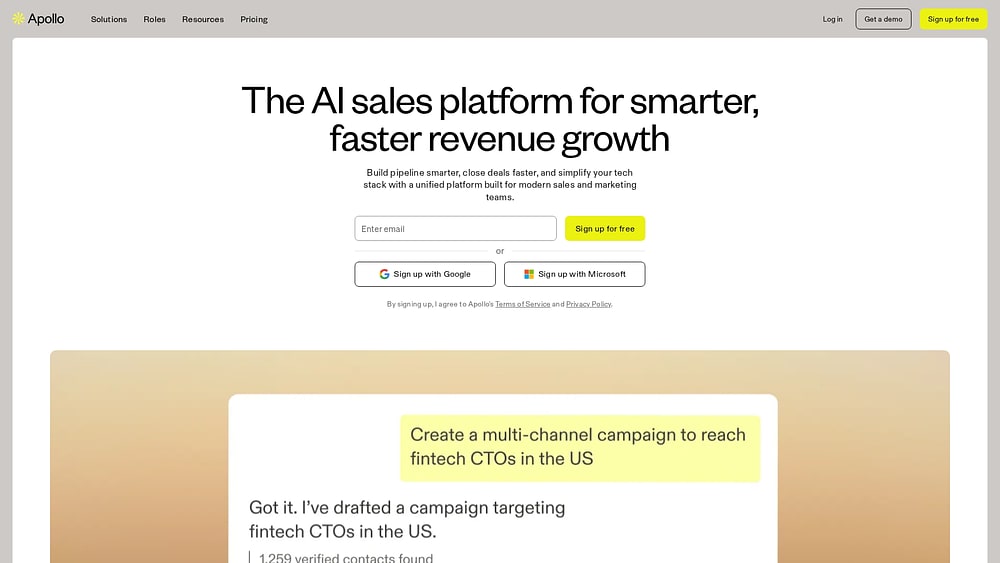
Apollo.io gives outbound teams data and execution in one place: a 275M+ contact database with sequencing and intent signals. It’s built for sales development and revenue ops teams that don’t want to stitch together multiple subscriptions. The Chrome extension also helps reps pull verified contact details directly from LinkedIn and company websites, keeping research quick and low-friction.
Use case
If your sales motion is heavily outbound and you need both verified contact data and multi-touch automation, Apollo.io is built for exactly that setup.
Key features
- 275M+ contact database with verified emails and direct dials: Reps get broad coverage across industries and geographies. Apollo’s seven-step email verification process hits 91% accuracy and includes credit refunds for recent bounces.
- Built-in email sequencing with A/B testing and automated follow-ups: Teams can build and launch multi-step outreach campaigns directly inside the platform.
- Buyer intent signals and job-change alerts: Apollo surfaces prospects showing active buying behavior and flags job changes, so reps can prioritize warm outreach over cold prospecting.
Pricing
Apollo.io offers a free plan with 900 credits per seat per year. Paid plans start at $49/user/month (billed annually) for Basic, with Professional at $79/user/month and Organization at $119/user/month (minimum 3 seats). Enterprise and custom plans are available via sales.
Considerations
- Data accuracy varies by region, with strongest coverage in North American markets and tech sectors. Teams operating in other geographies may find gaps in contact-level data.
- Apollo.io’s deal management capabilities are limited compared to purpose-built CRMs, so teams still need a dedicated CRM like monday CRM to manage leads through the full sales cycle after sourcing.
4. ZoomInfo
Best for: Enterprise teams needing deep B2B data and buyer intent signals

ZoomInfo is built for enterprise teams that need depth: a verified B2B database, 95%+ contact accuracy, buyer intent signals, and org chart mapping in one GTM platform. For mid-market and enterprise organizations working through complex buying committees, that combination makes it easier to identify the right people before outreach begins.
Use case
Enterprise sellers use ZoomInfo to find, rank, and engage decision-makers faster by combining verified data, live intent signals, and automated CRM enrichment in one platform.
Key features
- Contact and company search: Search millions of verified profiles using 300+ attributes, including firmographics and technographics, with stated 95%+ contact accuracy and direct access to verified emails and direct dials.
- Buyer intent data: Person-level intent signals drawn from 210 million IP-to-org pairings and 6 trillion+ keyword-to-device pairings monthly help teams prioritize accounts showing active buying behavior.
- CRM enrichment: Scheduled and on-demand enrichment automatically updates CRM records when contacts change roles or companies, keeping your pipeline current.
Pricing
ZoomInfo uses quote-based pricing with no publicly listed rates. Pricing varies by features, number of licenses, and credit usage, with enterprise-level contracts typically starting in the five-figure range. A free trial may be available upon request.
Considerations
- Enterprise-level pricing with annual contracts typically starts in the five-figure range, which puts it out of reach for smaller teams.
- ZoomInfo functions as a data source rather than a full sales execution platform. Teams still need a separate CRM and workflow layer to act on the leads it surfaces.
Learn more: Zoominfo alternatives
5. LinkedIn Sales Navigator
Best for: Social selling and relationship-based prospecting

Social selling is where LinkedIn Sales Navigator shines. Sales teams get access to the world’s largest professional network, along with 50+ advanced filters and real-time engagement signals that help surface high-intent leads quickly. According to LinkedIn’s 2024 Sales Navigator product page, 1.5M+ sellers rely on the platform. It’s especially useful for B2B organizations that value context and timing more than pure cold outreach volume.
Use case
For B2B teams that need precise, signal-based lead discovery across LinkedIn’s 1B+ member network, Sales Navigator offers a purpose-built alternative to static contact lists.
Key features
- 50+ advanced search filters: Search by seniority, company headcount growth, recent funding, technology usage, and intent signals like “changed jobs in last 90 days” or “posted on LinkedIn in 30 days” to zero in on your ICP.
- Real-time alerts and buyer intent signals: Receive notifications when prospects change roles, companies announce expansions, or connections engage with content, giving reps a natural, timely reason to reach out.
- CRM sync and embedded experiences: Sales Navigator integrates with CRMs like monday CRM to automatically create or update records when reps save leads, keeping pipeline data accurate and current.
Pricing
LinkedIn Sales Navigator offers three tiers: Core at $119.99/month, Advanced at $159.99/month, and Advanced Plus with custom pricing. Annual billing offers approximately 25% savings on Core and approximately 6% savings on Advanced versus monthly billing.
Considerations
- Sales Navigator doesn’t provide verified email addresses or phone numbers natively. Teams typically pair it with a data enrichment platform to get contact details for prospects identified through LinkedIn.
- Key features like Buyer Intent, TeamLink, and Smart Links require Advanced or Advanced Plus; CRM write-back and embedded experiences are gated behind Advanced Plus, which is quote-only.
6. Leadfeeder
Best for: Teams wanting to identify anonymous website visitors
Leadfeeder focuses on a different angle: turning anonymous website traffic into a ranked list of companies already researching your solution. That makes it particularly useful for B2B revenue teams running account-based marketing or intent-led outreach. Beyond showing which companies visited your site, it reveals page views and return visits. A searchable database of 60M+ companies and 400M+ contacts opens up a second sourcing path outside your own traffic.
Use case
Leadfeeder works well for B2B sales and marketing teams that want to spot in-market accounts from website behavior, source new contacts from a global database, and send both directly into CRM pipelines for faster follow-up.
Key features
- Website visitor identification: According to Leadfeeder’s 2024 product documentation, the platform identifies up to 45% of B2B visitors at the company level using a daily-refreshed IP-to-company database, with automatic bot and ISP filtering to keep lead lists accurate.
- Target database with 100+ filters: Search 60M+ companies and 400M+ contacts using firmographic, geographic, technographic, and trigger-based filters, including 33 trigger events like hiring signals and company expansion.
- CRM and ads activation: Syncs identified companies and sourced contacts directly into CRM pipelines, LinkedIn Matched Audiences, and Google Ads connectors, with no-code workflow automation to handle routing automatically.
Pricing
Leadfeeder offers a free Lite plan with the last 7 days of traffic and up to 100 identified companies per month. Paid plans start at $79/month (billed annually) for Discover, with Activate at $369/month and Scale at $599/month (annual billing only). Enterprise pricing is custom and quote-based.
Considerations
- Leadfeeder identifies companies, not individual contacts. Teams still need a separate contact-finding step to get specific names and emails for outreach.
- Low-traffic websites may not generate enough identified visitors to justify the cost of paid plans, and U.S. data coverage has some feature gaps compared to European data (for example, only “Job Offers” trigger events are supported in the U.S. Data Pack).
7. UpLead
Best for: Teams prioritizing data accuracy

UpLead puts data quality at the center of the pitch. Its 95%+ accuracy guarantee is backed by real-time email verification at the point of export, so teams sticking to “Valid Only” downloads avoid wasting credits on addresses that bounce. For SMB and mid-market sales teams, that emphasis on quality over sheer database size can be a major advantage. Add technographic filters, intent signals, and a Chrome extension, and targeted prospecting stays fast and organized.
Use case
Sales teams that want targeted, verified B2B contact data (without stepping into enterprise-level pricing or complexity) are the best fit for UpLead.
Key features
- Real-time email verification at export: Emails are checked for deliverability the moment you download them, reducing bounce rates and protecting sender reputation before outreach even begins.
- Technographic and intent filters: Search for prospects based on the software they use and surface companies actively researching relevant solutions, so outreach goes to warm targets, not cold lists.
- Chrome extension for in-browser prospecting: Pull verified contact data directly from LinkedIn profiles and company websites, then push it straight to your CRM without switching tabs.
Pricing
UpLead offers a free 7-day trial with 5 credits. Paid plans start at $99/month for Essentials (170 credits) and $199/month for Plus (400 credits), with annual billing discounts available at $74/month and $149/month respectively. Professional plans use custom pricing with annual billing only.
Considerations
- Intent data is locked behind the Professional plan, which requires annual billing and a sales conversation. Teams on Essentials or Plus won’t have access to it.
- Database coverage is strongest in North American markets, with less comprehensive data across EMEA and APAC regions, which may limit reach for globally focused teams.
8. Hunter
Best for: Teams focused on email finding and domain search

Hunter is built around a simple promise: make email discovery repeatable and scalable. Instead of relying on guesswork or manual digging, SDRs, content marketers, and lean teams can find and verify professional email addresses with clear labels, confidence scores, and source URLs. The data comes directly from the public web. That transparency makes it easier to know exactly what you are working with before outreach begins.
Use case
Hunter is a strong option for outbound teams that need to build verified, deliverability-ready contact lists efficiently, whether they are starting with one domain or a bulk CSV file.
Key features
- Domain search: Finds publicly available email addresses tied to a specific company domain. It surfaces contacts across departments and seniority levels, keeping source transparency front and center.
- Email verification: Runs multi-check validation (syntax, MX records, server response, and disposable email detection). Paid plans automatically re-verify saved leads monthly at no extra credit cost.
- Bulk email finding and Chrome extension: Upload CSV files to find verified emails at scale, or pull contact details directly from websites and LinkedIn profiles in real time.
Pricing
Hunter offers a free plan with 50 credits per month. Paid plans start at $49/month for Starter (2,000 credits), with Growth at $149/month (10,000 credits) and Scale at $299/month (25,000 credits). Annual billing saves 30%, and Enterprise pricing is custom.
Considerations
- While Hunter’s core strength is professional email discovery and verification, its toolkit goes further. It includes built-in features like Discover, Signals for intent data, a lightweight CRM (Leads), and Sequences. It doesn’t provide phone numbers, and teams needing deeper CRM or advanced sales-engagement functionality may still prefer integrating Hunter with their dedicated tools.
- Coverage depends on what’s publicly indexed. Smaller companies, crawler-blocking domains, or obfuscated email setups might return limited or no results.
9. LeadFuze
Best for: Teams automating list-building with AI

LeadFuze leans hard into automation. Its AI agent, Fuzebot, keeps building prospect lists in the background by identifying new contacts that fit your ICP criteria, so teams are not forced into constant manual searching. That makes it appealing to sales teams, recruiters, and marketers who want a self-refreshing stream of verified contacts feeding the pipeline.
Use case
Teams looking for always-on, automated lead sourcing with verified contacts synced into their CRM are the ones most likely to benefit from LeadFuze.
Key features
- Fuzebot AI list-building: Fuzebot runs continuously in the background, identifying new prospects that match your ICP filters and adding them to your lists in real time without any manual input.
- Market-based and account-based search modes: Teams can prospect broadly by industry, geography, and company size, or zero in on specific target accounts with tailored search criteria.
- Verified contact data with CRM sync: LeadFuze provides verified emails and direct dials for each prospect, then automatically pushes new leads into connected CRMs to keep pipelines current.
Pricing
LeadFuze operates on a full data license model starting at $1,500 to $2,000/month (pricing varies by contract term), which includes access to hundreds of millions of profiles, personal and business emails, 150M+ mobile numbers, and the identity resolution pixel. Enrichment API pricing is quote-based and depends on volume and use case, with term-based discounts available for multi-year commitments.
Considerations
- LeadFuze has moved away from its app-based software model and now operates exclusively as a full data license, which may not suit teams looking for a self-serve, credit-based prospecting platform.
- Data coverage is strongest in North American markets, so teams with significant international prospecting needs may find gaps in contact availability.
Why manual prospecting slows down sales teams
Talk to almost any SDR and the pattern is obvious: too many hours disappear into list-building. Searching profiles, copying information into spreadsheets, and verifying emails one at a time creates a slow, repetitive grind before the first real sales conversation even starts. That work does not just waste time. It compounds into pipeline drag across the entire team.
Here is how manual prospecting actively hurts your sales motion:
- Stale contact data: Manually sourced information goes bad the moment people change roles or companies shift direction.
- Damaged sender reputation: Relying on outdated lists drives up bounce rates and forces your team to work harder for worse results.
- Massive visibility gaps: When leads live in disconnected spreadsheets, sales leaders lose sight of which deals are stalling and where the team needs support.
Without a clear pipeline view, resource allocation becomes guesswork and reporting upward gets a lot harder than it should be.
7 key features that define effective lead sourcing software
Lead sourcing platforms vary widely. Pick the wrong one, and you are not just wasting budget; you are creating platform sprawl, introducing inconsistent data, and giving your team one more platform they stop using by Q2. Are you building a connected system, or simply stacking more software on top of existing problems?
What matters most is straightforward: verified leads should flow in, score automatically, and reach the right rep while the opportunity is still hot. The capabilities below are what separate platforms teams depend on from those that quietly go unused.
1. Verified contact data that protects sender reputation
Bad data can quietly wreck a pipeline. Once email addresses start bouncing and phone numbers fail, sender reputation suffers quickly. A domain with a 10% bounce rate is far more likely to land in spam, which weakens every campaign that follows.
That is where waterfall enrichment earns its place. By querying multiple providers in sequence until a verified contact record appears, it improves coverage without compromising accuracy. Reps spend less time validating data and more time selling.
2. Buyer intent signals for timely outreach
Fit alone is not enough. A company may match your ideal customer profile perfectly and still have no reason to buy today. Intent signals such as content downloads, review site activity, relevant job postings, and similar behaviors, reveal which accounts are actively exploring solutions right now.
That information becomes much more useful once it lands inside your CRM. A high-intent lead can trigger an automatic alert or move into a priority queue immediately, without waiting for someone to intervene manually.
3. AI-powered lead scoring to prioritize high-value prospects
Reps lose a surprising amount of time on the wrong leads. Static scoring models built around job title, company size, or industry help somewhat, but they only go so far. AI-powered scoring looks across historical deal patterns to surface the prospects most likely to close.
More specifically, it finds the combinations of firmographic and behavioral signals that actually align with closed-won outcomes. That makes lead qualification less subjective and gives managers a more reliable, data-backed basis for pipeline reviews.
4. Real-time CRM sync for instant lead routing
A fast response window matters. If a high-intent prospect sits untouched for 24 hours, there is a good chance a competitor reaches them first. Real-time CRM sync ensures that leads appear in the right rep’s queue as soon as they are identified.
The result is fewer CSV exports, fewer manual handoffs, and fewer unnecessary delays. With lead generation automation tools and conditional automations in place, leads can be assigned and advanced through the pipeline by territory or round-robin logic in seconds.
5. No-code workflow customization to adapt pipelines fast
Rigid platforms rarely get adopted for long. If the workflow does not fit the way your team operates, people will work around it. Revenue operations teams need the freedom to build, adjust, and refine lead workflows as territories change and sales cycles evolve. Simple updates should not require IT tickets or developer support.
With monday CRM, teams can customize pipelines, routing logic, and qualification fields without code. A basic qualification flow today can expand into a more complex process later, without forcing a rebuild from scratch.
6. Multichannel outreach to automate follow-ups
Finding the contact is only the beginning. Pipeline gets built through coordinated follow-up across email, social, and phone. Multichannel sequences keep that cadence moving automatically, so reps can focus on actual conversations instead of managing reminders and calendars.
Many teams use monday CRM to run email outreach directly inside their workspace, including mass email with personalized fields and automated follow-ups. Every touchpoint is logged in the lead’s activity timeline, giving the broader team context without requiring another platform.
7. Cross-functional visibility for seamless handoffs
Lead sourcing does not stop mattering once the SDR team is done. The full history matters to marketing, account managers, and leadership too. When that context is missing, handoffs break down, details get lost, and the reasons behind a win or loss become harder to trace. Early pain points, objections, and buying signals all matter later.
monday CRM keeps that history centralized by logging emails, meetings, and interactions in one timeline. In turn, revenue leaders get the visibility they need to forecast more confidently and place resources where they will have the greatest effect.
Try monday CRMHow AI agents are reshaping lead sourcing
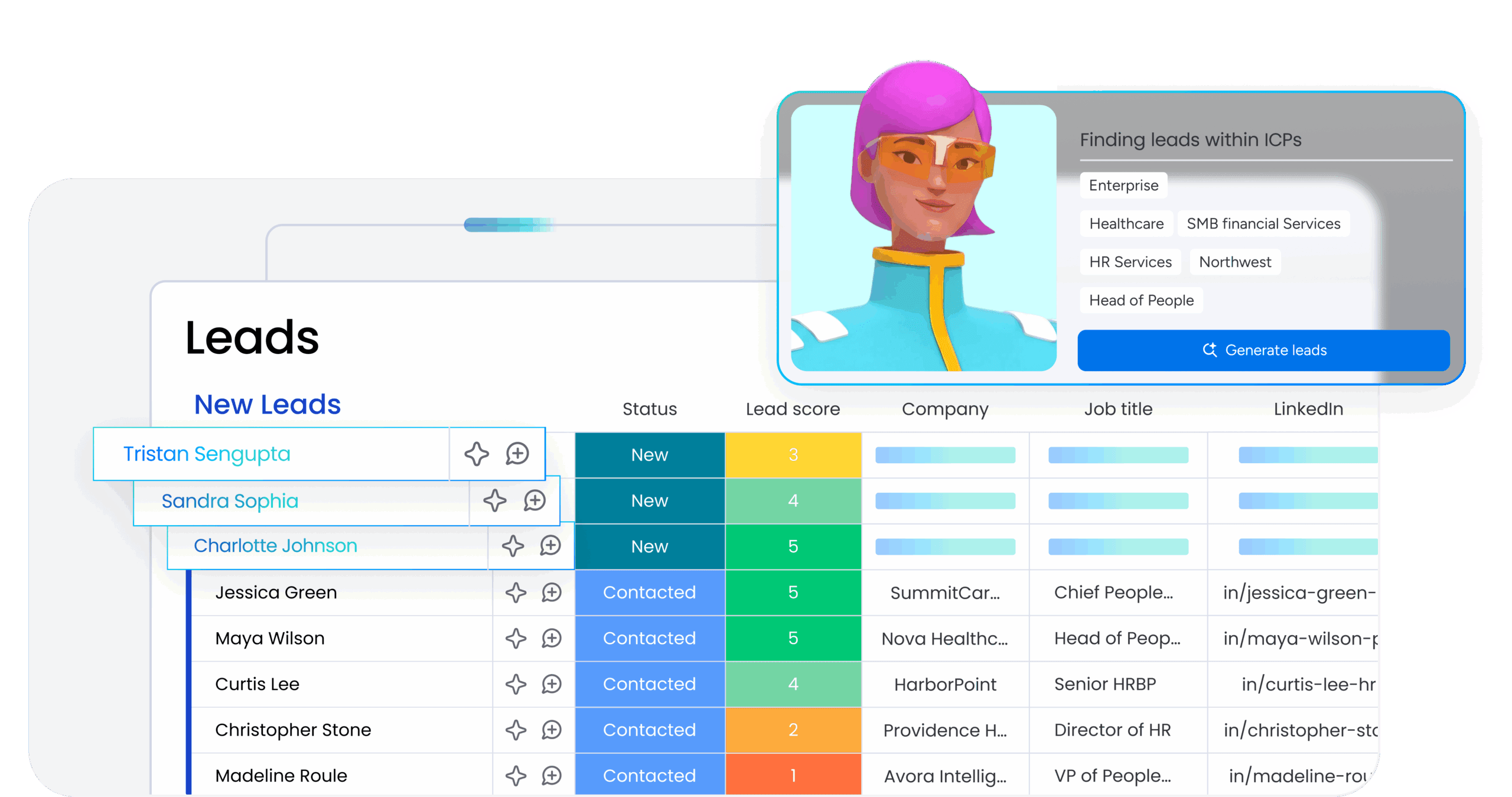
Prospecting consumes time at a brutal pace. How many hours are your reps burning on signals that go nowhere? AI lead generation software changes the equation by doing more than accelerating manual research; it removes much of the manual research entirely.
Here is how autonomous sourcing changes the way you build your pipeline:
- Autonomous prospecting: AI finds, qualifies, and routes leads without manual input.
- Higher deliverability: Sequential data querying across multiple providers improves verified email match rates and reduces bounce risk.
- Real-time intent: Prospects automatically re-enter your active pipeline when renewed buying intent surfaces.
A cold lead is not always a bad lead; often the timing was simply wrong. Continuous behavioral tracking helps you re-engage when the moment changes. That means your team can cover a much larger market without adding headcount, because outreach happens when the evidence says prospects are actually ready.
5 steps to choose the right lead sourcing platform
Choosing a lead sourcing platform is not about checking the most feature boxes. What matters is whether the platform fits your team’s workflow and earns consistent adoption. Hit that mark, and you gain a platform your whole team relies on daily.
Follow this framework to evaluate your options and find the right fit.
Step 1: Map your ideal customer profile and sourcing gaps
Start before the demos and pricing pages. Define exactly who you want to reach, then examine where your current sourcing process fails, whether that means missing verified contact data, targeting the wrong people, or both.
Different teams need very different capabilities. A company selling into enterprise financial services has little in common with one targeting retail buyers. Running this gap analysis first keeps your evaluation grounded in what actually matters.
Step 2: Prioritize integrations with your existing CRM
If the platform does not sync cleanly with your CRM, it creates a silo instead of solving a problem. That undermines the entire reason for buying it in the first place.
Native integrations tend to be faster, more dependable, and easier to maintain than third-party connectors. Ideally, leads should move straight into your pipeline with no manual CSV uploads anywhere in the process.
Step 3: Evaluate data accuracy and compliance coverage
Data accuracy is not only a performance issue. In many cases, it is also a compliance issue. Teams operating in regulated industries should confirm that any vendor under consideration meets the relevant privacy and data-handling standards before signing.
Ask direct questions about sourcing methods, refresh cadence, and compliance certifications. Vendors that verify emails in real time offer an added advantage by lowering bounce risk and helping protect sender reputation.
Step 4: Compare pricing models and total cost of ownership
Pricing structures vary more than many teams expect. Some platforms charge per seat, some per credit, and others by flat monthly fee. The advertised entry price often looks manageable until real usage volume is modeled out.
Be sure to include integrations, enrichment add-ons, and onboarding costs in your calculations. A platform that appears inexpensive upfront can become far more expensive once the full operating cost is visible.
Step 5: Test AI capabilities with a real workflow
AI should prove itself in your environment, not just in a polished demo. Run a pilot with your own criteria, lead flow, and outreach sequences to see whether the feature set creates genuine time savings in practice. Also pay attention to how quickly those features can be configured without technical support.
Teams using monday CRM often rely on features like Autofill with AI and AI-generated email drafts to remove manual steps and keep leads moving. Because admins can enable these features quickly, value tends to show up in days rather than after a long implementation cycle.
How monday CRM powers your entire lead sourcing engine
Momentum disappears fast when platforms stay disconnected. Leads enter from multiple sources, get trapped across separate systems, and leave reps doing administrative cleanup instead of selling. monday CRM eliminates that friction by connecting the whole prospecting operation, from the earliest signal to a qualified opportunity, in one workspace.
Revenue teams use monday CRM to turn sourced leads into active pipeline without switching tools. Lead capture, enrichment, qualification, routing, and reporting live in a single system that adapts as your process evolves. That means less time managing platforms and more time working deals that actually close.
AI agents that research, qualify, and draft outreach autonomously
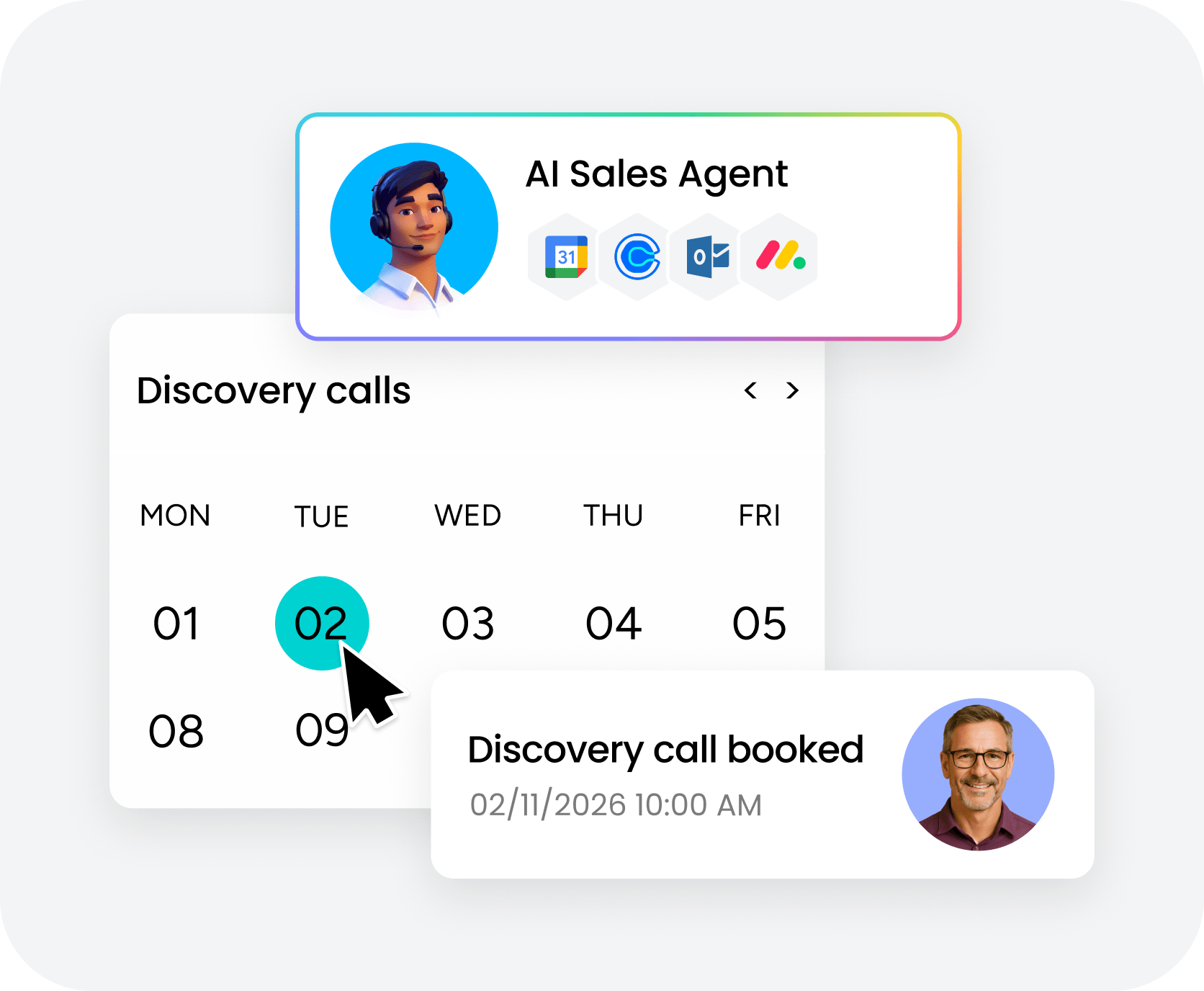
AI should be active, not passive. monday CRM’s AI agents work autonomously to research prospects, qualify leads, and draft personalized outreach, removing hours of manual work from your team’s day. These agents operate in the background, continuously identifying and preparing leads so reps can focus on conversations instead of data entry.
Autofill with AI to populate fields and detect sentiment automatically
Repetitive data entry slows teams down and introduces inconsistency across records.Autofill with AI handles that work by populating CRM columns automatically, extracting important details, assigning labels, and detecting sentiment using data already stored in your system. Instead of relying on each rep’s judgment alone, managers get a more uniform view of lead quality, making pipeline reviews grounded in actual data rather than interpretation.
Crunchbase enrichment to start every conversation with context
Reps waste time researching companies manually when that information should already be in front of them. monday CRM auto-enriches lead records using Crunchbase’s database, pulling in funding details, employee count, industry classification, and recent news without requiring a single search. New leads can be enriched with Crunchbase data automatically, then routed by territory or round-robin logic, with follow-up sequences triggering on status changes without manual intervention.
No-code workflows that adapt to your sales cycle instantly

Sales processes do not stay static for long, and your platform should not force you to slow down when they change. Teams can quickly build custom workflows for inbound leads coming from forms, ads, or other sources without writing a single line of code. Leads move through qualification stages, get assigned to the right rep, and trigger follow-up sequences based on rules you define, with the flexibility to adjust workflows in seconds when territories shift or handoff logic changes.
Native integrations for real-time pipeline visibility
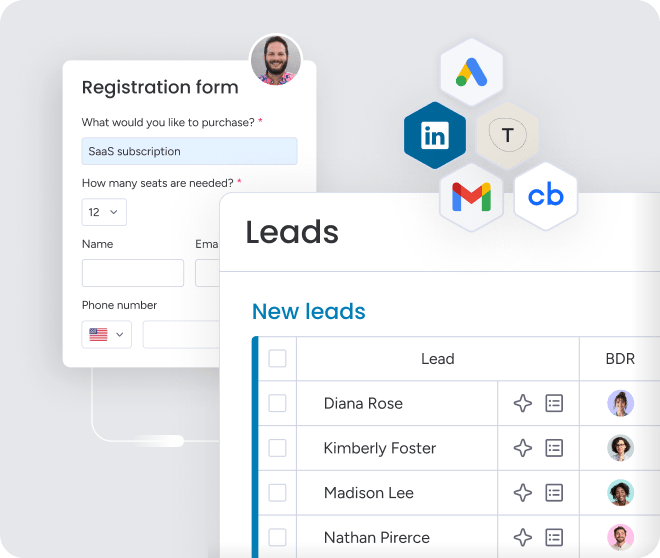
Manual CSV uploads and one-off data transfers introduce delays your team does not need. Native integrations connect lead sourcing platforms directly to your workspace, allowing leads to move in, get enriched, scored, assigned, and tracked automatically. From there, code-free dashboards give sales leaders an immediate read on pipeline status, source performance, lead volume, and conversion rates between stages, with visibility that benefits sales, marketing, and account managers alike.

“With monday CRM, we’re finally able to adapt the platform to our needs — not the other way around. It gives us the flexibility to work smarter, cut costs, save time, and scale with confidence.”
Samuel Lobao | Contract Administrator & Special Projects, Strategix
“Now we have a lot less data, but it’s quality data. That change allows us to use AI confidently, without second-guessing the outputs.”
Elizabeth Gerbel | CEO
“Without monday CRM, we’d be chasing updates and fixing errors. Now we’re focused on growing the program — not just keeping up with it."
Quentin Williams | Head of Dropship, Freedom Furniture
“There’s probably about a 70% increase in efficiency in regards to the admin tasks that were removed and automated, which is a huge win for us.“
Kyle Dorman | Department Manager - Operations, Ray White
"monday CRM helps us make sure the right people have immediate visibility into the information they need so we're not wasting time."
Luca Pope | Global Client Solutions Manager at Black Mountain
“In a couple of weeks, all of the team members were using monday CRM fully. The automations and the many integrations, make monday CRM the best CRM in the market right now.”
Nuno Godinho | CIO at Velv
“monday.com provides developmental flexibility, operational efficiency, and data transparency — all in one place. We became a company that moved from chasing data to leading with it.”
Hyunghan Lee | Team Lead, Sandbox Network
"monday.com brought every part of our business into one connected space. The harmony between work management and CRM has become our operating system — giving us the clarity and confidence to scale.”
Jennifer Chinburg | Executive Vice President of Corporate Development & Brand, Chinburg Properties
“We just weren’t getting value from our old CRM. With monday.com, it's a thousand times better. Our sales teams are more informed, more consistent, and far more connected."
James Arnold | Chief Operating Officer, CenversaBuild a lead sourcing engine that actually scales
Hitting pipeline targets does not come from working longer hours or piling on more software. Lead sourcing platforms become truly useful only when they connect to a CRM that can act on what they surface. monday CRM eliminates that gap by automating enrichment, routing, and qualification in one workspace, so your team can work through thousands of prospects without losing control of the process.
If leads are still sitting in disconnected systems while your team routes them on instinct, it is time to tighten the process. Review your current pipeline gaps, define your ideal customer profile, and connect your sourcing platforms to monday CRM. Stop hunting for information and start executing on data the moment it arrives.
Try monday CRMFAQs
What is the difference between lead sourcing and lead generation?
Lead sourcing and lead generation differ mainly in scope. Lead sourcing refers to the specific task of pulling contact information from databases, while lead generation covers the broader effort of attracting prospects through campaigns, ads, and content.
Are there free lead sourcing platforms for small businesses?
Yes, there are free lead sourcing platforms for small businesses. Some offer free tiers with limited monthly credits, making it possible to begin building prospect lists at no cost. As outreach volume grows, moving to a paid plan usually becomes the next practical step.
How do lead sourcing platforms integrate with a CRM?
Lead sourcing platforms integrate with a CRM through native integrations, direct APIs, or third-party connectors that sync prospect data automatically. Teams often use monday CRM alongside platforms like Apollo.io and ZoomInfo to eliminate manual exports and keep pipeline data current.
What is waterfall enrichment and why does it matter?
Waterfall enrichment is a process that queries multiple data providers one after another until a verified contact record is found. It matters because that sequence improves contact coverage, reduces bounced emails, and helps preserve sender domain health over time. That sequence improves contact coverage, reduces bounced emails, and helps preserve sender domain health over time.
How accurate is the contact data in lead sourcing platforms?
Contact data accuracy varies significantly across lead sourcing platforms. Some vendors prioritize broad coverage, while others focus on stricter verification standards. Before signing, it is worth asking exactly how data is sourced, how often it is refreshed, and whether real-time verification is part of the process.
Can lead sourcing platforms help with GDPR compliance?
Lead sourcing platforms can support GDPR compliance by offering consent-based data sources and geographic filters aligned with regional privacy requirements. Even so, the legal responsibility still sits with your team, so make sure the platform also provides appropriate opt-out mechanisms for prospects.
