



A lead submits a form at 2:00 p.m. By the time someone figures out who should handle it, sends a Slack message, waits for a reply, and manually updates the CRM, it’s nearly 4 p.m. The lead is already talking to a competitor. That gap between “lead arrives” and “rep follows up” is where revenue disappears. Automated lead routing closes that gap by instantly assigning each incoming lead to the right sales rep based on rules your team defines: territory, company size, product interest, or lead score.
This article covers how to build a routing system that works. You’ll find a breakdown of how automated lead routing works at each stage, seven routing strategies worth knowing, a five-step setup guide, best practices for keeping rules manageable as your team grows, and the metrics that tell you whether your routing is performing. Platforms like monday CRM make it possible to configure routing rules and launch workflows without technical expertise.
Key takeaways
- Speed wins deals: Leads contacted within 5 minutes convert at significantly higher rates, so removing manual handoffs is a direct revenue decision.
- Routing rules should match how your team actually sells: Territory, lead score, industry, and rep expertise all determine who gets which lead.
- Qualify leads before you route them: Sending unqualified leads to sales reps wastes time. Score and filter first, then assign.
- Real-time visibility into every assignment is essential: Track routing speed, rep workload, and conversion by route, all in one dashboard, so you can fix problems before they hit the pipeline.
- Treat routing as a living system, not a one-time setup: Review your metrics monthly and audit your rules quarterly so your routing keeps pace as your team grows.
What is automated lead routing?
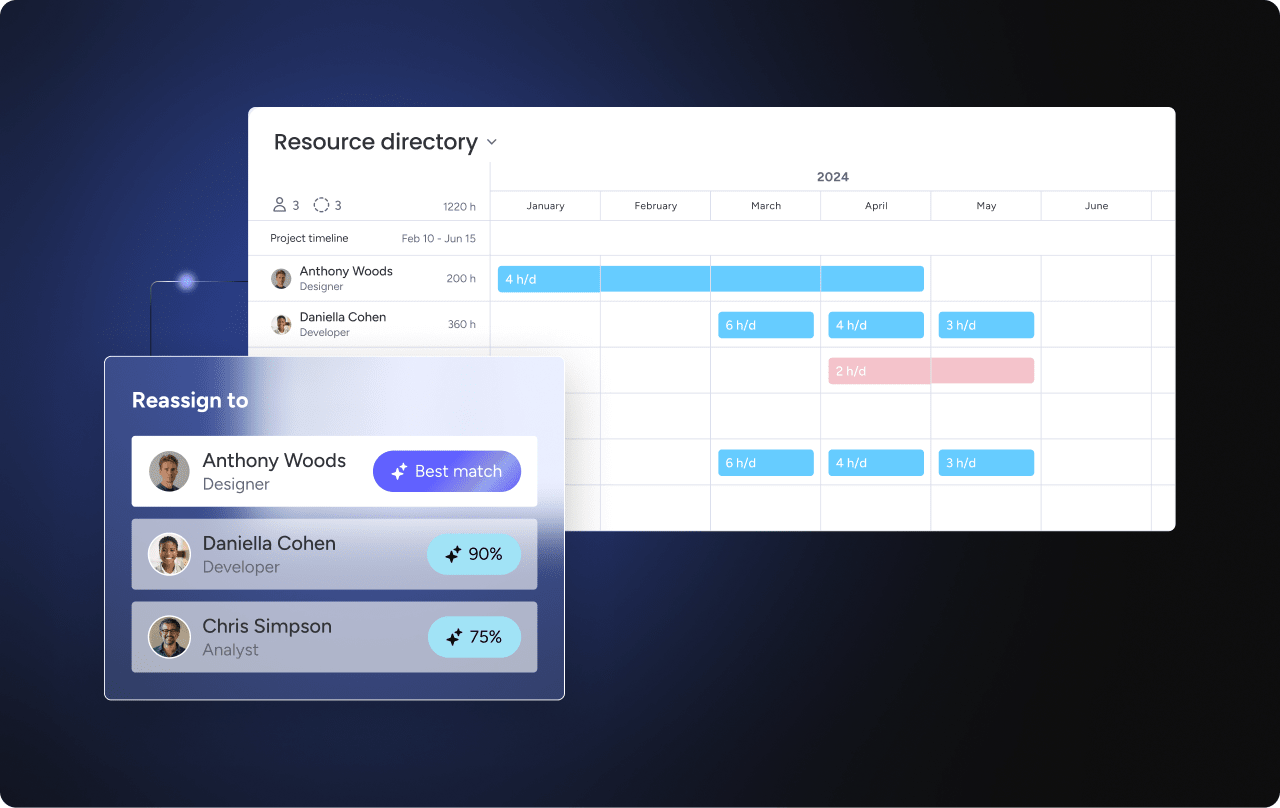
Automated lead routing is the process of instantly assigning incoming leads to the right sales rep or team based on predefined rules, without manual intervention. It works by evaluating lead attributes, like location, company size, or product interest, and matching them to routing criteria the moment a lead enters your system.
Unlike manual routing, where a manager reviews each lead and decides who should handle it, automated routing happens in seconds. This eliminates delays, reduces human error, and ensures every lead reaches someone equipped to follow up immediately.
For revenue teams managing high lead volume or complex sales motions, automation makes the difference between a lead that converts and one that goes cold.
Here’s what that looks like in practice. Picture a mid-market SaaS company with regional sales teams:
- A lead submits a demo request at 2:15 p.m.
- Within seconds, the system identifies the lead’s location (Texas), company size (150 employees), and product interest (enterprise plan).
- It routes the lead to the rep covering the Southwest region who specializes in mid-market accounts.
- By 2:20 p.m., the rep has already sent a personalized follow-up email.
No spreadsheet updates. No Slack messages asking “who’s got this?” No waiting until the next morning.
How automated lead routing works
Automated lead routing follows a structured process that ensures every lead reaches the right person at the right time. From the moment a lead enters your system to the point a rep takes action, each stage eliminates friction and accelerates follow-up. Here’s how each stage works.
Centralize lead capture from every source
Leads arrive from multiple channels: website forms, live chat, email inquiries, trade show scans, partner referrals, and third-party platforms like LinkedIn Lead Gen Forms. Automated routing systems centralize these sources, pulling lead data into a single system the moment it’s submitted.
Without centralized capture, leads slip through the cracks. A lead from a webinar might sit in a marketing automation platform for days before someone manually exports it to the CRM. With automation, that lead is captured, enriched, and routed instantly, regardless of where it originated. Revenue teams using monday CRM can collect leads via website forms, social ad campaigns, or other sources and centralize them in one place for immediate routing.
Qualify and score leads before assignment
Before a lead is assigned, AI-driven lead qualification evaluates whether it’s worth routing at all. Lead scoring models assess two dimensions:
- Fit signals: Job title, company size, industry
- Intent signals: Content downloads, pricing page visits, email engagement
Qualification answers the question: “Is this a good lead?” Routing answers: “Who should handle it?” These are distinct steps. A lead from a target industry with a VP title and recent demo page visits receives a higher score than a student downloading a whitepaper. The high-score lead gets routed to a senior rep; the low-score lead enters a nurture sequence. Learning how to qualify sales leads before routing prevents wasted sales time and ensures reps focus on opportunities with real potential.
Automatically assign leads based on routing rules
Once a lead is qualified, the system assigns it to the right rep or team based on routing rules. These rules match lead attributes to rep attributes:
- Lead attributes: Territory, industry, product interest, account ownership
- Rep attributes: Specialization, capacity, territory coverage
Assignment happens instantly. A lead from a healthcare company in the Northeast is automatically routed to the rep who covers healthcare accounts in that region, no manager intervention, no email chains, no delays. Automation also handles edge cases: if the assigned rep is out of office, the system routes to a backup. If two reps have equal claim, tie-breaking rules like round-robin or workload balancing determine the winner.
Trigger rep alerts and follow-up workflows
The moment a lead is assigned, the rep is notified via email, Slack, CRM alert, or mobile push notification. Instant alerts are critical for speed-to-lead. A rep who sees the assignment immediately can act before the lead’s attention shifts elsewhere.
Automation can also trigger automated sales follow-up workflows. When a high-priority lead is assigned, the system can:
- Queue a suggested email template for the rep to review
- Create a follow-up task in the CRM
- Log the initial activity automatically
Teams leveraging monday CRM can automate email follow-ups and track individual and mass emails, including open rate and link clicks, reducing manual steps and ensuring consistency across the team.
Track routing performance through dashboards
Routing systems provide visibility into lead flow, assignment speed, rep workload, and conversion rates. Revenue leaders should track these core metrics to optimize routing performance:
| Metric | What it measures | Why it matters |
|---|---|---|
| Routing time | Time from lead creation to assignment | Identifies delays in the routing process |
| Acceptance rate | Percentage of leads accepted by assigned reps | Reveals mismatches between leads and reps |
| Response time | Time from assignment to first rep action | Measures speed-to-lead after routing |
| Conversion by route | Win rate by routing rule or rep | Shows which routing strategies perform best |
A dashboard might reveal that leads routed to the enterprise team convert 30% faster than those routed to SMB. That insight prompts a rule adjustment, perhaps raising the company size threshold for enterprise routing.
Why automated lead routing matters for sales teams
Automated lead routing directly impacts revenue by improving how quickly and accurately leads reach the right sales rep. The benefits extend beyond speed, affecting conversion rates, team morale, and leadership visibility. Here’s what changes when routing is done right.
Faster speed-to-lead means fewer lost opportunities
Manual routing introduces delays. A lead submits a form at 3:00 p.m., but the sales manager doesn’t review the queue until 5:00 p.m. By then, the lead has already spoken to a competitor. Automation eliminates this gap entirely. A lead who requests a demo at 3:00 p.m. is automatically assigned and contacted by 3:05 p.m., before competitors even see the inquiry.
Objective lead distribution keeps teams motivated and balanced
Manual distribution often favors certain reps, intentionally or not. Top performers get cherry-picked leads. New reps get leftovers. Workload imbalances create resentment and burnout. Automation distributes leads based on objective criteria:
- Round-robin routing ensures every rep receives an equal share of inbound leads.
- Capacity-based routing prevents overload by accounting for current rep workload.
Fair distribution improves team morale and ensures all reps have equal opportunity to succeed.
Rule-based assignment eliminates costly mismatches
Human error is inevitable in manual assignment. A lead from a Fortune 500 account gets routed to the SMB team. A lead interested in Product A goes to the rep who specializes in Product B. Rule-based routing ensures leads always go to the right person based on fit, not guesswork. Revenue teams find that monday CRM allows them to centralize, qualify, and assign all leads while automating actions based on custom conditions, reducing wasted time and increasing conversion rates.
Real-time routing data gives revenue leaders actionable visibility
Without automation, revenue leaders operate in the dark. They don’t know how long leads sit unassigned, which reps are overloaded, or which routing rules are working. Automated routing provides real-time visibility into lead flow, rep performance, and routing effectiveness, giving leaders the data they need to act. A VP of sales can spot that leads from a specific source have a 50% lower conversion rate and investigate whether routing rules need adjustment before it affects the quarter.
Try monday CRM7 types of lead routing strategies
Different routing strategies suit different business models, team structures, and sales motions. Most organizations use a combination of strategies rather than relying on a single approach. Here’s a quick comparison to help you identify which approaches fit your team, followed by a breakdown of each.
| Strategy | Best for | Complexity | Key benefit |
|---|---|---|---|
| Round-robin | Small teams, equal skill levels | Low | Fair distribution |
| Territory-based | Field sales, regional coverage | Medium | Geographic alignment |
| Lead scoring | High volume, varying skill levels | Medium | Prioritizes best-fit leads |
| Account-based | ABM, enterprise, existing customers | Medium | Relationship continuity |
| Skills-based | Complex products, vertical sales | High | Expertise matching |
| Availability-based | High-velocity, call centers | Medium | Fastest response |
| Source-based | Channel teams, partner programs | Low | Specialized follow-up |
1. Round-robin: Equal distribution across available reps
Round-robin routing distributes leads evenly in rotation among available reps. Lead 1 goes to Rep A, Lead 2 to Rep B, Lead 3 to Rep C, then back to Rep A.
- Best for: Small teams with equal skill levels and no territory or specialization requirements
- Limitation: Doesn’t account for rep capacity, expertise, or lead fit
2. Territory-based: Geographic alignment for regional teams
Territory-based routing assigns leads based on geographic location: state, region, country, or custom-defined territories. A lead from California is automatically routed to the West Coast sales rep, while a lead from New York goes to the East Coast rep.
- Best for: Field sales teams and regional coverage models
- Key advantage: Ensures reps develop deep expertise in their geographic market
3. Lead scoring: Prioritizing high-fit leads for senior reps
Lead scoring routing assigns leads based on their score — a combination of fit signals (job title, company size, industry) and intent signals (content downloads, pricing page visits, email engagement).
- High-score leads go to senior reps or fast-track teams
- Low-score leads go to nurture sequences or junior reps
4. Account-based: Matching leads to existing account owners
Account-based routing matches leads to existing account owners or assigns them based on account tier and strategy. The system checks if the lead’s company is already a customer or target account, then routes to the assigned owner.
- Best for: ABM programs, enterprise sales, and existing customer expansion
- Key advantage: Prevents duplicate outreach and ensures relationship continuity
5. Skills-based: Routing leads to reps with the right expertise
Skills-based routing assigns leads based on rep expertise: industry knowledge, product specialization, or language proficiency. A lead from a healthcare company interested in compliance features is routed to the rep who specializes in healthcare and knows HIPAA requirements.
- Best for: Complex products, vertical sales motions, or multilingual teams
- Key advantage: Leads receive follow-up from the most qualified rep, not just the next available one
6. Availability-based: Fastest response for high-velocity sales
Availability-based routing assigns leads to reps who are currently available: not at capacity, not out of office, not in a meeting.
- Best for: High-velocity sales and inbound call centers where speed-to-lead is the primary success metric
- Key advantage: Minimizes the gap between lead submission and first contact
7. Source-based: Specialized follow-up by lead origin
Source-based routing assigns leads based on where they came from: website, event, partner referral, paid ad, or specific campaign. Leads from a partner referral program are routed to the partner sales team, while leads from paid ads go to the demand gen team.
- Best for: Channel teams, partner programs, and multi-source inbound motions
- Key advantage: Ensures leads receive follow-up from reps who understand the context of their entry point
5 steps to set up automated lead routing in minutes
Setting up automated lead routing doesn’t require complex technical work or months of implementation. With the right platform, revenue teams can configure routing rules, connect lead sources, and launch workflows in a single afternoon. Here’s how to do it.
Step 1: Map your lead sources
Start by identifying every place leads come from. Common sources include:
- Website contact forms and demo request pages
- Live chat and chatbot conversations
- Trade show booth scans
- Partner referrals
- Third-party platforms (LinkedIn Lead Gen Forms, review sites, etc.)
You can’t route what you can’t capture. If a lead source isn’t connected to your routing system, those leads sit in a silo, waiting for someone to manually export them. Audit your current lead flow and ask: “Where do leads enter our system today? Are any sources disconnected or delayed?”
Step 2: Define your routing rules
Routing rules determine how leads are assigned by matching lead attributes to reps or teams. The key attributes to consider:
- Location: State, region, or country
- Company size: SMB vs. mid-market vs. enterprise thresholds
- Product interest: Which product line or use case the lead is exploring
- Lead score: Fit and intent signals combined
Start by deciding which attributes matter most for your sales motion. For a regional team, territory is primary. For a vertical-focused team, industry is primary. Example rule: “If lead is from California AND company size > 500 employees, route to Enterprise West team.”
Step 3: Create routing fields in your CRM
Routing requires specific data fields in your CRM to capture and evaluate routing criteria. Common fields include:
- Territory
- Lead source
- Product interest
- Lead score
- Owner assignment
Create these fields as custom fields, picklists, or formulas, and ensure they’re populated automatically via form mappings or integrations. Standardize field values across all lead sources. If one form uses “California” and another uses “CA,” routing rules may fail.
Step 4: Build automation workflows using if/then logic

Workflows automate the routing process. When a lead is created, the system evaluates routing rules and assigns the lead to the appropriate rep. Teams using monday CRM can automate actions based on custom conditions, building workflows using if/then logic:
- Trigger: Lead is created
- Condition: Evaluate routing rules (territory, score, product interest)
- Action: Assign lead to matching rep
- Action: Send notification (email, Slack, CRM alert)
- Action: Create follow-up task or queue email template
Step 5: Test your routing flow before going live
Testing ensures routing works as expected before launch. Follow this process:
- Create test leads with different attributes and verify each one routes correctly.
- Test edge cases: no matching rule, duplicate leads, out-of-office reps.
- Confirm fallback logic routes unmatched leads to the right default owner or queue.
- After launch, monitor routing performance and adjust rules as needed.
Best practices for lead routing automation
Automated lead routing works best when you follow proven best practices. These guidelines help you avoid common pitfalls and build a routing system that scales with your team, whether you’re managing 50 leads a week or 5,000.
- Qualify leads before routing to protect sales time: Use lead scoring, form validation, or automated qualification workflows to filter leads before routing. Define qualification criteria including job title requirements, company size thresholds, budget/timeline indicators, and recent engagement signals.
- Keep routing rules modular and easy to update: Instead of one massive workflow with nested logic, create separate workflows for each routing scenario. Document routing rules in a shared location so anyone on the team can understand and update them without needing to reverse-engineer the logic.
- Add fallback paths so no lead goes unassigned: Define a default owner, queue, or team for leads that don’t match any rule. Monitor fallback assignments weekly — a high volume indicates gaps in routing logic that need addressing.
- Configure real-time notifications across multiple channels: Set up notifications via email, Slack, mobile push, and CRM alerts to reach reps wherever they are. Instant notifications ensure reps act on leads immediately.
- Balance routing speed with lead fit: For high-value enterprise leads, prioritize fit and route to the best-qualified rep, even if it takes slightly longer. For SMB or high-volume leads, prioritize speed using round-robin or availability-based routing.
- Review routing performance on a regular cadence: Review routing time, acceptance rate, conversion rate, and rep workload monthly. Schedule quarterly routing audits to update rules, rebalance territories, and remove bottlenecks before they affect pipeline performance.
How AI improves lead scoring and routing
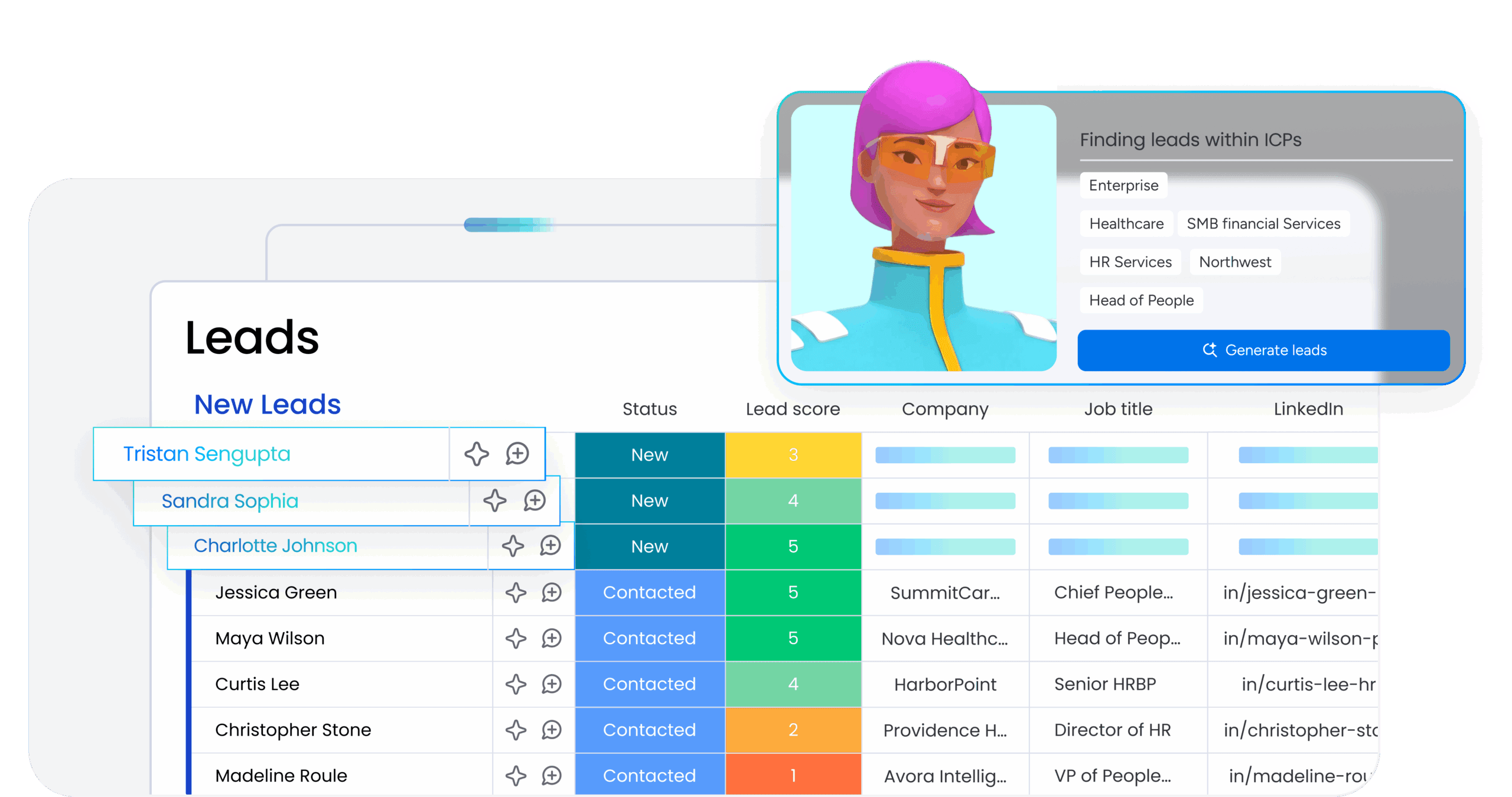
AI takes lead routing software beyond static rules by analyzing patterns, detecting intent, and making intelligent recommendations. While traditional routing relies on predefined criteria, AI learns from historical data and adapts in real time, making routing decisions sharper with every lead that moves through the system.
- Behavioral intent signal detection: AI analyzes behavioral signals like page views, content downloads, email opens, and chat interactions to identify high-intent prospects. A lead who visited the pricing page three times in one day signals stronger intent than one who downloaded a single whitepaper, triggering automatic routing to a sales rep for immediate follow-up.
- Sentiment detection: AI analyzes lead communication to detect sentiment and categorize it as positive, negative, or neutral. A lead expressing frustration requires different handling than one expressing curiosity, allowing the system to route leads to reps equipped to handle their emotional state.
- AI-generated lead summaries: AI generates concise summaries of lead context, like company background, role, pain points, and recent activity. Instead of reviewing raw CRM data, reps receive a narrative summary they can act on immediately.
- AI-assisted owner assignment: AI recommends the best owner for a lead based on historical conversion data, rep performance, and lead attributes. The system learns over time and improves recommendations as more data is collected.
- Human oversight and guardrails: AI-assisted routing still requires human review to ensure accuracy and fairness. AI makes recommendations, but humans approve or override assignments when needed. Reps should understand why AI made a recommendation, not just receive an assignment without context.
How account-based routing connects leads to the right owner
Account-based routing ensures leads from target accounts or existing customers are matched to the right owner based on account relationships. This strategy is critical for enterprise sales, ABM programs, and customer expansion motions where the wrong handoff can cost a deal. Here’s how each component works.
Lead-to-account matching prevents duplicate outreach
When a new lead enters the system, account-based routing checks whether the lead’s company already exists in the CRM. Matching happens based on company name, email domain, or other identifiers. This prevents duplicate accounts and ensures the lead inherits the account’s full context: owner, tier, history, and open opportunities.
Existing account ownership ensures relationship continuity
Leads from existing accounts are automatically routed to the assigned account owner. The owner has context, relationships, and responsibility for the account. Teams using monday CRM can see all connected deals, accounts, contacts, and projects in one place, ensuring a seamless experience for every customer interaction.
Buying group context routes each stakeholder appropriately
Enterprise deals involve multiple contacts from the same account: decision-makers, influencers, end-users, and technical evaluators. Account-based routing considers the buying group and routes each contact appropriately:
- A CFO is routed to the enterprise AE for executive-level conversations.
- An IT manager is routed to the technical specialist for implementation discussions.
Customer lifecycle stage determines the right team for each lead
Account-based routing adapts based on where an account sits in the customer lifecycle. Each stage requires a different team and a different approach:
- Prospect: Routes to sales (SDR or AE) for new business development
- Customer: Routes to account manager or CSM for relationship continuity
- Expansion: Routes to upsell or cross-sell team for revenue growth
- At-risk: Routes to customer success for churn prevention
What to look for in lead distribution software
Choosing the right lead distribution software ensures your routing strategy is scalable, flexible, and easy to manage. The wrong platform creates bottlenecks; the right platform accelerates your entire revenue motion. These are the capabilities that matter most.
- No-code automation builder for non-technical teams: Revenue teams need to update routing rules without IT help. Territories shift, products launch, reps join and leave. If every change requires developer involvement, routing becomes a bottleneck.
- Custom routing rules that match your sales motion: Look for flexible rule logic with AND/OR conditions, support for multiple routing criteria like territory and lead score, fallback options when rules don’t match, and rule prioritization to control which rules apply first.
- Native CRM and marketing integrations: Integrations connect routing systems to lead sources and CRMs without manual data transfers. Seamless data flow ensures leads are routed instantly, regardless of where they originated. monday CRM offers powerful integrations that centralize all customer information in one place.
- Real-time dashboards for routing visibility: Leaders need data to optimize routing rules and balance workloads before problems compound. Code-free, customizable dashboards in monday CRM provide immediate insights into sales pipeline status, team performance, and activity status.
- Role-based permissions and routing transparency: Control who can create, edit, and view routing rules. Look for role-based permissions for rule management, audit logs for rule changes, and transparency into routing logic so reps understand why they received a lead and managers can audit routing decisions.
6 metrics to track for speed-to-lead optimization
Tracking the right metrics helps you identify bottlenecks, optimize routing rules, and improve conversion rates. These six sales metrics provide the visibility revenue leaders need to continuously improve routing performance and catch problems before they affect the pipeline.
1. Routing time
Routing time measures the time between lead creation and lead assignment. Faster routing means faster follow-up and higher conversion rates.
- Best-in-class target: Under 1 minute
- Warning threshold: Anything over 10 minutes indicates a bottleneck
2. Time to first touch
Time to first touch measures the time between lead assignment and the rep’s first outreach. Routing is only half the equation. A lead assigned in 30 seconds but not contacted for 4 hours still loses the speed advantage.
- Best-in-class target: Under 5 minutes for high-priority leads
3. Lead acceptance rate
Lead acceptance rate measures the percentage of assigned leads that reps accept versus reject or reassign.
- Healthy target: Above 90%
- Warning threshold: Below 80% signals routing rule problems or rep-lead mismatches
4. Conversion rate by route
Conversion rate by route measures the win rate for leads routed through different rules, territories, or reps. Not all routing paths perform equally — Variance of more than 10 percentage points between routes warrants investigation.
5. Rep workload balance
Rep workload balance measures the distribution of leads across reps. Unbalanced workloads lead to burnout, missed leads, and resentment.
- Healthy target: Workload within 20% variance across reps with similar roles
6. Fallback assignment volume
Fallback assignment volume measures the number of leads routed to fallback queues because no primary rule matched. High fallback volume indicates gaps in routing logic that need to be addressed.
- Healthy target: Fallback assignments under 5% of total leads
How monday CRM streamlines automated lead routing
monday CRM gives revenue teams a centralized platform to capture, qualify, and route leads without technical expertise. Instead of juggling disconnected tools or waiting on IT to update routing logic, sales leaders can build and modify routing workflows using a visual, no-code interface. Every lead source connects to one system, every routing rule is transparent, and every assignment happens instantly.
The platform combines flexible automation with real-time visibility, so teams can route leads based on territory, score, product interest, or account ownership while tracking performance across the entire funnel. Whether you’re managing 50 leads a week or 5,000, monday CRM scales with your team and adapts as your sales motion evolves.
AI-powered lead scoring and qualification

monday CRM uses AI to analyze lead attributes and behavioral signals, automatically scoring leads based on fit and intent. The system evaluates job titles, company size, engagement history, and recent activity to prioritize high-value prospects before routing. AI-driven qualification ensures sales reps receive leads worth their time, not just every form submission that comes through. This reduces wasted follow-up and increases conversion rates by matching lead quality to rep capacity.
No-code automation builder for custom routing rules

Revenue teams can build routing workflows using if/then logic without writing code or submitting IT tickets. The automation builder supports multiple conditions, fallback paths, and rule prioritization, so you can route based on territory and lead score simultaneously. When rules need updating due to territory changes or new product launches, sales leaders make adjustments directly in the platform. Routing logic stays flexible and responsive to how your team actually sells.
AI-generated lead summaries for faster rep response

When a lead is assigned, AI generates a concise summary of the lead’s context, including company background, role, recent activity, and detected pain points. Reps receive a narrative overview instead of raw CRM data, allowing them to personalize outreach immediately. AI summaries eliminate the need to piece together information from multiple fields or tabs. Reps spend less time researching and more time engaging, improving speed to lead and conversation quality.
Real-time dashboards for routing performance visibility
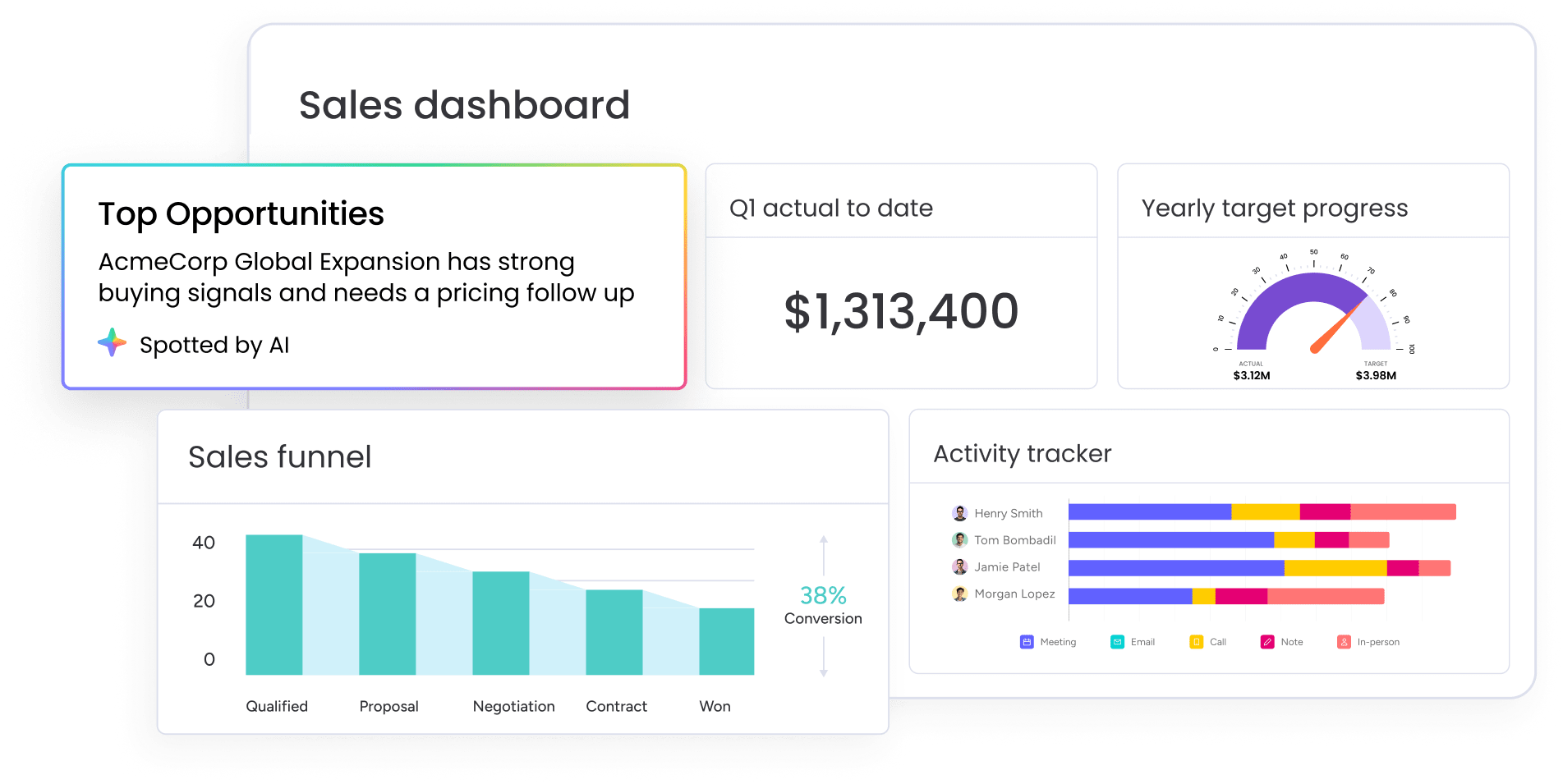
Customizable dashboards provide instant visibility into routing time, rep workload, acceptance rates, and conversion by route. Revenue leaders can track how quickly leads move from capture to assignment, identify bottlenecks before they affect the pipeline, and compare performance across routing strategies. Dashboards update in real time, so you always know which rules are working and which need adjustment. This visibility turns routing from a background process into a measurable driver of pipeline performance.
Build a lead routing system your team will actually use
Automated lead routing isn’t just an operational upgrade; it’s a revenue decision. Every minute a lead sits unassigned is a minute a competitor has to make contact first. Getting routing right means faster follow-up, fairer distribution, and a pipeline your leadership team can actually trust. The good news is that building an effective routing system doesn’t require months of configuration or a dedicated IT team. With the right platform, you can map your lead sources, define your rules, and launch automated workflows in a single afternoon.
Revenue teams that get the most from automated routing treat it as a living system, not a one-time setup. Review your metrics monthly, audit your rules quarterly, and adjust as your territories, products, and team evolve. That’s how routing goes from a background process to a genuine competitive advantage. Platforms like monday CRM make it possible to set up routing rules and start assigning leads faster, without technical expertise.
Try monday CRMFAQs
What is the difference between lead routing and lead distribution?
Lead routing refers to the rules and logic that determine which rep or team should receive a lead. Lead distribution refers to the actual assignment of leads to reps. In practice, most systems handle both: they evaluate routing rules and then distribute leads accordingly.
How fast should leads be routed to sales reps?
Leads should be routed to sales reps within seconds of entering your system, ideally under 1 minute. Leads contacted within five minutes of inquiry are significantly more likely to convert than those contacted later. If your routing time exceeds 10 minutes, investigate bottlenecks in your rules, integrations, or fallback logic.
Can small sales teams benefit from automated lead routing?
Small sales teams benefit from automated lead routing just as much as large teams, sometimes more. With fewer reps, every lead matters. Automation ensures leads are assigned instantly, distributed fairly, and tracked consistently. Even a three-person team can use round-robin routing to ensure equal distribution and real-time notifications to accelerate follow-up.
What happens when a lead doesn't match any routing rule?
When a lead doesn't match any routing rule, it should be assigned to a fallback owner or queue. Fallback rules prevent leads from sitting unassigned indefinitely. Common fallback approaches include routing to a general queue for manual review, assigning to a default owner, or triggering an alert for immediate attention.
How do you handle lead routing when reps are out of office?
Lead routing systems should account for rep availability. When a rep is out of office, leads should automatically route to a backup: either a specific colleague, a team queue, or the next available rep in a round-robin rotation. Without availability-based routing, leads assigned to unavailable reps sit untouched until the rep returns.
How often should lead routing rules be reviewed and updated?
Lead routing rules should be reviewed at least quarterly, with more frequent reviews during periods of change — new products, territory realignments, or team growth. Monthly reviews of routing metrics help identify issues early. Rules that worked six months ago may no longer reflect your current sales motion.
