



Most deals don’t die because the product was wrong or the price was too high — they die because someone forgot to follow up. Automated sales follow-up ensures every lead gets the right message at the right time, routes hot leads to the right rep within minutes, and keeps deals moving even when your team is focused elsewhere.
You’ll learn how automated sales follow-up works, which features matter most, a 7-step setup process, multi-channel strategies that drive replies, and the metrics that show if it’s working. Whether you’re starting from scratch or optimizing what you have, this guide shows you how to build a system your team will actually use.
Key takeaways
- Missed follow-ups cost you real revenue: Most deals need multiple touchpoints to get a response. Automation makes sure every lead gets the right outreach, every time — no exceptions.
- Your reps should be selling, not typing: Automating repetitive tasks like email writing and activity logging gives reps more time for live conversations that actually close deals.
- Multi-channel outreach gets more replies: Combining email, phone, and LinkedIn into one coordinated sequence reaches more prospects and reduces the risk of going dark on a warm lead.
- Track the metrics that connect to revenue: Reply rates, lead response time, and pipeline velocity show you what’s working and where to improve — so your system gets sharper over time.
- monday CRM lets you build and run follow-up sequences without IT: Its no-code automation builder, AI email drafting, and real-time dashboards give revenue leaders full visibility and control — from first touch to closed deal.
What is automated sales follow-up?
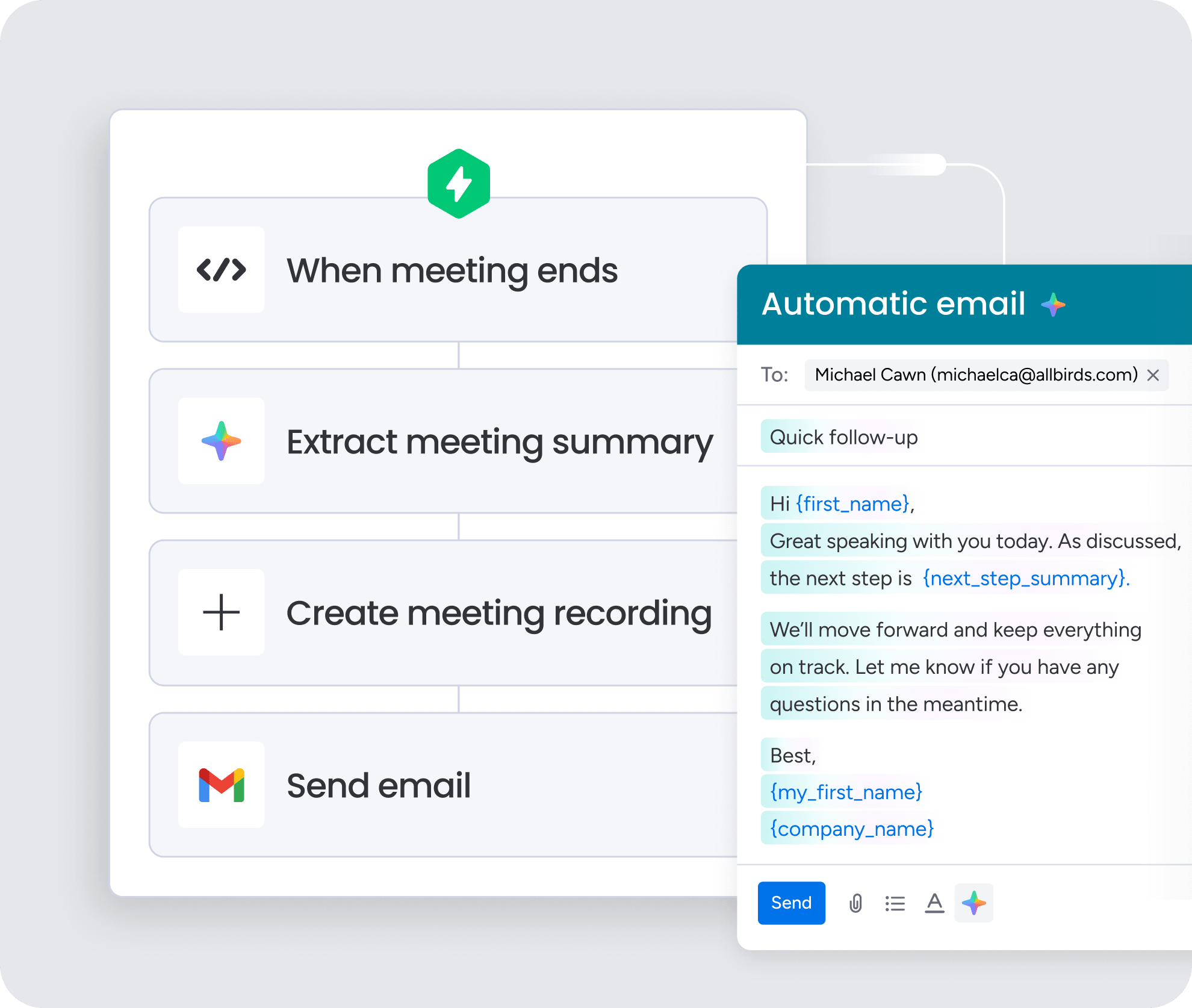
Automated sales follow-up is a system that handles repetitive outreach activities based on triggers, workflows, and predefined rules. When a prospect takes an action (or doesn’t), the system responds automatically: sending the next email in a sequence, assigning a call activity to the right rep, or moving the lead to a different track based on engagement signals.
True automated follow-up spans the entire sales cycle, from inbound lead capture through qualification, opportunity progression, closed deal, and account handoff. That’s different from basic email automation, which usually only handles top-of-funnel nurture. A complete system integrates CRM data, activity tracking, and cross-channel orchestration to ensure every touchpoint happens at the right time, through the right channel, with the right context.
Every follow-up system worth building needs:
- Follow-up emails and SMS: Triggered by prospect actions or time delays
- Task assignment: Routes leads to the right rep based on territory, capacity, or lead score
- Meeting reminders: Sends pre-call prep and post-call summaries automatically
- Pipeline updates: Logs activity and moves deals forward based on outcomes
Why automate sales follow-up?
Manual follow-up is inconsistent. That’s just how it works. Reps get busy, leads slip through, and pipeline visibility suffers. Here’s what automation solves, and why it matters for revenue teams at every stage of growth.
Capture revenue lost to missed touchpoints
Most deals require multiple touchpoints before a prospect responds. Manual follow-up rarely delivers that consistency. Reps forget to follow up, follow up too late, or skip touchpoints entirely when they’re busy with other deals.
Automation ensures every lead gets the right sequence at the right time:
- When a lead enters the CRM, the system triggers the first email within minutes.
- If the prospect doesn’t respond, the system sends the next touch on schedule.
- If they do respond, the system pauses the sequence and notifies the rep.
No lead falls through the cracks because a rep was on vacation, in a meeting, or simply overwhelmed.
Reclaim selling time for reps
Reps spend hours each week on tasks that don’t directly generate revenue: writing follow-up emails, logging calls, creating tasks, and managing their own outreach schedules. This administrative work pulls them away from selling.
Sales automation handles these repetitive tasks so reps can focus on live conversations, discovery calls, and deal progression. Instead of writing the same follow-up email for the tenth time this week, reps review an AI-drafted message and hit send. Instead of manually logging every call, the system captures activity automatically.
Deliver consistent outreach at scale
Manual follow-up creates inconsistency. Some reps are disciplined and follow up on time with thoughtful messaging. Others aren’t. Some leads get 10 touchpoints while others get 2, and the prospect experience varies wildly depending on which rep owns the account.
Automation standardizes the experience. Every lead receives the same high-quality cadence, regardless of which rep is assigned. The messaging is consistent, the timing is predictable, and the brand experience is professional — whether the team is managing 50 leads or 5,000.
Improve pipeline visibility for sales leaders
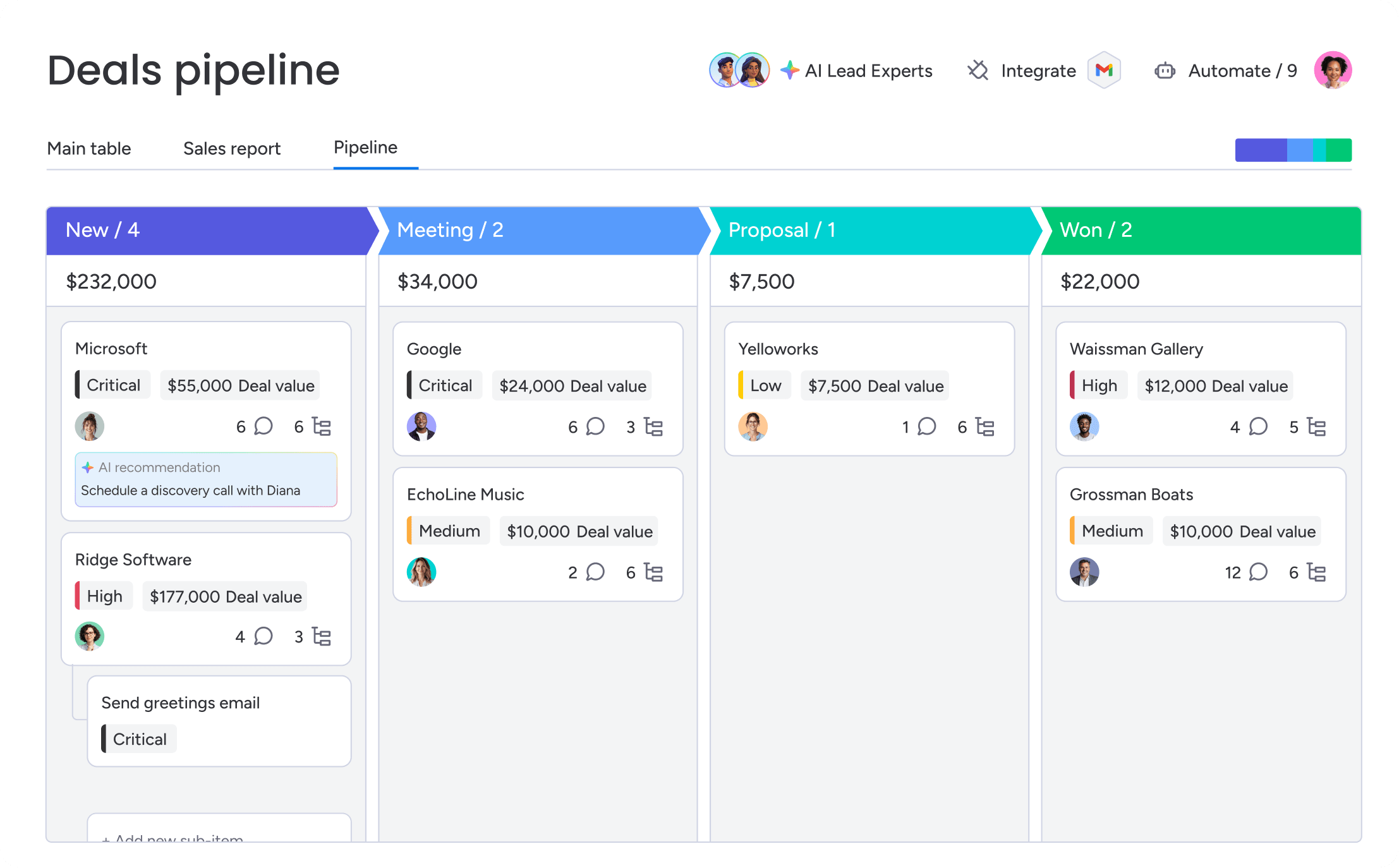
Manual follow-up creates visibility gaps for sales leaders. Activity isn’t logged consistently, follow-up status is unclear, and pipeline health is hard to assess. Leaders end up asking reps for updates instead of seeing the data themselves.
Automated systems provide real-time dashboards showing:
- Which leads are in-sequence, which have stalled, and which reps are hitting their activity targets
- How many leads entered the pipeline this week and how many are being actively worked
- Where deals are getting stuck
All of these give leaders the high-level data they need to coach, forecast, and allocate resources effectively.
How an automated follow-up system works
Automated follow-up systems work by connecting prospect behavior, CRM activity, workflow rules, AI-powered personalization, and lead prioritization. Together, these components help sales teams respond faster, follow up more consistently, and focus attention on the leads most likely to convert.
Activity capture and CRM sync
Automated follow-up starts with data. The system needs to know what prospects are doing and what reps are doing. Without this data, automation can’t decide what to do next.
Here’s how different data types move through the system:
| Data type | Source | How it’s used |
|---|---|---|
| Email engagement | Email tracking | Triggers follow-up based on opens, clicks, or no response |
| Form submissions | Web forms, landing pages | Initiates lead capture and first-touch sequences |
| Call outcomes | CRM activity logging | Updates deal stage and triggers next steps |
| Meeting status | Calendar sync | Sends reminders and post-meeting follow-up |
| Website behavior | Tracking integrations | Identifies high-intent signals for prioritization |
Real-time sync matters because follow-up actions should be based on the latest information. If a prospect opens an email but doesn’t reply, the system logs the open and triggers a follow-up task 2 days later. If the prospect replies before that task fires, the system pauses the sequence.
Lead scoring and routing
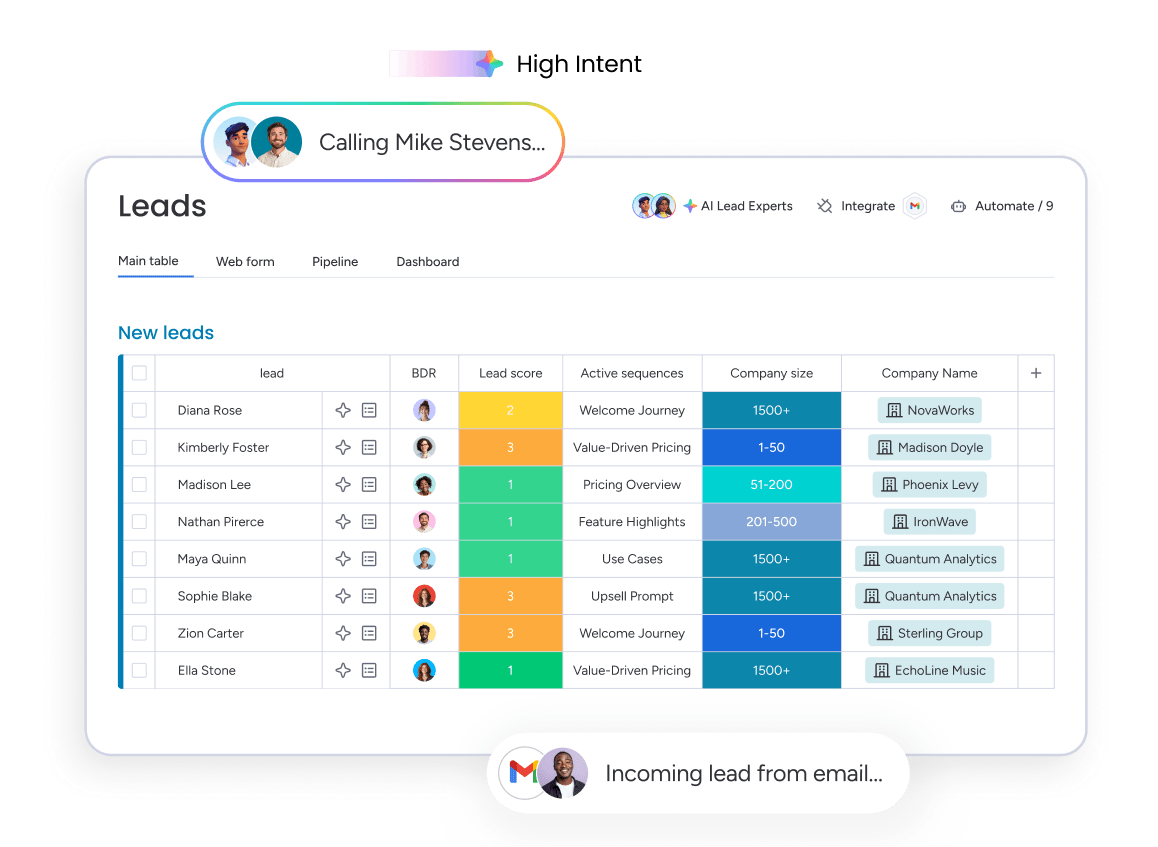
Not all leads are equal. A VP at a 500-person company who visits the pricing page 3 times is more valuable than a student who downloaded a whitepaper. Automated systems use lead scoring to prioritize follow-up and ensure the right leads get the right attention.
Scoring assigns points based on 2 factors:
- Fit criteria: Company size, industry, role, geography
- Behavioral signals: Email opens, content downloads, website visits, meeting requests
High-score leads get routed to senior reps or fast-tracked into priority sequences with faster cadence and more touchpoints. Lower-score leads enter nurture tracks with a lighter touch.
Trigger-based workflows
Automation relies on “if this, then that” logic. When a specific event occurs (the trigger), the system executes a predefined action (the workflow). This is what makes automated follow-up work: reps don’t have to remember to take action or manually trigger the next step.
Common triggers and their corresponding workflows include:
- Form submission: Send immediate welcome email
- Email response: Pause sequence and notify rep
- Meeting booking: Send confirmation and prep materials
- Deal stage change: Initiate new sequence for that stage
- No activity for 14 days: Trigger re-engagement sequence
AI personalization and next-best actions
AI helps automation sound less robotic. Traditional automation runs the same sequence every time, no matter what. AI-powered automation adapts based on context, so each touchpoint hits harder.
AI capabilities in follow-up systems include:
- Personalized email drafting pulls in prospect details to create tailored messages.
- Next-best action suggestions recommends phone calls over emails based on engagement patterns.
- Sentiment analysis detects prospect interest levels from email responses.
- Optimal timing predictions suggests best times to reach out based on past interactions.
Essential features of follow-up software
Follow-up software varies wildly in what it can actually do. These features separate tools that work from tools that waste your time. Here’s what matters:
Sequence and cadence builder
A sequence builder lets sales teams design multi-step follow-up flows without writing code. The interface should let teams build complex workflows fast, without a manual.
A robust sequence builder is essential for creating effective outreach without needing to code. When evaluating options, prioritize platforms that offer the following capabilities for maximum flexibility and ease of use:
- Drag-and-drop interface: Build sequences by arranging email, call, and task steps visually
- Time delays: Set specific intervals between steps to create natural cadence
- Branching logic: Create different paths based on prospect behavior
- Templates and cloning: Start with pre-built templates and customize for different scenarios
Multi-channel orchestration
Buyers don’t live in their inbox. You need to reach them where they actually pay attention. Single-channel sequences get lower response rates because prospects check email, LinkedIn, and their phone at different times.
Orchestration syncs your touchpoints across channels so nothing overlaps or conflicts. The system knows when to send an email, when to trigger a call, and when to suggest LinkedIn — based on where the prospect responds and what’s already happened. Effective orchestration prevents channel fatigue. If a prospect has received 3 emails with no response, the system suggests switching to phone or LinkedIn instead of sending a fourth email.
AI email drafting and summarization
An AI sales assistant saves reps significant time by generating personalized emails based on CRM data, recent activity, and sequence context. The system pulls in the prospect’s name, company, industry, and recent touchpoints, then drafts a contextually relevant message that the rep can review and send.
No more blank-page problem:
- Reps don’t have to write the same follow-up email from scratch for the hundredth time.
- They review the AI-drafted message, make any adjustments, and send.
monday CRM’s AI capabilities reduce manual writing while maintaining the personalization that drives replies.
Real-time dashboards and reporting
Dashboards show you sequence performance, rep activity, and pipeline health. Leaders need clear insights into critical metrics at a glance, not buried in weekly reports.
Key dashboard views and their importance:
| Dashboard view | What it shows | Why it matters |
|---|---|---|
| Sequence performance | Reply rates, meeting bookings, drop-off points | Identifies which sequences work and which need optimization |
| Rep activity | Emails sent, calls made, meetings booked | Ensures consistent execution and enables coaching |
| Lead status | Leads in-sequence, stalled, responded, converted | Shows pipeline health and identifies leads needing attention |
| Bottleneck analysis | Where leads are getting stuck | Pinpoints process issues that slow pipeline velocity |
Native integrations with your tech stack
If your follow-up system doesn’t integrate with your existing tools, it won’t work. Without integrations, data gets siloed, manual entry creeps back in, and the system can’t make smart decisions.
Native integrations beat APIs that need custom dev work. The best platforms let you connect tools in minutes, not weeks. monday CRM offers 200+ integrations designed to fit into existing workflows rather than replace them.
7 steps to set up an automated follow-up system
Setting up automated follow-up isn’t just technical work. You need to map your current reality, define the right rules, and build sequences your team will actually use. Here’s how to go from audit to optimization in 7 steps.
Step 1: Map your current follow-up process
Document how follow-up works today. This audit shows what’s working, what’s broken, and what should become automated sequences.
Key questions to answer during your audit:
- How many touchpoints do reps typically make before giving up?
- What channels do they use?
- How long does it take to follow up after a lead comes in?
- What happens when a prospect doesn’t reply?
- Which reps have the highest conversion rates, and what do they do differently?
Talk to your reps, dig into CRM data, and find the gaps. You’ll usually find leads that never got followed up because they came in during a busy week. Timing between touchpoints is all over the place. And there’s no standard process for re-engaging stalled opportunities.
Step 2: Centralize lead data in your CRM
Automation needs one place where all lead data lives. Every lead should hit the CRM automatically with full contact info, source, and engagement history.
Clean data is everything. If the CRM is incomplete or outdated:
- Emails will bounce.
- Messages will reference wrong information.
- Leads will get routed incorrectly.
Step 3: Define triggers and cadence rules
Decide what events trigger follow-up and how often you’ll reach out. Use the best practices from Step 1, but adjust for what your team can actually handle.
Sample trigger and cadence framework:
| Lead type | Trigger | Cadence |
|---|---|---|
| Inbound demo request | Form submission | Email within 5 minutes, call task within 1 hour, follow-up email day 2 |
| Content download | Asset download | Nurture email day 1, value-add email day 4, soft CTA email day 7 |
| Event attendee | Event registration | Thank-you email same day, follow-up email day 2, call task day 4 |
| Stalled opportunity | No activity for 14 days | Re-engagement email, call task 2 days later, final email day 5 |
Step 4: Build multi-channel sequences
Now build the actual follow-up flows. Give each sequence a clear goal and map out touchpoints across email, phone, and other channels.
The best sequences mix value with persistence. They share resources, offer demos, and follow up even when prospects go quiet. Testing different sequences for different personas or industries helps identify what resonates. monday CRM’s automation capabilities make it straightforward to design and clone multi-channel flows.
Step 5: Layer in AI for personalization
AI makes sequences feel personal, even when you’re running hundreds of them. Instead of sending the same templated email to every prospect, teams can use AI in sales to draft contextually relevant messages based on CRM data.
How teams should use AI in follow-up sequences:
- Enable AI email generation: Reference the prospect’s company, industry, role, and recent activity.
- Use AI for engagement analysis: Suggest whether the next touch should be a call, email, or LinkedIn message.
- Leverage AI summarization: Help reps quickly get context before a follow-up.
AI makes automation more effective. It doesn’t replace your judgment. Reps should still review AI-drafted emails before sending. monday CRM’s AI capabilities fit into automated workflows without adding complexity.
Try monday CRM AI capabilitiesStep 6: Test with a pilot group
Test with a small group first. Find issues, refine sequences, and build confidence before rolling it out to everyone. A 2–4 week pilot gives you enough data to know if it works before going all-in.
Key areas to validate during the pilot:
- Do sequences trigger correctly when leads enter the system?
- Are emails personalized appropriately, or do they feel generic?
- Do reps understand how to use the system and where to find their tasks?
- Are reply rates improving compared to manual follow-up?
Check in with pilot reps regularly and get their feedback. You’ll also find reps who love the system and can help train everyone else.
Step 7: Monitor, coach, and optimize
Automation isn’t set-it-and-forget-it. The best teams treat it as something that evolves based on data, not a one-time setup.
Focus areas for continuous improvement:
- Track sequence performance: Monitor reply rates, meeting bookings, and drop-off points.
- Measure rep adoption: Verify reps are using the system, not skipping steps.
- Assess pipeline impact: Check if deals are moving faster through stages.
Leaders should use dashboards to spot underperforming sequences and coach reps on improvement. A/B test subject lines, messaging, timing, and channel mix to keep improving.
Multi-channel follow-up strategies that drive replies
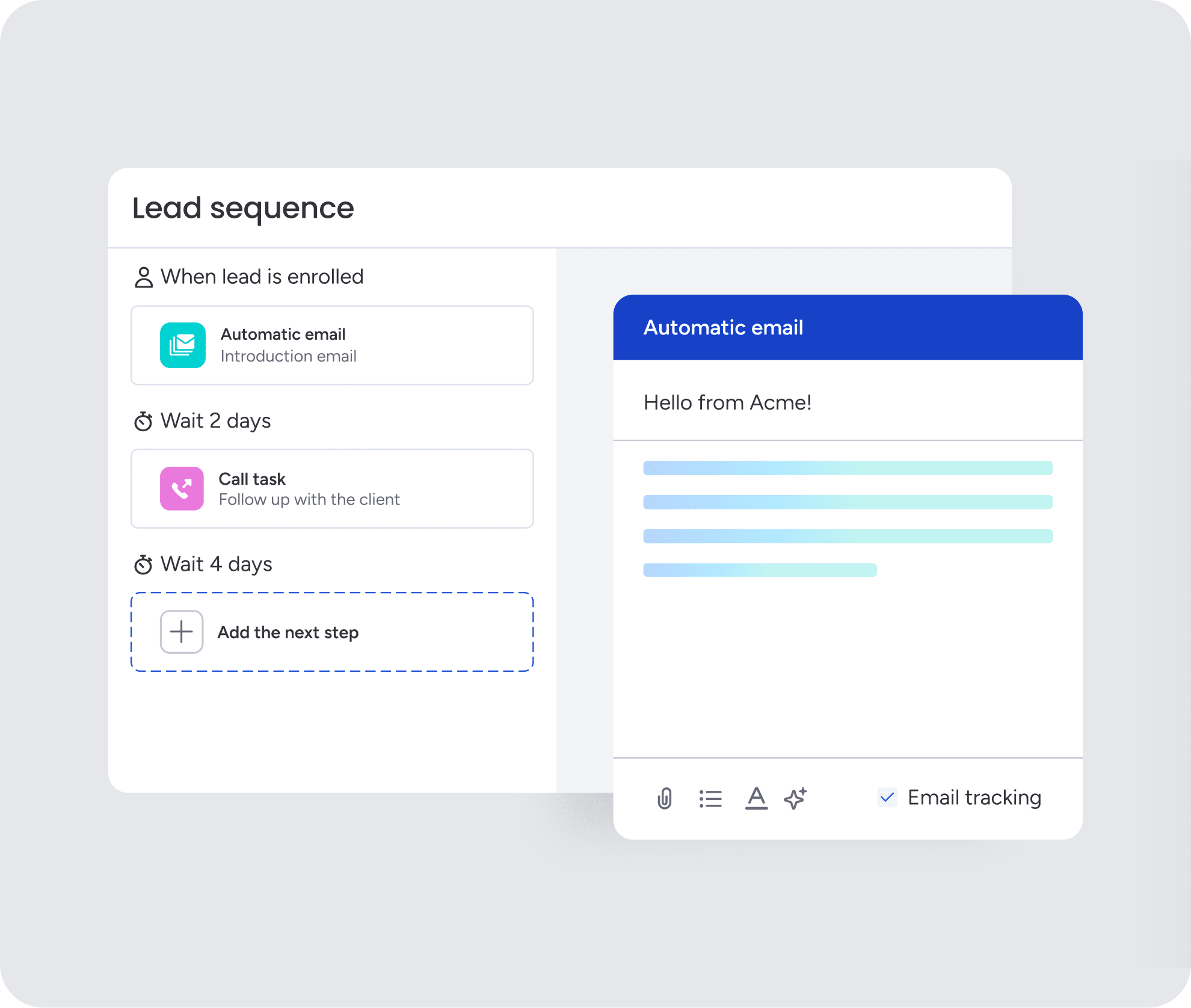
Email is usually the backbone of automated follow-up, but it shouldn’t be the only channel. Prospects respond in different places at different times, so the strongest follow-up systems coordinate email, phone, SMS, LinkedIn, and meeting reminders without overwhelming the buyer.
| Channel | Best use | Automation role |
|---|---|---|
| First-touch outreach, nurture sequences, meeting recaps, and value-add follow-up | Sends timed messages, tracks opens and replies, and pauses sequences when prospects respond | |
| Phone and SMS | High-intent leads, missed calls, meeting confirmations, and stalled opportunities | Creates call tasks, sends reminders, and prompts reps to follow up when engagement is high |
| Reaching executives, decision-makers, and prospects who ignore email | Triggers rep tasks to connect, view profiles, or send personalized messages | |
| Meeting follow-up | Reducing no-shows and keeping momentum after sales calls | Sends confirmations, reminders, post-call recaps, and next-step emails |
Email sequences
Email works best when it’s timely, short, and relevant. For inbound leads, the first email should go out quickly while the prospect’s interest is still active. For longer sequences, each message should add something new, such as a useful resource, customer proof point, product answer, or clear next step.
Strong email sequences usually include:
- Fast first response after lead capture
- Short messages with one clear CTA
- Context from the prospect’s activity or source
- A mix of value-add content, direct asks, and social proof
- Automatic pauses when a prospect replies or books a meeting
Phone and SMS touches
Phone and SMS are useful when a lead shows high intent or when email engagement stalls. The system shouldn’t replace the rep with automated dialing. Instead, it should create timely call tasks, show the rep the right context, and trigger SMS reminders where appropriate.
For example, a demo request might trigger an immediate confirmation email, a call task within an hour, and an SMS reminder before the meeting. A stalled opportunity might trigger a call task after several unanswered emails.
LinkedIn outreach
LinkedIn works best as a supporting channel, especially for executives and decision-makers who may not respond to email. Automation can remind reps when to connect or follow up, but the actual message should still feel personal.
Use LinkedIn to:
- Connect before pitching
- Reference shared context or recent engagement
- Follow up after email or event interactions
- Keep the conversation warm without sending another email
Meeting reminders and post-call follow-up

Follow-up doesn’t stop when a meeting is booked. Automated reminders help reduce no-shows, while post-call follow-up keeps deals moving after the conversation ends.
Useful meeting automations include:
- Calendar confirmations sent immediately after booking
- Reminder emails 24 hours before the meeting
- Prep materials or agenda notes before the call
- Post-call summaries sent within a few hours
- Follow-up tasks if the prospect doesn’t respond to next steps
5 best practices to build a follow-up system your team will use
Your follow-up system only works if your team actually uses it. These best practices help you build something reps trust, leaders use, and prospects respond to.
- Automate logistics and keep humans in the loop: The best systems automate repetitive tasks like email sending, activity logging, and lead routing while keeping reps in control of high-value interactions like discovery calls and deal negotiation. Automation amplifies reps. It doesn’t replace them.
- Personalize through signals, not volume: Use engagement signals to make automated messages feel relevant. Reference recent activity (“I saw you downloaded our guide”), company news, or role-specific pain points. AI helps by drafting personalized emails at scale, pulling in CRM data to create contextually relevant messages.
- Align sales and marketing on qualification: Automated follow-up fails when sales and marketing disagree on what a “qualified lead” looks like. Both teams need shared agreement on lead scoring criteria, handoff rules, and feedback loops. This alignment ensures automation routes leads correctly and reps trust the system.
- Make adoption effortless with no-code setup: Complex, IT-dependent systems kill adoption. Use no-code sequence builders, pre-built templates, and intuitive interfaces that reps can learn in minutes.
- Use dashboards to coach, not just report: Dashboards should surface insights that help leaders coach reps and improve performance. Track which reps have the highest reply rates, which sequences have low reply rates at specific steps, and where leads consistently stall. Use this data for weekly coaching, sequence tweaks, and sharing what works across the team.
These practices ensure your automation system drives adoption, improves performance, and delivers results your team can see.
By 2028, AI agents will outnumber human sellers by tenfold, but less than 40% of sellers will report that AI agents have improved their productivity (Gartner).
Metrics to measure follow-up automation success
Automated follow-up only works if it improves actual sales outcomes. The right metrics show whether your sequences are helping reps respond faster, book more meetings, and move deals through the pipeline. Here are the metrics to watch:
| Metric | What it shows | Why it matters |
|---|---|---|
| Lead response time | How quickly your team follows up after a lead enters the CRM | Faster responses help teams act while interest is still high |
| Reply rate | How many prospects respond to a sequence | Shows whether your messaging, timing, and channel mix are working |
| Meeting conversion rate | How many prospects book a meeting after follow-up | Connects follow-up activity to actual sales opportunities |
| Pipeline velocity | How quickly leads move from first touch to closed deal | Reveals whether automation is helping shorten the sales cycle |
| Sequence performance by rep | How different reps perform across the same workflows | Helps leaders coach reps and identify what’s working |
| Drop-off points | Where prospects stop engaging in a sequence | Shows which messages, steps, or channels need improvement |
Run automated sales follow-up with monday CRM
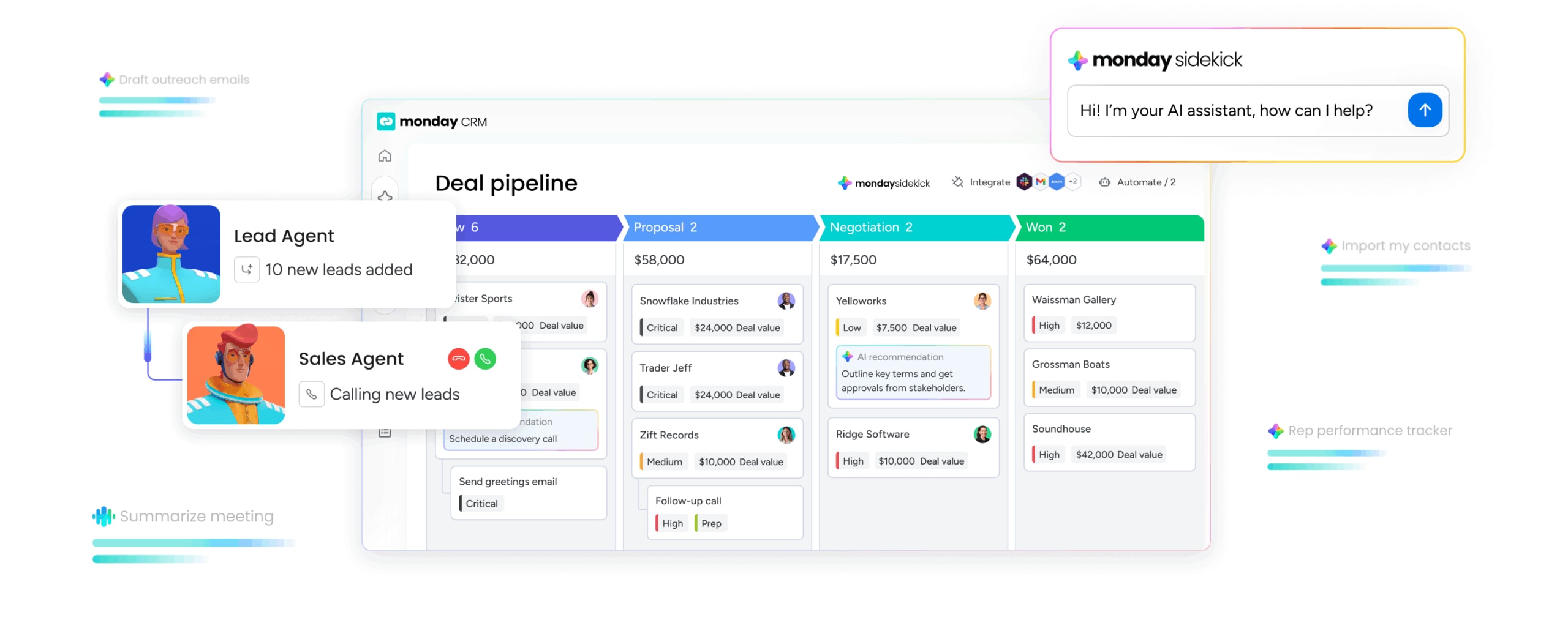
With monday CRM, automated follow-up is easy to set up, easy to use, and easy to scale — no IT support or complex integrations needed. It combines no-code automation, AI-powered personalization, and real-time visibility in one platform.
Build custom sequences without code
monday CRM’s no-code automation builder lets sales teams design multi-step follow-up sequences in minutes. The drag-and-drop interface makes it possible to create complex workflows without writing code or waiting for IT.
Teams can:
- Build multi-step sequences with email, task creation, lead routing, and notifications
- Set time delays between steps and add branching logic based on prospect actions
- Start with pre-built templates for common scenarios, then clone and customize for different personas, industries, or deal stages
Let AI draft, summarize, and suggest next steps
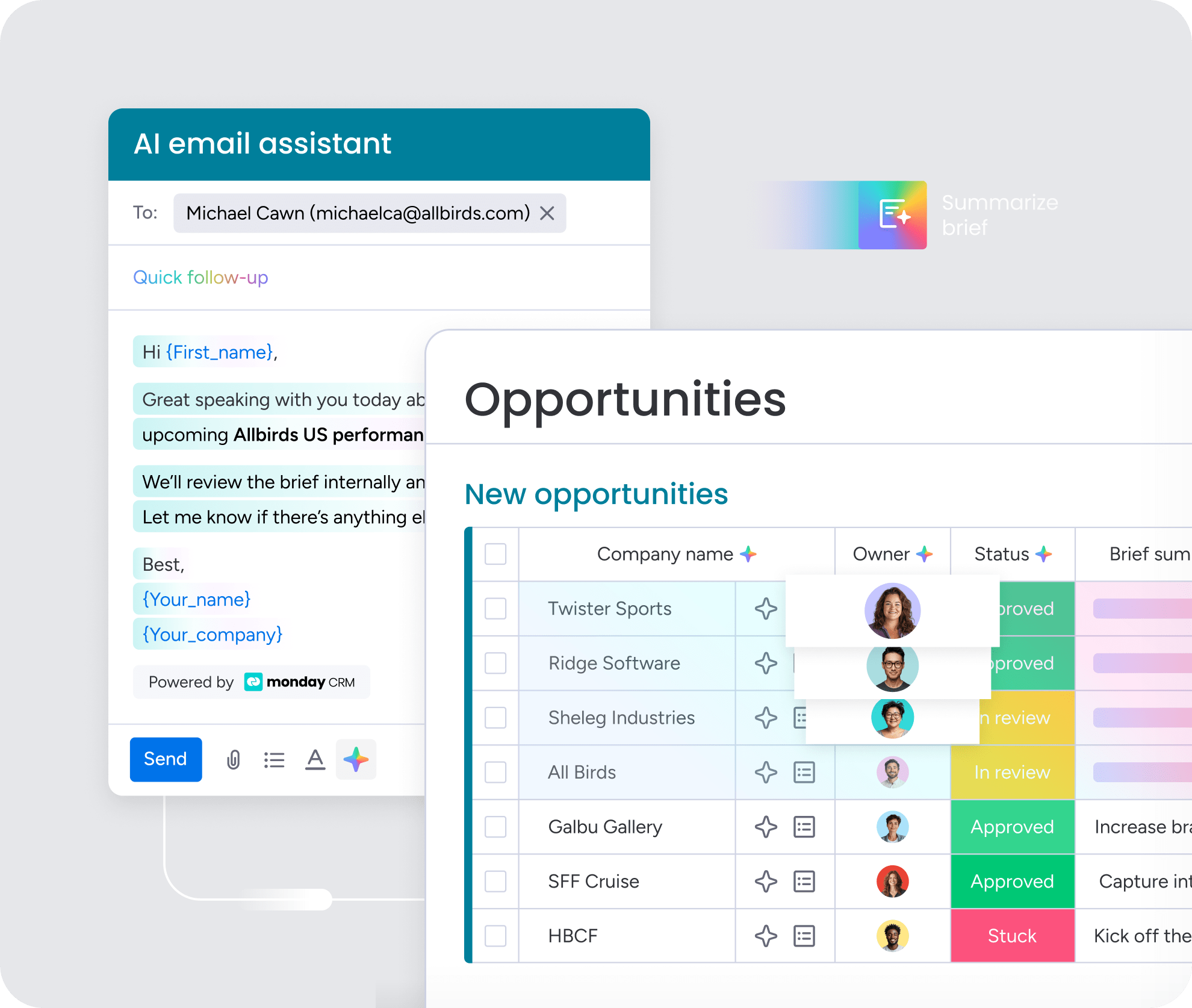
monday CRM’s AI capabilities reduce the manual work of follow-up. AI drafts personalized emails based on CRM data, pulling in the prospect’s name, company, industry, and recent activity to create contextually relevant messages. Reps don’t start from a blank page — they review and send.
AI also summarizes long email threads and call notes, so reps can quickly get up to speed before a follow-up. The AI timeline summary feature creates a short summary of all communication events, helping sales and support teams save valuable time.
Get real-time visibility across your pipeline
monday CRM’s dashboards provide real-time visibility into sequence performance, rep activity, and pipeline health. Leaders can see at a glance:
- Which sequences have the highest reply rates
- Which reps are hitting activity targets
- Which leads are stalled and where bottlenecks exist
Dashboards are customizable, so teams can track the metrics that matter most to their business. Real-time updates means leaders always have current data — no waiting for weekly reports or chasing reps for updates.
Connect sales, account management, and customer success in one place
monday CRM supports workflows across departments, not just within sales. When a deal closes, the platform can trigger onboarding sequences, notify the account manager, and ensure the customer receives the right follow-up at the right time.
This cross-functional capability means handoffs don’t get lost. The same automation engine that handles lead follow-up can manage customer onboarding, renewal sequences, and expansion outreach — all from one platform, without switching tools or losing context.

“With monday CRM, we’re finally able to adapt the platform to our needs — not the other way around. It gives us the flexibility to work smarter, cut costs, save time, and scale with confidence.”
Samuel Lobao | Contract Administrator & Special Projects, Strategix
“Now we have a lot less data, but it’s quality data. That change allows us to use AI confidently, without second-guessing the outputs.”
Elizabeth Gerbel | CEO
“Without monday CRM, we’d be chasing updates and fixing errors. Now we’re focused on growing the program — not just keeping up with it."
Quentin Williams | Head of Dropship, Freedom Furniture
“There’s probably about a 70% increase in efficiency in regards to the admin tasks that were removed and automated, which is a huge win for us.“
Kyle Dorman | Department Manager - Operations, Ray White
"monday CRM helps us make sure the right people have immediate visibility into the information they need so we're not wasting time."
Luca Pope | Global Client Solutions Manager at Black Mountain
“In a couple of weeks, all of the team members were using monday CRM fully. The automations and the many integrations, make monday CRM the best CRM in the market right now.”
Nuno Godinho | CIO at Velv
“monday.com provides developmental flexibility, operational efficiency, and data transparency — all in one place. We became a company that moved from chasing data to leading with it.”
Hyunghan Lee | Team Lead, Sandbox Network
"monday.com brought every part of our business into one connected space. The harmony between work management and CRM has become our operating system — giving us the clarity and confidence to scale.”
Jennifer Chinburg | Executive Vice President of Corporate Development & Brand, Chinburg Properties
“We just weren’t getting value from our old CRM. With monday.com, it's a thousand times better. Our sales teams are more informed, more consistent, and far more connected."
James Arnold | Chief Operating Officer, CenversaBuild a follow-up system that drives revenue
Automated sales follow-up isn’t about removing the human element from sales — it’s about making sure the human moments actually happen. When the repetitive work runs itself, reps can focus on the conversations that move deals forward.
The teams that win aren’t necessarily the ones with the most reps or the biggest budgets. They’re the ones who respond faster, follow up consistently, and use data to improve every week. Automation makes that possible at any scale.
Try monday CRMFAQs
How do I automate sales follow-up without losing personalization?
To automate sales follow-up without losing personalization, you should use CRM data to customize messages. Systems pull in prospect names, company details, recent activity, and engagement history to create emails that feel tailored. AI drafting capabilities generate contextually relevant messages that reps can review before sending. The key is triggering messages based on behavior, not just timing, and varying messaging by lead type, source, and engagement level.
What should an automated sales follow-up sequence include?
An automated sales follow-up sequence should include multiple touchpoints across channels. This includes initial response emails, value-add content, call tasks at strategic moments, meeting reminders, and post-call follow-up. Effective sequences vary cadence by lead source and include branching logic based on prospect behavior. The exact mix depends on your sales cycle and buyer preferences.
How do I trigger follow-ups based on lead activity or deal stage?
Follow-ups trigger based on "if this, then that" logic. Common triggers include form submissions, email responses, meeting bookings, deal stage changes, time passing with no activity, and engagement signals like pricing page visits. CRM automation builders let teams configure these triggers without coding, using simple dropdown menus and visual workflows.
How can I automatically assign the right rep to each follow-up?
Automatic rep assignment uses routing rules based on territory, industry, company size, lead source, or capacity. AI-powered assignment can evaluate context from CRM data to match leads with reps who have the right skills or availability. Round-robin distribution ensures even workload across teams. The system notifies reps instantly when they're assigned a new lead.
How do I track whether automated follow-ups are improving results?
Track lead response time, reply rates by sequence step, meeting booking rates, and pipeline velocity. Compare these metrics before and after implementing automation. Dashboards should show sequence performance, rep activity, and where leads are stalling so teams can optimize continuously. The key is connecting follow-up activity to actual business outcomes like meetings booked and deals closed.
Will automated follow-up replace sales reps?
Automated follow-up handles repetitive, time-consuming tasks — sending emails, logging activity, routing leads — so reps can focus on the work that actually requires a human. Discovery calls, deal negotiation, and relationship-building stay firmly in the hands of your team. Automation makes reps more effective, not redundant.
