



Your CRM database holds thousands of contacts, deal stages, and activity logs. But when leadership asks for a forecast, you’re still piecing together spreadsheets and hoping the numbers hold up. The data exists. The confidence doesn’t.
That gap between having information and knowing what happens next? That’s where analytical CRM software proves its worth. Unlike operational CRM, which tracks the daily work of logging calls and moving deals forward, analytical CRM digs into the patterns behind all that activity. It shows you which deals will close, which customers are worth pursuing, and where your pipeline quietly falls apart.
We’ll walk through 14 analytical CRM platforms revenue teams actually use, show you what separates useful analytics from expensive noise, and help you pick a platform that fits your team.
Try monday CRMWhat is analytical CRM software?
Your CRM database is packed with data. So why does forecasting still feel like guesswork? You have contact records and deal stages, but you lack the one thing that matters: knowing what will happen next.
With analytical CRM software, you can close that gap and turn scattered information into real answers that drive revenue. Where an operational CRM handles the daily grind (logging calls, sending emails, moving deals along), an analytical CRM digs into the patterns behind all that activity. It reveals what’s working, what’s failing, and where genuine opportunities hide. Here’s a closer look at the differences:
| Dimension | Operational CRM | Analytical CRM |
|---|---|---|
| Primary purpose | Run day-to-day sales tasks | Find patterns to make smarter decisions |
| Data usage | Records individual touchpoints and deal progress | Gathers data to find trends and predict outcomes |
| Key outputs | Contact records, deal stages, activity logs | Forecasts, trend analysis, customer segments |
| User focus | Reps and managers executing tasks | Leaders and strategists making decisions |
| Time orientation | Present-focused: what’s happening now | Future-focused: what will happen next |
Most CRM database software blends both capabilities, but analytical functionality separates reactive teams from proactive ones. Leaders who need accurate forecasts or want to understand declining win rates require analytics. It’s the engine for moving from simply doing the work to doing the right work.
How CRM analytics software transforms data into decisions
An analytical CRM doesn’t just hold information. It answers your toughest questions and turns raw data into actions that grow the business.
- Find your best customers: Analyze purchase history and engagement through customer data analysis to see which customer profiles are most valuable. Stop guessing and start focusing your team’s effort where it counts.
- Spot at-risk deals: Get ahead of problems by detecting warning signs like declining engagement or a sudden drop in communication. Your team can step in before a deal goes cold.
- Replicate your wins: Dig into historical data through customer data analysis to see which sales behaviors actually lead to closed-won deals. Revenue teams use monday CRM to spot these patterns and build strategy around facts, not gut feel.
Focus on these 3 areas and you’ll stop reacting to the market and start shaping your own pipeline.
14 best analytical CRM software platforms
Drowning in CRM options? Every platform promises breakthrough analytics, but most just add complexity and slow your team down. You need insights, not another engineering project.
This list focuses on what matters: real-time reporting, ease of use, and features that help you close deals faster. Price tags vary wildly, but the real value isn’t cost — it’s finding a platform with strong analytics and an interface your team enjoys using.
| Platform | Use case | Free plan? | Notable feature | Starting price |
|---|---|---|---|---|
| monday CRM | Revenue teams needing no-code dashboards and AI-powered forecasting | No (free trial only) | AI Timeline Summary + customizable dashboards | $12/user/month (billed annually) |
| Salesforce | Large enterprises needing advanced predictive analytics | Yes (limited CRM access) | CRM Analytics (Einstein) with ML forecasting | $25/user/month (Starter Suite) |
| HubSpot | Marketing-sales aligned teams focused on attribution | Yes | Multi-touch attribution reporting | $20/user/month (Starter) |
| Zoho | Organizations using Zoho ecosystem for unified analytics | Yes | Zia AI assistant for natural-language reporting | $25/month (2 users) |
| Microsoft Dynamics 365 | Enterprises embedded in Microsoft ecosystem | No | Native Power BI integration | $65/user/month |
| SAP Customer Experience | Global enterprises with complex governance needs | No | Enterprise-scale ML analytics | Custom pricing (quote-based) |
| Pipedrive | Mid-market sales teams needing practical visual reporting | No (free trial only) | Visual pipeline dashboards | $14/user/month (billed annually) |
| SugarCRM | Organizations needing deep customization | No | Time-aware predictive analytics | $59/user/month (15-user minimum) |
| Freshsales | Growing teams wanting AI insights without enterprise complexity | Yes | Freddy AI insights | $9/user/month (billed annually) |
| Insightly | Professional services firms connecting sales + projects | No (free trial only) | Project-based CRM analytics | $29/user/month (billed annually) |
| Oracle CX Cloud | Large enterprises needing governed AI analytics | No | 700+ prebuilt KPIs + AI Analytics Assistant | Custom pricing (quote-based) |
| Nimble | Relationship-driven teams focused on social selling | No | Social CRM analytics | $24.90/user/month (billed annually) |
| Close CRM | Inside sales teams reliant on calling and email | No (free trial only) | Built-in call analytics | $9/user/month (billed annually) |
| Attio | Modern startup revenue teams wanting visual data exploration | Yes | Real-time funnel analytics + relationship mapping | $29/user/month (billed annually) |
1. monday CRM
monday CRM turns raw customer data into decisions your team can act on, without turning your CRM rollout into an IT project. Revenue teams get a no-code setup built on the monday.com Work OS, so they can shape boards, views, and dashboards around their sales motion. Need analytical CRM software that doesn’t require a data team on standby? monday CRM keeps data entry, communication history, and reporting connected, ensuring your numbers match what’s actually happening in the pipeline.

Use case: Revenue teams that need predictable pipeline insights and accurate forecasts, but don’t have the technical resources for a complex CRM setup
Key features
- Emails & Activities + AI Timeline Summary: Summarize the full communication history (emails, calls, meetings, and notes) into a short overview.
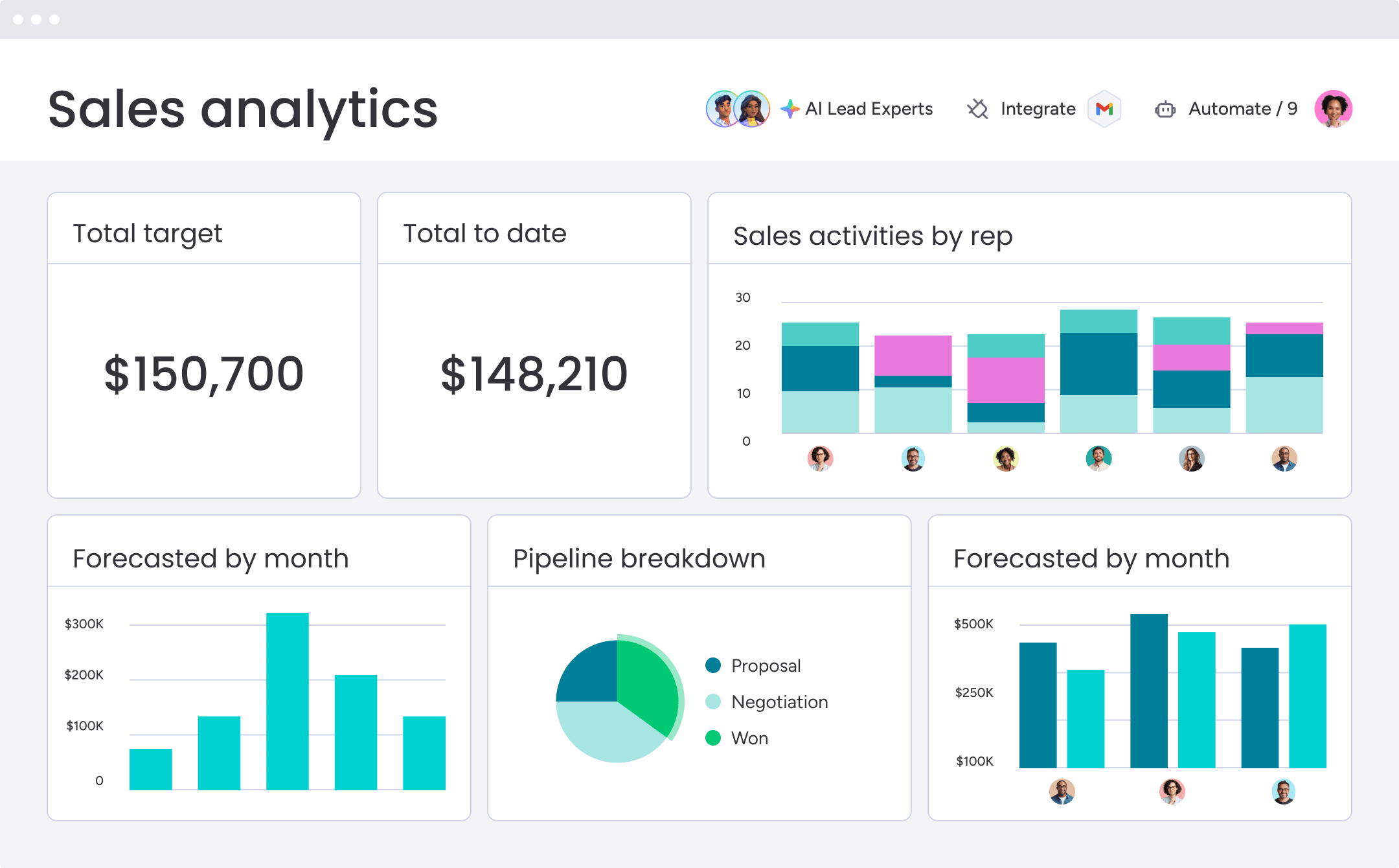
- Code-free, customizable dashboards: Track pipeline status, sales forecasting, team performance, and activity status in real time with sales-specific widgets.
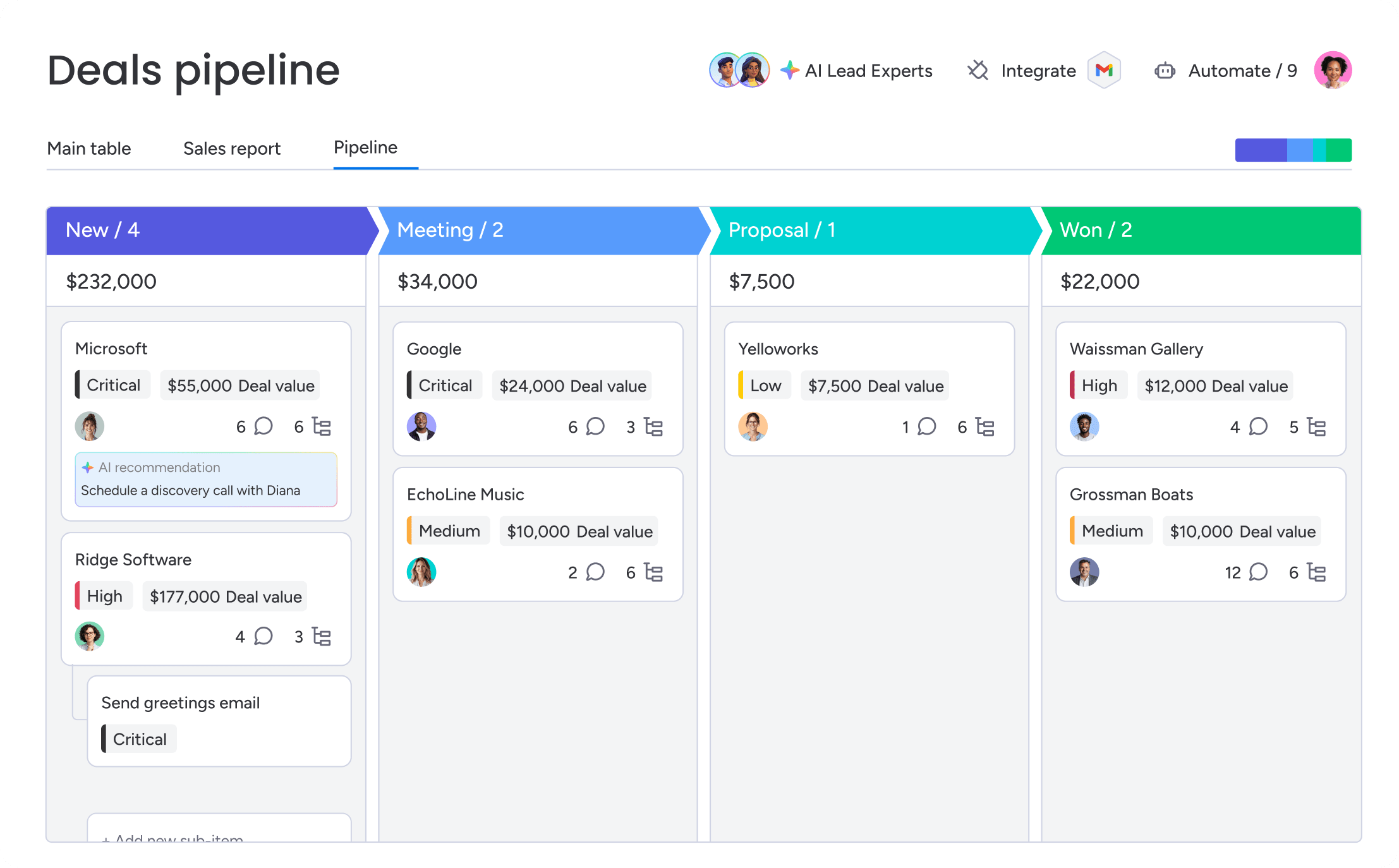
- Visual deal management: Customize your pipeline with drag-and-drop deal stages, and see exactly where every deal stands.
Pricing
- Basic: $12/seat/month (billed annually)
- Standard: $17/seat/month (billed annually)
- Pro: $28/seat/month (billed annually)
- Enterprise: Custom pricing (contact sales)
- Free trial: A 14-day free trial is available. There is no permanent free plan.
- Annual discount: Save up to 33% with yearly billing.
- Minimum seats: Plans start at 3 users.
Why it stands out
- Fast to adapt to change: Adjust processes in seconds and create tailored automations with no code and no IT dependency.
- Built for real adoption: The visual interface supports the way sales teams already work, which makes consistent CRM usage far more realistic.
- AI where it counts: AI supports everyday workflows like summarizing the Emails & Activities timeline, composing emails, and autofilling columns, so your reporting stays current without extra admin work.
2. Salesforce
Salesforce brings its analytical muscle to RevOps with CRM Analytics (formerly Einstein Analytics). It turns massive datasets into predictive insights for complex revenue teams, with AI-driven forecasting and deep reporting. A powerhouse for large organizations, if they have the technical team to run it.

Use case: Large enterprise teams juggling complex deals across regions and products that need sophisticated predictive analytics and have the tech expertise to manage a powerful platform
Key features
- ML-powered predictions: Deal outcome forecasts, recommended actions, and revenue projections driven by machine learning.
- Advanced reporting: Complex queries across multiple objects and relationships without technical barriers.
- Integrated BI platform: Built directly into CRM workflows with native Tableau and Data 360 connections.
Pricing
- CRM access: Starts at $0/user/month (for up to 2 users) or $25/user/month for the Starter Suite.
- CRM Analytics: Public tiers include Growth ($140/user/month), Plus ($165/user/month), and Revenue Intelligence ($220/user/month).
- Implementation: Expect significant costs for services, customization, and ongoing admin overhead.
- The real total: Your final bill will likely be much higher than the sticker price once you add all the necessary components.
Considerations
- Expect a multi-month setup and serious training investment to unlock its full analytics power.
- The pricing is a maze of add-ons and licenses that can explode your total cost. Not shocking.
3. HubSpot
HubSpot connects analytics across marketing, sales, and service teams through its Smart CRM. It specializes in attribution reporting that ties marketing campaigns directly to revenue. Built for mid-market teams that need insights across departments.

Use case: Teams focused on marketing-sales alignment, where understanding campaign impact on revenue shapes budget and resource decisions
Key features
- Multi-touch attribution reporting: Tracks customer journey touchpoints from first website visit through closed deal, showing which channels and campaigns drive the highest-value opportunities.
- Customer journey analytics: Visual mapping of complete prospect paths with up to 15 stages and 5-year lookback, revealing how different touchpoints contribute to conversion decisions.
- Unified cross-hub dashboards: Integrated analytics across marketing, sales, service, and commerce with consistent UX and shared CRM data layer.
Pricing
- Free: Core CRM and basic reporting dashboard
- Starter: $20/user/month with unlimited view-only seats for paid portals
- Professional: $1,450/month (5 seats included) with advanced attribution and journey analytics
- Enterprise: $4,700/month (7 seats included) with multi-touch revenue attribution and Customer Journey Analytics
- Required onboarding fees: $3,000 for Professional, $7,000 for Enterprise
Considerations
- Advanced attribution and journey features require Enterprise tier, creating potential upgrade pressure as analytical needs grow.
- Marketing Hub uses contact-based pricing that scales with database size, increasing total cost of ownership for growing organizations.
4. Zoho
Zoho delivers comprehensive business intelligence through deep integration across its 50+ app ecosystem, connecting customer data with financial, project, and operational metrics. Targeting organizations seeking unified analytics without maintaining separate tools for each department, Zoho’s Zia AI assistant transforms complex data queries into plain-language insights and automated reporting.

Use case: Organizations already running on the Zoho ecosystem who need unified analytics connecting sales, projects, finance, and operations without juggling multiple disconnected platforms
Key features
- Cross-platform integration: Native connections across the entire Zoho suite plus 500+ third-party connectors for comprehensive business intelligence.
- Zia AI assistant: Natural language queries generate reports automatically and flag unusual patterns that warrant attention.
- Flexible deployment options: Cloud, on-premise, and embedded analytics with global data centers for compliance requirements.
Pricing
- Basic: $25/month for 2 users and 0.5M rows
- Standard: Scales with additional users and data capacity
- Premium/Enterprise: Live Connect and advanced features (pricing varies by requirements)
- Always Free Plan: Available for small reporting needs
- Annual billing: 20% savings on most plans
Considerations
- Live Connect has limitations including no custom SQL query tables and performance dependency on source systems.
- Advanced modeling capabilities may require a learning curve compared to specialist BI platforms.
5. Microsoft Dynamics 365
Microsoft Dynamics 365 brings enterprise-grade analytical power through native Power BI integration, embedding Microsoft’s business intelligence platform directly into CRM workflows. Targeting large organizations already invested in the Microsoft ecosystem, it delivers AI-driven insights and advanced reporting that scales across complex enterprise structures. Deep integration across Microsoft’s technology stack transforms how enterprise teams visualize and act on customer data.

Use case: Enterprise organizations deeply embedded in the Microsoft ecosystem seeking analytical capabilities that integrate seamlessly with existing Power BI investments and Azure data infrastructure
Key features
- Native Power BI integration: Embed sophisticated dashboards and reports directly within CRM workflows without switching platforms.
- AI-driven predictive insights: Apply machine learning to customer data for deal outcome predictions, behavior analysis, and revenue forecasting.
- Enterprise-scale analytics: Handle massive data volumes with complex organizational hierarchies and detailed security models required by large corporations.
Pricing
- Dynamics 365 Sales Professional: $65/user/month
- Dynamics 365 Sales Enterprise: $105/user/month
- Dynamics 365 Sales Premium: $150/user/month
- Power BI Pro: $14/user/month (additional licensing required)
- Power BI Premium Per User: $24/user/month (additional licensing required)
- Additional costs include implementation services, custom development, and ongoing administrative overhead
Considerations
- Complex licensing structure with Power BI requiring separate costs that can significantly increase total investment.
- Requires substantial technical resources and administrative overhead to manage sophisticated enterprise implementations.
6. SAP Customer Experience
SAP Customer Experience delivers enterprise-grade analytical capabilities built for global organizations managing complex customer relationships across multiple regions and business models. Combining machine learning, advanced analytics, and enterprise reporting, it supports sophisticated analytical requirements at massive scale. Its analytical depth reflects SAP’s focus on serving the world’s largest, most complex organizations with dedicated technical teams.

Use case: Global enterprises with complex analytical requirements spanning multiple countries, currencies, languages, and business units that need sophisticated data governance and compliance features
Key features
- Machine learning capabilities: Analyze customer behavior patterns, predict outcomes, and recommend actions based on historical data across entire customer bases.
- Advanced analytics: Handle complex queries across vast data volumes with detailed segmentation, trend analysis, and predictive modeling.
- Enterprise reporting: Provide governance, security, and compliance features required by large multinational corporations.
Pricing
- Custom enterprise pricing: Quote-based models determined by organizational size, complexity, and specific requirements
- Implementation costs: Substantial services for custom development and platform setup
- Ongoing support: Separate contracts for maintenance and optimization
- Total cost of ownership: Includes implementation services, custom development, and ongoing support contracts
Considerations
- Implementations typically require significant resources, lengthy timelines, and ongoing technical expertise to maintain and optimize.
- The platform’s complexity may be excessive for organizations without dedicated technical teams for implementation and ongoing management.
7. Pipedrive
Pipedrive delivers visual sales analytics that teams actually use, turning pipeline data into actionable insights without overwhelming complexity. Targeting small to mid-market sales teams that need straightforward reporting that drives daily decisions rather than comprehensive business intelligence, it was built by salespeople for salespeople. Accessibility takes priority over analytical depth.

Use case: Mid-market sales teams seeking practical analytics that provide actionable insights without requiring data science expertise or extensive training
Key features
- Visual pipeline reporting: Drag-and-drop dashboards showing deal progress, win rates, and activity metrics.
- AI-powered report generation: Natural language prompts across all plans create custom reports instantly.
- Shareable dashboards: Public links allow external stakeholders to view live performance data without additional licenses.
Pricing
- Lite: $14/month (billed annually)
- Growth: $39/month (billed annually)
- Premium: $59/month (billed annually)
- Ultimate: $79/month (billed annually)
- Annual billing saves up to 42% compared to monthly plans
- 14-day free trial available with no perpetual free plan
- Add-ons like LeadBooster ($32.50/month), Projects ($6.67/month), and Campaigns ($13.33/month) available separately
Considerations
- Multiple dashboards and advanced sharing features are restricted to Premium and higher plans, limiting collaboration for smaller teams.
- Per-user report limits on lower tiers (15 reports on Lite, 50 on Growth) can constrain reporting libraries for growing teams.
8. SugarCRM
SugarCRM delivers advanced analytics through highly customizable dashboards that adapt to unique organizational requirements. Targeting mid-market to enterprise teams with complex business models who need analytical depth beyond standard CRM reporting, organizations with technical resources can leverage SugarCRM’s flexibility to build custom analytical solutions matching their specific workflows.

Use case: Organizations with unique analytical requirements that demand extensive customization beyond standard CRM reporting capabilities
Key features
- Time-aware analytics: Predictive forecasting uses statistical models on historical data to surface trends and identify patterns for strategic decision-making.
- Customizable dashboards: Build analytical views across Home pages, module views, and focus drawers with advanced filtering and real-time data updates.
- Advanced reporting: Support for complex queries, custom calculations, and detailed data modeling that handles unique business logic requirements.
Pricing
- Sales Standard: $59/user/month (15-user minimum, billed annually)
- Sales Advanced: $85/user/month (15-user minimum, billed annually)
- Sales Premier: $135/user/month (15-user minimum, billed annually)
- Service: $80/user/month (billed annually)
- On-Premises Enterprise: $85/user/month (billed annually)
- On-Premises Enterprise+: $120/user/month (billed annually)
Considerations
- Dashboard filters only apply to Home dashboards, not consoles, and require specific report configurations to function properly.
- Advanced features like Discover analytics require SugarCloud hosting and specific regional availability, adding governance complexity before teams can access enhanced dashboards.
9. Freshsales
Freshsales delivers AI-powered analytics through Freddy AI insights and visual reporting designed for growing revenue teams. Focusing on accessibility, it provides actionable insights without requiring data science expertise or enterprise-level complexity.

Use case: Growing sales teams seeking AI-powered analytical capabilities without the complexity or cost of enterprise platforms
Key features
- Freddy AI insights: Automatically surface patterns in customer data, predict deal outcomes, and recommend next actions based on historical success patterns.
- Visual reports and dashboards: Present key metrics through intuitive charts that communicate performance at a glance, with curated Sales Essentials Dashboard available out-of-the-box.
- Sales analytics tracking: Monitor individual and team performance across standard metrics like pipeline value, conversion rates, and activity levels with role-based permissions and audit logs.
Pricing
- Free: Up to 3 users (limited reporting capabilities)
- Growth: $9/user/month (billed annually) — includes curated reports
- Pro: $39/user/month — adds custom reports and advanced workflows
- Enterprise: $59/user/month — includes governance features like field permissions and audit logs
- 21-day free trial available across all paid plans
- Freddy AI Agent sessions: $49 per 100 sessions (500 free sessions one-time for paid accounts)
Considerations
- Dashboard limitations with only 3 analytics tabs available at once, which may restrict comprehensive data visualization for larger teams.
- Advanced reporting and scheduling features require Pro or Enterprise tiers, potentially increasing costs for teams needing comprehensive analytics capabilities.
10. Insightly
Insightly combines CRM analytics with project management insights, creating a unified view of how customer relationships connect to project delivery. Targeting professional services firms and agencies that need integrated visibility across sales and delivery operations, this dual focus proves particularly valuable for organizations where project success directly impacts customer satisfaction and retention.

Use case: Professional services organizations, agencies, and businesses where project delivery and customer relationships are deeply interconnected
Key features
- Project-based analytics: Track delivery metrics alongside sales performance, revealing how project outcomes influence customer satisfaction and renewal rates.
- Pipeline reporting: Standard CRM analytics covering deal progression, conversion rates, and forecast accuracy.
- Business intelligence features: Custom reporting that combines customer relationship data with project delivery metrics.
Pricing
- Plus: $29/user/month (annual billing) — includes advanced reports and pre-built business dashboards
- Professional: $49/user/month (annual billing) — adds workflow automation, AI Copilot, and custom dashboards/cards
- Enterprise: $99/user/month (annual billing) — includes unlimited custom dashboard cards, sandboxes, and advanced audit logging
- All-in-One bundles available starting at $349/month for Plus tier
- Free 14-day trial available
Considerations
- Custom dashboards and advanced analytics features require Professional or Enterprise tiers, limiting flexibility for smaller budgets.
- Mobile dashboards are read-only, preventing on-the-go editing and real-time updates.
11. Oracle CX Cloud
Oracle CX Cloud delivers enterprise-scale analytical capabilities through advanced AI and comprehensive reporting designed for multinational corporations. Specializing in unifying front-office and back-office data across global operations, it’s ideal for complex organizations requiring deep analytical governance. Oracle’s Fusion CX Analytics provides over 700 prebuilt KPIs and Oracle-managed data pipelines that sync with cloud releases.

Use case: Large enterprises with complex analytical requirements spanning multiple countries, business units, and customer segments
Key features
- Prebuilt dashboards with 700+ CX KPIs: Covering sales, marketing, service, and subscription metrics.
- AI-powered Analytics Assistant: Natural-language queries generate conversational insights.
- Oracle-managed data pipelines: Frequent refresh capabilities and governed semantic models.
Pricing
- Oracle Analytics Cloud Professional: Custom enterprise pricing (contact for quote)
- Oracle Analytics Cloud Enterprise: Custom enterprise pricing (contact for quote)
- Universal Credits: Committed-use discounts available for cloud services
- Additional licensing required for third-party data consumption
- Implementation services and ongoing support contracts add to total cost
Considerations
- Requires substantial technical expertise and lengthy implementation timelines to achieve full analytical capability utilization.
- Data refresh operates on scheduled pipelines rather than real-time streaming, with occasional data issues requiring warehouse resets.
12. Nimble
Nimble transforms relationship management by weaving social intelligence into every customer interaction. Specializing in social CRM analytics for small businesses and teams using Microsoft 365 or Google Workspace, it’s built for relationship-driven sales approaches.

Use case: Sales teams emphasizing relationship-building and social selling
Key features
- Social CRM analytics. Track engagement across social platforms, revealing which contacts actively engage with content and how relationships evolve over time.
- Contact intelligence. Aggregates information from multiple sources, building comprehensive profiles that inform relationship strategies.
- Dual dashboard experience. Today Page for daily operational insights and dedicated reporting dashboards for deeper pipeline analysis.
Pricing
- Business plan: $24.90 per user/month (billed annually) or $29.90 per user/month (billed monthly)
- Includes 25,000 contact records, 2 GB storage per seat, Microsoft 365 & Google Workspace integrations
- Email Marketing Engine: $15/company/month base fee
- Data Enrichment credits: 100 credits for $10/month
- Web Forms: $12/month per team
- Save up to 17% with annual billing
Considerations
- Analytics customization is limited compared to enterprise-grade platforms, with predefined report types and basic dashboard-level filters.
- Email tracking defaults to link-only tracking to preserve deliverability, which can limit certain engagement insights.
13. Close CRM
Close CRM delivers communication-focused analytics that turn every call, email, and text into actionable sales intelligence. Specializing in real-time performance tracking for inside sales teams, it’s built for organizations where phone and email outreach drive revenue. A bootstrapped team since 2013, Close combines native calling capabilities with instant reporting to eliminate data silos.

Use case: Inside sales teams that rely heavily on phone and email communication
Key features
- Call analytics: Track conversation metrics, talk time, and outcome correlations to reveal which approaches generate results.
- Email engagement insights: Show open rates, response patterns, and optimal timing across different message types.
- Sales performance reporting: Connects communication activities to pipeline progression and conversion rates.
Pricing
- Solo: $9/month (annual) or $19/month — 1 user, up to 10,000 leads
- Essentials: $35/month (annual) or $49/month — includes basic reporting features
- Growth: $99/month (annual) or $109/month — adds Power Dialer and AI Email Assistant
- Scale: $139/month (annual) or $149/month — includes Predictive Dialer and unlimited call recording
- 14-day free trial available
- Telephony and SMS usage billed separately based on minutes and messages
Considerations
- Custom Activities reporting only supports “Created” metrics, limiting deeper KPI analysis within dashboards.
- Lead visibility restrictions can make team-wide reporting appear incomplete if roles aren’t configured properly.
14. Attio
Attio delivers AI-native CRM analytics with real-time data processing and visual relationship mapping that reveals hidden customer connections. It targets ambitious go-to-market teams at startups and scale-ups who need sub-50ms query performance across millions of records.
Built on a proprietary “Particle” data layer, Attio makes complex analytics accessible through intuitive visual exploration rather than traditional report structures.

Use case: Modern revenue teams seeking contemporary interfaces and visual data exploration over traditional CRM reporting structures
Key features
- Real-time report generation: Explicit funnel methodology handles skipped stages and backwards movement for accurate conversion calculations.
- Historical vs. current segmentation: Enables true period-end cohorting within the CRM interface for precise time-series analysis.
- Relationship mapping: Visualizes connections between contacts, companies, and deals to reveal network effects and influence patterns.
Pricing
- Free: $0/month (up to 3 seats, 50,000 records, 3 reports)
- Plus: $29/month per user annually ($36 monthly, up to 250,000 records, 15 reports)
- Pro: $69/month per user annually ($86 monthly, up to 1,000,000 records, 100 reports)
- Enterprise: Custom pricing (unlimited objects, custom record caps, 100+ reports)
- Annual billing saves 20% compared to monthly plans
- Automation credit add-ons available from $70-$240 annually
Considerations
- Dashboard access management and segmentation features are limited on the Free plan.
- External dashboard sharing isn’t available — all sharing is workspace-internal only.
Key benefits that drive real CRM analytics adoption
Analytics that collect dust versus analytics that drive deals — what separates them? Your team actually uses them. Insights that solve real problems don’t require adoption campaigns. They become indispensable.
Benefits that stick make daily work easier and big decisions faster. Getting answers matters. Creating headaches doesn’t.
- Forecast revenue with confidence: Ditch gut-feeling forecasts and embrace real data. See what actually closes versus what’s wishful thinking. Report upwards with conviction and allocate resources where they’ll generate returns.
- Find growth opportunities in your data: Your customer data contains valuable clues. Identify your best customers and understand their needs, then focus efforts on deals most likely to close instead of spreading thin across long shots.
- Get sales and marketing on the same page: Shared data ends the blame game. Marketing sees which campaigns generate real revenue. Sales knows what content actually helps close deals. Both teams finally row in the same direction.
- Make faster decisions with real-time insights: Monthly reports are like driving using only the rearview mirror. Real-time insights let you spot pipeline problems the moment they emerge, not weeks later. Your team can seize opportunities and address issues before they derail the quarter.
Teams that see data helping them win stop avoiding the CRM and start depending on it.
Must-have features for analytical CRM success

Analytics are useless if your team ignores them. The best data in the world becomes expensive shelf-ware when it’s hard to access, difficult to interpret, and nearly impossible to act on. Which features actually move the needle?
Forecasting requires trust. If your team views predictions as numbers pulled from thin air, they’ll dismiss them entirely. Real trust emerges from understanding the “why” behind every forecast, not just the what.
Effective predictive tools reveal their methodology, letting your team examine the factors driving each number. When the system flags a deal as a sure thing, reps can evaluate the underlying signals and push back when something seems off. The system learns from reality, providing an honest assessment of forecast reliability — not guesswork masquerading as certainty.
Custom dashboards, no IT ticket required
Getting answers shouldn’t require a developer. A no-code dashboard builder puts report creation power where it belongs: with the people asking the questions.
Simple drag-and-drop setup lets sales managers track team performance while executives get their high-level view. Everyone accesses the right data without the noise. Build a dashboard in minutes. Change it just as fast when priorities shift.
A CRM that plays nice with your other tools
Your sales data doesn’t exist in isolation. Real insight comes from seeing the complete picture: pulling data from email, calendar, and marketing platforms automatically.
This eliminates manual data entry that wastes time and introduces errors. Native connections should handle common tools out of the box, with a solid API ready for custom systems. Your CRM needs to fit your stack, not force your stack to fit it.
Analytics that work where you do
Sales doesn’t happen at a desk, so your data shouldn’t be trapped there either. Whether your team is between meetings or working remotely, their analytics should travel with them.
We’re not talking about a watered-down mobile app. Your team needs the same powerful dashboards and insights on their phone as they get on their desktop. Anything less creates friction that slows them down.
The right features don’t just add capabilities — they remove the friction that prevents teams from using data in the first place.
AI features that actually earn their keep

AI in CRM gets hyped constantly, but most features are just noise. The AI that matters doesn’t impress with complexity — it saves time and surfaces insights your team would miss.
Look for AI that handles the grunt work: summarizing long email threads, flagging deals that show warning signs, and auto-filling data fields so reps stay focused on selling. Predictive scoring should tell you why a deal is likely to close, not just spit out a number. And conversational AI assistants? They’re only useful if they answer questions in plain language without requiring you to learn query syntax.
Try monday CRMChoosing analytical CRM software that fits your business
Picking a new CRM carries significant weight. Get it right, and you gain real answers that fuel growth. Get it wrong, and you’ve purchased an expensive digital paperweight. The secret isn’t a longer feature list — it’s finding a platform that matches how your team already operates.
Before reviewing demos, get honest about 3 things: your data, your team, and your existing tools. This isn’t about creating more work. It’s about ensuring your next move is the right one.
Step 1: Assess your current data foundation
Here’s a hard truth: no CRM can transform messy data into strategic insights. Your new platform’s success starts with the quality of information you feed it. Is your customer data clean and complete, or are you working from a dozen scattered spreadsheets?
Take a quick inventory of where your customer information lives. It’s probably distributed across sales, marketing, and support tools. Getting a complete picture of your business requires a platform that unifies everything without a massive IT project.
Step 2: Match platform capabilities to your team
A CRM your team won’t use is worse than no CRM at all. The fanciest features on earth are useless if they’re too complicated or slow people down. The real question: will your team actually want to use it?
If your reps live in their inbox and despise manual data entry, a complex platform is dead on arrival. Look for a CRM that feels intuitive from day one and delivers immediate value. Your team should spend time selling, not fighting with software.
Step 3: Map your integration requirements first
This is where CRM dreams often collapse. Your CRM doesn’t operate in a vacuum — it must connect to the other tools your business runs on. Discovering your new platform doesn’t integrate with your marketing automation or finance software after signing the contract is a costly mistake.
Create a simple list of must-have integrations your team needs to do their job. Prioritize platforms that connect to these systems easily. The goal is a seamless workflow, not a collection of disconnected tools.
Choosing based on fit rather than features builds a system that scales with your success instead of holding it back.
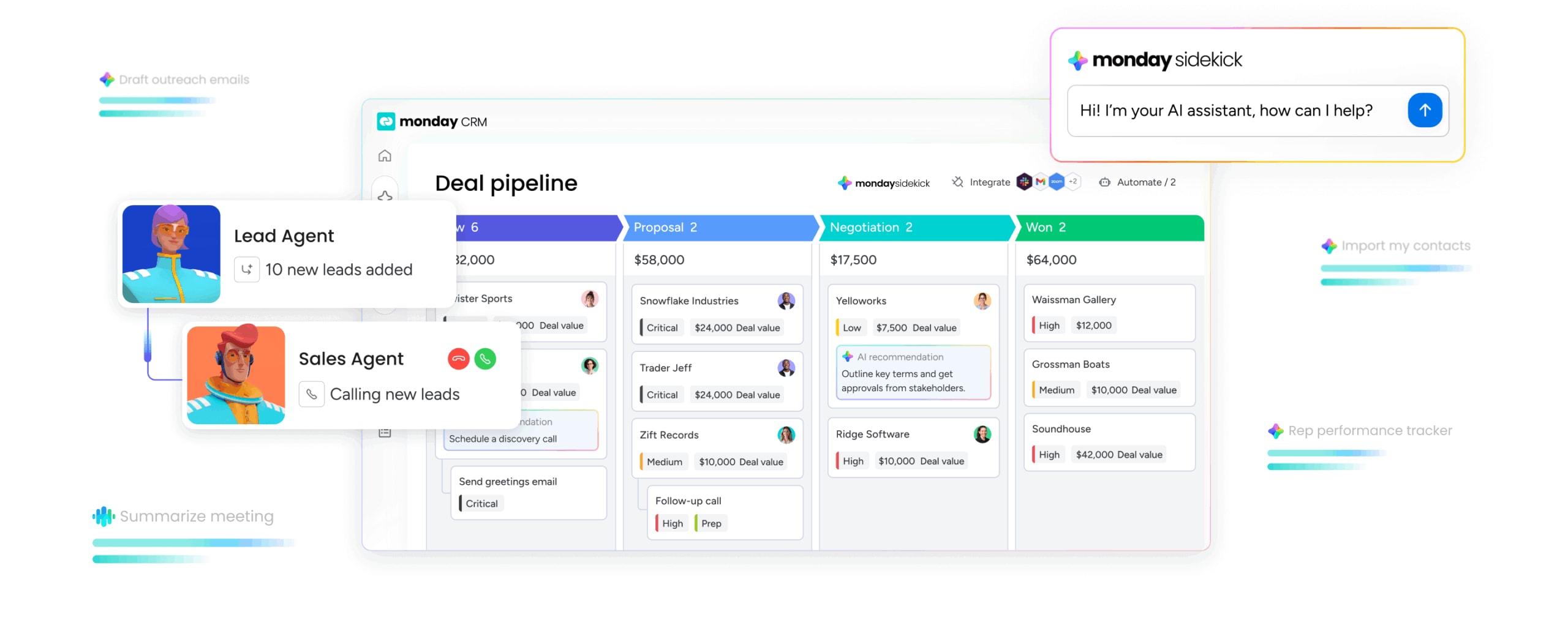
Analytics that nobody uses are just expensive decorations. Revenue teams find success using monday CRM to stop wrestling with data and start leveraging it. Instead of rigid reports and complex setups, you get flexible tools that work the way you do.
- Build what you need, when you need it: Drag-and-drop dashboards mean you can answer any business question without waiting for a developer. Your reports adapt as fast as your priorities change.
- Get smarter insights, instantly: AI does the hard work: flags at-risk deals, summarizes customer histories, and spots patterns you’d miss on your own.
- See the full revenue story: Connect marketing, sales, and post-sales data in one place. When everyone sees the same numbers, your teams can finally work toward the same goals.
This is what happens when a CRM is built for the people using it. You get answers you can trust and insights that actually push your business forward.

Turn your data into revenue today
Stop running your team on gut feelings. The path to predictable revenue isn’t buried under a mountain of features; it’s about answering the few questions that keep you up at night. Questions like “which deals will actually close this quarter?” or “where do our opportunities consistently stall?”
Forget platforms that promise everything but deliver in 6 months. The right CRM gives you answers in days, not quarters. Quick wins build momentum; massive, complicated launches just kill it. Teams discover that monday CRM enables them to get those critical answers immediately. Zero complex setup, zero waiting on IT. Just the insights you need to make the right call, right now.
Try monday CRMFAQs
What's the difference between analytical and operational CRM?
Operational CRM tracks daily sales activities, while analytical CRM finds patterns in that data to guide your strategy.
How quickly can teams implement analytical CRM software?
Teams can implement analytical CRM software in days with a no-code platform, but complex enterprise solutions can take months depending on your data quality and integrations.
Can small businesses use analytical CRM effectively?
Yes, small businesses can use analytical CRM effectively with platforms that offer AI-powered insights and no-code dashboards without needing a dedicated data team.
Which data sources connect with analytical CRM platforms?
Analytical CRM platforms connect with data sources like marketing automation, email, customer support, and financial software through native integrations and APIs.
Do you need a data team to use analytical CRM software?
No, modern analytical CRM software doesn't require a data team — AI and visual dashboards provide insights without requiring technical analysis.
