



The renewal email lands, and the customer says yes without a second thought. That quiet moment of loyalty rarely happens by accident. It’s the payoff of steady account management, the everyday work of staying close to customers long after the first deal closes. Account managers sit between your company and its customers, anticipating needs, solving problems, and introducing solutions that help clients grow. Done well, this work turns satisfied buyers into long-term partners who stay, spend more, and refer others.
This guide breaks down what account management involves, the main types, and the practices that protect retention and revenue. From there, we’ll look at how the right solution like monday CRM keeps every account moving in the right direction.
Key takeaways
- Account management is the structured practice of nurturing existing customers after the sale to protect retention and grow revenue.
- Sales wins new customers, while account management keeps and expands the ones you already have.
- The main types include sales, key, strategic, and territory or industry account management, each suited to different account sizes and goals.
- AI now flags at-risk accounts, summarizes activity, and automates follow-ups, shifting account teams from reactive to proactive.
- A flexible CRM like monday CRM centralizes account data, AI insights, and the full customer lifecycle in one platform.
What is account management?
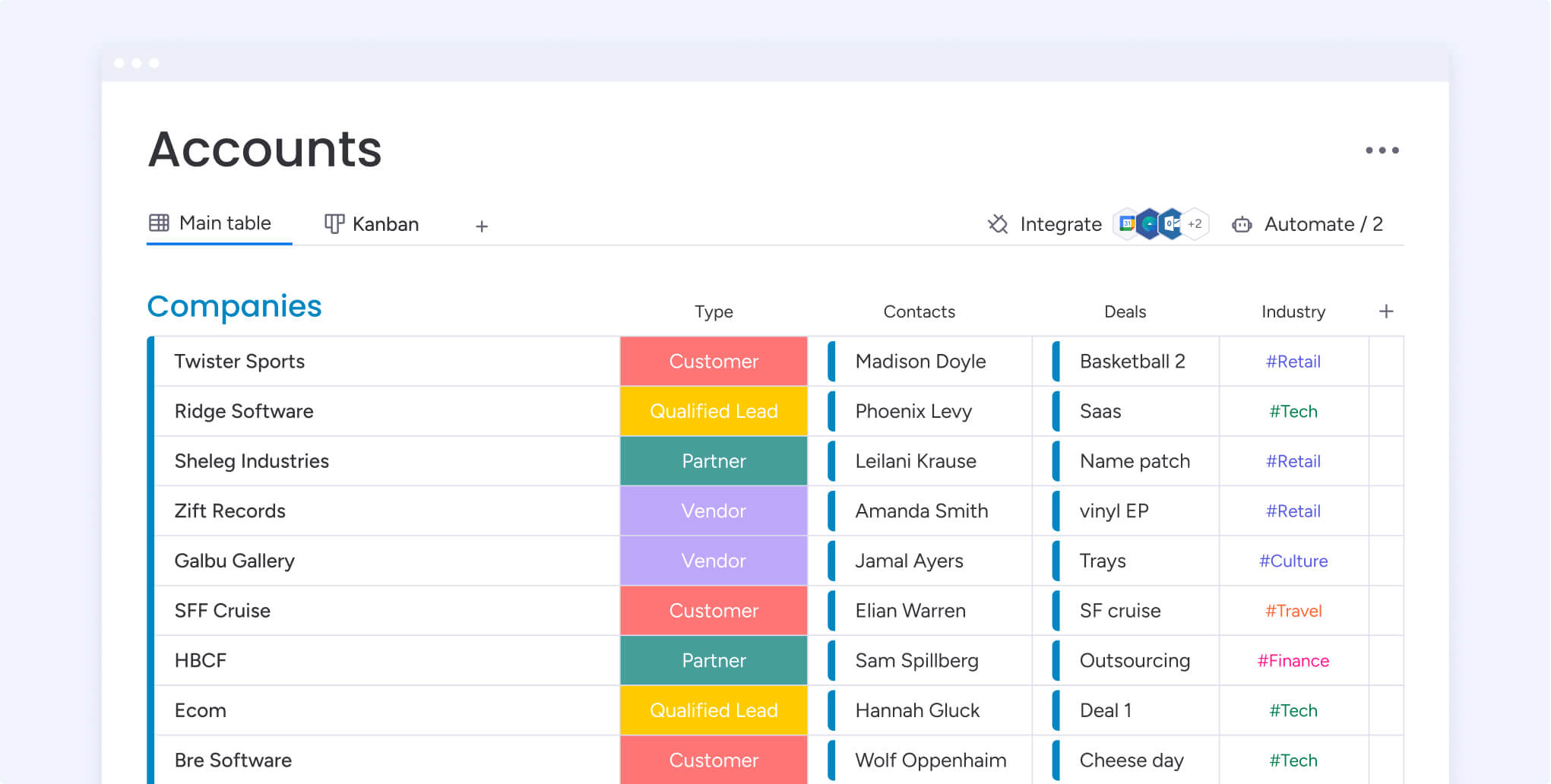
Account management is the practice of nurturing customer relationships after the sale to keep clients satisfied, loyal, and growing. It matters because retaining and expanding existing customers protects the revenue you already have and deepens the relationships that fuel long-term growth. In plain terms, the account management meaning comes down to a structured approach to managing customer relationships with your business to maximize value. It involves nurturing the relationship between clients and your business by learning more about customers’ needs and creating solutions and services that match.
At its core, successful account management is built on trust and mutual understanding, where businesses demonstrate a genuine commitment to their customers’ success. This generally encompasses providing customers with service, support, and improvement or expansion opportunities that increase their consumption of a product or service and maximize retention.
To keep a customer’s trust, you have to innovate and provide value continually after an initial purchase or conversion. Account management consists of guiding product usage, offering ongoing training, and providing personalized customer service.
The difference between account management and sales
Sales and account management are both vital to business growth, but they serve different purposes in the customer journey.
- Sales focuses on acquiring new customers by identifying leads, pitching solutions, and closing deals.
- Account management begins after the sale and is focused on strengthening existing relationships, drive retention, and uncover opportunities for long-term growth.
Put simply, sales brings customers in; account management keeps them engaged and helps them expand their success with your business.
The difference between an account manager and an account executive
Although their titles sound similar, account executives and account managers focus on different stages of the customer relationship.
- Account executives handle the front end of the sales process, including generating leads, delivering pitches, and converting prospects into paying customers.
- Account managers take over once the deal is closed, focusing on building long-term relationships, ensuring customer satisfaction, and identifying new ways to deliver value.
In short, account executives win new business, while account managers help that business thrive.
Types of account management
It’s difficult to set ground rules for account management because it can be different from one type of account to the next. Even within different types of account management, there are differences for each industry to take into consideration, too. While there are best practices that can apply to all types and industries, as we’ll see soon, it’s a good idea to first be aware of different types of account management.
Sales account management
Sales account management is the most straightforward version of account management. It involves following basic customer accounts, no matter their size, to ensure customer satisfaction by responding to inquiries. Often, account managers will have multiple accounts they’re responsible for and need to routinely keep close contact with each to maximize revenue opportunities and reduce churn.
Key account management
Key account management, or KAM, refers to focusing on the big accounts that are most important to a business. These can be high-profile accounts or clients that bring in a lot of revenue and repeat business.
Ideally, for KAM, you want an account manager who can spend more time on individual accounts instead of being spread over multiple smaller accounts. It’s also common to assign more than one account manager if the client account is really big, for example, an enterprise company with thousands of employees that’s using your business’s software.
Strategic account management
Strategic account management is similar to KAM, though some businesses view them differently. Certain companies may describe strategic accounts as the ones that are core to a business’s success; without them, a business may struggle to survive.
With this distinction, strategic account management is all about developing close long-term relationships over time. For example, a company may employ strategic account management if its client is a government branch that’s using specific services, like software, and makes up a significant portion of the company’s annual revenue.
Territory and industry account management
Another way to organize accounts is by territory or industry. Different areas and industries may have unique requirements, so it’s best to group them with other similar businesses so that account managers can stay consistent.
For example, a printing company may have many accounts, but their healthcare clients likely have different needs than their finance clients, so dividing these 2 types of accounts between account managers will ensure each gets the attention they need based on industry requirements.
Key benefits of using a CRM for account management
Account management is really a retention and revenue-expansion engine, not just relationship upkeep. Keeping and growing the customers you already have protects predictable revenue. In fact, Forrester reports that current customers, through renewal and expansion, account for 61% of B2B revenue. That’s why revenue teams increasingly treat retention as a growth priority, and its value goes well beyond saving time and money.
With the right CRM, your account management program can:
- Build long-term relationships: Prioritize retention and ongoing value over one-time sales.
- Enhance trust and loyalty: Develop deeper connections so customers are more likely to stay and expand with your company.
- Unlock upselling opportunities: Identify when and where to offer additional products or services to engaged customers.
- Drive scalable growth: Sustainably nurture large accounts to increase long-term revenue potential.
- Generate referrals: Turn satisfied customers into advocates who help bring in new business.
- Gain complete customer visibility: Centralize client data for a unified view of history, preferences, and interactions.
- Streamline team collaboration: Keep communication and messaging consistent across departments.
- Increase efficiency through automation: Free up time for relationship-building by automating routine tasks.
Ultimately, account management is about increasing customer satisfaction. Happy customers are more likely to stay loyal to your company, but achieving this with potentially hundreds of clients is no small feat, which is what makes the role of account manager so essential.
8 account management best practices and strategies
To manage client accounts in a way that improves retention and growth, stay proactive: know each account’s goals, keep communication consistent, and use data to spot risks and expansion signals early. The practices below turn that principle into a repeatable routine.
As an account manager, it’s your job not only to sustain a customer relationship but also to actively improve it. Depending on a number of factors like your industry, the level of your relationship with the customer, and the services you provide, account management can look different.
Here are the essentials we’ve seen drive retention, expansion, and stakeholder trust across industries that you can adapt to your cadence, contract structure, and customer goals.
1. Keep the program intentional and strategic
If you want your account management program to succeed, you won’t be able to make just any client a “strategic” account. Instead, find a way to deploy a simple cutoff that decides which customers deserve an extra set of eyes and ears. This could mean being selective about accounts with a higher degree of average recurring revenue (ARR) or accounts with the potential to improve ARR. Strategic account management could also be an extra layer of service that accounts can pay for, which would help justify and offset additional costs.
Learn more: AI account signal agent
2. Leverage technology and automation to strengthen every relationship
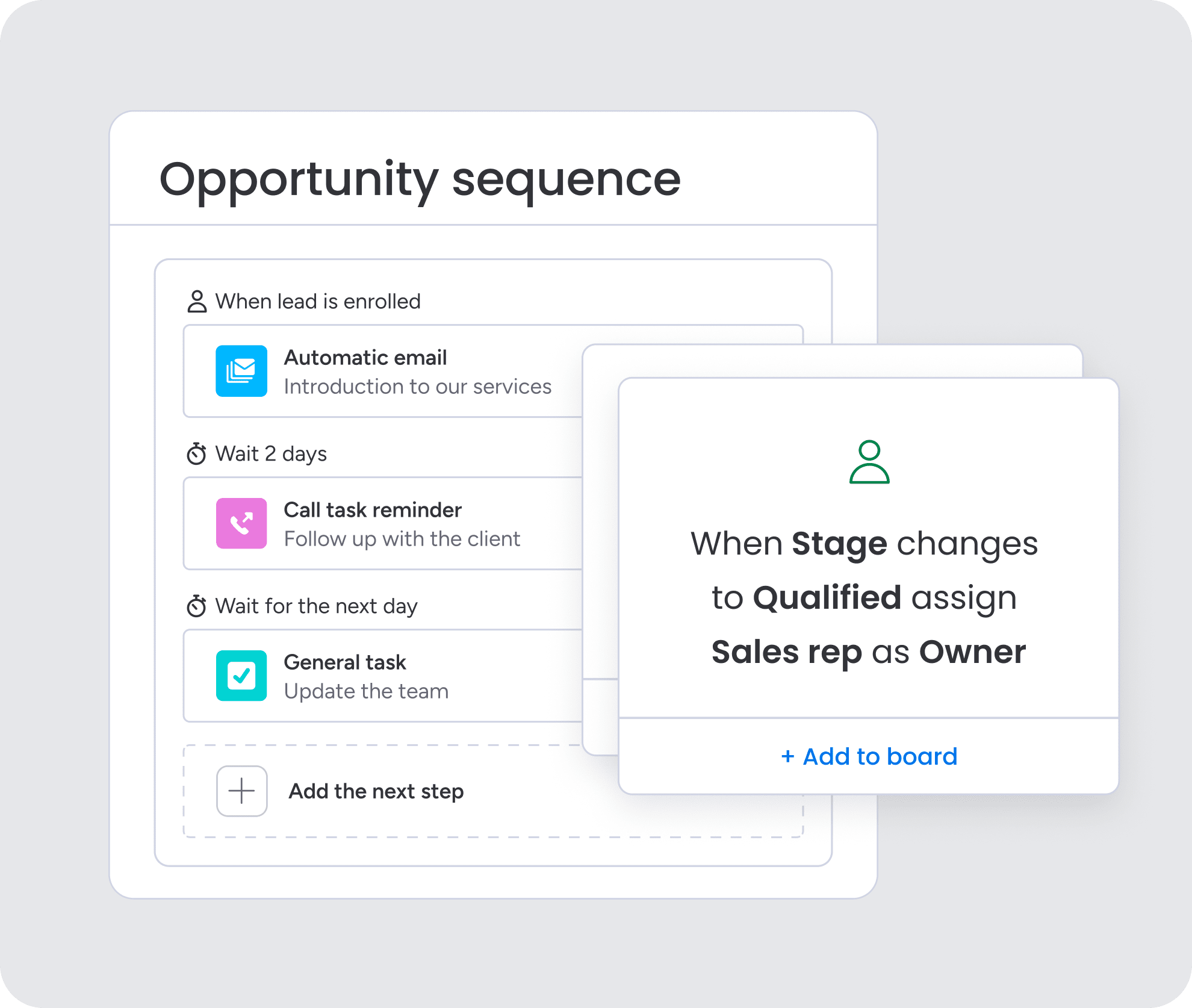
A strong account management program depends on how effectively you use technology to support customer success. A flexible CRM lets you centralize all client data, tasks, and communications so you always have a complete picture of each account.
From there, automations can handle repetitive administrative work like sending reminders, updating statuses, or flagging at-risk accounts, so managers can focus on the human side of the job. When technology works quietly in the background, account managers gain back valuable time to deepen relationships and deliver meaningful results.
3. Make account growth a top priority
As a key account manager, customer retention is always priority number one, but account growth is a close second. A strategic account manager knows how to keep customer engagement up and knows exactly what features or products they’ve purchased and how much more room for growth exists. To keep track of it all, you need consistent reporting. A platform like monday CRM can help keep your growth goals top of mind at all times with detailed reporting and dashboards.
4. Ensure seamless sales handover processes
The initial transition of a new client from a sales representative to an account manager shows a lot about your business. It’s important to ensure there’s a formal process in place so that the process is consistent and painless on the client’s end. Communication should be clear, which is why having a CRM to track messaging and important documentation between teams is so important.
5. Maintain a consistent, proactive communication rhythm
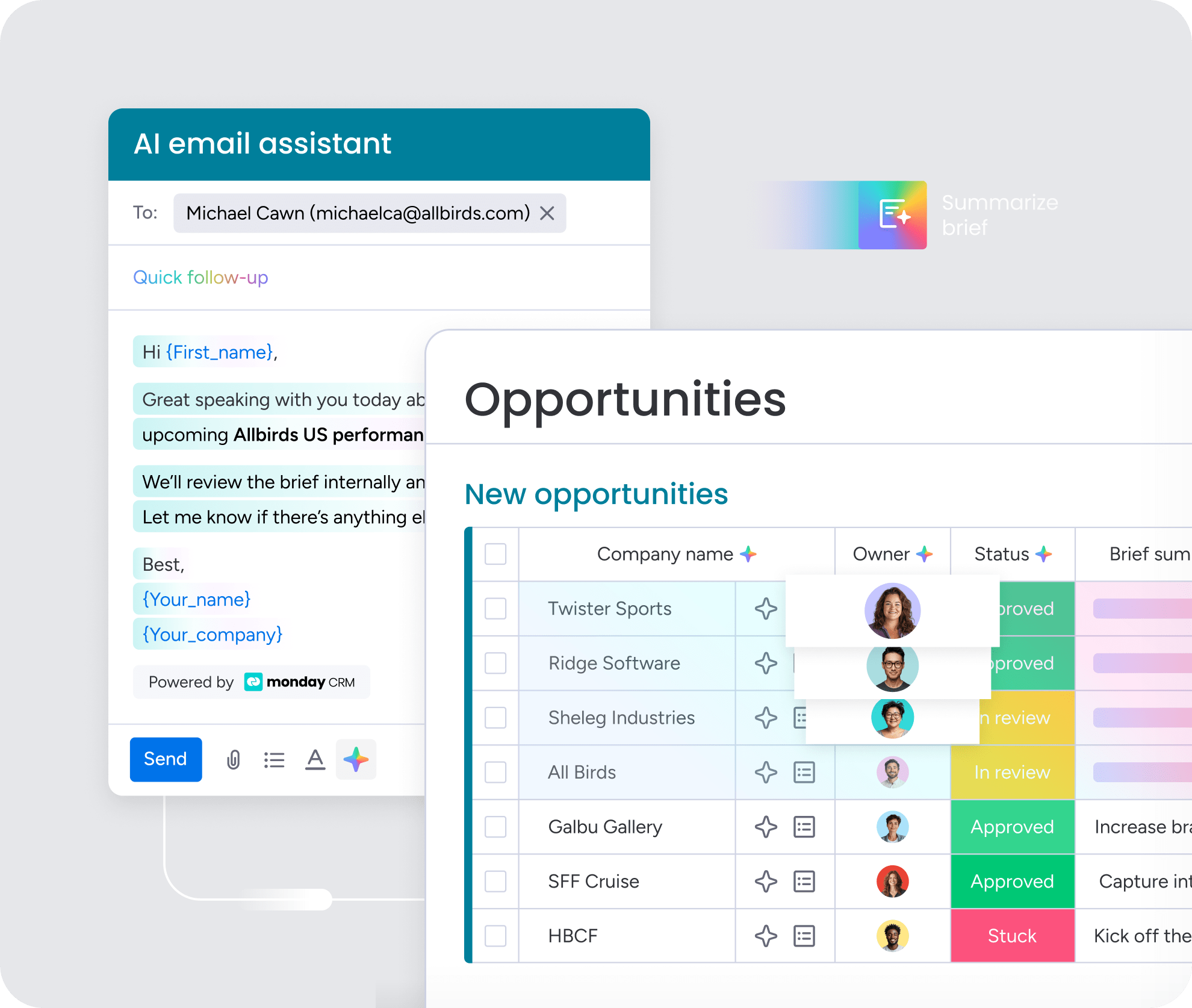
Consistency builds trust, and trust drives retention. To make every client feel valued, create a predictable cadence of communication rather than waiting for issues to surface. Use your CRM to schedule these touch points, log outcomes, and track next steps so nothing slips through the cracks.
When done proactively, these conversations shift your role from problem-solver to strategic partner. By reviewing progress toward customer goals, sharing insights from CRM dashboards, and co-planning next steps, you demonstrate commitment and position your team as an essential part of your client’s success story.
6. Gather data and feedback to stay ahead of critical decisions
Account managers need to know where every customer account stands at all times. That means keeping communication channels constantly open with your customer, but it also means routinely surveying decision-makers for satisfaction levels. Use surveys, questionnaires, and reports to track performance on various accounts and request feedback and customer reviews to get a sense of customer satisfaction. Finally, monitor data and analytics to get insights you may have missed on accounts that are at risk of cancellation to reduce customer churn.
7. Nurture and onboard new clients effectively
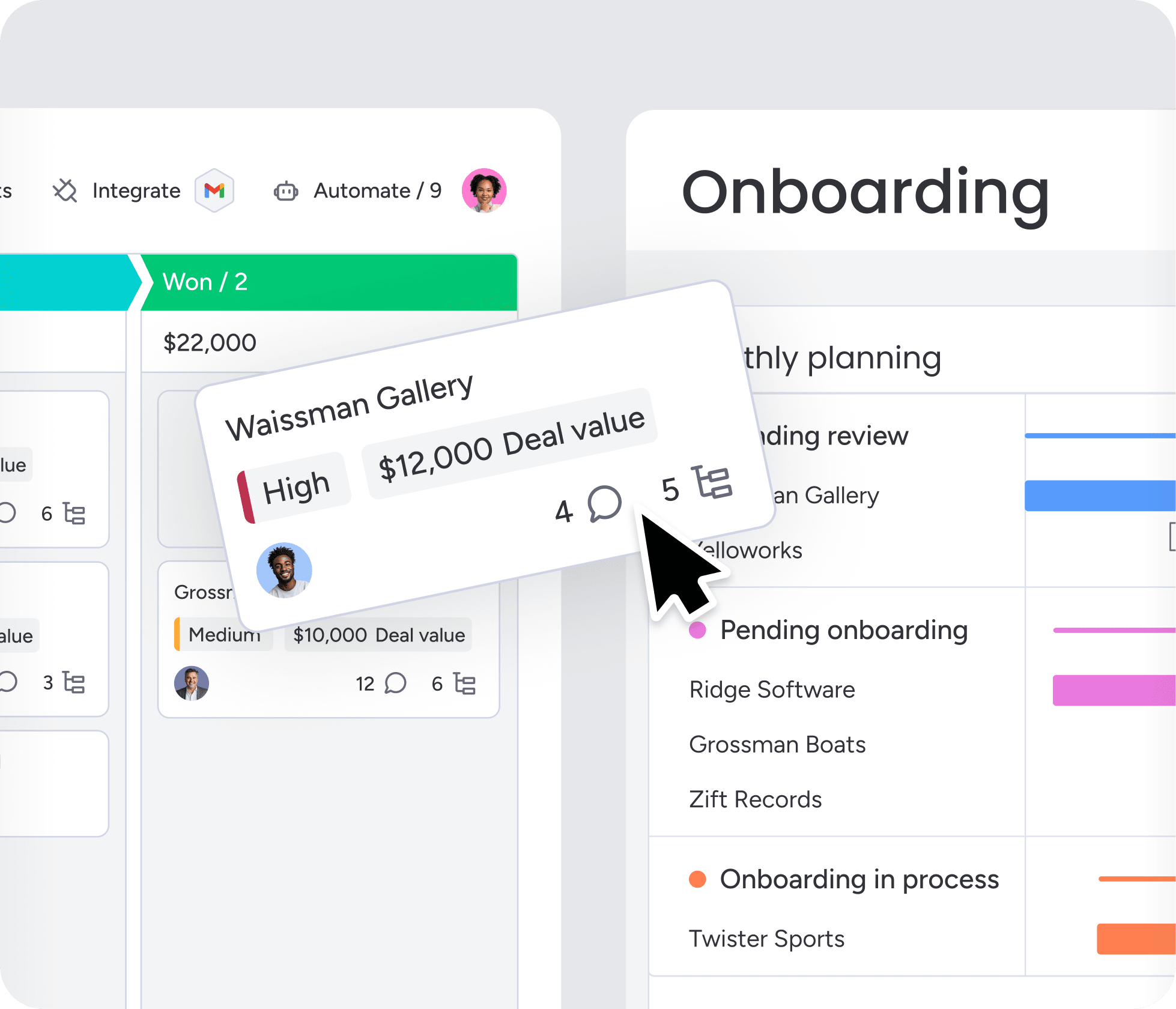
In most cases, the first 90 days of a new client relationship set the foundation for long-term success. Create a structured onboarding process that introduces clients to your team, establishes clear expectations, and helps them reach quick wins with your product or service. Use your CRM to track onboarding milestones so that nothing gets overlooked during this critical period.
8. Identify upsell and cross-sell opportunities
Your existing clients represent the greatest opportunity for revenue growth. Use your CRM data to analyze usage patterns, customer sentiment and preferences, and identify unmet needs to spot expansion opportunities. When clients are succeeding with your current solutions, they’re more receptive to additional products or services that can further improve their results.
Essential features to look for in a CRM for account management
If you’re unsure which exact capabilities to look for inCRM softwarethat will help you manage accounts effectively, the features below will give you a great starting point:
- Contact and company management: Centralize client information, including demographic and company data, to ensure consistent visibility into accounts
- Activity and communication tracking: Log emails, calls, meetings, and tasks so that account managers can monitor engagement levels
- Custom dashboards and reporting: Get detailed insights into account performance, growth trends, and client satisfaction to make data-driven decisions
- Integrations (email, calendar, accounting): Create seamless connections with email, calendar, accounting, and other business tools, eliminating data silos and building unified workflows
- Pipeline and renewal management: Track account milestones, renewals, and upsell opportunities visually so that nothing gets missed
- Complete communication history: Maintain a complete record of client interactions across all channels for contextual conversations and smooth handoffs
How to choose the right CRM for your account management team
Choosing the right CRM will have a significant impact on your account management processes. To make sure you’re using the right software for your specific needs, there are a few factors to take into consideration. Here’s a look at some things to keep in mind:
Core account management features
Make a list of the core account management features your team needs based on existing workflows or business goals. For example, monday CRM offers dedicated Accounts boards, account hierarchies, and AI-powered summaries that help teams manage complex client relationships from one central workspace.
Scalability
The platform you opt for should grow alongside your team, meaning it needs to scale as your team grows. Your team’s current workflows may evolve in 1-2 years if your business expands, so your CRM should accommodate a range of needs.
Ease of use
The CRM you choose needs to be easy to use for everyone on your team, regardless of technological skill level. Find a system that’s straightforward to onboard, learn, and grow in so that you’re never struggling with the technology. monday CRM’s no-code, drag-and-drop interface makes it simple for account managers to customize workflows without technical expertise.
AI and automation tools
CRM automation and AI are key features of most modern CRMs, though some are more advanced than others. According to monday’s State of Sales report, the vast majority of sales leaders use AI to boost productivity, which is why it’s important to look for a CRM with AI features that can automate manual tasks.
Vendor support
Every CRM offers different customer service options depending on the plan you choose, so it’s important to decide how much access to customer support your team will need before settling on an account management software or CRM.
Budget
Even if a product is perfect but exceeds your budget, it’s going to be a strain on your team. Look at a CRM’s pricing and plan offerings to understand its value and see if it fits in your budget.
Common pitfalls and challenges of CRM account management
Nurturing each customer account comes with different challenges, and using a CRM system introduces its own unique obstacles. While CRMs are powerful platforms for relationship building, they can create complications when not implemented or managed properly.
Being aware of the different challenges CRM account managers face can help you stay ahead of potential roadblocks so that you can actively address them. Here are some of the most common CRM account management challenges:
- Managing multiple accounts: Balancing multiple accounts with different expectations, needs, and deadlines can be overwhelming, especially when managing complex CRM workflows and data entry requirements.
- Cross-department alignment: Staying aligned with other departments such as sales, customer service, or marketing is essential to appear as a unified front, but certain software or using multiple systems can create silos if not properly configured.
- Limited tracking and insights: A lack of meaningful reporting can make it difficult to gauge your impact as an account manager, particularly when CRM reporting features aren’t set up to capture the right metrics
- Data inconsistency and lack of adoption: When team members don’t consistently update or use the CRM, incomplete or outdated information can lead to missed opportunities and damaged client relationships
- Over-automation and losing the human touch: Relying too heavily on AI, automated workflows, and generated communications can make interactions feel impersonal, undermining the human connection that’s crucial for account management
- Poor integration with existing tools: When CRMs don’t play well with your core business tools, account managers might waste a lot of time switching between platforms and risk missing important customer information
- Reactive instead of proactive management: Being reactive means you’re always trying to put out little fires to keep customers happy rather than leveraging predictive CRM data, like forecasts or sentiment analysis, to prevent issues altogether.
While these challenges are real, the right mindset, platform, and processes make them manageable, so you can keep accounts healthy and reduce customer churn.
How monday CRM supports account management
When you’re choosing a platform to run your account management program, monday CRM gives you everything you need without the setup burden of legacy systems. Its drag-and-drop visual interface, built-in AI, and no-code automations make it capable of handling even the most complex accounts.
This AI CRM supports account teams across the full customer lifecycle, from onboarding through renewal and expansion. It centralizes client data, automates routine tasks, and surfaces insights that help you stay proactive with every account.
Centralized account visibility and hierarchy mapping
he Accounts board centralizes contacts, current and past deals, communication history, and ongoing activity for each company. Account hierarchies map complex org structures, so parent and subsidiary relationships stay connected in a single view. You can email from the platform, connect apps like Gmail, Outlook, Slack, Zoom, and DocuSign through 200+ integrations, and build forms to gather customer feedback from every account.
AI-powered account summaries and risk detection
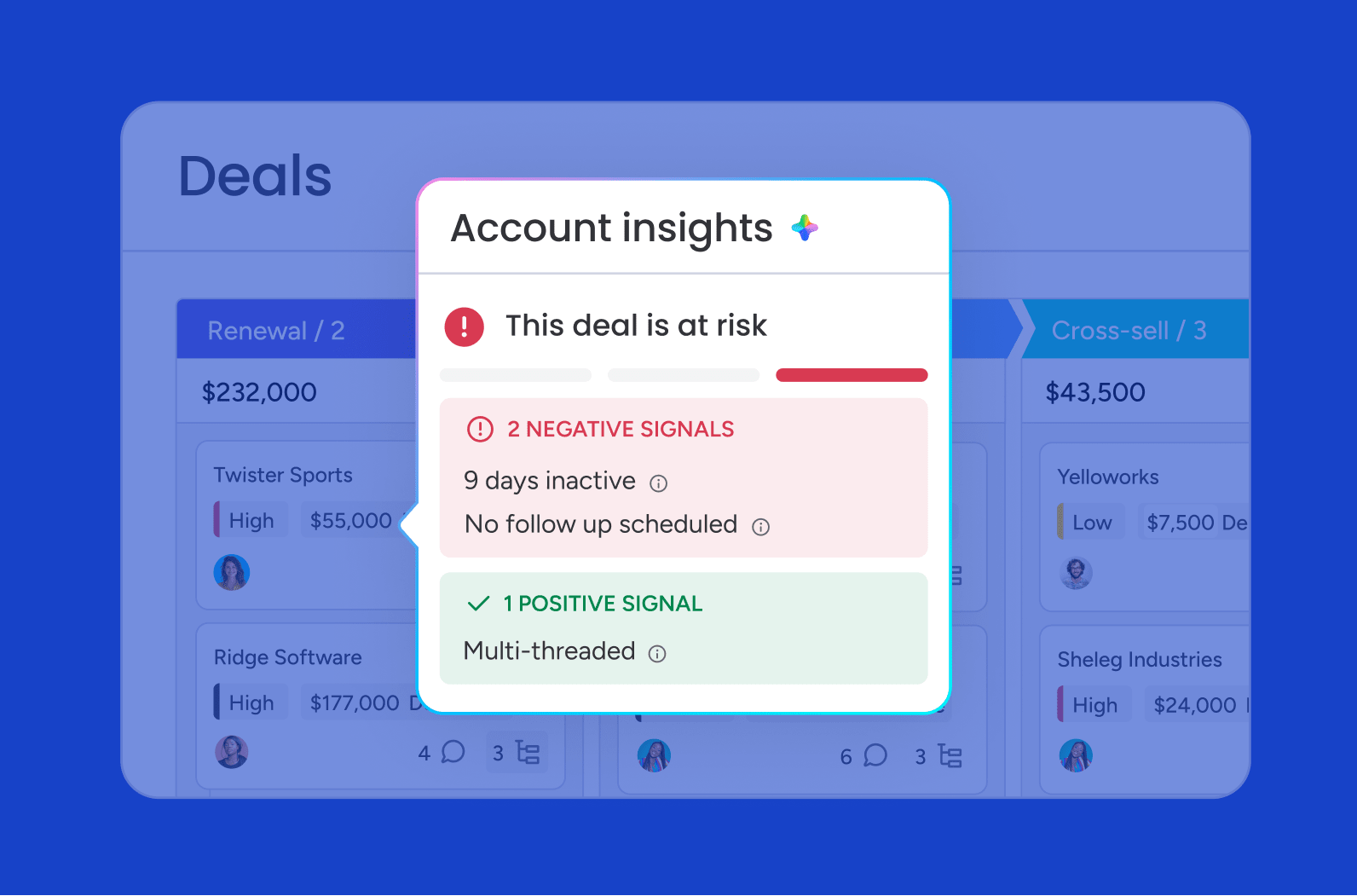
Account-level AI summarizes activity across teams, highlights risks and opportunities, and keeps context intact when account ownership changes. That continuity makes handoffs far smoother, so nothing gets lost when a new manager steps in. The Item Card pulls every email, meeting, call, and note into one interaction timeline, while the AI Notetaker transcribes calls, captures summaries, and links action items straight to your boards.
Intelligent workflow automation for proactive account management

With monday CRM’s AI-driven workflow automations, account managers stay on top of tasks, communications, and reporting for each account. Automations trigger workflows, send follow-ups, and flag next steps, so no account falls by the wayside. The platform’s AI moves deals along, automates approvals, and detects sentiment in customer communications to keep pipeline management smart and efficient.
Predictive analytics and real-time account health tracking
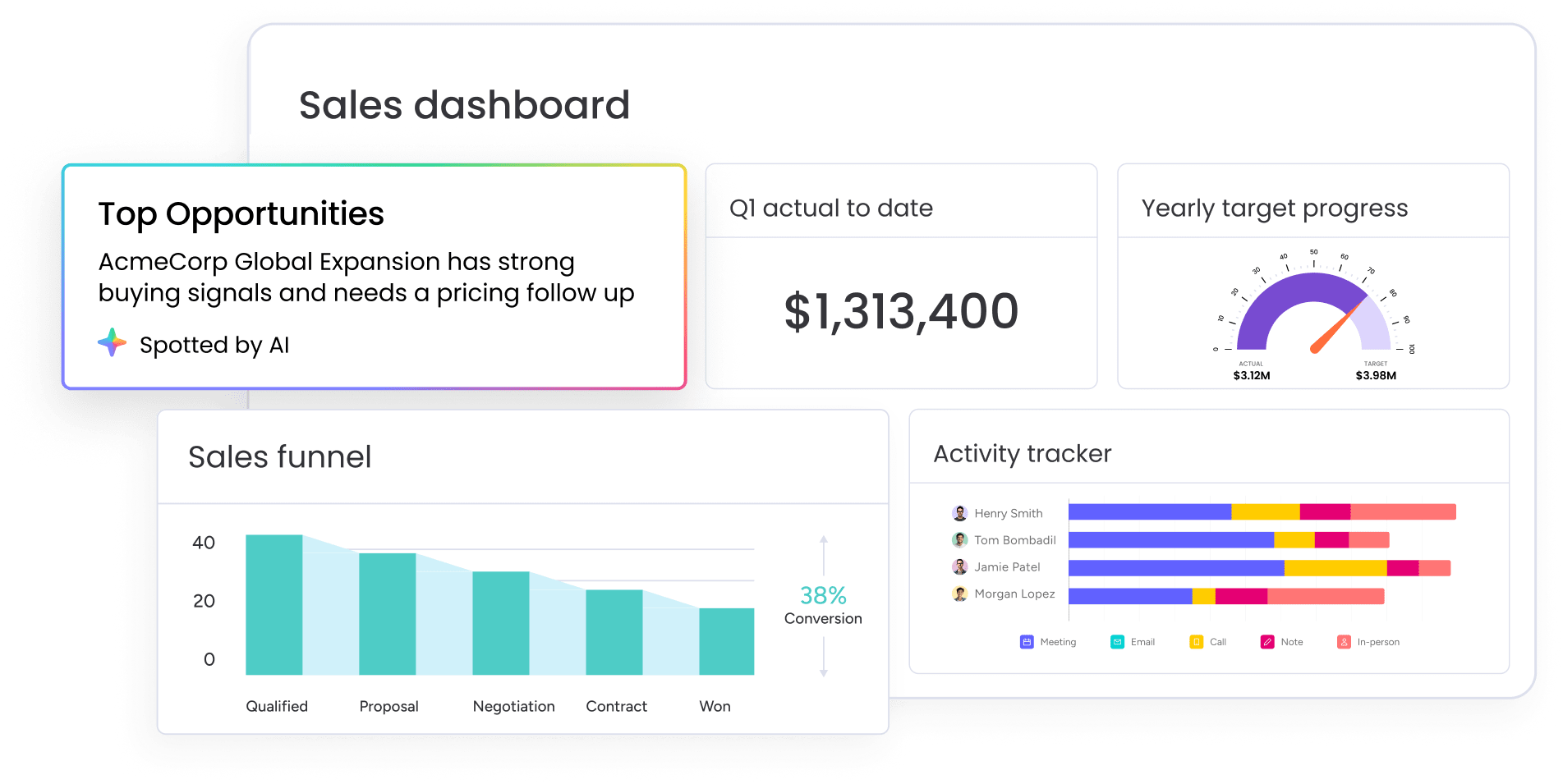
Create automated reports and custom dashboards to track account health, renewals, and revenue in real time. With predictive analytics and sales forecasting, the Deal Insights widget flags at-risk or stalled accounts and recommends the next move, so retention risks surface before they become churn. monday CRM surfaces early churn risks, highlights upsell opportunities, and generates account summaries that save managers hours each week.
Here’s how monday CRM compares to traditional or legacy CRMs for account management:
| Capability | monday CRM | Traditional or legacy CRMs |
|---|---|---|
| Setup and customization | no-code changes in minutes that adapt to any workflow | developer time and long implementation cycles |
| Embedded AI at the account level | ai summaries, at-risk signals, and agents built in | ai often limited or sold as paid add-ons |
| Customer-lifecycle coverage | pre-sale to post-sale in one platform | focused mainly on the pre-sale pipeline |
| Team adoption | intuitive interface teams actually use | steep learning curve and low adoption |
Learn more: AI account health agent
Build stronger relationships through effective account management
The key to retaining the customers you have lies in adopting the right platform and embracing the future of account management. AI-powered insights and automation are impacting how teams engage with clients, enabling proactive outreach based on predictive analytics and reducing repetitive workflows for maximum efficiency.
A strong system, like monday CRM, that harnesses these technologies allows you to store customer information, track interactions, automate communications, and integrate seamlessly with your existing tools. With monday CRM, you’re doing more than just managing accounts; you’re building a foundation for sustainable growth through smarter, data-driven relationship management.
FAQs
What's the difference between a sales representative and an account manager?
The difference between a sales representative and an account manager is where they focus: sales reps acquire new customers through lead generation, prospecting, and closing deals, while account managers work with existing clients to maintain relationships, ensure satisfaction, and identify growth opportunities. Sales reps are like hunters that seek out new business, while account managers are nurturers focused on retention and expansion.
How does an account management CRM integrate with accounting software?
An account management CRM integrates with accounting software through native integrations or APIs, syncing invoices, payment history, and contract details. This gives account managers real-time visibility into billing and client value without switching systems.
Do I need a specialized account management CRM, or will a general-purpose one work?
Whether you need a specialized account management CRM depends on how high-touch your accounts are: a general-purpose CRM handles most needs if it offers flexible workflows, automation, and reporting. A dedicated account management CRM often adds features like account health scoring and expansion planning that make a difference for high-touch teams.
What account management processes can be automated with a CRM?
The account management processes you can automate with a CRM include renewal reminders, follow-up emails, onboarding checklists, satisfaction surveys, and QBR scheduling. You can also automate report generation, task assignments, and notifications when customer sentiment or usage trends change.
How can a CRM help a team collaborate on a client account?
A CRM helps a team collaborate on a client account by keeping all client data, notes, and updates in one place so every team member sees the same information. Shared boards, activity logs, and automated notifications help sales, service, and account management stay aligned on priorities.
Can a CRM help improve customer retention and loyalty?
Yes, a CRM can help improve customer retention and loyalty by consolidating customer data, automating follow-ups, and tracking satisfaction metrics so teams stay proactive instead of reactive. This leads to faster response times, more personalized outreach, and stronger long-term relationships.
Which CRM features matter most for small business account management?
The CRM features that matter most for small business account management are contact and activity tracking, customizable pipelines, dashboards, automation, and easy integrations for email, calendar, and accounting. These features simplify client management without requiring a large team or complex setup.
How does monday CRM approach account management?
monday CRM approaches account management by combining an Accounts board, account-level AI summaries and at-risk signals, and full customer-lifecycle coverage in one no-code platform. That means your team manages contacts, communications, renewals, and growth from a single, adaptable workspace.
