


A client kickoff ends with a launch date, a budget decision, and three people agreeing to follow up. The next step is making those decisions easy to find and act on. A meeting summary workflow connects the conversation to the work that follows. It gives each commitment an owner, a due date, and a place on the project board.
This guide walks through the five workflow stages, examples for different teams, and ways to automate follow-up. You’ll also see how monday AI Notetaker helps turn meeting decisions into tracked work on the boards your team already uses.
Key takeaways
- A meeting summary workflow turns conversations into tracked work: It connects capture, summarize, assign, distribute, and track into one repeatable process, so decisions don’t disappear after the call ends
- Action items only get done when they have an owner, a deadline, and a home: Without all three, commitments made in meetings rarely translate into completed work
- Not every meeting needs the full workflow: Focus it on decision-heavy meetings like client reviews, sprint retrospectives, and cross-functional planning sessions where follow-up is expected
- monday AI Notetaker closes the gap between meeting and execution: It joins calls automatically, generates time-stamped summaries, and sends action items directly to your monday.com boards
- Before rolling out AI meeting capture, set your governance rules: Decide who can access recordings, how long they’re stored, and whether sharing is private by default
What is a meeting summary workflow?
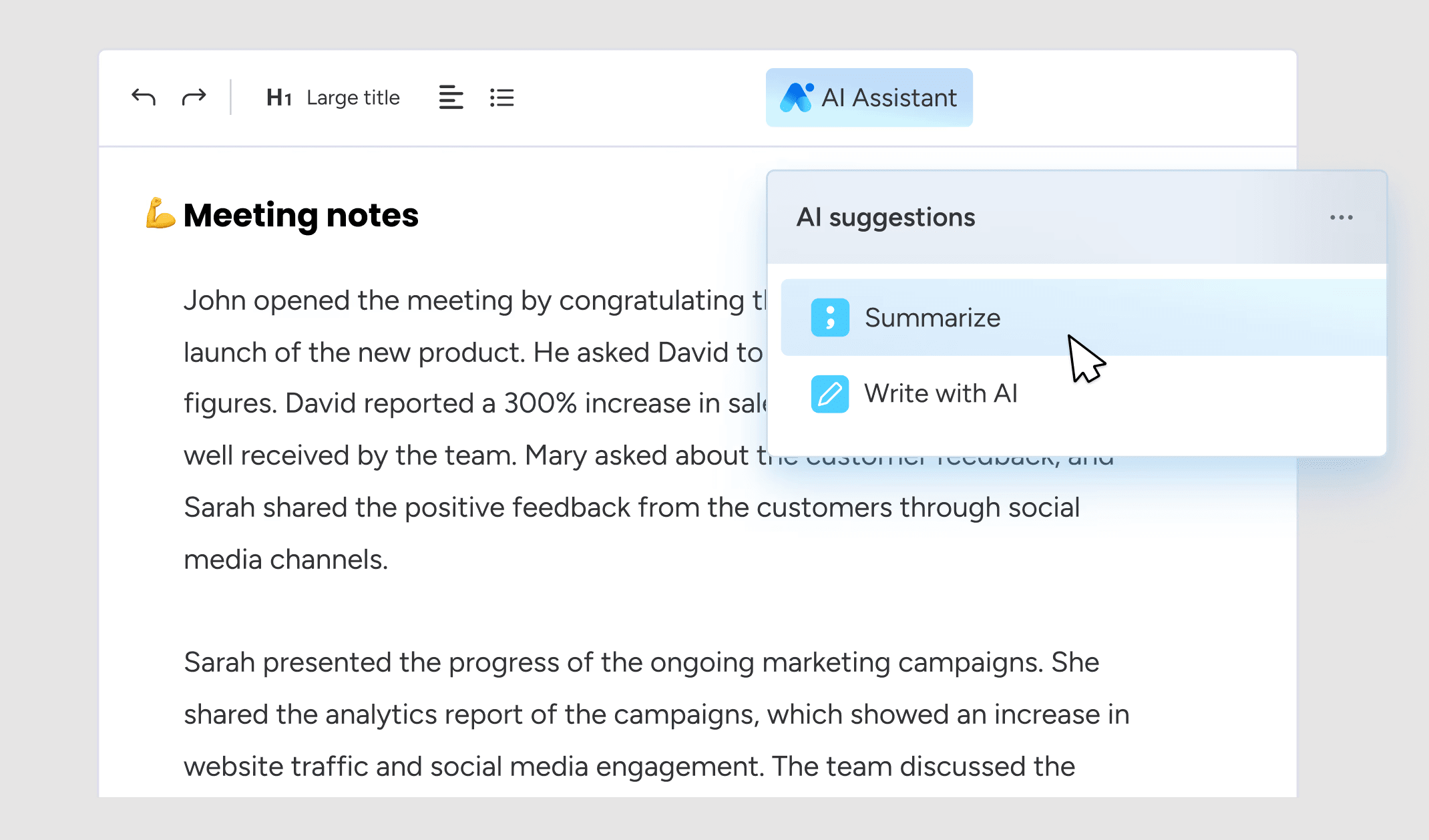
A meeting summary workflow is a repeatable, end-to-end process that moves a meeting from live conversation through to tracked, assigned work. It isn’t a static document someone writes after the fact. It’s a connected sequence where each stage triggers the next.
In a business context, a workflow management process is a defined sequence of steps that moves work from input to output. Each step has a trigger, an owner, and a handoff to the next step. A meeting summary workflow applies that same structure to every meeting’s output.
Most meeting notes fail to drive execution because they break at predictable points:
- Notes end up in a document nobody reopens: The summary exists, but it sits in a folder or email thread that no one revisits
- Action items lack owners or deadlines: Without accountability, commitments made in meetings rarely translate into completed work
- No connection to the project management system: The summary lives in one place while the team tracks work in another
- No follow-up mechanism: The notes were never designed to trigger follow-up
A meeting summary workflow treats the meeting as the start of the work, not the end of the conversation. A summary records what happened. A workflow drives the follow-up to completion.
Why your team needs a meeting summary workflow
A meeting summary workflow isn’t about producing a document. It’s about getting results out of your meetings. When meeting output is the first step of a workflow instead of the last step of a conversation, work moves faster, owners are clear, and context sticks around.
Benefit 1: Time saved on manual note-taking and follow-ups
A meeting summary workflow takes over note-writing, update-chasing, and re-explaining. Project managers and team leads can reclaim hours each week by automating post-meeting admin, including:
- Writing up notes and sending recap emails
- Copying action items into a project board
- Following up with attendees who missed the context
Automate each stage, from capture through distribution, and you get those hours back for work that moves projects forward. According to Microsoft’s 2026 Work Trend Index, 66% of AI users say AI lets them spend more time on high-value work. The savings add up with every meeting. Run one automated workflow across your weekly meetings, and you can recover a full workday each month.
Benefit 2: Accountability through assigned owners and deadlines
A workflow that pulls out action items with named owners and due dates gives you accountability that informal notes can’t. Without all three elements – what needs to be done, who is responsible, and when it is due – decisions made in a meeting rarely translate into action. This clarity gap is widespread: in 2026, only 49% of U.S. employees strongly agreed they know what is expected of them at work, according to Gallup.
You’ve seen this before. The team agrees on next steps, but without an owner, those commitments stall. A meeting summary workflow fixes that by making every commitment visible, assigned, and time-bound the moment the meeting ends.
Benefit 3: Shared organizational knowledge across departments
Distributing structured meeting summaries builds a searchable knowledge base that benefits people who were not in the room. Consider what this means in practice:
- Cross-functional teams gain context on decisions made by other departments
- New hires onboarding to a project can review past meeting summaries to understand how decisions were reached
- Executives who need context without attending every meeting can scan a structured summary in minutes instead of watching a full recording
Meetings stop being private conversations and become something the whole company can learn from.

Five stages of a meeting summary workflow
These five stages represent the complete lifecycle of a meeting summary workflow, from the moment a meeting starts to the point where every follow-up is tracked to completion. They apply whether the workflow is manual or automated, and whether meetings are virtual or in-person.
Walk through each stage, and you’ll spot where your current process breaks down and where automation helps most:
- Capture the meeting automatically through recording and transcription
- Generate a structured AI summary with time-stamped topics, decisions, and open questions
- Extract action items with owners and due dates so every commitment is trackable
- Distribute the summary to stakeholders who need the context
- Track follow-up actions to completion inside the team’s project management system
Stage 1: Capture the meeting automatically
The first stage is to record and transcribe the meeting so nothing is lost. There are two main capture methods:
- Bot-based joining: A bot joins virtual meetings on Zoom, Microsoft Teams, or Google Meet automatically
- Desktop app capture: A device-based approach records in-person meetings without requiring a bot in the room
Automatic capture frees people to focus on the conversation instead of splitting attention between listening and typing. The best methods connect to your calendar once, then join every meeting on their own. Every meeting is captured reliably.
Everything gets captured by default. You opt meetings out instead of remembering to opt them in.
Stage 2: Generate a structured AI summary
Raw transcripts hold every word, but AI makes them usable by turning them into a summary with clear sections for key topics, decisions, and open questions. AI turns them into a summary with clear sections for key topics, decisions, and open questions.
A strong AI summary does three things that simple transcript condensation cannot:
- Time-stamps each section so readers can jump to the relevant moment in the recording
- Distinguishes discussion from decisions, separating context from outcomes
- Applies semantic understanding to interpret meaning, identify who committed to what, and filter background conversation from actionable conclusions
That’s what separates a summary you’ll use from a wall of condensed text.
Stage 3: Extract action items with owners and due dates
This is the stage where a meeting summary workflow diverges from traditional meeting notes. The AI identifies every commitment made during the meeting and attaches three pieces of information to each:
- What needs to be done
- Who is responsible
- When it is due
With all three in place, every action item is complete and ready to be executed. The strongest workflows let team members assign owners and choose the right project or board for each action item directly from the summary interface, rather than requiring manual copy-paste into a separate system.
This is the handoff that matters. It’s where a decision either becomes tracked work or gets lost.
Stage 4: Distribute the summary to stakeholders
A summary shared widely multiplies its value across the team. This stage involves sharing the summary, recording, and action items with the right people, including attendees, their managers, and anyone else who needs context.
Distribution methods include:
- Direct sharing with teammates
- Posting to a team channel
- Making the summary available to the broader organization
Distribution should respect permissions. The workflow lets the meeting organizer decide exactly who gets access to each summary. The goal is to get the right context to the right people without the organizer manually forwarding documents after every call.
Stage 5: Track follow-up actions to completion
Sending the summary is just the start of execution. The final stage connects action items to the team’s existing project management system so they appear alongside other work, with status tracking, deadline visibility, and accountability.
In practice, this means meeting action items show up as tracked items on a project board with owners, due dates, and status columns. This is the stage where strong workflows prove their value: the summary flows into the same system where follow-up gets tracked.
When action items land directly inside active workflows, the gap between “decided” and “done” closes.
How to build a meeting summary workflow for your team
The stages above show what happens. Here’s how to set it up for your team: which meetings to include, how to capture them, where the output goes, and what rules to set before you roll it out.
Step 1: Define which meetings need the workflow
The workflow delivers the most value when applied selectively to meetings where decisions are made and follow-up is expected. The workflow delivers the most value when applied to meetings where decisions are made, and follow-up is expected. Categorize your meetings by type and apply the workflow selectively.
These meeting types get the most from a summary workflow. Each one produces decisions or context that needs to reach people who weren’t in the room:
- Client kickoffs and reviews: Scope, milestones, and deliverables are agreed upon and need tracking by both internal and external stakeholders
- Sprint retrospectives: Identify process improvements and assign them to team members for the next sprint cycle
- Cross-functional planning sessions: Multiple departments align on priorities, dependencies, and resource allocation. Context needs to reach people across every department involved
- Sales discovery calls: Prospect pain points, budget signals, and next steps need to flow into the CRM or deals board for follow-up
- Executive and leadership reviews: Strategic decisions and escalations require documentation and accountable owners
A weekly team standup, by contrast, may not need a full workflow if the updates are already tracked on a project board.
Step 2: Choose capture methods for virtual and in-person meetings
The two capture scenarios require different approaches. The platform you choose should handle both without requiring separate setups.
Virtual and in-person meetings need different capture methods:
| Capture scenario | Recommended method | Key consideration |
|---|---|---|
| Virtual meetings | Calendar-based auto-join that connects to the user's calendar once and automatically joins scheduled Zoom, Microsoft Teams, or Google Meet calls | Removes the need for anyone to remember to start the recording |
| In-person meetings | Desktop-app-based capture that records without sending a bot into the room | Important for meetings where a visible bot would be disruptive or where participants are in a shared physical space |
Step 3: Connect summaries to your project management software
The most important implementation decision is where action items land after the meeting. This disconnect is a leading reason teams change tools: according to Capterra’s Project Management Software Buyer Insights, 42% of organizations switch because work is scattered across spreadsheets, email, and chat, forcing manual follow-ups and fragmented tracking. Here is how the two paths compare:
- Standalone document or separate app: Follow-through drops because items are disconnected from the team’s daily workflow
- Directly in the project board: Action items are treated like any other deliverable, with status tracking, deadline visibility, and owner accountability
The summary workflow should let team members choose which project or board receives each action item, assign an owner, and set a due date — all from within the summary interface. The fewer steps between “meeting ended” and “action item tracked,” the higher the completion rate.
Step 4: Set governance rules for recordings and access
Before rolling out a meeting summary workflow, the team needs to establish rules for who can record, who can access recordings and transcripts, and how long recordings are retained.
Governance rules protect your company and the people in the room. Decide these before you launch:
- Recording consent: Whether all participants are notified when a meeting is being recorded and how consent is handled across different regions and meeting types
- Access permissions: Who can view the summary, transcript, and recording after the meeting, and whether access is limited to attendees or extended to their managers and teams
- Sharing controls: Whether summaries can be shared outside the immediate team or organization, and who has the authority to extend access
- Retention policies: How long recordings and transcripts are stored before deletion, aligned with the organization’s data retention requirements
- Privacy defaults: Whether the system is private by default, meaning only the organizer sees the summary until they choose to share it
Enterprise teams should look for privacy-by-default controls and compliance support. We cover security in more detail below.
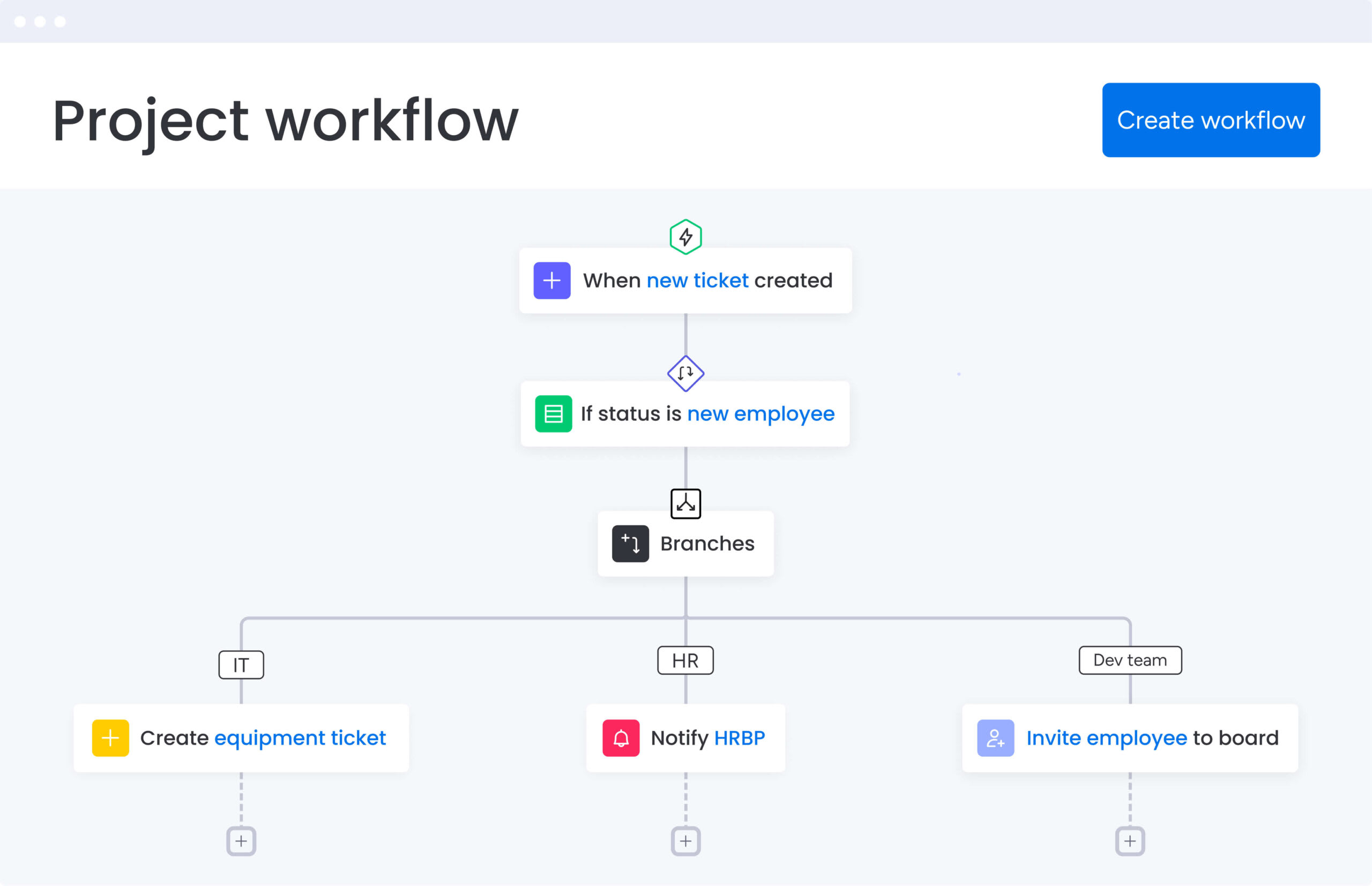
How to automate your meeting summary workflow
Automation runs every stage of the workflow for you — starting the recording, writing the summary, routing action items, sending the recap, and checking on follow-ups, so the process runs reliably every time. Automation handles all of that. One version works when somebody remembers. The other runs every time.
Automation 1: Calendar-based triggers that join meetings without manual setup
Connect your Google or Outlook calendar once, and the system joins every scheduled Zoom, Microsoft Teams, or Google Meet call automatically. The system captures every meeting automatically from the moment it starts.
Once the calendar connection is active, the system captures every meeting by default. The team can exclude specific meetings rather than remembering to include them.
Automation 2: AI-generated action items that land in active projects
Connect AI action-item extraction to a project board, and the moment a meeting ends, action items show up as tracked work with owners and deadlines. Here’s the difference:
- A document-based list: Generates action items in a summary file that someone must manually transfer to a project board
- A workflow-connected system: Creates actual tracked items inside the team’s existing workflow the moment the meeting ends
When action items become board items with status columns, due dates, and owners, they get treated as real work with visible accountability.
Automation 3: Automated distribution to channels your team already uses
Automated sharing sends the summary to attendees, posts it to a Slack or Teams channel, or makes it available on a shared workspace, so the organizer can rely on automatic delivery to the right audience. This ensures the right people automatically get context after every meeting.
You can configure distribution once, and it runs automatically after every meeting, matching the right level of detail to the right audience.
Meeting summary vs. meeting minutes vs. transcript
Teams often confuse meeting summaries, meeting minutes templates, and transcripts. Each serves a different purpose, reaches a different audience, and leads to different outcomes. Understanding the distinctions helps teams choose the right format for each meeting type.
| Dimension | Meeting transcript | Meeting minutes | Meeting summary workflow |
|---|---|---|---|
| What it contains | Word-for-word record of everything said | Formal record of motions, votes, and official decisions | Structured overview of topics, decisions, and action items with owners and deadlines |
| Who creates it | AI transcription or a stenographer | A designated secretary or note-taker | AI generates the summary; the workflow assigns and tracks follow-ups |
| Primary audience | Legal, compliance, or anyone who needs the exact wording | Board members, committees, or governance bodies | The working team and stakeholders who need to act on decisions |
| What happens after | Stored as a record; rarely drives action | Filed as an official document | Action items flow into project boards and are tracked to completion |
| Best used for | Legal proceedings, compliance, reference | Board meetings, formal governance | Team meetings, client calls, cross-functional reviews, sprint retrospectives |
| Ends in tracked work? | No | No | Yes |
A meeting summary workflow borrows from both transcripts and minutes, then goes further. It doesn’t stop at recording what happened. It routes decisions into tracked work with owners.
Meeting summary workflow examples by team
The same five stages work across meeting types. Here’s what each looks like in practice.
Example 1: Sales discovery calls
A sales discovery call is a conversation between a sales rep and a prospect to understand their needs, budget, and timeline. The workflow captures the full context and routes it to the right people for follow-up.
Discovery calls surface pain points, budget signals, and timelines that often never make it into the CRM. A meeting summary workflow gets them to the right person:
- Summary: Prospect pain points, budget signals, and timeline discussed
- Action items: Assign a follow-up proposal to the account executive with a due date
- Distribution: Share the summary with the sales manager and solutions engineer
- Tracking: Proposal item tracked on the CRM or deals board
Example 2: Sprint retrospectives
A sprint retrospective is a team meeting at the end of a development cycle to review what went well, what needs improvement, and what process changes the team agrees to make.
Retros deliver the most value when every improvement has a named owner, so progress compounds sprint after sprint:
- Summary: What went well, what needs improvement, and process changes agreed upon
- Action items: Assign each improvement to a team member with a sprint deadline
- Distribution: Share the summary with the engineering team and product manager
- Tracking: Add improvement items to the next sprint backlog
Example 3: Client kickoffs and reviews
A client kickoff or review meeting confirms project scope, agrees on milestones, and flags risks between the delivery team and the client.
Client meetings create commitments for your team and the client. The workflow keeps both sides on the same page:
- Summary: Project scope confirmed, milestones agreed, and risks flagged
- Action items: Deliverables assigned to project leads with milestone dates
- Distribution: Share the summary with the client (with appropriate permissions) and internal stakeholders
- Tracking: Deliverables tracked on the client project board
Example 4: Cross-functional operations reviews
A cross-functional operations review brings together department leads to share status updates, identify blockers, and make resource decisions that affect multiple teams.
Ops reviews touch several departments at once. The workflow makes sure every blocker has an owner and every escalation is visible:
- Summary: Status updates from each department, blockers identified, and resource decisions made
- Action items: Blocker resolutions assigned to department leads with escalation deadlines
- Distribution: Share the summary with all department heads and the executive sponsor
- Tracking: Blocker items tracked on the operations board with status updates
How to keep meeting recordings and summaries secure

Meeting recordings hold sensitive material: client details, financial discussions, personnel decisions, strategic plans. When adopting AI for meetings, security should match the same standards as your other core systems. The platform should meet the same standards as your other core systems.
Control 1: Privacy-by-default settings and permissions
“Private by default” means the recording, transcript, and summary are visible only to the meeting organizer until they explicitly choose to share. This is the foundation of meeting security. The organizer controls exactly who can view each recording, transcript, and summary.
These controls set the baseline for meeting privacy:
- Organizer-controlled sharing: The person who ran the meeting decides who sees the output. Sharing is always an active, intentional choice
- Role-based access: Different team members see different levels of detail based on their role. A project lead may see the full transcript, while a stakeholder sees the summary and action items
- Guest and external sharing controls: The ability to share context with clients or partners without exposing internal discussions or sensitive details from other parts of the meeting
Control 2: Enterprise compliance requirements for AI meeting workflows
Before you adopt an AI meeting workflow, confirm the platform meets these standards:
- SOC 2 Type II: Verifies that the platform follows strict security practices for handling customer data over time
- ISO 27001: International standard for information security management systems, covering risk assessment and data protection controls
- GDPR: European data protection regulation requiring consent, data handling controls, and the right to access or delete personal data
- HIPAA: Required for teams in healthcare or any organization handling protected health information
What to look for in a meeting summary workflow platform
The platform you pick decides whether your workflow runs end to end or breaks at one of the five stages. Use these criteria to compare options.
Criterion 1: Workflow integration with your existing software
First, check whether the platform sends meeting output straight to the project management system your team already uses. When action items flow directly into the project system, teams complete them at much higher rates.
“Direct integration” means action items from the summary become tracked items on a project board without copy-paste, export, or switching between apps. The fewer handoffs between the meeting summary and the team’s daily workflow, the more reliably action items get completed.
Criterion 2: AI summary quality and semantic understanding
AI summary quality differs significantly across platforms. Look for one that separates discussion from decisions, shows who committed to what, and links each section to its moment in the recording.
The difference between keyword-based extraction and semantic understanding comes down to this:
- Keyword-based extraction: Pulls phrases without understanding context, producing a condensed but often misleading summary
- Semantic understanding: Interprets meaning, identifies commitments, and separates background conversation from outcomes, producing a summary that is actually useful
Criterion 3: In-person and virtual meeting support
Most teams run a mix of in-person and virtual meetings, so the platform should handle both from a single setup. The platform should handle both without requiring different setups:
- For virtual meetings: Look for automatic bot-based joining that connects to the user’s calendar
- For in-person meetings: Look for a desktop-app or device-based capture option that does not require sending a bot into the room
A platform that supports both scenarios from a single setup reduces friction and ensures consistent capture across all meeting types.
Criterion 4: Live AI agents that act during meetings
The most advanced meeting summary workflow platforms allow AI agents to participate in meetings in real time. These agents can answer questions from the team’s data, look up project status, or complete actions before the meeting ends.
This collapses the gap between “discussed” and “done” from hours or days to seconds. Instead of waiting for the meeting to end and then manually creating follow-up items, the team can resolve questions and complete actions while the conversation is still happening.
How monday AI Notetaker turns meetings into tracked work
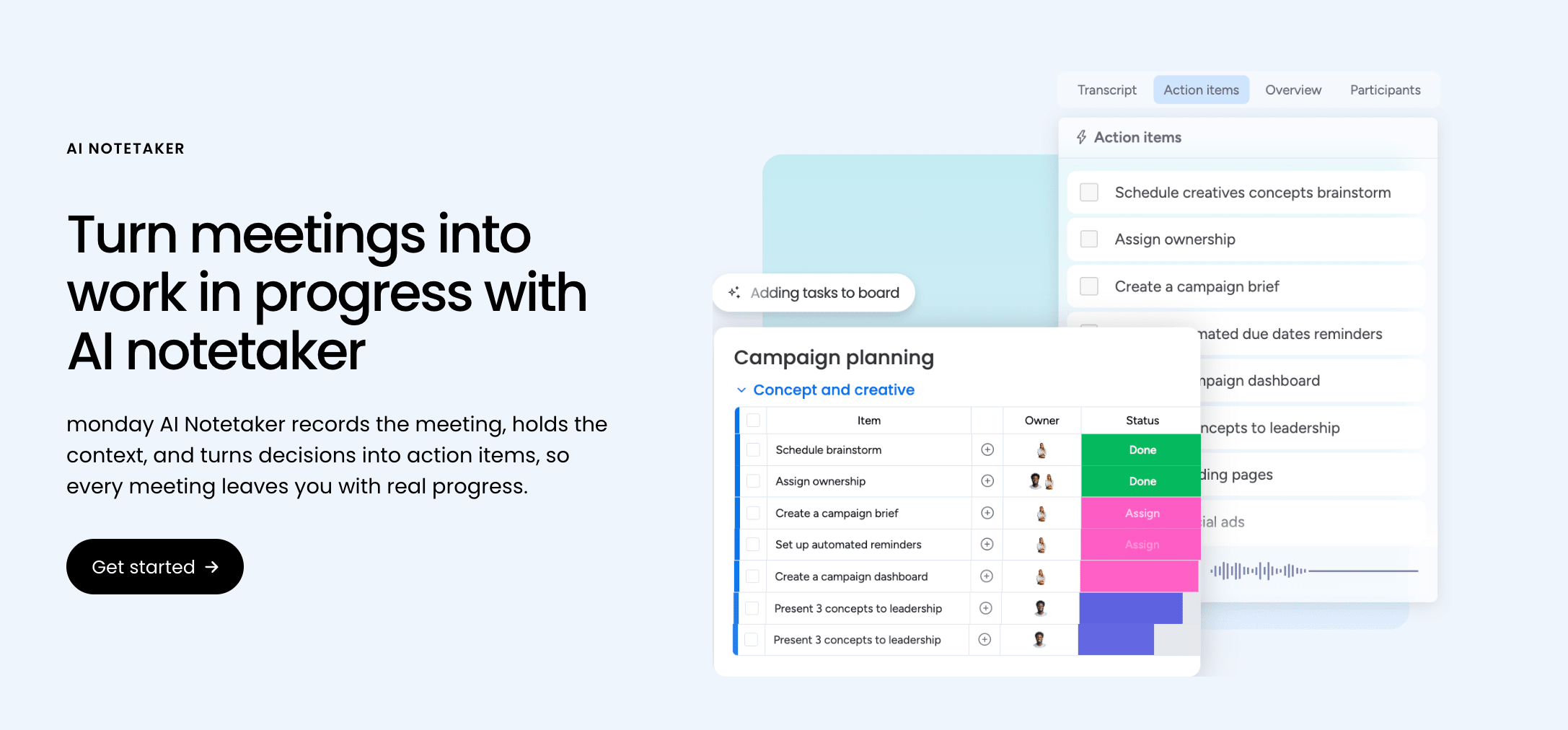
monday AI Notetaker is built into the monday.com AI Workspace, so summaries, action items, and decisions land directly in the workflows your team already uses, with no manual transfer. Summaries, action items, and decisions land directly in the workflows your team already uses, with no manual transfer.
Automatic capture across Zoom, Teams, and Google Meet
monday AI Notetaker connects once to a user’s calendar and automatically joins every scheduled meeting on Zoom, Microsoft Teams, and Google Meet. It also supports in-person meeting capture through the desktop app without sending a bot into the room.
Every scheduled meeting is captured automatically from the moment it begins.
Time-stamped summaries with decisions and next steps
The AI generates structured, time-stamped summaries that separate discussion context from decisions and commitments. Each section of the summary links to the corresponding moment in the recording, so readers can jump directly to the relevant part of the conversation.
Team members can also ask questions against the transcript after the meeting to find specific moments or verify what was said. Anyone can catch up in minutes by scanning the structured summary and jumping to the moments that matter.
Action items assigned to owners inside monday.com workflows
Team members can assign owners, choose the right project or board, and set due dates for action items directly from the meeting summary. These action items appear as tracked items on monday.com boards alongside the team’s other work, with status columns, deadline visibility, and owner accountability.
Decisions become tracked work with owners, flowing directly into the boards your team already uses. The action item lands where your team already works, so it gets treated like any other deliverable.
AI agents that answer questions and complete actions in real time
monday agents can join live meetings to answer questions from the team’s data, look up project status, or complete actions in real time, before the meeting ends. If someone asks “What’s the status of the client deliverable?” during a meeting, the agent can pull the answer from the project board and share it with the group. If the team agrees on a next step, the agent can create the item immediately.
The meeting itself becomes a place where work gets done in real time. Follow-up that once stretched across days now happens in seconds.
Enterprise-grade security and governance built in
The platform is private by default. The recording, transcript, and summary are visible only to the meeting organizer until they choose to share. Organizer-controlled sharing, enterprise-grade permissions, and compliance with SOC 2 Type II, ISO 27001, GDPR, and HIPAA ensure that teams with strict governance requirements can adopt AI meeting workflows without compromising on security.
Enterprise teams gain faster execution and tighter cross-functional alignment from automated meeting capture while maintaining full governance over sensitive conversations.
The table below compares standalone transcription platforms with monday AI Notetaker across the dimensions that matter most for execution:
| Dimension | Standalone transcription platforms | monday AI Notetaker |
|---|---|---|
| Where action items land | In a document or separate app | Directly on monday.com project boards as tracked items |
| Follow-up tracking | Manual; requires copy-paste to a project management system | Automatic; action items are tracked alongside other work |
| Live AI participation | Not available | AI agents join meetings to answer questions and complete actions in real time |
| In-person meeting support | Limited or requires a separate device | Desktop app captures in-person meetings without a bot |
| Privacy and compliance | Varies by vendor | Private by default; SOC 2 Type II, ISO 27001, GDPR, HIPAA |
How to turn every meeting into an action plan your team can track
A meeting summary workflow turns every conversation into measurable results. Capture, summarize, extract, distribute, track: five stages that turn every conversation into work with an owner.
Connect and automate each stage, and every meeting becomes a source of tracked, owned work. The summary holds the context. The action items hold the commitments. And they all land in the system your team already uses.
AI is moving from recording the meeting to joining it, answering questions and completing actions during the call, so the summary confirms work the team has already set in motion. The best meeting is one where decisions turn into owned work the moment the conversation ends.
FAQs about meeting summary workflows
What are the five steps of a meeting summary workflow?
A meeting summary workflow follows five stages: capture the meeting automatically through recording and transcription, generate a structured AI summary with time stamps, extract action items with assigned owners and due dates, distribute the summary to stakeholders, and track follow-up actions to completion inside a project management system.
How do you build a meeting summary workflow for a team?
Start by identifying which meeting types need the workflow, such as decision meetings, client calls, and retrospectives. Choose capture methods for both virtual and in-person meetings. Connect the summary output to your project management software so action items become tracked work. Set governance rules for recording access and sharing permissions.
What does a meeting summary workflow look like in practice?
In practice, a meeting summary workflow starts when an AI notetaker automatically joins a scheduled call, records and transcribes the conversation, generates a structured summary with decisions and action items, distributes it to attendees and stakeholders, and creates tracked items with owners and deadlines on the team's project board.
Can a meeting summary workflow create items automatically?
Yes. Platforms like monday AI Notetaker extract action items from the meeting summary and create them as tracked items directly on monday.com project boards, complete with assigned owners and due dates, without requiring manual copy-paste or data entry.
Is it safe to record and transcribe meetings with AI?
It is safe when the platform uses privacy-by-default controls, organizer-managed sharing permissions, and meets enterprise compliance standards such as SOC 2 Type II, ISO 27001, GDPR, and HIPAA.
What is the difference between a meeting summary and meeting minutes?
Meeting minutes are the formal record of motions, votes, and official decisions, usually for governance settings. A meeting summary workflow gives you topics, decisions, and action items with owners and deadlines, then sends them to your project management system to be tracked.
 Get started