








In this video

See how the monday dev Cursor extension brings your full task context right into your IDE. View tasks, updates, and code history without breaking flow — so you can go from task to code faster, with AI that actually understands the work behind it.

Transcript

Stop switching tabs. Stop chasing context.

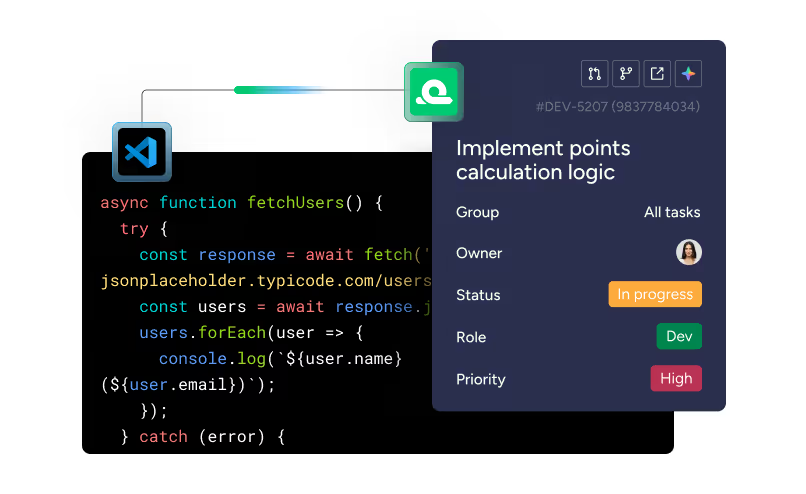
With the monday dev Cursor extension, your full task list and all its context live right in your IDE — so you can go from task to code without breaking flow.

Let's check it out.

Got a new task? Good news—vague tickets are a thing of the past. Click into any item and open the context panel. You’ll see why it matters, what code it touches, and who worked on it last, so you never have to dig around for info or start from scratch.

Execution just got a whole lot easier with monday dev tasks in your IDE.

The extension works with VS Code, Cursor, and more.

And it’s not just the tasks — important context like updates, code history, and team discussions flow into your IDE too. That means AI tools like Cursor generate code with the full story in mind. The result? Smarter output, fewer errors, and faster delivery.

With the monday dev Cursor extension, developers stay in flow, AI works smarter, and managers stay aligned.

Go from task to code in record time with AI coding and full task context in your IDE — only with the monday dev Cursor extension.


Read more

Learn more about features and workflows

Case study
How Vistra increased feature delivery speed by 28% with monday dev
Plan
Release
Manage
3
m
Roy Naftaly, Software Engineer
4 burndown tips from an engineering manager
Manage
Plan
2
m
Rebecca Helfenbaum
Your engineering team’s new AI power-up — monday dev
Execute
Manage
3
m

Heading 1

Heading 2

Lorem ipsum dolor sit amet, consectetur adipiscing elit, sed do eiusmod tempor incididunt ut labore et dolore magna aliqua. Ut enim ad minim veniam, quis nostrud exercitation ullamco laboris nisi ut aliquip ex ea commodo consequat. Duis aute irure dolor in reprehenderit in voluptate velit esse cillum dolore eu fugiat nulla pariatur.

Heading 3

Heading 4

Heading 5
Heading 6
Block quote

Ordered list

  1. Item 1
  2. Item 2
  3. Item 3

Unordered list

Text link

Bold text

Emphasis

Superscript

Subscript

Heading 1

Heading 2

Lorem ipsum dolor sit amet, consectetur adipiscing elit, sed do eiusmod tempor incididunt ut labore et dolore magna aliqua. Ut enim ad minim veniam, quis nostrud exercitation ullamco laboris nisi ut aliquip ex ea commodo consequat. Duis aute irure dolor in reprehenderit in voluptate velit esse cillum dolore eu fugiat nulla pariatur.

Heading 3

Heading 4

Heading 5
Heading 6
Block quote

Ordered list

  1. Item 1
  2. Item 2
  3. Item 3

Unordered list

Text link

Bold text

Emphasis

Superscript

Subscript