



Great candidates slip through the cracks when follow-ups get buried, resumes land in the wrong inbox, or conversation history disappears across scattered tools. That kind of miss usually points to messy systems, not weak recruiting. Recruitment CRM software gives hiring teams one place to manage candidate relationships before someone applies and while roles move forward. The right platform keeps outreach moving, stores every conversation, and uses AI to handle repetitive work that eats recruiter time.
We’ll cover what recruitment CRM software actually does, how it’s different from an ATS, which features you should care about, and 10 AI-powered platforms worth your time. We’ll also walk through how to pick a system your team will actually use, including flexible options like monday CRM for teams that want recruiting, communication, and reporting in one place. Let’s start with what this software is really there to do.
Try monday CRMWhat is recruitment CRM software?
Great candidates usually don’t disappear because sourcing failed. They vanish when a follow-up gets missed, the pipeline has no clear structure, or a recruiter has to dig through tangled email threads just to locate a resume. Recruitment CRM software is designed to prevent that exact failure point.
A recruitment CRM (Candidate Relationship Management) platform helps teams track and nurture relationships from the first hello through to a signed offer.
Here’s how it changes your daily workflow:
- Centralizes candidate data: Keeps every interaction, resume, and note in one searchable place.
- Automates repetitive outreach: Sends follow-ups and nurture campaigns without manual effort.
- Provides real-time visibility: Gives your entire team a clear view of the active pipeline and forecasting data.
An applicant tracking system processes inbound applicants. A recruitment CRM manages the relationships around hiring. Instead of scattered inboxes and missing sticky notes, you get a visible, measurable process. Hiring managers gain the pipeline insight they’ve been asking for, and candidates get the fast, personalized communication they now expect.
Recruitment CRM vs. applicant tracking system
These two platforms get confused all the time, and honestly, that’s understandable. Both hold candidate information and connect with email, but treating them as interchangeable quickly creates disorder. The key difference is timing.
A recruitment CRM starts working well before anyone applies. It helps you build talent pipelines, log outreach, and stay in touch with people who are not ready to move yet. After a candidate submits an application, the applicant tracking system steps in to manage interviews, offers, and onboarding.
| Recruitment CRM | Applicant tracking system (ATS) | |
|---|---|---|
| Primary purpose | Manages relationships before applications, tracks outreach, and builds talent pipelines | Manages active applicants through structured hiring processes like interviews and offers |
| When it activates | Before a candidate applies | After a candidate submits an application |
| Who it manages | Passive candidates, past applicants, referrals, and sourced talent | Active applicants who applied to open roles |
| Core strength | Relationship nurturing, pipeline development, and outreach automation | Workflow management, compliance tracking, and interview coordination |
| Typical user | Staffing agencies, executive search firms, and proactive talent teams | In-house HR teams managing high-volume hiring |
7 key features of recruitment CRM software
Not every recruitment CRM truly supports recruiting. Plenty of tools look impressive on the surface, then turn out to be dressed-up contact lists once your team’s already buried in open roles. What you need are capabilities that fit your recruiting motion, whether that means high-volume hiring or highly specialized executive search.
Here are the features that separate a real recruitment CRM from a digital rolodex:
- Unified database for candidates and clients: A centralized CRM database brings candidate profiles, interaction history, and client information into one place. Open a record, and the full timeline of emails, calls, and interviews is immediately there.
- AI-powered sourcing and candidate matching: Good AI matching gets smarter as it learns from your hiring patterns, surfacing candidates from your existing pipeline who make sense in context instead of returning shallow lists of loosely related job titles. Pairing your CRM with a dedicated candidate sourcing platform can extend that reach further into passive talent pools your existing database doesn’t cover.
- Automated outreach and follow-up sequences: Multi-step sequences triggered by candidate behavior cut manual work from routine touchpoints without making communication feel robotic. Recruiters can see who’s engaging, who’s gone silent, and where to focus next.
- Platform consolidation: The best systems eliminate tool sprawl by combining CRM, ATS, and communication features in one place, reducing context-switching and keeping your team’s data in sync.
- Pipeline visibility and reporting: Real-time dashboards show exactly where every candidate and role stands, giving managers the visibility they need to forecast accurately and spot bottlenecks before they slow hiring down.
- Email and calendar integration: Two-way sync with Gmail, Outlook, and calendar tools keeps every interaction logged automatically, so recruiters spend less time on data entry and more time building relationships.
- Customizable workflows and stages: Flexible pipeline stages that adapt to your actual hiring process mean the system works the way your team works, not the other way around.
10 best recruitment CRM software platforms
Slow hiring cycles cost way more than most teams realize. Pick the wrong recruitment software and you’ll lose budget, time, and top candidates while your team wrestles with spreadsheets and disconnected tools. The system has to fit how you actually recruit.
The options below span different team sizes, hiring models, and budget ranges. Use this comparison to see where each platform shines. A better fit means fewer administrative slowdowns and a faster path to closing roles.
| Platform | Use case | Starting price* |
|---|---|---|
| monday CRM | Agencies and in-house teams that need flexible pipelines and cross-functional visibility | From $9/seat/month |
| Recruit CRM | Staffing agencies needing an ATS + CRM combo | Contact for pricing |
| Manatal | In-house teams and agencies wanting AI candidate scoring | From $15/user/month |
| Recruiterflow | Recruiting agencies wanting automated outreach sequences | From $99/user/month |
| Loxo | Agencies wanting an all-in-one talent intelligence platform | Contact for pricing |
| Bullhorn | Large staffing firms needing enterprise-grade ATS + CRM | Contact for pricing |
| Zoho Recruit | Budget-conscious teams needing a customizable ATS + CRM | Free plan available |
| Gem | In-house talent teams focused on pipeline analytics and DEI | Contact for pricing |
| Tracker RMS | Mid-size staffing agencies needing an integrated back-office | Contact for pricing |
| Workable | In-house teams managing high-volume hiring with collaborative workflows | From $189/month |
Prices may vary based on plan, billing cycle, or region. Verify current pricing on each vendor’s website.
1. monday CRM
Best for: Recruiting and staffing teams that need flexible pipelines and cross-functional visibility without tool sprawl.
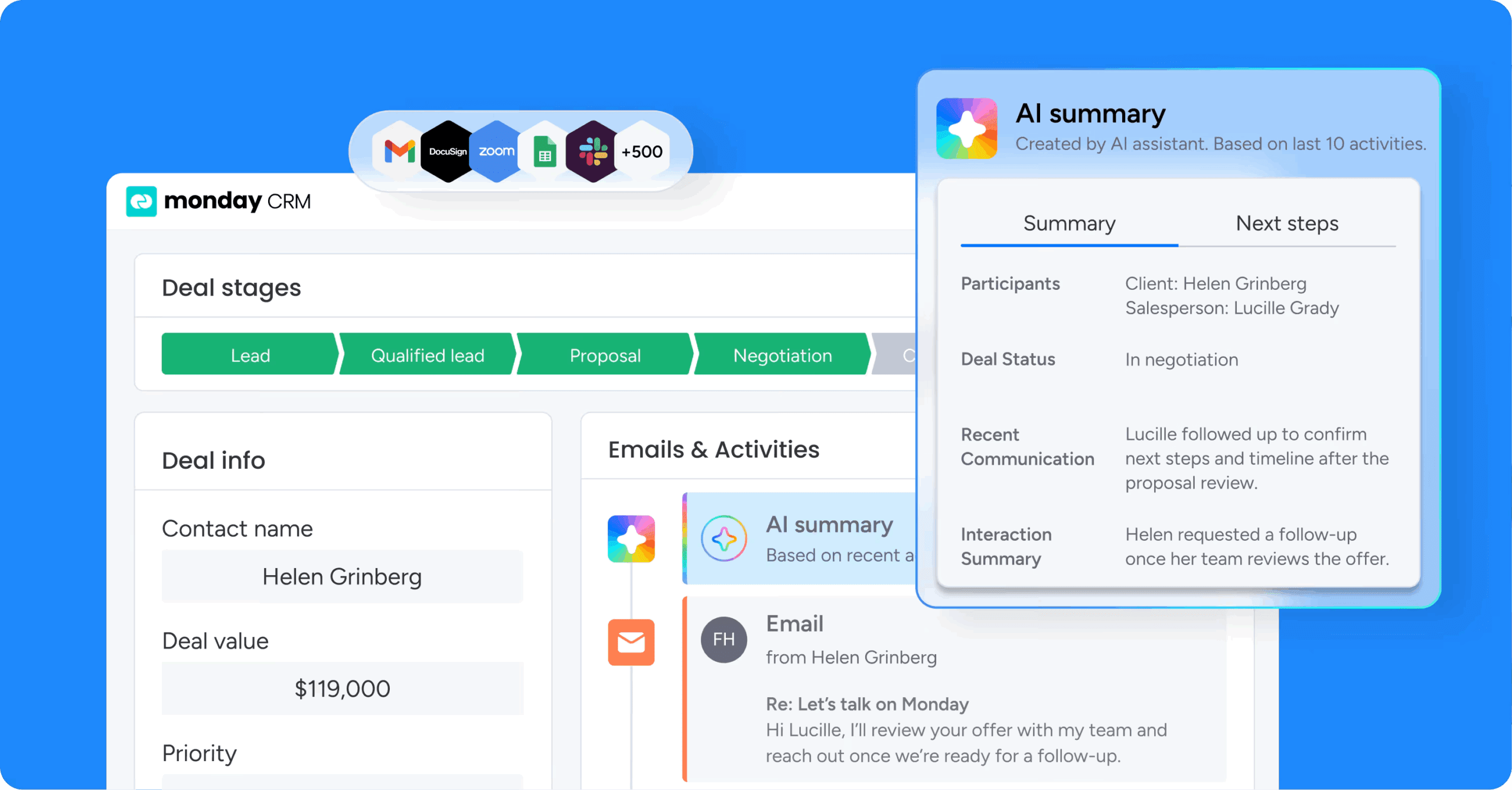
For recruiting teams that need flexibility, monday CRM offers a pipeline that can be shaped around the way work really happens, whether you’re running agency desks, in-house hiring, RPO, or some blend of all three. Because it runs on the monday.com Work OS, that pipeline can sit alongside the rest of your revenue operations instead of getting trapped in another isolated system. With customizable CRM software, teams can update stages, automations, and reporting without taking on a large technical project or waiting through a drawn-out implementation cycle.
Use case
Built for recruiting and staffing teams that need to manage client development and candidate pipelines in one place, plus track the communication history that makes or breaks a placement. A practical example: an agency can track clients as accounts, hiring requests as deals, and candidates as contacts, then keep every email, meeting, call, and note tied to the right record so the full team stays aligned.
Key features
- Visual pipeline management: A visual pipeline shows you where every role, candidate, or client opportunity stands. Drag-and-drop stages let you match the pipeline to your real hiring motion and adjust it fast when the process changes.
- Account and contact management with interaction history: The expanded item view keeps key details in one place and logs every interaction in a single timeline (emails, meetings, and notes). When a recruiter’s out sick or a role changes hands, the context stays put.
- Mass email and tracking: Send individual or mass emails using dynamic fields and templates, then track engagement (open rates and link clicks). Perfect for talent community re-engagement, reference checks, and client updates.
- monday CRM agents: AI agents work inside your CRM to handle repetitive tasks automatically. They can qualify leads, update records, draft follow-ups, and surface insights without manual prompting — so recruiters spend less time on admin and more time closing roles.
Pricing
monday CRM starts at $9/seat/month on the Standard plan, with AI features available on Standard, Pro, and Enterprise plans. Every account receives 500 free AI credits per month, and you can verify current pricing at monday.com/crm/pricing.
Why it stands out
- Adapt it without heavy technical work: Teams use monday CRM to tailor pipelines, fields, and dashboards to their process without turning every change into a project plan.
- Built for the full customer journey: monday CRM supports pre-sale and post-sale workflows, so recruiting leaders can connect client development, placements, onboarding, renewals, and billing in one platform.
- Visibility leaders can use: Code-free dashboards and CRM reporting help sales and recruiting leaders track pipeline health, activity, and outcomes without hunting down updates.
2. Recruit CRM
Best for: Staffing agencies that want a unified ATS and CRM without maintaining separate systems for candidate relationships and active hiring workflows.

Recruit CRM doesn’t force agencies to split relationship-building and active hiring across different systems. It brings both into one platform. Created specifically for staffing agencies and executive search firms, it combines AI-driven sourcing with Kanban-style pipeline views. You can see where every job order and candidate stands.
Use case
Perfect for staffing agencies that want a unified ATS and CRM without maintaining separate systems for candidate relationships and active hiring workflows.
Key features
- AI resume parsing and candidate matching: Automatically extract candidate information from resumes and populate database fields. AI matching surfaces the most relevant candidates for each role. Zero guesswork.
- GPT integration: Built-in GPT capabilities help draft outreach, generate job descriptions, and streamline communication without leaving the platform.
- AI sourcing: Intelligent sourcing tools help you discover qualified candidates faster by analyzing profiles and matching them to open roles automatically.
- Combined ATS and CRM: Manage candidate relationships and active job applications in one place. Kanban pipeline views show exactly where every candidate and job order stands.
- Email integration and automated sequencing: Sync Gmail and Outlook to track all candidate and client communication. Higher-tier plans unlock automated email, LinkedIn, and SMS sequences.
Pricing
Recruit CRM offers three public plan tiers (Pro, Business, and Enterprise), with annual billing saving up to 20% across all plans. Be sure to verify current prices directly on their website.
Considerations
- Recruit CRM focuses entirely on recruiting workflows. If you need to connect recruiting to project delivery, billing, or broader operations, the platform’s scope will feel limiting.
- Watch the add-ons. Key capabilities like workflow automation and LinkedIn Messages Integration sit behind the Enterprise plan or cost extra on lower tiers.
3. Manatal
Best for: Smaller recruitment agencies that want AI-assisted candidate prioritization without juggling separate ATS and CRM subscriptions, plus in-house HR teams looking for a standalone, AI-powered ATS.

Manatal puts AI-powered sourcing and candidate ranking inside one recruitment platform, helping teams move from pipeline to placement faster. It serves two different audiences: in-house HR teams get a polished ATS, while smaller agencies get an ATS and CRM bundled together. For agencies watching total cost of ownership, that built-in CRM matters. There’s no reason to pay for two systems when one can cover the work.
Use case
Smaller recruitment agencies that want AI-assisted candidate prioritization without juggling separate ATS and CRM subscriptions, plus in-house HR teams looking for a standalone, AI-powered ATS.
Key features
- AI candidate scoring and recommendations: Automatically ranks candidates based on role fit using machine learning, so recruiters know exactly who to contact first.
- LinkedIn sourcing integration: Pulls candidate profiles directly into the platform via a Chrome extension, at no additional cost.
- Client pipeline management (Agency accounts only): Tracks the full client lifecycle from prospecting to placement with customizable pipeline stages, integrated email, and collaborative notes.
Pricing
Manatal starts at $15/user/month on the Professional plan (billed annually) and scales up to $55/user/month on Enterprise Plus. A 14-day free trial is available with no credit card required, though some features stay locked until you complete both an active subscription and account verification.
Considerations
- Recruitment CRM features are only available under the “Agency” account type. In-house corporate teams won’t have access to client pipeline management.
- Workflow automations, API access, and SSO are gated behind Enterprise and Enterprise Plus tiers, which may limit scalability for fast-growing teams on the Professional plan.
4. Recruiterflow
Best for: Recruiting agencies wanting automated outreach sequences and AI-powered workflow management.

Built around outbound sourcing, Recruiterflow combines ATS and CRM functionality in a single platform for recruiting and staffing agencies. AI agents are woven directly into core workflows, handling tasks such as call summaries and job change alerts so recruiters can spend less time updating records and more time making placements. With 2,100+ search firms using it globally, the platform is well suited to retained, contingent, and executive search teams.
Use case
Recruiterflow gives recruiting agencies a unified system to manage client relationships, candidate pipelines, and multi-channel outreach without stitching together a Frankenstein tech stack.
Key features
- Multi-channel sequencing: Run email, LinkedIn, SMS, and call sequences with branching logic and per-step analytics, all inside the CRM. No external tools required.
- AIRA agent suite: AI agents handle call transcription, CRM field updates, job change detection, and candidate matching, reducing manual data work across the team.
- Client portal and live dashboards: Share candidate shortlists and real-time pipeline dashboards directly with clients. Give hiring managers full visibility and kill the back-and-forward emails.
Pricing
The Platform plan starts around $99 to $149/user/month, while the AIRA plan requires custom pricing through sales. A 14-day free trial is available.
Considerations
- Several flagship AI features, including LinkedIn sequencing steps, Job Change Alerts, and AIRA Notetaker, are locked behind the AIRA or custom-priced plans. This limits how much you can actually test drive during the free trial.
- The platform is built specifically for agency and search firm workflows. If you’re an in-house recruiting team or need cross-functional tools beyond recruiting, this will feel too narrow.
5. Loxo
Best for: Agencies wanting an all-in-one talent intelligence platform.

Loxo packages sourcing, CRM, outreach, and ATS capabilities into one talent intelligence platform. Recruiting agencies, executive search firms, and in-house teams use it to replace a patchwork of separate tools with a single system of record. One of its more notable advantages is a self-updating data layer that keeps candidate profiles current automatically, reducing time spent on database cleanup.
Use case
Loxo suits recruiting teams that want a self-contained platform to manage the full hiring workflow, from candidate sourcing and outreach to pipeline tracking and client collaboration, without stitching together multiple tools.
Key features
- Self-Updating CRM Agent: Automatically enriches candidate records with current titles, skills, locations, and certifications, reducing data decay across the database.
- AI-powered candidate matching: Surfaces relevant candidates from a database of over 800 million profiles based on job requirements, cutting manual sourcing time.
- Omni-channel outreach automation: Runs personalized email, SMS, and phone sequences natively within the platform, with engagement tracking built in.
Pricing
Loxo starts with a free plan for 1 user that includes ATS, recruiting CRM, unlimited jobs, and Chrome extension. The Basic plan runs $169/user/month (billed annually), while Professional and Enterprise plans require custom pricing through sales.
Considerations
- AI agents and advanced automation features are only available on Professional and above, so teams on the Basic plan will have limited access to Loxo’s core AI capabilities without upgrading.
- The platform functions as a closed ecosystem, which can limit flexibility for teams that rely on specific third-party tools, and Open API access comes at an additional cost.
6. Bullhorn
Best for: Large staffing firms needing enterprise-grade ATS + CRM.
For staffing agencies handling large volumes of candidates, clients, and placements, Bullhorn brings ATS and recruitment CRM capabilities together in a single system. It’s designed around the three-way relationship between candidates, jobs, and clients, helping sales and recruiting stay aligned without duplicate data entry. Large firms with back-office complexity often choose it because the platform can scale from smaller teams all the way up to global enterprises running on Salesforce.
Use case
Bullhorn suits staffing agencies that need sales pipeline management, candidate tracking, and back-office operations (payroll, billing, and compliance) connected in one system.
Key features
- Relationship Intelligence (Pulse): Automatically captures email and phone activity to surface relationship health and flag which client accounts need attention, without manual logging.
- AI-assisted candidate search and matching: Ranks likely-to-place candidates and auto-builds searches from job descriptions, so recruiters surface database talent before spending on paid sourcing.
- One-click sales-to-job conversion: Converts a won opportunity directly into a job order, keeping the client record, submissions, and pipeline linked from first contact to placement.
Pricing
Bullhorn offers three main tiers: Starter ($99/user/month), Core ($165/user/month), and Pro (custom pricing). Midsize and enterprise pricing is available on request, and optional add-ons like AI Search & Match, Onboarding, and Back Office are available at additional cost.
Considerations
- Full sales pipeline CRM functionality is only available on the Pro tier, so smaller agencies on Starter or Core plans will need to upgrade to access complete CRM features.
- No self-serve free trial is available; evaluation requires a demo, which can slow down hands-on assessment for teams that prefer to explore a platform before committing.
7. Zoho Recruit
Best for: Budget-conscious teams needing a customizable ATS + CRM.

Running separate systems for ATS and CRM is unnecessary overhead for many teams. Zoho Recruit combines both functions in one platform, giving recruiters a single place to source talent and manage hiring pipelines. It offers separate editions for staffing agencies and corporate HR teams, and the free plan gives solo recruiters or small teams a low-risk way to try it before moving to a paid tier.
Use case
Zoho Recruit suits budget-conscious recruiting teams that want a combined ATS and CRM without paying for two separate tools.
Key features
- Blueprint process automation: Enforce stage-gated recruiting workflows with approvals, notifications, and structured transitions to keep every hire on track.
- Client and candidate portals: Cut the endless email chains. On higher-tier plans, you get a Candidate Portal so applicants can track their own status. If you use the Staffing Agency edition (on Enterprise or Zoho One/PeoplePlus tiers), you also unlock a Client Portal to share profiles and collect feedback directly.
- Zia AI matching: Automatically surface best-fit candidates for open roles and generate AI summaries to speed up screening decisions.
Pricing
Zoho Recruit offers a free plan for 1 active job with limited features. Paid plans historically start around $25 to $50/recruiter/month (billed annually), though exact rates depend heavily on your region and chosen edition. Annual billing typically saves up to 16% compared to monthly rates, and add-ons like video interviews and vendor portals are billed separately.
Considerations
- The interface feels a bit dated compared to newer platforms. You’ll also need to spring for an Enterprise plan to unlock heavy-hitting features like Blueprint automation, client portals, and advanced analytics.
- Deep integration with Zoho CRM is locked to the Staffing Agency edition. If you’re a corporate HR team, your CRM sync options will be limited.
8. Gem
Best for: In-house talent teams focused on pipeline analytics and DEI.

For talent acquisition teams, Gem shifts candidate relationship management from a reactive scramble to a more proactive, AI-driven motion. Designed for organizations ranging from startups to global enterprises, it brings sourcing, CRM, ATS, scheduling, and analytics together in one platform, reducing system switching and freeing recruiters to spend more time building pipelines.
Use case
Gem gives talent acquisition teams a single system of record for every candidate relationship, from first outreach to hire, with AI-powered rediscovery and real-time ATS sync keeping the entire pipeline accurate and actionable.
Key features
- AI Talent Rediscovery: Surfaces past applicants and silver-medalists using natural-language search, so teams start with warm, pre-qualified candidates rather than sourcing from scratch every time.
- Automated nurture sequences: Multi-stage, personalized outreach campaigns with “send on behalf of” (SOBO) hiring manager capability.
- Real-time, bi-directional ATS sync: Keeps Gem and your existing ATS (Greenhouse, Workday, Lever, iCIMS, and others) in step, so candidate data stays consistent across both systems without manual updates.
Pricing
Gem offers custom pricing based on company FTE count for both “Gem + Your ATS” and “Gem All-in-One” plans. A Startup Program is available for companies under 30 employees, offering Gem All-in-One free for six months, then 50% off when moving to paid.
Considerations
- Pricing for mid-market and enterprise plans is quote-only, with no public list prices beyond the Startup Program, so budget planning requires a sales conversation.
- Some functionality varies depending on which ATS you connect, so teams with less common or limited ATS integrations may not get the full feature set.
9. Tracker RMS
Best for: Mid-size staffing agencies needing an integrated back-office.

Tracker RMS ties front-office recruiting and client relationship management to back-office operations inside a single platform. Created for staffing agencies, it keeps job orders, client accounts, and candidate pipelines aligned, reducing the chance that information gets lost between a business development call and a placement. Agencies working across temp, contract, perm, and executive search will likely find the unified workflow especially useful.
Use case
Tracker RMS suits mid-size staffing agencies that need ATS, CRM, and back-office functionality (including timesheets, invoicing, and payroll integrations) managed in one place.
Key features
- AI content suite: Generate job descriptions, candidate outreach, and client communications using AI-powered content tools that adapt to your brand voice and save hours of writing time.
- AI match and ranking: Automatically surface the best-fit candidates for each role using intelligent matching algorithms that learn from your placement history and hiring patterns.
- Built-in sales sequencer: Multi-step, multi-channel outreach (email, SMS, workflow triggers) runs natively inside the platform, with MANDACT lead qualification and one-click conversion of leads into job orders.
- Integrated ATS and CRM: Client development, job orders, and candidate pipelines stay connected in real time, so recruiters and BD teams always work from the same data.
- Reporting and pipeline visibility: Configurable dashboards track team performance, placement rates, pipeline value, and revenue forecasts across the full recruiting cycle.
Pricing
Tracker RMS starts at $79/user/month on the Launch plan (up to 5 recruiters), with the Core plan at $99/user/month adding AI features, client portals, and billing tools. Professional and Enterprise plans require custom pricing through sales, and a free trial is available.
Considerations
- Advanced automation, sequences, and back-office features are gated behind Professional and Enterprise tiers, which are quote-only, making total cost harder to predict without a sales conversation.
- The platform is purpose-built for staffing workflows, so teams that need to extend CRM functionality beyond recruiting will find limited flexibility.
10. Workable
Best for: In-house teams managing high-volume hiring with collaborative workflows.

Workable pairs ATS functionality with a built-in talent CRM, giving in-house teams a way to manage high-volume hiring without stacking multiple platforms together. Used by 35,000+ companies across 100+ countries, it is designed for speed, from sourcing passive candidates to coordinating interviews and gathering team feedback. Its agentic AI continuously searches 400M+ profiles, which makes it a strong option for teams that need to hire quickly and keep pipelines active.
Use case
Workable suits in-house recruiting teams that need to manage multiple open roles simultaneously, with collaborative workflows and AI-assisted sourcing built directly into the hiring process.
Key features
- AI-powered candidate sourcing: Searches 400M+ external profiles using natural-language criteria, resurfaces qualified past applicants for new roles, and claims approximately 2x response rates compared to standard outreach templates.
- Talent CRM database: Centralizes applicants, prospects, and past candidates in one searchable system with tagging, filtering, and access controls so your pipeline stays organized across every open role.
- Integrated communications: Two-way email and calendar sync, SMS texting, LinkedIn Recruiter System Connect (RSC), and customizable templates keep candidate outreach consistent and trackable.
Pricing
Workable starts at $299/month for 1 to 20 employees on the Standard plan, with Premier at $599/month and Enterprise at $719/month. A 15-day free trial is available, and annual billing saves 20%.
Considerations
- LinkedIn RSC requires a full LinkedIn Recruiter license (not Recruiter Lite), which adds external licensing cost and complexity for teams that rely heavily on LinkedIn sourcing.
- Talent Pool data is excluded from certain pipeline reports (such as the hiring funnel report), which can limit visibility for teams that want end-to-end reporting across their full candidate database.
6 steps to choose the right recruitment CRM system
Choosing a recruitment CRM is almost never just a feature-comparison exercise. Make the wrong call, and your team ends up back in spreadsheets within a matter of weeks, with budget wasted and adoption nowhere in sight. A smart decision starts before the first demo.
Use the framework below to evaluate your options and pick a platform your team will genuinely use.
Step 1: Map your staffing motion and team size
Before you compare platforms, get clear on how your team actually operates. A contingency agency and an in-house team building a passive talent pipeline do not need the same tooling.
- Identify your pipeline volume: How many active pipelines do you run at once to hit your targets?
- Define your requirements: Answering this prevents you from buying software built for someone else’s workflow. Define your exact requirements around client relationships and back-office tasks immediately.
Learn more: AI candidate matching agent
Step 2: Prioritize must-have features over nice-to-haves
Feature lists can be deceptive. Most platforms advertise dozens of capabilities, but teams typically depend on only a small subset. Start with the bottlenecks that matter most, not the flashy extras that sound impressive during a sales pitch.
- List workflow issues: Document your top three workflow issues, like manual follow-ups or lost candidate history.
- Evaluate against needs: Compare options against those specific needs rather than generic feature lists.
Step 3: Evaluate AI depth versus bolted-on AI
You’ll notice the difference between native AI and bolted-on AI almost immediately in day-to-day work. If recruiters have to leave their workspace, paste data somewhere else, and manually apply outputs, adoption drops fast.
- Check daily workflow integration: Ask vendors directly where their AI appears in your daily workflow.
- Assess context switching: Determine if the AI requires constant context switching to function properly.
Step 4: Calculate total cost beyond seat pricing
Seat pricing rarely tells the whole story. Onboarding fees, paid add-ons for advanced reporting, and the internal cost of training people on a complicated system can reshape the budget quickly.
- Request full estimates: Ask every vendor for a total cost of ownership estimate rather than just a monthly user fee.
Step 5: Test integrations with your existing tech stack
Even strong software creates friction if it ignores the tools your team already depends on. During a live trial, make sure the essential connections, like email, calendar scheduling, and sourcing tools work the way they should instead of trusting a feature checklist.
- Verify connections: Revenue teams find success using monday CRM to centralize their data, easily connecting with over 200 platforms so your existing tech stack stays completely intact.
Step 6: Run a pilot with real recruiter workflows
Before you commit, run a live pilot using active candidates and real recruiter workflows. That’s where adoption issues surface, far away from the polished vendor demo, and where you learn how long it actually takes to update records or move a candidate ahead.
- Test with real data: Organizations achieve incredible results when they leverage monday CRM for these workflows, using intuitive automations so recruiters spend less time on manual updates and more time closing roles.
If the team avoids the software after two weeks of real work, it is not the right fit. The best system earns adoption by making daily work easier immediately, not by relying on a leadership mandate.
Try monday CRMAI trends reshaping candidate relationship management
Recruitment CRMs have moved well beyond acting as digital filing cabinets for resumes. More and more, they are becoming systems that surface insights and draft outreach before a recruiter even opens the inbox. Recognizing that shift now can keep you from buying a platform you outgrow next year.
Shift from passive databases to proactive digital recruiters
In practice, the difference between shallow AI and meaningful AI becomes obvious fast. One recruiter gets a nudge about a cold candidate plus a drafted re-engagement email. Another gets little more than a search box.
What matters is whether the system actually helps do the work instead of merely storing information. Many organizations see stronger outcomes with monday CRM by automating client communication and pulling actionable insight from every interaction. AI Blocks can categorize data at scale and summarize meeting notes instantly, helping teams act on the right information at the right time.
Integration of cross-functional recruitment and revenue operations
Look closely at how connected your pipeline data really is. Recruiting does not happen in isolation; candidate pipelines and client revenue pipelines often reflect two sides of the same business. Leaders need visibility into both to make better, faster decisions.
When platforms trap teams inside recruiting-only workflows, blind spots grow quickly. In-house teams want candidate data linked directly to headcount planning and onboarding. Systems built around silos simply struggle to keep pace with that expectation.
Focus on skills-based hiring and data quality
As skills-based hiring becomes more common, the CRM itself has to track different kinds of information. A platform built around simple job-title matching will fall short when you need clarity on whether a candidate truly has the capabilities required. That raises an important question: does your current system really understand your talent pool?
The answer depends heavily on CRM data management. Even sophisticated AI models produce weak recommendations when CRM data capture leaves records outdated or incomplete. So look beneath the feature layer. The platforms that keep their value over time are the ones that actively strengthen the data they run on.
Keeping pace with these trends helps your team stay competitive in a tight talent market. The right technology evolves with those changes, keeping pipelines full and recruiters focused on relationship-building.
Run your recruitment pipeline on monday CRM
For most recruiting teams, the problem isn’t a lack of software. It’s fragmentation. The ATS, spreadsheet, and sales CRM all sit in different places, and none of them communicate well. That disconnect creates blind spots, slows follow-ups, and makes it nearly impossible to see where candidates actually stand.
monday CRM gives recruiting teams a way to replace that sprawl with one connected system. Candidates, clients, and outreach can all be managed in one place, without pulling in IT every time the process needs to change. Because it’s built on the monday.com Work OS, the platform adapts to your recruiting motion instead of forcing your team into rigid workflows designed for someone else’s hiring process.
AI agents that handle repetitive recruiting tasks automatically
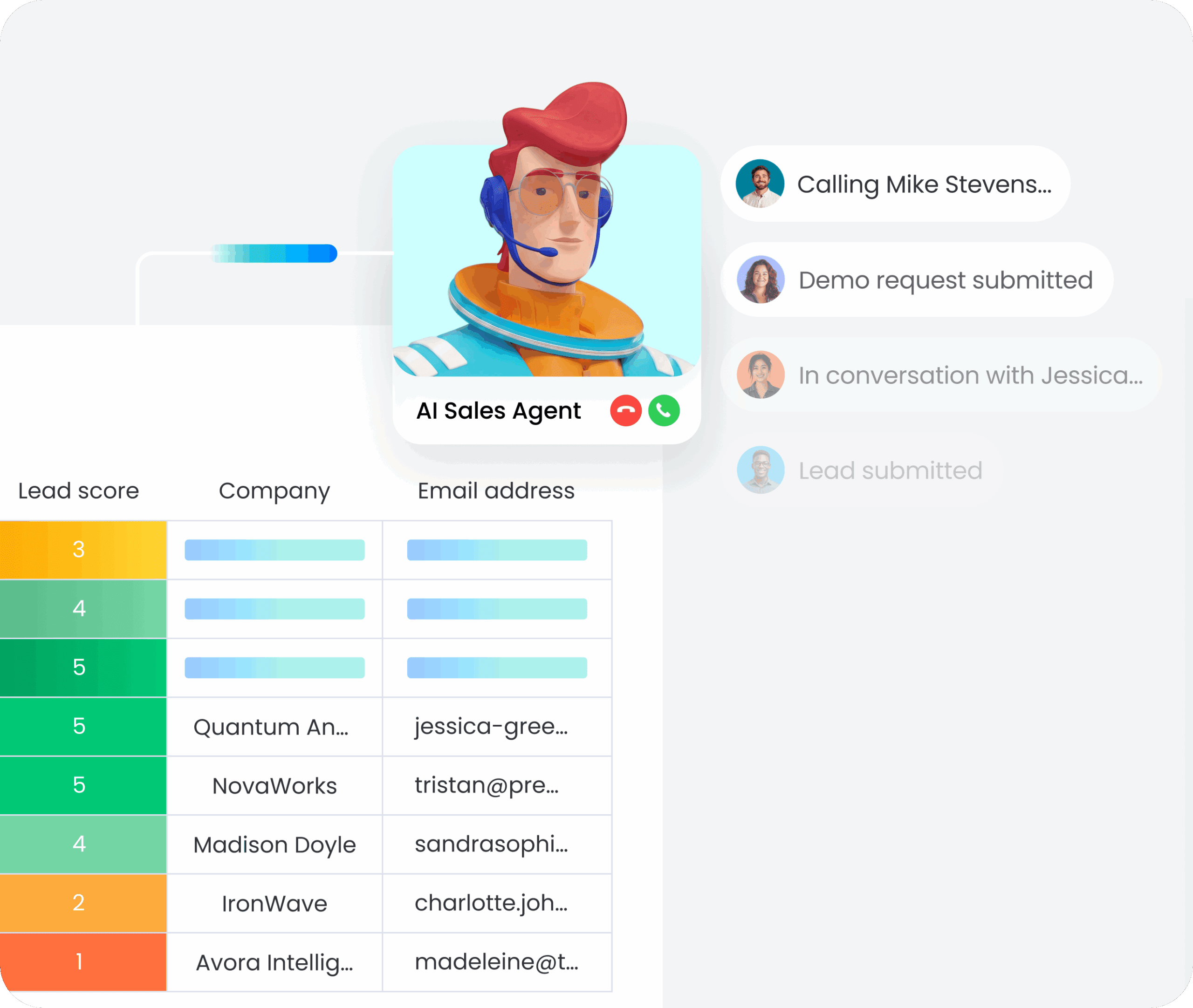
monday CRM agents work inside your workspace to handle repetitive tasks without manual prompting. They can qualify leads, update candidate records, draft personalized follow-ups, and surface insights based on pipeline activity. Recruiters spend less time on admin and more time building relationships that lead to placements.
AI-powered email and communication tools
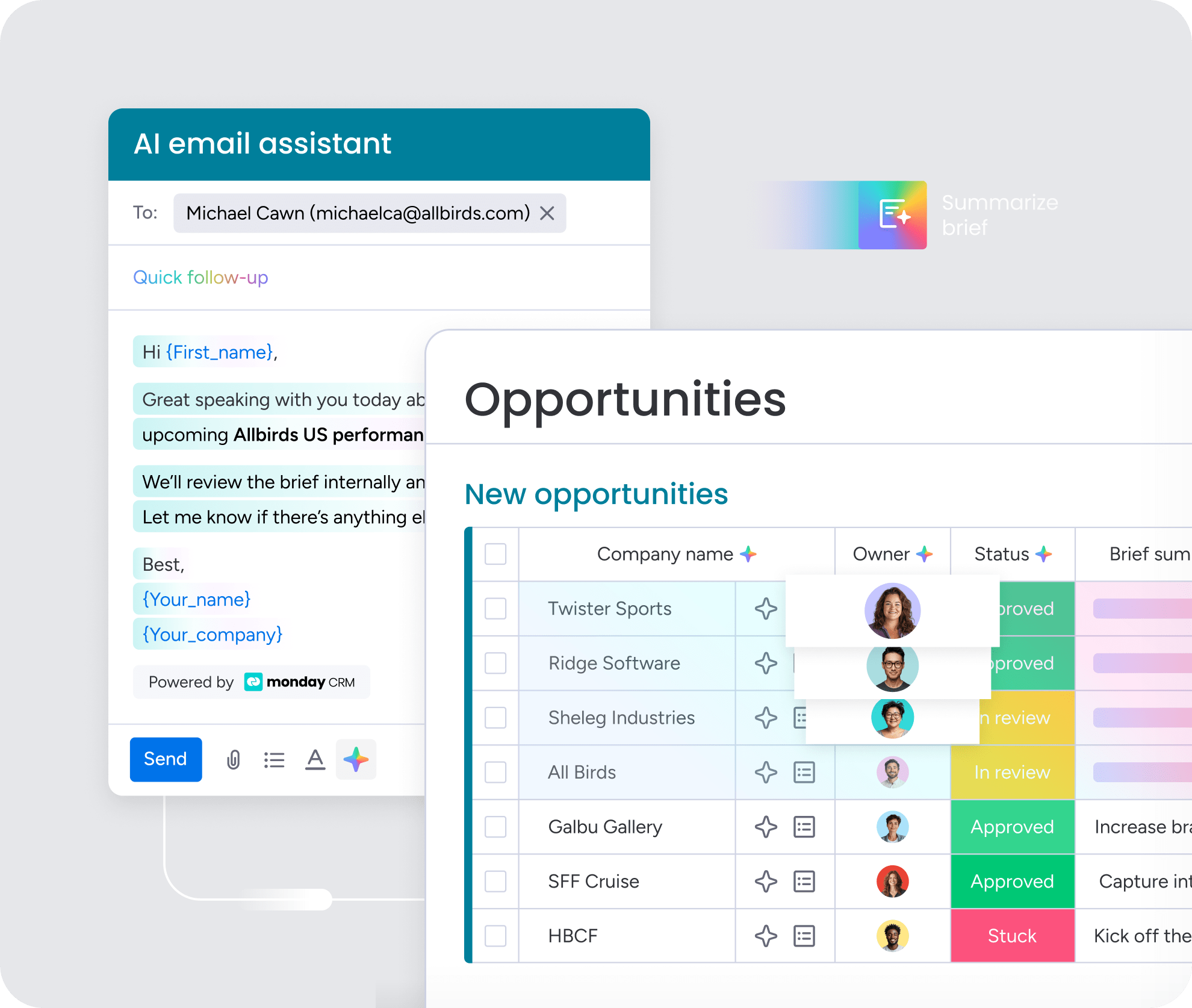
The AI email assistant drafts and refines candidate outreach instantly, letting you control tone and length directly within your workspace. AI timeline summaries give you an instant snapshot of all emails, calls, and notes with a specific candidate or client, so you skip scrolling through endless threads. Sentiment detection categorizes communications as positive, negative, or neutral, helping you instantly identify which relationships need immediate attention.
Autofill candidate data with AI
Pull key information from resumes and PDFs straight into your board columns without manual data entry. AI autofill extracts skills, experience, contact details, and other relevant fields automatically, keeping your candidate database accurate and up to date. This eliminates the data entry bottleneck that slows down high-volume recruiting teams.
AI-driven automations for pipeline management

Trigger follow-ups, stage changes, and team notifications based on custom conditions without writing code. AI automations learn from your hiring patterns and can suggest workflow improvements over time. When a candidate moves forward, the system handles the next steps automatically, keeping your pipeline moving without constant manual oversight.
“With monday CRM, we’re finally able to adapt the platform to our needs — not the other way around. It gives us the flexibility to work smarter, cut costs, save time, and scale with confidence.”
Samuel Lobao | Contract Administrator & Special Projects, Strategix
“Now we have a lot less data, but it’s quality data. That change allows us to use AI confidently, without second-guessing the outputs.”
Elizabeth Gerbel | CEO
“Without monday CRM, we’d be chasing updates and fixing errors. Now we’re focused on growing the program — not just keeping up with it."
Quentin Williams | Head of Dropship, Freedom Furniture
“There’s probably about a 70% increase in efficiency in regards to the admin tasks that were removed and automated, which is a huge win for us.“
Kyle Dorman | Department Manager - Operations, Ray White
"monday CRM helps us make sure the right people have immediate visibility into the information they need so we're not wasting time."
Luca Pope | Global Client Solutions Manager at Black Mountain
“In a couple of weeks, all of the team members were using monday CRM fully. The automations and the many integrations, make monday CRM the best CRM in the market right now.”
Nuno Godinho | CIO at Velv
“monday.com provides developmental flexibility, operational efficiency, and data transparency — all in one place. We became a company that moved from chasing data to leading with it.”
Hyunghan Lee | Team Lead, Sandbox Network
"monday.com brought every part of our business into one connected space. The harmony between work management and CRM has become our operating system — giving us the clarity and confidence to scale.”
Jennifer Chinburg | Executive Vice President of Corporate Development & Brand, Chinburg Properties
“We just weren’t getting value from our old CRM. With monday.com, it's a thousand times better. Our sales teams are more informed, more consistent, and far more connected."
James Arnold | Chief Operating Officer, CenversaTransform your hiring process with the right CRM
Scattered spreadsheets and disconnected tools do more than create inconvenience; they actively drag down hiring momentum. A dedicated recruitment CRM brings candidate data together, automates repetitive outreach, and gives your team the visibility needed to fill roles faster. Instead of searching for context, recruiters can spend their time building stronger relationships with top talent.
The strongest platforms adapt to your workflows rather than forcing your team into rigid processes. Consolidating the tech stack cuts manual entry, keeps everyone aligned around open roles, and reduces operational friction. Start by identifying your bottlenecks, then prioritize the features that solve them, and choose a system that genuinely improves daily execution. Platforms like monday CRM give recruiting teams the flexibility to manage candidates, clients, and outreach in one connected workspace, with AI agents handling repetitive tasks so your team can focus on what actually moves placements forward.
Try monday CRMFAQs
What is the difference between a recruitment CRM and an applicant tracking system?
The main difference between a recruitment CRM and an applicant tracking system (ATS) involves where candidates sit in your pipeline. A CRM builds relationships with passive talent before they apply, while an ATS manages active applicants moving through structured interview workflows.
Do recruiting teams need both a recruitment CRM and an ATS?
Recruiting teams often need both a recruitment CRM and an ATS to manage the complete hiring lifecycle effectively. Using a unified platform that handles both passive sourcing and active pipeline management keeps your data centralized and prevents tool fatigue.
How much does recruitment CRM software cost?
Recruitment CRM software costs vary widely based on your organization's size, typically ranging from $15 to $99 per user each month for mid-market platforms. You must also factor in implementation fees, add-ons, and integration expenses to calculate your true total cost of ownership.
Can recruitment CRM software integrate with LinkedIn?
Recruitment CRM software can integrate with LinkedIn to help you import profiles and manage sourcing workflows instantly. Teams discover that monday CRM enables them to connect LinkedIn alongside 200+ other platforms, keeping all outreach and pipeline tracking perfectly centralized.
What is AI-powered candidate matching?
AI-powered candidate matching uses artificial intelligence to instantly surface relevant talent from your database based on specific job requirements. This technology learns from your hiring patterns over time, meaning candidate recommendations become increasingly accurate without any manual searching.
How do recruitment CRMs help with compliance and data privacy?
Recruitment CRMs help with compliance and data privacy by centralizing candidate information, tracking consent, and maintaining clear audit trails. Secure platforms include role-based permissions and built-in privacy controls, eliminating the severe risks associated with managing sensitive data manually.
