


A star performer recently submitted a resignation. They managed three critical projects, mentored junior team members, and still found time to handle urgent requests across the organization. This situation is common when workload planning defaults to allocating the hardest work to whoever appears most capable.
Sustainable performance requires a more strategic approach. Workload planning ensures work is distributed according to actual capacity, skill sets, and priorities rather than relying solely on top performers. When implemented effectively, it prevents burnout, accelerates project delivery, and enables teams to maintain consistent, high-quality output.
This article explores ten strategies for increasing team efficiency through strategic workload planning. Readers will learn how to visualize capacity in real time, automate workload distribution, and leverage data to make informed resource decisions while maintaining balance and alignment across teams.
Key takeaways
- Effective workload planning prevents burnout: distribute work based on capacity, skills, and priorities rather than overloading top performers.
- Data-driven insights improve team efficiency: real-time visibility, predictive analytics, and performance tracking help managers allocate resources strategically.
- Skill-based task assignment enhances quality and speed: matching work to expertise ensures faster completion and higher-quality results.
- Cross-departmental visibility reduces silos: connecting teams and systems allows for better coordination, workload balance, and dependency management.
- Workload management tools like monday monday AI Workspace support scalable planning: visual dashboards, automation, and AI-driven recommendations help optimize capacity across teams.
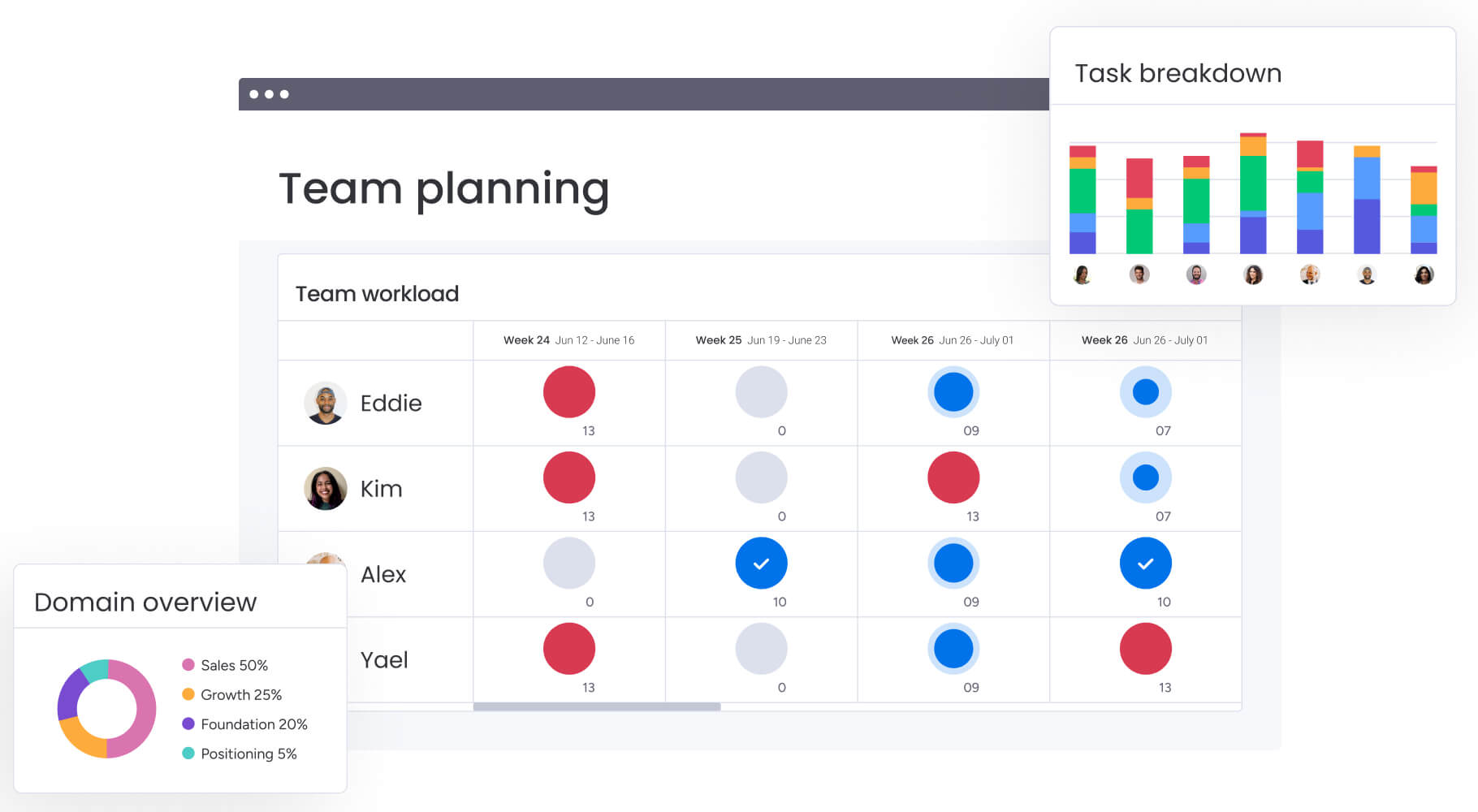
Workload planning is the process of analyzing, distributing, and balancing work across a team based on capacity, skills, and priority. It goes beyond assigning tasks — it includes forecasting availability, matching work to expertise, and allocating resources so teams remain productive without risking burnout.
Consider a marketing team preparing for a product launch. Without a plan, all campaign tasks fall on the most skilled designer while junior team members have little to do. With workload planning, managers distribute graphics, copy, and video assignments based on availability and capability. The result is faster delivery, higher-quality work, and a team that finishes the week energized instead of exhausted.
Operations teams encounter similar challenges during peak periods. When orders increase, workload planning allows managers to reallocate resources dynamically. Instead of reacting to bottlenecks, they can anticipate capacity constraints and adjust assignments proactively.
Core elements of effective workload planning
Effective workload planning relies on five elements that work together to maintain sustainable team performance. Understanding each one allows managers to build a complete system rather than applying temporary fixes.
- Capacity assessment: a realistic evaluation of team availability that accounts for meetings, administrative work, and non-project time.
- Skill mapping: assigning work based on team member capabilities ensures tasks go to the right person for efficient execution.
- Priority alignment: connecting each task to business objectives ensures high-impact work receives attention before lower-value activities.
- Timeline coordination: managing dependencies and deadlines across projects shows how delays in one area affect other work.
- Workload distribution: balancing assignments prevents overloading top performers while giving all team members meaningful contributions.
How workload planning drives business outcomes
Workload planning delivers measurable results. Teams that implement it effectively experience fewer delays, improved resource use, and lower turnover. Yet only 12% of U.S. HR leaders report conducting strategic workforce planning with a three-year horizon, despite 73% using operational workforce planning. This gap shows that many organizations remain reactive rather than predictive.
When executed correctly, workload planning provides leaders with data to make confident resource decisions. Managers can justify hiring by identifying capacity gaps or adjust budgets based on actual utilization.
Without visibility, poor planning creates cascading issues. Missing a launch because a critical engineer is overbooked is preventable with workload planning. Properly assessing capacity, aligning skills, and prioritizing tasks ensures work flows smoothly and teams perform sustainably.
Download now: Workforce planning template
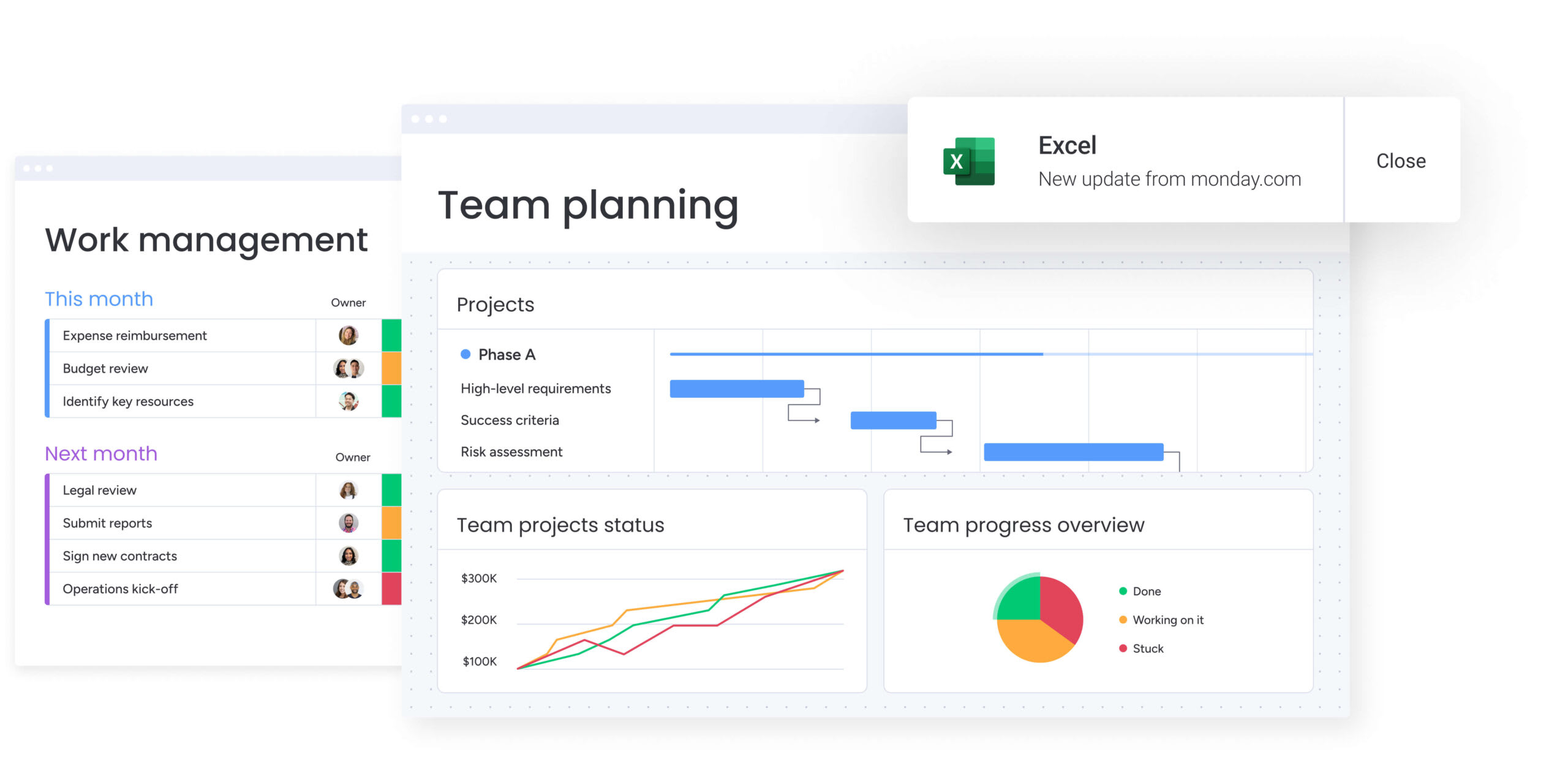
Why workload planning transforms team performance
Workload planning strengthens both team output and morale. By shifting from reactive firefighting to proactive planning, teams reach higher performance levels they can sustain over time.
Unlock measurable productivity gains
Strategic workload planning reduces productivity blockers such as context switching, overallocation, and skill mismatches. When work aligns with team capacity and expertise, projects move forward more efficiently and with less friction.
This also decreases the time managers spend on emergency task reassignment and prevents overloaded team members from delaying critical work. Teams perform best when assignments match their skills and feel achievable.
Modern platforms like monday.com provide visibility through the Workload View, enabling managers to balance resources effectively and adapt quickly as priorities change.
Prevent burnout before it happens
Workload planning gives leaders the insight needed to maintain team wellbeing through proactive resource management. Managers can identify overcapacity early and intervene before burnout escalates to resignation. Research shows that22% of employees globally report burnout symptoms, rising to 45% among those with high job insecurity, highlighting the importance of workload balance.
During peak periods or when team members are unavailable, structured planning allows smooth redistribution of work through resource leveling. This keeps projects on schedule and protects team morale.
What does your current process reveal about team capacity before challenges escalate?
Enable smarter resource allocation
With workload planning, resource allocation becomes strategic rather than speculative. Leaders gain data to decide when to hire, reassign tasks across teams, or adjust timelines.
This visibility also supports budget planning and forecasting, allowing organizations to align workforce costs with revenue cycles. Data may show, for example, that a design team is underutilized in Q1 but overwhelmed in Q3, enabling proactive contractor planning.
Try monday.comWorkload planning vs. resource management
Although often used interchangeably, workload planning and resource management serve distinct purposes. Understanding the difference ensures both short-term execution and long-term strategy are addressed effectively.
| Dimension | Workload planning | Resource management |
|---|---|---|
| Focus | Distribution and optimization of specific work among current team members | Acquisition, allocation, and utilization of resources (people, budget, equipment) at a high level |
| Timeline | Ongoing, operational, and short-to-medium term (daily, weekly, quarterly) | Periodic, strategic, and long-term (quarterly, annually, multi-year) |
| Scope | Optimizes current capacity to ensure immediate delivery and team balance | Plans future capacity requirements to ensure the organization can meet long-term goals |
| Primary users | team leads, project managers, and department heads | executives, PMO directors, and resource managers |
Both disciplines complement each other: resource management ensures the right people are in place, and workload planning ensures they are focused on the right tasks at the right time.

These strategies build on each other, helping managers improve team performance over time. Implementing even a few of these approaches can boost visibility, optimize output, and reduce bottlenecks immediately.
1. Visualize team capacity in real time
Real-time ccapacity assessment prevents overallocation by providing an instant snapshot of available bandwidth. Visuals such as workload percentages, deadlines, and skill availability help managers make decisions quickly.
When a client requires urgent attention, a visual dashboard reveals who can take the work without affecting other deadlines. Teams gain this insight on modern platforms like monday.com, which turn raw data into a clear picture of team health.
2. Automate workload distribution across teams
Automation removes the manual effort of balancing workloads. By setting rules for assignment based on capacity, skills, and availability, organizations ensure consistent workload management.
Automation rules can instantly route new requests to the next available team member with the right expertise or redistribute work through effective workload distribution if a team member marks themselves as unavailable. This minimizes administrative tasks and keeps projects moving even when managers are offline.
3. Match tasks to skills, not just availability
Assigning work only by who is free often results in lower quality and slower completion, which proper capacity planning prevents.Skill-based assignment ensures work is done efficiently and effectively.
This approach improves both speed and quality while supporting professional growth. Giving a complex data project to a junior marketer because they are free might cause delays, whereas waiting for a data specialist produces accurate results faster.
4. Break down silos with cross-departmental views
Effective workload planning requires visibility beyond individual teams. Cross-departmental views expose dependencies and collaboration opportunities hidden in siloed systems, similar to a resource calendar.
This prevents conflicts, such as marketing and product teams competing for the same resources during a launch. Cross-board dashboards on monday.com consolidate data across teams, enabling operations and customer success to coordinate client onboarding for smooth handoffs.
5. Forecast capacity with predictive analytics
Data-driven forecasting uses historical information and current trends to anticipate future capacity needs accurately. Predictive analytics identifies seasonal workload changes, estimates project completion timelines, and highlights future resource requirements.
This allows decisions such as hiring ahead of a predicted capacity crunch or adjusting project schedules proactively. How far ahead can your current planning process see?
6. Set intelligent workload alerts
Proactive alerts prevent workload issues before they affect delivery. Intelligent systems notify managers of overallocation, approaching deadline conflicts, or skill gaps in upcoming project phases.
For example, an alert might show that an engineer is booked for 60 hours next week, allowing managers to reassign work immediately. These alerts reduce manual monitoring while ensuring critical capacity issues are never overlooked.
7. Connect your entire tech stack
Integration eliminates manual data entry and creates a comprehensive picture of team workload. Linking project management, time tracking, CRM, and communication systems ensures all work is reflected in the capacity plan.
Disconnected systems can hide “shadow work,” where team members appear free but are actually busy with emails or support tickets. Platforms like monday.com integrate with 200+ apps, including Microsoft Teams, Gmail, Slack, Jira, and Salesforce, helping teams manage projects efficiently without switching between tools.
8. Monitor team wellbeing indicators
Workload planning includes tracking team health metrics beyond completion rates. Indicators such as sustained workload balance, overtime trends, and completion rate changes provide insight into team morale and sustainability.
If data shows a team consistently logging weekend hours to meet deadlines, it signals a process or resourcing issue that requires adjustment. Sustainable performance requires ongoing attention to these signals.
9. Create dynamic scenario plans
Scenario planning prepares teams for workload fluctuations and unexpected events. Managers can model scenarios such as a team member taking sudden leave, changes in project scope, or shifts in corporate priorities.
This agility allows teams to pivot quickly with pre-approved contingency plans rather than scrambling when reality diverges from the roadmap. How would your projects fare if a critical team member were unavailable for two weeks?
10. Continuously optimize with data insights
Ongoing analysis improves workload planning over time. Tracking metrics such as completion rates, workload balance, and team utilization helps managers identify trends and long-term bottlenecks.
Insights may reveal that a process consistently delays design projects or that a skill set is oversubscribed, indicating a need for training or hiring. Data-driven optimization ensures continuous improvement in operational performance.

Successful workload planning requires a structured approach and stakeholder alignment. Following these five steps ensures that workload management becomes a strategic operational strength, rather than a routine administrative task.
Step 1: map your current workload landscape
Begin by assessing existing workload distribution to identify challenges and establish baselines. This audit involves documenting all current projects, reviewing team capacity, and mapping skill sets.
Key deliverables include:
- Comprehensive workload inventory: complete documentation of all active projects and assignments.
- Capacity assessment report: analysis of actual available hours versus allocated work.
- Skills mapping: identification of team capabilities and expertise gaps.
This mapping often uncovers hidden overallocation, skill gaps, or unclear priorities that may be limiting team performance.
Step 2: define team capacity metrics
Establish measurable capacity standards to guide workload decisions consistently. Capacity levels should reflect role, experience, and task type, as the output of a senior developer differs from that of a junior team member.
Metrics can include:
- Hours per week: standard working hours minus meetings and administrative time.
- Project load: number of concurrent projects or initiatives per person.
- Complexity points: weighted scoring based on task difficulty and required expertise.
Time tracking and reporting features in modern platforms like monday.com help teams understand how long projects take, ensuring future planning is data-driven and efficient.
Step 3: select your workload planning system
Choosing the right platform is critical for adoption and scalability. Evaluate capabilities such as real-time visibility, automation options, integrations, and flexible reporting.
The platform should support complex workflows while remaining intuitive for daily use. Modern tools like monday.com offer a customizable environment with multiple board views, scaling from simple tracking to enterprise-level planning.
Step 4: build standardized workflows
Consistent workflows are the foundation of effective workload planning. Develop processes for capacity assessment, assignment, monitoring, and adjustment.
Core workflow components include:
- Assignment protocols: rules for matching work to team members based on capacity and skills.
- Escalation triggers: automated alerts when workload limits are exceeded.
- Adjustment procedures: standard processes for redistributing work when priorities change.
Clear procedures for handling overdue projects or missed deadlines help maintain consistency across teams and make onboarding new managers smoother.
Step 5: launch, monitor, and scale
Implementation should be gradual and iterative. Start with a pilot team or department to refine workflows before rolling out organization-wide.
Ongoing monitoring should include:
- Adoption tracking: measuring how consistently teams use the new processes.
- Outcome measurement: comparing performance metrics against baseline data.
- Feedback collection: gathering input from team members and managers.
As workflows mature, expand the approach to additional teams, new use cases, and connected systems to scale workload planning across the organization.
Try monday.comModern platforms like monday.com make workload planning visible, measurable, and adaptable. By combining real-time dashboards, automation, and reporting, teams can maintain alignment, balance workloads, and optimize performance across projects.
Essential workload planning capabilities and features
Effective workload planning requires specific capabilities that move beyond basic lists. These functional categories represent the essential toolkit for managers seeking sustainable team performance.
Visual workload management capabilities
Visual interfaces are essential for effective workload planning because they help teams interpret complex capacity data quickly. Different stakeholders benefit from tailored perspectives: team leads require detailed daily views to manage execution, while executives rely on high-level dashboards to monitor department performance.
Key visual elements that drive workload planning include:
- Capacity charts: utilization heatmaps that highlight who is overbooked and who has available bandwidth.
- Workload distribution views: groupings by assignee that reveal imbalances across teams.
- Timeline visualizations: dependency mapping that shows how delays in one area affect capacity in others.
Modern platforms like monday.com provide these insights through customizable dashboards with over ten drag-and-drop widgets, enabling teams to view data the way they need for faster, informed decisions.
Automation that eliminates manual tracking
Automation reduces the administrative burden that often undermines workload planning initiatives. Automated functions handle workload calculation, suggest assignments based on logic, and generate alerts for exceptions.
This removes the need for manual activities such as:
- Capacity spreadsheet updates: automatic calculation of available hours and utilization rates.
- Overallocation monitoring: real-time alerts when team members exceed capacity thresholds.
- Status report compilation: automated generation of workload summaries and trend reports.
By ensuring that data is always current and policies are applied consistently, automation supports fair and efficient workload management. Platforms like monday.com offer templates and automations that save time by handling project board creation, approval notifications, and reminders.
Analytics for continuous improvement
Analytics turn workload data into actionable insights, enabling data-driven optimization. Key analytical functions include trend forecasting, capacity utilization reporting, and performance tracking for individual development.
These insights reveal:
- Seasonal workload patterns: predictable fluctuations in demand and capacity requirements.
- Team productivity trends: shifts in output and efficiency over time.
- Resource utilization rates: how effectively existing capacity is applied.
Organizations can leverage these insights to make strategic decisions about hiring, service pricing, and process improvements, fostering sustainable performance across teams.
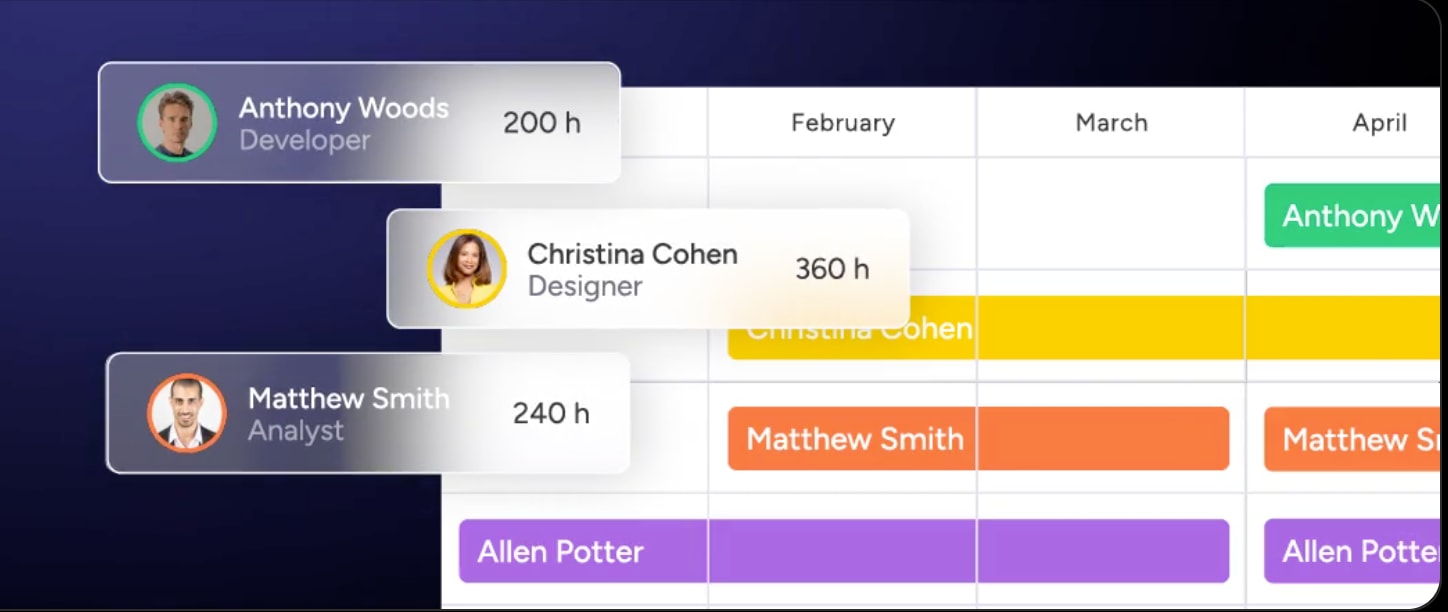
Future-proof your workload planning with AI
AI enhances workload planning by augmenting human judgment with computational speed and pattern recognition. Organizations using modern platforms like monday.com can access these capabilities to make planning more accurate, less manual, and more strategic.
AI-driven capacity optimization
AI evaluates complex workload patterns to recommend optimal capacity allocation across teams. By analyzing multiple factors at once, AI identifies the most efficient distribution of work.
This includes:
- Load balancing suggestions: recommendations for redistributing work to prevent overallocation.
- Capacity gap identification: early warning of future resource shortfalls.
- Timeline optimization: adjustments based on real-world project velocity data.
These AI capabilities allow teams to deploy ready-made AI actions, unlocking smarter, more efficient workflows. AI Blocks can categorize incoming requests at scale, summarize complex topics, and extract key information from documents.
Predictive workload intelligence
Predictive intelligence improves forecasting accuracy, giving managers visibility into upcoming workload demands. AI analyzes historical data alongside current trends to anticipate future needs more precisely than manual estimation.
Key capabilities include:
- Project timeline prediction: estimated completion dates based on current pace and historical performance.
- Resource requirement forecasting: anticipated staffing needs for upcoming projects.
- Bottleneck identification: early detection of potential capacity constraints.
This intelligence supports proactive hiring and early project adjustments to maintain team efficiency.
Automated skills-based allocation
AI simplifies assigning work to team members by evaluating skills, availability, workload balance, and professional development goals.
The resource management capabilities on monday.com enable AI to assign the right people to the right projects, considering effort, level, availability, and skills. Automated allocation ensures faster completion, higher-quality output, and reduces the time managers spend on manual assignment and triage.
Scale workload planning with monday.com
Modern platforms like monday.com elevate workload planning from a tactical activity to a strategic advantage. The system unifies capacity planning, project execution, and resource management on a single, scalable platform.
See every team’s capacity at a glance
The platform provides real-time visibility into workload through intuitive views and capacity visualizations. Managers can immediately see who is overbooked and who has bandwidth across the organization.
Capabilities include:
- Workload widgets: visual capacity displays in hours or items that update in real time.
- Dynamic capacity charts: utilization views that adjust automatically as work progresses.
- Cross-team visibility: organizational views that break down departmental silos.
Team leads can manage daily capacity, while executives use these insights to guide department utilization and headcount decisions.
Automate complex workload workflows
The automation engine streamlines workload management. Automations can assign work based on capacity and skills, send alerts when team members approach limits, and redistribute tasks when priorities change.
AI Blocks enhance this further by intelligently categorizing incoming work and suggesting assignments. The platform handles repetitive activities so teams can focus on strategic priorities.
Connect strategy to daily execution
High-level goals are linked directly to individual workload planning, ensuring every hour contributes to strategic objectives. Features like goal tracking, portfolio management, and cross-department visibility ensure resources are directed to the work that matters most.
This approach transforms workload planning from operational efficiency into a driver of business strategy. Teams can identify company and team-level goals, then create detailed action plans using collaborative workdocs, timelines, dashboards, and more.

“monday.com has been a life-changer. It gives us transparency, accountability, and a centralized place to manage projects across the globe".
Kendra Seier | Project Manager
“monday.com is the link that holds our business together — connecting our support office and stores with the visibility to move fast, stay consistent, and understand the impact on revenue.”
Duncan McHugh | Chief Operations OfficerTransform your team's performance with strategic workload planning
Workload planning represents a shift from reactive management to strategic orchestration. Organizations that develop this capability achieve predictable delivery, sustainable team performance, and the agility to adjust when priorities change. The benefits extend beyond operational efficiency. Teams experience higher job satisfaction when work is distributed fairly and aligned with their skills. Leaders gain the visibility required to make informed decisions about hiring, project timelines, and resource allocation.
Modern platforms like monday.com make it easier to design workload planning that scales with organizational growth. By centralizing tasks, timelines, and team capacity, these platforms support fair work distribution while giving leaders clear insights into project progress.
Try monday.comFrequently asked questions
What does workload planning include?
Workload planning includes capacity assessment, strategic distribution, skill matching, and timeline coordination to ensure work aligns with team availability and business priorities.
How do you plan your workload effectively?
Effective planning requires assessing team capacity, prioritizing work based on business value, matching skills to requirements, and continuously monitoring progress to adjust for changes.
What is an example of workload management?
A marketing manager preparing a campaign launch assigns graphics to designers and copy to writers based on their hours and expertise, ensuring balanced and manageable schedules.
How does AI enhance workload planning?
AI improves planning by analyzing team capacity, recommending assignments based on skills, and predicting bottlenecks using historical performance data.
Can workload planning reduce employee turnover?
Balanced workload planning prevents burnout, ensures fair distribution, and provides predictable schedules. Employees maintain work-life balance, stay engaged, and perform at their best, directly reducing turnover.
How does monday.com approach workload planning differently?
Platforms like monday.com combine real-time capacity views, AI-powered automation, and cross-department visibility. This enables organizations to manage workload strategically across the entire business, not just within isolated projects.

 Get started