



Technical specification documents are crucial for aligning technical implementations with business goals and providing a reference guide for project execution. Among their many benefits, they provide clear communication among team members and stakeholders and prevent the development team from wasting time and effort on unnecessary steps. They’re also crucial for mitigating misunderstandings and development errors. It’s fair to say that a wise developer will always consult the technical specification before writing a single line of code.
This guide explores why it’s essential to use a technical specification, who writes it, what it contains, and how to write one in 5 steps. You’ll also see a filled-in example and how AI is changing spec writing. Plus, keeping specs next to sprint work on monday dev helps them stay current.
Try monday devKey takeaways
- A technical specification document explains how your team will build a feature, while PRDs and functional specs explain what to build and why.
- Strong specs cover scope, non-goals, functional and non-functional requirements, the technical approach, testing, rollout, and success metrics.
- Testable requirements, such as a page load under 2 seconds, give engineering, QA, and product the same definition of “done.”
- AI speeds up drafting, gap-spotting, and summaries, while a named human reviewer keeps every section accurate.
- monday dev keeps specs next to sprints and work items, and its AI summarizes PRDs and drafts acceptance criteria so specs stay tied to delivery.
What is a technical specification document?
A technical specification document is a written plan that explains how engineers will build a product, feature, or system. It translates business and user requirements into architecture, testing, and rollout decisions the whole team reviews before coding starts.

A technical specification, also known as a tech spec, is a comprehensive document outlining the detailed requirements, design, and functionality of a product, system, or project. It serves as a blueprint for engineering teams, bridging the gap between business requirements and technical implementation. It covers all the vital, nitty-gritty information about the product development process and lays out the technical requirements necessary to achieve the project’s goals.
A wise developer will always consult the technical specification before writing a single line of code. After reading a technical specification document, the development team and stakeholders should know:
- How the proposed product is going to behave
- What it can and can’t do
- How it’s going to be developed
- All systems that are going to be used/changed/created to assist development
- Security measures for data privacy
- The plan for rollout and rollback if necessary
- Business-related metrics
- Support and maintenance plans
- The project timeline
Technical specification vs functional specification
A technical specification is sometimes confused with a functional specification. While both documents lay the groundwork for a successful project, there are key differences.
A functional specification is based on business requirements. It focuses on user experience by looking at product functionality. In contrast, a technical specification focuses on internal programming, technical standards, and performance requirements. It includes plans for implementation, testing, and the benefits of specific features, and defines all the technical requirements.
Put simply, a functional specification describes what you want from your software development, and a technical specification details how you get there. Here’s a rundown of the main differences between these two spec terms.
| Functional specification | Technical specification | |
|---|---|---|
| Focus | Describes what the system should do from a user's perspective | Details how the system will be implemented technically |
| Content | Outlines features, functionality, and user experience | Covers internal programming, technical standards, performance requirements, and implementation plans |
| Audience | Primarily for stakeholders and end-users | For developers and technical team members |
| Purpose | Defines the "what" of the software project | Explains the "how" of the project implementation |
| Level of detail | Focuses on high-level user requirements and product behaviour | Provides in-depth technical details, including architecture and technology stack |
| Timing | Usually created earlier in the project lifecycle | Typically follows the functional specification, translating requirements into technical solutions |
But a functional spec isn’t the only document that sits next to a tech spec. Product teams write product requirements documents (PRD), contract-driven projects use a software requirements specification (SRS), and many engineering orgs call their design specification a technical design document (TDD). If you’ve ever wondered what a software specification is, the table below examines more about each document.
| Document | What it answers | Owner | When it’s written |
|---|---|---|---|
| Product requirements document (PRD) | What are we building, for whom, and why? | Product manager | During discovery, before engineering design starts |
| Software requirements specification (SRS) | What must the system do, across every functional and non-functional requirement? | Business analyst or product owner, with engineering input | After discovery, as a formal requirements baseline |
| Technical design document (TDD) | How is the system architected, and which design trade-offs did we accept? | Tech lead or architect | During system design, alongside the tech spec |
| Technical specification document | How will we build, test, and roll out this feature or system? | Engineer or tech lead who owns delivery | After requirements are agreed, before sprint work starts |
10 benefits of a technical specification document
Using a technical specification is crucial for successful project development and execution. It keeps everyone on the same page and prompts questions throughout the process. Here are the key reasons why it’s important.
- Clarity and precision: Technical specifications provide clear, detailed requirements, reducing ambiguity and ensuring all stakeholders have a consistent understanding of the project.
- Risk reduction: By identifying potential technical challenges early, specifications allow for proactive risk mitigation and help prevent scope creep.
- Quality improvement: Detailed requirements enable comprehensive test plans and define acceptance criteria, leading to higher quality outcomes.
- Efficiency boost: A well-written specification can save time and money by reducing errors, misunderstandings, and the need for rework.
- Productivity enhancement: Technical specs serve as a blueprint, eliminating the need for trial and error and allowing developers to focus on immediate tasks.
- Improved communication: Specifications provide a common language for all team members and stakeholders, facilitating better collaboration.
- Documentation: They serve as a reference for the project, both during implementation and after completion.
- User satisfaction: By clearly defining features and functionality, tech specs ensure the end product meets user needs.
- Investment protection: A thorough specification can be seen as an investment, potentially saving significant costs during implementation.
- Project alignment: They keep the technical implementation in line with business goals and objectives.
Why does up-front clarity matter so much on larger initiatives? In PMI’s Pulse of the Profession 2026, 31% of complex projects failed to achieve the full scope of their intended benefits.
Respondents to the global survey also reported missed deadlines (35%) and budget overruns (28%) as a result of complexity. These figures measure complexity, not spec quality, so treat them as context rather than proof. They still show how much is at stake when teams start building before they agree on scope, approach, and success.
By providing these benefits, technical specifications contribute to more successful project outcomes, improved team collaboration, and higher-quality end products.

Who writes technical specifications?
Depending on the organization and the nature of the project, a technical specification is typically written by one of the following:
- Engineers: Often the engineer who will build the solution or be the point person during implementation writes the technical specification.
- Technical leads: For larger projects, technical leads may create the specification.
- Project leads: Sometimes project leads take on the task of writing technical specifications, especially for complex projects.
- Senior engineers: Experienced engineers with deep knowledge of the product/project may be tasked with writing the specification.
- Technical writers: Specialized professionals known as technical writers or technical authors are often employed to create technical specifications. They have expertise in conveying complex technical information clearly and concisely.
- Spec writers: Also known as specifiers, these professionals specifically focus on developing construction specifications for projects in the architecture and construction industries.
These individuals collaborate with various stakeholders, including product teams, developers, and subject matter experts, to gather information and create comprehensive technical specifications that guide project implementation.
14 key components of a technical specification document
A technical specification should include everything a team needs to build, test, and ship the work without guessing. Some teams call this a technical specification sheet, and the 14 components below work as a ready-made technical specification template.
- Front matter: Title, author(s), team, reviewer(s), creation date, last updated date, and reference link such as an epic, ticket, issue, or task.
- Introduction: Overview of the project, its goals, and objectives.
- Purpose and scope: Outlines the technical solution’s intended outcomes.
- Functional requirements: Describes features, functionalities, and performance criteria.
- Design requirements: Specifies user interface and design elements.
- Technical standards: Details industry standards, protocols, and regulations to follow.
- Solutions: Explains the approach to tackle each element of the project.
- Testing requirements: Outlines test plans, cases, and acceptance criteria.
- Delivery requirements: Specifies delivery dates, installation, and training needs.
- Support and maintenance: Includes information on warranties, maintenance, and technical support.
- Success evaluation: Defines how the project’s success will be measured.
- Work breakdown: Details the tasks and timeline for implementation.
- Further considerations: Addresses potential challenges or alternatives.
- End matter: Includes any additional relevant information or appendices.
How to write non-functional requirements and acceptance criteria
Functional requirements describe what the system does but non-functional requirements describe how well it does it, covering speed, security, uptime, and accessibility, and they’re where vague wording slips in fastest.
Write each one so QA can pass or fail it with a single test. The examples below show how.
| Requirement type | Vague version | Testable version |
|---|---|---|
| Performance | The app should load fast | The restaurant list loads in under 2 seconds at p95 on a 4G connection |
| Security | User data must be secure | Passwords are hashed with bcrypt, and all traffic uses TLS 1.2 or higher |
| Availability | The service should always be up | Order placement holds 99.9% monthly uptime, with rollback completed within 15 minutes |
| Accessibility | The app should be accessible | All checkout screens meet WCAG 2.2 AA, verified with automated and screen reader tests |
11 types of technical specifications
There are several types of technical specifications, each serving a specific purpose in various industries and projects.
- IT technical specification: Addresses IT infrastructure projects, system updates, and technical requirements for IT teams.
- Website technical specification: Outlines technical requirements for website development, including design, functionality, and user experience.
- Software technical specification: Describes the software application’s technical requirements, including the software architecture, programming languages, database schema, and user interface design.
- Agile technical specification: Incorporates user stories and acceptance criteria, allowing for continuous feedback and adjustments for each iteration or sprint in Agile development.
- Product technical specification: Serves as a blueprint for product development, detailing features, functionality, and technical requirements.
- Equipment technical specification: Provides detailed information about technical aspects of equipment, including manufacturing, power requirements, and safety considerations.
- Architecture specification: Outlines the structure and design of a system, explaining software architecture and hardware requirements.
- Performance specification: Defines operational requirements and performance criteria for a system.
- Technical design specification: Describes the product’s functions and outlines how users will interact with it.
- Open specifications: Allow flexibility and freedom of choice in product creation, often used by governing bodies to set standards.
- Closed specifications: Provide precise instructions, including safety specifications, necessary materials, and product design.

How to write a technical specification document in 5 steps
To write a technical specification, use the steps the below. Before you start, set aside time for the first draft, and use the 14 components above as your template.
Step 1. Gather requirements and answer the preliminary questions
Start with what already exists, such as the PRD, feature requirements, and any technical standards or past documentation that apply. Then use that material to answer the questions that define how your app should behave:
- What should the app do, and for which users?
- What problem does it solve for those users?
- How will it improve on the food delivery apps already out there?
- Who will read the spec, and what do they need from it?
Be specific about what the system can and can’t handle, and capture the answers as user stories.
Step 2. Set limitations and non-goals
Next, decide what the app won’t do. This “out of scope” section gives the project manager evidence-based grounds to push back on unrealistic stakeholder requests. For example, the app won’t accept cryptocurrency payments.
Step 3. Choose and document your technical approach
Brainstorm possible solutions for each part of the project, and talk through your preferred option with experienced engineers before you commit to it. Then document the approach and your reasoning. For example, if you’re using biometric security for user login, explain why it’s the best option and how you’ll implement it. This section should also cover how you’ll protect user privacy and prevent breaches.
Step 4. Plan testing and support
Outline how you’ll test and deploy the app, along with how you’ll support users after release. If you’ve arranged a 100-person alpha test, detail it here, together with your release platforms and how you’ll monitor feedback.
Step 5. Get sign-off and connect the spec to execution
A spec is only useful once the team agrees on it and can act on it. Share the draft with a senior engineer, a QA lead, and the product manager, and ask each to check the areas they know best.
Sign-off is also when the team agrees on what success looks like. In PMI’s Pulse of the Profession 2026, 40% of high performers reported aligning sponsors on success at initiation, compared with 30% of low performers. That’s an association rather than a guarantee, but it’s a strong reason to treat approval as a deliberate step.
Once the spec is approved, turn it into work the team can pick up right away. These 3 habits keep the document and the delivery in sync:
- Version every change: Record the date, author, and reason for each update so reviewers can see what has changed since approval.
- Break it into epics and stories: Map each requirement to an epic or user story, and link that story back to its spec section.
- Name a single owner: One person keeps the spec current as decisions change during the sprint.

10 best practices to control technical specifications
Implementing these control measures help you maintain high-quality, up-to-date technical specifications that effectively guide project development and execution.
- Establish clear standards: Create consistent formats, templates, and content requirements to guide document creation and approval processes.
- Use specification management software: Implement advanced tools for digital formatting, real-time updates, and full traceability.
- Conduct regular reviews and updates: Perform compliance checks, technical reviews, and assessments of creation, storage, and change practices to ensure accuracy and completeness.
- Implement version control: Use a system that tracks changes, maintains revision history, and only lets authorized users modify documents.
- Provide ongoing employee training: Ensure all team members understand how to use the specification system, their roles in maintaining accuracy, and the importance of revision control.
- Utilize templates: Employ standardized templates to maintain consistency across documents and streamline the creation process.
- Gather and incorporate feedback: Regularly collect input from team members and stakeholders to refine and improve specifications.
- Conduct peer reviews: Implement a review process where other team members assess the document for accuracy and completeness before finalization.
- Define clear objectives and requirements: Ensure that the technical specifications align with project goals and accurately reflect both functional and non-functional requirements.
- Implement security measures: Establish access controls and data security protocols to protect sensitive information within the specifications.
Technical specification do’s and don’ts
A spec stays useful only while it matches what the team is building. Treat it like the rest of your living Scrum documentation, a record that changes with the work. Use this quick reference during spec reviews.
| Do | Don’t |
|---|---|
| Keep the spec as a living document that’s updated whenever a decision changes | Export a static file that drifts out of date after the first sprint |
| Assign a single owner who approves every change | Let anyone edit without a clear owner or change log |
| Write testable requirements with numbers and thresholds | Use vague words like “fast,” “secure,” or “user-friendly” |
| Link each requirement to the epic, story, or pull request that delivers it | Store the spec in a folder nobody opens once development starts |
| Review the spec at milestones such as design sign-off, sprint planning, and pre-release | Treat approval as the last time anyone reads the document |
How AI is changing technical specification writing
AI is now part of everyday engineering work. The Stack Overflow 2025 Developer Survey found that 84% of respondents use or plan to use AI in their development process. Among professional developers, 51% use AI daily.
DORA’s 2025 research on AI-assisted development reports that 90% of technology professionals use AI at work, and over 80% believe it has increased their productivity. DORA also associates AI adoption with higher software delivery instability, so speed gains need strong review habits alongside them.
So where does AI fit into a technical specification document? Here are 5 practical ways teams use it, each with a human checkpoint built in:
- Drafting from PRDs: AI turns an approved PRD into a first-draft spec outline, so engineers start from structure instead of a blank page.
- Generating acceptance criteria: It proposes given-when-then criteria for each requirement, which reviewers then tighten and approve.
- Spotting gaps and edge cases: AI flags missing error states, undefined limits, and conflicting requirements before the review meeting.
- Summarizing long specs: It condenses a 15-page spec into a short brief for leadership, design, or support teams.
- Providing context for coding assistants: A precise spec gives AI coding assistants the requirements and constraints they need to produce relevant code.
Keep one risk in view as you adopt these habits. DORA warns about “hollow documentation” as a way AI can lower codebase quality. Treat every AI-drafted section as a first draft with a named human reviewer. On monday dev, AI summarizes PRDs and generates acceptance criteria right where the team plans the work.
How to choose a platform for technical specification documents
Where your spec lives shapes whether people read it after kickoff. A document stored apart from the backlog drifts, while a spec linked to work items stays visible during every sprint. Which criteria matter most when you compare platforms? Use these points to evaluate each option against how your teams build today:
- Dev platform integrations: Look for Git integrations that show branches, commits, and pull requests next to the spec items they deliver.
- Links between specs and work items: Each requirement connects to an epic, story, or bug, so spec changes reach the people building the feature.
- Collaboration and permissions: Reviewers comment in context, and access controls let you share specs widely while protecting sensitive details.
- AI assistance: Built-in AI drafts acceptance criteria, summarizes long documents, and flags risks inside the same workflow where teams plan work.
- Governance and security at scale: Version history, audit trails, and enterprise security controls keep specs compliant as you add teams and portfolios.
You can run a short pilot before you commit. Pick one live feature, write its spec on each shortlisted platform, and check whether engineering, QA, and product can trace every requirement to shipped work.
Manage technical specification documents with monday dev
Built on the monday AI Workspace, monday dev offers several features to create and manage your technical specifications.Here’s how each of those features supports spec work, from the first draft to the final release.
- Customizable templates: Use pre-built templates or create custom boards tailored to your technical specification needs.
- Collaborative workspace: Share files, communicate instantly, and make real-time changes, ensuring all team members can access the latest technical specification details.
- Integration capabilities: Connect with tools like GitHub and GitLab to link code repositories and pull requests directly to your technical specification items.
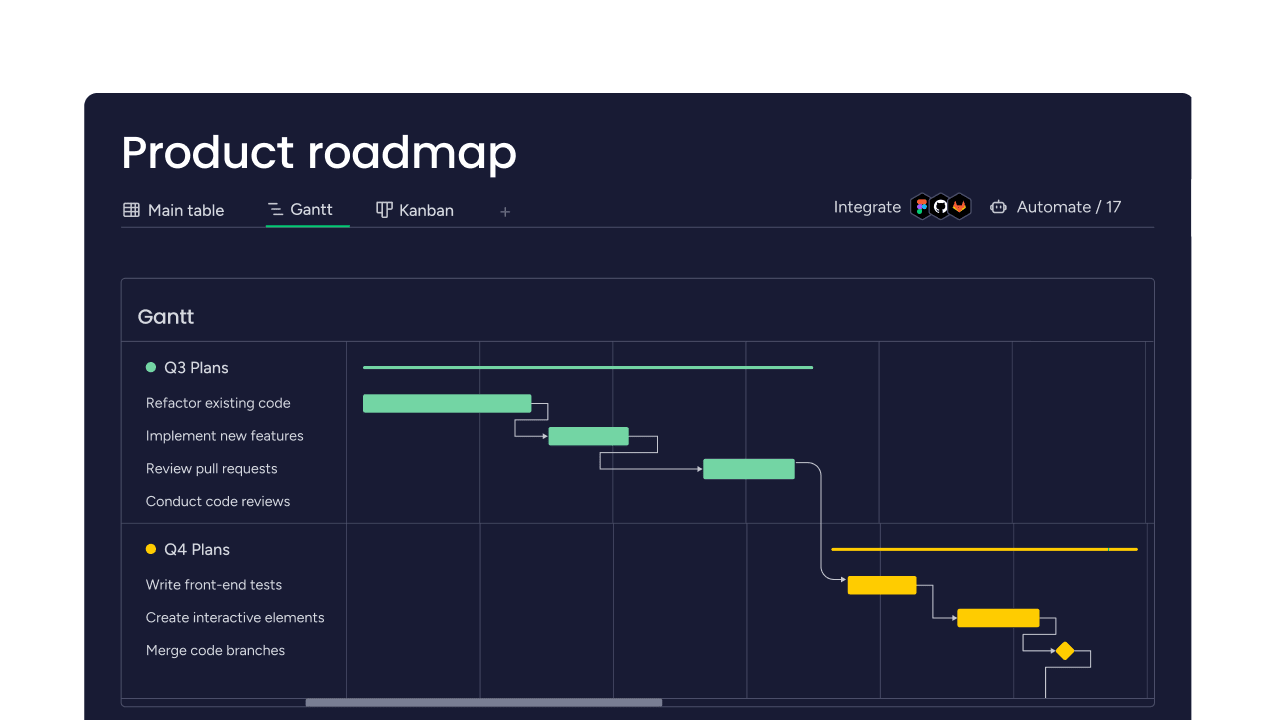
- Visual representations: Utilize various views like Kanban boards (above) and Gantt charts (below) to visualize your technical specification progress and dependencies.
- Automation features: Set up automations for task assignments, notifications, and workflow integrations to streamline the technical specification process.
- Sprint management: Plan and track sprints, which can be helpful in the iterative development of technical specifications.
By leveraging these features, monday dev can help teams create, collaborate on, and manage technical specifications more efficiently throughout the product development lifecycle.

AI that drafts and checks specs
monday dev brings AI directly into the workflows where specs turn into work. Your team spends less time copying details between documents and tickets and more time on design decisions:
- PRD and documentation summarization: AI evaluates PRDs, extracts the key information, and displays the summary in tasks so each team member has context.
- Ticket and acceptance-criteria generation: Approved requirements become tickets with drafted acceptance criteria that your team reviews and refines.
- Risk identification: AI surfaces delivery risks early, while there’s still time to adjust scope or sequencing.
monday agents, vibe, and MCP for spec workflows
The wider monday AI ecosystem extends spec work beyond a single document. Each capability works on the context your team already keeps in monday dev:
- monday agents: Once a spec is approved, the Project Planner Agent turns the brief into milestones and tasks on your board, with owners, due dates, and dependencies. The Sprint Planner then organizes the backlog and drafts sprint goals around your team’s capacity.
- monday vibe: Teams build custom apps on their monday dev data, such as a spec-review dashboard or a release-readiness dashboard shaped around their own process.
- monday MCP: AI assistants like Claude, Cursor, or ChatGPT create specs as monday docs attached to an item, via OAuth within existing permissions.
Engineering visibility from spec to merge
Once a spec turns into code, leaders need to see how the work is flowing. The GitHub integration syncs branches and pull requests to the items they deliver, so every requirement stays traceable from spec to merge.
The Engineering Performance Dashboard tracks time to PR, time to code review, and cycle time, so you can spot slowdowns between approval and release. For product managers, the Product Team solution includes a PRD template, so requirements and specs start from the same structure.
Related templates for technical specification work
Here’s a selection of related templates to get your development projects up and running in next-to-no time.
Product development planning:Our product development planning template, which we call a product roadmap template, serves as a centralized repository for planning, building, and managing your sprints. It allows you to track progress, deadlines, owners, and more. Thanks to our product development planning template, organizing and tracking sprints has never been easier.
Features and releases roadmap template:Organize your product and feature release goals in one place with our features and releases roadmap. Assign priorities to major releases, get automatic deadline reminders, and view team feedback while keeping your roadmap tidy. With our roadmap template, you have a clear plan to manage and execute releases for each quarter.
Scrum software development template:The Scrum software development template keeps your team on track by allowing you to prioritize your backlog, track bugs, and reflect on previous sprints. Your projects have never been this organized.
Kanban software development template:Use the Kanban software development template to manage your Kanban workflow while improving efficiency. This is done by monitoring progress, assigning action priorities, and keeping your plan firmly in view with our premade Kanban stages.
Try monday dev
Turn technical specification documents into shipped products
A technical specification document gives your team one shared answer to what you’re building, how you’ll build it, and how you’ll know it works. Clear scope, testable requirements, and a deliberate review step turn that answer into something engineering and QA can act on.
You’ll notice the real value when the spec stays connected to the work. Keep it next to your epics, sprints, and pull requests, let AI handle first drafts and summaries, and keep a person accountable for every decision.
With monday dev, specs, sprints, and delivery data live on one platform. Your next spec moves from approved to shipped with everyone on the same page.
Try monday devFAQs
What is an example of a technical document?
An example of a technical document is a technical specification, which explains how a team will build a feature or system. Other common examples include API documentation, software requirements specifications (SRS), user manuals, and release notes.
What are the 4 main types of technical documentation?
Technical documentation is commonly grouped into 4 main types: product, process, user, and system documentation. Product and system docs describe how the software works, process docs cover how teams build it, and user docs help people use it.
What are the 6 main parts of a technical specification document?
The six main parts of a technical specification document typically include front matter, introduction, purpose and scope, functional requirements, design requirements, and technical standards. The front matter covers details such as the title, author, and date.
What makes a good technical specification?
A good technical specification is clear, detailed, and well-structured, with precise language tailored to its audience. It also includes visual aids and examples so every stakeholder understands the project objectives.
How detailed should a technical specification document be?
A technical specification document should be detailed enough for an engineer to build and test the feature from the document alone. Focus the detail on decisions, requirements, and edge cases, and link to supporting material for everything else.
How does monday dev keep technical specifications connected to development work?
monday dev keeps technical specifications connected to development work by attaching specs to the items, epics, and sprints that deliver them. The GitHub integration syncs branches and pull requests to those items, so the spec and the code stay traceable.
Can AI write a technical specification document on monday dev?
Yes, AI can help with technical specification documents on monday dev. AI summarizes PRDs and drafts acceptance criteria inside tasks, and the Project Planner Agent turns an approved brief into milestones and tasks with owners and dates. The agent waits for your approval before it changes the board, so a person signs off on every step.

 Try monday dev