


Accounting professionals are especially attuned to how workflow impacts the bottom line, but without the right systems or tools in place, it can be difficult to make the right tweaks to improve efficiency.
This article explores14 accounting workflow management software platforms for 2026, covering everything from specialized practice management tools to flexible work ecosystems that connect finance to the rest of the business. You’ll also get selection criteria, must-have features, and a look at how AI is reshaping financial workflows. Whether you’re running an accounting firm or leading an in-house finance team, this guide helps you find the platform that fits how you work.
Get startedKey takeaways
- Accounting workflow management software automates financial processes like accounts payable (AP) and accounts receivable (AR) tracking, month-end close, and tax preparation with structured approvals and audit trails.
- The right platform accelerates close cycles, improves accuracy, and frees teams for strategic work by eliminating manual administrative tasks.
- Specialized tools serve accounting firms managing client deliverables, while flexible platforms connect in-house finance teams to the broader organization.
- Essential features include customizable workflows, real-time dashboards, AI-powered automation, audit-ready compliance, and deep ERP integrations.
- monday.com’s AI Workspace connects accounting workflows to the rest of the business, delivering payback in less than 4 months according to a Forrester study.
What is accounting workflow management software?
Accounting workflow management software organizes and automates core financial processes, with structured approvals, timestamped records, and recurring deadline management built in. It handles the unique demands of finance teams that generic project platforms can’t support, turning chaotic manual work into repeatable, auditable processes.
Key benefits:
- Accelerate month-end close: Automation sequences workflows so the next step triggers the moment the previous one finishes, keeping the process moving without manual intervention.
- Improve accuracy and simplify audits: Structured workflows guarantee consistency, while automated data capture eliminates manual entry errors and creates instant audit readiness.
- Free your team for strategic work: Absorbing administrative burden unlocks capacity for variance analysis, strategic planning, and client advisory without adding headcount.
- Strengthen talent retention: AI-assisted workflows and intuitive interfaces strip away repetitive drudgery, making jobs more engaging and reducing burnout.
This software serves two audiences. Accounting firms use it to track billable hours and manage client engagements. In-house finance teams use it to run internal operations like AP/AR and financial close. The difference is focus: firms handle external client deliverables, while internal teams connect accounting to the rest of the business.
14 best accounting workflow management software platforms
Not all accounting software is built the same. Some platforms specialize in client-facing work for accounting firms, while others connect in-house finance teams to the rest of the business. The right choice depends on whether you need deep accounting functionality or cross-departmental visibility—and this list covers both.
| Platform | Best For | AI Capabilities | Cross-Functional | Starting Price |
|---|---|---|---|---|
| monday.com | In-house finance teams + cross-departmental workflows | ✓ Core AI throughout | ✓ Yes | Free (up to 2 seats) |
| Karbon | Accounting firms managing client deliverables | Limited | No | $59/user/month |
| Jetpack Workflow | Small firms needing deadline tracking | No | No | $40/user/month |
| TaxDome | Tax firms wanting all-in-one client lifecycle | Limited | No | $700/seat/year |
| Canopy | Firms managing full engagement lifecycle | Add-on (credit-based) | No | $74/user/month |
| Mango Practice | Small-to-mid CPA firms consolidating tools | No | No | Quote-based |
| Financial Cents | Bookkeeping practices with recurring work | ✓ AI template generation | No | $19/month (solo) |
| CCH Axcess | Large firms in CCH ecosystem | No | Limited | Quote-based |
| Aero Workflow | CAS firms enforcing procedure consistency | No | No | $108/month (1–5 users) |
| Pixie | Firms under 20 employees, email-first workflow | No | No | $129/month (unlimited users) |
| OfficeTools | Mid-sized tax firms on Windows desktop | No | No | Quote-based |
| CCH iFirm | Regional firms in CCH tax ecosystem | No | No | $820/year (U.S.) |
| ClientTrack | Small Canadian tax firms, desktop-first | No | No | $34/user/month |
| HubiFi | High-volume enterprises needing ASC 606 compliance | No | Limited | $22,000/year |
1. monday.com’s AI Workspace
monday.com’s AI Workspace unifies accounting workflows across your entire organization—HR, procurement, operations, and executive reporting—in one intelligent workspace.
Finance teams coordinate cross-departmental work without jumping between fragmented systems, while embedded AI handles the repetitive tasks that used to consume hours of manual effort. A Forrester Total Economic Impact study revealed that organizations utilizing the platform achieved payback in less than 4 months.
Example:
Finance and accounting teams use monday.com’s AI Workspace as a no-code coordination workspace that thinks alongside them. It handles AP/AR tracking, month-end close, budget approvals, and compliance workflows while AI automatically extracts invoice data, routes approvals to the right stakeholders, and flags anomalies before they become problems.
These capabilities are essentially AI agents for finance working inside existing accounting workflows rather than as a separate tool. To make this work in a demanding finance department, teams typically combine intake, execution, and reporting into one continuous, AI-assisted flow:
To make this work in a demanding finance department, teams typically combine intake, execution, and reporting into one continuous, AI-assisted flow:
- Requests & approvals: Gather policy exceptions, vendor setups, and spend requests via Forms. AI automatically categorizes submissions by urgency and type, routes them to designated approvers based on expertise, and monitors decisions on a centralized board.
- Close management: Execute the financial close as a strictly time-bound project utilizing Gantt, Timeline, or Calendar views. AI extracts data from uploaded documents, auto-fills columns, and surfaces bottlenecks so every stakeholder can see milestones, owners, and due dates in real time.
- Cross-team handoffs: Link financial action items directly to operational triggers like HR updates or procurement specs. AI summarizes lengthy email threads into concise updates and automatically assigns follow-up tasks to keep critical dependencies connected.
Key features:
- AI-powered workflow boards: Build any accounting procedure—from close checklists to purchase requests—using intuitive no-code blocks. AI reads uploaded receipts and invoices to populate columns instantly, while personnel operate in whichever view suits the task at hand: Workload, Kanban, Timeline, Calendar, or Gantt.
- Real-time dashboards with intelligent insights: Give finance executives live, cross-board reporting that AI continuously updates. These dashboards aggregate timelines, workload distribution, progress, and vital metrics, allowing portfolio-level updates to flow to stakeholders without endless status meetings.
- Multi-level permissions and enterprise-grade security: Control exactly who can edit or view sensitive financial records. Multi-level permissions enable secure collaboration with external partners while maintaining strict internal governance. AI respects these boundaries, operating only within each user’s access rights.
Pricing:
- Free: $0/month (up to 2 seats)
- Basic: $9/seat/month (billed annually)
- Standard: $12/seat/month (billed annually)
- Pro: $19/seat/month (billed annually)
- Enterprise: Contact sales for a custom quote
Why it stands out:
- AI at the core, not bolted on: Intelligence is woven throughout the platform. AI extracts data from finance documents, categorizes incoming requests, routes tasks to the right owner, and auto-fills repetitive fields, turning hours of manual work into seconds of automated execution.
- Cross-functional by design: The architecture connects different business units seamlessly. Finance can run procurement approvals, extract necessary HR inputs, and distribute executive-ready reports from one unified workspace while AI handles the coordination.
- Scales with the organization: Departments can launch a single accounting workflow, then rapidly standardize and replicate successful processes using AI-powered automation patterns and templates as user adoption expands.
- Recognized for adoption: Backed by stellar G2 customer reviews, the platform holds recognition for Highest User Adoption for Enterprises. When employees like their software, documentation stays accurate and reporting stays current.
How AI transforms accounting workflows:
- Intelligent document processing: AI reads receipts, contracts, and invoices (including images and PDFs) to instantly extract critical data—amounts, dates, vendor names, line items, directly into board columns. What used to require manual data entry now happens automatically the moment a file is uploaded.
- Smart routing and categorization: AI tags incoming submissions by urgency, expense type, or compliance requirement, then automatically assigns tasks to the appropriate owner based on their expertise and role. Approvals reach the right desk without manual triage.
- Contextual summarization: AI distills lengthy email threads, meeting notes, and status updates into concise executive highlights, so leadership stays informed without wading through paragraphs of detail.
- Predictive autofill: AI learns from your team’s patterns to auto-populate columns, suggest next steps, and flag anomalies before they derail the close. Repetitive administrative chores resolve themselves as the board updates dynamically.
Automations:
- No-code automation for finance handoffs: Instantly alert approvers upon request submission, ping item owners as deadlines loom, and automatically advance items to the next phase when statuses shift, all without writing a single line of code.
- Templated processes: Accelerate the rollout of repeatable workflows using pre-built templates for cyclical duties, easily tweaking individual steps as company policies mature.
- Fewer manual updates: Because AI and automations drive follow-ups, data extraction, and ownership transfers, finance professionals spend drastically less time chasing colleagues and more time analyzing data.
Integrations:
- Keep work connected to where requests start: Bind workflows directly to communication hubs like Slack, Microsoft Teams, Gmail, and Outlook. Requests transition smoothly into tracked processes without tedious copy-pasting.
- Centralize supporting files: Anchor backup materials, approvals, and invoices to their respective items by attaching and previewing documents natively via Google Drive. AI reads these files to populate your workflow automatically.
- Run portfolio work across systems: Import legacy data from Excel, and establish connections with platforms like Asana or Jira Cloud whenever finance requires line-of-sight into external delivery dependencies. The platform also boasts an open API and integrates with 200+ apps for highly tailored ecosystems.
Accounting workflow management software features:
- End-to-end finance process coordination: Ingest requests through Forms, let AI extract and categorize data, navigate approvals via intelligent automations, monitor execution on visual boards, and broadcast stakeholder updates through live dashboards.
- Standardization with flexibility: Enforce rigorous procedural consistency using templates, while simultaneously granting teams the freedom to execute work in their preferred visual formats. AI ensures data accuracy regardless of how teams choose to work.
- Budget and variance tracking: Monitor planned versus actual expenditures utilizing Number and Formula columns, subsequently visualizing rollups and trends in Dashboards for leadership review. AI flags variances that require attention.
2. Karbon
Karbon operates as a practice management platform engineered specifically for accounting firms. It fuses team workflows, client deliverables, and email collaboration into a single environment. Serving bookkeeping and accounting practices of all sizes, it features robust integrations with QuickBooks and Xero to ensure workflow statuses and client data remain perfectly synchronized.

Use case:
Rather than toggling between email, spreadsheets, and isolated project platforms, accounting firms rely on Karbon. This unified platform manages recurring client deliverables, automates compliance steps, and monitors team capacity.
Key features:
- Workflow automation with accounting-specific templates: Karbon’s Automators dynamically adjust task visibility, due dates, and statuses based on predefined triggers. The platform includes specialized templates for advisory, bookkeeping, and tax workflows—complete with tax-extension logic and conditional sections.
- Integrated email and client collaboration: Shared Triage and standard Triage pull client correspondence directly into actionable workflow items. Meanwhile, the Karbon for Clients portal securely manages auto-reminders, e-signatures, approvals, and file sharing, linking everything back to specific tasks.
- Practice Intelligence dashboards: Firm leadership can instantly evaluate profitability metrics, staff capacity, and work statuses without purchasing a separate BI license. This makes identifying bottlenecks during grueling tax seasons remarkably straightforward.
Pricing:
- Team: $59/user/month (billed annually) or $79/user/month (billed monthly)
- Business: $89/user/month (billed annually) or $99/user/month (billed monthly)
- Enterprise: Custom pricing — includes dedicated support, customization, and unlimited usage limits
Considerations:
- Firms seeking cross-departmental visibility might find Karbon’s scope restrictive, as it focuses heavily on external client deliverables.
- Crucial functions like budget and time tracking are gated behind the Business plan or higher, and advanced reporting requires purchasing premium add-ons.
3. Jetpack Workflow
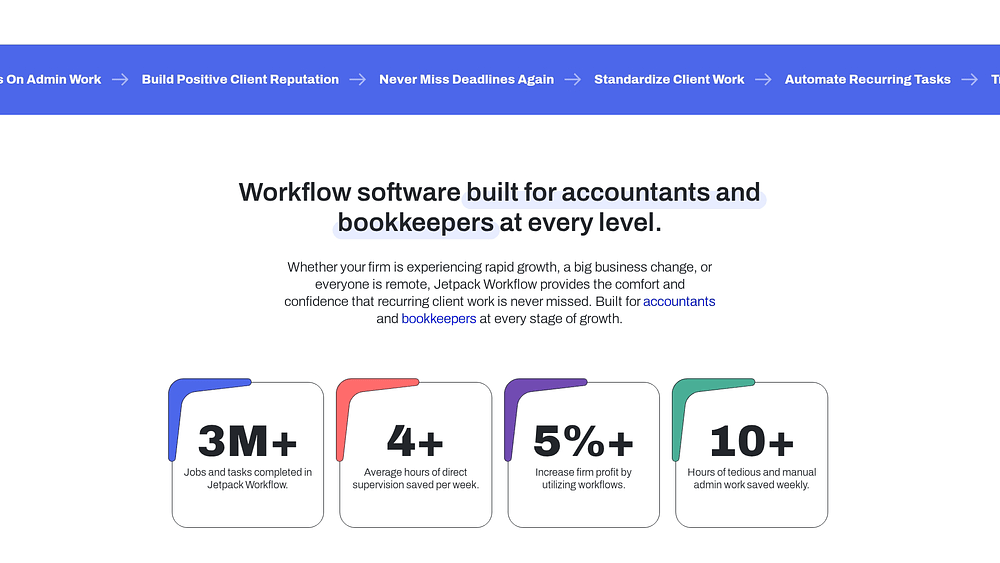
Jetpack Workflow provides small-to-mid-size accounting firms and bookkeepers with a streamlined, no-frills environment for tracking deadlines and recurring client tasks. Engineered specifically for Client Advisory Services (CAS) teams, solo CPAs, and firm owners, it champions immediate value and rapid deployment over exhaustive feature lists.
Use case:
When accounting practices need to standardize recurring client work without the bloat of a massive practice management suite, Jetpack Workflow steps in. It focuses strictly on deadline tracking and staff capacity.
Key features:
- Recurring workflow templates with cascading deadlines: Deploy prebuilt templates or design your own, assign them to clients, and automate repetitive cadences (annual, monthly, weekly, or daily) to guarantee deliverables remain on schedule.
- Capacity planning and workload visibility: The dedicated capacity tab empowers managers to evaluate workloads across different timeframes and staff members. This foresight allows for seamless task reassignment to neutralize bottlenecks before they materialize.
- Task dependencies and audit trail: Managers gain a definitive historical record of how projects progress through the firm by tracking turnaround times, establishing item dependencies, and reviewing completion audits.
Pricing:
- Current plan: $49/user/month (billed monthly) or $40/user/month (billed annually)
- 14-day free trial available; no credit card required
- Annual plans include a 30-day guarantee
- Optional paid onboarding packages: Kickstarter ($299), Fast Track ($749), Done For You ($1,499)
- SSO available for an additional fee
Considerations:
- Because it lacks native modules for billing, document management, or client portals, users must rely on external integrations or parallel software stacks.
- Mobile access is restricted entirely to web browsers since mobile access is limited to web browsers., potentially frustrating teams that operate on the go.
4. TaxDome
TaxDome functions as an all-encompassing practice management ecosystem tailored for bookkeeping, accounting, and tax firms. By merging workflow automation, billing, e-signatures, document management, and a client portal into one unified hub, it effectively eliminates platform sprawl across the engagement lifecycle.

Use case:
Tax and accounting firms looking to consolidate their tech stack use TaxDome to automate the entire client-facing lifecycle. Everything from data collection and e-signatures to invoicing happens inside one unified environment.
Key features:
- Pipeline-based workflow automation: Kanban-style pipelines utilize automove functionality, conditional logic, and stage automations to instantly advance jobs the moment a client completes an action, such as paying an invoice or submitting an organizer.
- Recurring job engine: Maintain strict compliance schedules by automating job creation on annual, quarterly, monthly, weekly, or daily cycles using standardized templates.
- Template Marketplace: Drastically reduce onboarding and setup time by downloading ready-made pipeline templates that come pre-loaded with email sequences, organizers, and embedded automations.
Pricing:
- Essentials (solo): $800/seat/year (1-year), $750 (2-year), $700 (3-year)
- Pro (teams): $1,000/seat/year (1-year), $950 (2-year), $900 (3-year); monthly temporary seats available at $100/month
- Business (larger teams): $1,200/seat/year (1-year), $1,150 (2-year), $1,100 (3-year); seasonal 4-month seats available at $500/seat (initially offered to new Business clients)
Considerations:
- Achieving high precision with pipelines and automations demands a substantial initial time investment, creating a noticeable learning curve during deployment.
- Regional restrictions apply to certain features; for instance, EU-based firms cannot access the Bookkeeping Hub, and payment processing availability varies globally based on rollout status.
5. Canopy
Canopy delivers a cloud-based practice management solution designed exclusively for accounting firms, seamlessly linking billing, time tracking, document management, workflows, engagements, and client intake. Catering to practices of all sizes, including private-equity-backed enterprises, it maintains a laser focus on the complete client journey. The moment a proposal receives a signature, Canopy automatically generates projects and delegates tasks to appropriate personnel, virtually eliminating manual handoffs.
Use case:
From the moment an engagement letter is signed to the final deliverable, Canopy manages the entire lifecycle. Accounting firms use it to oversee recurring work, staff assignments, and deadlines within a single integrated ecosystem.
Key features:
- Engagement-triggered workflows: Converted proposals instantly spawn projects, assign team roles, and trigger if-then automations across client requests and sub-items, stripping away manual coordination at every phase.
- 100+ accounting-specific templates: Firms gain an immediate fast track to repeatable execution via prebuilt templates that embed automations for standard advisory and tax processes.
- Embedded capacity planning: Managers can rebalance workloads on the fly without leaving the workflow module, thanks to native two-week capacity planning built directly into the interface.
Pricing:
- Standard: $74/user/month (annual billing)
- Plus: $109/user/month (annual billing)
- Premium: $149/user/month (annual billing)
- Enterprise: Quote-based for large firms (typically 200+ staff)
Considerations:
- Long-range resource forecasting is impossible natively, as capacity planning only looks two weeks ahead, limiting firms that require annual staffing projections.
- Buyers should carefully evaluate total costs during the selection phase, since credit-based AI features and specific add-on subscriptions quickly inflate the base per-user price.
6. Mango Practice Management
Mango Practice Management merges workflow management, document handling, billing, and time tracking into a singular hub built for accounting professionals. Tailored specifically for tax experts, bookkeepers, and CPAs, it replaces a chaotic web of disconnected apps with one streamlined command center. Practices seeking to slash administrative bloat without inheriting the steep learning curve of enterprise software will find it highly practical.

Use case:
Small-to-mid-size CPA firms adopt Mango Practice Management to escape platform fatigue. It acts as a central command center for client workflows, billing, deadlines, and document sharing.
Key features:
- Workflow and project management: Keep every engagement strictly on schedule utilizing project dashboards, due date tracking, recurring templates, and sub-item dependencies that automatically trigger subsequent steps.
- Integrated time, billing, and payments: Eradicate duplicate data entry with a two-way sync for QuickBooks Online and Desktop. Time entries flow directly into invoices, supported by batch and recurring billing options.
- Email-native file sharing and e-signatures: MangoShare empowers staff to request, send, and sign documents straight from their inbox—bypassing the need for client portal logins—while two-way Gmail and Outlook integrations keep communication centralized.
Pricing:
- Mango offers three tiers (Basic, Plus, and Pro) billed annually on a per-user, per-month basis.
- Specific pricing is not publicly listed; firms must request a quote.
- All plans include free implementation, data migration assistance, and a starting pool of 200 e-signatures.
- Overage fees apply for e-signature envelopes used beyond the included amount.
- A 14-day free trial is available with no credit card required.
Considerations:
- Mango suits practices with highly standardized processes, as its workflow customization trails behind more configurable competitors.
- Essential tools like capacity planning and email integrations are locked behind higher-tier subscriptions, leaving Basic plan users with a somewhat restricted feature set.
7. Financial Cents
Financial Cents brings billing, time tracking, client communication, and workflow management under one roof for bookkeeping and accounting firms. Engineered with smaller practices in mind, it features a passwordless client portal and ready-to-deploy templates that drastically reduce coordination friction.

Use case:
Designed to eliminate friction in client coordination, Financial Cents helps small bookkeeping and accounting practices standardize recurring work. It tracks team capacity and automates reminders without requiring users to juggle multiple apps.
Key features:
- Recurring workflow templates: Instantly launch AI-generated or pre-built templates for standard engagements. Automated status updates, sub-items, and dependencies ensure projects always remain on schedule.
- Integrated email management: Slash manual data entry by connecting Outlook or Gmail to automatically convert client correspondence into trackable projects, anchoring all communication to the actual work.
- Capacity management and profitability reporting: Make highly informed resourcing decisions by monitoring live team workloads alongside realization, budgeting, and profitability metrics.
Pricing:
- Solo: $19/month (billed annually), single-user firms only
- Team: $49/user/month (billed annually); $69/user/month (billed monthly)
- Scale: $69/user/month (billed annually); $89/user/month (billed monthly)
- Enterprise: Custom pricing, with enhanced security, customization, and priority support
Considerations:
- Cross-functional organizations may outgrow the platform quickly due to its hyper-focus on small accounting practices.
- Reviewers frequently note that the mobile experience needs refinement, and advanced automations are gated behind premium subscription tiers.
8. CCH Axcess Workflow
CCH Axcess Workflow embeds compliance-driven workflow management directly into the expansive CCH Axcess accounting and tax suite. Tailored for corporate tax departments and public accounting firms, it standardizes complex, multi-step procedures through approval routing, audit trails, and profound integrations with client collaboration and document management platforms. Practices already entrenched in the CCH ecosystem will experience the most seamless adoption.

Use case:
Corporate tax departments and large accounting firms utilize CCH Axcess Workflow to orchestrate deadline-driven tasks. It provides an auditable, centralized system that connects seamlessly with the broader CCH Axcess suite.
Key features:
- Dual scheduling modules: The optional Calendar-Based Scheduling (CAL) module facilitates long-term capacity planning for massive engagements, while the Resource Allocation Scheduler (RAS) manages immediate staff assignments based on workload and role.
- Embedded workflow analytics: Firm leadership can preemptively neutralize bottlenecks using built-in analytics (Pro and Essentials tiers) that reveal throughput data, year-over-year comparisons, and time-in-status metrics.
- Open Integration Platform: Automate task orchestration without building from scratch by leveraging a curated integration marketplace and a published Workflow API kit to connect external systems.
Pricing:
- CCH Axcess Workflow: Quote-based; pricing available through Wolters Kluwer sales
- Calendar-Based Scheduling (CAL): Optional add-on, priced separately
- Analytics tiers: Essentials and Pro tiers available at different price points
- API enablement: Consulting and training services available for firms building custom integrations; service-built options available for those without in-house development resources
Considerations:
- Budgeting requires direct sales contact since most pricing across the CCH Axcess modules is quote-only or hidden behind logins, complicating cross-vendor comparisons.
- The sheer number of optional add-ons (client collaboration, e-sign, API consulting, CAL, analytics) and the complexity of implementation mean smaller firms must carefully scope their total cost of ownership.
9. Aero Workflow
Aero Workflow introduces procedure-based management to accounting and bookkeeping firms striving to scale recurring client work flawlessly. Developed by accountants intimately familiar with industry pain points, the software transforms granular, step-by-step procedures into reusable templates. This eliminates execution variability and ensures every employee operates from an identical playbook. Its flat, firm-level pricing structure offers financial predictability for expanding CAS practices.

Use case:
Bookkeeping and CAS firms that must enforce strict, repeatable processes across their staff rely on Aero Workflow. It removes the dependency on individual knowledge by standardizing execution.
Key features:
- Procedure-based templates: Access over 150 pre-built bookkeeping and accounting templates—ranging from bank reconciliations to monthly close—that teams can easily modify with custom priorities, billable settings, and default budgets.
- Embedded time tracking: Log hours directly inside each workflow via an auto-starting task timer. This feeds into detailed reporting by team member, project, or client, with an optional sync to QuickBooks Time or QuickBooks Online.
- Client Vault: Safely store sensitive client IDs and credentials within an encrypted, secure vault featuring built-in reporting and highly configurable security clearances.
Pricing:
- Startup (1–5 users): $108/month (billed annually) or $135/month (billed monthly)
- Growth (6–25 users): $200/month (billed annually) or $250/month (billed monthly)
- Enterprise (50+ users): Custom pricing, scaled per additional group of 10 users
Considerations:
- Integration options are notably narrow; Xero is unsupported natively, and email triage is restricted to Office 365 following the deprecation of Google Workspace support in June 2023.
- The user interface leans toward the utilitarian side, lacking the cross-functional polish needed for broader departmental operations outside of pure accounting processes.
10. Pixie
Pixie distills accounting workflow management into a highly focused platform designed exclusively for small bookkeeping and accounting firms. Targeting teams with fewer than 20 employees, it anchors operations around a two-way email inbox, seamlessly converting client messages into trackable processes. Its unlimited-user pricing model ensures the entire firm can collaborate within the same system without accumulating punitive per-seat fees.
Use case:
Firms with fewer than 20 employees turn to Pixie for structured, email-first workflow management. It bypasses the steep learning curves of enterprise-grade platforms by centering operations around the inbox.
Key features:
- Email-to-workflow integration: Automatically file all correspondence against the correct job and client by connecting Microsoft 365 or Gmail inboxes directly to Pixie, instantly converting emails into actionable processes.
- Automated job triggers and reminders: Keep firm-wide deadlines strictly on track by dispatching automated chasers and initiating recurring jobs based on specific client date fields.
- Client portal with e-signing: Centralize client-facing interactions by providing a secure environment for e-signature collection and document exchange, complete with comprehensive audit trails.
Pricing:
- Under 250 clients: $129/month
- 251–500 clients: $199/month
- 501–1,000 clients: $329/month
- Over 1,000 clients: Custom pricing available on request
- 30-day free trial available; unlimited users included at every tier
Considerations:
- Hourly billing requires a separate Clockify integration since native time tracking is absent, adding an extra setup step for many practices.
- As practices scale beyond 20 staff members or demand complex third-party connections, Pixie’s focused feature set may become a bottleneck.
11. OfficeTools
OfficeTools operates as a robust practice management platform for mid-sized and small tax and accounting firms requiring document management, billing, time tracking, and workflows in one unified space. Now integrated into the CARET ecosystem, it relies on a rigid assignment-and-project model optimized for recurring deadlines and compliance calendars.

Use case:
Operating primarily as a desktop workspace, OfficeTools allows small and mid-sized tax firms to shepherd client engagements from initial project creation all the way through to payment collection.
Key features:
- Project definitions with deadline logic: Keep all compliance deadlines on track by configuring recurring projects with automatic promised-date calculations, weekend/holiday skips, rollover rules, and fiscal-year offsets.
- Firm-wide project control: Monitor progress across all active engagements, shift due dates, and bulk-reassign staff from a single screen utilizing the “Manage Active Projects” panel.
- Integrated client portal with eSignature and payments: Close the loop from final deliverable to collected revenue by allowing clients to pay invoices, sign returns via IRS KBA-compliant eSignature, and exchange documents directly through the portal.
Pricing:
- WorkSpace: Custom pricing — contact OfficeTools for a quote
- eSignature is metered separately, billed monthly per completed signature
- Integrated payments (CARET Pay) operate under separate merchant service terms with standard transaction costs
Considerations:
- Cloud-native, browser-based operations are not the default here; WorkSpace is a Windows desktop application requiring local server hosting or deployment via Abacus Private Cloud.
- New users face a steep learning curve when configuring project definitions, assignment groups, and global reminders, demanding significant initial setup effort.
12. CCH iFirm Practice Manager
CCH iFirm Practice Manager equips accounting firms with a cloud-native environment to oversee client workflows, capacity, billing, and jobs simultaneously. Developed by Wolters Kluwer, it caters to audit and accounting practices across Southeast Asia, the UK, Canada, and Australia that already operate within the CCH ecosystem. Its deep integration with regional CCH tax products—such as Taxprep in Canada and TaxWise/ATX in the U.S.—makes it an obvious choice for firms wanting tax preparation and workflow management to function as a single entity.

Use case:
Firms seeking real-time job visibility and flexible billing models without stitching together disparate tools choose CCH iFirm Practice Manager. It provides a comprehensive view of capacity and client workflows.
Key features:
- Real-time job management: Monitor, prioritize, assign, and create jobs as they navigate the firm, benefiting from attached workpapers per engagement and automated recurring job generation.
- Capacity planning: Forecast resources months in advance and dodge bottlenecks using an optional add-on that dynamically recalculates available capacity as jobs are allocated and timesheets are submitted.
- Flexible billing and WIP tracking: Strengthen cashflow management with robust debtor and WIP visibility, supporting multi-entity billing alongside value-based, fixed-fee, and time-based models.
Pricing:
Pricing varies significantly by region. The following annual prices are for the U.S. market; other regions like Canada have different public pricing, while APAC and India are largely quote-only.
- Practice Manager: $820/year (1 user included; one-time setup fee of $157.50)
- Client Portal: $730/year (1 user included; one-time setup fee of $157.50)
- CCH iFirm Suite (Practice Manager + Client Portal): $1,295/year
Considerations:
- Functionality is highly market-specific—such as e-invoicing in Malaysia or CCH AnswerConnect research integration in Canada—creating an uneven experience for multi-national firms.
- Total costs scale rapidly as user counts and optional modules (Client Portal, Capacity Planning, Analytics) increase, requiring careful evaluation before commitment.
13. ClientTrack/Clear Biz
ClientTrack (frequently branded as Clear Biz) offers a desktop-first practice management solution for small tax and accounting firms seeking structured, industry-specific workflows without the burden of a massive cloud platform. Developed by Trilobyte Solutions since 2002, it appeals to practices that value integrated billing, client communication logs, and due-date tracking over expansive automation. A supplementary portal bridges the desktop experience with the web, facilitating client payment requests, e-signatures, and secure document exchange.

Use case:
Practices that prioritize due-date tracking and integrated billing over cloud-native automation opt for ClientTrack. It delivers affordable, accounting-specific workflow controls in a desktop-first environment.
Key features:
- Engagement workflow management: Monitor missing client information across all active projects, track deadlines using native provincial and federal libraries, and define custom steps for year-end engagements and personal tax returns.
- Integrated time, billing, and A/R: Manage accounts receivable, generate invoices, and log time entries entirely within the desktop environment, drastically reducing reliance on external billing software.
- Client Track Portal: Push workflows to clients via a Canadian-hosted encrypted portal. It handles payment requests, e-signatures, and secure uploads, while an Outlook add-in converts standard emails into encrypted messages.
Pricing:
- Workflow Edition: $34/user/month or $365/user/year
- Workflow + Portal bundle: $39/user/month or $399/user/year
- Portal only: $24/user/month or $249/user/year
- Add-ons: Additional e-signature document packs (e.g., 100 for $110; 500 for $410) and extra storage available separately
- Free trials: 30-day free trial for the desktop edition; 14-day free trial for the portal
Considerations:
- U.S. firms miss out on portal-to-desktop synchronization, which is restricted to Canadian users, preventing a fully integrated workflow loop.
- The Windows-only architecture and limited third-party integrations present hurdles for practices wanting broad connectivity, browser-based access, or a large peer review community to benchmark against.
14. HubiFi
HubiFi automates order-to-cash accounting and ASC 606-compliant revenue recognition for high-volume enterprises demanding rapid, audit-ready books. Engineered by data and finance veterans intimately familiar with the agony of manual revenue reconciliation, the platform bridges your general ledger and billing systems to post, reconcile, and calculate journal entries daily. Finance departments at organizations like Strava, AllTrails, and Copy.ai have successfully transitioned from months of manual drudgery to a continuous close in under 30 days.

Use case:
High-volume e-commerce, app, and subscription businesses deploy HubiFi to achieve audit-ready subledgers and daily journal entries. It automates GAAP-attested revenue recognition without forcing finance teams to build complex rules.
Key features:
- Purpose-built ASC 606 engine: Finance teams spend less time correcting errors and more time analyzing data as the engine calculates compliant revenue entries across disputes, refunds, payments, and invoices—complete with prior-period adjustments and automated contract modification handling.
- Source-system-agnostic integrations: Custom integrations typically go live in under a week, connecting seamlessly to major data warehouses, SAP, Oracle, QuickBooks, Sage Intacct, NetSuite, Shopify, Chargebee, Zuora, Recurly, Stripe, and both Google and Apple app stores.
- Audit-ready subledger with full lineage: Backed by ISO 27001, SOC 2 Type II, and SOC 1 Type II certifications, the platform guarantees drill-down traceability from any journal entry straight back to the originating transaction.
Pricing:
- Essentials: Starting at $22,000/year
- Growth: Starting at $45,000/year
- Enterprise: Starting at $100,000/year
- Tailored: Quote-based
Considerations:
- Because HubiFi excludes billing, contract management, and payment processing, finance teams must maintain separate systems for those functions alongside it.
- The Essentials tier limits users to monthly journal entries and excludes multi-currency entries and automatic GL posting, potentially frustrating teams that require a continuous close immediately.
6 criteria for choosing accounting workflow software
Selecting the ideal accounting platform is a high-stakes maneuver that dictates the rhythm of your entire financial operation. The chasm between a perfect fit and a near miss becomes agonizingly apparent during an audit or a frantic month-end close. These criteria slice through marketing jargon to highlight what genuinely matters for accounting and finance professionals.
Step 1: Prioritize workflow flexibility and customization
Generic platforms rarely accommodate unique financial processes. The ideal system bends to your team’s operational style, rather than forcing you into rigid boxes. Seek out no-code builders that allow your staff to tweak workflows on the fly, transforming what used to be a grueling IT project into a simple afternoon task.
Step 2: Demand deep integration with core finance systems
A workflow platform’s value plummets if it cannot communicate with your financial system of record, be it an ERP, NetSuite, or QuickBooks. Insist on profound, bidirectional integrations that synchronize data autonomously. Anything less merely generates manual reconciliation chores, entirely defeating the purpose of a centralized digital workspace.
Step 3: Look for automation and AI that does the work
While basic triggers handle simple notifications, modern finance demands more. Can your platform intelligently flag anomalous transactions or extract line items from a PDF invoice? Elevating your system from simple alerts to intelligent action liberates your staff to prioritize analysis over data entry.
Step 4: Ensure ironclad audit trails and compliance
Auditors demand absolute proof of who executed an action and when. Every status shift and approval must generate an immutable, time-stamped log. This capability is your primary defense against compliance risks and the cornerstone of enforcing the separation of duties.
Step 5: Evaluate scalability across teams and workflows
Financial data flows through every department, from HR to procurement to sales. A platform incapable of spanning these divisions creates dangerous information silos and necessitates manual workarounds. Genuine scalability means absorbing higher volumes as the company expands while providing leadership with a unified, cross-departmental performance view.
Step 6: Assess rapid implementation and high adoption
Even the most sophisticated software fails if employees refuse to log in. Intuitive design and rapid time-to-value form the bedrock of high adoption rates, yielding a tangible competitive edge. For instance, organizations deploying monday.com’s AI Workspace frequently achieve payback in under 4 months simply because teams can launch quickly and witness immediate results.
Evaluating vendors against these six pillars guarantees you select a system engineered for real-world execution. A choice like monday.com’s AI Workspace elevates your financial operations from a chaotic string of manual processes into a highly synchronized engine.
Get startedMust-have features in workflow software for accounting firms
Establishing the right criteria confirms a platform is worth your time, but examining specific features proves it can actually execute the work. Because accounting relies on strict approval chains and unforgiving deadlines, your software must offer absolute dependability for both internal finance and client deliverables.
Customizable templates and workflow builders
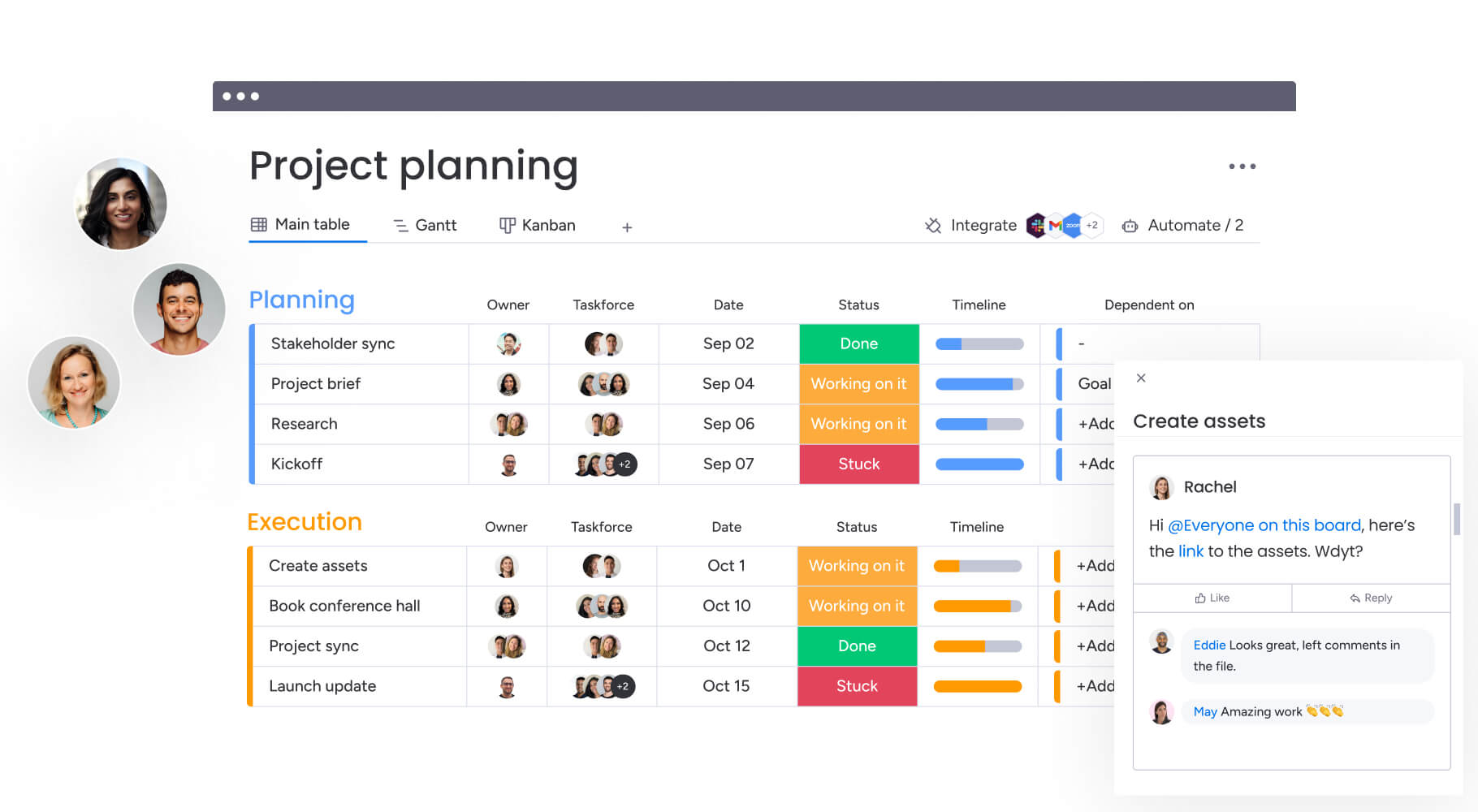
Client onboarding, month-end close, and tax season all follow predictable rhythms. A robust project management workflow builder allows you to map that sequence once—complete with logic and deadlines—and run it infinitely. This effectively converts institutional knowledge into an error-proof, automated machine.
Key point: The platform should anticipate the next step rather than waiting for manual intervention. Drag-and-drop templates allow you to construct any process, assign owners, and establish deadlines that automatically populate for every subsequent project.
Real-time dashboards and live reporting
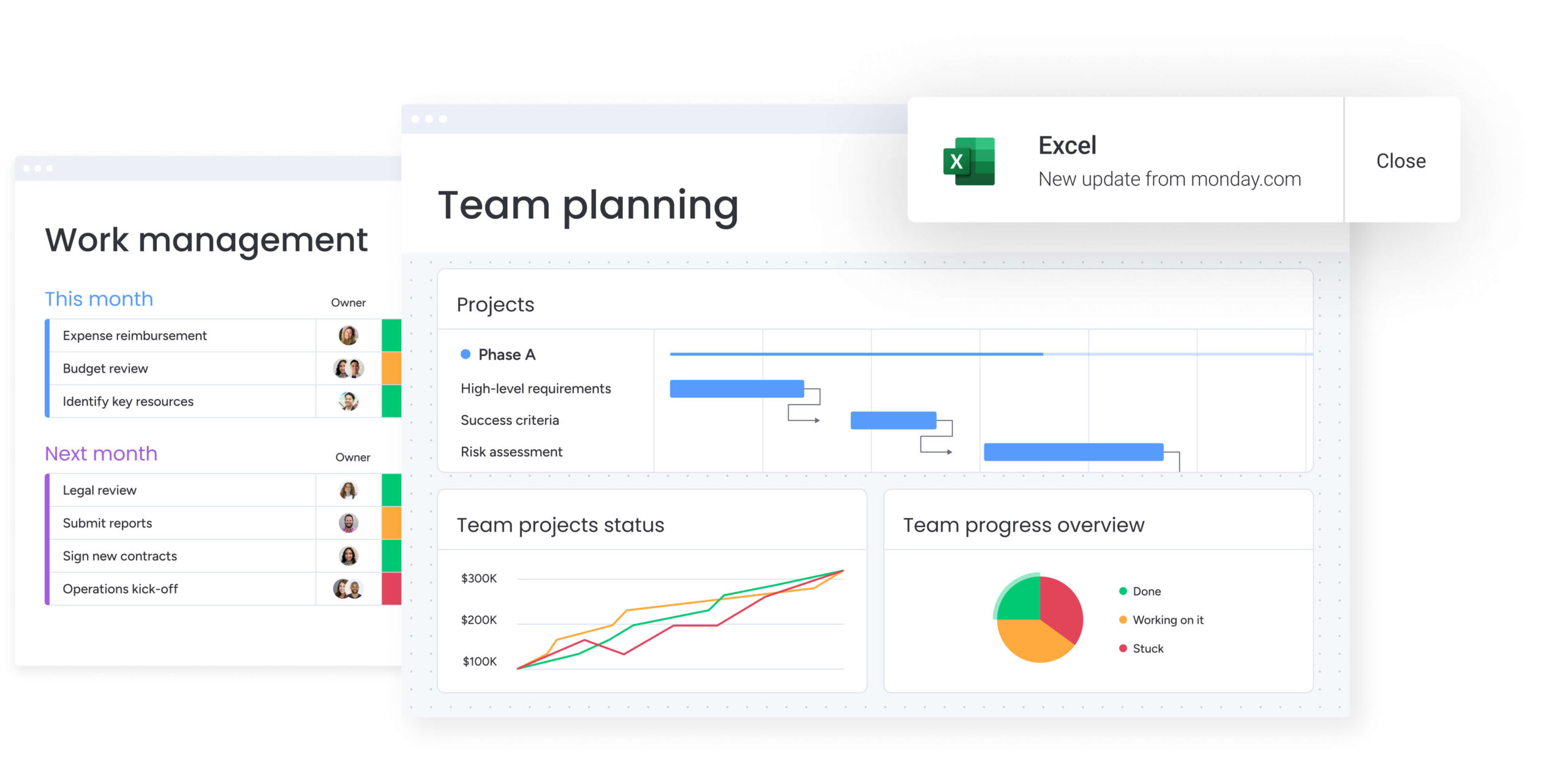
Executives require immediate answers to maintain operational momentum. Dashboard software for finance provides this clarity by pulling live data directly from active workflows without necessitating a single status meeting. You instantly identify overdue files, pinpoint reconciliation blockers, and verify staffing levels ahead of the end-of-quarter rush.
Key point: Live reporting provides an up-to-the-minute view of reality that static spreadsheets cannot match. monday.com’s AI Workspace enables the creation of executive dashboards that fuse operational data with financial health, establishing a single source of truth for leadership.
Document management and intelligent capture
Engagement letters, tax forms, receipts, and invoices form the bedrock of accounting workflows. While basic platforms merely allow file attachments, intelligent systems utilize AI to read them. They extract vital data—like amounts, dates, and invoice numbers—to populate your workflow autonomously.
Key point: Automating document uploads eradicates the manual data entry errors that plague downstream reconciliations. What was once a tedious chore becomes a frictionless component of your daily process.
Approval routing and granular permissions
Maintaining financial integrity requires non-negotiable, structured approvals. Payments demand authorization, deliverables require a partner’s signature, and journal entries need a reviewer. Automated approval sequences ensure every item receives the proper sign-off before progressing, generating a timestamped audit trail at every juncture.
Key point: Enforcing the separation of duties is vital for regulatory compliance and internal controls. Granular permissions guarantee that individuals only access information strictly relevant to their specific roles.
Client and stakeholder collaboration
Finance teams waste countless hours hunting down approvals and documents from individuals outside their department. A dedicated stakeholder or client portal resolves this by offering a secure environment for file uploads and Q&A, completely shielding your internal data from external eyes.
Key point: Automated escalations and notifications liberate your staff to concentrate on high-value analysis, whether they are coordinating with external clients or internal department heads.
Time tracking and resource management
Time tracking directly dictates profitability for accounting firms, while in-house teams use it to justify headcount and expose process bottlenecks. Regardless of your structure, understanding exactly where your team’s capacity goes is paramount.
Key point: Integrating time tracking directly into workflows yields precise data for every operational phase. Managers can easily identify over-allocated personnel and redistribute work long before deadlines are jeopardized.
Equipping your department with these core features strips away the friction that bogs down financial operations. When the software manages the coordination, your personnel can dedicate their full attention to execution and accuracy.
Elevate your financial operations with monday.com's AI Workspace
The right accounting workflow management software transforms how finance teams operate. Manual processes give way to intelligent automation. Fragmented tools consolidate into a single workspace. Teams shift from chasing approvals to driving strategic initiatives that move the business forward.
monday.com’s AI Workspace delivers this transformation by connecting accounting workflows to every corner of your organization. Finance gains real-time visibility across departments, AI handles repetitive tasks automatically, and audit-ready compliance becomes the default. Organizations achieve payback in less than 4 months because teams adopt quickly and see immediate results.
Start by identifying your biggest workflow bottlenecks—whether it’s month-end close, AP/AR tracking, or cross-departmental approvals. Map the processes that consume the most manual effort, then deploy a platform flexible enough to automate them without rigid constraints. When your accounting workflows connect seamlessly to the rest of the business, finance becomes a strategic engine rather than a bottleneck. Try monday.com’s AI Workspace today.
Get startedFrequently asked questions about accounting workflow management software
How should accounting workflow management software differ from practice management or ERP tools?
To understand how accounting workflow management software differs from other tools, it's helpful to know their functions. Accounting workflow software automates and tracks processes, while practice management adds client billing and ERPs manage core financial data. They are distinct tools that often work together to support different operational layers.
What is the best workflow management software for small accounting firms?
The best software for a small firm depends on its specific priorities, such as ease of use or cost. Growing firms often choose a scalable platform like monday.com's AI Workspace to support future needs without a later migration.
Does QuickBooks have built-in workflow management features?
QuickBooks Online offers basic workflow features for reminders but lacks advanced capabilities like approval routing or audit trails. Teams that need robust, cross-functional coordination require a dedicated workflow platform.
How long does it take to implement accounting workflow management software?
Implementation can take a few days to several weeks, depending on the solution's complexity. Teams using monday.com's AI Workspace are typically comfortable in 2–4 weeks and see a payback period of less than 4 months.
Can general work management platforms handle accounting-specific workflows?
Yes, general work management platforms can handle accounting workflows if they provide no-code customization, automation, and strong permissions. Teams use monday.com's AI Workspace for AP/AR tracking, month-end close, and budget management to gain cross-functional visibility.
What is continuous accounting, and how does workflow software support it?
Continuous accounting spreads processes throughout the month instead of bundling them at period-end. Workflow software enables this by automating recurring processes and providing real-time visibility, turning month-end into a simple verification step.
 Get started