


A well-built event budget template gives you a structured framework to track every dollar from the first vendor quote to the final invoice reconciliation. It transforms scattered spreadsheets and email threads into a single source of truth that keeps your entire team aligned on spending, approvals, and financial priorities throughout the planning process.
In this guide, you’ll find seven free templates for different event types, 10 essential expense categories, practical customization tips, and proven strategies to prevent budget overruns. We’ll also look at how monday.com’s AI Work Platform takes your budget a step further by connecting expenses to project timelines, automating approvals, and surfacing real-time spending data across your entire planning workflow.
Key takeaways
- Include a contingency fund: Build a 10-15% buffer into every event budget to handle unexpected costs and small overruns.
- Identify hidden venue fees early: Track setup time, equipment rentals, and overtime charges that can add 20-30% to your total costs.
- Connect budgets to workflows: Use monday.com’s AI Work Platform to link expenses with project timelines and automate updates and approvals.
- Separate fixed and variable costs: Distinguish venue and speaker fees from food and materials so spending can flex with attendance changes.
- Review budgets consistently: Update weekly during planning and daily before the event to catch and correct overruns in time.
What is an event budget template?
An event budget template is a pre-formatted spreadsheet template that tracks all income and expenses for your event. This means you have a ready-made structure for recording venue costs, catering fees, marketing expenses, and every other financial detail in one organized document.
It’s helpful to consider this template as your financial command center. Simply input costs as you plan, track spending as it happens, and compare actual expenses against your original projections. The template does the math automatically, showing you exactly where your money goes.
Why every event planner needs a budget template
A budget template gives event planners complete cost visibility from day one. With cost control a major concern for 75% of planners, having that structure in place from the start is what separates confident execution from costly surprises.
A solid template gives you complete financial visibility and the structure to act on it.
Whether you’re running a corporate summit or a charity gala, the right template keeps every dollar accounted for. Here’s what it delivers:
- Financial transparency: Every dollar is documented and traceable, making it simple to show stakeholders exactly how funds are allocated.
- Early warning system: See potential overruns weeks before they happen, giving you time to adjust plans or find additional funding.
- Smarter spending decisions: Compare costs across vendors and categories to ensure money goes where it creates the most impact.
- Faster approvals: Present organized, professional budgets that executives can review and approve quickly.
Fixed vs variable event costs
Fixed costs stay the same no matter how many people attend. Variable costs change based on attendance.
In the table below we’ve outlined the key differences to help you build flexible budgets that adapt to registration changes:
| Cost type | Examples | Why it matters |
|---|---|---|
| Fixed | Venue rental, speaker fees, AV equipment | These lock in early and can't be reduced |
| Variable | Food per person, printed materials, swag | These scale up or down with attendance |
Keep in mind that when registration is lower than expected, you save on variable costs but still pay full fixed costs. For example, an experienced event coordinator will book venues and speakers based on minimum expected attendance, not best-case scenarios.
7 free event budget templates to use right now
The right template saves hours of setup time and prevents costly oversights. Each template below includes automatic calculations, built-in expense categories, and space for tracking both planned and actual costs.
1. General event budget template
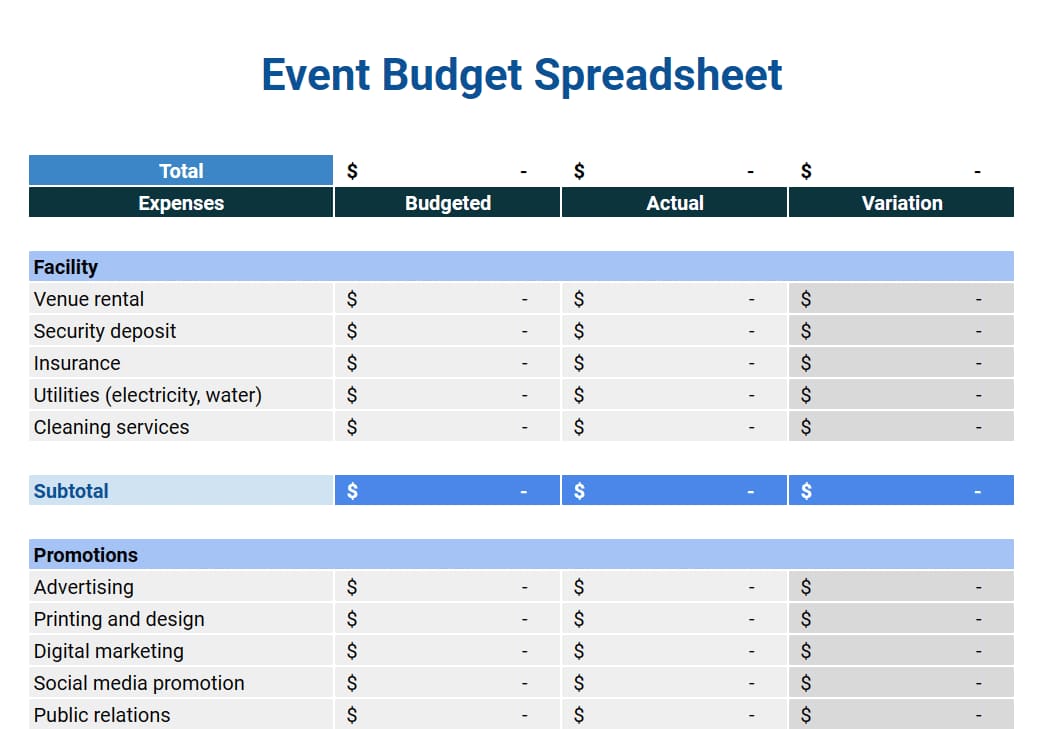
An all-purpose template works for any event type. It includes sections for every major expense category, from venue costs to contingency funds. Built-in formulas calculate totals automatically as you enter expenses.
Look for templates that use color coding to separate expense types visually. Green for venue costs, blue for catering, yellow for marketing, making it easy to see where your budget is allocated at a glance.
2. Conference budget template
Multi-day conferences and large-scale event management need specialized tracking for speaker travel, breakout room rentals, and attendee materials. This template includes dedicated sections for each conference component, plus formulas that calculate per-attendee costs.
You’ll find tabs for different event days, making it simple to track when expenses occur. A cash flow statement template also helps with planning since many conference costs hit at different times.
3. Fundraising event budget template
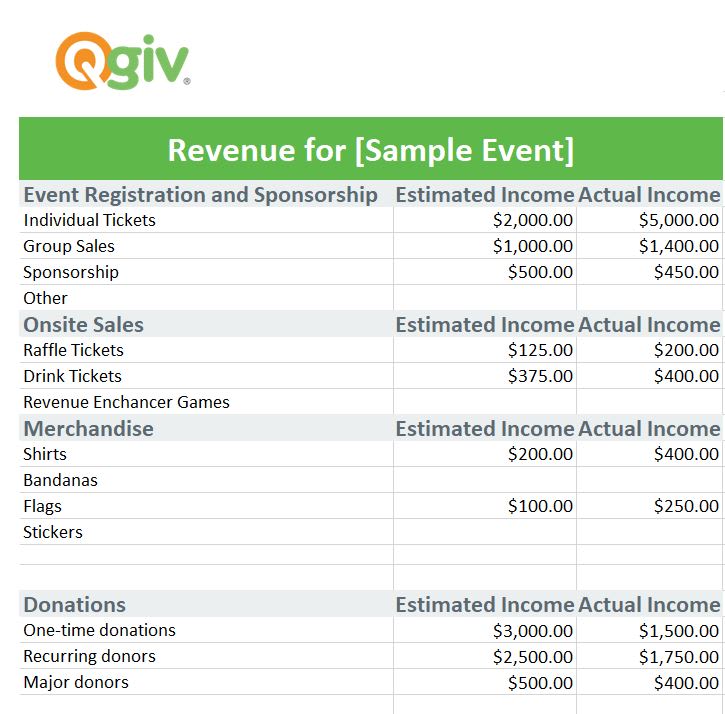
Non-profit events track both revenue and expenses. This template includes sections for sponsorship income, ticket sales, and donation tracking alongside traditional expense categories. Special formulas calculate net proceeds and cost-per-dollar-raised metrics.
The template also tracks in-kind donations and volunteer hours, further complementing a financial statement template approach to show the full value of community support beyond just financial contributions.
4. Corporate event budget template
Corporate events aim to strengthen teams, align strategy, and deliver measurable business impact. A well-structured budget template keeps spending transparent while linking every expense to its intended outcome.
Key areas to track include:
- Employee engagement initiatives: Workshops, recognition programs, and team-building activities.
- Operational logistics: Venue, catering, technology, and travel arrangements.
- ROI measurement: Productivity improvements, retention benefits, and alignment with company goals.
With platforms like monday.com’s AI Work Platform, these templates integrate seamlessly into your existing workflows. Budgets update automatically as projects progress, approvals route to the right stakeholders, and teams maintain a single, accurate view of costs and performance in real time.
5. Hybrid event budget template
Hybrid events require dual budgeting for in-person and virtual components. This template provides distinct sections for each cost category, showing precisely how much you’re investing in each format. It includes specialized categories for streaming technology, virtual platform fees, and digital engagement tools.
Formulas help you optimize the mix of in-person and virtual elements based on budget constraints and expected attendance for each format.
6. Party budget template
Social events need simpler tracking focused on creating memorable experiences. This template covers decorations, entertainment, food and beverages, and party favors with visual budget gauges showing spending against targets.
Built-in checklists ensure you don’t forget smaller details like napkins, ice, or thank-you cards that can add up quickly.
7. Wedding budget template
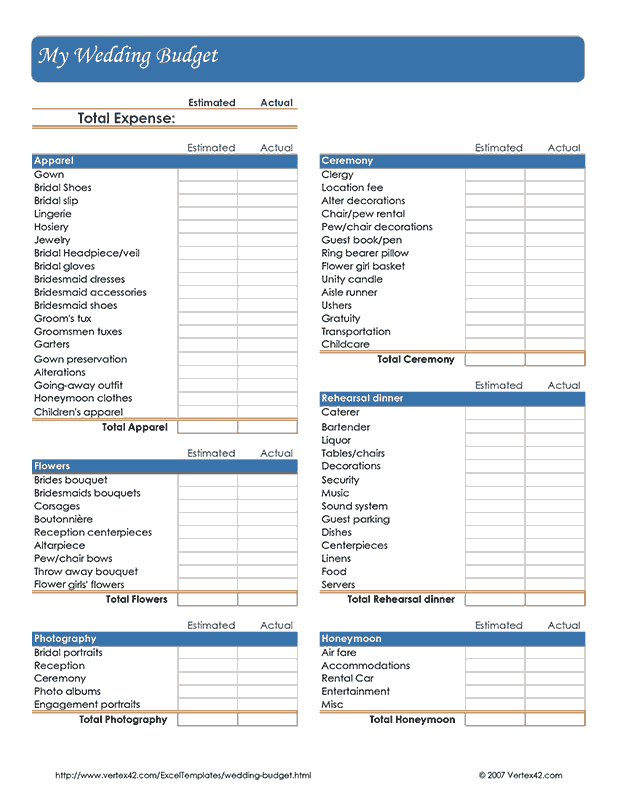
Weddings involve multiple vendors and payments, so tracking is key. This template organizes every expense for smoother planning.
- Vendor management: Log deposits, installments, and final balances.
- Spending ratios: Follow percentage-based guidelines across major categories.
- Payment timeline: Track due dates to prevent last-minute cash flow issues.
10 essential expense categories for any event budget
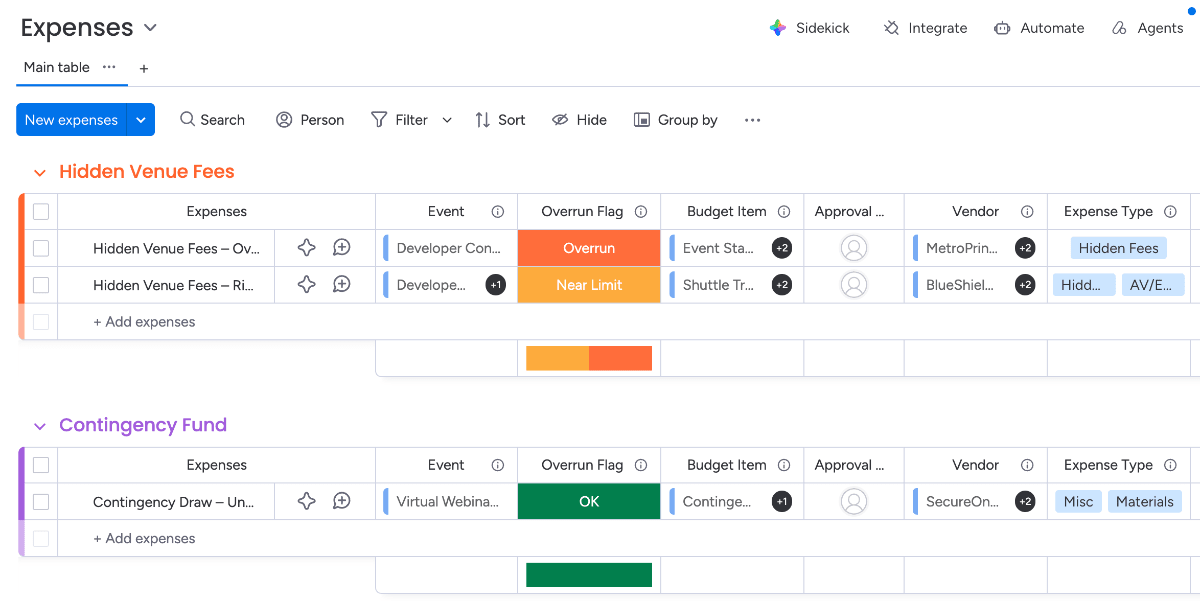
Every event shares certain core expenses: including these core expenses in your budget from the start is the best way to ensure accurate financial planning and keep your event on track.
Here’s what to track and why each category matters.
1. Venue and location costs
Venue expenses hide everywhere. Beyond the rental fee, venues charge for setup time, security deposits, cleaning, and equipment that seems like it should be included.
Always ask for a complete fee schedule. What happens if you run overtime? Are tables and chairs included or extra? Does the venue require specific insurance? These hidden costs can add 20-30% to your base rental rate.
2. Catering and food service
Food costs extend beyond the per-plate price. Service charges, gratuities, rental equipment, and bar setups significantly impact your total catering budget.
Don’t forget dietary accommodations. Gluten-free, vegan, and allergy-friendly options often cost more but are essential for inclusive events. Plan for 5-10% more servings than confirmed attendees to avoid running short.
3. Audio-visual and technology
Modern events depend on reliable technology. Basic AV needs include microphones, screens, and projectors. Add lighting design, streaming equipment, and backup systems for critical components.
Internet connectivity deserves special attention. Standard venue Wi-Fi rarely handles hundreds of simultaneous connections. Budget for dedicated bandwidth if attendees need reliable internet access.
4. Staffing and labor
Staffing is often underestimated in event budgets. Plan for every role and the full time commitment required.
- Role coverage: Include coordinators, registration staff, technical support, setup crews, and security.
- Accurate time estimates: Account for setup and teardown; a five-hour event can require up to 12 staff hours.
- Overtime costs: Factor in premium rates for extended or late shifts.
5. Marketing and promotion
Getting people to your event requires multi-channel promotion, which is where a marketing mix template can guide your strategy. Digital advertising, email campaigns, social media management, and printed materials all carry costs.
Photography and videography serve double duty — documenting the event and providing content for future marketing. Budget for both event coverage and post-production editing.
6. Speaker and entertainment fees
Speaker costs include honorariums, travel expenses, hotel accommodations, and ground transportation. Some speakers have specific technical requirements or green room needs that impact your budget.
Always have backup plans. Last-minute speaker cancellations happen, and replacement speakers often cost more due to short notice. Build flexibility into this budget category.
7. Transportation and logistics
How will attendees reach your venue? Shuttle services, parking fees, and directional signage all factor into transportation planning. For multi-venue events, transportation becomes even more critical.
Shipping costs for materials, displays, and equipment can surprise first-time planners. Get quotes early and build in buffer time for delays.
8. Registration and ticketing
Registration platforms charge in different ways — per ticket, percentage of sales, or monthly subscriptions. Payment processing adds another 2-3% to every transaction.
Consider the full registration experience. Badge printing, lanyards, check-in equipment, and staffing for registration desks all add costs beyond the basic platform fees.
9. Decor and branding
Visual elements create atmosphere and reinforce your message. Flowers, linens, centerpieces, and branded materials transform generic spaces into memorable experiences.
Lighting design dramatically impacts ambiance and photography quality. Professional lighting costs more upfront but creates far stronger results than relying on standard venue lighting.
10. Insurance and contingency
Event insurance protects against cancellations, accidents, and liability claims. Different coverage types include general liability, liquor liability, and cancellation insurance.
Your contingency fund should cover unexpected costs, with some experts suggesting you should allocate 5%-10% of the total budget as a contingency (leaning toward the higher end for more volatile events).
Remember, this isn’t just for emergencies — it covers the small overruns that happen in every category when final counts exceed estimates.
How to customize your event budget template
Generic templates provide structure, but customization makes them powerful. How do you transform a basic spreadsheet into a planning resource that actually fits your organization’s needs?
Start by understanding your event’s unique requirements. A tech conference needs different categories than a charity gala. Your approval process might require multiple sign-offs that a standard template doesn’t accommodate.
Setting budget categories by event type
Different events emphasize different expenses. Corporate meetings focus on content and productivity. Fundraisers prioritize donor experience and revenue generation. Social events emphasize entertainment and atmosphere.
Review your last three similar events. Which categories consumed the most budget? Where did overruns occur? This historical data shapes your template customization, ensuring you allocate appropriately from the start.
Intuitive work management platforms like monday.com’s AI Work Platform let you save customized templates for reuse, building a library of event-specific formats that improve with each iteration.
Adding formulas for automatic calculations
Manual math leads to errors. Excel formulas and a budget template for Google Sheets handle calculations automatically, updating totals instantly when you adjust individual line items.
Essential formulas include:
- SUM functions: Add expense categories and calculate totals.
- Percentage calculations: Show how much of your budget each category consumes.
- Variance tracking: Compare planned versus actual expenses, also known as cost variance, to measure the difference between earned value and actual costs.
- Conditional formatting: Highlight overruns in red for immediate visibility.
Building approval workflows
Multi-level organizations need structured approval processes. Your template should show who can approve different expense levels and track where approvals stand.
Create columns for approval status, approver names, and authorization dates. This documentation proves invaluable during audits and helps identify bottleneck points in your planning process.
5 ways to avoid event budget overruns
What separates a well-run event from one that finishes over budget? Often it’s a handful of small oversights and optimistic estimates that compound over time, which is why cost estimation in project management is crucial from day one.
These five strategies below will help you maintain control from initial planning through final reconciliation.
1. Include all hidden venue fees
Venues excel at presenting attractive base rates while hiding significant additional charges. Service fees, overtime charges, and equipment rentals can double your venue costs if you’re not careful.
Request detailed contracts that list every possible charge. Ask specifically about setup/breakdown fees, damage deposits, parking costs, and required vendor fees. Some venues mandate using their preferred vendors at premium prices.
2. Calculate realistic staff hours
Staff time is easy to underestimate. Adding buffers keeps events running smoothly and prevents burnout.
- Plan extra time: Schedule longer shifts for setup, breakdown, and post-event cleanup.
- Add buffers: If setup takes two hours, budget for three; if breakdown takes one, plan for two.
- Reduce overtime: Proactive planning prevents costly last-minute extensions.
3. Build a smart contingency fund
Generic contingency funds often get raided for known expenses rather than true emergencies. Instead, allocate contingency by risk level.
High-risk items like outdoor events or first-time vendors need a larger project contingency. Low-risk items like printed materials need minimal buffers. This targeted approach ensures protection where you need it most.
4. Track actual vs projected costs in real time
Waiting until after your event to compare budgets against actual costs means missing every opportunity to course-correct. Real-time cost tracking reveals issues while you still have options.
Update your budget weekly during planning and daily as the event approaches. monday.com’s AI Work Platform’s dashboards show budget status visually, making it obvious when categories trend toward overruns.
5. Collaborate with all stakeholders early
Late input from stakeholders is one of the fastest ways to derail an event budget. Misalignment often stems from differing perceptions of how well change is managed: 45% of senior leaders believe it’s handled “very well,” compared with only 23% of individual contributors. Small last-minute requests, like upgraded menus or additional equipment, can quickly add up.
To prevent this, bring all departments together early in the planning process. Collect every requirement upfront, document it accordingly, and secure written approval before finalizing the budget. If changes arise later, outline the financial impact before moving forward.
Transform your event budget with monday.com's AI Work Platform
Complex event planning — with multiple stakeholders, approval chains, and real-time changes — calls for a connected event planning software. How do you maintain visibility when multiple team members need access, approvals span several departments, and priorities shift week to week?
monday.com’s AI Work Platform transforms static budgets into dynamic planning resources. Connect financial tracking to project timelines, team assignments, and stakeholder communications in one integrated platform.
Automate budget tracking and approvals
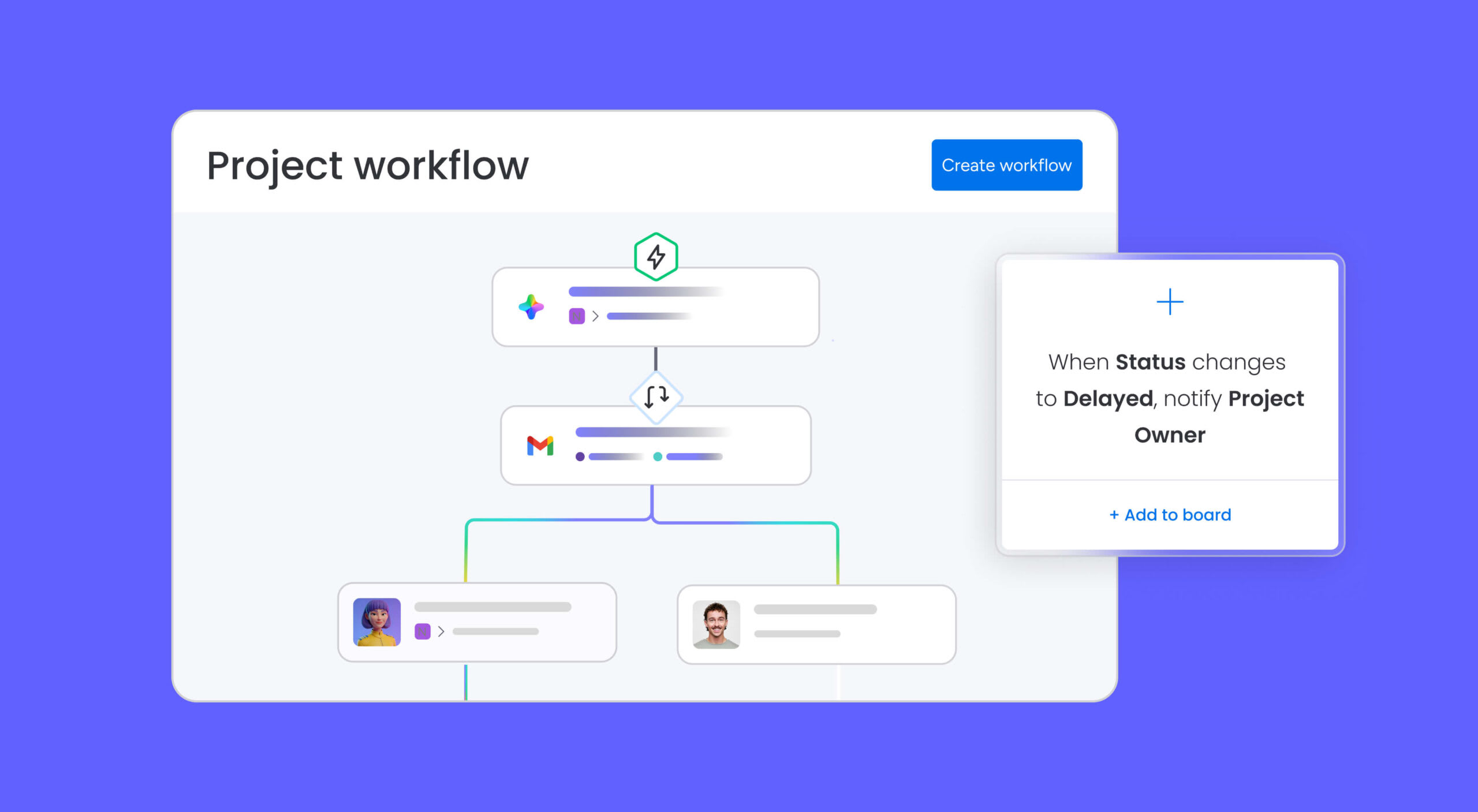
Manual updates waste time and introduce errors. Automation handles routine processes like approval routing, variance alerts, and status updates without constant oversight.
Set triggers for specific conditions. When expenses exceed 90% of budget, notify the project manager. When new items need approval, route to the appropriate stakeholder automatically. These workflows keep planning moving without manual intervention.
Connect budgets to your event timeline
Budget items don’t exist in isolation, they’re tied to specific planning phases and deadlines. Venue deposits come due months before events. Catering numbers finalize weeks prior. Marketing expenses spread across the entire timeline.
Linking budget items to timeline milestones shows cash flow requirements with precision. You’ll know when major expenses hit and can plan accordingly.
Leverage AI to optimize your event budget
AI-powered capabilities go well beyond basic budget calculations. monday agents — autonomous AI agents embedded directly in your workflows — handle specialized work that used to require hours of manual effort.
Here’s how specific agents support event budgeting:
- RSVP Manager agent: Tracks event attendance by sending invitations, monitoring responses, and updating participant statuses, so your catering and venue numbers stay accurate in real time.
- Vendor Researcher agent: Analyzes procurement requirements and researches supplier options, helping you compare vendor pricing and find savings before contracts are signed.
- Risk Analyzer agent: Detects schedule, dependency, and workload risks across your event projects, flagging potential budget overruns before they escalate.
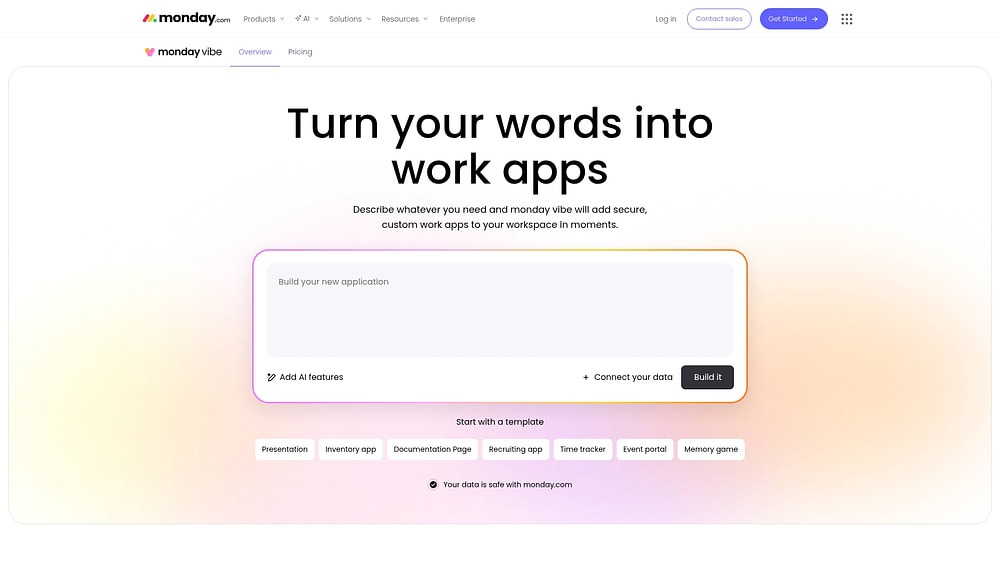
Want a custom budget tracking experience? monday vibe, an AI-powered no-code builder, lets you describe what you need and creates a fully functional app in minutes. Build a dedicated event budget portal, a vendor comparison dashboard, or an expense approval workflow simply by typing what you want.
For teams that already use external AI assistants like Claude or Copilot, monday MCP connects those assistants directly to your workspace data. Ask for cross-board budget rollups, spending summaries, or risk assessments without switching platforms.
Share real-time updates with stakeholders
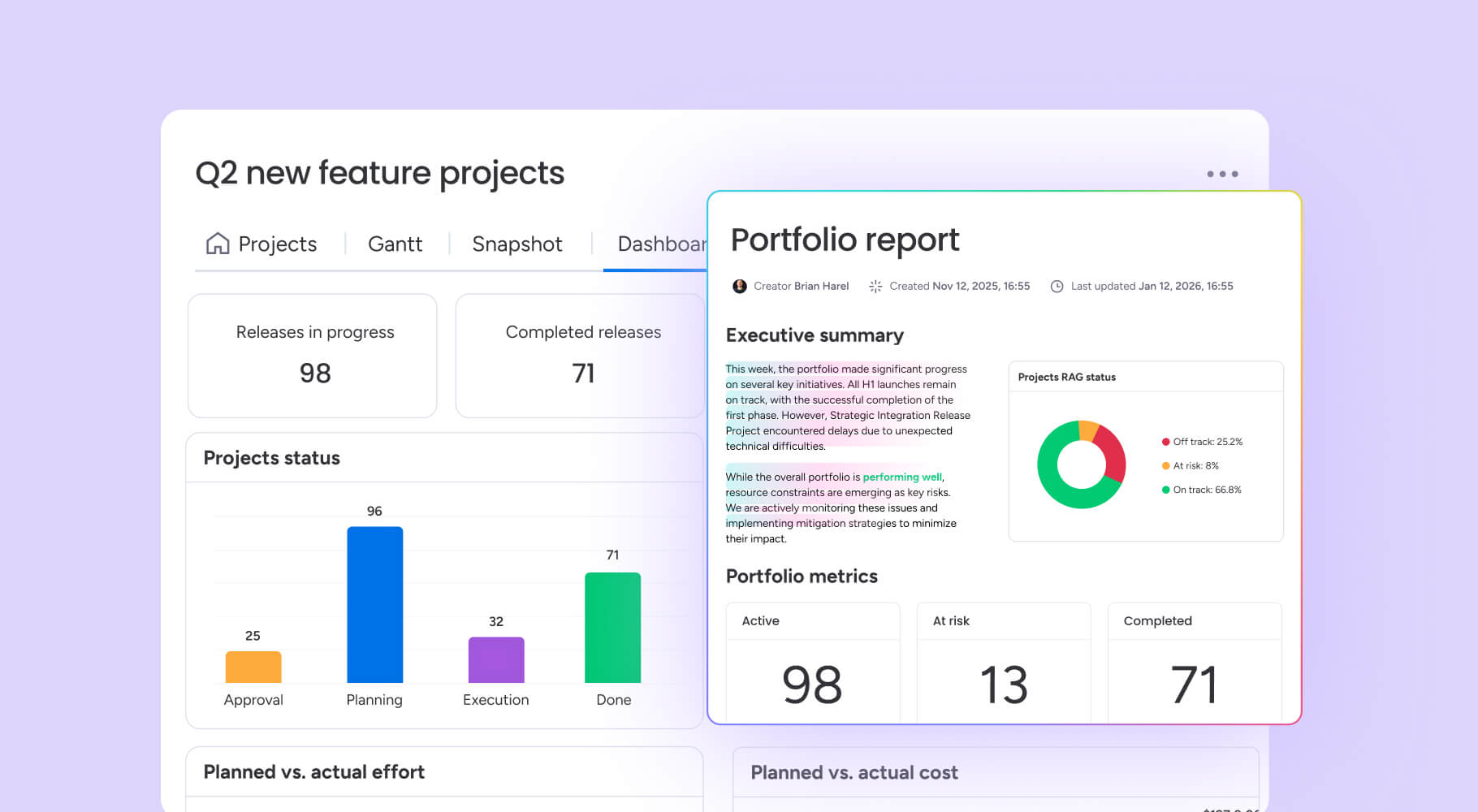
Live dashboards ensure every stakeholder works from a single, current version of the budget. Who updated the venue line item? Which changes were approved? What’s the current spend total? Everyone sees the same answers, in real time.
Live dashboards solve these problems. Stakeholders see current information whenever they need it, a crucial capability for building trust, especially since research shows only 61% of employees in large enterprises are satisfied with transparency.
Changes also appear immediately, while comments and approvals stay connected to specific line items. This transparency accelerates decision-making and builds trust across every department involved in your event.
Spreadsheets vs. the AI Work Platform
Still wondering whether to stick with spreadsheets or move to a dedicated platform? This comparison highlights the key differences:
| Capability | Spreadsheets | The AI Work Platform |
|---|---|---|
| Real-time collaboration | Limited — version conflicts | Live multi-user editing |
| Budget approvals | Manual email chains | Automated routing with triggers |
| Cost tracking | Manual formula updates | Dashboards with live data |
| AI-powered insights | None | monday agents flag risks and optimize spend |
| Vendor management | Separate tracking | Integrated forms and automations |
| Custom budget apps | Not possible | Build with monday vibe in minutes |
Plan every event dollar with confidence
A structured event budget template is the difference between a well-executed event and one that spirals past its financial limits. With per-attendee costs projected to rise 4.3% and economic uncertainty ranking as the top challenge for 32% of meetings professionals, disciplined budgeting has never been more critical.
The templates, expense categories, and strategies in this guide give you a solid foundation for any event type. And when you’re ready to move beyond static spreadsheets, monday.com’s AI Work Platform connects your budget to your entire planning workflow with automations, dashboards, and AI agents that keep spending on track from kickoff to wrap-up.
FAQs
How much should I budget for unexpected event expenses?
To budget for unexpected event expenses, most event planners allocate 10-15% of their total budget for contingency funds. Outdoor events and first-time venues typically require higher contingencies around 15-20% due to weather risks and unknown variables.
What percentage of an event budget typically goes to catering?
The percentage of an event budget that typically goes to catering is 25-35%, though this varies significantly by event type. Corporate dinners and galas may allocate up to 50% for food and beverage, while conference budgets might only dedicate 20% to catering.
Should I create separate budgets for hybrid event components?
Yes, creating separate budgets for hybrid event components helps you understand the true cost of each format. Tracking in-person and virtual expenses independently makes it easier to optimize resource allocation between physical and digital experiences.
When should I lock in vendor contracts to get the best event rates?
To lock in the best event rates, book major vendors six to nine months in advance. Venues and caterers often offer early booking discounts, while last-minute bookings typically cost 20-30% more due to limited options.
How do I create a budget for an event?
To create a budget for an event, start by defining your event objectives and listing every expense category: venue, catering, AV, staffing, marketing, entertainment, transportation, registration, decor, and contingency. Research realistic costs for each category, add a 10-15% contingency buffer, and track actual spending against projections throughout the planning process.
What are the 5 basic elements of a budget?
The 5 basic elements of a budget are income or revenue, fixed costs, variable costs, a contingency fund, and profit or surplus tracking. For event budgets specifically, income includes ticket sales and sponsorships, while fixed and variable costs cover everything from venue rental to per-attendee catering.
Can monday.com's AI Work Platform help manage my event budget?
Yes, the AI Work Platform helps manage event budgets through customizable dashboards, automated approval workflows, and AI agents that flag spending risks in real time. Teams can connect budget tracking to project timelines, automate vendor communications, and build custom budget apps with monday vibe.

 Get started