


Your finance team just spent 20 minutes hunting for last quarter’s vendor contract while Marketing can’t find the latest brand guidelines. When documents live scattered across email attachments, shared drives, and filing cabinets, finding what you need becomes a daily treasure hunt that slows down real work.
This guide breaks down what effective document management actually looks like, how successful teams implement it, and the specific efficiency gains you’ll see across your departments. We’ll show you how the right work platform integrates document organization directly into your processes rather than treating it as a separate challenge.
Try monday work managementKey takeaways
- Replace manual filing and email attachments with intelligent systems that automatically categorize, route, and track documents through approval processes.
- Today’s systems automatically extract key information from contracts and invoices, categorize documents by content, and route them to appropriate teams without human intervention.
- Cloud-based document management allows multiple people to work on the same files simultaneously while maintaining version control and comprehensive audit trails for compliance.
- Track concrete metrics like reducing document retrieval time from 15 minutes to under 2 minutes and cutting approval cycles by 40-60% to justify your investment.
- Connect document organization directly to project workflows with monday work management, keeping files accessible within the actual work context rather than buried in separate repositories.

Document management is the systematic approach to storing, organizing, tracking, and controlling digital and physical documents throughout their lifecycle. This means capturing information as it enters your organization, organizing it so teams can find what they need, and managing how documents move through approvals, reviews, and eventual archiving.
Document management vs. file storage
File storage and document management serve fundamentally different purposes, though many organizations confuse the 2. Here are the key differences:
| File storage | Document management | |
|---|---|---|
| Organization | Manual folder creation and naming | Automated categorization using metadata and tags |
| Search | File name searches only | Full-text search across document content |
| Version control | Manual naming schemes (v1, v2, final) | Automatic version tracking with complete history |
| Collaboration | Email attachments creating multiple copies | Real-time collaboration on a single source of truth |
| Security | Basic folder permissions | Granular access controls with audit trails |
| Workflow | None; manual routing required | Automated approval and routing processes |
| Compliance | Manual record keeping | Automated retention policies and compliance reporting |
Core elements of document management systems
A document management system (DMS) is software that digitizes, stores, manages, and tracks electronic documents and images of paper-based information. Think of it as a filing cabinet that actually organizes itself, remembers what’s inside each document, and nudges the right people when they need to take action.
Modern document management systems are built on several essential components that work together to create efficient workflows:
- Document repository: The central storage location where all files live, accessible to authorized team members across the organization regardless of their physical location
- Metadata management: Structured information about each document including creation date, author, keywords, and custom fields that make organization and retrieval faster
- Version control: Automatic tracking of document changes that maintains a complete history of edits and allows rollback to previous versions
- Access controls: Security features that determine who can view, edit, share, or delete specific documents based on roles or departments
- Workflow automation: Predefined processes that automatically route documents through approval chains and track progress through each stage
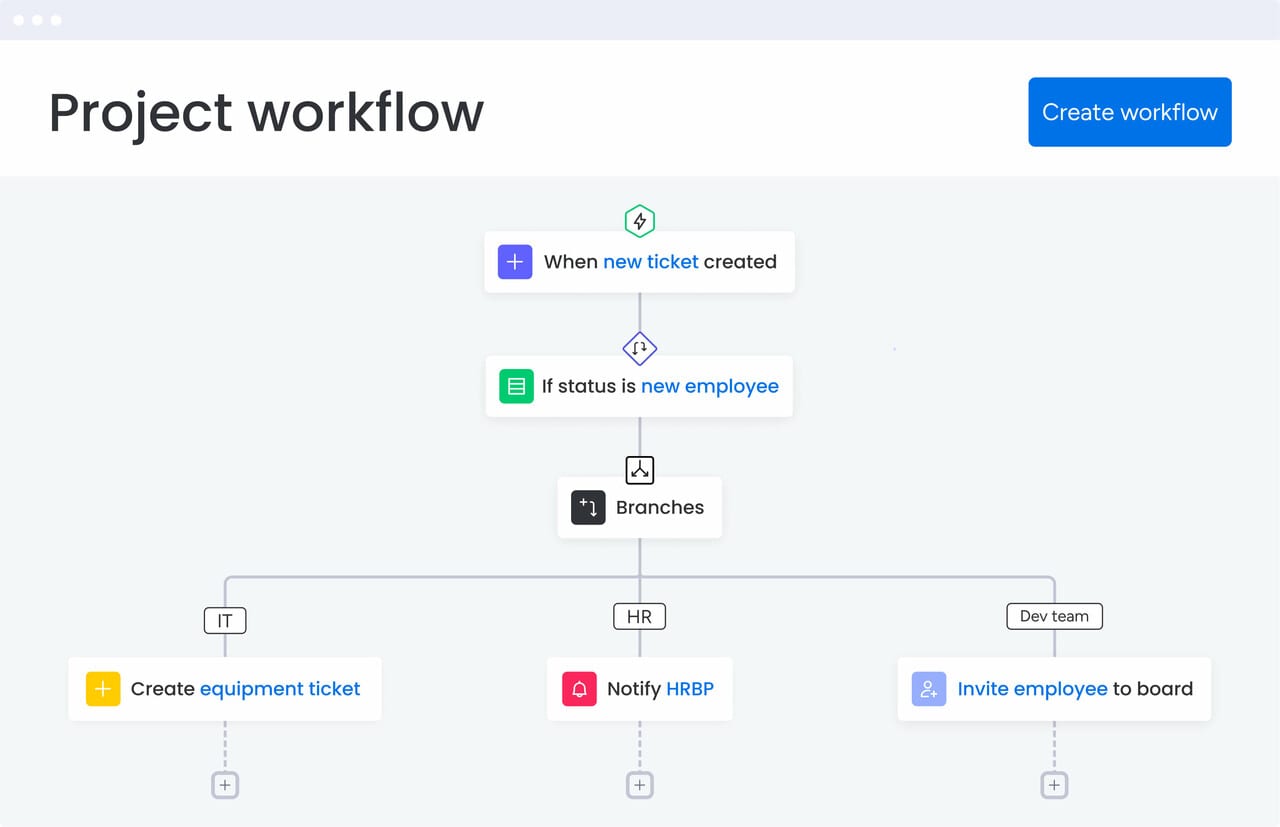
How document management works in practice
Effective document management works in 4 key stages, with each one eliminating a different headache from your current paper chase. These stages work together to ensure documents move smoothly from creation to approval to storage and back into your hands when you need them.
1. Capture and digitize documents
Documents enter the system through multiple pathways. Teams create files directly using word processing software, upload from computers, or forward email attachments that auto-save to designated locations. Mobile apps let field workers capture documents with phone cameras, instantly adding them to the central repository.
Scanning technology converts physical documents into digital files through electronic document management. OCR reads text in scanned images and converts it into searchable content—find that contract by searching for the client name or any text within it.
Modern systems integrate with email, cloud storage, and business apps to automatically capture documents through document management online. When sales receives a signed contract via email, it auto-saves to the right client folder.
2. Organize through intelligent indexing
Once documents enter the system, automated processes organize them using metadata, tags, and folder structures. The system extracts information from documents and creates searchable indexes.
AI can help categorize documents by content, so contracts get tagged with client names, contract types, and key dates without manual entry. The system indexes everything, letting you search by any phrase buried on page 47, even if it’s not in the file name.
3. Process through automated workflows
Documents move through predefined processes automatically. When someone submits an expense report, it routes to their manager, then finance, then accounting—with notifications, tracking, and escalations built in.
Automated workflows handle complex approval chains across departments, conditional routing based on content, parallel reviews, and complete audit trails.
4. Enable search and retrieval capabilities
Find documents instantly using keyword searches, metadata filters, or content queries. The system delivers results as you type, with preview snippets so you don’t waste time opening wrong files.
Advanced features include full-text search across all documents, fuzzy matching for misspellings, and natural language queries. The experience is fast and intuitive — whether you need a specific contract or that policy doc from last month’s meeting, you’ll find it in seconds.
Key benefits of document management systems
The right document system delivers concrete wins: faster approvals, fewer version mix-ups, bulletproof compliance trails, and the ability to grow without drowning in paperwork.
- Cost reduction and efficiency gains: Digital document management eliminates paper costs, printing expenses, physical storage fees, and document reproduction charges. Employees can now locate files in seconds, and — across hundreds of employees — the productivity gains add up fast.
- Enhanced collaboration across teams: Multiple team members access and work on documents simultaneously from different locations. Real-time collaboration features let colleagues edit together, leave comments, and see changes as they happen — no more email attachments or outdated versions.
- Security and compliance advantages: Document management systems meet regulatory requirements through comprehensive audit trails, automated retention policies, and granular access controls. Security features include encryption, multi-factor authentication, permission-based access, and automated compliance rules.
- Faster document processing: Automated workflows eliminate manual handoffs and reduce processing time dramatically. Invoice processing that once took 5-10 days now completes in 24-48 hours through electronic capture, automatic data extraction, and rule-based routing.
Essential features for smarter document management
Today, document management systems go far beyond file storage. They capture documents as they enter the organization, understand their contents, connect them to workflows, and protect sensitive information throughout its lifecycle. Increasingly, these capabilities are powered by AI — not as an add-on, but as part of how modern platforms operate by default.
Intelligent document capture and classification
Documents arrive in many formats, including PDFs, scanned files, emails, and images. Modern systems automatically capture these inputs and classify them based on content rather than file names or folder placement.
AI-assisted classification identifies whether a document is an invoice, contract, employee form, or customer request without manual sorting. Key information is extracted automatically. For invoices, this includes vendor names, dates, amounts, and line items. For contracts, systems identify parties, effective dates, renewal terms, and financial obligations, making documents immediately searchable and usable.
Workflow automation and intelligent routing
Document management platforms connect documents directly to workflows, reducing handoffs and delays. Routing decisions are based on document content and predefined business rules, ensuring files reach the right people without manual intervention.
For example:
- Marketing vendor invoices route to marketing leaders.
- IT service invoices route to technology owners.
- Contracts route for review based on value or contract type.
Once approvals are completed, workflows automatically trigger follow-up actions such as payment processing, project updates, or record archiving. By automating these steps, teams reduce processing time and errors while maintaining clear accountability.
Advanced search and metadata management
As document libraries grow, finding the right information quickly becomes critical. Advanced search capabilities go beyond file names, enabling full-text search across document contents and structured metadata.
Metadata allows teams to organize and filter documents based on how the business actually operates — by project, client, date, status, or ownership. AI-enhanced search helps surface relevant results even when users don’t know the exact wording or location of a document.
Saved searches, multi-field filtering, and intelligent suggestions reduce time spent searching and help teams reuse existing information instead of recreating it.
Business application integration
Document management is most effective when it operates as part of a connected system. Integration with email platforms allows attachments to be captured automatically. CRM connections link documents to customer records. Accounting integrations associate invoices with financial transactions. Project management integrations connect documents to timelines, tasks, and deliverables.
By keeping documents connected to the tools teams already use, organizations reduce duplicate data entry and ensure information stays accurate across systems. AI-assisted mapping helps align document data with structured fields, minimizing manual reconciliation.
Secure access, permissions, and remote availability
Modern teams work across locations, devices, and time zones, making secure remote access essential. Document management systems support web and mobile access while maintaining enterprise-grade security controls.
Core capabilities include:
- Role-based permissions aligned with organizational responsibilities
- Temporary access for external collaborators
- Encrypted storage and transmission
- Multi-factor authentication and device controls
- Offline access with automatic syncing
AI increasingly supports governance by monitoring usage patterns and flagging unusual activity, helping organizations maintain security without slowing productivity.
Analytics, insights, and governance support
Beyond storing documents, modern platforms provide visibility into how information moves through the organization. Analytics highlight frequently accessed documents, identify workflow bottlenecks, and surface missing or outdated records.
AI-driven insights help teams anticipate issues such as upcoming contract renewals, compliance gaps, or capacity constraints. Instead of reacting after problems occur, organizations gain the ability to improve processes proactively.
With documents treated as structured, analyzable data, document management becomes a source of operational insight rather than passive storage.
Try monday work management
Document management systems deliver value across organizations, but certain departments experience particularly significant improvements due to their document-intensive workflows and compliance requirements. Understanding which teams gain the most helps organizations prioritize implementation and measure success.
Human resources
HR departments manage extensive documentation throughout the employee lifecycle, making them ideal candidates for document management transformation. New hire processes involve offer letters, background checks, tax forms, benefits enrollment, policy acknowledgments, and training documentation, all requiring secure storage, proper routing, and compliance tracking.
Document management streamlines these processes through automated workflows:
- New employee onboarding: Automatic routing to reviewers and tracking of completion status
- Employee file management: Centralized and secure storage with access controls ensuring only authorized personnel view sensitive information
- Policy distribution: Automatic notifications when handbooks are updated, tracking acknowledgments, and maintaining records of who received which version
Finance and accounting
Finance teams handle high volumes of invoices, receipts, contracts, and financial reports requiring accurate processing, proper approvals, and secure storage for audit purposes. Manual invoice processing is time-consuming and error-prone, making automation particularly valuable.
Automated invoice processing delivers significant improvements:
- Electronic capture: Invoices captured automatically from email or scanning
- AI data extraction: Vendor information, amounts, and details extracted without manual entry
- Validation: Data validated against purchase orders and contracts
- Approval routing: Sent to appropriate approvers based on amount and vendor
- Payment processing: Triggered automatically after approval completion
Marketing and creative
Marketing teams manage extensive libraries of brand assets, campaign materials, creative files, and marketing collateral that must remain organized, accessible, and version-controlled. Brand consistency requires ensuring teams use current logos, approved messaging, and up-to-date product information.
Document management systems serve as centralized asset libraries:
- Version control: Ensures everyone works from the latest approved assets, preventing brand inconsistencies from outdated materials
- Metadata tagging: Allows quick filtering by campaign, product line, asset type, or usage rights
- Automated approvals: Creative materials route through review cycles, collecting stakeholder feedback and tracking approval status
Operations and project
Operations teams manage procedures, project documentation, process workflows, vendor contracts, and equipment manuals that must be readily accessible. Standard operating procedures need version control to ensure teams follow current processes while maintaining historical records.
Document management supports project collaboration by creating centralized workspaces:
- Project documentation: Teams store deliverables, meeting notes, specifications, and related documentation in one location
- Real-time access: Team members access project files from anywhere, see real-time updates as documents are modified
- Organized history: Maintain organized project history records for future reference

Cloud vs. on-premise solutions: Which is right for you?
Organizations choosing document management systems must decide between cloud-based solutions hosted by vendors and on-premise systems installed on internal servers. Each approach offers distinct advantages depending on organizational needs, regulatory requirements, and technical capabilities.
| Cloud-based | On-premise | |
|---|---|---|
| Initial costs | Lower upfront investment with subscription pricing | Higher hardware and software costs |
| Maintenance | Vendor-managed updates and infrastructure | Requires internal IT resources |
| Scalability | Easily scale users and storage | Limited by hardware capacity |
| Security | Enterprise-grade, vendor-managed controls | Full control over custom security configurations |
| Accessibility | Access from anywhere with internet | Internal network access unless VPN is configured |
| Customization | Configurable within vendor limits | Fully customizable |
| Compliance | Vendor certifications (SOC 2, ISO 27001, HIPAA) | Direct control for specialized regulatory needs |
Choosing between cloud-based and on-premise document management depends on your organization’s regulatory requirements, IT resources, and long-term scalability needs. Cloud solutions typically reduce infrastructure overhead and support distributed teams, while on-premise systems may appeal to organizations with strict data residency or customization requirements. Many teams prioritize flexibility and ease of access when evaluating modern document management platforms.
Transform document chaos into organized workflows with monday work management
With monday work management software, you can embed documents directly into the workflows teams already use to run projects, processes, and approvals. Files stay connected to the work they support, giving teams real-time visibility into document status, ownership, and next steps without switching tools.
The platform serves as a centralized workspace where teams organize, track, and collaborate on document-centric workflows alongside all other work. Documents aren’t buried in separate repositories. They live within projects and processes where they’re actually used, making them instantly accessible to the people who need them.
Document organization and tracking capabilities
Teams create custom boards tracking document workflows with the same flexibility monday work management brings to project management. Contract management boards track each contract with columns showing status, owners, key dates, and approval stage — with documents attached directly to their tracking records.
Custom fields capture the metadata that matters: version numbers, approval status, compliance flags, or any categorization your organization needs. Unlike rigid systems with predefined fields, you define what to track and how to display it — dropdown menus, date fields, status labels, or custom text.
Document status becomes visible at a glance through Kanban boards showing workflow stages, timeline views displaying deadlines and dependencies, or calendar views highlighting upcoming review dates.
Automated workflow processing
Automation capabilities move documents through approval stages automatically, notify stakeholders at the right moments, and enforce routing rules based on document attributes such as value, status, or ownership. AI Blocks enhance document workflows through automated categorization, content extraction, and intelligent routing.
For example, conditional automations handle complex approval chains where routing depends on document content. Contracts over certain values automatically route to executive approval, and documents requiring legal review automatically notify the legal team. These intelligent workflows adapt to your business rules without requiring custom coding.
Cross-team collaboration features
Teams collaborate on document projects using shared boards that show real-time status and progress. When sales, legal, and finance work on contracts together, everyone sees what’s outstanding and what’s next.
Notifications keep people informed without the noise — you get alerts for your assignments, comment mentions, and items you’re following. Documents sync automatically to cloud storage, link to CRM records, and trigger actions across systems without manual updates.
Unify your documents and workflows on one platform
Document management transforms scattered files and manual processes into organized, automated workflows that eliminate wasted search time, reduce version control errors, and enable seamless collaboration. Modern systems leverage AI to handle categorization and data extraction automatically, while intelligent workflows route documents through approvals and advanced search makes finding information instant.
Ready to connect your documents directly to the work they support? With monday work management, you can integrate document organization into your actual workflows — no separate repositories, no disconnected systems, just files living where your team needs them.
Try monday work managementFAQs
What are the key features of a document management system?
Key features of a document management system include centralized storage with version control, advanced search capabilities using metadata and full-text search, automated workflow routing for approvals, granular access controls for security, and audit trails for compliance tracking. Modern systems also include AI-powered categorization and data extraction capabilities.
How do document management solutions improve security and compliance?
Document management solutions improve security through encryption, multi-factor authentication, and role-based access controls that ensure only authorized users view sensitive documents. They enhance compliance by maintaining comprehensive audit trails, automating retention policies according to regulatory requirements, and providing detailed records of all document interactions for regulatory audits.
How can AI and automation transform document management workflows?
AI and automation transform document management by automatically categorizing incoming documents, extracting key data without manual entry, and routing documents through appropriate workflows based on content. AI can detect patterns to identify compliance risks, predict when contracts need renewal, and provide insights that help organizations optimize their document processes.
What should I look for when choosing a document management platform?
When choosing a document management platform, prioritize integration capabilities with your existing tools, AI and automation features that reduce manual work, scalability to grow with your organization, and intuitive interfaces that encourage adoption. Also consider security certifications, compliance support for your industry, and whether the platform connects documents to broader work management processes.

 Get started