


Your database holds years of customer records, project history, and operational data. But when leadership asks for a status update or a team needs to act on that information, the gap between “stored” and “useful” becomes painfully obvious.
That’s the limitation many organizations hit with Caspio. It’s a capable database platform, but as teams scale and workflows grow more complex, they need more than a place to keep records. They need a system that turns data into coordinated action across departments, projects, and goals.
This guide explores a variety of leading Caspio alternatives built for work execution, not just data storage. We’ll cover what separates a database from a true business operating system, break down the strengths of each platform, and walk through how to evaluate which one fits your organization’s needs.
Key takeaways
- Databases are not execution platforms: Caspio stores data well, but it does not connect records to workflows, ownership, or outcomes.
- Modern teams need action-driven systems: the best alternatives turn data into live work with automation, approvals, and real-time visibility.
- AI reduces operational drag: leading platforms use AI to summarize information, route work, and eliminate manual setup.
- Scalability depends on workflows, not tables: execution platforms support cross-team processes without rebuilding systems as you grow.
- monday work management bridges data and delivery: it transforms records into tracked work, automates execution, and gives leaders portfolio-level visibility.
Why teams choose work execution platforms over database tools
Database platforms excel at keeping information organized. But for a scaling organization, tidy data is just the starting line — not the finish. The real challenge? Turning static records into work that actually moves the business forward.
You can’t bridge data storage and execution with just another place to keep files. A database records what happened. It doesn’t help you make what’s next happen. That’s where a work execution platform comes in — connecting data to workflows, strategic goals, and how teams actually collaborate.
On a work execution platform, your data kicks off real work, it doesn’t just sit there. Leaders see what’s happening in real time. Teams get what they need to do their best work.

Picking a Caspio alternative isn’t just swapping databases — it’s choosing a system that runs your whole business. The best platforms don’t just store data — they manage the work that happens around it.
Here’s what separates a basic database from a platform that can actually run your business:
- Execution-driven data: data shouldn’t sit isolated. It should kick off workflows. From starting projects to assigning resources, the right platform turns records into an engine that drives your operations.
- Operational AI: skip platforms that make you configure everything by hand. The best platforms use AI to summarize docs, read sentiment in messages, and build project plans in seconds, so teams can focus on work that matters.
- Frictionless scaling: growth shouldn’t cost you more than it should. A solid alternative gives you clear pricing that covers your whole team and partners — so costs don’t surprise you as you grow.
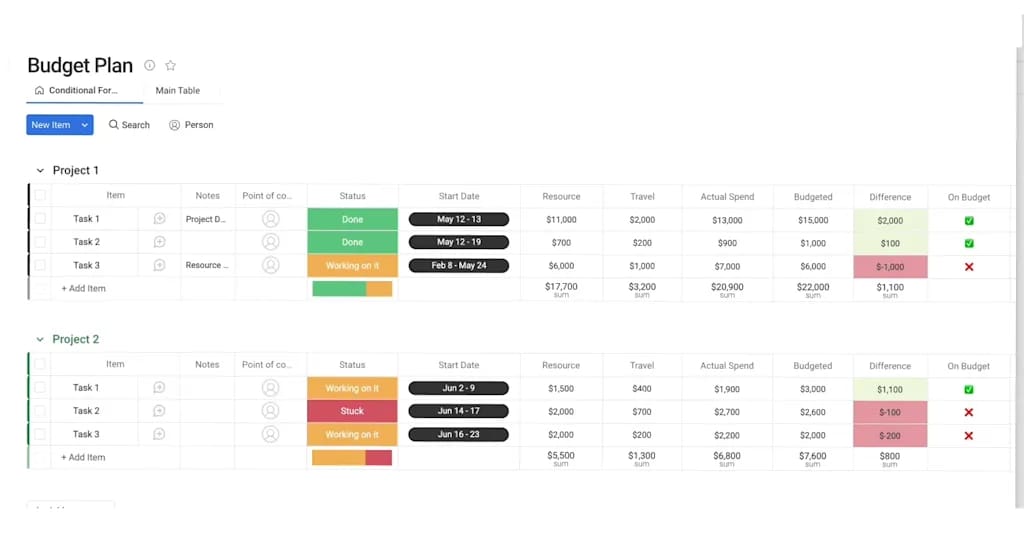
9 best platforms to replace Caspio
Leaving Caspio is your chance to pick a solution that runs your business — not just stores records. Most teams need a tool that connects departments — not one that keeps data locked away.
Each of these alternatives takes a different approach. Some are built for developers who want deep customization. Others let non-technical teams build and automate workflows without code.
Instead, find the solution that helps your organization grow. Remember, the right platform links strategy to execution: so you can run your business with confidence.
1. monday work management
monday work management turns structured data into coordinated work across every project and goal. Track work at the item level, then roll it up into portfolio, resource, and goal views. Leaders get data they can trust to make decisions.
For mid-to-large teams leaving database-first tools, the shift is big: data isn’t the end goal anymore — it’s what kicks off action.

Use case:
Organizations utilize monday work management to treat “records” as live work items, connecting them to the processes that drive progress.
Former Caspio users often run request-driven work: capture intake (requirements, deadlines, owners), route approvals, track delivery, and build reports — all without moving data between systems.
Key features:
- Visual workflow builder lets non-technical teams build complex processes across departments.
- Portfolio management tracks multiple projects and dependencies — giving execs real-time visibility.
- Resource management tools balance capacity and skills across hundreds of projects at once.
Pricing:
- Free: $0 (up to two seats)
- Basic: $9/seat/month (billed annually).
- Standard: $12/seat/month (billed annually).
- Pro: $19/seat/month (billed annually).
- Enterprise: custom pricing (quote-based).
- Annual billing saves 18%.
- Volume discounts available for teams over 40 users.
Why it stands out:
- Acknowledged as a Gartner Leader in three distinct work management categories: Collaborative Work Management, Adaptive Project Management & Reporting, and Marketing Work Management.
- It supports PMO-grade delivery with essential project controls like Gantt, dependencies, milestones, baseline, and critical path, providing a complete suite of timeline tools.
- Leadership gains immediate insight through dashboards and reporting, utilizing widgets to track workload, timelines, and initiative progress.
Advanced AI features:
- AI Blocks automatically categorize data, pull details from documents, summarize meetings, and analyze sentiment.
- Digital Workers act like AI specialists — the Project Analyzer spots risks, and the Research Assistant gathers info fast.
- AI workflows reduce the manual data work that usually consumes hours in database management.
Automations:
- Templates and automations keep execution consistent: handling reminders, notifications, and approvals so work flows between teams.
- The Automation center: allows teams to build and manage logic, while run history provides transparency for troubleshooting.
- AI Automation blocks: (Pro and Enterprise) enable advanced actions like categorize with AI, summarize text with AI, extract information with AI, detect sentiment with AI, and translate text with AI.
Integrations:
- Over 200 native integrations connect with apps like Slack, Microsoft Teams, Google Workspace, and DocuSign.
- An open API makes it easy to build custom connections and sync data with your tech stack.
- Everyday execution connects seamlessly to planning apps, including Microsoft Teams, Slack, Outlook, Gmail, Google Drive, Zoom, Jira Cloud, Excel, Toggl, and Harvest.
Caspio alternative features:
- Structured tracking via boards and columns (including Text, Date, Number, Dropdown, People, and Status) allows for consistent record-keeping without custom forms applications.
- Integrated forms and project intake & approvals centralize requests and route decisions, instantly converting submissions into tracked work.
- Versatile views (such as Kanban, Calendar, Timeline, Workload, and Gantt chart) enable teams to work in their preferred format while leadership monitors the big picture through dashboards.
2. Noloco
Operations teams tired of rigid software and scattered spreadsheets should check out Noloco. It turns data into custom business apps teams actually like using. Noloco uses no-code app building with AI to close the gap between simple databases and full business systems — with real-time syncing and strong security.
Use case:
Great for teams that want to build custom apps and workflows on top of existing databases — especially for client portals and internal work.
Key features:
- Nola AI assistant builds structures, fields, and workflows through a simple chat interface.
- Live synchronization with Airtable and SmartSuite, supported by views like Kanban, Timeline/Gantt, and Maps.
- Detailed permission settings at the record and field level, backed by ISO/IEC 27001 certification and SSO.
Pricing:
- Free: available with basic features.
- Starter: $39/month (annual billing) or $49/month (monthly billing).
- Pro: $119/month (annual billing) or $149/month (monthly billing).
- Business: $255/month (annual billing) or $319/month (monthly billing).
- Enterprise: custom pricing with advanced features.
- Annual billing provides approximately 20% discount across all paid plans.
- Additional costs for extra seats and data rows beyond plan limits.
- 50% nonprofit discount available.
Considerations:
- Upgrading to higher tiers or Scale Databases ensures large workspaces have ample data and sync capacity.
- Heavy loads sometimes cause UI lag or bugs — pretty common for fast-moving no-code platforms.
3. Knack
Knack takes a unique approach by merging database functionality directly with easy-to-build business apps. It caters to organizations that need to integrate data storage with workflow automation, enabling the creation of customer-facing tools without requiring a separate tech stack.
Its pricing model, which allows for unlimited users, makes it a cost-effective choice for deploying solutions organization-wide.

Use case:
Best suited for businesses requiring a blend of database power and workflow automation for both internal processes and customer-facing applications.
Key features:
- No-code tools for building custom apps with relational databases, role-based access, and automated workflows.
- Unlimited user allowance across all plans, facilitating company-wide portals and external partner access.
- Knack Flows integrates with over 500 tools, including Salesforce and Asana, secured by SOC 2 Type II and HIPAA compliance.
Pricing:
- Starter: $59/month (monthly) or $49/month (annual) — includes unlimited users, three apps, 20k records, 2 GB storage.
- Pro: $130/month (monthly) or $110/month (annual) — adds unlimited apps, 50k records, 10 GB storage, e-commerce payments, 2FA.
- Corporate: $300/month (monthly) or $250/month (annual) — includes 125k records (scales to 2.5M), 50 GB storage, Advanced SSO, app restores.
- Enterprise: Custom pricing — adds dedicated account manager, HIPAA/GovCloud options, private server options, 2.5M+ records.
- Annual billing saves 17% across all plans.
- Limited-time new customer discounts available for Starter and Pro tiers.
Considerations:
- Applications are browser-based and require an internet connection, as they do not have a native offline mode.
- API limits apply daily (1,000-10,000 calls), with extra fees for higher usage, which could restrict high-frequency automation.
4. Zoho Creator
Zoho Creator reimagines database development as a visual, AI-enhanced experience that fits naturally into your current business ecosystem. This low-code environment allows both developers and business users to craft custom solutions that bypass the limitations of standard project management software.
For those already using Zoho products, it offers a seamless way to extend system capabilities with tailored workflows.

Use case:
Perfect for organizations deeply invested in the Zoho suite that need to build custom database functionality and automate workflows to augment their existing tools.
Key features:
- CoCreator AI generates data models, scripts, and workflows from simple text prompts.
- Visual Blueprint orchestration manages complex approvals and stage-based processes.
- Single-build deployment creates web, iOS, and Android apps simultaneously, including offline mobile support.
Pricing:
- Free plan: available with basic features.
- Standard plan: paid tier with enhanced capabilities.
- Professional plan: mid-tier option with advanced features.
- Enterprise plan: full-featured plan with Blueprint analytics and BI workspace.
- Flex plan: custom tailored pricing available.
- Annual billing saves more than 30% across all paid plans.
- Add-ons available for portal users, Integration Flow tasks, and BI Analytics rows.
Considerations:
- Advanced features like Blueprint analytics are locked behind higher-tier Enterprise plans.
- Complex automations may require learning Deluge scripting, presenting a learning curve for deep customization.
5. Tadabase
Speed and security define Tadabase, a platform designed for building no-code database applications with unlimited user access. It is particularly effective for organizations needing to launch secure, white-labeled portals for internal teams and external stakeholders without technical overhead. With flat-rate pricing and HIPAA compliance, it manages costs effectively while adhering to strict regulatory standards.

Use case:
Organizations looking for rapid development of secure, compliant business applications that feature modern interfaces and unlimited user collaboration.
Key features:
- Comprehensive visualization options including Kanban boards, calendars, resource planning, and timelines.
- Native automation via record rules, action rules, and scheduled tasks to handle repetitive processes.
- “Pipes” and “Pipescripts” enable server-side integrations and custom logic without external dependencies.
Pricing:
- Starter: $42/month (annual billing) — three apps, 30,000 records, 5 GB storage.
- Growth: $105/month (annual billing) — five apps, 125,000 records, 10 GB storage
- Pro: $210/month (annual billing) — ten apps, 250,000 records, 50 GB storage.
- Elite: $375/month (annual billing) — 15 apps, 500,000 records, 100 GB storage.
- HIPAA Edition: additional $450/month for compliance features and business associate agreements.
- Annual billing provides two months free compared to monthly rates.
- Enterprise plans start at $2,000/month for dedicated infrastructure.
Considerations:
- Applications are responsive web-based only; there is no native mobile app.
- Real-time data visibility can be slightly delayed as some advanced calculations process upon saving.
6. Bubble
Visual programming takes center stage with Bubble, allowing organizations to construct sophisticated work management applications without writing code. It empowers teams to build complex web and mobile apps that include integrated database functionality, making it a strong choice for those whose needs exceed the capabilities of standard platforms.

Use case:
Best for organizations requiring highly customized applications with unique data structures, conditional workflows, and complex business logic.
Key features:
- Unified visual development environment combining UI creation, workflow logic, and database design.
- Capability to build native mobile apps alongside web applications for a consistent cross-device experience.
- Access to 2,000+ services via Zapier and direct API connections through an extensive integration marketplace.
Pricing:
- Free: $0/month — development version with 1 editor, 50K workload units monthly, web and mobile editors.
- Starter: $59/month (billed annually) — adds live website, custom domain, recurring workflows, 175K workload units monthly.
- Growth: $209/month (billed annually) — premium version control, 2 editors, 10 branches, 250K workload units monthly.
- Team: $549/month (billed annually) — sub-apps, 5 editors, 25 branches, 500K workload units monthly.
- Enterprise: custom pricing — dedicated hosting, custom workload limits, SSO, invoicing options.
- Additional workload tiers available starting at $26/month for 200K units.
- Up to 20% savings with annual billing.
- Education and nonprofit discounts available.
Considerations:
- Learning visual programming concepts and app architecture requires a significant time investment.
- Heavy automation or API usage can consume workload units quickly, potentially leading to unpredictable costs.
7. UI Bakery
Developers looking to build internal tools quickly often turn to UI Bakery. This low-code platform connects to existing databases to create custom dashboards and operational interfaces, balancing speed with technical control. By offering React code export and enterprise-grade security, it solves the dilemma between rapid development and long-term application ownership.

Use case:
Designed for organizations needing custom internal apps and dashboards that connect to existing data sources while retaining developer control and avoiding vendor lock-in.
Key features:
- Server-side automations: execute scheduled workflows and webhook triggers across data sources with conditional logic and error handling.
- React code export: generate clean code to ensure long-term maintainability and ownership.
- Enterprise security: features include SOC 2 Type I compliance, SSO, role-based access control, and self-hosted deployment options.
Pricing:
- Free: $0/month — unlimited apps, data connections, and public users with community support.
- Builder: $20/month (annual) or $25/month (monthly) — includes $25 AI credits, environments, app export, and up to 50 viewer seats.
- Team: $35/month (annual) or $40/month (monthly) — adds $40 AI credits, RBAC, audit logs, and premium support.
- Enterprise: custom pricing — dedicated infrastructure, custom SSO, and unlimited viewer seats.
Annual billing provides up to 20% savings compared to monthly plans. Automation overages cost $50 per additional 5,000 executions beyond plan limits.
Considerations:
- Lower-tier plans have automation quotas that may necessitate paid overages for high-volume use cases.
- Access to advanced source control features like Git version control requires plan enablement and support contact.
8. Appian
Large agencies and enterprises rely on Appian for high-stakes process orchestration. The platform unifies data management, workflow automation, and AI-driven decision-making into a single, robust environment. With a 25-year track record and leadership recognition in Gartner’s BOAT and LCAP Magic Quadrants, Appian is built for complex, regulated sectors where compliance and governance are critical.

Use case:
Targeted at large enterprises needing sophisticated business process management and database functionality, especially for workflows spanning multiple systems and departments.
Key features:
- Case Management Studio allows business users to configure workflows, forms, and permissions without extensive IT support.
- Process HQ offers real-time analytics to identify bottlenecks and suggest improvements.
- AI agents and embedded automation manage people, documents, and systems with strict security controls.
Pricing:
- Community Edition: free personal environment for exploration and building.
- Standard, Advanced, Premium: quote-based pricing with capabilities scaling by tier.
- Additional licensing: required for autoscaling and certain AI features with action quotas varying by tier.
- Enterprise features: SOC 1/2/3, HIPAA, FedRAMP compliance options available across deployment models.
Considerations:
- Advanced capabilities often require additional licensing, and feature availability varies by tier.
- The quote-based pricing model can make upfront cost forecasting more difficult than per-user models.
9. Quickbase
Operational industries like construction and manufacturing find their match in Quickbase. The platform empowers business users to build departmental solutions that combine database management with workflow automation, removing the bottleneck of IT dependency.
With features like field-to-office execution and AI-assisted creation, Quickbase effectively connects strategic planning with on-the-ground reality.

Use case:
Ideal for organizations needing to empower business users to create departmental apps that merge database management and workflow automation while maintaining governance.
Key features:
- Smart Builder AI generates tables, fields, and dashboards from natural language prompts or spreadsheets.
- Pipelines orchestration connects with 40+ prebuilt channels, including Salesforce, Jira, and Procore.
- Quickbase Mobile and FastField integration enable offline data capture and real-time synchronization.
Pricing:
- Team: $35/user per month (billed annually).
- Business: $55/user per month (billed annually)
- Enterprise: custom pricing (contact sales).
- Platform minimum fees apply separate from per-user pricing.
- Enhanced Services packages and additional “Reads” available as add-ons.
Considerations:
- Total cost can be opaque due to platform minimums and usage-based licensing.
- While connected tables sync external data, direct editing of those fields within Quickbase is not possible, requiring workflow workarounds.

“monday.com has been a life-changer. It gives us transparency, accountability, and a centralized place to manage projects across the globe".
Kendra Seier | Project Manager
“monday.com is the link that holds our business together — connecting our support office and stores with the visibility to move fast, stay consistent, and understand the impact on revenue.”
Duncan McHugh | Chief Operations Officer5 steps to choose your ideal Caspio alternative
Selecting the right platform involves more than a simple software swap; it requires a fundamental shift in how your organization operates. The objective is to move beyond data storage and establish cross-departmental workflows that propel the business.
A successful transition depends on evaluating how a new solution will enhance daily execution.
Step 1: map your current workflows
Understanding your current position is the first step toward finding a more effective system. Documenting how teams utilize data is the prerequisite for finding a platform that genuinely supports them. Look past the storage of information and examine how it drives decisions and triggers actions.
Dig deeper into the flow of information between departments. You will likely discover that the need isn’t just for a new database, but for a central hub to manage the complex processes surrounding your data.
- Where do handoffs stall?
- What bottlenecks impede delivery?
- How does data transit between sales, operations, and marketing?
This map serves as your blueprint. It illuminates the critical intersections between teams, pinpointing exactly where a unified work management platform will deliver the most value.
Step 2: calculate the true cost of migration
Sticker price is rarely the final number. The actual cost of switching platforms encompasses setup, training, and the temporary productivity dip during the transition. A comprehensive calculation of total ownership is vital for a confident decision.
To see the full picture, account for both direct and indirect expenses:
- Subscription fees: the recurring platform cost.
- Implementation: resources required for data migration and setup.
- Onboarding: investment in training staff to proficiency.
- Productivity lag: the adjustment period for teams.
However, consider the return on investment. A robust work execution platform generates value by automating manual tasks, optimizing resources, and ensuring project visibility. These efficiency gains typically offset migration costs quickly, yielding a measurable ROI.
Step 3: assess integration requirements
Silos kill efficiency. A new platform should function as a natural extension of your current tech stack, not an isolated island. The real value lies in how seamlessly the solution connects with the tools your teams use daily.
Identify the connections critical to your business. The ideal platform integrates effortlessly with your CRM, financial systems, communication channels, and document storage. These links ensure data flows freely, keeping teams aligned without the need for custom development.
Platforms like monday work management offer extensive integration ecosystems. With flexible APIs and pre-built connectors, they link to hundreds of applications, unifying your digital workspace and enhancing operations rather than complicating them.
Step 4: evaluate AI and automation capabilities
Manual data entry is a relic of the past. The right AI and automation features can revolutionize team efficiency and reveal powerful insights. Rather than viewing AI as a generic add-on, focus on specific capabilities that address your operational pain points.
Seek out automations that manage repetitive tasks, such as data categorization or skill-based assignment. The aim is to convert reactive data entry into proactive coordination, allowing your team to concentrate on high-impact work.
For instance, monday work management leverages AI to automate workflows and extract document insights, while its automation engine manages routine processes without code. This empowers leaders to construct intelligent workflows that monitor progress, flag risks, and advance work automatically.
Step 5: test for user adoption potential
Features don’t matter if the team refuses to log in. The success of any platform hinges on adoption. Before committing, evaluate the user experience and predict how readily your teams will accept the change.
Is the interface intuitive? Can users execute common workflows without extensive training? Running a pilot test with a diverse group of employees — from power users to occasional contributors—is the best way to gauge this. Their feedback will indicate how the platform performs in practice.
When teams genuinely enjoy using a platform, superior results follow. A user experience designed for how people actually work fosters natural adoption, ensuring your organization maximizes the return on its investment.
How monday work management transforms work beyond databases
Work is about action, not just storage. While many platforms treat data as a static endpoint, monday work management utilizes it as a springboard for coordinated execution.
We evolve your data from a simple record into a dynamic system that connects teams, automates workflows, and propels strategy.
Put your data to work with intelligent automation
Imagine a platform that acts as a proactive partner rather than a passive repository. monday work management embeds AI directly into workflows, rendering manual data processing obsolete.
This enables teams to accelerate and focus on high-value initiatives. Key capabilities include:
- Automated categorization: sort thousands of items instantly by context and content, from project files to customer feedback.
- Information extraction: automatically pull critical details like dates, names, and requirements from documents into structured fields.
- Sentiment detection: analyze emotional context in communications to identify trends and flag urgent issues.
The platform’s Digital Workforce operates as a team of AI specialists managing complex, ongoing tasks. The Project Analyzer identifies risks before they impact timelines, while the Research Assistant synthesizes information in hours rather than days. This builds an operational brain for your organization.
Connect every team on a single platform
Silos between departments often strangle even the best strategies. Giving every team custom workflows while maintaining a single source of truth is the challenge monday work management solves. It unifies work orchestration across the entire organization.
This provides a shared space where every department, from finance to marketing, can design their ideal processes. Everyone connects to the bigger picture through:
- Portfolio management: track progress and dependencies across all initiatives in one place for real-time visibility.
- Resource management: ensure the right people are on the right projects by optimizing capacity and skill allocation.
- Goal alignment: establish a visible line from daily tasks to strategic objectives, showing everyone how their efforts drive results.
Instead of managing separate databases, teams operate within a connected digital workspace. Departments gain autonomy, while leadership secures the unified visibility needed to steer the business.
Turn stored data into strategic momentum
Data shouldn’t just sit in a vault; it should drive the business. monday work management converts your data into the engine for execution, linking knowledge to action. This shifts your platform from a passive database to an active business operating system.
Building a responsive organization that moves in sync becomes possible through:
- Automated workflows: trigger actions based on data changes to ensure consistent execution without manual handoffs.
- Real-time dashboards: convert operational data into strategic insights, providing leaders with an instant, accurate business pulse.
- Seamless integrations: create a unified information flow by connecting data across your tech stack.
This approach offers a more dynamic way to run your business. Here is the comparison:
| Capability | monday work management | Traditional database platforms | Low-code platforms |
|---|---|---|---|
| AI-powered automation | AI proactively categorizes data, extracts insights, and handles complex analysis | Requires manual scripting for basic automation; no intelligent capabilities | Offers basic, rule-based automation with limited AI features |
| Unified work execution | Integrates portfolio management, resource planning, and goal alignment with data | Focuses on data storage and retrieval with limited workflow coordination | Builds application-specific workflows with little cross-functional connection |
| Enterprise scalability | Supports complex organizational structures with unlimited boards and unified visibility | Scales by adding separate databases, creating information silos | Scales by adding separate applications, increasing integration complexity |
| User experience | Features an intuitive, visual interface that drives high adoption with no coding required | Uses form-based interfaces that often require technical knowledge | Varies by platform, but often requires some technical understanding to build |
| Integration ecosystem | Provides over 200 pre-built integrations and a flexible API for a connected tech stack | Requires custom development for most integrations | Offers platform-specific integrations with varying API capabilities |
Make the move from a database platform to a work execution platform
Switching from a database tool isn’t just an IT ticket; it’s a business evolution. This transition changes how teams link daily execution to high-level goals, replacing isolated data pockets with a single source of truth for every process and project.
Begin with a pilot program for a key workflow or single department to refine processes and prove value quickly. This builds confidence for a broader, phased rollout without disrupting business operations.
Teams coordinating on monday work management experience the impact directly through unified visibility and automated workflows. When every project has a direct, visible connection to business results, your organization gains the agility to scale with confidence.
Frequently asked questions
How difficult is it to migrate from Caspio to a new platform?
The difficulty of migrating from Caspio to a new platform depends on your data structure. However, platforms offering dedicated support and robust import tools can streamline the process, often completing standard database transfers in just a few weeks.
Can I import my existing Caspio databases into these alternatives?
Yes, standard methods like API connections or CSV files allow you to import existing Caspio databases. Solutions like monday work management provide dedicated support to map data to new formats, ensuring a smooth transition.
Which Caspio alternative offers the most value for unlimited external users?
Comparing platforms based on your specific collaboration needs and total feature set is the best way to find value for unlimited external users. Look for options that offer flexible guest access models.
Do these platforms require coding knowledge like Caspio's JavaScript integration?
Most Caspio alternatives utilize no-code principles, enabling any team member to build custom dashboards, automations, and workflows without writing a single line of code.
What compliance certifications do Caspio alternatives offer?
While leading alternatives typically provide key certifications like HIPAA, GDPR, and SOC 2 Type II, it is essential to verify a specific platform's credentials against your industry's regulatory requirements.
How do AI capabilities in these platforms compare to Caspio?
Caspio alternatives offer AI capabilities that far exceed Caspio's scope, providing intelligent workflow optimization, predictive analytics, and automated insights to help teams work more proactively.

 Get started