


Media teams are constantly balancing competing priorities — from multi-channel campaigns to last-minute creative changes — all while racing against unforgiving deadlines. When your portfolio includes dozens of active projects spanning video production, digital campaigns, and content creation, tracking progress toward strategic goals becomes complex. The challenge isn’t just managing individual projects but connecting daily creative work to measurable business outcomes.
Great goal tracking software doesn’t just manage projects — it connects what your teams are doing today with what your business needs to achieve this quarter. These platforms flex with your creative reality: sudden priority shifts, complex resource needs across in-house teams and freelancers, and everything from video assets to engagement numbers. When your platform fits your team’s actual workflow instead of forcing you into rigid boxes, you’ll not only hit your goals — you’ll keep hitting them consistently.
Let’s look at what actually works in goal tracking for media teams, the features that support real creative workflows, and practical ways to scale your system from small campaigns to enterprise operations.
Key takeaways
- Connect creative work to business impact: link daily tasks to strategic goals so every campaign contributes to measurable outcomes, not just creative output.
- Eliminate manual coordination across teams: automate status updates and approval workflows to save 15+ hours weekly on administrative tasks that drain productivity.
- Get real-time visibility across all projects: track campaign progress, resource allocation, and potential risks instantly instead of waiting for outdated weekly reports.
- Scale your operations without losing control: monday work management handles hundreds of concurrent campaigns through portfolio dashboards and AI-powered insights that surface issues before they become critical.
- Integrate your existing creative tools seamlessly: connect Adobe Creative Suite, Slack, and other specialized platforms to create one unified workspace without forcing teams to change how they work.
What makes project managers choose monday work management for goal tracking in media?

Generic project platforms fall flat for media teams dealing with the messy reality of creative production and campaign coordination. Here’s why media teams need purpose-built solutions, not generic project platforms.
Your platform must roll with the punches of media work: creative briefs that evolve mid-project, shifting campaign priorities, and production schedules that constantly overlap and compete for resources. Traditional goal management software forces you into rigid structures that don’t match how media teams actually work.
Intelligent solutions like monday work management tackle these challenges head-on with a platform that bends to your needs, not the other way around. You keep your creative process intact while the platform does the heavy lifting of connecting it all together.
Visual boards give your team exactly what they need to see: whether that’s campaign deadlines, creative files, or deliverable status — all organized your way.
Key challenges media teams face:
- Cross-functional visibility: creative teams need to see how their work connects to campaign goals.
- Resource coordination: managing freelancers and agency partners across multiple simultaneous projects.
- Real-time updates: stakeholders require instant progress visibility without disrupting workflows.
- Dynamic workflows: accommodating changing briefs and shifting priorities without losing momentum.
monday work management top features for goal tracking in media
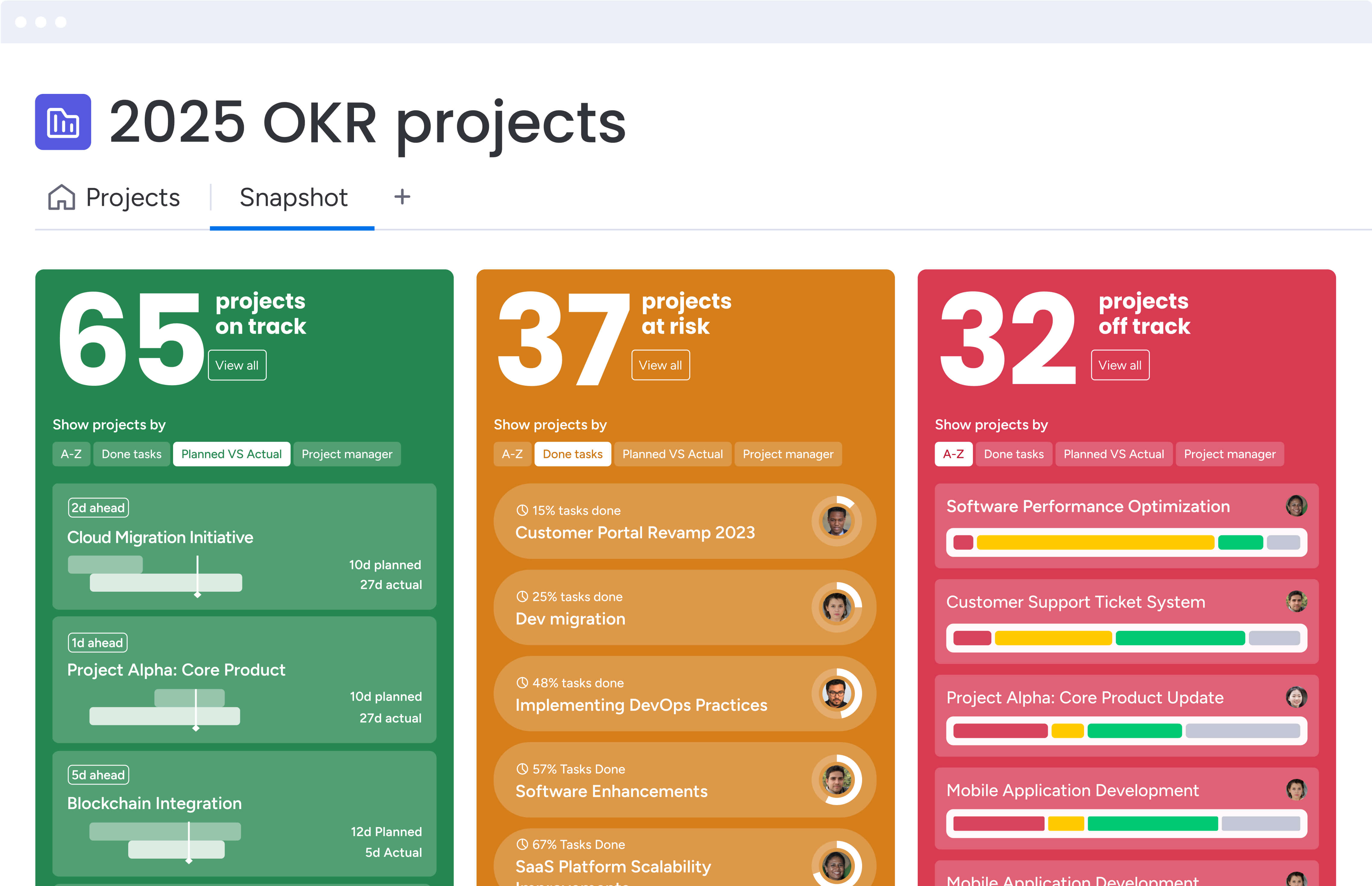
These core capabilities have the power to transform how media teams connect strategic objectives to daily execution. Each feature addresses specific challenges that media project managers face when coordinating complex creative workflows.
Goals & OKRs
Strategic alignment starts with connecting daily media work to broader business objectives. The Goals & OKRs feature creates a direct line from company-level targets to individual creative deliverables.
Media teams can set quarterly objectives for campaign performance, audience engagement, or content production, often using a goal setting template for structured planning. Each objective breaks down into measurable key results that teams track in real-time. A streaming service might set an objective to increase viewer engagement, with key results tracking content releases, social media metrics, and audience retention rates.
Visual progress tracking benefits:
- Color-coded indicators: instantly identify which objectives are on track, at risk, or behind schedule.
- Real-time updates: progress reflects automatically as teams complete work.
- Early intervention: course-correct before small delays become major issues.
Portfolio management
Managing multiple media projects requires a command center view of everything in motion. Portfolio management aggregates all your campaigns, productions, and creative projects into one high-level dashboard.
Project managers gain instant insights into resource allocation across projects. You can see which campaigns are consuming the most resources, identify bottlenecks in production workflows, and reallocate team members to priority initiatives. The portfolio view scales from ten projects to 1,000+ without losing clarity or performance.
AI-powered risk insights scan across your entire portfolio to surface potential issues. The system identifies when production schedules conflict, when resources are overallocated, or when campaign timelines are at risk. These proactive alerts give you time to adjust plans before problems impact delivery.
Dashboards & reporting
Real-time visibility transforms how media teams track goal progress, often requiring advanced goal trackers for precise measurement. Custom dashboards pull data from across projects to create executive-ready reports in seconds, not hours.
Build dashboards that matter for your specific media operations. Track campaign performance metrics, production milestones, budget utilization, and team capacity in one view. Widgets display data as charts, timelines, progress bars, or numerical indicators based on what communicates most effectively.
Automated reporting advantages:
- Eliminate manual compilation: set dashboards to refresh automatically and share with stakeholders on schedule.
- Executive visibility: teams get the insights they need without constant check-ins.
- Current data: reports reflect real-time status instead of outdated information.
Project management
Media projects demand advanced project management capabilities that handle complex dependencies and timelines. The platform provides Gantt charts, critical path analysis, and milestone tracking designed for enterprise-scale operations.
Cross-project dependencies become visible and manageable. When a video production delay impacts a campaign launch, the system automatically highlights affected timelines. Project managers can adjust schedules, reassign resources, and communicate changes instantly across teams.
Managed templates standardize project structures while maintaining flexibility. Create templates for campaign launches, content production cycles, or event management that include pre-built automations, approval workflows, and reporting structures. Teams start with proven frameworks while customizing for specific project needs.
Automations
Manual coordination consumes hours that media teams can’t spare. Automation recipes handle repetitive tasks so project managers focus on strategic decisions rather than administrative work.
Status updates flow automatically as work progresses. When creative teams mark assets as complete, the system notifies production teams and updates campaign timelines. Approval requests route to the right stakeholders based on project type and value. Reminders trigger when deadlines approach or when items await review.
Media-specific automation examples:
- Campaign approval workflows: automatically create project boards when campaigns get approved.
- Skills-based assignment: assign team members based on availability and expertise.
- Milestone reporting: generate progress reports when key deliverables are reached.
Integrations
Media teams rely on specialized creative and communication tools that need to work together seamlessly. The platform connects with 200+ applications to create a unified workspace.
Adobe Creative Suite integrations bring design work directly into project workflows. Teams can attach creative files, preview designs, and track revisions without leaving the platform. Slack and Microsoft Teams integrations keep conversations connected to actual work items. Google Drive and Dropbox integrations centralize asset management.
The open API enables custom integrations with proprietary systems. Connect your media asset management platform, analytics tools, or client portals to create end-to-end visibility across your entire tech stack.
How a project manager in media benefits from monday work management
The transformation begins with centralized visibility that eliminates the chaos of scattered information. Instead of chasing updates across email threads, spreadsheets, and chat messages, you have one source of truth for all media projects.
Time savings compound quickly when manual coordination disappears:
- 15-20 hours saved weekly: project managers report significant time recovery on status meetings and report creation.
- Automated workflows: handle routine updates, approval routing, and deadline reminders.
- Strategic focus: recovered time goes toward planning and creative problem-solving.
Team alignment improves dramatically when everyone works from the same platform. Creative teams understand how their work impacts campaign goals. Production teams see dependencies and adjust schedules proactively. Stakeholders get real-time visibility without disrupting workflow.
Resource optimization becomes data-driven rather than reactive:
- Capacity visibility: see exactly who’s available, their skills, and time allocation.
- Burnout prevention: avoid overallocation while ensuring priority projects have needed talent.
- Strategic allocation: match the right people to the right projects based on skills and availability.
Decision-making also accelerates with concrete insights instead of gut feelings about project health. You have metrics on progress, risks, and performance. AI-powered insights surface issues before they become critical, giving you time to adjust strategies.
Finally, scale becomes manageable rather than overwhelming. Whether you’re managing ten projects or hundreds, the platform maintains the same level of visibility and control.
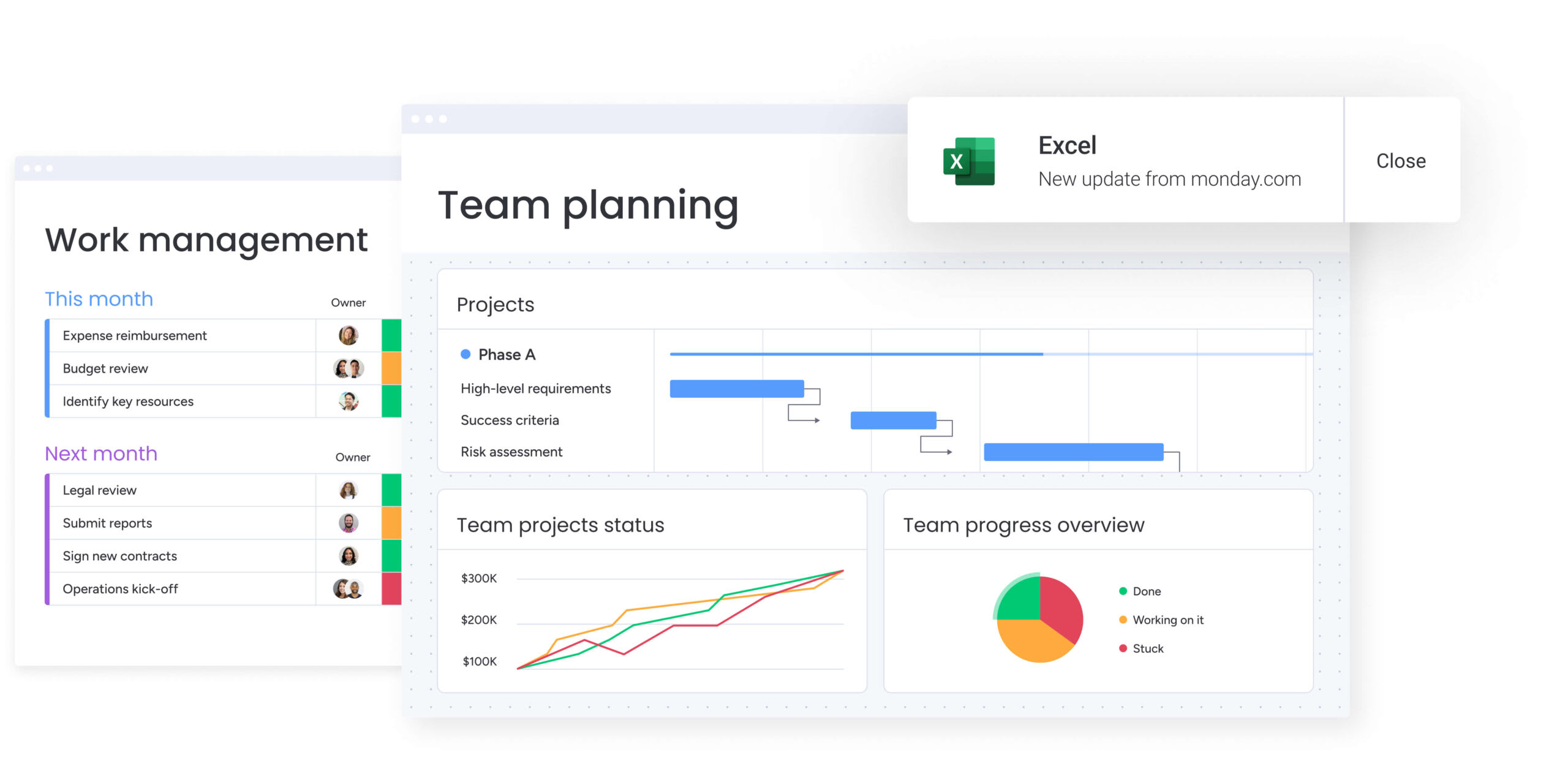
How to track goals across media projects with monday work management
Setting up goal tracking for media projects requires an approach that balances structure with flexibility. This step-by-step process ensures your team can connect strategic objectives to daily execution while maintaining the agility media work demands.
Step 1: establish your goal framework
Begin with company-level objectives that cascade down to team and project goals. Media organizations typically track objectives around audience engagement, content production, revenue generation, and operational efficiency.
Framework components:
- Company objectives: high-level targets that align with business strategy.
- Team goals: department-specific outcomes that support company objectives.
- Project deliverables: specific campaign results that contribute to team goals.
Create OKR boards that connect these high-level goals to specific campaigns and productions. This hierarchy ensures every creative task contributes to measurable business outcomes.
Step 2: build your project portfolio structure
Organize projects into logical portfolios based on how your media organization operates. You might group by content type (video, digital, print), client accounts, or campaign themes.
Each portfolio gets its own dashboard with relevant metrics and milestone tracking. This structure provides the right level of visibility for different stakeholder groups while maintaining operational clarity.
Step 3: configure automated workflows
Set up automation recipes that match your existing processes. Create triggers for common scenarios like creative approval workflows, production handoffs, and campaign launches.
Essential automation triggers:
- Asset completion: notify production teams when creative work is ready.
- Approval routing: send requests to stakeholders based on project type and value.
- Progress updates: automatically update goal achievement as work moves through stages.
These automations should update goal progress automatically as work moves through stages, eliminating manual status tracking.
Step 4: customize dashboards for different audiences
Build targeted dashboards for various stakeholder groups. Each audience needs different information presented in formats that support their decision-making.
Dashboard types:
- Executive dashboards: focus on portfolio health and goal achievement.
- Team dashboards: emphasize task completion and upcoming deadlines.
- Client dashboards: showcase campaign performance and deliverable status.
Step 5: integrate your creative tech stack
Connect the specialized tools your media teams already use. Link Adobe Creative Cloud for asset management, Google Analytics for performance tracking, and communication platforms for seamless collaboration.
These integrations ensure data flows automatically into your goal tracking system, creating a unified view without requiring teams to change their preferred creative tools.
Comparison table: monday work management vs competing platforms for goal tracking
By now, we’ve explored how different platforms support goal tracking and project execution for media teams. To make it easier to compare them at a glance, the table below highlights how leading tools stack up across the features that matter most in real media workflows.
This snapshot focuses on practical differences around scalability, creative integrations, automation, and resource visibility, so you can quickly see which platforms are built for managing complex, fast-moving media portfolios and which are better suited to lighter use cases.
Use it as a quick reference to validate your shortlist and spot trade-offs before diving deeper into demos or trials.
| Feature | monday work management | Asana | Wrike | ClickUp |
|---|---|---|---|---|
| Portfolio capacity | 1,000+ projects with AI insights | 500 projects | 200 projects | 100 projects |
| Media-specific templates | Campaign, production, content calendars | Generic project templates | Marketing templates only | Limited media templates |
| Creative tool integrations | Adobe Suite, Canva, Figma native | Limited creative integrations | Adobe plugin available | Basic file attachments |
| Resource management | AI-powered allocation with skills matching | Basic workload view | Resource planning add-on | Manual resource tracking |
| Custom automation | No-code builder with 200+ recipes | Rule-based automation | Limited automation options | Automation requires setup |
| Adoption timeline | 2-4 weeks to full adoption | 4-6 weeks | 6-8 weeks | 4-6 weeks |
| Freelancer access | Unlimited guest access with permissions | Paid guest seats | Limited guest access | Restricted external access |
| Real-time dashboards | Instant refresh with 30+ widgets | Manual refresh | Scheduled updates only | Limited widget options |
How SPH Media transformed their campaign delivery process

This real-world example demonstrates how monday work management addresses the specific challenges media teams face when managing complex creative workflows. SPH Media’s transformation illustrates the practical benefits of unified goal tracking and project management.
The challenge
SPH Media Content Lab managed creative campaigns across multiple brands and platforms, but their workflow was fragmented across different tools. Project managers spent hours compiling status reports, creative teams worked in silos, and stakeholders lacked visibility into campaign progress.
Specific pain points:
- Resource allocation struggles: without clear visibility into team capacity, some designers were overloaded while others had availability.
- Cascading delays: campaign delays occurred because dependencies weren’t visible until deadlines were missed.
- Manual coordination overhead: weekly status meetings ran long as teams tried to sync information from various sources.
- Outdated reporting: by the time reports reached executives, the data was already outdated.
The solution
SPH Media implemented monday work management to create a unified campaign management system. They built portfolio dashboards that provided instant visibility across all active campaigns, from initial brief to final delivery.
The team configured automated workflows that eliminated manual status updates. When creative teams completed designs, the system automatically notified production teams and updated campaign timelines. Approval workflows routed assets to stakeholders based on campaign value and type.
Implementation highlights:
- Unified visibility: portfolio dashboards showing all active campaigns in real-time.
- Automated coordination: workflows that eliminated manual status updates and approval routing.
- Resource optimization: real-time capacity tracking with skills-based project matching.
The results
Campaign delivery time improved significantly within three months. The automated workflows eliminated coordination delays, while real-time visibility helped teams identify and resolve bottlenecks quickly.
Measurable improvements:
- 15 hours saved weekly: project managers recovered time previously spent on status meetings and report creation.
- Strategic focus shift: recovered time went toward strategic planning and creative development.
- Consistency with flexibility: standardized templates ensured campaign consistency while maintaining customization options.
Executive visibility increased dramatically with automated portfolio reporting. Leaders could see campaign health, resource utilization, and goal progress in real-time. This visibility enabled faster decision-making and more accurate forecasting for future campaigns.
Give media teams the visibility they need with monday work management
As we’ve highlighted in this guide, media project management requires more than basic task tracking — it demands a platform that connects creative brilliance to business impact while scaling with your ambitions. The complexity of coordinating creative teams, managing production timelines, and tracking campaign performance across multiple channels requires specialized capabilities that generic project management tools simply can’t provide.
Modern solutions like monday work management transforms this complexity into coordinated execution through its unified approach to goal tracking and project management. The platform’s flexible architecture adapts to your workflows rather than forcing you to change how you work, while providing the enterprise-scale capabilities needed to manage hundreds of concurrent campaigns.
Key transformation areas include:
- Centralized visibility: one source of truth for all media projects, from individual tasks to portfolio-level metrics.
- Automated coordination: workflows that eliminate manual status updates and approval routing.
- Strategic alignment: direct connections between daily creative work and business objectives.
- Resource optimization: AI-powered insights that prevent overallocation while ensuring priority projects have needed talent.
The results speak through customer success stories like SPH Media, where teams report faster campaign delivery, 15+ hours saved weekly on administrative tasks, and dramatic improvements in cross-team alignment.
When your teams love the platform they use, data flows naturally and visibility becomes automatic.
Your media projects deserve a platform built for how you actually work — one that scales from startup to enterprise and evolves with your changing needs while maintaining the agility that creative work demands.
The content in this article is provided for informational purposes only and, to the best of monday.com’s knowledge, the information provided in this article is accurate and up-to-date at the time of publication. That said, monday.com encourages readers to verify all information directly.
Frequently asked questions
What's the difference between goal tracking and project management software?
Goal tracking software focuses on connecting strategic objectives to measurable outcomes and tracking progress over time, while project management software handles task execution and workflow coordination. monday work management combines both capabilities, letting media teams set OKRs, track campaign goals, and manage the detailed project work needed to achieve those objectives in one unified platform.
How does monday work management handle goal tracking across multiple media projects?
monday work management uses portfolio management to aggregate goals from hundreds of media projects into unified dashboards, with AI-powered insights that identify risks across campaigns. The platform's Goals & OKRs feature creates visual connections between company objectives and individual project deliverables, while automated progress tracking updates goal achievement in real-time as teams complete work.
Can monday work management integrate with creative tools like Adobe Creative Suite?
Yes, monday work management offers native integrations with Adobe Creative Cloud, allowing teams to attach files, preview designs, and track revisions directly within project boards. The platform also connects with other creative tools like Figma, Canva, and Sketch, plus communication platforms like Slack and Microsoft Teams to keep all media work synchronized.
How long does it take to implement goal tracking in monday work management?
Most media teams achieve full adoption of monday work management within two to four weeks, with basic goal tracking operational in the first week. The intuitive interface requires minimal training, pre-built media templates accelerate setup, and the customer success team provides implementation support to ensure teams quickly realize value from the platform.
What goal setting frameworks work best for media projects?
OKRs (Objectives and Key Results) work exceptionally well for media projects because they connect qualitative creative objectives with measurable outcomes like engagement rates, production milestones, and campaign performance. monday work management supports OKR methodology natively, but teams can also implement SMART goals, KPIs, or custom frameworks that match their specific media operations.
Do I need separate tools for OKRs and project management?
No, monday work management eliminates the need for separate OKR and project management tools by combining strategic goal setting with tactical execution in one platform. Teams set objectives, track key results, manage project tasks, and monitor progress through unified dashboards, reducing tool sprawl and ensuring alignment between strategy and daily work.

 Get started