



Agile retrospectives give teams a dedicated space to pause, learn from the last iteration or sprint, and decide how to work better in the next one.
Yet many teams rush through these meetings or fail to turn feedback into real change, so retrospectives start to feel like a box‑ticking exercise rather than a growth engine.
Whether you’re new to Agile or already running sprints with tools like monday dev, this guide explains what Agile retrospectives are, why they matter, and how to run them in a way that drives long‑term team success.
Try monday devKey takeaways
- Agile retrospectives are recurring, time‑boxed meetings where teams reflect on a recent sprint and decide on concrete improvements for the next one.
- When done well, retrospectives boost delivery velocity, product quality, and team health by turning real feedback into small, testable changes each iteration.
- Effective retros rely on psychological safety, a clear purpose, a focused timebox, actionable outcomes, and consistent follow‑up on agreed actions.
- Teams can keep retrospectives engaging with simple, proven formats and by avoiding common pitfalls like blame culture, too many topics, and poor follow‑through.
- With monday dev, teams can run better retrospectives and track the impact of changes over time with centralized feedback, AI‑powered summaries, action items, and Agile insights.
What is an Agile retrospective?
An Agile retrospective is a recurring meeting held at the end of an iteration where the team reflects on what worked, what did not, and which improvements to test in the next cycle. As stated in the last Agile principle:
At regular intervals, the team reflects on how to become more effective, then tunes and adjusts its behavior accordingly. In other words, Agile is built on the idea of identifying challenges and correcting them quickly, which is why retrospectives are so critical.
In Scrum, retrospectives are one of the core ceremonies of the framework. The sprint retrospective (or retro) meeting focuses on the most recent sprint so teams can continuously improve their workflows, collaboration, and delivery outcomes.
When, who, and how: The anatomy of an Agile retrospective
An Agile retrospective works best as a time‑boxed session at the end of each iteration, includes the right people in the room, and follows a simple, repeatable format that turns team insights into concrete improvements.
When do you hold the Agile retrospective meeting?
Teams usually hold the Agile retrospective meeting right after each sprint or iteration ends — while events are still fresh, but before planning for the next cycle begins. For Scrum teams working in 2‑week sprints, that typically means a recurring session every 2-4 weeks, with the length adjusted to match sprint duration and complexity.
Who should attend an Agile retrospective?
An Agile retrospective should include everyone who worked on the sprint, typically the whole development team, the Scrum Master (or facilitator), and the product owner. Other stakeholders can join occasionally when their input is vital, but the core group should be the people directly involved in the work so feedback and decisions stay relevant and actionable.
What is the Agile retrospective format?
Most Agile retrospectives follow a simple flow: set the stage, review what happened, generate insights, agree on a small set of improvement actions, and close with clear owners and next steps. Within that structure, teams can use different activities and formats, such as “start, stop, continue” or “mad, sad, glad,” to keep the conversation focused, engaging, and tailored to their needs.
How Agile retrospectives drive team success
Agile retrospectives help teams improve sprint over sprint by turning real feedback into changes that boost delivery velocity, product quality, and overall team health.
Faster, more sustainable velocity
Retrospectives let teams inspect what slowed work down in the last sprint, such as unclear scope, dependencies, or interruptions, and agree on small process experiments that increase flow in the next one.
Over multiple iterations, this continuous tuning leads to more predictable and often higher velocity because teams reduce over‑commitment, smooth out bottlenecks, and plan based on real data rather than optimism.
Higher product quality
By reviewing defects, churn, and “near misses” together, teams can identify where quality broke down in the workflow — e.g., requirements, handoffs, testing, deployment — and change how they build and test, not just patch issues.
This steady focus on learning from mistakes early helps reduce recurring bugs and production incidents over time, so quality improves without relying solely on heroics or late‑stage checks.
Stronger team health and collaboration
Team retrospectives give everyone a voice, which, when well facilitated, strengthens psychological safety and trust, making it easier for people to surface risks, disagree constructively, and share ideas.
As teams regularly celebrate wins and solve problems together, engagement and cohesion grow, leading to better communication, smoother conflict resolution, and a healthier environment that supports more sustainable high performance.
5 essential components of effective retrospectives
Effective Agile retrospectives are built around a few non-negotiables:
- People feel safe to speak up
- The meeting has a clear purpose and defined timebox
- The team leaves with a small set of actions they will actually follow up on
With these elements in place, retrospectives consistently improve both how the team works and how it feels to work together.
1. Psychological safety
Team members need to be able to share wins, concerns, and mistakes without fear of blame or judgment so real issues surface and diverse perspectives are heard. Ground rules, inclusive facilitation, and occasional anonymous input help create the trust required for honest conversations.
2. Clear purpose
Each retrospective should have a specific goal, such as improving flow, reducing defects, or strengthening collaboration, rather than trying to fix everything at once. Stating that purpose upfront keeps discussion focused and makes it easier to decide which ideas become concrete actions.
3. Focused timebox
Retrospectives are most effective when they are time‑boxed, with set durations for each phase so the conversation stays energetic and on track. Adjusting the overall length to sprint duration (for example, 45–90 minutes) helps teams go deep enough without causing fatigue.
4. Actionable outcomes
Every retrospective should produce a short list of specific, realistic improvement actions with clear owners and target dates. Capturing these as visible items in the team’s backlog or workflow increases accountability and the chances that changes actually happen.
5. Follow‑up
At the start of the next retrospective, the team should quickly review previous actions, check what was completed, and discuss the impact. This follow‑through closes the loop, prevents the same issues from resurfacing, and signals that people’s input leads to real, sustained improvements.
How to run your first retrospective meeting
Running your first retrospective is easier if you follow a simple, repeatable flow that helps the team reflect, prioritize, and leave with clear next steps. These steps work for in‑person and remote teams, and you can adapt the timing as your sprints and team size change.
- Set a clear goal for the session: Decide what you want to improve this sprint — for example, handoffs, quality, or focus time — and share that purpose at the start so everyone knows why they are in the room.
- Gather data and perspectives from the sprint: Review your board, incidents, and any feedback, then ask the team what went well, what was hard, and what surprised them to build a shared picture of the sprint.
- Generate insights and find themes: Cluster similar points, look for patterns, and discuss root causes so you move beyond symptoms like “we were busy” to underlying issues like unclear priorities or missing information.
- Decide on a small set of improvement actions: Brainstorm possible changes, then vote or agree on a few realistic actions the team can take in the next sprint, assigning an owner to each.
- Record actions and owners: Capture your agreed‑upon actions using owners, due dates, and status columns so progress is visible to the whole team. [Pro tip: use a dedicated retrospectives or sprint‑improvement board like those in monday dev.]
- Schedule and prepare the next follow‑up: Before closing, confirm the date of your next retrospective and plan to start it with a quick review of these actions, so the team can see what changed and keep improving over time.
See how monday dev helps teams run better retrospectives and track improvements over time:
7 proven retrospective formats that work
Switching up your retrospective format keeps conversations fresh and helps Agile teams look at their work from different angles. Here are 7 proven Agile retrospective examples teams use to keep sprint retrospectives effective and engaging:
1. Start, stop, continue
Team members list practices to start, stop, and continue in the next sprint. Use this when you want a simple, action‑oriented retro that quickly turns observations into clear decisions about future behavior.
2. Mad, sad, glad
The team reflects on what made them mad, sad, or glad during the sprint, focusing on emotional reactions and team dynamics. This format is ideal when morale feels off, communication has been tense, or you want to surface feelings that might not show up in metrics alone.
3. 4Ls (liked, learned, lacked, longed for)
People capture what they liked, learned, lacked, and longed for, giving a balanced view of positives, insights, gaps, and unmet needs. Use 4Ls after a significant change, release, or experiment when you want deeper learning and constructive critique without losing sight of what went well.
4. Sailboat
The team imagines a sailboat heading toward an island (goal), with wind pushing it forward, anchors slowing it down, and rocks representing risks. This visual format works well for roadmap or multi‑sprint reviews where you want to connect day‑to‑day work with longer‑term goals, risks, and enablers.
5. Starfish (keep, less, more, stop, start)
Feedback is organized into 5 categories: keep, do less, do more, stop, and start. Choose this when the team wants more nuance than ‘Start, stop, continue’ — especially if you need to fine‑tune how much you invest in existing practices.
6. Timeline
The facilitator draws a timeline of the sprint (or several sprints), and the team adds key events, releases, incidents, and emotions along the line. This is particularly useful for longer periods, cross‑team work, or complex projects where you need to see cause‑and‑effect over time.
7. Went well / could be better / ideas
Team members capture what went well, what could be better, and ideas to try next. Use this format when you want a straightforward structure that still encourages creative suggestions and balances praise with improvement opportunities.
Common retrospective mistakes teams make (and how to fix them)
Even experienced teams can fall into patterns that make retrospectives feel repetitive or frustrating instead of helpful. Being aware of a few common pitfalls makes it much easier to design retros that actually lead to change.
Blame culture instead of learning
When retrospectives turn into finger‑pointing, people become defensive, stay quiet, or avoid raising real problems.
How to avoid it: Shift the focus from “who messed up” to “what in our system led to this outcome.” Use blameless language, and remind the team that the goal is learning, not punishment.
Too many topics, not enough depth
Trying to cover every issue from the sprint often leads to shallow discussion and no real root‑cause analysis.
How to avoid it: Use dot‑voting or prioritization to pick 1-3 themes that matter most, and spend your time going deep on those instead of skimming 10 different problems.
No clear action items
Retros that end with vague intentions like “communicate better” leave the team unsure what will actually change.
How to avoid it: Always convert insights into a small set of specific, testable actions with owners, due dates, and clear success criteria.
Poor follow‑up on commitments
If no one checks whether previous actions happened, the same issues resurface and people lose trust in the process.
How to avoid it: Start each retrospective with a quick review of the last agreed actions, update their status together, and adjust or replace them based on what you learned.
Reusing the same template until it goes stale
Running the same format every time can make retros feel mundane, with people going through the motions without energy or new insights.
How to avoid it: Rotate between a few simple formats (like Start‑Stop‑Continue, Mad‑Sad‑Glad, or a Timeline retro) based on what the team needs, while keeping the core structure of reflection plus action.
Best practices for effective retrospectives (including remote teams)
Strong retrospectives follow the same fundamentals whether a team is co‑located or spread across time zones — clear expectations, inclusive participation, and visible follow‑through. For remote teams, adding async input, smart scheduling, and the right tools makes an even bigger difference to how useful each session feels.
Collect input asynchronously throughout the sprint
Give people a shared retro board they can update anytime, so ideas and issues are captured when they happen rather than relying on memory at the end. This reduces “blank page” moments in the live meeting and lets you spend most of the synchronous time on discussion and decisions rather than recall.
Be intentional about time zones and scheduling
For distributed teams, rotate retro times or use a hybrid model (async pre‑work plus a shorter live discussion) so no one is always stuck with the least convenient slot. Sharing the agenda and expected prep ahead of time helps people join ready to contribute, even if they are working at different times.
Use collaborative tools to keep everyone engaged
Digital whiteboards, virtual sticky notes, and integrated Agile tools make it easier for remote participants to contribute equally, vote on topics, and see action items in real time. Choose one primary workspace for your retrospectives and link actions directly to your backlog or boards so nothing gets lost between tools.
Keep the structure consistent, but vary the format
Follow a simple, familiar flow (set the stage → gather insights → discuss → decide actions → close) so people know what to expect every time. Within that structure, rotate through a few formats that align with your goals and team mood to avoid “retro fatigue” while still delivering clear, trackable improvements.
How monday dev enhances Agile retrospectives
Built on monday.com Work OS, monday dev brings everything you need for effective retrospectives into one place, so teams can collect feedback, agree on changes, and track their impact across future sprints without extra tools or manual admin. From asynchronous input to AI‑powered summaries and Agile insights, it helps teams turn every retro into concrete, measurable improvements.
Collect feedback asynchronously ahead of the retro
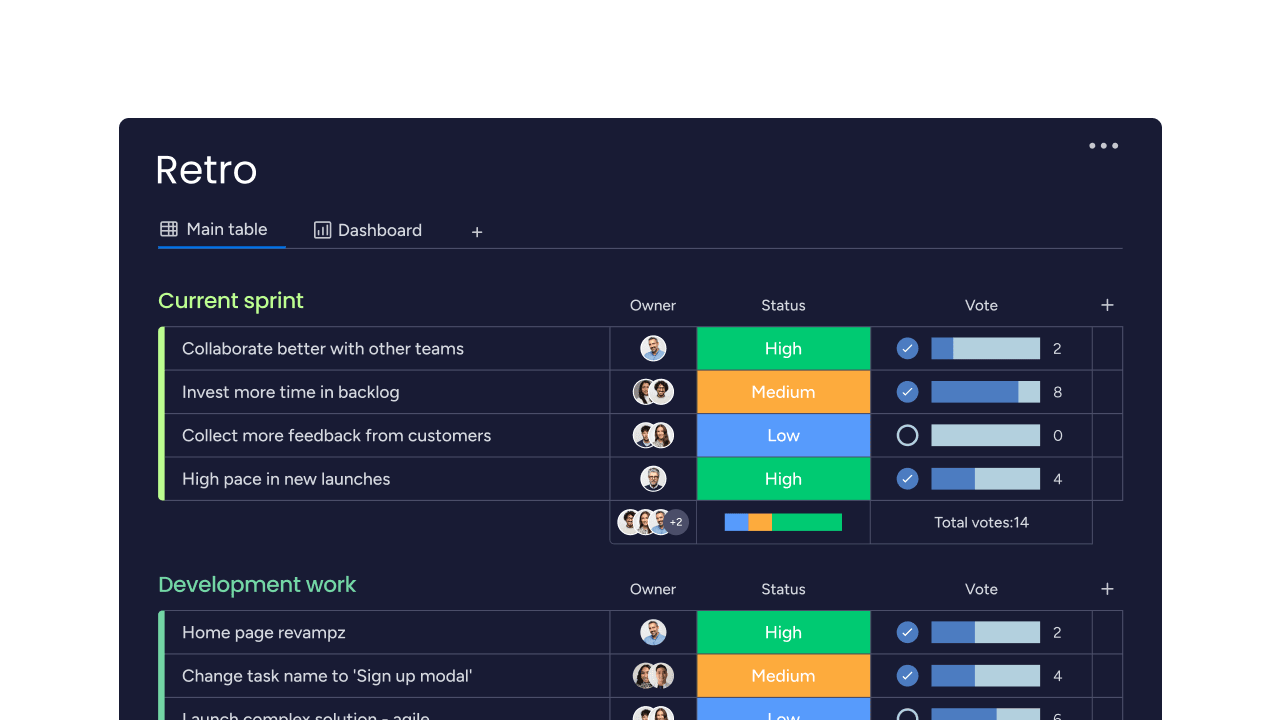
Use the built‑in retrospectives board and monday dev forms to capture feedback throughout the sprint, not just during the meeting. Team members can add items, leave updates, and tag colleagues as issues or ideas arise, so you start the session with a complete picture of what happened.
Use monday dev AI to cut down manual work
When retros generate long discussion threads, monday dev’s AI can summarize key themes and decisions instantly, reducing admin work and keeping teams focused on action
Make meetings more collaborative with voting and themes
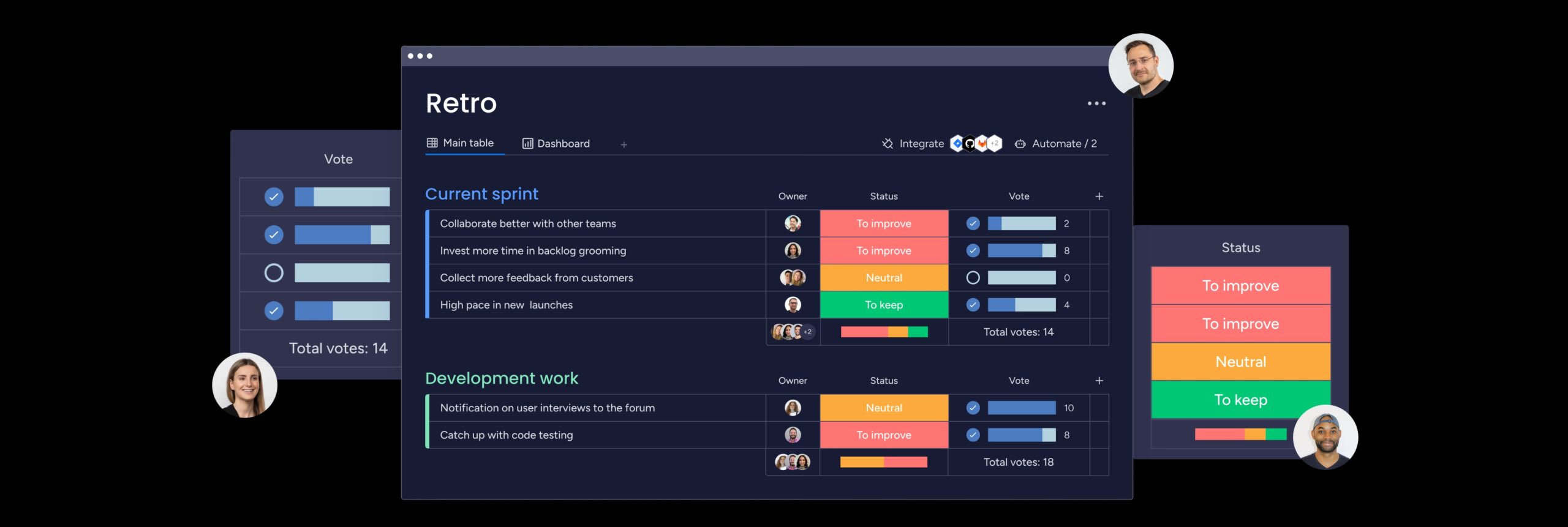
During the retrospective, you can review all discussion items on the retro board, group related topics into themes, and use the Vote Column to quickly see which issues the team cares about most. This keeps remote and in‑person retrospectives focused, democratic, and aligned around the topics that will have the biggest impact on the next sprint.
Turn agreements into backlog items with clear owners
Once the team agrees on improvement actions, you can convert them into items on your backlog or tasks board, assign owners and dates, and link them to related epics or stories. Because everything lives inside monday dev, improvement work sits alongside your sprint scope instead of disappearing into separate documents or side lists.
Track impact over time with burndown, velocity, and Agile insights
As you complete retrospective actions, monday dev automatically reflects that work in burndown charts, sprint views, and Agile insights so you can see how process changes affect delivery and team performance. Dashboards that combine velocity, burndown, and retro‑action status make it easy to bring hard data back into future retros and show how continuous improvement is paying off.
Put your Agile retrospective to work
While it can feel tempting to just get Agile retrospectives out of the way and move on to the next iteration, you should never rush through them. As a core pillar of the Agile methodology, it’s essential to make each iteration more productive than the last. With a platform like monday dev, you can enhance your retrospectives and turn feedback into positive results.
Try monday dev free for 14 days and experience the retrospective difference for your team.
Try monday devFAQs
How long should an Agile retrospective last?
Most teams spend 30–90 minutes on an Agile retrospective, depending on sprint length and complexity. A common rule of thumb is about 30 minutes per week of work, so a 2‑week sprint retro often runs around an hour, with enough time to discuss issues and agree on clear actions.
What is the difference between a retrospective and a post-mortem?
A retrospective is a recurring meeting held after each sprint to improve how the team works in the next iteration. A post‑mortem typically occurs once at the end of a large project or major incident and produces a detailed report on what happened, rather than a short list of small, near‑term changes.
Can retrospectives work for non-technical teams?
Yes, retrospectives work well for any team that wants to learn from experience and improve how they collaborate. Marketing, operations, HR, and customer service teams use the same structure — what worked, what didn’t go well, what can we do differently next time — to refine campaigns, processes, and customer journeys over time.
How do you measure retrospective effectiveness?
Retrospective effectiveness shows up in both behaviors and outcomes — higher completion rates for action items, stronger participation, and visible improvements in metrics, such as lead time, quality, and team health. Teams using monday dev can also track how often retro actions are delivered within sprints and correlate them with trends in velocity and defect rates.
What tools work best for virtual retrospectives?
Good virtual retrospective tools make it easy to contribute asynchronously, collaborate in real time, and turn ideas into trackable actions. Options range from dedicated retro apps and digital whiteboards to end‑to‑end platforms like monday dev, where feedback, action items, and Agile metrics all live in one place.
How often should teams change their retrospective format?
Teams don’t need to switch formats every sprint, but periodically refreshing the format can prevent “retro fatigue” and spark new perspectives. Many teams keep a familiar structure for several sprints, then introduce a new format when energy dips or the team wants to explore different themes, such as morale or risks.
