



Your website traffic looks healthy, but a scroll through your CRM tells a different story. Most visitors browse and leave without a trace, creating a gap between traffic and pipeline where revenue quietly disappears. Lead capture software closes that gap by identifying anonymous visitors and pulling in their contact details automatically. Then it flags the prospects actually worth your time. Instead of waiting for someone to raise their hand, your team gets visibility into who’s already showing interest.
We’re breaking down 15 lead capture platforms, from chat-based solutions to full CRM systems, and covering the features that actually move deals forward. We’ll cover what to look for, how to evaluate your options, and how to build a capture process that scales with your team. The right platform connects these signals directly to your pipeline, so reps can act while buying intent is still fresh. Tools like monday CRM make this possible by unifying lead capture and pipeline management in one place.
Try monday CRMWhat is lead capture software?
Your website gets plenty of visitors. The problem? Most of them are ghosts. They browse, they click, and then they vanish without a trace, taking their buying intent with them.
Lead capture software keeps visitors engaged and present. It identifies those anonymous visitors and turns their quiet interest into actual sales opportunities your team can act on. It’s the difference between waiting for leads to come to you and actively finding them on your own turf.
Core functions that drive results
How does mystery traffic become revenue? Lead capture software uses a few key functions to turn anonymous browsing into qualified pipeline.
- Visitor identification: It tells you which companies are browsing your site, even if no one fills out a form. No more guessing who’s behind the screen.
- Data enrichment: Forget the manual research. Once a visitor is identified, the software automatically pulls in contact details and company info, giving your team the full picture.
- Lead qualification: It scores leads based on their actions, so your team knows who to talk to now and who needs more time.
- Automated outreach: When a hot lead is flagged, personalized follow-ups can be triggered instantly. Because speed wins deals.
How lead capture differs from CRM systems
Lead capture is the front door. Your CRM is where the real work happens. Lead capture software works at the top of the funnel to find qualified prospects and get them in the door. Juggling separate systems for this is a classic sales drag. monday CRM handles both: visitor identification and full pipeline management in one place. It connects the dots from the first anonymous visit to the final signature, all in one place.
Channels that feed your sales pipeline
Your prospects aren’t just on your website; their journey is spread across different channels. A good lead capture process tracks engagement everywhere to build a complete picture of buying intent on your sales pipeline.
Watch for signals across:
- Website behavior: Page views, time on site, and pricing page visits.
- Social media: Engagement with posts and direct messages.
- Email campaigns: Open rates and click-throughs on nurture sequences.
- Content downloads: Whitepapers, case studies, and webinar sign-ups.
15 best lead capture software platforms
Lead capture tools range from simple form builders to entire revenue platforms. Most of them just scatter your data across different apps, creating more work. You get a messy patchwork of tools that slows everyone down.
The right fit isn’t another puzzle piece. It’s one platform that connects lead capture directly to your pipeline. Your team acts on opportunities while they’re still hot. The table below compares the best leasd capture solutions side-by-side.
| Platform | Primary use case | Key capabilities | Starting price | Target audience |
|---|---|---|---|---|
| monday CRM | Unified lead capture and pipeline management | Multi-channel capture, AI blocks, no-code customization, automated sequences | $12/user/month | Revenue teams who want one platform for everything |
| Tidio | Real-time chat-based lead capture | Live chat, chatbots, visitor tracking | $29/month | Small businesses prioritizing chat engagement |
| Salesflare | Automated B2B lead tracking | Email tracking, automatic data entry, contact enrichment | $29/user/month | Small B2B teams wanting automated CRM |
| Jotform | Custom form creation and lead collection | Form builder, conditional logic, payment collection | $34/month | Teams needing flexible form solutions |
| CallPage | Phone-based lead conversion | Callback widgets, call tracking, lead routing | $149/month | Sales teams focused on phone conversations |
| RocketReach | Contact database and email finder | Contact search, email verification, bulk lookup | $53/month | Prospecting teams needing contact data |
| Lusha | LinkedIn-based contact enrichment | Chrome extension, contact enrichment, CRM sync | $29/user/month | Sales reps prospecting on LinkedIn |
| Sleeknote | Website popup lead capture | Popup builder, targeting rules, A/B testing | $55/month | Marketing teams optimizing website conversion |
| OptiMonk | Website personalization and lead capture | Popups, personalization, exit intent | $39/month | E-commerce and SaaS conversion optimization |
| VideoAsk | Video-based lead qualification | Interactive videos, async communication, lead scoring | $30/month | Teams using video for engagement |
| Landbot | Conversational chatbot lead qualification | No-code bot builder, conditional logic, integrations | $40/month | Marketing teams automating qualification |
| Wave Connect | LinkedIn automation and social selling | LinkedIn outreach, connection requests, message sequences | $29/month | B2B teams focused on LinkedIn prospecting |
| iCapture | Event badge scanning and lead capture | Badge scanning, lead retrieval, event management | Custom pricing | Trade show and event exhibitors |
| Cvent LeadCapture | Enterprise event lead management | Badge scanning, lead scoring, event analytics | Custom pricing | Large organizations managing multiple events |
| Whova | Event networking and attendee engagement | Attendee networking, agenda management, lead exchange | Custom pricing | Event organizers facilitating connections |
1. monday CRM
monday CRM turns lead capture into a system your team can actually run, not a pile of forms and forgotten follow-ups. Capture sales leads, qualify them, engage them, and move them through the pipeline with the context sales managers and revops actually need.
monday CRM is built on the monday.com Work OS, so revenue teams shape boards, views, dashboards, and automations around their process, not the other way around.
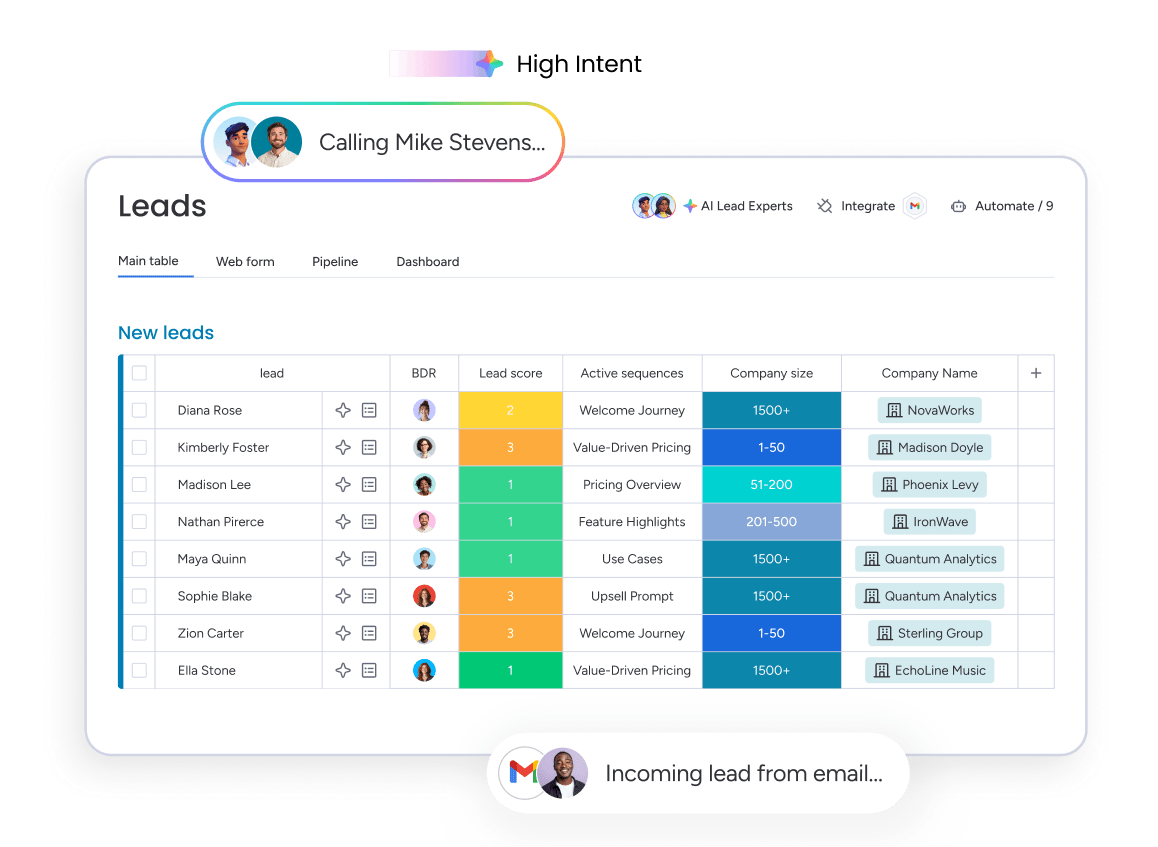
Example:
Revenue teams use monday CRM to collect leads from website forms and social ad campaigns, enrich them with company context, then run outreach and deal stages without losing the thread.
Key features:
- Multi-source lead collection: Collect leads from website forms and social ad campaigns, then put them in one place so reps and managers work from the same record.
- Visual pipeline management: See where deals stand with a visual pipeline. Customize it with drag-and-drop deal stages that match your sales cycle.
- Email + activity tracking in one timeline: Log and track every interaction — emails, meetings, notes — so anyone can pick up the conversation with confidence.
- Mass email and tracking: Send individual and mass emails using dynamic fields and templates. Track opens and link clicks to see what’s landing.
Advanced AI features:
AI on monday CRM shows up where sellers spend their time: writing, reading, and updating records.
- Emails & Activities: timeline summary with AI: Generate a quick summary of emails, calls, meetings, and notes so reps and managers get context fast.
- Emails & Activities: AI-assisted email drafting: Compose emails directly inside Emails & Activities, so follow-ups are easier to write and easier to keep consistent.
- Autofill with AI (board columns): Turn unstructured text into usable CRM data by autofilling columns with AI actions like Detect sentiment, Extract information, Summarize, Assign label, and Assign person.
- This works across common CRM columns, including text, date, number, dropdown, people, and status columns.
- You can also use Custom action to instruct AI using data from your board columns, then write results back into the column you choose.
Automations:
Automation in monday CRM keeps things moving without constant oversight.
- Automate email follow-ups: Set follow-up workflows so leads keep moving, even when reps are slammed.
- Automate actions based on custom conditions: Trigger next steps based on what you’re already tracking — stage changes or field updates.
- Conditional label change: Keep lead and deal statuses consistent, so reporting stays trustworthy and pipeline reviews stay focused.
Integrations:
Integrations matter most when they reduce manual research and data entry.
- Crunchbase enrichment: Auto-enrich lead data using Crunchbase’s database, so reps start with company context instead of hunting for basics.
Lead capture software features:
Lead capture is only useful when it feeds the rest of your process without extra admin.
- Expanded item view for context: See all relevant account and contact information in one place, without bouncing between records.
- Connected customer journey: See connected deals, accounts, contacts, and even related projects together, so handoffs stay smooth.
- Dedicated mobile experience: Manage leads, updates, and follow-ups when your day isn’t happening at a desk.
Pricing:
- Basic: $12/month per seat (billed annually)
- Standard: $17/month per seat (billed annually)
- Pro: $28/month per seat (billed annually)
- Ultimate: Contact sales for quote
- Plans start from 3 seats with 18% discount for annual billing.
- AI credits included with paid plans, additional usage available as needed.
Why it stands out:
- A CRM people stick with: The visual experience and flexible setup make adoption realistic, not a quarterly “please update your CRM” campaign.
- Adaptable by the revenue team: Revenue leaders can tailor pipelines, dashboards, and automations to their process without heavy technical lift.
- Built for the whole customer journey: Teams use monday CRM beyond lead capture, including account management, onboarding progress, renewals, and even collection tracking as they grow.
2. Tidio
Tidio transforms website visitors into qualified leads through real-time chat engagement and intelligent automation. The platform specializes in chat-based lead capture for small businesses and e-commerce sites, combining live chat with AI-powered chatbots to maintain 24/7 availability. With 300,000+ businesses already using the platform, Tidio offers a proven approach to converting browsing behavior into meaningful conversations.

Use case:
Perfect for small businesses and e-commerce teams who want to capture leads the moment visitors show interest, without requiring dedicated sales staff around the clock.
Key features:
- Pre-chat surveys that automatically collect contact details, newsletter consent, and department preferences before conversations begin
- 40+ ready-to-use automation templates for lead collection, appointment booking, and quote requests with visual, no-code builders
- Multi-channel lead capture across website chat, Facebook Messenger, Instagram, and WhatsApp with unified contact management
Pricing:
- Free: 50 billable conversations, 100 Flow visitors reached, one-time 50 Lyro AI conversations
- Starter: From $24.17/month (annual billing) for 100 billable conversations with live chat and basic analytics
- Growth: From $49.17/month (annual billing) starting at 250 conversations with advanced analytics and user permissions
- Plus: From $749/month for teams with departments, multi-project support, and dedicated success manager
- Premium: Custom pricing with guaranteed 50% AI resolution rate and enterprise features
- Flows add-on: Starting at $24.17/month (annual) for 2,000+ monthly visitors after free 100-visitor limit
- Lyro AI Agent add-on: $32.50/month (annual) for 50 monthly AI conversations
Annual billing includes two months free, with 7-day free trials available without credit card requirements.
Considerations:
- Flow automations pause when monthly visitor limits are reached, potentially missing leads during high-traffic periods
- WhatsApp automations support limited triggers and only three visible quick-reply buttons, restricting conversation flow options
3. Salesflare
Salesflare automates lead data entry and tracking for small B2B teams through email integration and contact enrichment. The platform specializes in zero-input capture, automatically creating contact records from your existing email conversations and meetings without manual CRM work.

Use case:
Small B2B sales teams managing straightforward sales cycles who want to minimize manual CRM data entry while maintaining comprehensive lead tracking.
Key features:
- Automated contact creation: Pulls lead information from email conversations, signatures, and meeting interactions without manual input.
- Built-in prospecting tools: Lead Finder and Email Finder help you discover new prospects and find high-probability business email addresses, all on a credit-based system.
- Multi-channel capture: A Chrome extension captures leads from LinkedIn and websites, while sidebar integrations pull data directly from your Gmail and Outlook inboxes.
Pricing:
- Growth: $29/month per user (annual billing) with core CRM features and 5 lead credits monthly
- Pro: $49/month per user (annual billing) with advanced workflows, custom dashboards, and 100 lead credits monthly
- Enterprise: $99/month per user (annual billing, 5-user minimum) includes dedicated support and 250 lead credits monthly
- Additional lead credit packs available: 250 credits for $39/month, 500 for $69/month, or 1,000 for $129/month
Considerations:
- Native web form capture requires third-party integrations like Zapier, adding setup complexity and potential costs.
- Email discovery relies on monthly credit limits, which may constrain high-volume prospecting without purchasing additional credit packs.
4. Jotform
Jotform delivers flexible form creation for teams capturing leads across websites, events, and campaigns. The platform combines drag-and-drop building with powerful automation, making it a strong fit for organizations that need custom forms without coding expertise. With 35M+ users worldwide, it handles everything from simple contact forms to complex multi-step lead qualification.
Use case:
Marketing teams needing versatile, branded forms that work everywhere — from pop-ups and QR codes to offline kiosks at trade shows.
Key features:
- Conversational forms: One-question-per-page flows that reduce friction and boost completion rates.
- Multi-channel deployment: Embed forms, create lightboxes, generate QR codes, or run offline with kiosk mode.
- Direct CRM integration: Automatically send submissions to Salesforce, HubSpot, Zoho CRM, and dozens of other platforms.
Pricing:
- Starter: Free (with Jotform branding and usage limits).
- Bronze, Silver, & Gold: Paid tiers with increasing limits and features (like HIPAA compliance on the Gold plan). Pricing varies by region, so check their site for current rates.
- Enterprise: Custom pricing (SSO, data residency, white-label options).
- Nonprofit and education discounts up to 50% available.
- No transaction fees for payment collection.
Considerations:
- GA4 tracking requires full source code embedding instead of standard JavaScript, adding complexity for marketing teams.
- Free accounts include Jotform branding and strict usage caps that may not work for high-volume campaigns.
5. CallPage
CallPage converts website visitors into phone conversations through instant callback widgets that connect prospects with sales reps in 28 seconds. The platform specializes in behavior-driven popup targeting with 24 scoring rules, making it a strong fit for phone-first sales teams in real estate, insurance, and financial services.
Use case:
Sales organizations where phone conversations drive conversion and teams with strong phone sales capabilities seeking to maximize callback conversion rates.
Key features:
- Instant callbacks in 28 seconds with customizable popup widgets and scoring rules based on visitor behavior
- Multi-contact options including “Call me now,” “Schedule a call,” and “Leave a message” with automated routing
- Call recording, tracking, and lead management with CAPTCHA filtering to reduce bot spam
Pricing:
- Essentials: $31/month (annual) or $39/month (monthly) — 50 successful calls, basic integrations
- Pro: $79/month (annual) or $99/month (monthly) — 100 calls, unlimited integrations, international calling
- Enterprise: Custom pricing — 600+ calls, dedicated customer success
- Annual billing saves 20% compared to monthly plans
- Add-ons include extra users ($10/month), additional calls ($30 per 50), and virtual numbers (from $10/month)
Considerations:
- No free plan available since September 2023, only 14-day trial
- Call limits and multiple add-ons can increase costs as volume scales, with overage fees for exceeding monthly successful call quotas
6. RocketReach
RocketReach delivers professional contact intelligence through a massive database of verified email addresses, phone numbers, and social profiles. The platform focuses on proactive lead discovery rather than traditional web forms, making it well-suited for outbound sales teams building targeted prospect lists. Real-time email verification and automated list-building through their Autopilot feature enable continuous lead capture without manual effort.
Use case:
Sales development teams running account-based prospecting campaigns who need accurate contact data and want to automate ongoing lead discovery.
Key features:
- Autopilot automation: Continuously builds and updates prospect lists based on saved search criteria, delivering new matching contacts directly into sequences
- Browser extension capture: Find and verify contact information directly from LinkedIn profiles and company websites with real-time SMTP validation
- Bulk enrichment capabilities: Process entire contact lists simultaneously through API integration, Zapier workflows, or CSV uploads
Pricing:
- Free: $0/month with 5 lookups per month
- Essentials: $69/month with 100 lookups, email-only contacts, and limited Autopilot jobs
- Pro: $119/month adding phone numbers, technographics, and expanded integrations
- Ultimate: $209/month with highest lookup limits and maximum Autopilot capacity
- Team billing and bulk credit discounts available for larger organizations
Considerations:
- Focuses on contact discovery rather than native web form capture, requiring separate solutions for inbound lead conversion
- Credit-based pricing model can become expensive for high-volume prospecting programs without bulk purchasing
7. Lusha
Lusha enriches contact records with email addresses and phone numbers through a Chrome extension and LinkedIn integration. The platform excels at instant contact data enrichment, serving sales teams who need immediate access to prospect information without leaving their workflow.

Use case:
Sales representatives conducting LinkedIn-based prospecting who need immediate access to contact information and teams running account-based sales development campaigns targeting specific companies.
Key features:
- Chrome extension and LinkedIn integration for real-time contact enrichment during prospecting
- No-code connectors through Zapier, Workato, and Make for automated form-to-CRM enrichment workflows
- Bulk CSV enrichment capabilities for processing large lead lists with plan-based volume limits
Pricing:
- Free: Up to 70 credits per month
- Professional/Pro: Credit-based pricing (1 credit per verified email, 10 credits per phone number)
- Premium: Higher credit allowances and additional features
- Scale (Enterprise): Custom pricing through sales team
- Monthly credits can roll over up to 2× the plan limit
- Annual plans receive all credits upfront
Considerations:
- Phone reveals consume significantly more credits than email enrichment (10x cost difference).
- Higher-tier features like CSV enrichment are gated behind higher tiers (plan-dependent), limiting high-volume operations on lower tiers.
8. Sleeknote
Sleeknote creates targeted popup campaigns to capture leads from website visitors based on behavior, page views, and exit intent. The platform centers on ecommerce-focused lead capture with advanced targeting rules and gamification features, serving Shopify merchants and online retailers looking to maximize website conversion rates.
Use case:
Marketing teams focused on maximizing website conversion rates through strategic popup placement and ecommerce companies testing various lead magnet offers.
Key features:
- Behavioral targeting: Display specific popups based on traffic source, page history, geographic location, and visitor behavior patterns
- Automated triggering: Smart triggers automatically optimize timing and trigger selection to find the highest-converting combinations
- Gamification elements: Interactive campaigns including spin wheels, scratch cards, and quizzes to boost engagement and capture rates
Pricing:
- Core (0-25k visitors): $69/month ($55/month annually)
- Core + Gamification (0-25k visitors): $95/month ($76/month annually)
- Core (25-50k visitors): $83/month ($66/month annually)
- Core + Gamification (25-50k visitors): $115/month ($92/month annually)
- Higher traffic tiers: Available up to 500k visitors with custom enterprise pricing beyond that
- Annual discount: 20% off all plans when billed annually
- Free trial: 14-day trial available
Considerations:
- Exit-intent triggers don’t work on mobile devices, limiting capture opportunities for mobile-heavy traffic
- Lead data is only stored for three months without ESP integration, requiring immediate setup of external systems to avoid data loss
9. OptiMonk
OptiMonk combines website personalization with popup lead capture to optimize conversion rates. The platform displays personalized content and offers based on visitor behavior, traffic source, and previous interactions. Exit intent technology detects when visitors are about to leave and presents last-chance offers or lead capture forms.
Use case:
E-commerce sites and SaaS companies optimizing website conversion through personalized experiences and sophisticated segmentation campaigns.
Key features:
- Exit intent technology with personalized popups, sticky bars, and full-screen overlays triggered by visitor behavior
- AI-powered Smart Popups and A/B testing for automated content optimization and personalization
- Deep ecommerce integrations with Shopify, including product recommendations and unique discount codes
Pricing:
- Free: 10,000 pageviews/month, 1 domain, unlimited campaigns
- Essential: $29-$59/month for 20k-50k pageviews, up to 2 domains
- Growth: $99-$174/month for 100k-250k pageviews, up to 4 domains
- Premium: $249-$374/month for 500k-1M pageviews, up to 10 domains
- Master: Custom pricing for unlimited domains and higher pageview limits
- AI add-on: Starting at $198/month for Smart A/B Testing and advanced personalization features
- Annual billing offers 3 months free
Considerations:
- Pageview-based pricing can become expensive for high-traffic sites since every page load counts toward limits
- Mobile exit-intent detection isn’t universally supported across all devices and may not fire consistently
10. VideoAsk
VideoAsk reimagines lead capture through interactive video conversations that feel personal rather than transactional. The platform builds on asynchronous video engagement, appealing to teams who want to qualify leads through genuine human connection instead of static forms.
Use case:
VideoAsk excels at creating engaging qualification experiences for complex sales where understanding prospect context requires detailed, personal conversations.
Key features:
- Interactive video flows with conditional logic and scoring to guide prospects through qualification questions
- Built-in contact forms, calendar embeds, and Live Call functionality for immediate escalation of hot leads
- CRM integrations with HubSpot and Salesforce plus analytics tracking with generate_lead events
Pricing:
- Free plan: Available with basic features
- Grow: Starting around $24/month (usage-based on processing minutes)
- Brand: Higher tier with more processing minutes
- Enterprise: Custom pricing with BAA available for HIPAA compliance
- Annual billing discounts available
- 25% discount on monthly plans for non-profits and educators, 40% off monthly plans for students
Considerations:
- Contact forms limited to only four fields (Name, Email, Phone, Product name) with no customization options
- Pricing based on “processing minutes” can create cost variability for high-volume video responses, requiring upgrades when limits are exceeded
11. Landbot
Landbot converts static forms into conversational experiences that capture leads through guided chat flows on web and WhatsApp. The platform merges AI-powered responses with structured UI elements, serving marketing teams who need to qualify high volumes of prospects without overwhelming their sales pipeline.
Use case:
Marketing and growth teams use Landbot to automate lead qualification through conversational chatbots that collect contact details, assess prospect fit, and route qualified leads directly to CRM systems.
Key features:
- Multi-channel lead capture through web widgets, pop-ups, and WhatsApp bots with proactive triggers
- Lead scoring and qualification system with conditional logic, A/B testing, and keyword routing
- Real-time CRM integration with native HubSpot and Salesforce connectors plus webhook support
Pricing:
- Sandbox: Free for 100 web chats/month and 1 seat
- Starter: €40/month (€32/month annually) for 500 chats/month and 2 seats
- Pro: €100/month (€80/month annually) for 2,500 chats/month with expanded integrations
- WhatsApp Starter: €80/month including web and messenger access
- WhatsApp Pro: €120-200/month for approximately 1,000 WhatsApp chats
- Business: Starting at €400/month with custom quotas and compliance options
- Annual billing offers 20% savings across plans
Considerations:
- Pricing can escalate quickly with higher chat volumes and advanced features, especially for WhatsApp campaigns
- The drag-and-drop builder interface is currently not accessible for users with visual or motor impairments
12. Wave Connect
Wave Connect elevates the digital business card into a comprehensive lead capture system for events. This Montreal-based tool centers on browser-based contact exchange, eliminating the need for new connections to download an app before sharing their info. It’s a frictionless solution for sales teams working the floor at trade shows and conferences.
Use case:
Built for the chaos of event-based lead gen. Your team can capture contacts from conference badges, paper business cards, and direct networking without slowing down the conversation.
Key features:
- AI-powered badge and business card scanning with automatic contact enrichment
- Two-way contact exchange allowing prospects to instantly share their information back
- Offline capture mode that queues contacts and syncs when internet connection returns
Pricing:
- Free: $0/month with digital card, unlimited sharing, and 10 free badge scans
- Pro: $7/month (annual billing) with AI scanning, CRM sync, and contact enrichment
- Teams: $5/user/month (annual billing, 3-seat minimum) with admin console and shared lead dashboard
- Enterprise: Custom pricing with SSO, SCIM, and advanced compliance features
Considerations:
- Recipients need internet access to fully load shared contact pages.
- Dynamics 365 integration is one-way only, limiting bi-directional data updates.
13. iCapture
iCapture delivers universal badge scanning and lead retrieval for trade shows and conferences. The platform eliminates event-specific scanner rentals with one consistent system that works across 100+ badge providers, serving B2B exhibitors running multi-event programs.
Use case:
Companies exhibiting at trade shows who need efficient lead capture that syncs directly to their CRM without manual data entry or event-by-event tool switching.
Key features:
- Badge scanning with offline capability and real-time CRM sync to eliminate post-event spreadsheet cleanup
- Custom qualification questions with lead scoring to prioritize hot prospects during booth conversations
- Business card capture with dual human verification to ensure accurate contact data transcription
Pricing:
- Annual service agreement: Starts at $8,000/year
- Detailed packages require custom quotes based on event volume and integration needs
Considerations:
- Initial setup requires careful field mapping between event data and CRM systems, which can be time-intensive for first deployments
- Starting price point of $8,000 annually may be cost-prohibitive for smaller exhibitors with limited event programs
14. Cvent LeadCapture
Cvent LeadCapture brings enterprise-grade lead management to your events with badge scanning, lead scoring, and real-time analytics. It’s a key part of Cvent’s event ecosystem, the same one trusted by over half the Fortune 500 for their major trade shows and conferences.
Use case:
Enterprise organizations running multiple events annually who need sophisticated lead tracking, attribution, and detailed ROI reporting across their entire event portfolio.
Key features:
- Badge and QR code scanning with business card capture for comprehensive lead collection
- Configurable lead qualification questions and rating systems to prioritize high-value prospects
- Real-time exhibitor portal with instant lead access and ROI analytics for immediate insights
Pricing:
- Professional: Quote-based pricing with 10 user logins and core platform features
- Enterprise: Quote-based pricing includes additional licenses, all user logins, SSO/MFA, and API access
- LeadCapture available as add-on to base platform pricing
- Hardware rentals and device options available for additional cost
- Special rates offered for non-profit organizations
Considerations:
- When used for events not hosted on Cvent, the “Universal Lead Capture” feature relies on third-party badge kits, which can be less predictable.
- Quote-only pricing with potential add-on costs for hardware rentals and premium services.
15. Whova
Whova transforms event networking into a lead generation powerhouse through its all-in-one event management platform. The platform goes beyond simple badge scanning with multi-channel lead capture, appealing to event organizers who want to maximize exhibitor ROI and attendee engagement.
Use case:
Event organizers and exhibitors who need to capture, qualify, and export leads from conferences, trade shows, and corporate events while driving meaningful attendee connections.
Key features:
- QR code scanning via mobile app with no hardware required, plus Apple/Google Wallet integration for faster scanning
- Multi-channel lead generation through offers, gamification (Passport Contest), and Exhibitor Outreach Campaigns
- Team-friendly workflows with role-based permissions, custom qualifier tags, and instant Excel export or CRM integration via Zapier
Pricing:
- Platform pricing: Quote-based for core event management and lead retrieval add-ons
- Registration fees: Free for free tickets; 3.0% + $0.99 per paid ticket (plus Stripe processing fees)
- Lead retrieval: Available as organizer-controlled add-on (pricing not publicly disclosed)
Considerations:
- Lead capture functionality requires organizers to purchase add-ons, which may increase overall event costs
- Platform dependency means lead capture only works within Whova’s ecosystem, unlike some competitors that can scan any badge type
Key features that turn visitors into pipeline
Collecting contacts is easy. Converting them into actual revenue is another story. The difference comes down to the tech working behind the scenes to spot intent, qualify prospects, and get your team in the door while interest is high. Here’s what separates a platform that drives pipeline from one that just fills a database.
Multi-channel lead capture
Your prospects don’t move in a straight line. They check your site, download a guide, and maybe even show up to a webinar. Tracking these actions in silos means you’re only getting half the story and underestimating who’s ready to buy. A complete view of engagement reveals patterns that a single touchpoint can’t, helping your team distinguish casual browsers from serious buyers and focus on the right leads every time.
AI-powered lead scoring and qualification
Manual qualification is a grind of reviewing info, researching companies, and trying to prioritize follow-ups. AI automates the analysis so your team can jump straight to the opportunities most likely to close. The system learns what actions and traits lead to closed deals based on your own data, spots buying signals like repeat site visits or specific page views, and flags the leads that fit your ideal customer profile. Revenue teams find success using monday CRM to automatically detect sentiment in emails and pull key details from conversations, so you can spot an at-risk deal or find budget and timeline info without digging through long email threads.
Website visitor identification
Most people who visit your website never fill out a form. That’s a lot of potential revenue walking out the digital door. Visitor identification bridges this gap by connecting anonymous site traffic to the companies they work for, revealing who’s doing their research. You see the company name, industry, and what pages they’re viewing, giving your sales team a massive advantage to start conversations with interested accounts before they’ve even thought about reaching out to a competitor.
Automated lead enrichment
Manually digging for a prospect’s contact details or company background is a huge time sink that delays follow-up. Automated enrichment instantly adds the missing pieces to the puzzle. The moment a lead comes in, the system fills in their contact info, job title, company size, and even what tech they use. With monday CRM, organizations give reps full context before the first call, leading to more productive conversations.
Speed-to-lead alert systems
Responding to a new lead within five minutes makes them 21 times more likely to convert. Yet most teams take hours or even days to follow up. An alert system closes that gap by notifying reps the second a qualified lead comes in and automatically routing it to the right person based on territory or availability. With monday CRM, automations trigger instant notifications for high-value leads, getting your best opportunities to the right reps while they’re still hot and turning visitors into qualified pipeline faster than any manual process ever could.
Try monday CRMHow lead capture software works with your tech stack
Your lead capture tool shouldn’t be an island. It needs to talk to your CRM and marketing platforms, but most integrations are a tangled mess of sync errors and delays. This is where deals go to die.
Native CRM integration
Leads need to flow directly into your CRM, or they’re just noise. Manual data entry creates delays and errors, forcing reps to copy and paste instead of sell. Without a tight connection, you’re just hoping that hot lead makes it into the pipeline. monday CRM solves this by unifying lead capture and pipeline management, so leads from any source instantly appear as deals in your pipeline. Leads from any source instantly appear as deals in your pipeline. No middleware, no mapping, no waiting.
Marketing automation sync
Your marketing automation is only as smart as the data it gets. When a lead attends a demo, your system needs to know now so it can send the right follow-up. A bad sync means you’re sending generic spam to your most engaged prospects, killing the conversation.
Data flow between systems
Trying to keep data consistent across platforms is a recipe for chaos. You end up with duplicate records, conflicting information, and sync delays that create dangerous data gaps. Your team is left wondering what’s real and what’s not. Organizations achieve better results when they leverage monday CRM for its unified approach, which sidesteps these integration nightmares entirely. You get complete data consistency without the technical mess or the constant worry that your systems are out of sync.
How to choose the right lead capture platform
A great demo doesn’t guarantee a great platform. The real test is what happens when your team actually has to use it, and too many platforms create more work than they save. The right one captures leads without friction, works with the tools you already use, and grows with you.
Identify your primary lead sources
Where do your best leads actually come from? Don’t get stuck with a platform that excels at event check-ins when your leads are all coming from website forms. Your platform has to live where your leads are.
A multi-channel strategy needs a tool that can handle everything without dropping the ball. Revenue teams find success using monday CRM to pull leads from websites, email campaigns, and social media into a single, unified pipeline. This keeps the context clean for every single interaction.
Evaluate integration requirements
A platform that doesn’t connect to your other tools is just another data-entry job for your team. It has to connect to your CRM and marketing automation platforms, no excuses. Otherwise, you’re just creating manual work and losing critical deal momentum.
Look for native integrations that work out of the box, not surface-level connections that only sync a name and email. Comprehensive integrations that transfer engagement history and behavioral data are what make the difference.
Calculate real implementation time
Forget the six-month implementation project. You need to capture leads now, not two quarters from now. Vendor timelines are notoriously optimistic, so ask about the entire process: setup, configuration, and team training.
Complex systems that demand consultants and custom development kill your time-to-value. Teams discover that monday CRM enables them to start capturing and managing leads within days, not months, thanks to no-code customization and templates that actually work.
Understand total cost of ownership
The sticker price is never the real price. You need to account for implementation fees, training, ongoing administration, and extra charges for features that should be standard. Enterprise platforms can lock you into five-figure projects before you’ve even captured a single lead.
Watch out for hidden costs and per-user pricing that punishes you for growing. Organizations achieve better results when they leverage monday CRM for its transparent pricing, which includes core features like automation and AI without surprise fees or consultant requirements.
5 key benefits of lead capture software
Your website gets traffic, but who are they? Most visitors browse and bounce, leaving you with zero leads and a lot of questions. Lead capture software fixes that. It turns anonymous visitors into actionable sales opportunities and gives your team the tools to act fast.
The benefits go far beyond collecting email addresses. A smart lead capture system helps you identify prospects, speed up response times, and prove which marketing efforts actually drive revenue.
1. See who’s on your site
Most website visitors never fill out a contact form. They check you out and then disappear, taking their buying intent with them. That’s a lot of missed opportunities. Good lead capture software identifies the companies visiting your site, turning invisible traffic into a list of potential customers. Your sales team can stop waiting for the phone to ring and start engaging prospects who are already showing interest.
2. Respond in minutes, not hours
Waiting to respond to a lead is like letting a deal walk out the door. Research from Harvard Business Review shows companies that respond within five minutes are 21 times more likely to qualify those leads. Speed is everything. Automated alerts notify reps the second a hot lead comes in. Revenue teams find success using monday CRM to route leads to the right person instantly, so you’re always the first to the conversation.
3. Give your sales team their time back
Sales reps should be selling, not doing data entry. All that time spent manually updating your CRM is time they aren’t closing deals. Automated lead capture syncs everything for you. Contact details, company info, and interaction history all go straight into the CRM without anyone lifting a finger. That’s hours back every week for the work that actually grows revenue.
4. End the sales vs. marketing blame game
Marketing says sales ignores their leads. Sales says the leads are junk. Sound familiar? This friction kills momentum and wastes budget. A shared system creates transparency. Both teams can see exactly which campaigns drive qualified leads and closed deals, ending the debate over lead quality. When everyone agrees on what a good lead looks like, the finger-pointing stops and the collaboration begins.
5. Know which marketing efforts actually make money
You’re spending money on ads, content, and events, but can you prove what’s working? Without clear attribution, your marketing budget is just a guessing game. Lead capture software tracks every lead from the first touch to the final sale. You get a clear picture of your ROI, so you can double down on what works and cut what doesn’t. No more guessing, just results.
Try monday CRMAI and Lead capture automation
Your leads don’t keep business hours. So why should your lead capture? AI transforms this process from a waiting game into a qualification machine that works 24/7, giving your team the edge when speed is everything.
Let AI handle the late-night inquiries
AI-powered agents take on the grunt work your team dreads, like qualifying prospects and booking meetings. They don’t need coffee, and they never forget to follow up on that 11 p.m. inquiry from a prospect in Tokyo.
Revenue teams find success using monday CRM to deploy AI agents that monitor the pipeline and spot bottlenecks. These agents qualify leads based on your rules, schedule calls, and trigger personalized outreach that feels human.
The result is simple: you get 24/7 lead response without the 24/7 payroll. Every lead gets the same VIP treatment, no matter the time zone.
Stop guessing which leads are hot
Traditional lead scoring can feel like throwing darts blindfolded. You assign points and hope for the best, but static models rarely reflect reality.
Predictive intelligence changes the game entirely. AI digs into your historical data to find the characteristics and behaviors that actually lead to a closed deal. It uncovers winning patterns your best reps might even miss.
Build workflows that grow with you
Manual lead routing is a bottleneck waiting to happen. As you grow, it gets worse, and hot leads go cold while waiting for a human to assign them. AI automates these decisions instantly. It qualifies, scores, and routes leads to the right reps without anyone lifting a finger, whether you have 100 leads a month or 10,000.
These workflows are also smarter. If a lead ignores the first email, the system can automatically try a different message or channel until it gets a response.
Lead capture implementation in 3 phases
Trying to build the perfect lead capture setup overnight? That’s a fast track to a clunky system nobody uses. Real-world success comes in stages, not in one giant leap. Here’s a 3-phase plan to roll out lead capture that your team will actually get behind.
Phase 1: Get your foundation right
Your lead capture is only as good as its data. First, map every single place a lead can find you, think website forms, email campaigns, events, and social media. If a lead comes from there, you need to track it without anything falling through the cracks.
Before you automate anything, decide what a good lead actually looks like. What’s their company size, industry, or budget? This isn’t just paperwork; it’s the brain behind your routing and scoring, so get it right from the start.
Phase 2: Connect your tech and test it
Now, it’s time to connect your lead capture to the rest of your tools. Link it to your CRM and marketing platforms so data flows freely without manual entry. Start with your highest-volume lead sources to get the biggest impact, fast. Make sure contact info, company details, and engagement history all sync correctly. Run a few test leads through the system to catch any weirdness before you go live with the entire team.
Phase 3: Launch and get your team on board
Adoption is everything. Your team doesn’t need a lecture on features; they need to see how this makes their job easier. Show them how it cuts down on admin work so they can spend more time actually selling.
Don’t flip the switch for everyone at once. Start with one team or territory to work out the kinks, and define your success metrics beforehand. Revenue teams find success using monday CRM because it’s built to adapt, letting you configure workflows without needing a technical degree.
Why monday CRM powers superior lead capture
A superior CRM captures opportunities, not your team’s time. It replaces administrative work with revenue-generating activity. Clunky interfaces and rigid rules create more admin work, not more revenue. It’s time to stop collecting leads and start capturing opportunities the moment they appear.
Visual pipelines teams actually use
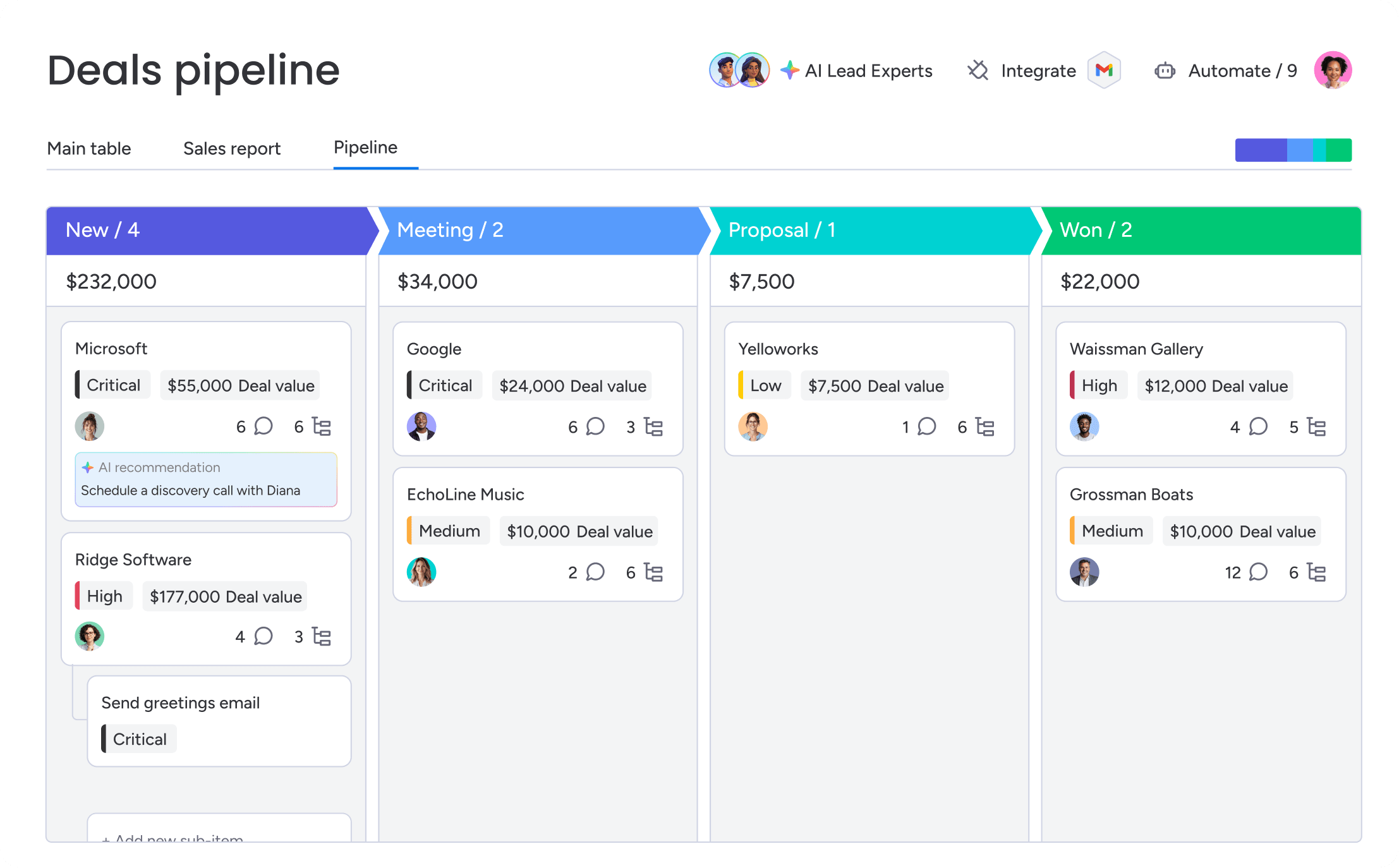
Old-school CRMs feel like a punishment. They’re cluttered, confusing, and so rigid that your team ghosts them for spreadsheets. We built a visual, drag-and-drop pipeline that just makes sense, so your team actually wants to use it. With color-coded stages and customizable views, everyone sees what’s happening at a glance, no training marathons needed.
AI that automates the boring stuff
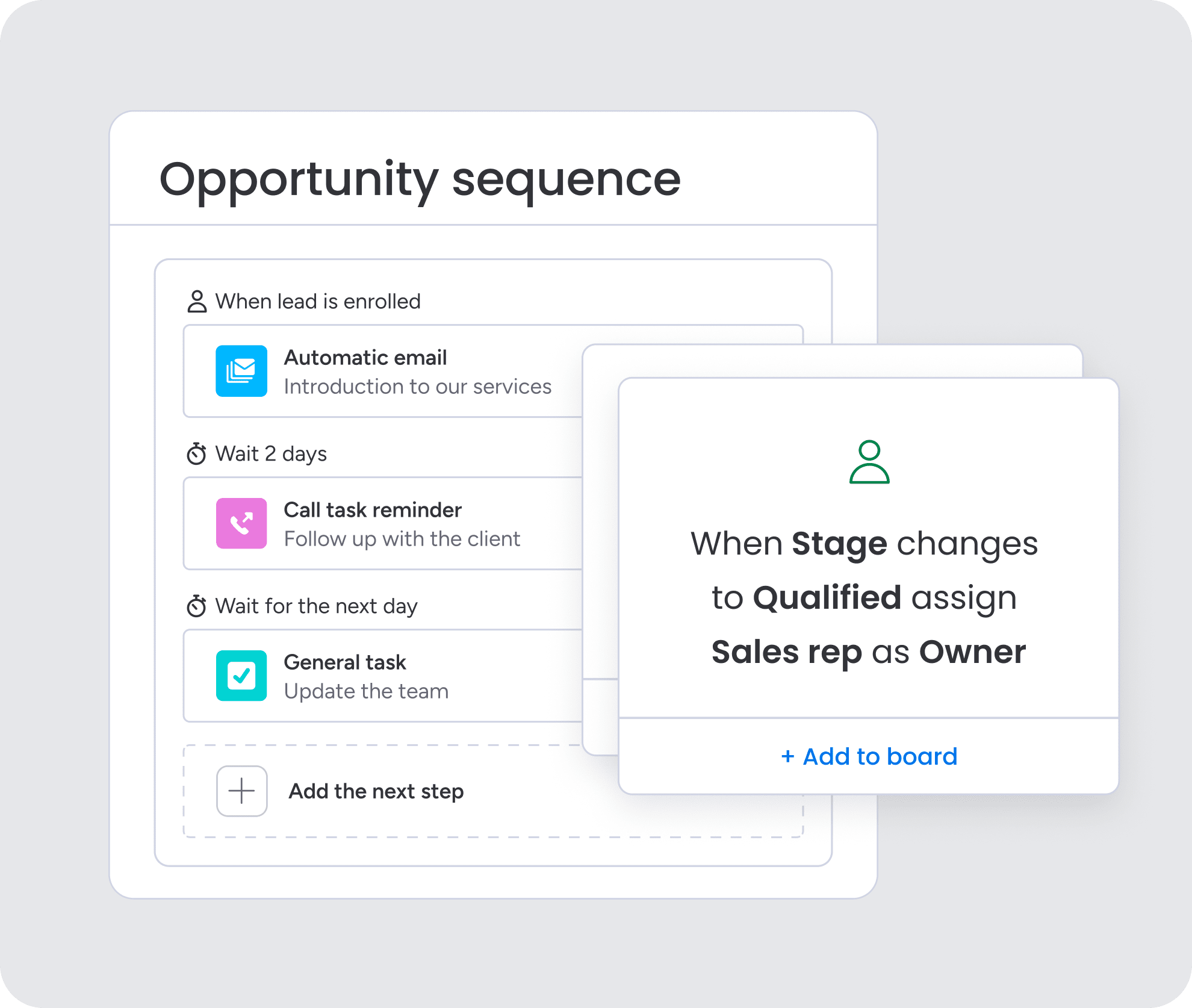
Manual data entry kills momentum. Our AI blocks handle the grunt work for you by pulling key details from emails, analyzing sentiment to flag at-risk deals, and turning messy text into structured data. No more copy-paste. The moment a lead comes in, AI can categorize it, score it, and route it to the right rep. It even summarizes entire communication histories in a click.
No-code customization for your sales process

Your sales process is unique, so why is your CRM a one-size-fits-all box? Forget forcing your team into rigid workflows or waiting months for developers. Revenue teams find success using monday CRM to build the exact process they need, no code required. Whether your sales cycle is three days or eighteen months, you can configure it here in minutes.

“With monday CRM, we’re finally able to adapt the platform to our needs — not the other way around. It gives us the flexibility to work smarter, cut costs, save time, and scale with confidence.”
Samuel Lobao | Contract Administrator & Special Projects, Strategix
“Now we have a lot less data, but it’s quality data. That change allows us to use AI confidently, without second-guessing the outputs.”
Elizabeth Gerbel | CEO
“Without monday CRM, we’d be chasing updates and fixing errors. Now we’re focused on growing the program — not just keeping up with it."
Quentin Williams | Head of Dropship, Freedom Furniture
“There’s probably about a 70% increase in efficiency in regards to the admin tasks that were removed and automated, which is a huge win for us.“
Kyle Dorman | Department Manager - Operations, Ray White
"monday CRM helps us make sure the right people have immediate visibility into the information they need so we're not wasting time."
Luca Pope | Global Client Solutions Manager at Black Mountain
“In a couple of weeks, all of the team members were using monday CRM fully. The automations and the many integrations, make monday CRM the best CRM in the market right now.”
Nuno Godinho | CIO at Velv
“monday.com provides developmental flexibility, operational efficiency, and data transparency — all in one place. We became a company that moved from chasing data to leading with it.”
Hyunghan Lee | Team Lead, Sandbox Network
"monday.com brought every part of our business into one connected space. The harmony between work management and CRM has become our operating system — giving us the clarity and confidence to scale.”
Jennifer Chinburg | Executive Vice President of Corporate Development & Brand, Chinburg Properties
“We just weren’t getting value from our old CRM. With monday.com, it's a thousand times better. Our sales teams are more informed, more consistent, and far more connected."
James Arnold | Chief Operating Officer, CenversaStart capturing every opportunity today
That spike in website traffic feels great, but here’s the reality: 98% of those visitors are ghosts. They show up, look around, and vanish without a trace, leaving a huge gap in your pipeline. Your team is left chasing dead ends while real opportunities go cold. Relying on basic contact forms is like using a fishing net with giant holes.
It’s time to stop collecting leads and start capturing opportunities the moment they appear. Organizations achieve better results when they leverage monday CRM for building automated workflows that capture, qualify, and convert prospects without manual work. You can finally stop losing leads and turn your website into a revenue engine.
Try monday CRMFAQs
How is lead capture software different from a CRM?
Lead capture software is different from a CRM in its primary function. Lead capture tools are the front door, grabbing prospects from your website, social media, and forms, while a CRM manages the entire relationship after they're inside. The best platforms do both, so you aren't stuck taping two systems together.
Which channels can lead capture software monitor?
A good platform tracks leads from everywhere: your website, social media, email campaigns, and events. This gives you the full story on every prospect, not just a single, out-of-context chapter.
How long does implementation really take?
It can be days or months, depending on the platform. User-focused systems get you capturing leads almost immediately, while clunky, legacy software can turn into a months-long IT project before you see a single result.
What technical skills are required to manage it?
Ideally, none. User-focused platforms are built for sales and marketing teams to run themselves. You should be able to build workflows and change settings without needing to file a ticket with IT.
How does the software handle duplicate leads?
It should automatically find and merge contacts captured from different channels. This keeps your pipeline clean and gives you one complete, accurate history for every prospect.
Can lead capture software integrate with my existing tools?
Yes, it should connect seamlessly with the marketing and sales platforms you already use. This avoids manual data uploads and keeps your entire tech stack working together.