



Your forecast says you’ll hit quota. Your gut says otherwise. That gap between pipeline confidence and actual closed revenue keeps widening for a reason. Deals stall in spreadsheets. Context disappears between handoffs. Reps spend more time updating records than selling. And when leadership asks for a number they can plan around, the answer involves too much guesswork.
Deal management software gives revenue teams a single place to track every opportunity, log every conversation, and see exactly which deals need attention right now. But most platforms still rely on manual updates and basic automation. The ones worth considering in 2026 use AI to do the heavy lifting: summarizing deal history, flagging risks before they tank your quarter, and keeping data accurate without adding work. We’ll cover 8 platforms with AI, such as monday CRM, that actually helps your team sell.
Try monday CRMWhat is deal management software?
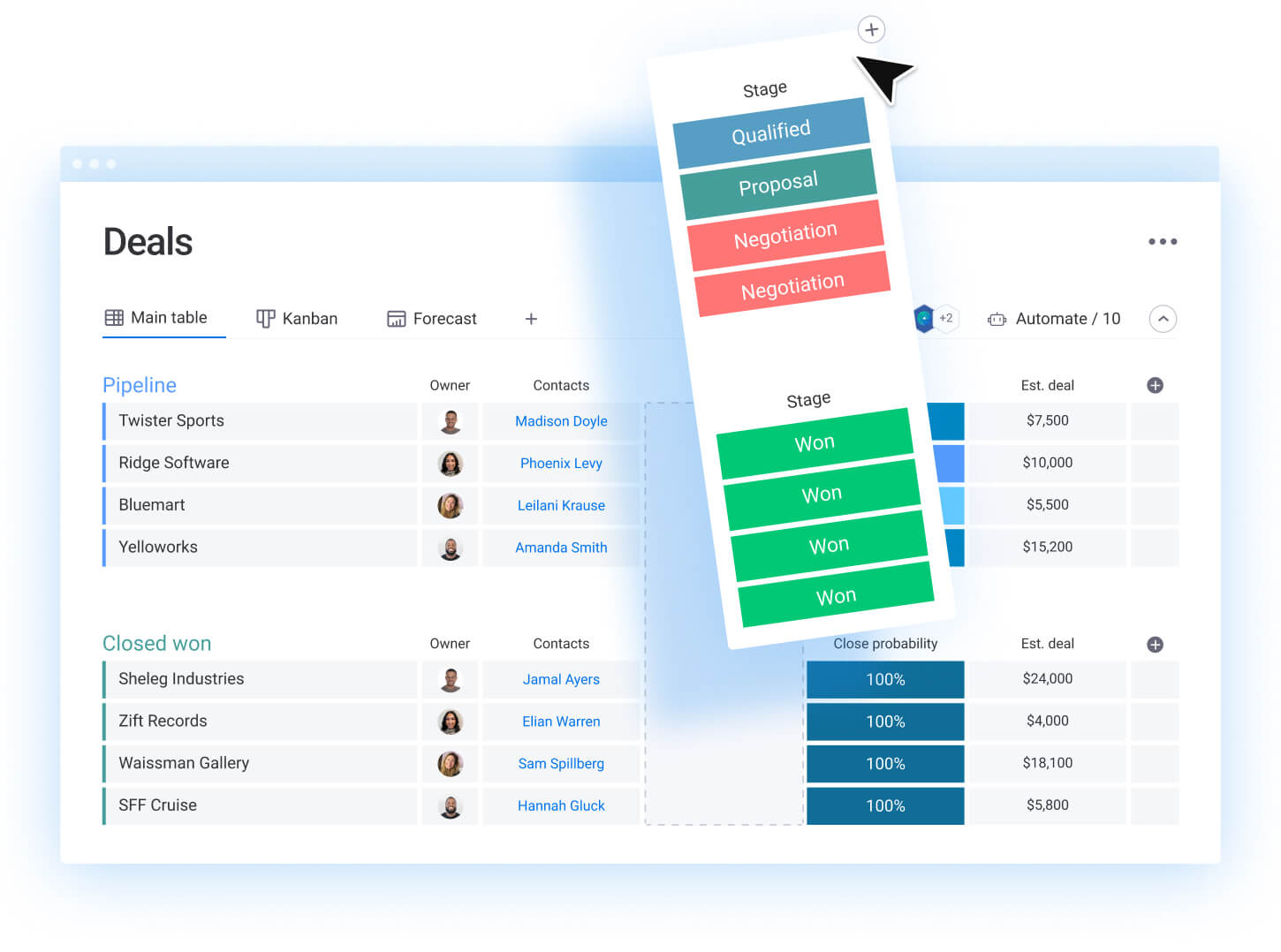
Stop trying to run your pipeline from a spreadsheet or a clunky all-in-one CRM. Deal management software is built for one job: closing deals. It gives your revenue team a single source of truth to track every opportunity from that first “hello” to the final signature.
Think of it as your team’s command center for revenue. Instead of digging through emails and Slack threads, every conversation, document, and decision lives in one place.
Deal management software gives you a real-time view of your entire pipeline, so you always know which deals are on track and which ones need a nudge.
How does it actually work? Here’s what directly impacts your bottom line. This isn’t about adding more work; it’s about making the right work easier.
- See your pipeline: Use simple drag-and-drop boards to track deals through every stage of your sales process.
- Know what’s next: Get a clear view of every interaction and milestone, so guesswork is a thing of the past.
- Forecast with confidence: Stop wondering if you’ll hit your number. Use real data to predict revenue and make smarter decisions about where to focus your team’s energy.
5 signs your deals are stalling without proper tracking
That sinking feeling hits hard. A deal you counted on suddenly goes dark, and your forecast feels more like a wish list. Without a single source of truth for your pipeline, deals don’t just stall; they vanish. Here’s how it shows up.
Your team is flying blind, and so are you. This leads to:
- Disappearing deals: Opportunities fall off the map without warning.
- Vague updates: Reps can’t explain why a deal is stuck.
- Painful handoffs: Context gets lost between sales, legal, and finance.
- Unreliable forecasts: You can’t predict revenue with any confidence.
- Stretched-out sales cycles: Deals take forever to close, if they close at all.
These are symptoms of a broken system. When your process relies on scattered spreadsheets and mental notes, you lose control. Fix the visibility problem, not just the symptoms.
Learn more: AI portfolio management software
8 best deal management platforms with real AI capabilities
Most AI claims are just noise. Real AI should do more than write a follow-up email. It should help your team capture deal context faster, keep records accurate, and turn messy info into something your pipeline can actually use. It should help your team capture deal context faster, keep records accurate, and turn messy info into something your pipeline can actually use.
These platforms actually speed up sales and improve win rates with practical AI. Each one offers unique AI strengths for different teams and sales cycles, and they all connect to your other systems in some way.
| Platform | Use case | Key AI features | Starting price |
|---|---|---|---|
| monday CRM | Teams wanting customizable deal management without the technical headaches | Emails & Activities timeline summary, AI email assistant, Autofill with AI (extract info, assign label, assign person, summarize) | $12/user/month |
| folk CRM | Relationship-focused sales teams prioritizing contact management | Contact enrichment, relationship mapping, network intelligence | $20/user/month |
| Pipedrive | Activity-driven teams wanting visual pipeline management | AI sales assistant, deal forecasting, activity recommendations | $14/user/month |
| Salesforce | Enterprise organizations managing complex, multi-stakeholder deals | Einstein AI scoring, predictive forecasting, opportunity insights | $25/user/month |
| DealRoom | M&A and complex transaction management with deal flow management | AI-powered due diligence, document analysis, risk detection | Custom pricing |
| Dealpath | Commercial real estate deal management | Market analysis, property valuation AI, transaction workflow automation | Custom pricing |
| Dynamo Software | Private equity and investment management | Portfolio analysis, deal sourcing, investment intelligence | Custom pricing |
| Affinity | Relationship-driven industries like investment banking and consulting | Automatic relationship mapping, network analysis, deal sourcing | Custom pricing |
There’s no magic bullet. The right platform depends on your team and how you sell. Revenue teams find success using monday CRM when they need AI that lives inside the day-to-day sales workflow, plus the flexibility to match their own sales process through effective deal flow management.
1. monday CRM
monday CRM delivers no-code deal management that adapts to your sales process. No technical expertise or expensive implementation needed. You get a visual sales pipeline with built-in automations. Plus AI that summarizes activity, writes emails, and populates CRM data when you’re moving fast.
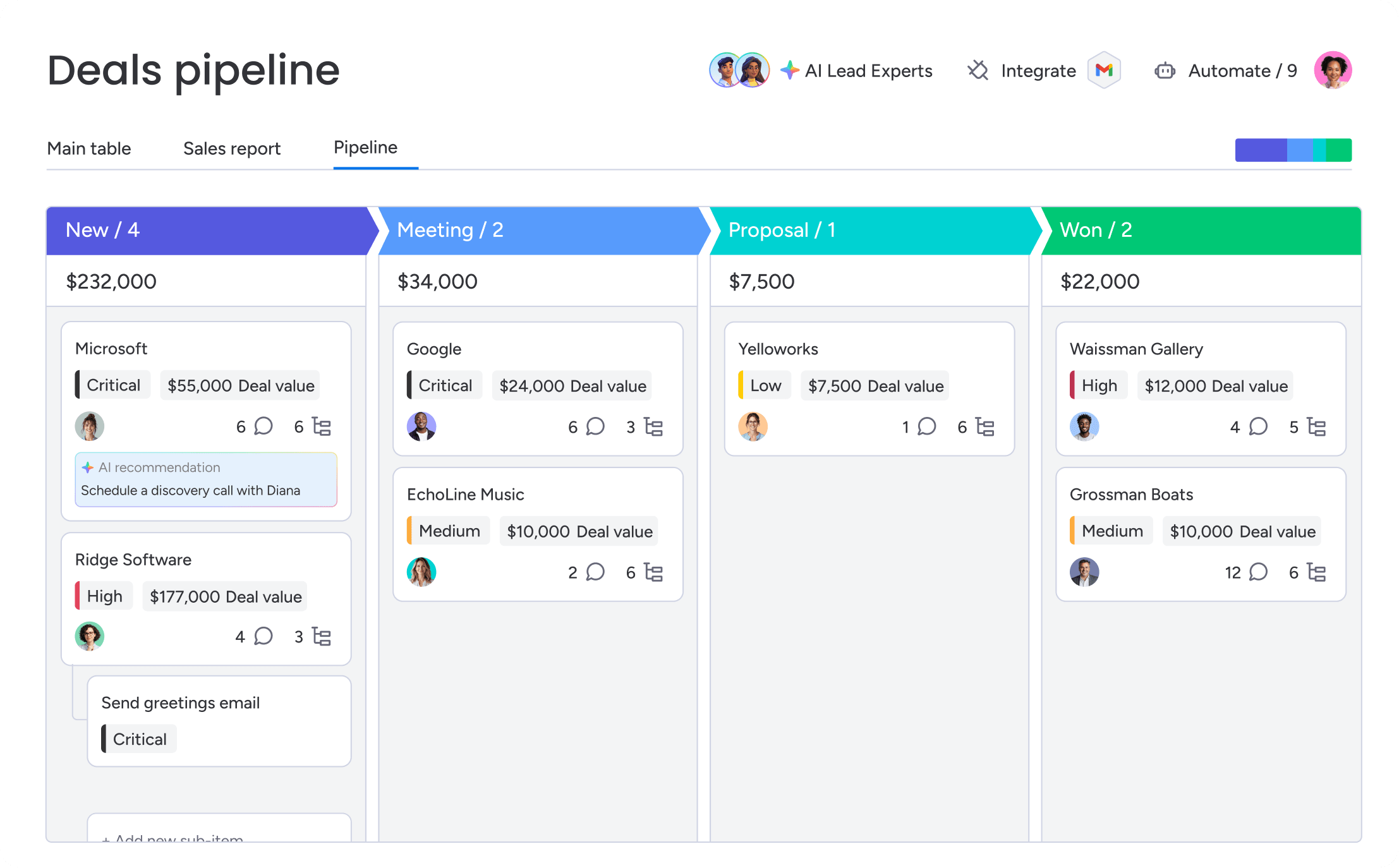
Example:
Revenue teams use monday CRM to manage deals through customizable pipelines with drag-and-drop stages, automations based on custom conditions, and a full communication history logged in one Emails & Activities timeline.
That means less time chasing context and more time moving deals forward. Need legal to review a contract, finance to confirm terms, or an account manager to prep onboarding? Keep the work connected instead of scattered. Teams can keep the work connected instead of scattered.
Key features:
- Sales pipeline you can shape in minutes: Build a visual pipeline, customize deal stages with drag-and-drop, and track where every deal stands.
- Emails & Activities timeline: Log and track every interaction, including emails, meetings, and notes, so reps and managers see the full deal story in one place.
- Account and contact management with connected context: Use an expanded item view to see relevant account and contact details, plus connected deals, accounts, contacts, and projects together.
- Automations that match your process: Automate actions based on custom conditions, including status changes (like conditional label change) and internal handoffs.
- AI where it actually helps: Summarize your Emails & Activities timeline, compose emails inside Emails & Activities, and Autofill columns with AI to keep data up to date.
Pricing:
- Basic: $12/month per seat (billed annually)
- Standard: $17/month per seat (billed annually)
- Pro: $28/month per seat (billed annually)
- Enterprise: Custom pricing (contact sales)
- Annual billing offers a discount compared to monthly plans.
- 14-day free trial available with no credit card required.
Why it stands out:
- A CRM people stick with: monday CRM is built for real adoption, with an intuitive interface and no-code setup that doesn’t demand IT support.
- One platform for the whole customer journey: Teams can manage deals and continue into post-sales work like onboarding progress, renewals, and collection tracking on the same platform.
- Reporting leaders can use: Build dashboards to track pipeline status, forecasting, activity, and performance. You can include sales-focused widgets like the leaderboard and funnel to visualize key metrics.
Advanced AI features:
AI capabilities in monday CRM are available on Standard, Pro, and Enterprise plans once an admin enables them. Here’s what teams actually use day to day.
- Emails & activities timeline summary with AI: AI creates a short summary of communication events, including emails, calls, meetings, and notes, so reps and managers can get up to speed fast.
- AI email assistant: AI helps compose emails directly inside Emails & Activities, so follow-ups stay consistent and on-brand without slowing reps down.
- Autofill with AI (column-level): Apply AI actions to supported columns, including Text, Date, Number, Dropdown, People, and Status columns.
Automations:
The best automations take recurring steps off your reps’ plates. With monday CRM, teams set up automations to keep deal management software running even when everyone’s in back-to-back calls.
- Automate actions based on custom conditions: Move work forward when a status changes, a date arrives, or a deal hits a specific stage.
- Keep cross-functional handoffs on track: Route review steps to stakeholders like legal and finance as part of the deal workflow.
- Pair automations with AI columns: For example, use Autofill with AI to assign a label, then trigger an automation based on that label.
Integrations:
Integrations should reduce manual data entry and keep your pipeline current. monday CRM supports a centralized workspace where your team can log communication, email contacts from within the CRM, and keep all deal activity visible.
- Centralized communication tracking: Sales teams can track emails and activities in one timeline, so context doesn’t disappear across inboxes.
- Connected work across teams: Because monday CRM is part of the monday product suite, teams can manage adjacent processes beyond sales in one platform.
Deal management software features:
Your pipeline, activity, and reporting should live together. That’s when deal management gets easier. monday CRM supports the full set of workflows revenue leaders rely on to run predictable sales motions.
- Sales forecasting: Create forecasts and projections, compare forecast vs. actual sales, and drill down by month, sales rep, or other criteria.
- Sales analytics dashboards: Track pipeline status, forecasting, team performance, and activity status with code-free dashboards.
- Quotas and attainment tracking: Manage quotas and track attainment over time.
- Sales widgets built for revenue teams: Use widgets like the leaderboard and funnel to spot where deals pile up and where wins come from.
- Mass email and tracking: Send individual and mass emails using dynamic fields and templates, then track engagement like open rate and link clicks.
- Dedicated mobile experience: Keep deals moving when you’re away from your desk.
- Post-sales workflows: Track onboarding progress, manage renewals, run client projects (including billable hours and quotes), and monitor collection tracking.
2. folk CRM
folk CRM puts relationships first. It’s built for teams who know that complex B2B sales depend on stakeholder networks. Contact enrichment and relationship mapping are the platform’s core strengths. They’re especially valuable when multiple decision-makers control deal success.

Use case:
folk CRM helps sales teams map relationships within target accounts and leverage network intelligence to identify warm introduction paths and multi-threaded engagement opportunities.
Key features:
- AI-powered contact enrichment automatically populates detailed prospect profiles from public sources, freeing up your team to focus on building relationships.
- Relationship mapping visualizes connections between contacts within accounts, helping teams identify champions and understand reporting structures
- Network intelligence surfaces warm introduction paths by analyzing existing team relationships for warmer outreach than cold prospecting
Pricing:
- Standard: $20/user/month (billed annually) or $25/user/month (billed monthly)
- Premium: $40/user/month (billed annually) or $50/user/month (billed monthly) — includes Deals, dashboards, sequences, and advanced permissions
- Custom: Starting at $80/user/month (billed annually) or $100/user/month (billed monthly) — custom limits and dedicated support
- 14-day Premium trial available
Considerations:
- While the Standard plan offers basic pipeline views, the dedicated Deals module for more advanced tracking is only on the Premium plan. That doubles the cost for teams that need it.
- Mobile access is available through a responsive web experience. Mobile access relies on a responsive web experience, which may limit field sales usage.
3. Pipedrive
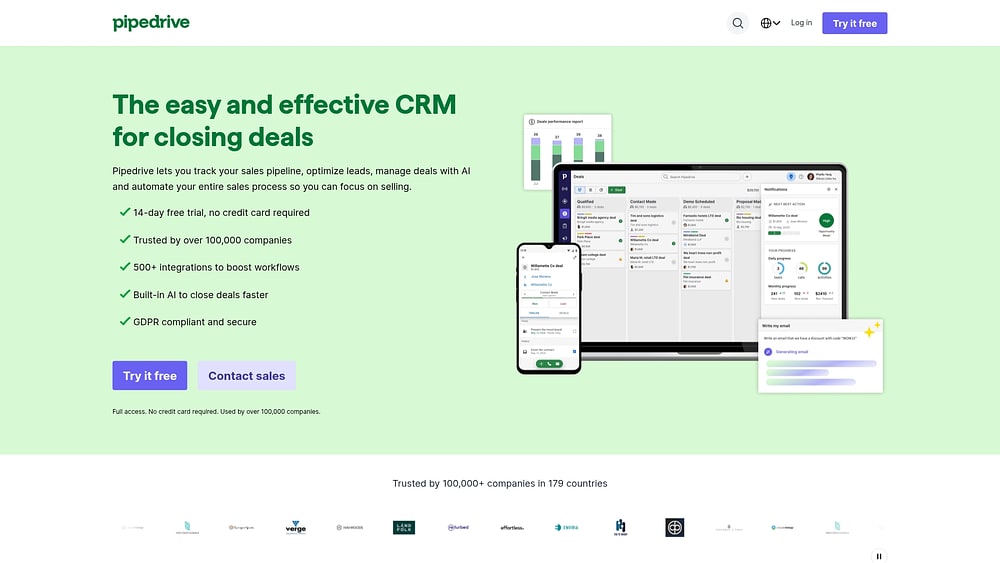
Pipedrive is all about visual pipeline management. It’s built for activity-driven sales teams who need consistent execution to hit their numbers. The drag-and-drop interface makes deal progression instantly visible, and AI-powered recommendations keep opportunities moving toward close. Pipedrive works best for small and midsize businesses that need speed and simplicity.
Use case:
Pipedrive works best for transactional sales environments where consistent activity execution drives volume-based success and teams need visual pipeline clarity without heavy customization overhead.
Key features:
- Visual pipeline management: Drag-and-drop deal cards with color coding show exactly where opportunities stand and which deals need immediate attention.
- AI sales assistant: Analyzes deal patterns to recommend specific next actions, such as calls, emails, or meetings, based on what historically moves similar deals forward.
- Activity-driven workflows: Built-in prompts like “deal rotting” alerts and activity-based sorting ensure reps focus on high-impact actions rather than guessing what to do next.
Pricing:
- Lite: $14 per user/month (billed annually)
- Growth: $24 per user/month (billed annually)
- Premium: $49 per user/month (billed annually)
- Ultimate: $69 per user/month (billed annually)
- 14-day free trial available.
- Add-ons like LeadBooster, Projects, and Campaigns are billed per company, not per user.
- Annual billing can save up to 26% compared to monthly plans, though discounts may vary by plan and region.
Considerations:
- Advanced features like forecast view and deal scoring are locked to higher-tier plans, limiting functionality for budget-conscious teams.
- The web application requires an internet connection for full functionality, with true offline access only available through mobile apps.
4. Salesforce
Salesforce delivers enterprise-grade deal management. It’s built for organizations running complex, multi-stakeholder sales cycles. Einstein AI plus extensive customization makes Salesforce the default choice for large enterprises that need sophisticated deal scoring and predictive insights.
Use case:
Salesforce excels at managing intricate enterprise deals where multiple stakeholders, approval workflows, and extensive data analysis drive revenue decisions.
Key features:
- Einstein AI: Analyze hundreds of data points to score deal quality and predict close probability with high accuracy
- Pipeline Inspection: Get consolidated, inline-editable views with AI insights and historical change tracking
- Conversation Intelligence: Capture and analyze calls to surface risks, objections, and recommended next steps
Pricing:
- Free Suite: $0/month (max 2 users)
- Starter Suite: $25/month per user
- Pro Suite: $100/month per user
- Enterprise: $175/month per user (includes Advanced Pipeline Management & Deal Insights)
- Unlimited: $350/month per user (adds predictive AI and Sales Engagement)
- Agentforce 1 Sales: $550/month per user (full AI suite with unmetered usage)
- Revenue Intelligence add-on: $220–$250/month per user
- Einstein Relationship Insights: $50–$150/month per user
Considerations:
- Significant implementation complexity requires dedicated administrators or consultants to configure and maintain
- Advanced analytics and relationship insights require expensive add-ons beyond core licensing costs
5. DealRoom
End-to-end M&A lifecycle management comes together in DealRoom, serving corporate development teams and private equity firms executing complex transactions. Pipeline management, due diligence, and post-merger integration live in one system. This consolidates your deal workflows into a single, unified system. Purpose-built for buyer-led M&A, DealRoom has powered over $255 billion in transactions across 25+ countries.
Use case:
DealRoom excels for organizations running multiple concurrent deals or roll-up strategies, where traditional VDRs create information silos and manual processes slow execution.
Key features:
- Unified deal lifecycle: Pipeline CRM connects seamlessly to due diligence rooms and integration workstreams, maintaining context across all deal phases
- AI-powered document analysis: Automatically categorizes files, extracts key contract terms, and flags potential risks during due diligence reviews
- Unlimited user collaboration: Teams can involve legal, finance, and operational stakeholders without per-seat pricing constraints
Pricing:
- Pipeline: $1,000/month billed annually ($12,000/year)
- Diligence & Integration: $1,000/month billed annually ($12,000/year)
- M&A Platform (full bundle): Custom pricing with volume discounts
- AI Analysis and Synergy Tracker available as paid add-ons
- All plans include unlimited users and enterprise-grade security features
Considerations:
- Annual-only billing with $12,000 minimum commitment may not suit smaller deal volumes
- Base storage limits are modest (1-2 GB) with higher capacities requiring platform bundles
6. Dealpath
AI-powered deal management built specifically for commercial real estate investment teams. That’s Dealpath’s specialty. Market intelligence, transaction workflows, and broker networks live in one unified workspace. That makes it essential for institutional investors managing complex property deals. Dealpath reports managing over $10T in transactions for more than 300 institutional clients, making it the go-to for firms that need more than generic deal management.
Use case:
Dealpath excels at managing the entire commercial real estate investment lifecycle, from initial property sourcing through due diligence, financing, and closing, with embedded AI for market analysis and automated workflow coordination.
Key features:
- AI-powered deal screening and market analysis: Leverages AI Studio to analyze comparable properties, market trends, and economic indicators, plus AI Extract to capture structured data from offering memorandums and property flyers
- Direct broker integration through Dealpath Connect: Real-time listings feed from CBRE and JLL directly into buy-side pipelines, eliminating manual sourcing and accelerating deal flow
- End-to-end transaction management: Standardized workflows with audit-ready documentation, role-based task assignments, and milestone tracking from LOI through closing
Pricing:
- Professional plan: Custom pricing (contact sales required)
- Enterprise plan: Custom pricing with SSO, open API, and sandbox environments
- Minimum of five users per plan
- White-glove implementation included with 6-8 week typical deployment
Considerations:
- Quote-only pricing model with minimum user requirements may limit accessibility for smaller investment firms
- Implementation timeline of 6-8 weeks could delay immediate value realization for teams needing quick deployment
7. Dynamo Software
Private capital markets need specialized tools. Dynamo Software delivers end-to-end deal management covering everything from initial sourcing to portfolio monitoring. It serves private equity, venture capital, and hedge funds with AI-powered relationship intelligence and comprehensive back-office capabilities. Over 1,000 clients use Dynamo to manage a reported $10+ trillion in assets, helping them consolidate vendors and accelerate processes.
Use case:
Dynamo consolidates deal sourcing, due diligence, portfolio tracking, and fund accounting into a single platform, reducing manual data reconciliation and giving investment teams a unified view from pipeline to exit.
Key features:
- AI-powered deal sourcing: Analyzes market data and company information to surface investment opportunities that match your criteria.
- Relationship intelligence: “Dynamo Indicators” score relationship health and conversion potential while automating meeting note summarization.
- Integrated portfolio management: Tracks performance across all investments with financial metrics and operational data analysis.
Pricing:
- Custom pricing: Quote-based model tailored to assets under management, user count, and module selection.
- Contact required: Pricing discussions happen during demo calls rather than published tiers.
- Add-on modules: Portfolio monitoring, fund accounting, investor relations, and data automation services priced separately.
Considerations:
- The learning curve can be steep given the platform’s comprehensive functionality and breadth of features.
- A quote-only pricing model may slow procurement processes compared to transparent, self-serve alternatives.
8. Affinity
Affinity turns relationship intelligence into deal flow. It’s built for private capital firms and investment teams. The platform automatically maps network connections and surfaces warm introduction paths. It’s ideal for venture capital, private equity, and investment banking teams who close deals through relationships instead of cold outreach.

Use case:
Affinity centralizes deal pipelines while leveraging relationship data to identify the strongest connections to decision-makers, enabling warmer outreach and faster deal progression.
Key features:
- Automatic relationship mapping: Analyzes email and calendar data to build comprehensive network graphs without manual input
- AI-powered deal intelligence: Notetaker captures meeting summaries while Deal Assist answers diligence questions from notes and documents
- Network-driven deal sourcing: Identifies potential opportunities within existing relationships and shows introduction paths to target prospects
Pricing:
- Essential: $2,000 per user/year (activity capture, relationship scoring, basic pipeline management)
- Scale: $2,300 per user/year (adds Chrome extensions, enhanced relationship mapping, deal analytics)
- Advanced: $2,700 per user/year (adds AI meeting intelligence, scaled email communications, premium data enrichment)
- Enterprise: Custom pricing (includes SSO, granular access controls, full API access)
Considerations:
- Premium pricing may challenge smaller funds with limited budgets
- Some users report performance slowdowns during collaborative pipeline reviews and occasional Chrome extension authentication issues
7 AI features that actually speed up your sales cycle
Most AI promises sound impressive until you realize they’re solving problems you don’t have. These seven features attack the real friction that kills deal momentum and slows down revenue teams.
1. Get the full deal story, instantly
Digging through old emails and call notes before a client call wastes precious selling time. AI reads every interaction to create instant deal summaries, giving reps the context they need in seconds rather than hours. Revenue teams find success using monday CRM to get new reps up to speed on complex deals immediately, while sales managers review pipeline health without scheduling another status meeting.
2. Qualify leads without the guesswork
Bad leads drain everyone’s energy. Rather than relying on gut feelings, AI analyzes the DNA of your past wins (company size, industry, and engagement patterns) to score new opportunities. Qualification time shrinks from days to minutes, pipeline quality improves, and subtle patterns that predict wins emerge to filter out dead-end deals before they waste your team’s time.
3. Spot deal risks before they go cold
A hot deal suddenly goes quiet. AI acts as an early warning system, flagging at-risk deals based on changes in communication, stakeholder engagement, or timelines slipping. When radio silence appears, the system alerts the team to re-engage before the opportunity evaporates, helping you maintain a more predictable and accurate forecast.
4. Write effective emails in less time

Staring at a blank screen trying to craft the perfect follow-up drains hours from your week. AI helps write context-aware emails for any deal stage, stakeholder, or situation. monday CRM cuts writing time from hours to minutes, keeping every email on-point and professional while improving consistency across the team without turning reps into robots.
5. Match every lead to the perfect rep
Simple round-robin assignment falls short. A hot lead assigned to the wrong rep becomes a missed opportunity. AI routes new leads to the best person for the job based on skills, workload, and track record with similar deals. The system identifies who has the industry expertise and bandwidth to act fast, dropping response times while conversion rates climb.
6. Finally, a forecast you can actually trust
Most sales forecasts blend data with wishful thinking. AI changes the equation by looking beyond pipeline stage and rep optimism. Sales velocity, engagement levels, and historical patterns build projections grounded in reality. Deals that look healthy on the surface but show signs of stalling get flagged, giving leadership a forecast they can use to plan with confidence.
7. Real-time coaching that builds top performers
What makes your best reps win so consistently? AI reveals the answer by analyzing sales activities to find patterns leading to closed deals. Instant suggestions replace quarterly reviews: when to engage a new stakeholder, how to adjust follow-up cadence. Everyone on the team can adopt the habits of top performers, turning intelligent deal management into a system that works the way your team thinks.
Choosing the right deal management platform for your revenue team
The market is full of platforms promising to fix your sales process. But a long feature list won’t guarantee results. Finding a platform your team will actually use to close deals faster matters more than comparing specs.
Will it integrate with your other platforms?
Integration headaches derail more implementations than anything else. Some platforms require endless custom code and multiple developers just to connect with your email or calendar. That hidden cost drains resources and delays actual selling.
Connecting your tech stack shouldn’t feel like a major project. Revenue teams find success using monday CRM to connect with over 200+ tools right out of the box, creating a single source of truth rather than another integration headache.
How quickly will you see a return?
The time to close your first deal on a new platform is the only ROI metric that matters. Legacy systems can take 6-12 months, killing momentum and frustrating your team long before any value shows up. Legacy systems can take 6–12 months, killing momentum and frustrating your team long before any value materializes.
Waiting a year for results you need this quarter? That’s a waste. Rapid deployment means your team is up and running in weeks, not seasons. Faster adoption drives faster wins and gets your team excited to use their new workspace.
Will your team actually use it?
Here’s the uncomfortable truth: a CRM your team avoids is expensive shelfware. When reps aren’t logging in daily and keeping data fresh, you’re flying blind. Low adoption destroys predictability and renders AI features useless.
Avoiding digital dust requires choosing a platform that matches how your team already works. An intuitive interface drives adoption far more effectively than week-long training sessions.
Flexibility vs. a one-trick pony
Some CRMs target one specific industry. That sounds appealing until your sales process evolves. Rigid systems trap you. Adapting to new markets or strategies means starting over.
Your process is unique. Your platform should keep pace. Organizations get better results when they use monday CRM for its no-code flexibility. Software should support your process, not dictate it.
Real implementation timelines and what to expect
Forget fantasy timelines and vendor promises. A real CRM implementation takes work. It succeeds when teams plan for the messy reality of data migration, user adoption, and workflow changes. A real CRM implementation takes work, succeeding when teams plan for the messy reality of data migration, user adoption, and workflow changes.
Here’s what actually happens when you launch a new deal management system.
Step 1: Audit and prepare your data (Weeks 1-2)
Your data is messier than you think. The first two weeks focus on finding where every piece of deal information lives and cleaning it up. These first two weeks focus on finding where every piece of deal information lives and cleaning it up. Getting this right now saves months of headaches later.
Catalog everything: your old CRM, forgotten spreadsheets, random email archives. This audit always uncovers more chaos than you’d expect. Then fix incomplete records, merge duplicates, and archive junk. Your goal is to migrate clean, organized data.
- Data inventory: Find all your deal data sources, including old CRMs, spreadsheets, and email folders, to see the full picture.
- Quality check: Identify and fix incomplete records, duplicate entries, and outdated information that will cause problems later.
- Migration plan: Map your existing data to the new platform, deciding what to move, what to transform, and what to leave behind.
Learn more: AI deal prep briefing agent
Step 2: Configure the platform (Weeks 3-4)
During these two weeks, a blank platform becomes your team’s command center. Designing pipelines, setting permissions, and testing integrations creates the foundation. This determines whether your team actually uses the system.
Translate your sales process into the platform’s structure. Define deal stages and set up approval workflows. Set user permissions to give reps, managers, and leadership the right access levels. Revenue teams find success using monday CRM to accelerate this phase, building pipelines with visual, no-code tools instead of waiting on IT tickets.
- Pipeline design: Build deal stages and workflows that match your sales methodology, complete with required fields and approval steps.
- User setup: Create roles and permissions that give the right access to the right people while keeping data secure.
- Integration testing: Connect your email, calendar, and other essential platforms, then check that data is flowing correctly.
Step 3: Roll out to a pilot team (Weeks 5-8)
Theory meets reality in a controlled rollout. A small group tests the new setup to validate workflows and gather feedback before everyone else jumps in.
Select 5-10 users from different roles to test the system with real deals. Hands-on training where they learn by doing beats reading manuals. Daily check-ins catch friction points immediately, enabling quick adjustments before bad habits form.
- Pilot selection: Choose a mix of power users, average performers, and new reps to test the system in real-world conditions.
- Hands-on training: Run sessions where the pilot team learns by entering and managing actual deals in the new system.
- Feedback collection: Gather daily input to find what’s working, what isn’t, and what needs to change before the full rollout.
Step 4: Deploy fully and optimize (Weeks 9-12)
Go-time arrives. Roll out the validated system to the entire revenue team and turn theoretical success into measurable impact.
Role-specific training programs replace generic overviews. Reps learn deal management, managers focus on forecasting, and leaders master strategic reporting. Adoption dashboards reveal who’s logging in, which features they’re using, and where teams might need additional support.
- Company-wide training: Deliver targeted training that teaches reps, managers, and executives the skills they actually need.
- Performance monitoring: Track adoption, usage, and data quality to find areas that need more support or a few tweaks.
- Continuous optimization: Use feedback and data to refine workflows, automate repetitive tasks, and make the system even better.
Following a structured timeline avoids the chaos of a rushed launch and ensures your team is ready to sell from day one.
Try monday CRMmonday CRM: Deal management built for how you actually sell
Your sales process is unique. It’s shaped by your market, your team, and the deals you close. A rigid CRM forces you to abandon what works and adopt someone else’s playbook. That kills momentum and frustrates your team.
Revenue teams find success using monday CRM because it adapts to their process instead of forcing them to change. Build pipelines that match your sales motion, automate the repetitive work, and let AI handle the heavy lifting. Your team gets a platform that supports how they sell, not one that gets in the way.
Visual pipeline management that matches your process
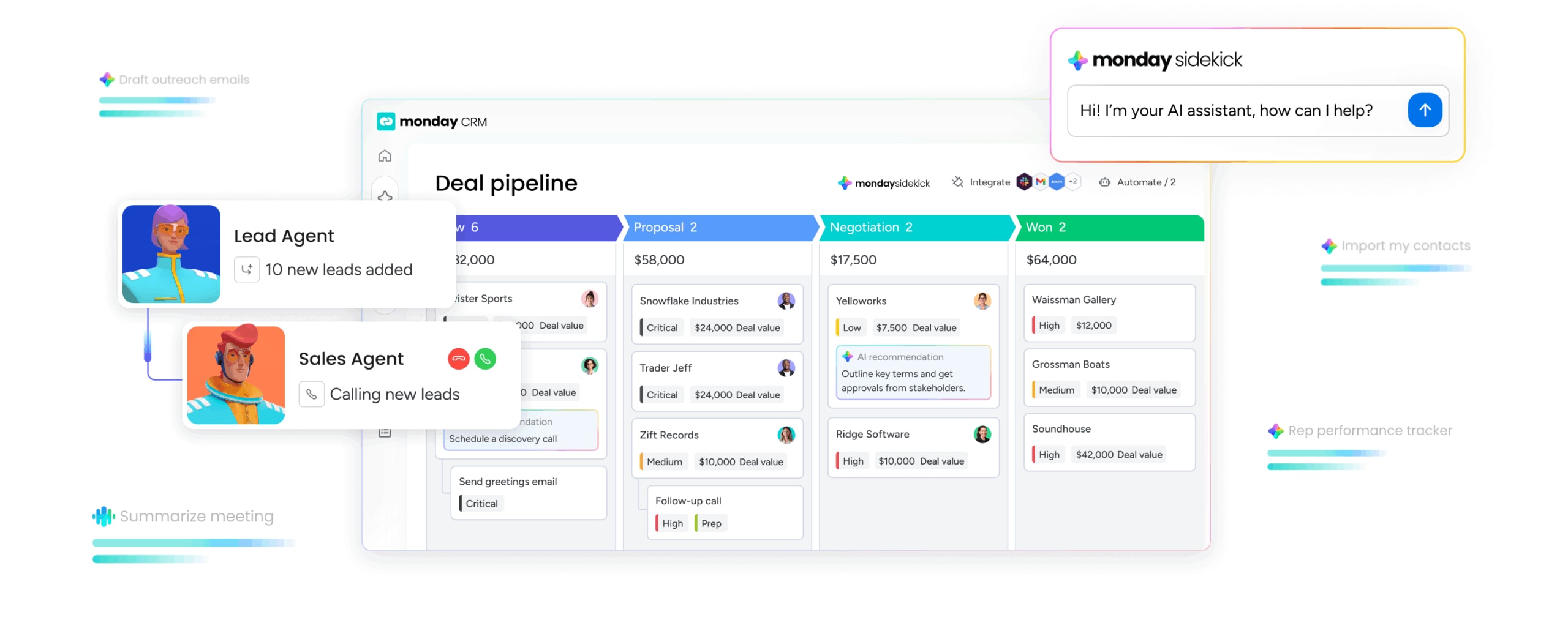
Drag-and-drop boards let you design deal stages that reflect your actual sales cycle. Change them in minutes when your process evolves. Whether you’re running high-velocity inside sales or complex enterprise deals, the platform shapes itself around your workflow. Reps see exactly where every deal stands without digging through menus or running reports.
AI that works inside your workflow
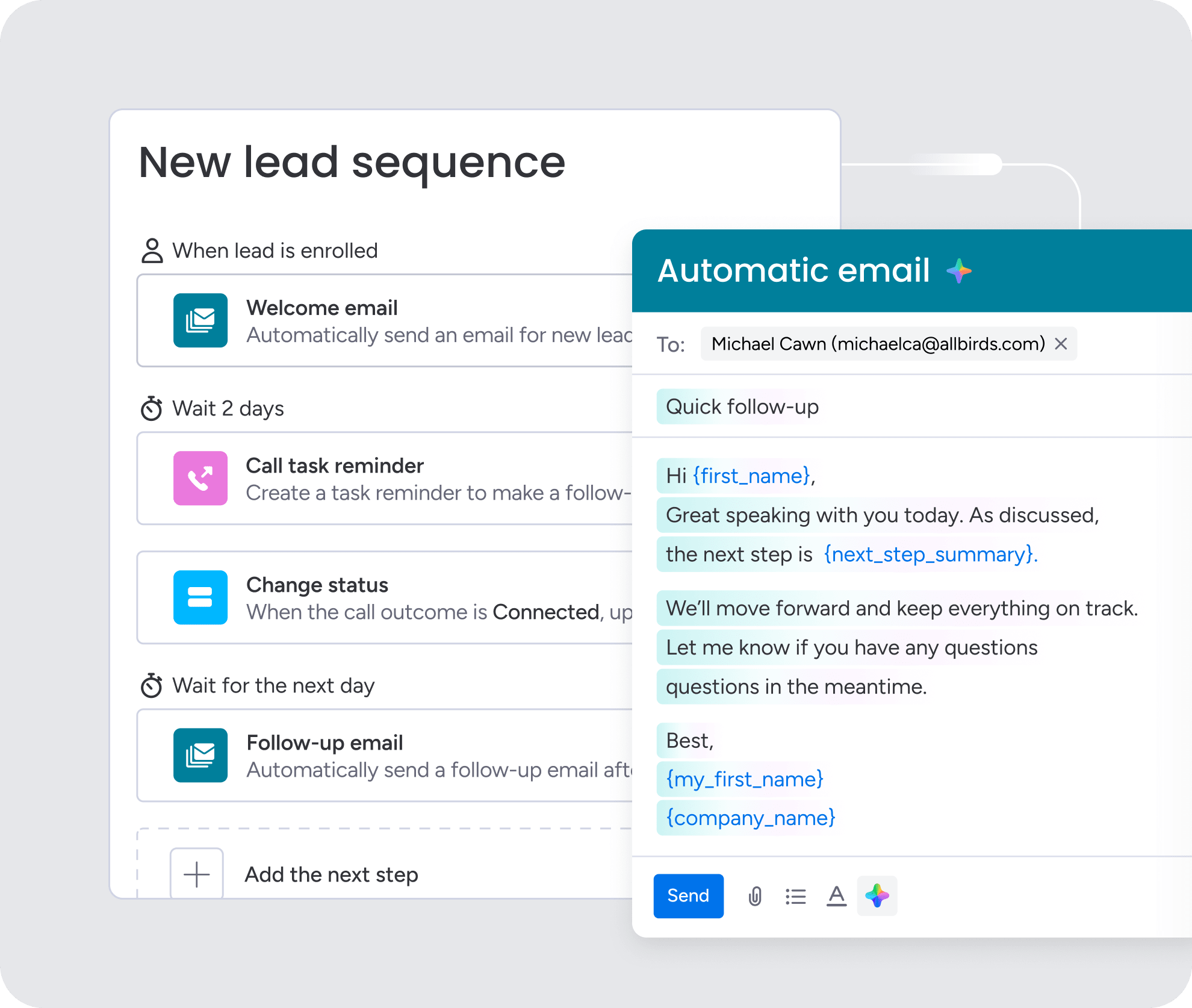
AI capabilities in monday CRM don’t add extra steps. They live where your team already works. Summarize your Emails & Activities timeline to get the full deal story in seconds. Use the AI email assistant to write personalized follow-ups without staring at a blank screen. Autofill with AI keeps your data accurate by extracting information, assigning labels, and populating fields automatically. Your reps stay focused on selling, not updating records.
Automations that eliminate busywork
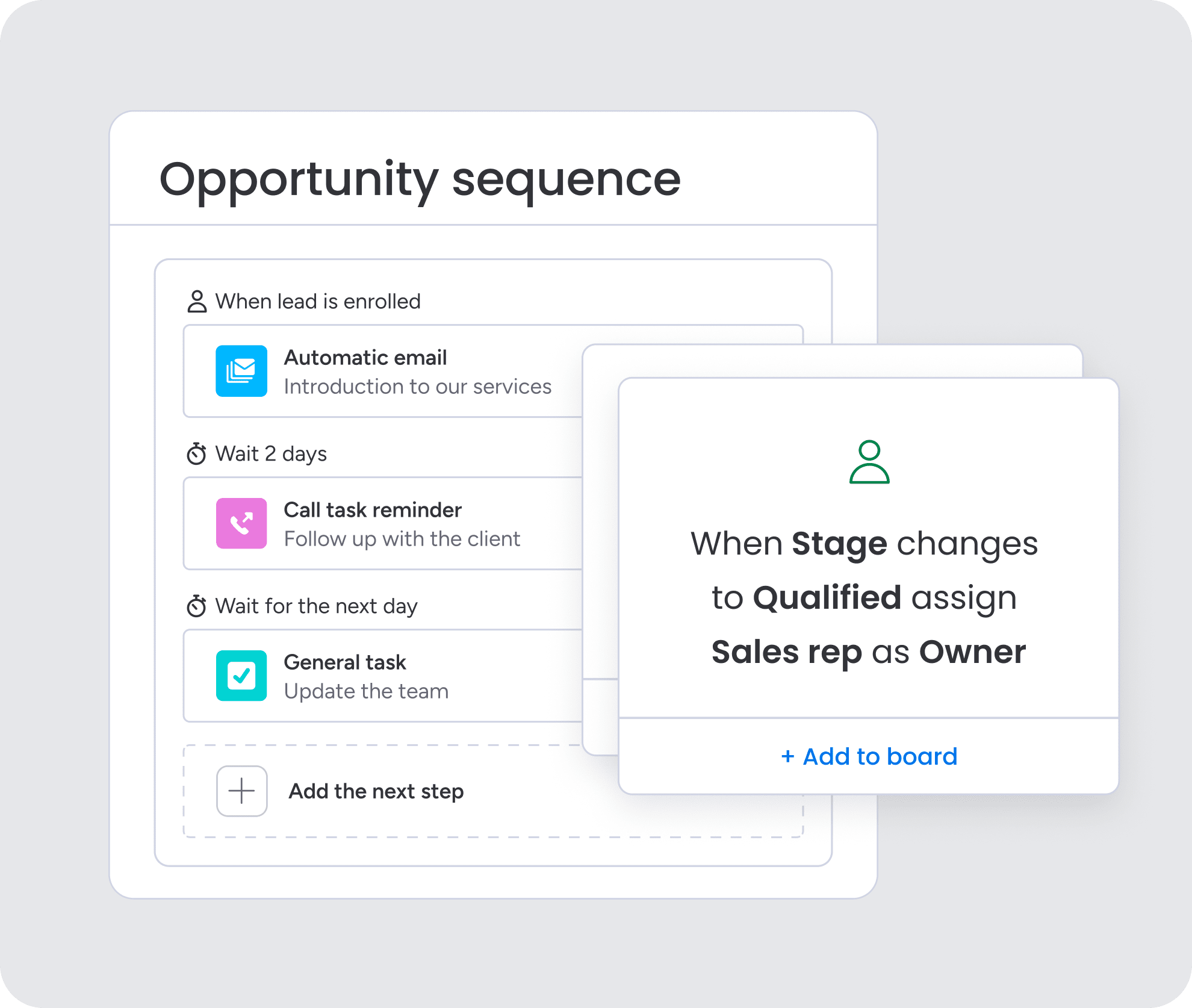
Set up automations based on custom conditions to handle the repetitive tasks that slow your team down. When a deal stage changes, notify the right stakeholders. When a date arrives, trigger the next step. Route approvals to legal or finance without manual handoffs. Automations keep deals moving forward even when your team is in back-to-back calls.
Integrations that connect your entire tech stack
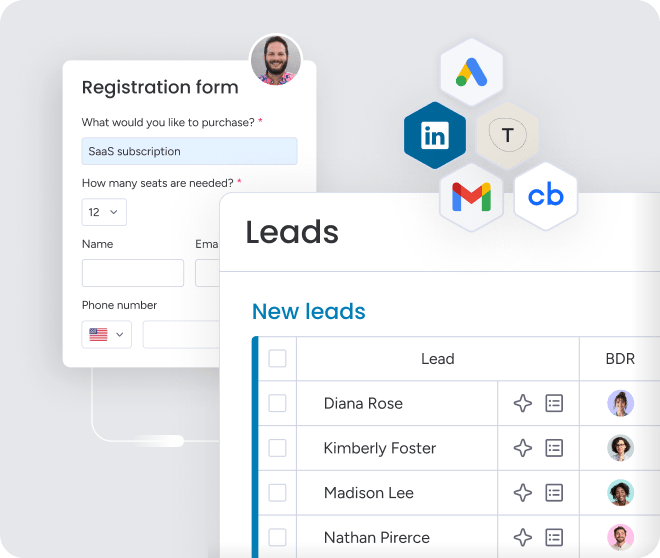
Data silos kill momentum. When your tools don’t talk to each other, your team wastes time on manual data entry. Organizations achieve better results when they use monday CRM as the central hub for all revenue activity. Connect to 200+ apps instantly, or use the flexible API to sync with specialized systems. When a deal updates in one place, it updates everywhere. Your team gets accurate information without chasing it down.

“With monday CRM, we’re finally able to adapt the platform to our needs — not the other way around. It gives us the flexibility to work smarter, cut costs, save time, and scale with confidence.”
Samuel Lobao | Contract Administrator & Special Projects, Strategix
“Now we have a lot less data, but it’s quality data. That change allows us to use AI confidently, without second-guessing the outputs.”
Elizabeth Gerbel | CEO
“Without monday CRM, we’d be chasing updates and fixing errors. Now we’re focused on growing the program — not just keeping up with it."
Quentin Williams | Head of Dropship, Freedom Furniture
“There’s probably about a 70% increase in efficiency in regards to the admin tasks that were removed and automated, which is a huge win for us.“
Kyle Dorman | Department Manager - Operations, Ray White
"monday CRM helps us make sure the right people have immediate visibility into the information they need so we're not wasting time."
Luca Pope | Global Client Solutions Manager at Black Mountain
“In a couple of weeks, all of the team members were using monday CRM fully. The automations and the many integrations, make monday CRM the best CRM in the market right now.”
Nuno Godinho | CIO at Velv
“monday.com provides developmental flexibility, operational efficiency, and data transparency — all in one place. We became a company that moved from chasing data to leading with it.”
Hyunghan Lee | Team Lead, Sandbox Network
"monday.com brought every part of our business into one connected space. The harmony between work management and CRM has become our operating system — giving us the clarity and confidence to scale.”
Jennifer Chinburg | Executive Vice President of Corporate Development & Brand, Chinburg Properties
“We just weren’t getting value from our old CRM. With monday.com, it's a thousand times better. Our sales teams are more informed, more consistent, and far more connected."
James Arnold | Chief Operating Officer, CenversaBuild a pipeline that moves as fast as you do
Your revenue engine sputters when running on manual tasks and a CRM that fights back. Deals stall, forecasts become guesswork, and your team spends more time on admin than selling. Scaling requires a system that grows with your ambition, not against it.
Revenue teams find success using monday CRM to build this kind of momentum. They automate the busywork and get the visibility needed to close deals, not just track them. Intelligent deal management works the way your team thinks, not the way legacy systems demand.
Try monday CRMFAQs
What is the difference between deal management software and CRM?
Deal management focuses only on your sales pipeline, while a CRM manages the entire customer lifecycle. Think of it as the engine that powers your deals, not the entire car.
How long does deal management software implementation really take?
Expect a full deployment to take 8–12 weeks for data migration, configuration, and team training. Rushing the setup almost always leads to poor adoption later.
Which integrations are essential for deal management platforms?
Your platform must connect to email, calendars, and accounting software to provide full deal context. Without them, your team is stuck doing manual data entry instead of selling.
What ROI should I expect from AI-powered deal management?
Teams often report a 15–25% increase in deal velocity and 20–30% better forecast accuracy within six months. AI saves time, which lets your team handle more opportunities.
How do I ensure my sales team actually adopts the new platform?
Choose a platform with an intuitive interface that doesn't force your team to change how they already work. If it's not easy to use from day one, your team won't use it.
Can deal management software handle complex, multi-stakeholder deals?
Yes, the right platform tracks stakeholders and routes approvals to keep everyone aligned. Your software should adapt to your deals, not the other way around.
How does monday CRM's AI differ from basic automation features?
Basic automation follows rules, while monday CRM's AI gives you predictive insights and recommends your next move. It helps your team make smarter decisions, not just shuttle data around.
What makes monday CRM suitable for teams switching from spreadsheets?
Its visual interface is easy to adopt, and no-code tools let you build the workflow you already know. You get the power of a real CRM without the painful learning curve.