



Your AI assistant just asked your CRM a question. Something happened: a record updated, a deal stage changed, a follow-up got logged. But who approved that? What data did it touch? And how did it even get access in the first place? These are the questions revenue leaders and RevOps teams are starting to ask. The answers lie in understanding two different connection models: CRM APIs and MCP.
As AI assistants become a real part of how sales teams work, the difference between the two matters. A CRM API helps software connect to your CRM data. MCP helps AI assistants use that data in a governed, conversational way. They solve different problems, and choosing the right one for the right job changes how well your AI setup actually performs. Here’s what each connection model does, when to use one over the other, what data AI can touch, and how to roll out a CRM-to-AI connection while maintaining strong governance. Platforms like monday CRM bring these connection paths together in one place.
CRM API vs. MCP: Key takeaways
- APIs and AI assistants need different connections: APIs sync data between systems automatically. MCP lets AI assistants take approved actions through conversation.
- Start with read access, then earn write access: Let AI summarize and search first. Add write permissions only after your team trusts the output.
- Your CRM data quality determines your AI results: Messy records produce unreliable AI actions. Clean, structured data gives assistants something real to work with.
- monday CRM supports both connection paths in one place: Native AI actions, open API access, and monday MCP work together, so teams can start small and expand without switching platforms.
- Tight governance beats broad access every time: Scope permissions, log every action, and add human review for sensitive updates before rolling out to the full team.
What is a CRM API?
A CRM API lets outside systems read from and write to your CRM data through programmatic requests. A form platform can create a lead automatically. A billing platform can update account status without anyone typing it in.
Quick translation on API: an API (Application Programming Interface) is how one system asks another for data or an action. These terms show up in almost every CRM integration:
- API: The rules for how one system talks to another.
- Request: The specific ask, such as “create a lead” or “get open deals.”
- Response: The data or confirmation returned by the CRM.
- Authentication: The identity check that decides whether access is allowed.
The main CRM API actions usually look like this:
| Operation | What it does | Example |
|---|---|---|
| Read | Retrieves existing data | Pull all deals in negotiation |
| Create | Adds new records | Create a lead from a website form |
| Update | Changes record fields | Mark a deal as closed won |
| Trigger | Starts another process | Notify a rep after lead assignment |
If your meeting platform logs call notes to the CRM, it’s using the API. Some platforms offer different API styles like REST or GraphQL, but the point stays the same: software can work with CRM data directly. For revenue teams building custom workflows, monday CRM offers open API access to power those integrations. monday CRM supports open API access for custom revenue workflows.
What is MCP?
MCP stands for Model Context Protocol. It’s an open standard that helps AI assistants discover what data they can access and what actions they can take across connected systems.
That sounds close to an API, but it solves a different problem. APIs help software connect. MCP helps assistants understand how to use approved connections in a consistent way. An assistant needs more than raw access. It needs a structured menu of available actions, relevant context, and permission boundaries.
How an MCP server controls what AI can see and do
An MCP server sits between the assistant and the business system, controlling what the assistant can see and do. It exposes approved actions and context through the MCP standard instead of handing over broad access and hoping for the best.
Here’s how it works:
- The assistant connects to the MCP server with authorized credentials.
- The server exposes what the assistant can see and do.
- The assistant uses those actions on the person’s behalf when prompted.
That doesn’t mean unrestricted access. The server only exposes what you configured and approved.
monday MCP is a hosted server that connects approved AI assistants to a monday workspace, including CRM records and related work context, so teams get value without building and maintaining their own server.
Why MCP gives AI assistants more than just raw CRM access
CRM work isn’t just structured fields. It’s human context too. Deal amount and close date matter. So do notes, emails, meeting history, and the reason a deal lost momentum. That’s why MCP can expose more than records alone:
- Records the assistant can read: Leads, contacts, accounts, deals, and fields.
- Actions it can take: Create records, update stages, assign owners, log activities.
- Surrounding context: Notes, emails, pipeline history, and related cross-team work.
Most teams need AI to do more than fetch fields; they need it to understand what happened around the deal. Revenue teams usually need both.
CRM API vs. MCP for AI agents: Which one fits your workflow?
Most teams don’t need a protocol lecture. They need a decision: should AI connect through the CRM API, through MCP, or through both? Here’s the fastest view:
| Dimension | CRM API | MCP |
|---|---|---|
| Primary purpose | System-to-system exchange | Assistant access to approved context and actions |
| Who usually uses it | Developers, RevOps, IT | Reps, managers, operators |
| Interaction style | Programmatic requests | Natural-language prompts |
| Best for | Repeatable backend workflows | Conversational queries and assisted updates |
| Common sales example | Signed contract updates stage | "Show me stalled deals" |
| Control focus | Keys, limits, error handling | OAuth, scoped actions, inherited permissions |
Here’s the split: Use APIs when the system already knows what to do. Use MCP when a person wants an assistant to help figure out what to do next.
When to use CRM API access for direct integrations
APIs fit repeatable, predictable workflows. The trigger, record, and outcome are all known upfront. RevOps teams usually start here because the logic is testable, repeatable, and easy to monitor.
Common examples include:
- Form submission creates a lead: An inbound form pushes a lead into the CRM.
- Contract signed updates stage: An e-signature event changes the deal to closed won.
- Billing sync updates account status: Payment activity updates account health fields.
When to use MCP access for AI assistants
MCP fits conversational workflows. A rep or manager asks a question, and the assistant uses approved actions to answer or prepare the next move.
Common examples include:
- “Show me accounts at renewal risk.”
- “Turn these call notes into next steps and log them.”
- “What changed on the Acme deal this week?”
Most teams would rather ask a question and get an answer right away than wait for a preset report. That’s usually the moment MCP clicks.
How CRM API and MCP work together in practice
Most teams use both layers. APIs keep the CRM current. MCP helps assistants work with that current data. Here’s a common setup:
- APIs sync contracts, payments, forms, and communications into the CRM.
- MCP exposes approved records and actions to the assistant.
- The assistant answers questions or prepares updates using current data.
monday CRM supports both layers, which matters when sales, finance, and account teams all touch the same customer record.
What CRM data can AI actually access?
AI performs at its best when your CRM data model matches your sales process. Structured, connected record types give the assistant more to work with and more accurate results. How records connect matters as much as what you call them. Here’s what AI can typically access and why it matters:
Core record types: Leads, contacts, accounts, and deals
CRM data breaks into a few core record types, each with a different role in the revenue process:
- Lead: Early interest that still needs qualification.
- Contact: A specific person tied to communication history.
- Account: The company or customer organization.
- Deal: The active revenue opportunity with stage, value, and owner.
Qualifying a lead isn’t the same as advancing a deal. monday CRM organizes these records in structured ways that make AI actions more reliable.
Signal data: Activities, notes, emails, and pipeline history
Record fields don’t tell the whole story. The real signal lives in activities, notes, emails, and stage history:
- Activities: Calls, meetings, and follow-ups.
- Notes: Rep observations and deal background.
- Emails: Thread history and timing.
- Pipeline updates: Stage, value, and owner changes.
If a deal still looks open but recent notes say “budget paused,” the assistant needs that context. That is where AI Timeline Summary for Emails and Activities on monday CRM becomes useful for quick account readouts.
Read access vs. write access: Why the distinction matters
Before you start governance, separate reading from writing. That one decision shapes everything AI can do.
| Read access examples | Write access examples |
|---|---|
| Summarize recent deal activity | Create a lead from meeting notes |
| Search accounts closing this month | Update a follow-up date |
| Review contacts at a company | Log a next step |
| Pull pipeline metrics | Assign an owner |
Most teams start with read-only access first. That way, they can validate understanding before the assistant writes back.
What AI agents can do with CRM data
Once access is in place, AI can help throughout the sales cycle. The useful work is rarely flashy. It’s usually the repetitive, context-heavy work that slows reps down. On monday CRM, native AI actions often become the first proving ground before custom builds.
- Create and update leads: Turn forms, emails, and notes into structured records. On monday CRM, pair this with actions such as Extract information, Assign person, and Assign label.
- Summarize deals and accounts: Pull recent meetings, emails, blockers, and next steps into a short readout using AI Timeline Summary and Summarize.
- Log call notes and next steps: Turn transcripts into owners, deadlines, and activity records with AI Automation blocks and Custom action.
- Flag pipeline risks and build reports: Watch for deals with missing next steps or passed close dates, then package those signals into leadership-ready summaries, a strong fit for AI sales manager use cases.
How secure is a CRM-to-AI connection?
A CRM-to-AI connection is secure when the assistant acts only within the person’s existing permissions and every action stays visible. That’s the real governance question: what’s the assistant allowed to do, and under whose authority?
A safe rollout starts narrow and grows as you prove value. Six controls keep trust intact:
- Use OAuth for authorization: OAuth lets a person grant access without sharing credentials, which is what monday MCP uses for secure connections.
- Match access to user permissions: The assistant inherits the person’s existing access and never bypasses it.
- Separate read tools from write tools: Searching records and editing records should not share the same approval level.
- Add human review for sensitive updates: Stage changes, ownership changes, and customer-facing emails deserve a look first.
- Keep an audit trail: Teams need a record of what the assistant did and when.
- Limit shared data: Only expose the fields and files a task requires.
Here’s what breaks trust fastest: silent write actions, weak permission mapping, and vague logs. monday CRM addresses this with permission-aware AI behavior and AI run history for board actions, so revenue teams keep control and visibility over every AI-driven update.
Do I need a developer to connect AI to my CRM?
Not every team needs a full agent architecture on day one. Most teams can start with native AI and low-code setup, then expand when the workflow calls for it. Three practical paths, from lightest to heaviest lift:
- Native AI features: Start inside the CRM with built-in actions. In Using AI with monday CRM, monday documents capabilities such as AI Timeline Summary, Writing assistant, Extract information, Assign person, Detect sentiment, and Custom action.
- Low-code automation setup: Use automations and AI Blocks to define what gets captured and where it goes, no code required.
- Custom API or MCP implementation: Build tailored integrations when a workflow truly needs them.
monday MCP then adds the assistant layer for approved conversational access. According to the monday MCP overview, supported assistants include ChatGPT, Claude, Cursor, and Microsoft Copilot. Permission rules still apply, and standard API limits still matter.
5 implementation checks before connecting AI
Architecture choices look great on a diagram. They prove themselves when data stays current, requests succeed, and retries don’t create duplicate records. Run through these 5 checks before going live. They save a lot of cleanup later.
- Check API rate limits and usage controls: High-volume summaries or bulk updates can hit limits faster than teams expect.
- Use webhooks for real-time updates: Webhooks push changes as they happen, so assistants work from current data.
- Map CRM objects to your sales process: Define what qualifies a lead, what moves a stage, and what signals renewal risk.
- Plan for retries, batching, and idempotency: These controls help avoid duplicate leads and partial updates.
- Monitor API and MCP activity: Watch failed requests, repeated errors, and unusual write patterns.
If your data model is messy, AI will mirror that mess fast. A smaller, governed rollout lands faster.
How monday CRM supports CRM API and MCP workflows
Revenue teams don’t want three separate systems for integrations, AI actions, and governance. They want one place where data, permissions, workflow logic, and cross-team context all stay connected. monday CRM makes this practical and actionable.
| Capability | monday CRM |
|---|---|
| Hosted MCP availability | Yes, through monday MCP |
| Custom API support | Open API and GraphQL API |
| No-code workflow actions | Automations, AI Blocks, templates |
| Revenue-focused AI help | Lead Qualifier, Pipeline Guardian, Deal Prep Briefing Agent, and more |
| Cross-team context | Sales data connects with service, projects, and operations |
| Permission controls | Role-based access and admin controls |
monday CRM centralizes leads, contacts, accounts, deals, emails, and activities in one place. That makes AI summaries, drafting, and field updates sharper. When context lives in one connected system, the assistant delivers accurate, grounded answers. Teams can start by summarizing Emails & Activities, drafting follow-up emails, or extracting fields from contracts before building anything custom.
Here’s a useful sequence for a revenue leader or RevOps owner:
- Start with one job: Lead qualification, deal prep, or pipeline monitoring.
- Choose the lightest connection path: Native AI, API, MCP, or both.
- Expand only after the team trusts the output: That’s when adoption sticks.
Connect AI to your sales data with monday CRM
Revenue teams need a CRM that supports both structured integrations and conversational AI access without forcing them to choose between control and flexibility. monday CRM gives teams a single platform where APIs, MCP, and native AI actions work together, so you can start with what matters most and expand as your needs grow.
Whether you’re syncing data from external tools, letting assistants summarize deal context, or building custom workflows, monday CRM keeps your sales data connected, governed, and ready for AI to use. Teams get the structure they need for reliable automation and the conversational layer that makes AI assistants genuinely useful.
monday MCP for governed assistant access
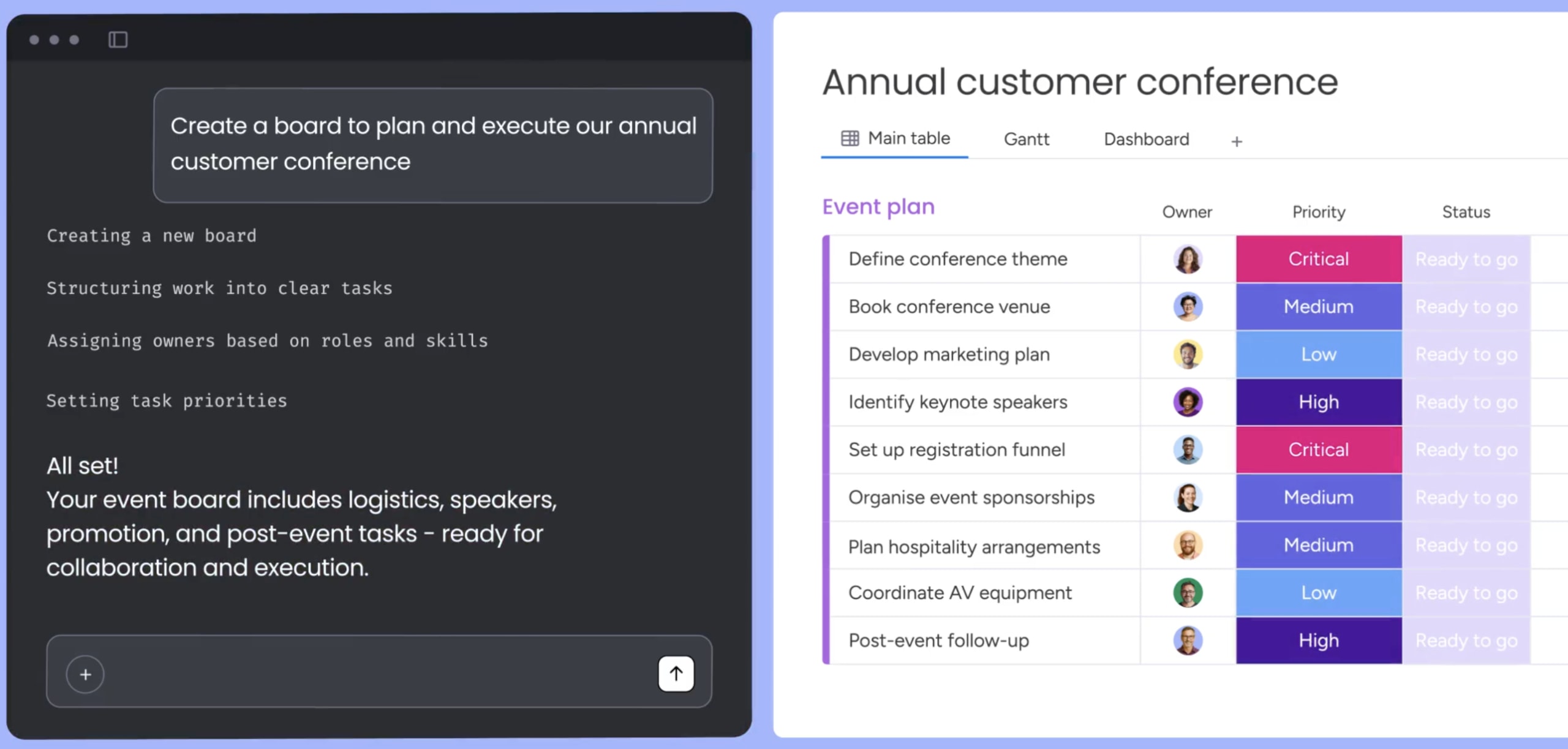
monday MCP is a hosted server that connects approved AI assistants like ChatGPT, Claude, Cursor, and Microsoft Copilot directly to your monday workspace. It gives assistants permission-aware access to CRM records, activities, and cross-team context so reps can ask questions and take actions through natural conversation. Every action respects the user’s existing permissions, and nothing happens outside your governance rules.
Open API and GraphQL support for custom integrations
monday CRM offers open API and GraphQL API access for teams that need custom integrations or want to build tailored workflows. Connect forms, billing systems, contract platforms, and communication tools directly to your CRM so data flows automatically. API access gives RevOps teams the flexibility to design repeatable, backend workflows that keep records current without manual entry.
Native AI actions for common sales tasks
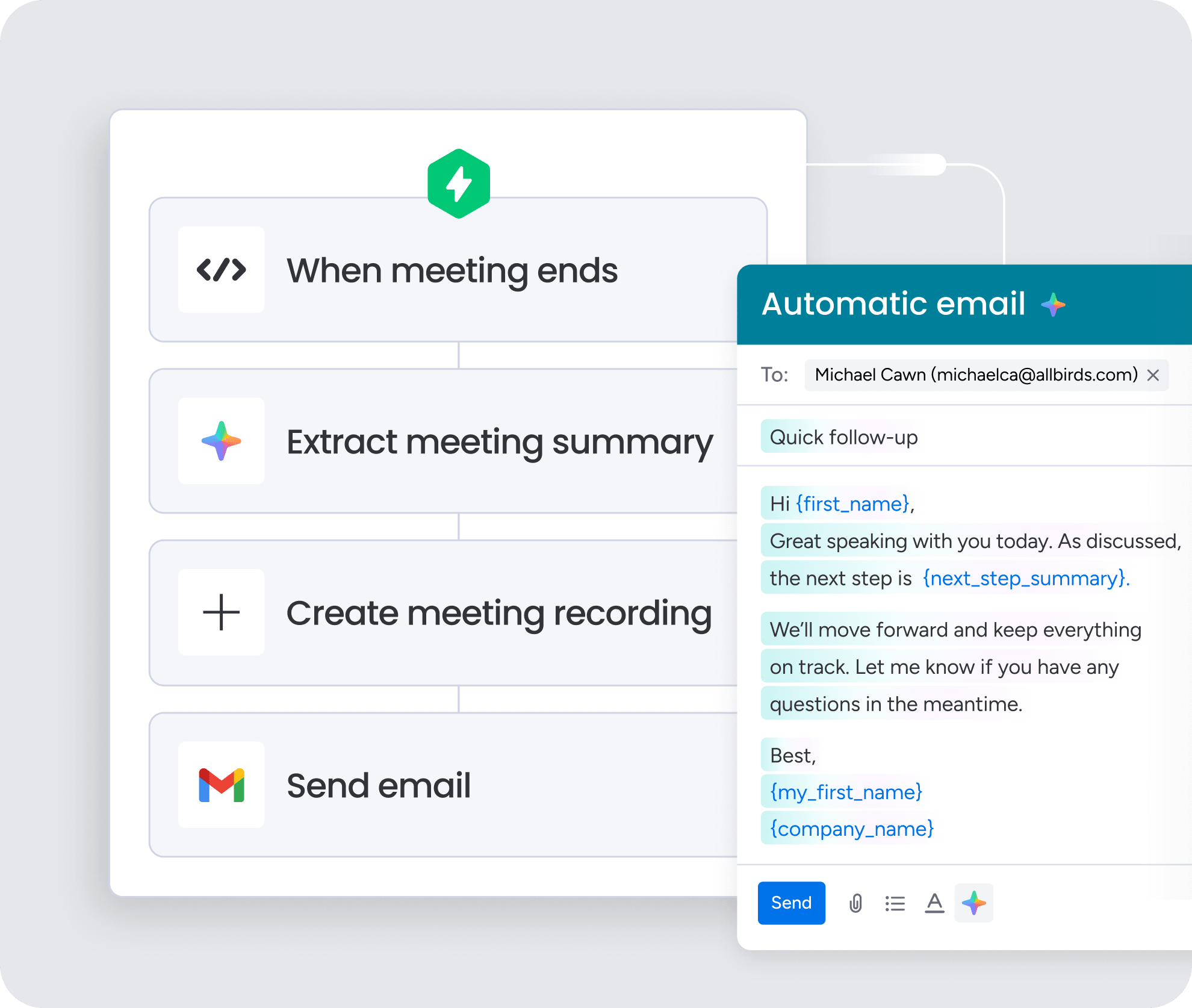
Built-in AI features handle the repetitive work that slows teams down. AI Timeline Summary pulls recent emails, meetings, and updates into a quick readout. Extract information turns unstructured notes into structured fields. Writing assistant drafts follow-up emails. Detect sentiment flags tone shifts in customer communication. These actions work inside the CRM without requiring custom builds, so teams can prove value before expanding to more complex workflows.
AI Automation blocks for no-code workflows

AI Automation blocks let teams define what gets captured, where it goes, and what happens next using a visual builder. Turn meeting transcripts into next steps, assign owners based on deal stage, or flag pipeline risks when close dates pass. No coding required. Teams can design governed workflows that combine AI actions with business logic, then adjust them as the process evolves.
Start connecting AI to your CRM the right way
CRM APIs and MCP solve different problems. APIs keep systems in sync. MCP helps assistants work with approved CRM context through conversation. Most revenue teams will end up using both, and the path there doesn’t have to be complicated.
Useful AI depends on structure, trust, and current context. Connected records beat isolated ones. Not every workflow should be handed to an agent on day one. Pick one high-friction sales job, decide whether it needs read access, write access, or both, and roll it out with tight controls. Expand once the team trusts the results. For teams that want custom integration paths and assistant access in one governed environment, monday CRM brings connected records, built-in AI actions, open APIs, and monday MCP together in the same workspace.
Try monday CRM MCPFAQs
What is the difference between MCP and an API?
An API lets software exchange data with systems through programmatic requests. MCP gives AI assistants a structured way to discover and use approved actions and context. APIs connect systems. MCP connects assistants to what they're allowed to do. Both solve different problems, and most revenue teams end up using both depending on the workflow.
What is a CRM API?
A CRM API is a structured connection that lets outside systems read, create, update, and interact with CRM records like leads, contacts, accounts, and deals. It enables automated workflows where one system can push or pull data from your CRM without manual entry. Common examples include form submissions creating leads or contract signatures updating deal stages automatically.
When should a team use MCP instead of a CRM API?
Use MCP instead of a CRM API when you want an assistant to search, summarize, or take approved CRM actions through natural language conversation. MCP fits workflows where a person asks a question and needs an answer or action right away. APIs fit repeatable backend workflows where the trigger and outcome are already known.
Can AI write back to CRM records, or only read?
AI can both read and write back to CRM records. It reads records to summarize and search. With the right permissions, it writes updates, assigns owners, and logs next steps. Most teams start with read-only access first to validate understanding before allowing the assistant to write back. That approach builds trust before expanding permissions.
Is it safe to let AI agents update CRM records?
It's safe to let AI agents update CRM records when teams use OAuth, scoped permissions, review steps for sensitive actions, and an audit trail for every change. The assistant should inherit the person's existing permissions and never bypass them. Start narrow with read access, add human review for critical updates, and expand only after the team trusts the output.
Does monday CRM support MCP and API-based AI workflows?
monday CRM supports MCP and API-based AI workflows through monday MCP, open API access, GraphQL API support, automations, and permission-aware AI controls. Teams can start with native AI actions, connect external systems through APIs, or enable conversational assistant access through MCP. All three paths work together in one platform without switching tools or losing governance.
