



A call log template gives every conversation a consistent home: who you spoke with, what was discussed, and what needs to happen next. For individuals and small teams, a solid spreadsheet gets the job done. When your team grows and call volume picks up, the right structure keeps your pipeline reliable instead of guesswork.
You’ll get a free call log template you can copy into Excel, Google Sheets, Word, or another tool, plus guidance on customizing it for different teams, the fields to include, and when it’s time to move beyond spreadsheets.
Key takeaways
- A call log template keeps customer conversations organized by capturing key details like the contact, call outcome, notes, and next steps.
- Different teams can customize the same template with fields that support their workflow, such as deal stages for sales or issue categories for customer service.
- Standardized fields and dropdown menus make call logs easier to search, analyze, and report on over time.
- Logging calls immediately after each conversation improves accuracy and helps ensure follow-ups happen on schedule.
- As call volume grows, a CRM can automate call logging and connect every interaction to contacts, deals, and ongoing workflows.
What is a call log template?
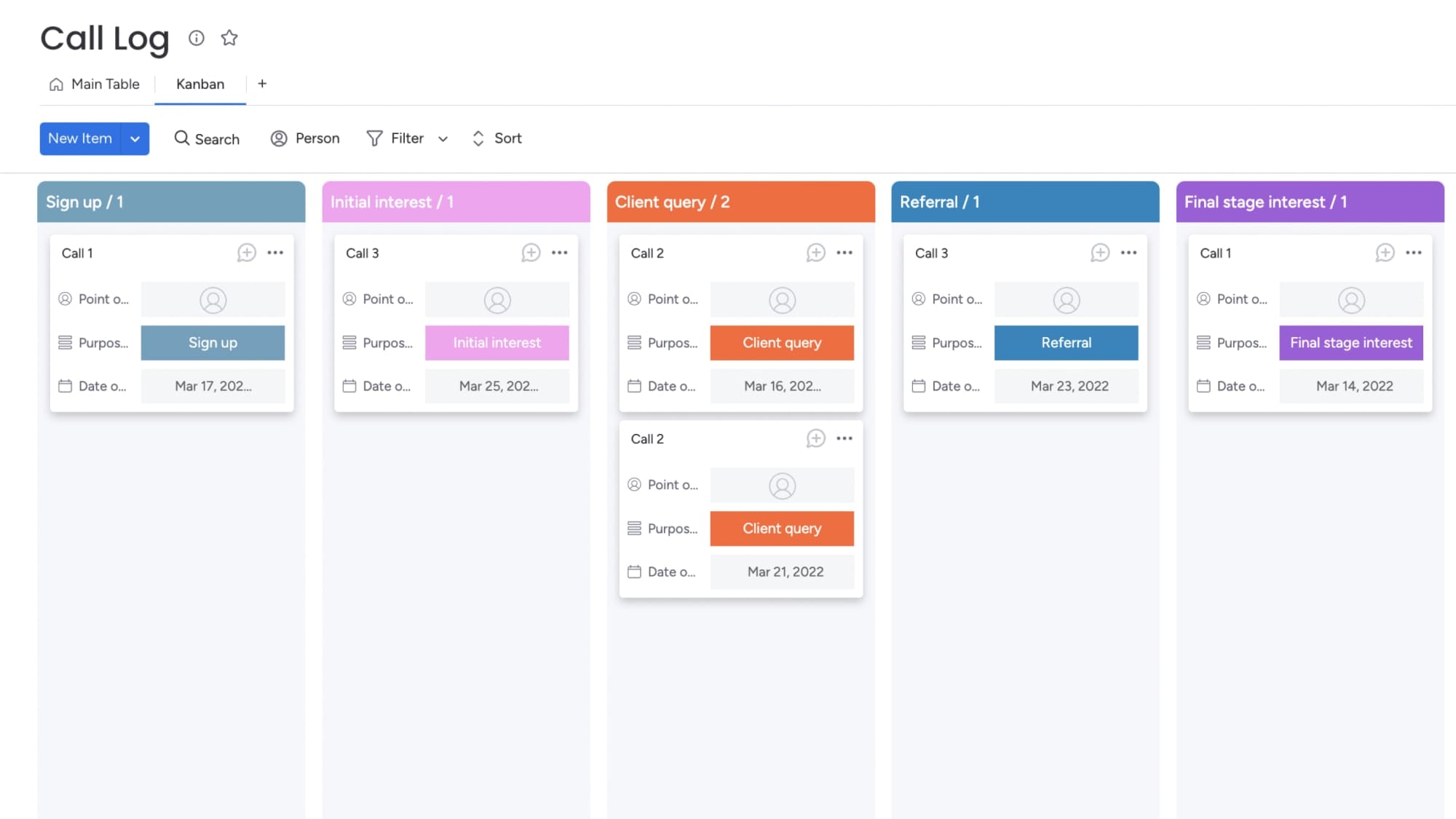
A call log template is a pre-structured document or spreadsheet designed to capture essential information about phone conversations. It keeps your team logging calls the same way every time, so nothing gets missed or recorded differently.
Call log templates are used across roles and industries:
- Sales teams track prospect conversations and deal progress
- Customer service reps document customer support calls and issue resolution
- Receptionists log messages for colleagues who missed calls
- Managers review team activity to identify coaching opportunities or performance trends
Here’s the difference between a template and a system. Templates are static — you enter data manually after every call. A CRM automates the logging, links calls to contacts and deals, and gives you real-time reports — no manual entry. Templates get you started. Systems scale as your call volume grows.
Why use a call log template
Call log templates give your team structure, consistency, and visibility into every customer interaction. Here’s what changes when your team logs calls consistently.
- Centralized records: Anyone on the team can see the full conversation history, so customers don’t repeat themselves and handoffs happen smoothly.
- Consistent documentation: Standardized data can be filtered, sorted, and analyzed — turning scattered notes into usable insights.
- Faster follow-ups: Logging next steps with deadlines keeps deals moving and reduces slippage from slow or missed follow-up.
- Better reporting: Track metrics like call volume by rep, connection rate, outcome distribution, and follow-up completion to see what’s actually working.
When your team logs calls the same way every time, you move from guesswork to data-driven decisions.
Free call log template example
Copy these fields into Excel, Google Sheets, Word, or another tool to create a call log template that fits your workflow.
| Field | What to enter | Example |
|---|---|---|
| Date | Date of the call | July 17, 2026 |
| Time | Time the call took place | 10:30 a.m. |
| Contact name | Person you spoke with | Sarah Chen |
| Company | Organization (if applicable) | Acme Inc. |
| Phone number | Contact's phone number | (555) 123-4567 |
| Call direction | Whether the call was inbound or outbound | Outbound |
| Call type | Purpose of the call | Follow-up |
| Call outcome | Result of the conversation | Connected |
| Call notes | Brief summary of the discussion | Reviewed pricing and answered implementation questions. |
| Next step | Action to take after the call | Send proposal |
| Follow-up date | When the next action should happen | July 19, 2026 |
| Owner | Team member responsible for follow-up | Jamie Smith |
Suggested dropdown options
For consistent reporting, use dropdown menus for fields such as call direction, call type, and call outcome. Every completed call should also have a specific next step, follow-up date, and owner.
| Field | Options |
|---|---|
| Call direction | Inbound, Outbound |
| Call type | Prospecting, Follow-up, Demo, Support, Check-in |
| Call outcome | Connected, Voicemail, No answer, Gatekeeper, Callback scheduled |
| Priority | High, Medium, Low |
| Follow-up status | Pending, Completed, Overdue |
Types of call log templates
Every team tracks different information during phone calls. Start with the core call log template, then customize it by adding fields that match your workflow.
| Call log type | Best for | Common additional fields |
|---|---|---|
| Simple call log | Individuals and low-volume teams | Contact, date, time, outcome, notes |
| Sales call log | Sales representatives and revenue teams | Deal stage, deal value, next step, follow-up date |
| Customer service call log | Support teams | Issue category, resolution status, escalation status |
| Client call log | Agencies and consultants | Project, billable time, commitments, next meeting |
Sales call log template
Sales teams need more than a record of who they called. They need context that keeps deals moving through the pipeline. In addition to the core template, consider adding:
- Deal stage: Qualified, demo scheduled, proposal sent, negotiation, or closed
- Estimated deal value: Forecasted revenue or contract size
- Decision-maker status: Whether you reached the buyer, a gatekeeper, or voicemail
- Next step: The agreed follow-up action and deadline
As your pipeline grows, manually updating spreadsheets becomes harder to manage. A CRM connects every call to the related contact, deal, and activity history, giving your team a complete view of the sales process.
Customer service call log template
Support teams need to document issues, resolutions, and follow-up commitments—not just the conversation itself. Add fields like:
- Account or case ID: The customer’s reference number
- Issue category: Billing, technical support, product question, or complaint
- Resolution status: Resolved, escalated, pending, or transferred
- Call duration: Time spent handling the issue
- Resolution notes: Actions taken and any promised follow-up
These additional fields make it easier to monitor service quality, track open issues, and ensure customers receive consistent support.
What to include in a call log template
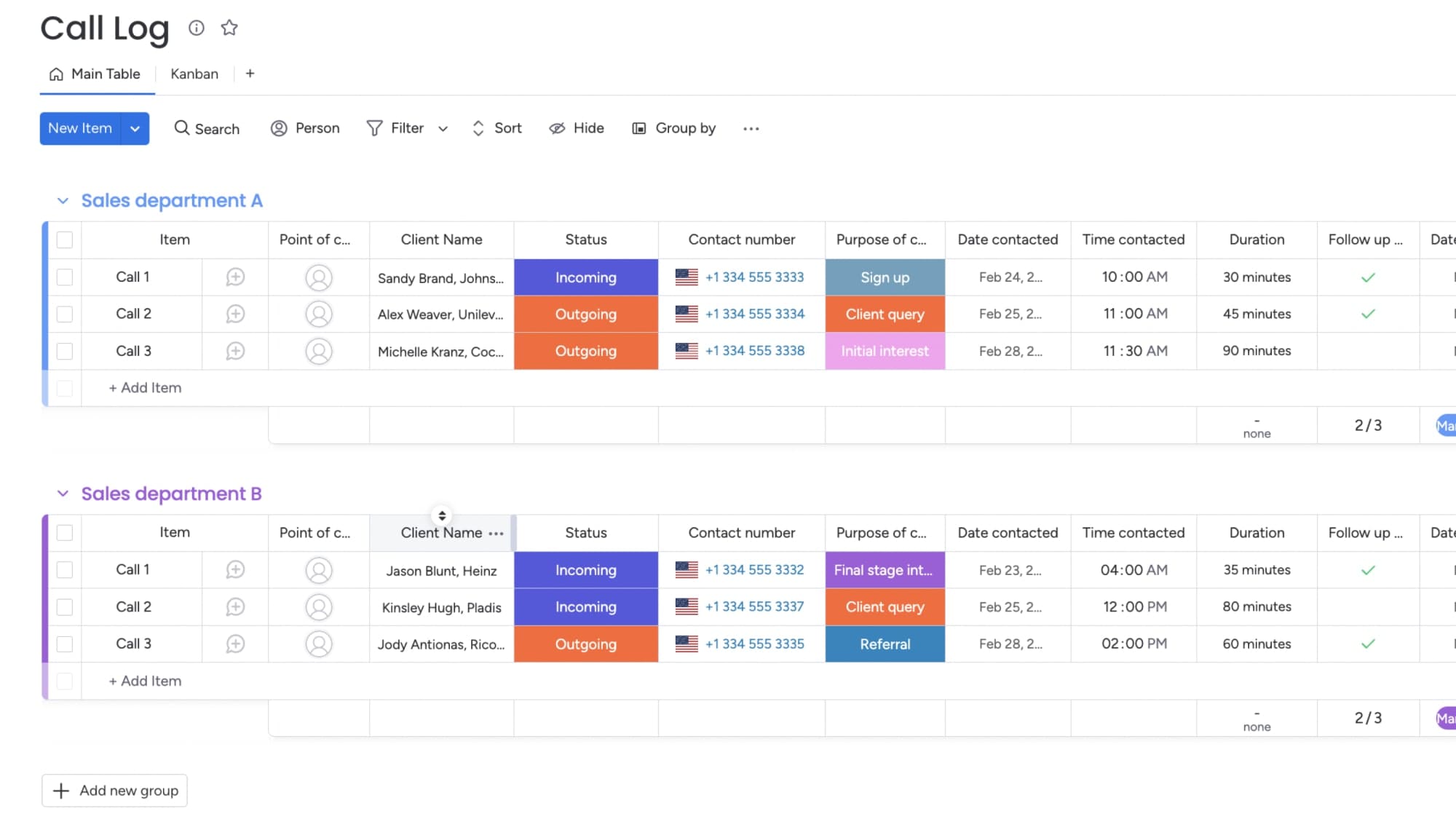
A solid call log captures what matters without burying your team in fields. These elements are the foundation of call tracking. Get them right, and your team will actually use the log.
Contact and company details
Log the contact’s name and company so you know exactly who you spoke with. Contact details should include:
- Full name: First and last name of the person you spoke with
- Company name: Where they work (if applicable)
- Job title: Their role, which helps prioritize follow-up
Include the primary phone number and note any additional participants when relevant.
Call date and time
Log the exact date and time to build a chronological record. Date/time tracking helps:
- Schedule follow-ups: Know when to reach out again
- Measure activity: Track how many calls were made per day, week, or month
- Identify trends: Spot peak call times or response patterns
Call direction and call outcome
Call direction (inbound vs. outbound) and outcome show what happened. Use the table below to standardize how your team records outcomes.
| Outcome | Definition |
|---|---|
| Connected | Spoke with the intended contact |
| Voicemail | Left a message |
| No answer | Call went unanswered, no voicemail left |
| Gatekeeper | Spoke with someone other than the decision-maker |
| Callback scheduled | Agreed on a specific follow-up time |
Call notes and summary
Call notes document what was actually discussed. Effective call notes should:
- Be concise: Summarize key points without transcribing the entire conversation
- Highlight action items: Note what was agreed upon or promised
- Capture objections or concerns: Record any hesitations or pushback raised
Next step and follow-up date
Log the next step and a follow-up date so nothing gets forgotten. Next-step tracking helps:
- Maintain momentum: Keep deals or conversations moving forward
- Prioritize work: Know which follow-ups are most urgent
- Measure follow-through: Track whether promised actions were completed on time
How to customize your call log template
Your call log only works if your team fills it in. Here’s how to set up and maintain a call log that fits your workflow.
Choose only the fields your team needs
Most templates come with generic fields. Customize them to fit how your team actually works — and cut everything else.
Customization examples:
- Add industry-specific fields: “Policy number” for insurance, “Case ID” for legal
- Remove unnecessary columns: If you don’t track call duration, delete that field
- Rename labels: Change “Outcome” to “Call Result” if that’s more intuitive for your team
Require too many fields, and reps won’t fill them in. Start with the essentials. Add fields only when you actually need them.
Signs you have too many required fields:
- Reps leave fields blank or enter placeholder text
- Logging a single call takes more than 60 seconds
- Team members complain about “busywork”
Standardize outcomes with dropdown menus
When everyone uses different words for the same thing, your data’s useless. Using drop-down menus for fields like “Call Outcome” ensures consistency across every rep and every log.
Start with these common fields:
| Field | Example options |
|---|---|
| Call outcome | Connected, Voicemail, No Answer, Callback Scheduled |
| Call type | Prospecting, Follow-up, Demo, Support, Check-in |
| Priority | High, Medium, Low |
| Status | Pending, Completed, Escalated |
Assign an owner and deadline to every next step
Assign an owner to every call. That way, calls don’t get forgotten or duplicated.
Assigning follow-up owners helps:
- Establish accountability: Everyone knows who’s responsible.
- Prevent duplicate work: Avoid 2 people following up on the same call.
- Track individual performance: Measure follow-through by rep.
“Follow up soon” is not a next step. “Send proposal by Friday” is.
Good next steps include:
- Action: What needs to happen (send, call, schedule, review)
- Deadline: When it needs to happen (specific date)
- Owner: Who’s responsible
Log calls immediately
Memory fades fast. Details that seem obvious during a call become fuzzy surprisingly quickly. To make immediate logging easier:
- Keep the call log open in a browser tab or on a second monitor.
- Use mobile-friendly formats for logging on the go.
- Build logging into the call workflow so it becomes a natural last step.
Review call data regularly
Review your call logs regularly, or they’re useless. Build call log reviews into weekly or monthly team meetings — cover volume, outcomes, and follow-up completion.
What to review:
- Call volume: Are reps making enough calls to hit targets?
- Connection rates: What percentage of calls reach the intended contact?
- Follow-up completion: Are next steps being completed on time?
- Outcome trends: Which call types or times are most successful?
Call logs get cluttered fast. A quick weekly cleanup keeps your data clean and your team focused on real opportunities.
When to replace a call log template with a CRM
Call log templates work well for low-volume teams, but manual tracking becomes harder to manage as call activity grows. You’ll know it’s time to move beyond spreadsheets when manual tracking starts costing you deals.
Here are the signs your call log template has hit its limit:
- Call volume outpaces manual entry: Your team is making 50+ calls per day, and logging each one manually slows them down.
- Multiple people need simultaneous access: Spreadsheets lock when 2 reps try to update at once, or version conflicts create duplicate records.
- Calls aren’t connected to deals: You can see that a call happened, but you can’t see where the deal stands or what stage it’s in.
- Reporting requires manual work: Pulling weekly or monthly reports means copying data from multiple sheets, filtering manually, and building charts from scratch.
- Follow-ups get missed: Next steps live in a spreadsheet cell instead of triggering reminders or automated workflows.
A CRM changes how call logging works. Instead of entering data after every call, the system captures it automatically. Calls link directly to contacts and deals, so you see the full relationship history in one place. Follow-up tasks trigger reminders, and reports update in real time without manual consolidation.
How monday CRM transforms call logging
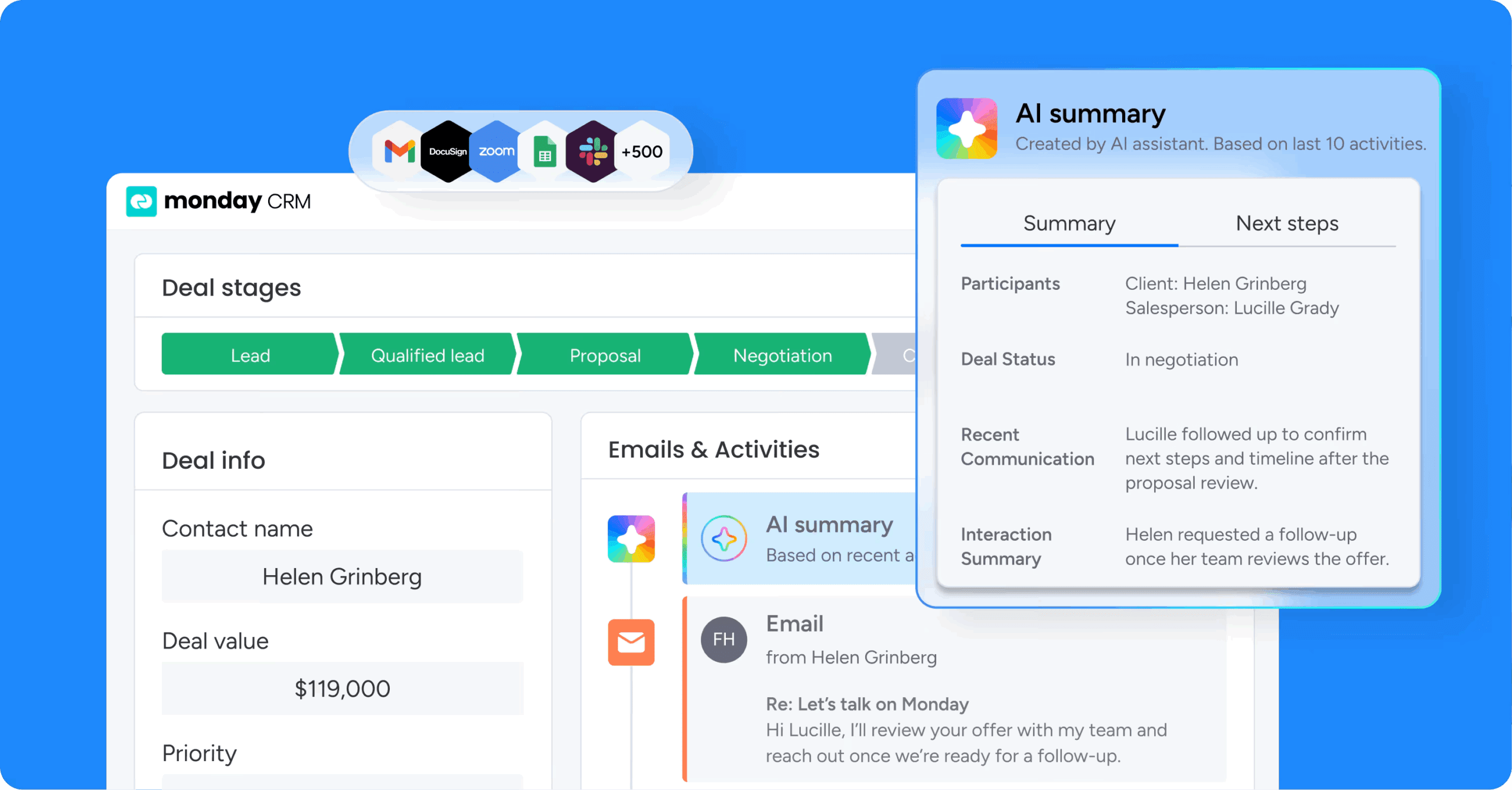
When spreadsheets start slowing your team down, monday CRM replaces manual logging with connected customer records and automated workflows. Instead of logging calls in isolation, every conversation connects directly to contacts, deals, and pipeline stages — so your team sees the full relationship history in one place.
Key capabilities that transform call logging:
- Automatic call logging: Capture call details without manual entry, so reps spend less time typing and more time selling
- Pipeline integration: Log a call, and it updates the deal stage, triggers the next task, and keeps your forecast accurate in real time
- AI-powered summaries: monday AI automatically summarizes call notes, identifies sentiment to flag at-risk deals, and drafts follow-up emails based on what was discussed
- Automated workflows: Set up triggers that create tasks, send reminders, or notify team members when specific call outcomes occur
- Real-time reporting: Track call volume, connection rates, and follow-up completion across your team without manual consolidation
- Mobile access: Log calls and update deal stages from anywhere using the monday mobile app
You’re not just tracking calls — you’re moving deals forward. monday CRM connects every conversation to the actions that close revenue, so nothing falls through the cracks as your team scales.

“With monday CRM, we’re finally able to adapt the platform to our needs — not the other way around. It gives us the flexibility to work smarter, cut costs, save time, and scale with confidence.”
Samuel Lobao | Contract Administrator & Special Projects, Strategix
“Now we have a lot less data, but it’s quality data. That change allows us to use AI confidently, without second-guessing the outputs.”
Elizabeth Gerbel | CEO
“Without monday CRM, we’d be chasing updates and fixing errors. Now we’re focused on growing the program — not just keeping up with it."
Quentin Williams | Head of Dropship, Freedom Furniture
“There’s probably about a 70% increase in efficiency in regards to the admin tasks that were removed and automated, which is a huge win for us.“
Kyle Dorman | Department Manager - Operations, Ray White
"monday CRM helps us make sure the right people have immediate visibility into the information they need so we're not wasting time."
Luca Pope | Global Client Solutions Manager at Black Mountain
“In a couple of weeks, all of the team members were using monday CRM fully. The automations and the many integrations, make monday CRM the best CRM in the market right now.”
Nuno Godinho | CIO at Velv
“monday.com provides developmental flexibility, operational efficiency, and data transparency — all in one place. We became a company that moved from chasing data to leading with it.”
Hyunghan Lee | Team Lead, Sandbox Network
"monday.com brought every part of our business into one connected space. The harmony between work management and CRM has become our operating system — giving us the clarity and confidence to scale.”
Jennifer Chinburg | Executive Vice President of Corporate Development & Brand, Chinburg Properties
“We just weren’t getting value from our old CRM. With monday.com, it's a thousand times better. Our sales teams are more informed, more consistent, and far more connected."
James Arnold | Chief Operating Officer, CenversaFrom call logs to pipeline control
Call log templates are a great starting point for organizing customer conversations and keeping follow-ups on track. As your team grows, though, manual tracking becomes harder to maintain. Connecting call activity to contacts, deals, and automated workflows helps every conversation move work forward instead of creating more administrative overhead.
Try monday CRMFAQs
What is a call log template used for?
A call log template is used to document phone conversations in a structured format, capturing essential details like contact information, call date and time, call outcome, and follow-up actions. Sales teams use call logs to track prospect conversations and deal progress, while customer service teams use them to document support interactions and issue resolution.
What should be included in a call log?
A call log should include the contact's name and company, phone number, call date and time, call direction (inbound or outbound), call outcome (connected, voicemail, no answer), call notes summarizing the conversation, and the next step with a follow-up date. Additional fields may include call duration, call owner, deal stage, or issue category depending on your specific needs.
How do I create a call log in Excel?
To create a call log in Excel, open a new spreadsheet and create column headers for the fields you want to track. Format the header row with bold text and filters, then add drop-down menus for fields like "Outcome" using Data Validation to ensure consistency. Use formulas to auto-calculate totals if needed, and save the file as a template (.xltx) so you can reuse the format.
What is the difference between a call log and a call list?
A call log is a record of calls that have already been made, documenting what happened during each conversation, the outcome, and follow-up actions. A call list is a prospective list of people to call, used for planning outreach, prioritizing contacts, and tracking call status before the calls are made.
Can I use Google Sheets for call logging?
Google Sheets works well for call logging, especially for teams that need real-time collaboration. Multiple team members can log calls simultaneously from different locations, and changes sync instantly across devices, though Google Sheets requires manual data entry and lacks advanced CRM features like linking calls to deals or triggering automated follow-ups.
When should I switch from a call log template to a CRM?
Consider switching from a spreadsheet-based call log to a CRM when call volume grows beyond what manual tracking can handle, when multiple team members need to update the same records simultaneously, when you need call data connected to deals and pipeline stages, or when reporting requires manual consolidation from multiple sources. A CRM automates these processes and provides the visibility teams need to scale effectively.
