



What if your CRM could actually work the way your team sells instead of forcing you to adapt to rigid templates and generic workflows? Building your own CRM system means configuring a platform that matches your exact sales process — no coding, no developers, just visual builders that give you the potential to create custom pipelines and automations in weeks.
This guide shows you how to build your own CRM without technical expertise. You’ll discover what platform-based building means today, compare it to custom development, and follow an 8-step framework to launch your system with AI-powered features like automated data entry, lead scoring, and email intelligence, depending on the platform and plan.
Key takeaways
- Use no-code platforms to configure custom pipelines and workflows through drag-and-drop interfaces without hiring developers or writing code.
- Design workflows that match how your team actually sells instead of forcing reps to adapt to rigid vendor assumptions.
- Leading platforms include native AI features like email intelligence, predictive lead scoring, and automated data capture without expensive add-ons.
- You have the potential to save money and complete setup in weeks using visual builders and pre-built templates in monday CRM instead of waiting months for traditional implementations.
What building your own CRM means today
Building your own CRM means configuring a no-code platform to match your exact sales process. You’re not writing code or hiring developers. You’re using visual builders, pre-built components, and drag-and-drop interfaces that let sales leaders potentially create custom systems in weeks rather than months.
The idea that you need technical expertise to build a CRM is outdated. A decade ago, custom CRMs meant hiring developers, writing thousands of lines of code, and managing your own servers. That approach still exists if you’ve got highly specialized needs, but it’s not the default anymore.
No-code platforms changed who can build a CRM. Sales operations managers, revenue leaders, and business owners now configure sophisticated CRM systems without submitting IT tickets or waiting for developer availability. The technical barrier between buying and building is much lower.
For your team, this means one thing: Instead of adapting your workflow to fit a vendor’s rigid structure, you configure customizable CRM software to reflect how your team actually sells. The building happens through visual interfaces. You drag pipeline stages, click to create automations, and select fields from menus rather than writing database queries.
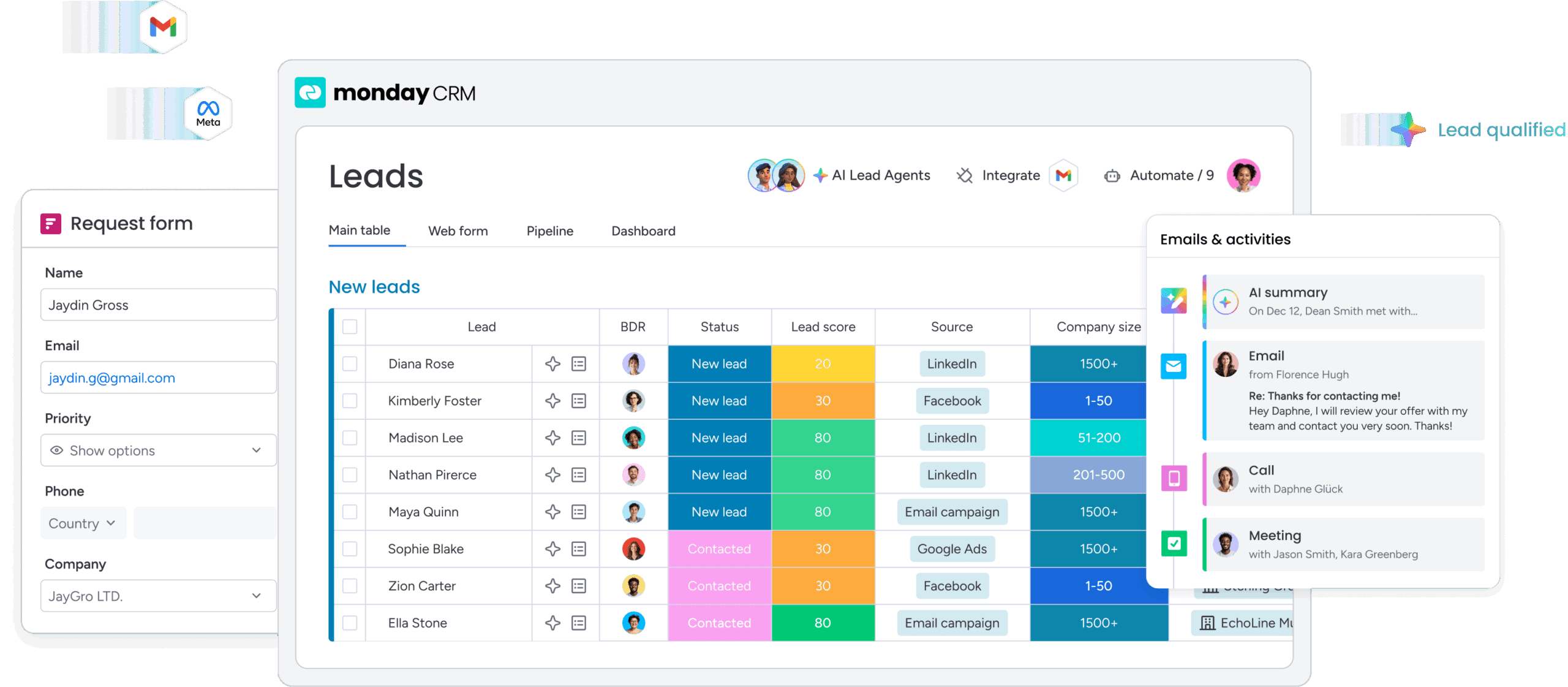
Note: Timelines, costs, and AI capabilities vary depending on the platform, team size, and implementation scope.
Platform approach vs. building from scratch
You’ve got two paths when you want a CRM built for your specific needs. The choice you make determines your timeline, costs, and long-term maintenance responsibilities, so it’s critical to understand the differences.
| Factor | Platform approach | Building from scratch |
|---|---|---|
| Time to launch | Often 3–6 weeks for initial implementation, depending on complexity | Often 6–18 months for a production-ready version, depending on scope |
| Technical skills required | Typically configured by business users with minimal coding, though some technical support may be needed | Requires developers and ongoing technical expertise (e.g., engineering, DevOps) |
| Upfront investment | Usually low upfront cost with subscription-based pricing; setup costs may vary | Often requires significant upfront investment, which can reach hundreds of thousands depending on requirements |
| Maintenance responsibility | Platform vendor manages infrastructure, updates, and security | Internal team or partners handle maintenance, updates, and infrastructure |
| AI capabilities | Many platforms include built-in AI features that can be configured | AI typically requires custom development or third-party integrations |
| Scalability | Platforms are designed to scale with usage, though limits depend on the vendor | Scalability depends on system architecture and infrastructure planning |
Custom development means hiring developers or an agency to write code for you. You’ll define technical specs, manage the project, and handle ongoing maintenance. Custom development makes sense for enterprises with specialized needs and dedicated IT teams.
Platform-based building gives you the infrastructure. You handle the setup. No-code CRM platforms offer visual builders, pre-built components, and flexible data structures that you customize to match your sales process. The vendor handles infrastructure, security patches, and new features. Your team configures pipelines, automations, and reports that match how you work.
Choosing the right approach depends on your organization’s specific situation. Platform-based building works for most mid-market teams. You get customization without technical complexity, faster launch times, and predictable monthly costs instead of huge upfront bills.
Top 5 benefits of building your own CRM
Building your own CRM fixes what drives sales leaders away from pre-built solutions. Systems that don’t match your process kill predictability. Rigid structures force workarounds that tank efficiency. That’s why custom configuration beats bending to vendor assumptions.
1. Complete control over sales workflows
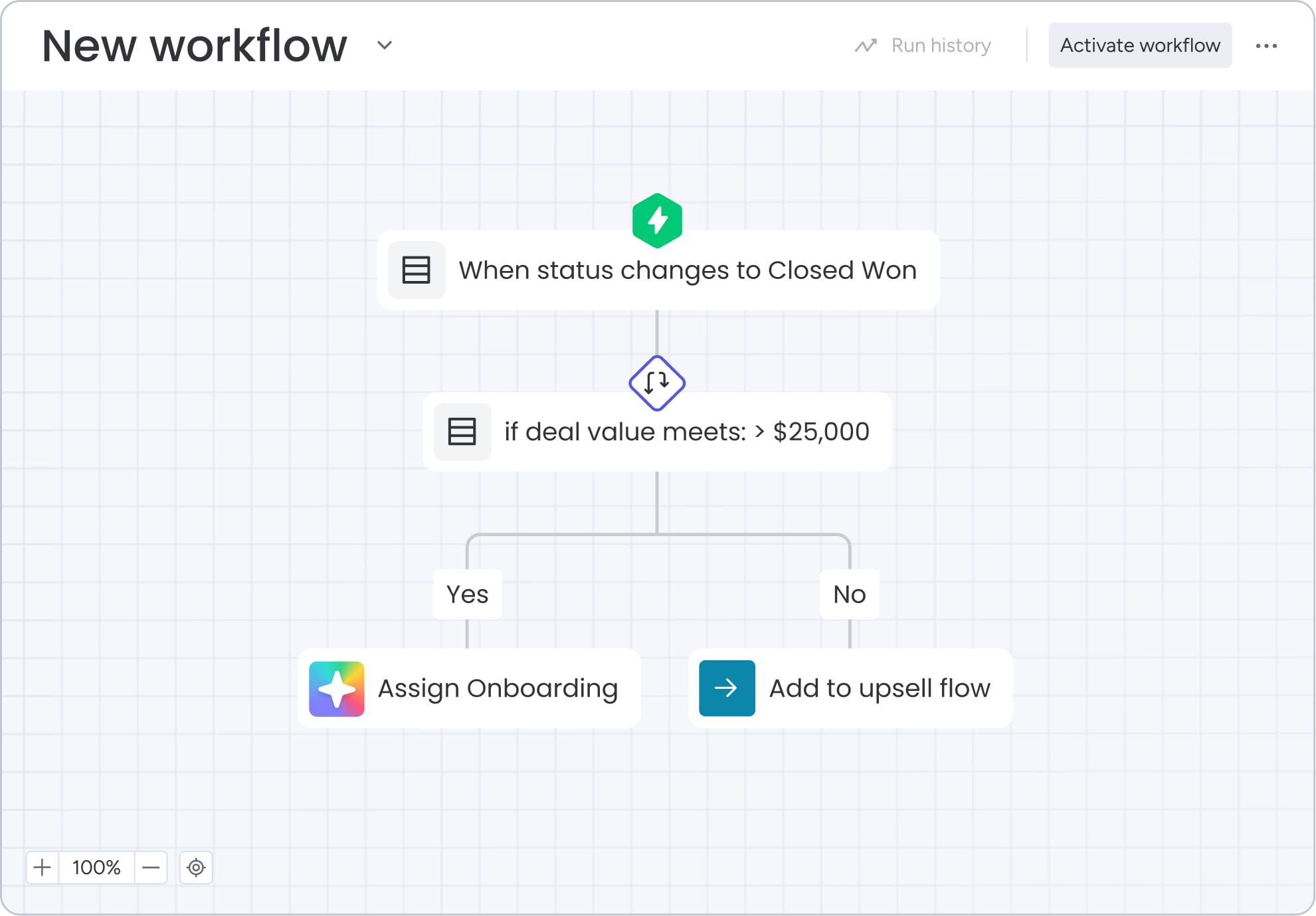
Pre-built CRMs force your team to work how the vendor thinks you should sell. When your sales cycle doesn’t match the CRM’s stages, reps build workarounds. They track stuff in spreadsheets, skip irrelevant fields, and build their own systems outside the CRM.
Build your own CRM and you get workflows that match how you actually sell:
- Every stage reflects reality: Real steps your team takes, not generic assumptions
- Fields capture what matters: Information your reps actually need and use
- Automations trigger correctly: At the right moment in your specific workflow
- Terminology matches yours: Language your team already speaks
Adoption can jump when the CRM matches how people actually work. Reps resist CRMs that feel disconnected from their daily reality. When reps see their workflow in the platform, they actually use it.
2. AI capabilities from day one
Adding AI to an existing CRM usually means buying expensive add-ons or third-party integrations. Legacy CRMs were built before AI became practical. Adding it now costs serious money.
Platforms with native AI give you features you can configure right away:
- Email intelligence: Suggests responses and analyzes sentiment automatically
- Lead scoring: Learns from your historical data patterns
- Data capture: Extracts contact information and meeting notes without manual entry
- Predictive insights: Identifies high-probability opportunities early
Having AI from day one gives you an edge that grows over time. Your team’s already using it for smarter emails, better lead scoring, and less data entry.
3. Faster launch than enterprise CRM
Enterprise CRM implementations take 6-12 months. Timelines stretch because every customization needs a developer. IT dependencies slow down security reviews. Data migration exposes years of messy data.
Platform-based building accelerates every phase:
- Pre-built templates: Starting points you customize rather than building from scratch
- Visual configuration: Replaces developer tickets and technical delays
- Easier data import: Handles migration without extensive IT involvement
- Immediate iteration: Adjust the system as your team discovers what works
Launching in weeks instead of months makes a real difference. You see value faster. Teams may start seeing value sooner.
4. Perfect fit for your business
Pre-configured CRMs assume standard sales processes. They work well for straightforward B2B SaaS sales or transactional deals with single decision-makers. When your business doesn’t fit, you’re stuck with workarounds that trash your data quality.
Build your own CRM and handle what makes your business different:
- Complex deal structures: Multiple products with custom pricing
- Industry-specific needs: Real estate teams tracking property listings
- Multi-stakeholder processes: Buying committees and procurement workflows
- Custom terminology: Fields and pipelines using your actual language
When the CRM speaks your language and matches your process, people actually use it.
5. Greater flexibility and data portability
Traditional CRMs create lock-in through proprietary data formats and expensive migration costs. Organizations discover this when they try to switch. Years of data trapped in formats that don’t export cleanly. Custom workflows that would need rebuilding from scratch.
Open platforms with strong APIs and standard exports can help reduce this risk:
- Portable data: Remains in formats that other systems can import
- Standard APIs: Integrations connect without proprietary connectors
- Export flexibility: Move your data when business needs change
- Integration freedom: Connect with best-of-breed tools as they emerge
True costs of building a custom CRM system
Cost matters for any CRM decision. You need to see all the costs, not just subscription fees. Real costs include implementation, maintenance, and technical requirements that arise later.
Platform building costs
Platform-based CRM costs typically scale with your team size and are generally more predictable than custom development:
- Platform subscription: Often ranges from $50–150 per user monthly, depending on platform, features, and plan
- Implementation time: Commonly 20–40 hours of initial configuration, depending on complexity
- Data migration: Often 10–20 hours for structured, clean data; more if data requires cleanup
- Integration setup: Typically 10–15 hours to connect core tools, depending on the number and complexity of integrations
- Training investment: Often 15–25 hours for onboarding across the team, depending on roles and familiarity
For example, a 25-person sales team might pay approximately $1,500–3,750 per month for CRM capabilities, including automations and AI features, depending on plan selection and usage.
Many teams can get comfortable with core functionality within a few hours of training, though reaching full productivity may take several weeks and varies based on system complexity and team adoption.
Traditional development costs
Custom CRM development typically involves significant upfront investment along with ongoing technical overhead:
- Initial development: Custom CRM builds can cost hundreds of thousands of dollars, depending on scope, features, and complexity.
- Infrastructure: Ongoing hosting and service costs may range from a few hundred to several thousand dollars per month, depending on usage and architecture.
- Maintenance team: Ongoing support often requires dedicated technical resources or external partners, which can add several thousand dollars per month.
- Additional expenses: Project management, testing, and scope changes can increase total costs beyond initial estimates.
Custom development costs can be difficult to predict. Changes in scope, technical complexity, and evolving requirements often lead to higher-than-expected timelines and budgets.
Ongoing maintenance comparison
Maintenance responsibilities differ significantly between platform-based CRM solutions and custom-built systems:
| Maintenance aspect | Platform approach | Custom development |
|---|---|---|
| Software updates | Typically handled by the platform vendor and included in the subscription | Your team or partners typically plan, test, and deploy updates |
| Security patches | Usually managed by the platform vendor as part of ongoing service | Your team is responsible for monitoring, implementing, and validating patches |
| Feature additions | New features are released by the platform and can often be configured as needed | Often requires dedicated development work to design, build, and deploy |
| Bug fixes | Issues are typically reported to the vendor and resolved through platform updates | Your team is responsible for identifying, fixing, and deploying solutions |
| Monthly cost | Included in subscription pricing, though internal admin time may still be required | Ongoing costs vary widely depending on team structure, vendors, and system complexity |
6 must-have features for your DIY CRM
Every custom CRM needs core capabilities to support revenue teams. These features give you predictability, visibility, and collaboration. Without these, your CRM’s just a place to store data.
1. Contact and deal management
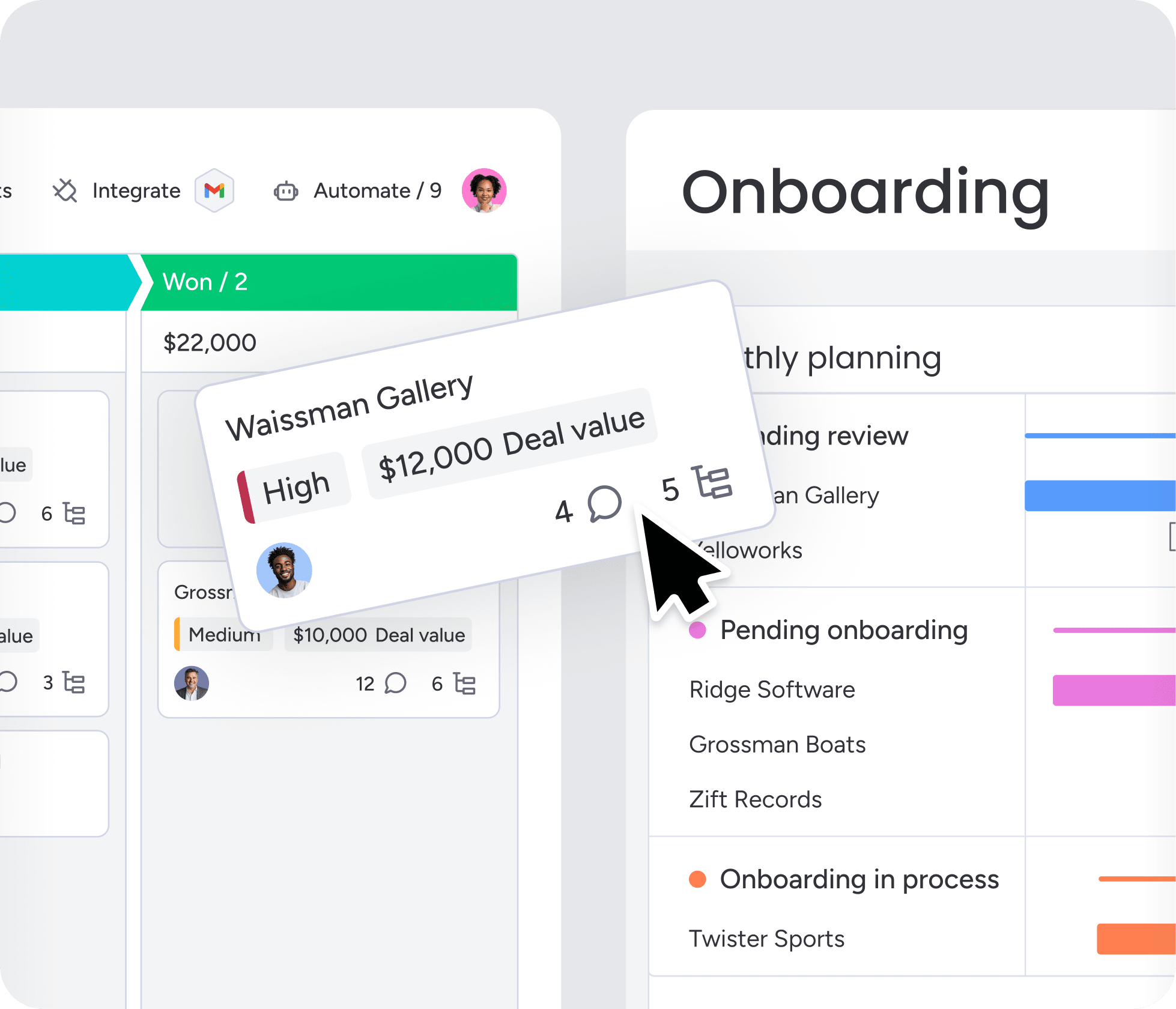
Contact and deal management is the foundation. Without strong capabilities here, everything else falls apart.
Contact management essentials:
- Complete profiles: Custom fields for information specific to your sales process
- Company hierarchies: Relationships between contacts across organizations
- Relationship mapping: Connections between different companies and stakeholders
- Communication history: Every interaction automatically logged and searchable
For deal management, be sure you have customizable stages, value tracking, probability scoring, and associated records.
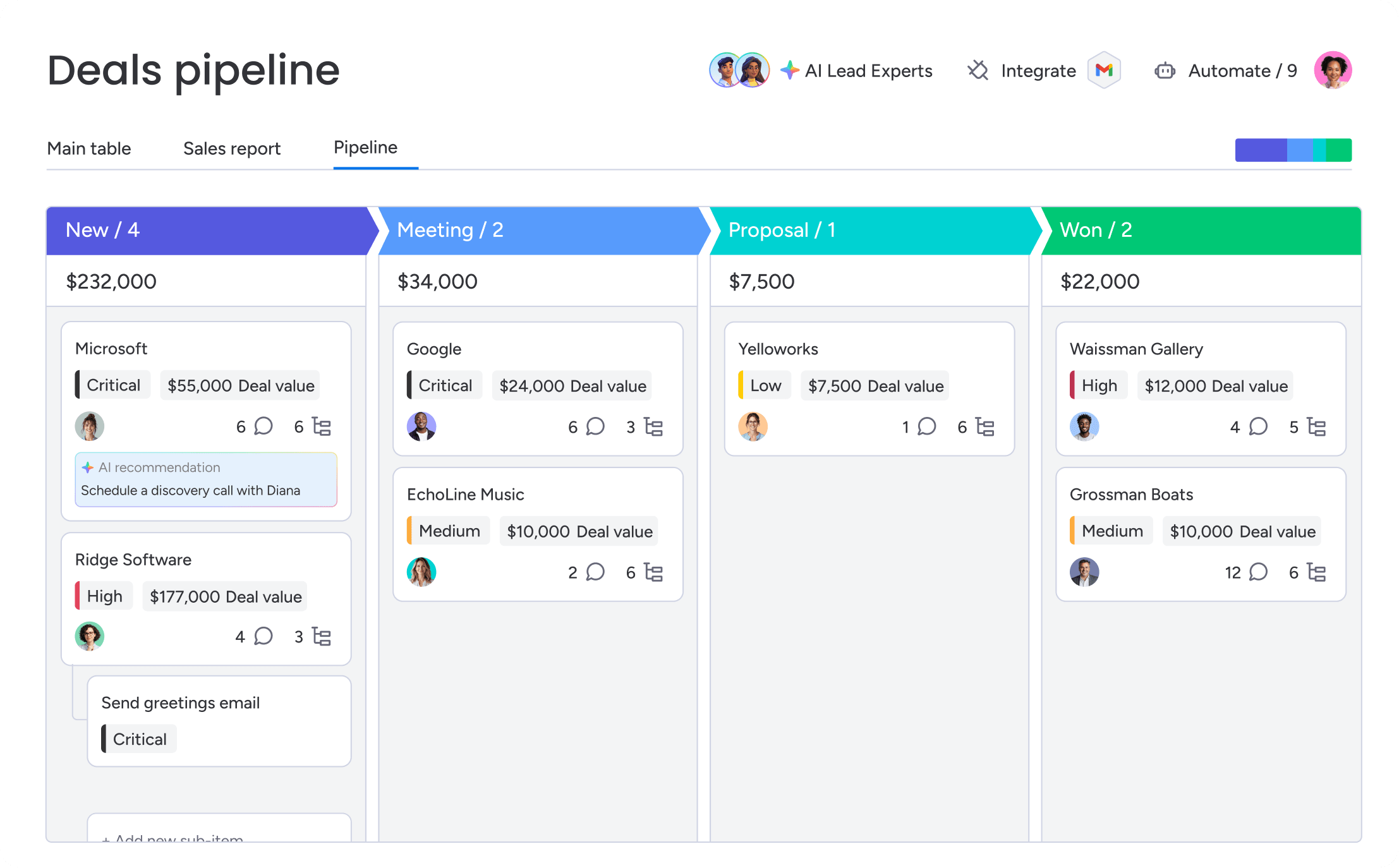
2. Visual sales pipelines
Spreadsheets and list-view CRMs make it hard to spot patterns, find bottlenecks, or check pipeline health fast. Visual pipelines change how teams track deals.
Key visual pipeline capabilities:
- Drag-and-drop movement: Reps update stages by moving cards between columns
- Kanban-style boards: Show exactly how many deals sit in each stage
- Visual bottleneck identification: Deals that haven’t moved stand out immediately
- Stage-specific metrics: Time spent, conversion rates, and average deal size per stage
Visual pipelines make forecasting more accurate. No more scrolling through lists and doing mental math. You see deal distribution instantly.
8 steps for how to build your own CRM without coding
This framework shows you how to build a custom CRM quickly. Mid-market teams can execute these steps without developers. Each step builds on the last to help you avoid common mistakes.
Step 1: Map your sales process
Before building your CRM, document how your sales process actually works today. A strong CRM strategy depends on understanding your actual process—not your ideal workflow—so your system reflects how your team sells.
- List each stage from first contact to closed-won.
- Define what must happen before a deal moves forward.
- Identify where deals hand off between team members.
- Note where deals tend to stall or slow down.
The biggest mistakes? Mapping your ideal process instead of reality, over-complicating with too many stages, and ignoring cross-functional touchpoints. Start simple. You can refine your process once it’s live.
Step 2: Choose your CRM builder platform
Your platform choice determines what you can build. The right platform makes setup simple and gives you flexibility for unique needs.
- Look for platforms where non-technical users can build pipelines without IT support.
- Verify connections with your existing tools work seamlessly.
- Confirm AI capabilities are included rather than expensive add-ons.
- Avoid platforms requiring professional services for basic setup.
- Watch out for limited API access restricting future integrations.
Choose a platform that grows with you. The best CRM builder balances ease of use today with flexibility for tomorrow’s needs.
Step 3: Set up your data structure
Your CRM database structure defines how information is stored and connected in your CRM. Getting CRM data management right from the start prevents data quality problems later. This is your foundation. Everything else builds on it.
- Configure contacts with custom fields for your business.
- Set up companies with hierarchy relationships.
- Create deals with stages matching your process.
- Enable activities with automatic logging from integrations.
- Plan relationships between objects carefully.
Start with the minimum viable data structure. Remember you can always add fields later, but removing them creates complications.
Step 4: Build custom pipelines
Pipeline configuration turns your sales process into the visual workflow your team uses every day. This step makes your process real inside the CRM.
- Use your team’s actual terminology for stage names rather than generic labels.
- Set duration alerts for typical time before deals need attention.
- Define required fields that must be complete before progression.
- Create separate pipelines for new business and renewals.
- Test pipeline functionality with sample deals before rolling out.
Your pipeline should feel natural to your team. When reps see their actual workflow reflected in the CRM, adoption happens faster.
Step 5: Create automated workflows
Automation cuts manual work and keeps things consistent. Start with high-impact automations that address your biggest time drains. The goal is removing friction from your sales process, not automating everything possible.
- Identify where reps spend time on repetitive activities.
- Configure lead assignment based on territory or criteria.
- Set up task creation for meeting preparation.
- Create notifications when deals stall.
- Use visual interfaces to select triggers, configure conditions, and choose actions.
Building automations on platforms like monday CRM uses visual interfaces where you select a trigger from a menu, configure conditions, and choose actions. Test automations thoroughly before activating for the whole team.
Step 6: Connect your tech stack
Integration connects your CRM with existing systems to create a unified sales ecosystem. The goal is eliminating data silos and reducing manual data entry that slows down your team.
- Connect email platforms like Gmail/Outlook for automatic communication logging.
- Integrate calendar systems to track meetings as CRM activities automatically.
- Link marketing automation to pass qualified leads into sales pipelines.
- Test lead handoffs from marketing systems.
- Validate data flows between systems before full rollout.
Test integrations with real scenarios before full rollout to catch configuration issues early. When your tools talk to each other, your team works faster.
Step 7: Configure AI features
AI feature setup activates the intelligent capabilities that differentiate your CRM from traditional systems. These features should feel like having a smart assistant that handles routine work and provides insights.
- Detect sentiment to categorize text automatically.
- Extract information from files into structured columns.
- Use the writing assistant to generate text based on your prompts and context.
- Start with 1 or 2 AI features and expand gradually.
- Monitor AI performance in the first few weeks.
Don’t try to activate every AI feature at once. Pick the ones that solve your biggest pain points first, then expand as your team gets comfortable.
Step 8: Roll out to your team
Rollout determines whether your custom CRM becomes a platform your team uses daily or another system they work around. A thoughtful rollout strategy ensures adoption and minimizes disruption to ongoing sales activities.
- Start with a pilot team of 5-10 users who can identify issues.
- Clean duplicates and incomplete records before import.
- Gather feedback on usability and missing features.
- Provide role-specific training since reps need different capabilities than managers.
- Add features based on real usage patterns rather than assumptions.
Your CRM evolves with your team. Listen to feedback, watch how people actually use the system, and refine based on what you learn.
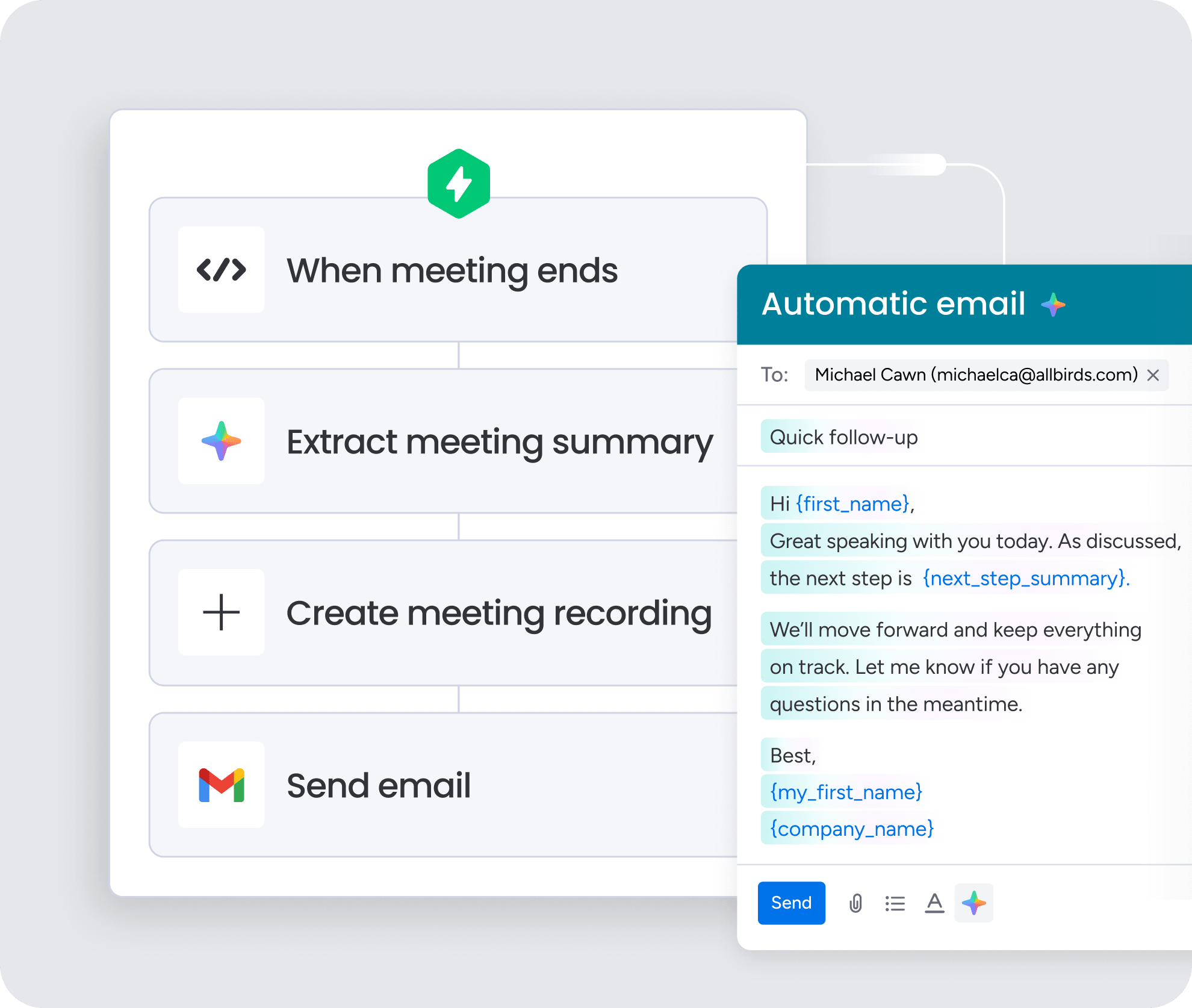
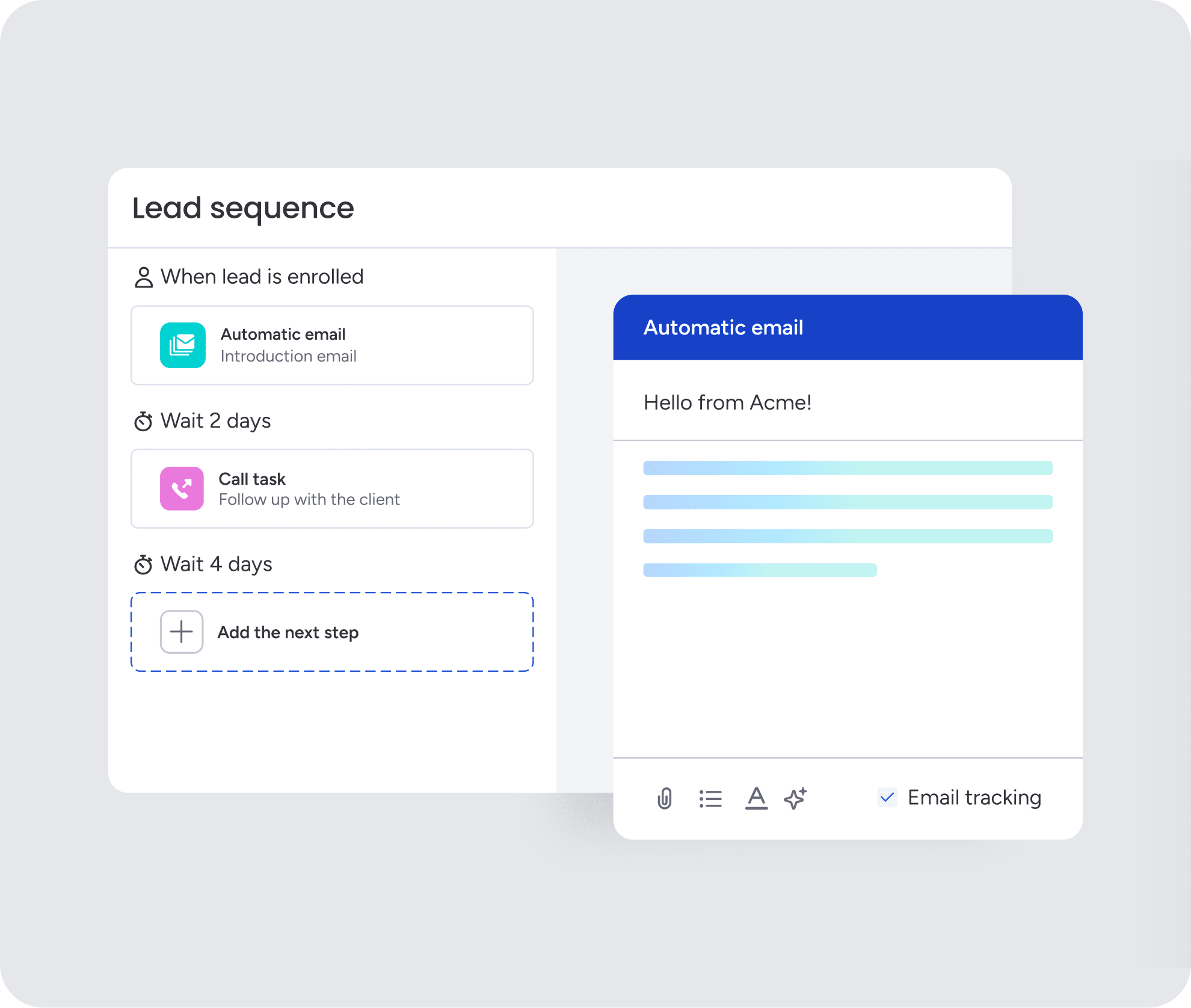
3. Email automation and tracking
Revenue teams need more than basic send-and-receive. Automation and tracking cut manual work and show you how prospects engage.
Email automation capabilities:
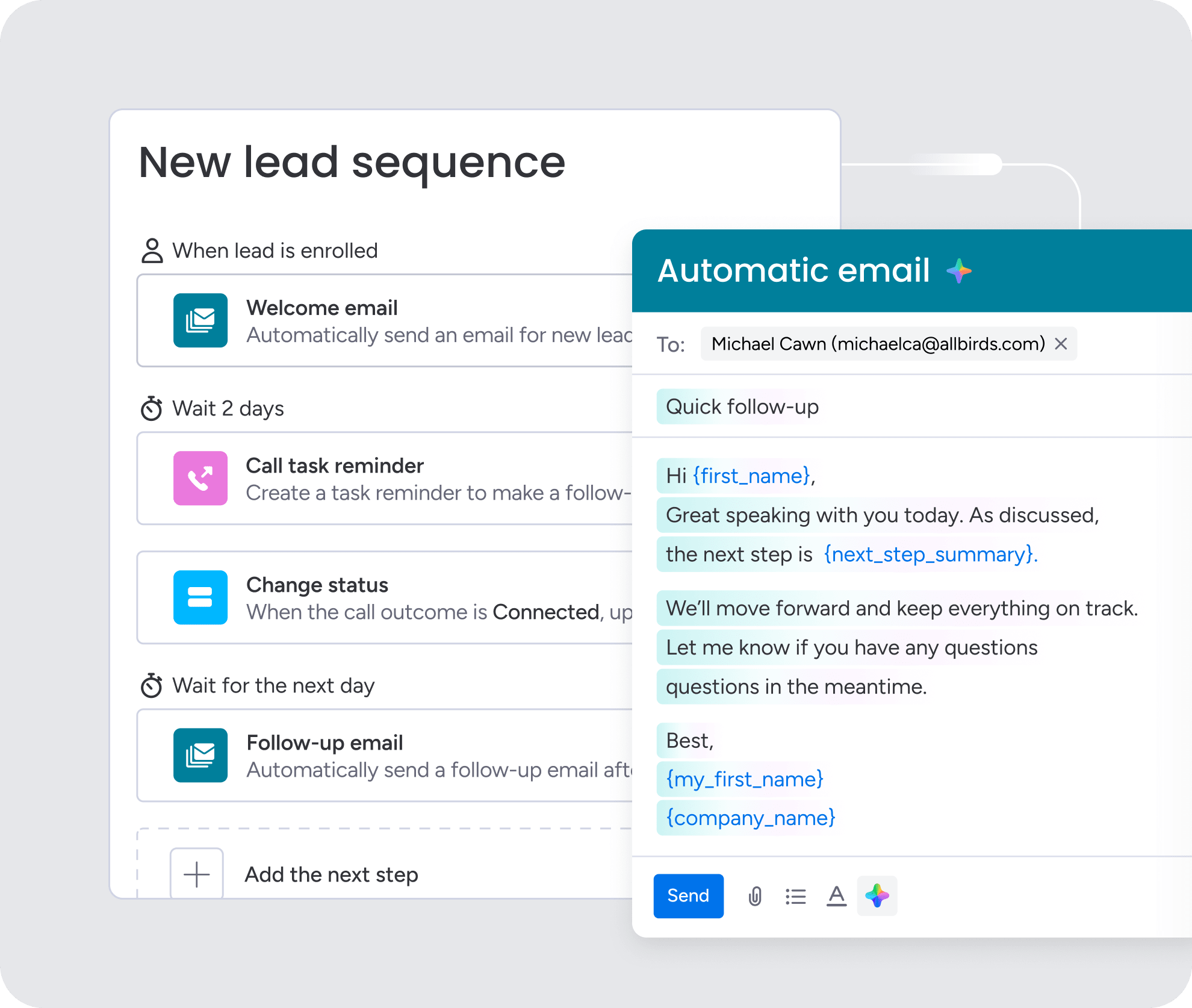
- Sequence creation: Pre-written series sent automatically based on triggers
- Trigger-based sending: Emails fire when specific events occur in your pipeline
- Personalization at scale: Contact-specific information inserted into templates
- Open and click tracking: Know when prospects engage with your messages
- Engagement scoring: Identify hot prospects automatically based on email behavior
Email integration logs all communications automatically — no manual entry.
4. Custom reporting dashboards
Pre-built CRM reports rarely capture the metrics that matter most to your specific business. Custom reporting capabilities let you track what actually drives your revenue.
Dashboard requirements:
- Real-time data visualization: Charts and graphs that update automatically
- Customizable metrics: Calculated fields for business-specific KPIs
- Role-based views: Different dashboards for reps, managers, and executives
- Drill-down capabilities: Click through to understand the story behind each number
Essential reports to configure include pipeline velocity, win rates by source, rep performance metrics, and forecast accuracy.
5. Workflow automation
Workflow automation cuts manual work and keeps your sales process consistent. These automations fix the biggest time-wasters and gaps that slow teams down.
Key automations to configure:
- Lead assignment: Automatically assign to reps based on territory or criteria
- Follow-up creation: Generate tasks and reminders before important meetings
- Stale deal alerts: Notify managers when deals haven’t been updated
- Cross-team handoffs: Create onboarding tasks when deals close
Platforms like monday CRM make creating these automations visual and code-free. You select triggers from menus and configure actions through forms rather than writing scripts.

6. AI-powered features
Built-in AI capabilities change daily work. These features cut manual work and improve decisions and engagement.
Essential AI capabilities:
- Email intelligence: Generates drafts based on deal context and analyzes sentiment
- Predictive lead scoring: Identifies high-probability opportunities by analyzing patterns
- Automated data capture: Extracts contact information and meeting notes automatically
- Smart suggestions: Recommends next actions based on successful deal patterns
monday CRM’s AI detects sentiment, extracts file information, improves text, summarizes content, translates, and assists with writing. It also auto-assigns labels and people based on your criteria.
Try monday CRM AI FeaturesFuture-proof your CRM with AI
AI capabilities in CRM platforms continue evolving rapidly. Building on platforms with native AI ensures you stay current without expensive upgrades or custom development.
Built-in email intelligence
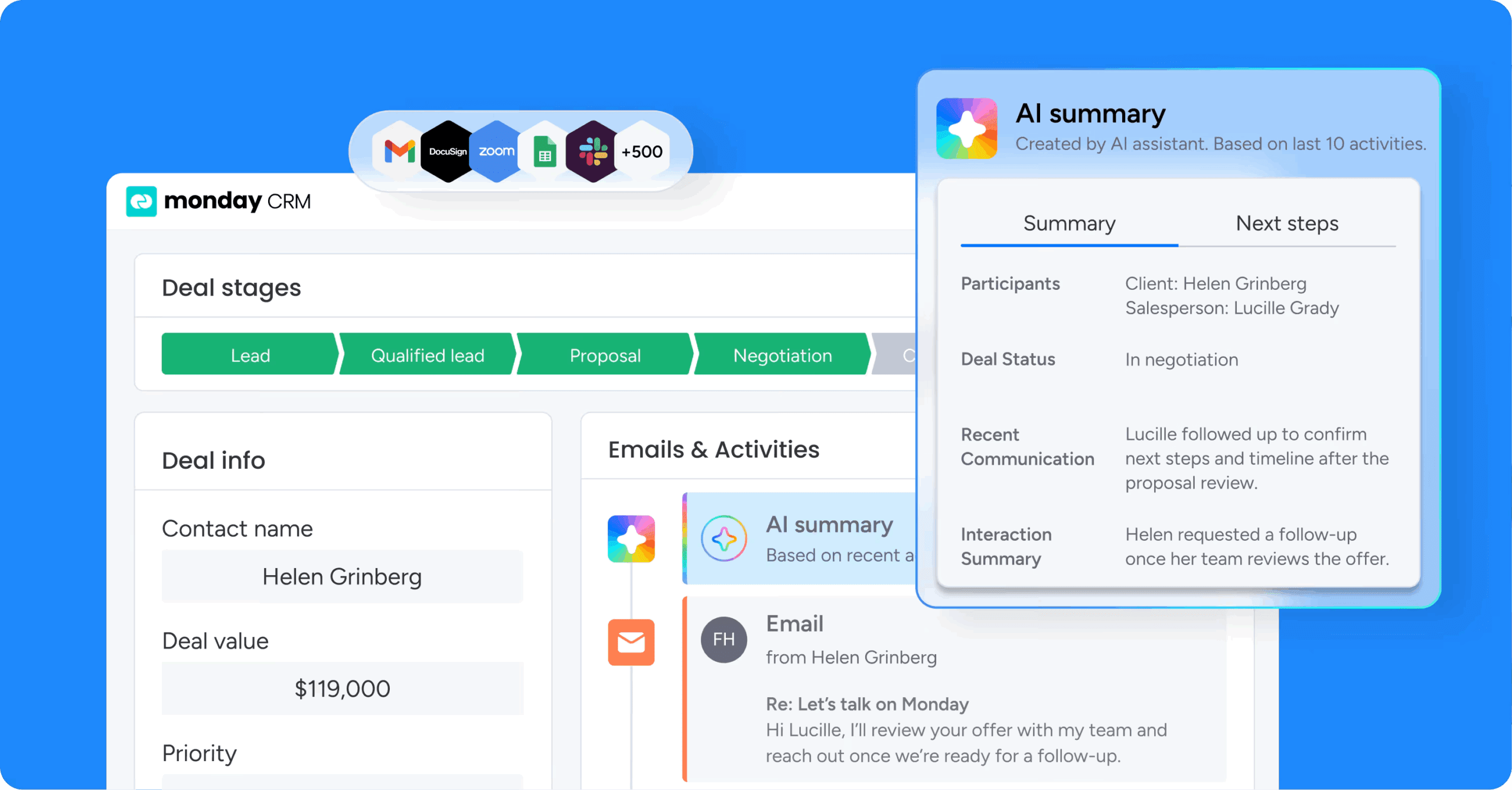
AI-powered email capabilities transform how sales teams communicate with prospects. Email intelligence analyzes your communication history and deal context to suggest relevant, personalized messages. The AI learns your writing style and generates drafts that sound authentic.
Key email intelligence features:
- Style learning: AI adapts to your communication patterns over time
- Context awareness: Suggestions based on deal stage and prospect behavior
- Sentiment analysis: Flags concerning language or positive engagement signals
- Response optimization: Improves open rates and reply rates through testing
Predictive lead scoring
Predictive lead scoring uses AI to analyze patterns in your historical data and identify which new leads are most likely to convert. When new leads enter your pipeline, the AI scores them based on how closely they match your historical winners.
Scoring factors the AI considers:
- Company characteristics: Size, industry, technology stack
- Engagement patterns: Email opens, website visits, content downloads
- Behavioral signals: Response time, meeting attendance, stakeholder involvement
- Timing indicators: Budget cycles, contract renewals, competitive situations
Automated data capture
Manual data entry is the enemy of CRM adoption. Automated data capture solves this by extracting information from emails, calls, and meetings without manual entry.
Data capture capabilities:
- Contact extraction: Pulls names, titles, and phone numbers from email signatures
- Meeting summarization: Extracts key points from call recordings
- Deal updates: Automatically updates when prospects mention budget or timeline
- Document processing: Extracts information from contracts and proposals
Smart workflow suggestions
AI recommendations help reps perform like top performers by codifying what works into intelligent suggestions. The AI analyzes what actions led to wins in similar situations and suggests next steps when deals stall.
Types of AI suggestions:
- Next best actions: What to do based on deal stage and prospect behavior
- Risk alerts: When deals show patterns associated with losses
- Opportunity identification: When prospects show buying signals
- Process optimization: Suggestions for improving workflow efficiency
Build your perfect CRM with monday CRM
Organizations using monday CRM configure revenue systems that match their exact sales process without technical complexity. Built on the monday.com Work OS, it provides enterprise-grade infrastructure with an intuitive interface that sales leaders and operations teams configure without IT support.
What makes monday CRM different from traditional platforms? It combines the flexibility of custom development with the speed and simplicity of no-code configuration. You get the power to build exactly what you need without the technical overhead that slows down traditional implementations.
Key capabilities that set monday CRM apart:
- Visual no-code builder: Configure pipelines, fields, and automations through a drag-and-drop interface.
- Pre-built templates: Start with ready-made workflows for sales, leads, and account management.
- Enterprise-grade security: Includes SOC 2, GDPR, ISO 27001, and role-based permissions.
- Built-in AI features: Support tasks like email drafting, data extraction, and lead prioritization.
- Real-time customization: Adjust workflows and structures without developer support.
- Connected integrations: Sync with email, calendar, and other tools to keep data aligned.
Start building your revenue engine today
Building your own CRM has transformed from a technical project requiring developers into a configuration exercise that sales leaders complete in weeks. The shift to no-code platforms has made custom systems accessible to organizations without dedicated IT resources.
Building on a platform like monday CRM means your system evolves with your business. New AI features become available through platform updates, and new integration options expand your connected ecosystem. The CRM you build today grows with you as your needs change.
Try monday CRM AI Features
“With monday CRM, we’re finally able to adapt the platform to our needs — not the other way around. It gives us the flexibility to work smarter, cut costs, save time, and scale with confidence.”
Samuel Lobao | Contract Administrator & Special Projects, Strategix
“Now we have a lot less data, but it’s quality data. That change allows us to use AI confidently, without second-guessing the outputs.”
Elizabeth Gerbel | CEO
“Without monday CRM, we’d be chasing updates and fixing errors. Now we’re focused on growing the program — not just keeping up with it."
Quentin Williams | Head of Dropship, Freedom Furniture
“There’s probably about a 70% increase in efficiency in regards to the admin tasks that were removed and automated, which is a huge win for us.“
Kyle Dorman | Department Manager - Operations, Ray White
"monday CRM helps us make sure the right people have immediate visibility into the information they need so we're not wasting time."
Luca Pope | Global Client Solutions Manager at Black Mountain
“In a couple of weeks, all of the team members were using monday CRM fully. The automations and the many integrations, make monday CRM the best CRM in the market right now.”
Nuno Godinho | CIO at Velv
“monday.com provides developmental flexibility, operational efficiency, and data transparency — all in one place. We became a company that moved from chasing data to leading with it.”
Hyunghan Lee | Team Lead, Sandbox Network
"monday.com brought every part of our business into one connected space. The harmony between work management and CRM has become our operating system — giving us the clarity and confidence to scale.”
Jennifer Chinburg | Executive Vice President of Corporate Development & Brand, Chinburg Properties
“We just weren’t getting value from our old CRM. With monday.com, it's a thousand times better. Our sales teams are more informed, more consistent, and far more connected."
James Arnold | Chief Operating Officer, CenversaFAQs
How can I build my own CRM system without coding or hiring developers?
To build your own CRM system without coding or hiring developers, you can use a no-code platform like monday CRM. These platforms offer visual builders, drag-and-drop interfaces, and pre-built templates you customize to match your sales process.
What core features should I include in a custom CRM?
A custom CRM should include contact and deal management, visual sales pipelines, email automation and tracking, custom reporting dashboards, workflow automation, and AI-powered features for data capture and lead scoring.
Should I build a fully custom CRM from scratch or configure a no-code platform?
For most mid-market organizations, configuring a no-code platform is recommended because it has the potential to launch in weeks rather than months, costs significantly less, and shifts maintenance responsibility to the platform vendor.
How can AI help automate data entry in a custom CRM?
AI can extract information from files like invoices and contracts, capture contact details from email signatures, summarize meeting notes, detect sentiment in communications, and automatically assign labels and ownership based on defined criteria.
What is the difference between a customizable CRM and a custom-built CRM?
A customizable CRM is a platform you configure through visual interfaces without coding, while a custom-built CRM is software developed from scratch by programmers specifically for your organization.
