



A rep sends the proposal, updates the stage, and the deal appears to be moving. Then the thread goes quiet. Finance asks for the latest version, and leadership pieces together what happened from scattered notes and inboxes. Good proposal management software keeps that part of the sales cycle visible and moving. It helps teams build proposals faster, route approvals without chasing people, track buyer engagement, and keep every update tied to the deal record.
That matters when sales, legal, and finance all need the same picture before the quarter closes. We’ll show you how to evaluate each option based on how your revenue org already works, starting with what proposal management software actually does and how platforms like monday CRM keep proposals connected to your pipeline.
Try monday CRMWhat is proposal management software?
A lot of sales teams treat the proposal as the end of the journey. It’s not. More often, it is the point where momentum fades, visibility drops, and reps stop knowing what happens next. Proposal management software closes that gap by centralizing how teams create, approve, and track proposals. Instead of scattered email chains and misplaced PDFs, you get one transparent workflow.
You can see exactly when a prospect opens your message. The software sends documents through internal approval paths, captures e-signatures, and logs how buyers engage with your pitch in detail. Did they spend time on the pricing page? Did they pass it along to finance? A static attachment can’t tell you that. This software can.
It sits between pipeline management and the final signed agreement. That’s where forecasts get fuzzy and opportunities vanish with no clear explanation.
Revenue teams work more efficiently when proposals connect directly to a CRM and sync automatically with the deal record, without manual updates.
With full visibility, teams spend less time guessing and more time responding to real buyer signals. Below, we’ll look at the top platforms that make that possible.
9 best proposal management software platforms
The right platform depends on how your revenue org already works. Find software that fits your existing sales motion, not one that adds another silo. We reviewed these tools based on four things sales leaders actually care about: integration depth, AI support, speed to first draft, and collaboration across legal and finance.
| Platform | Use case | Key differentiator | Starting price |
|---|---|---|---|
| monday CRM | Revenue teams needing proposals embedded in their CRM workflow | Proposals live inside the deal pipeline with native CRM context and cross-departmental collaboration | $9/user/month |
| PandaDoc | Document-heavy workflows requiring deep template libraries | Extensive document automation with built-in e-signature and audit trails | Free; paid from $19/user/month |
| Proposify | Teams prioritizing proposal-specific analytics | Detailed engagement tracking showing time spent on each proposal section | $19/user/month |
| Qwilr | Buyers who prefer interactive web experiences over PDFs | Web-based proposals with embedded video, pricing tables, and real-time engagement tracking | $35/user/month |
| Responsive | Enterprise RFP response teams coordinating large-scale formal proposals | AI-assisted content recommendations from centralized response libraries for RFP workflows | Custom pricing |
| Loopio | Organizations responding to high volumes of formal RFPs | Searchable content library with AI-suggested answers from previously approved responses | Custom pricing |
| GetAccept | Complex B2B sales requiring buyer engagement features | Video messaging, live chat within proposals, and digital sales room collaboration | $25/user/month |
| Oneflow | Teams needing seamless proposal-to-contract continuity | Contract and proposal creation in one platform with real-time collaborative editing | Free; paid from €250/month |
| Better Proposals | Freelancers and small teams prioritizing speed and simplicity | Fast proposal creation with large template library and integrated payment collection | $13/user/month |
Prices may vary based on plan, billing cycle, or region.
1. monday CRM
Best for: Revenue teams needing proposals embedded in their CRM workflow
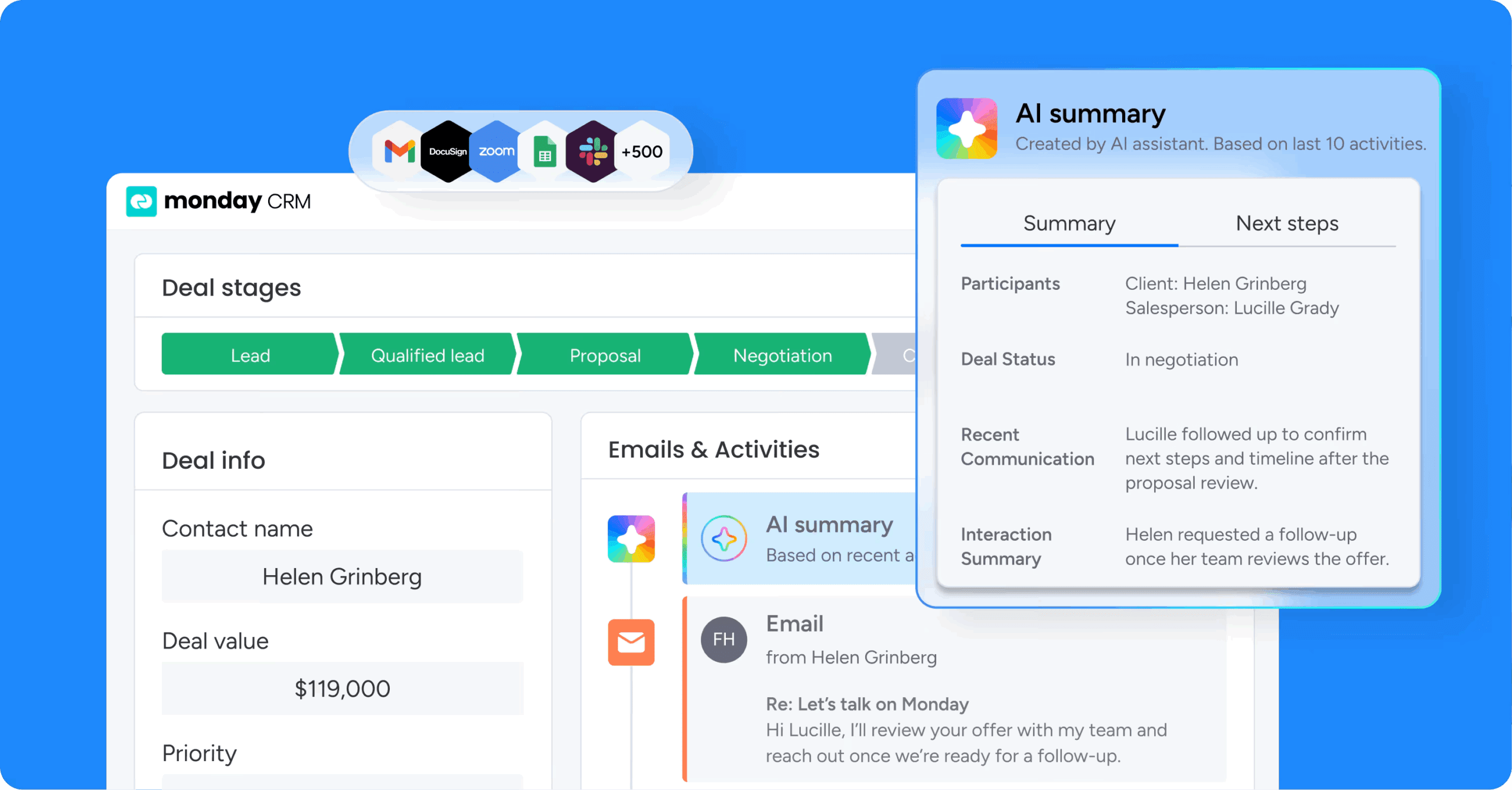
With most proposal platforms, the document process sits outside the CRM. Reps end up copying fields, hunting for the latest version, and piecing together deal context from three separate systems. monday CRM keeps the deal, contact, and communication history in one place, so proposals stay tied to the pipeline activity that moves the sale forward—and when the sales cycle shifts halfway through a deal, which it always does, teams can rework the flow fast, keep everyone aligned, and maintain visibility without chasing people for status updates.
Use case
For revenue teams that want proposal work and deal management in one workflow, monday CRM fits naturally. Every stakeholder works from the same deal record: emails, notes, meetings, and files all in one place. In practice, that means a rep can move a deal to “Proposal,” send the proposal email from the deal’s Emails & Activities timeline, and give a manager instant visibility into that activity, without separate tools or manual reporting.
Key features
- AI Timeline Summary on Emails & Activities: Summarizes emails, calls, meetings, and notes into a short recap so teams can catch up on deal context without reading through every thread.
- AI email assistant in Emails & Activities: Draft and refine proposal follow-ups right where the communication lives, so your outreach matches the deal’s actual history.
- AI actions for document processing: Use actions like Writing assistant, Summarize, and Extract information to turn raw inputs into structured fields your team can actually report on.
- Dashboards for full proposal visibility: Use sales-focused widgets like the Sales pipeline widget, Sales funnel widget, and Leaderboard widget to see where proposals cluster, where they stall, and which reps need support.
- Automations for handoffs and follow-ups: Automate repetitive steps like assigning an owner when a deal hits a proposal stage, notifying stakeholders in updates, and triggering follow-up actions when a deal hasn’t moved.
Pricing
monday CRM is available on multiple plans, with AI features included on Standard, Pro, and Enterprise tiers. Prices start at $9/user/month, and plans are flexible according to how many users you need. Visit monday CRM pricing for current details and to explore a free trial.
Why it stands out
- Unified deal visibility: Your team can pull up an expanded item view to see key account details, connected deals, contacts, and related work, all in one view.
- Fast, flexible customization: Revenue teams can customize pipelines, statuses, columns, and automations fast, so the process matches how your org sells today, not 18 months ago.
- Collaboration that doesn’t derail the deal: Teams can loop in stakeholders like legal and finance inside the same workspace where the deal lives, so questions, approvals, and context don’t get lost in email threads.
2. PandaDoc
Best for: Teams sending high volumes of complex, branded proposals that need e-signature and payment collection in one platform

PandaDoc manages the entire document lifecycle, from proposal creation through e-signature and payment collection, inside one platform. It serves sales, legal, HR, and customer success teams across industries like technology, professional services, and construction. With 68,000+ customers and native CPQ options for Salesforce and Pipedrive, it extends far beyond basic signing and is built for teams that need complete audit trails and compliance-ready workflows.
Use case
PandaDoc fits teams that want to move proposals from initial draft to signed agreement inside a single system.
Key features
- Drag-and-drop editor with reusable content library:Teams build proposals using pre-built templates and a centralized content library, so branding and structure stay consistent across every rep and every deal.
- Integrated e-signature with complete audit trail:Proposals go straight to e-signature, with no reformatting or re-exporting. Every view, edit, and signature is logged in a complete audit trail, which is critical for compliance-sensitive industries.
- Page-level engagement analytics: Track exactly when a prospect opened the proposal, how long they spent on each section, and where they dropped off, so sales teams get a concrete signal for when to follow up.
Pricing
PandaDoc offers a free eSign plan with up to 60 documents per year, plus paid tiers starting at $19/user/month (billed annually). Annual billing saves money compared to monthly rates, and add-ons like CPQ for Salesforce, Bulk Send, and Qualified Electronic Signatures can increase total cost depending on usage.
Considerations
- PandaDoc functions as a standalone document platform, so proposal activity won’t automatically flow back into deal stages unless a CRM integration is set up, adding another coordination layer for teams that want proposals embedded inside their revenue workflow.
- Mobile limitations: template creation and catalog item management must happen on the web, which can slow down reps who work mostly on mobile.
3. Proposify
Best for: Services-focused sales teams that need proposal creation, quoting, e-signatures, and contract management in one platform

Proposify covers the full proposal lifecycle, from creation and quoting through e-signatures and contract management, all from a single platform. It is especially popular with services-led teams in consulting, IT, and construction because it preserves brand control while giving buyers interactive pricing. SMBs and franchises often value its workspace structure and guided onboarding.
Use case
For services-focused sales teams, Proposify simplifies the path from proposal creation to approval and signature by keeping everything in one place. That means less jumping between documents and email threads.
Key features
- Proposal-specific analytics: Track exactly when prospects open proposals, how long they spend on each section, and where they drop off. Follow-up timing is based on real signals, not guesswork.
- Structured content library: Build a reusable library of proposal sections, pricing tables, and case studies. Reps assemble proposals by pulling from approved content instead of writing from scratch every time.
- Approval workflows (rolling out): Route proposals through internal review chains before they reach prospects. Note: Proposify is currently rolling this feature out in stages, so availability varies by account and may still be listed as “coming soon” for some users.
Pricing
Proposify offers four tiers starting at $19/user/month (annually) or $29/user/month (monthly) on the Basic plan. Team, Business, and Enterprise plans are available with higher send limits and additional features.Unused sends roll over, and overage fees apply when limits are exceeded.
Considerations
- Proposify excels at proposal creation, but it is not a CRM. Teams still need a separate system to manage the broader pipeline and the full deal lifecycle.
- Send limits are also worth watching closely. Lower-tier plans cap usage at 10 sends per month on Basic and 30 on Team. In addition, some advanced features, including the Zapier integration, remain in beta as of April 2026.
4. Qwilr
Best for: B2B sales teams that want to replace traditional proposal files with interactive, web-based experiences

Instead of sending a static file, Qwilr publishes proposals as interactive web pages designed to engage buyers. It is a strong match for B2B sales teams with five or more reps, though solo users can still get started on the starter plan. Proposals, e-signatures, and payments all live behind a single link, supported by real-time analytics that capture buyer engagement and identity. The result is a much clearer picture of how prospects interact with your pitch, though the occasional email security bot may trigger a view. For teams tired of sending PDFs and hoping for the best, Qwilr offers a more interactive alternative.
Use case
Qwilr works best for B2B sales teams that want to replace traditional proposal files with interactive, web-based experiences that surface buyer engagement data and help accelerate deals.
Key features
- Interactive web-based proposals:Proposals live as hosted web pages, not PDFs, with embedded video, pricing calculators, and clickable sections that give prospects a more engaging buying experience.
- Real-time engagement analytics: Qwilr tracks proposal opens, section engagement, and sharing activity to help sales reps time their follow-ups. It gives you a strong read on buyer intent, though it’s worth noting that email security bots can occasionally trigger a view.
- AI Prefill (Scale plan): Automatically populates proposal fields using CRM data and past project information, reducing manual data entry and speeding up document creation.
- Smart Proposal Engine (Scale plan): Uses AI to recommend optimal proposal structures and content based on deal characteristics and historical performance data.
- Integrated e-signature and payments: Prospects can sign and pay directly inside the proposal via QwilrPay (powered by Stripe), removing the back-and-forth between acceptance and invoicing.
Pricing
Qwilr offers three paid tiers starting at $35/user/month (annual) or $49/user/month (monthly) on the Starter plan, which includes 1 user. Growth and Scale plans start at $55 and $75 per user per month respectively, with minimum user requirements and annual billing only. A 14-day free trial is available.
Considerations
- Many of Qwilr’s more advanced capabilities, including Salesforce integration, conditional content, and the Smart Proposal Engine, are reserved for the Scale plan, which comes with a 10-user minimum and annual commitment.
- Its web-based approach is excellent for buyer experience, but it may not fit industries or buyers that still expect PDF proposals. It also depends on CRM integration to tie proposal activity back to pipeline data.
5. Responsive
Best for: Enterprise teams managing high volumes of complex, cross-functional RFP responses
Responsive manages the full RFP response process, from intake and go/no-go decisions to drafting, approvals, and final submission, within a governed workspace. It is designed for enterprise and upper-midmarket teams handling formal RFPs at scale, coordinating work across sales, legal, finance, and technical stakeholders. According to Responsive’s own reporting, it serves more than 2,000 customers, including over 20% of the Fortune 500.
Use case
Enterprise proposal and sales teams dealing with complex, cross-functional RFP responses will find Responsive especially well-suited to maintaining answer quality and version control.
Key features
- AI-powered answer library:Responsive’s AI surfaces similar questions and their approved answers from a centralized library, reducing time spent writing from scratch and keeping responses consistent across submissions.
- TRACE Score for AI quality assurance: Every AI-generated answer receives a 0–100 score across five dimensions (trustworthiness, relevance, accuracy, completeness, and explainability), giving teams a concrete way to assess content integrity before it goes out the door.
- Automated workflow routing:Responsive routes questions to the right subject matter experts, tracks response status, and manages approval workflows, so every item stays visible when legal, product, and finance all need to weigh in.
Pricing
Responsive uses quote-based pricing with an annual platform fee, user licenses, and optional add-ons. Unlimited projects are included in every edition, which helps contain costs as response volume grows.
Considerations
- Responsive is specifically built for inbound RFP response. Teams focused primarily on outbound proposals may find it more complex than their workflow requires.
- The quality of AI output depends heavily on the freshness and accuracy of the underlying content library, so ongoing maintenance remains essential.
6. Loopio
Best for: Organizations responding to high volumes of formal RFPs

For teams operating inside procurement-heavy sales cycles, Loopio turns RFP response from a grind into a repeatable, controlled process. According to Loopio’s published customer data, the platform supports 1,700+ global customers and answers 6 million+ questions annually.
Use case
Loopio is designed for organizations answering high volumes of formal RFPs, security questionnaires, and DDQs, where speed matters but governed, accurate content matters more.
Key features
- Governed answer library: Stores approved RFP responses with version history, audit trails, and scheduled review cycles to keep content accurate and on-brand across every submission.
- AI-powered answer suggestions:“Magic” auto-populates answers by searching the library and prior projects, while Response Intelligence generates, edits, and summarizes content with cited sources, reducing time spent writing from scratch.
- SME routing and collaboration: Assigns questions to the right subject matter experts across sales, legal, product, and technical teams, with automated reminders and timeline tracking to keep submissions on schedule.
Pricing
Loopio offers Foundations, Enhanced, and Enterprise tiers, all quote-based with no public list prices. Add-ons include Project Translations, Onboarding Packages, and Industry Integrations, with support levels and advanced features varying by tier.
Considerations
- Loopio is tuned for inbound RFP response rather than outbound proposal creation, so teams looking for a lighter, faster proposal process may find it adds unnecessary complexity.
- Because pricing is fully quote-based and several advanced features are tier-dependent, assessing fit typically requires a sales conversation.
7. GetAccept
Best for: B2B sales teams that want to engage buyers directly inside proposals and move from draft to signed contract without switching platforms

GetAccept reframes proposals as interactive buyer experiences rather than static documents. Built for B2B revenue teams working through complex deals, it combines proposals, e-signatures, live chat, video messaging, and mutual action plans inside a digital sales room. For sales cycles with multiple stakeholders and long email back-and-forth, that can remove a lot of friction.
Use case
GetAccept is a fit for B2B sales teams that want to engage buyers directly inside proposals, watch stakeholder behavior in real time, and move from draft to signed contract without switching platforms.
Key features
- Digital sales rooms:All proposal documents, meeting notes, communications, and mutual action plans live in one shared space, accessible to both sellers and buyers throughout the deal.
- Buyer engagement tools: Reps can record personalized video introductions, enable live in-document chat, and receive real-time alerts when a prospect opens, shares, or spends time on specific sections of a proposal.
- CRM-connected workflows: Connect to platforms like Salesforce, HubSpot, Pipedrive, and Microsoft Dynamics 365 to auto-log proposal activity and skip the manual data entry. You can also trigger event-based CRM updates in HubSpot, Pipedrive, and Dynamics 365.
Pricing
GetAccept offers three tiers: eSign at $25/user/month, Professional at $49/user/month (annual billing only, 5-user minimum), and Enterprise with custom pricing. A free trial is available with no credit card required.
Considerations
- CPQ, premium CRM integrations, eID verification, and SMS reminders come as add-ons rather than standard inclusions, which can raise the total cost depending on your setup and proposal requirements.
- The Professional tier requires at least 5 users and annual billing, so it may not suit smaller teams or those looking for monthly flexibility beyond the eSign plan.
8. Oneflow
Best for: Teams needing seamless proposal-to-contract continuity
Oneflow removes the friction between proposal acceptance and contract execution by keeping both stages inside one continuous workflow. It is aimed at sales, HR, finance, and procurement teams that need live, negotiable documents instead of static PDFs. According to Oneflow’s public reporting, more than 7 million contracts have been signed across 45+ countries, showing broad adoption of its model. Once contracts are signed, many teams still lack visibility into renewal dates, obligations, and compliance risk across their full portfolio — a gap that AI contract management software is designed to close.
Use case
Oneflow is well-suited to teams that lose momentum in the handoff between proposal acceptance and contract completion, because it combines creation, negotiation, and e-signature inside a single live document.
Key features
- Proposal-to-contract conversion:Once a prospect accepts a proposal, it converts directly into a contract inside the same platform, eliminating file exports, version confusion, and manual reformatting.
- Live document collaboration: Both the sender and the recipient can edit the same document in real time, with inline comments, suggestion mode, and tracked changes keeping every revision visible to both parties.
- CRM-triggered workflows: Native integrations with major CRMs let teams auto-generate and send proposals based on deal stage changes, keeping pricing accurate and reducing manual data entry.
Pricing
Oneflow offers a free plan for basic PDF contracts with dashboards and audit trails. Business plans start at €250/month (billed annually) and include 5 users, while Enterprise plans use custom pricing and include 10 users with SSO, SCIM, and advanced admin controls.
Considerations
- Oneflow does not replace a CRM, so teams still need a separate system for pipeline visibility and deal tracking, which adds integration overhead for organizations trying to keep everything centralized.
- Internal approval flows and the approver role are limited to Business and Enterprise plans, which may constrain smaller teams using entry-level options.
9. Better Proposals
Best for: Freelancers and small teams prioritizing speed and simplicity

Better Proposals is designed for speed. It takes teams from template to sent proposal in minutes. Geared toward freelancers, small businesses, and growing sales teams, it combines interactive web-based proposals with built-in e-signatures and payment collection. Clients can review, sign, and pay without leaving the proposal itself.
Use case
Small teams and freelancers that need polished proposals quickly, along with payment collection at signing, will find Better Proposals a strong match.
Key features
- Template library with 250+ options: Reps select from industry-specific templates across verticals like consulting, real estate, legal, and software, then customize and send in minutes.
- Real-time proposal tracking: The platform notifies senders the moment a prospect opens a proposal and tracks time spent on each section, so follow-ups are timed with precision.
- Integrated payments at signing: Clients can pay via Stripe, GoCardless, or PayPal directly from the proposal, removing friction between acceptance and payment collection.
Pricing
Better Proposals offers three tiers starting at $13/user/month (billed annually) or $19/user/month (billed monthly) on the Starter plan. Premium and Enterprise plans are available with higher send limits and additional features, and annual billing saves up to 35%.
Considerations
- The Starter plan is limited to 1 user and 10 sends per month, which can restrict growing teams. Advanced CRM integrations with Salesforce and HubSpot are also reserved for higher-tier plans.
- Larger revenue organizations dealing with complex approvals or very high send volumes may find the platform less robust than enterprise-focused alternatives.
7 key features to look for in proposal management software
Not every proposal platform is built with revenue teams in mind. Some provide attractive templates and polished exports, then leave the harder operational work to your team. The features that genuinely help deals progress are the ones that tie proposal activity directly to the pipeline, cut down the legal back-and-forth, and give reps the timing and context they need to act well.
1. Native CRM integration for automatic pipeline sync
A proposal can be sent while the CRM still shows the deal as “Qualified.” That disconnect undermines forecasting immediately. Native CRM integration solves it by updating the deal record automatically, with no manual entry required from the rep. The distinction between a native integration and a bolt-on connector matters more than it seems. Middleware can break when APIs change, often syncs in only one direction, and creates maintenance work no one planned for.
2. AI-powered drafting that uses real deal context
There is a huge difference between AI that polishes wording and AI that drafts proposals using live deal context. Effective AI pulls in details like industry, company size, and pain points to create something relevant from the start, reducing drafting time from hours to minutes. That is what separates a generic template from a proposal that feels genuinely tailored to the opportunity.
3. Centralized content library for brand consistency
If every rep builds proposals from scratch, variation creeps in fast. Brand voice drifts. Pricing mistakes appear. A centralized content library addresses that by giving the team one searchable source for pre-approved sections and contract language. Its value increases even more when the library connects to live deal data, surfacing the right case study and legal language automatically instead of forcing reps to dig around and hope they found the latest version.
4. Automated approval workflows to prevent bottlenecks
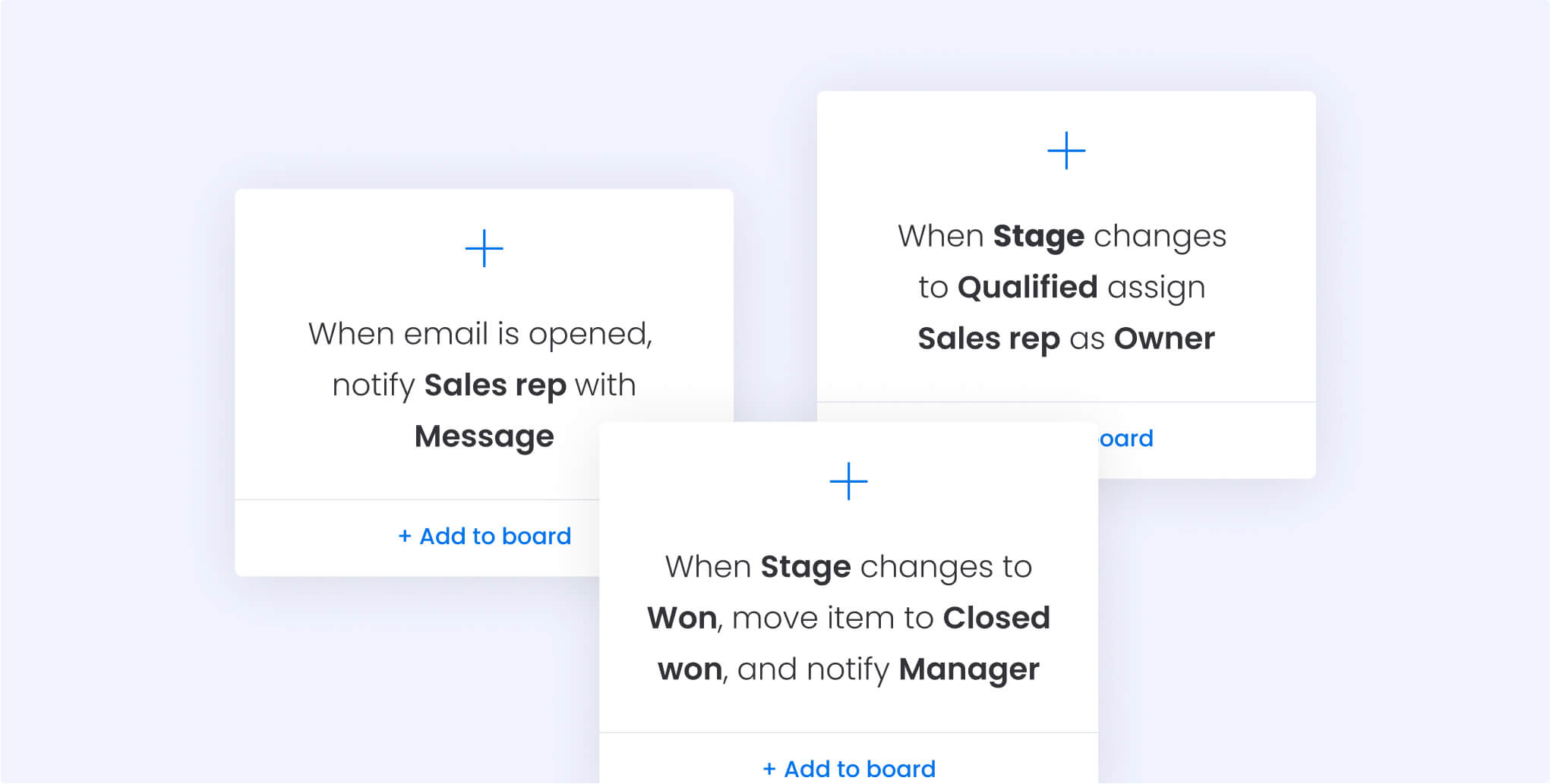
Enterprise deals hold momentum best when approval routing keeps stakeholders moving efficiently. Automated workflows send proposals to the right reviewer based on criteria like deal size while giving everyone real-time status visibility. Splitting approval from signature introduces needless friction, reps end up exporting, reformatting, and re-uploading documents right when speed matters most. Platforms like monday CRM let you trigger approval routing based on custom conditions, configure workflows without IT involvement, and adjust them in seconds as your sales process evolves.
5. Real-time engagement analytics for timed follow-ups
A prospect spending eight minutes on your pricing section is a very different signal from a proposal sitting untouched for three days. Engagement tracking gives follow-up real direction instead of leaving it to instinct, you know when to reach out and what likely caught their attention. The best platforms track email opens and link clicks natively inside the deal record so the whole revenue team can see it, not just the sender.
6. No-code customization to adapt your sales process
The sales process that works for a small team rarely holds up unchanged at 50 people. Platforms that require IT tickets every time you need a workflow update slow the business down in exactly the wrong place. Look for tools that let teams adjust automations, pipeline stages, and approval workflows through a visual interface with no code required—a RevOps manager should be able to create a new stage, set the automation rules, and route proposals for approval in a single afternoon.
7. Cross-functional collaboration for faster legal review
Most enterprise proposals pass through at least three teams before they ever reach a prospect. With a shared workspace, those reviews happen in one place, keeping version control tidy and easy to follow. Legal can review contract language, finance can approve pricing, and delivery teams can validate technical details where the proposal work is already happening. Every comment stays tracked, every approval is timestamped, and there is no confusion about which version is current.
Try monday CRMHow AI agents are reshaping proposal software
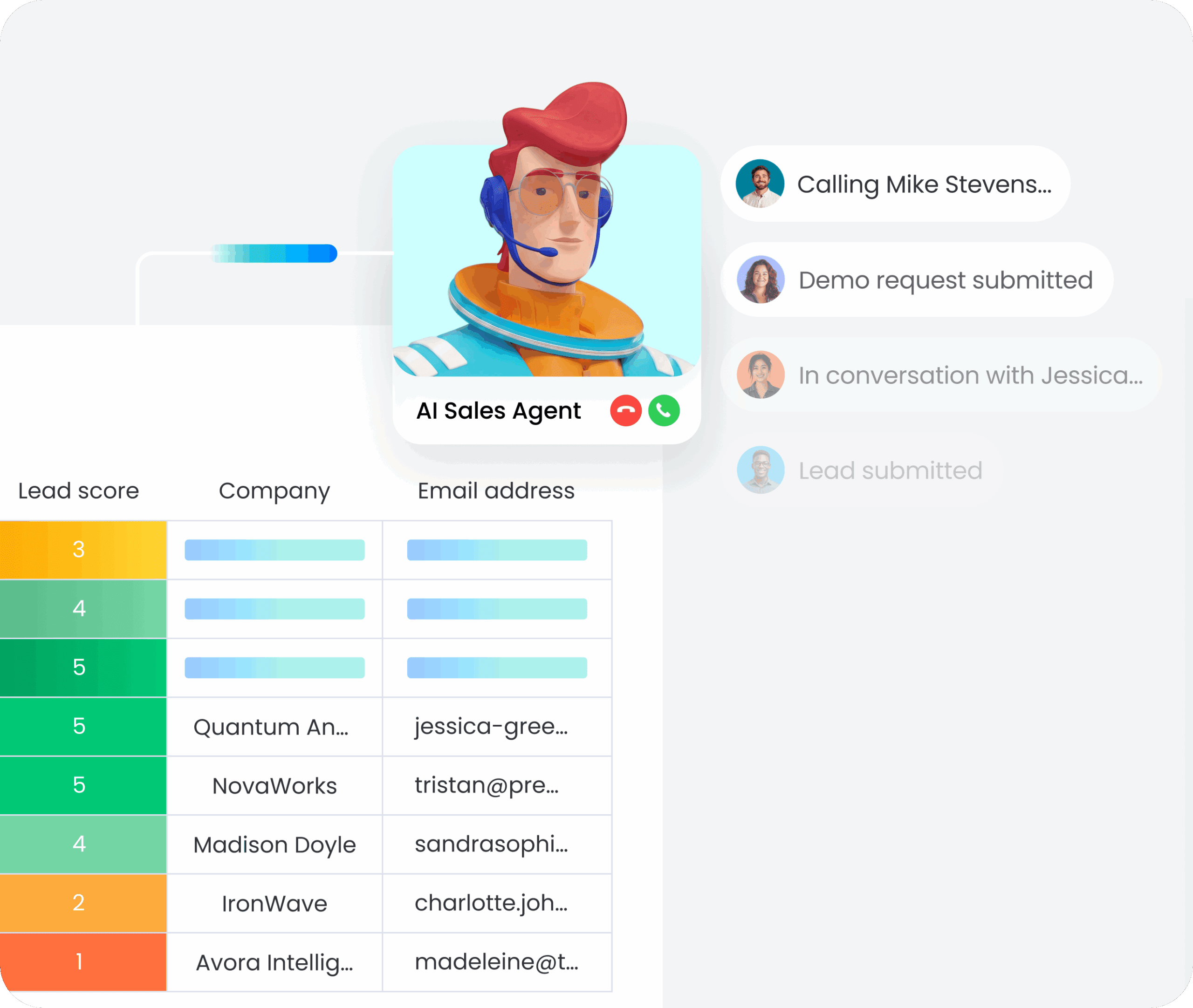
AI in proposal software has moved well beyond spell-check. It now drafts, routes, and follows up, often without waiting for a rep to remember the next task. For sales leaders comparing platforms, the difference between AI marketing claims and actual execution is becoming one of the most important evaluation points.
The shift from content libraries to autonomous drafting
This evolution has unfolded in three stages. At first, AI simply surfaced content from a library while reps assembled proposals manually. Then it started generating sections from prompts, which is still where many standalone proposal platforms remain.
A third stage is now emerging. AI agents can draft full proposals from deal context, route them for approval, and update the pipeline.
That shift is not minor. It is the difference between a writing aid and something closer to a teammate, one that handles the mechanical work so reps can focus on strategy.
The curate, automate, and analyze AI framework
To judge AI maturity, look at three capability layers. Miss even one, and the revenue team ends up filling the gap manually.
- Curate: Surfaces the right case study or pricing table before a rep even searches for it.
- Automate: Handles routing and follow-up sequences based on pre-configured rules.
- Analyze: Interprets engagement data, showing you which sections a prospect spent time on and recommending the optimal follow-up based on similar closed deals.
A platform that curates content but stops short of automated follow-ups still depends on human memory. Momentum fades fast when a rep forgets to check back three days later.
Human oversight to protect AI-generated content
Speed alone is not enough. If an AI-generated proposal reaches a prospect with outdated pricing or unapproved legal language, the result is not efficiency. It is risk. The best systems keep humans responsible for final approval while letting AI handle the repetitive drafting work.
Organizations achieve stronger outcomes when they leverage monday CRM to balance this automation with control. Users validate agent actions before they execute, ensuring every proposal moves forward with an accurate audit trail. You define exactly what AI can and cannot do without human sign-off.
The objective is not to remove people from the process. It is to remove the manual drag so your team can focus attention on the decisions that actually determine whether a deal is won or lost.
How to choose the best proposal software for your team
Choosing proposal software is really a workflow decision, not a feature-shopping exercise. Pick the wrong platform and you add integration headaches to the stack. Pick the right one and a surprising amount of friction simply disappears. Before you sit through a demo, it helps to have a method for separating polished sales narratives from tools that actually work in production.
- Map your current proposal workflow end to end. Document the full path from deal qualification to final signature. Identify who touches the proposal, where the process slows down, and what the specific sources of delay are. Those answers become your real requirements.
- Define must-have integrations with your tech stack. If your CRM is the system of record, the proposal platform needs bidirectional sync. List the essential tools proposal data must connect with, then use that list as a hard filter.
- Assess AI capabilities and governance controls. Look beyond marketing claims to what the AI can actually execute. The baseline worth measuring against includes strict permissions, human-in-the-loop review, and full audit trails.
- Evaluate time to first proposal and implementation speed. Ask for a trial that involves a real proposal on a live deal, not a low-stakes sandbox exercise. Complex deployments that demand developer support add time up front and maintenance costs later.
- Compare total cost of standalone platforms vs. integrated ones. Standalone proposal platforms bring hidden costs: middleware, developer time, and the ongoing effort required to keep everything connected. The true cost includes the license, the integration burden, and the time your reps lose moving between systems.
- Run a pilot with real deals and cross-functional stakeholders. Test the tool under real conditions with proposals that need legal review, finance approval, and complicated pricing. Make sure the people who will use the system daily are part of the evaluation.
How monday CRM keeps proposals connected to your pipeline
Most proposal tools sit outside the CRM, which means reps copy data between systems, lose track of versions, and struggle to see what actually happened after they hit send. monday CRM eliminates that friction by embedding proposal work directly into the deal record where pipeline activity, contact history, and communication threads already live.
Revenue teams get full visibility without switching platforms. When a rep moves a deal to the proposal stage, they can draft the document, send it from the same timeline where emails and calls are logged, and watch engagement unfold in real time. Every update syncs automatically, so forecasts stay accurate and leadership always knows where deals stand.
AI agents that draft, route, and follow up automatically
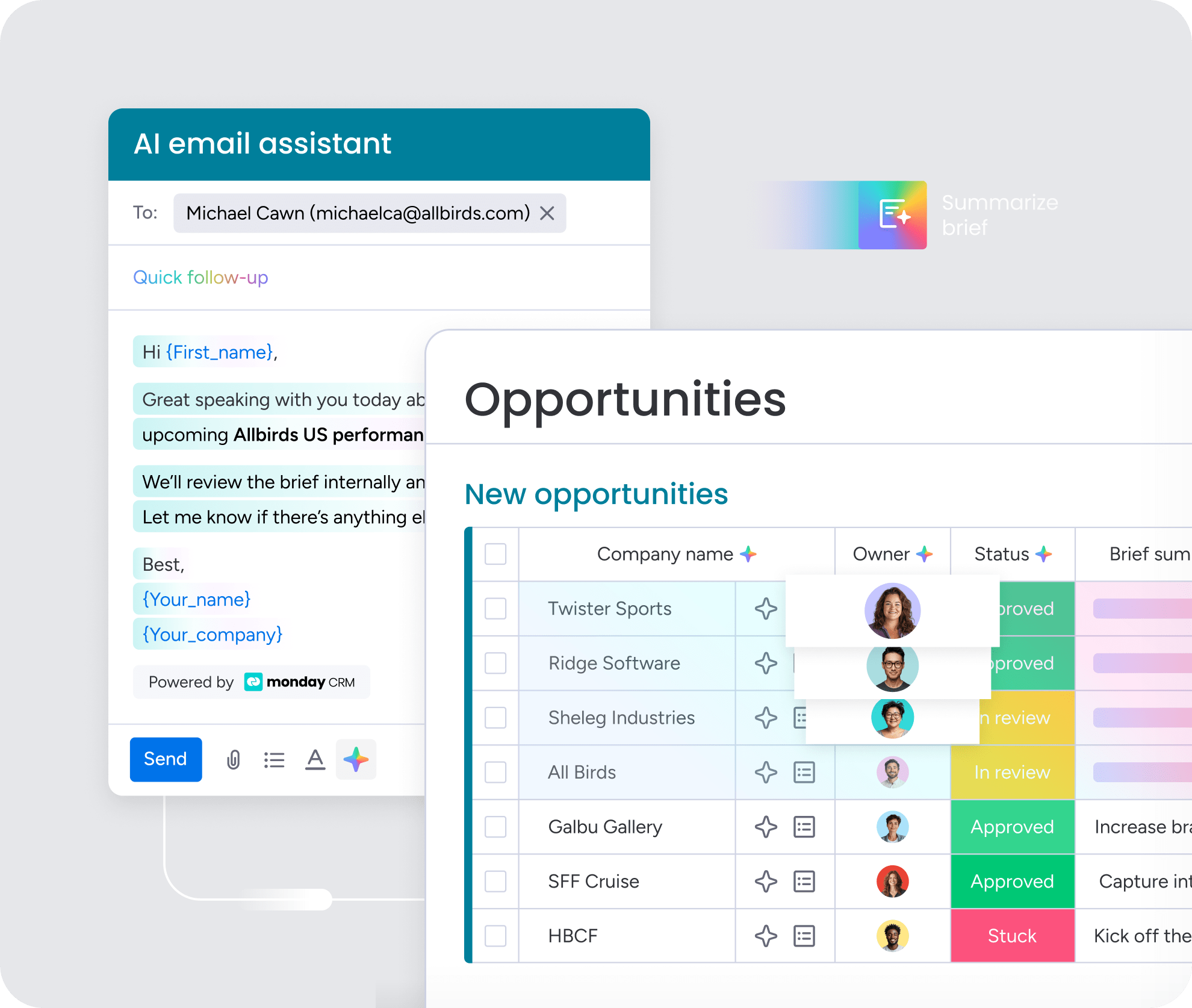
The Deal Facilitator agent monitors proposal activity, flags deals that have gone quiet, and recommends the next best action based on patterns from similar closed deals. The AI email assistant helps reps draft and refine outreach without leaving the deal record, while AI Timeline Summary compresses calls, emails, and meeting notes into a short recap so anyone can catch up fast, and AI actions like Writing assistant and Extract information skip manual data entry entirely.
No-code proposal apps built with monday vibe
RevOps managers can build custom proposal dashboards, client-facing portals, and deal room experiences using natural language prompts instead of writing code.With monday vibe, teams create functional tools in minutes that show every active pitch, its current stage, and the next recommended action, while client-facing portals give prospects a branded space to review and approve terms with every interaction logging automatically back to the main deal record.
monday sidekick for context-aware proposal assistance
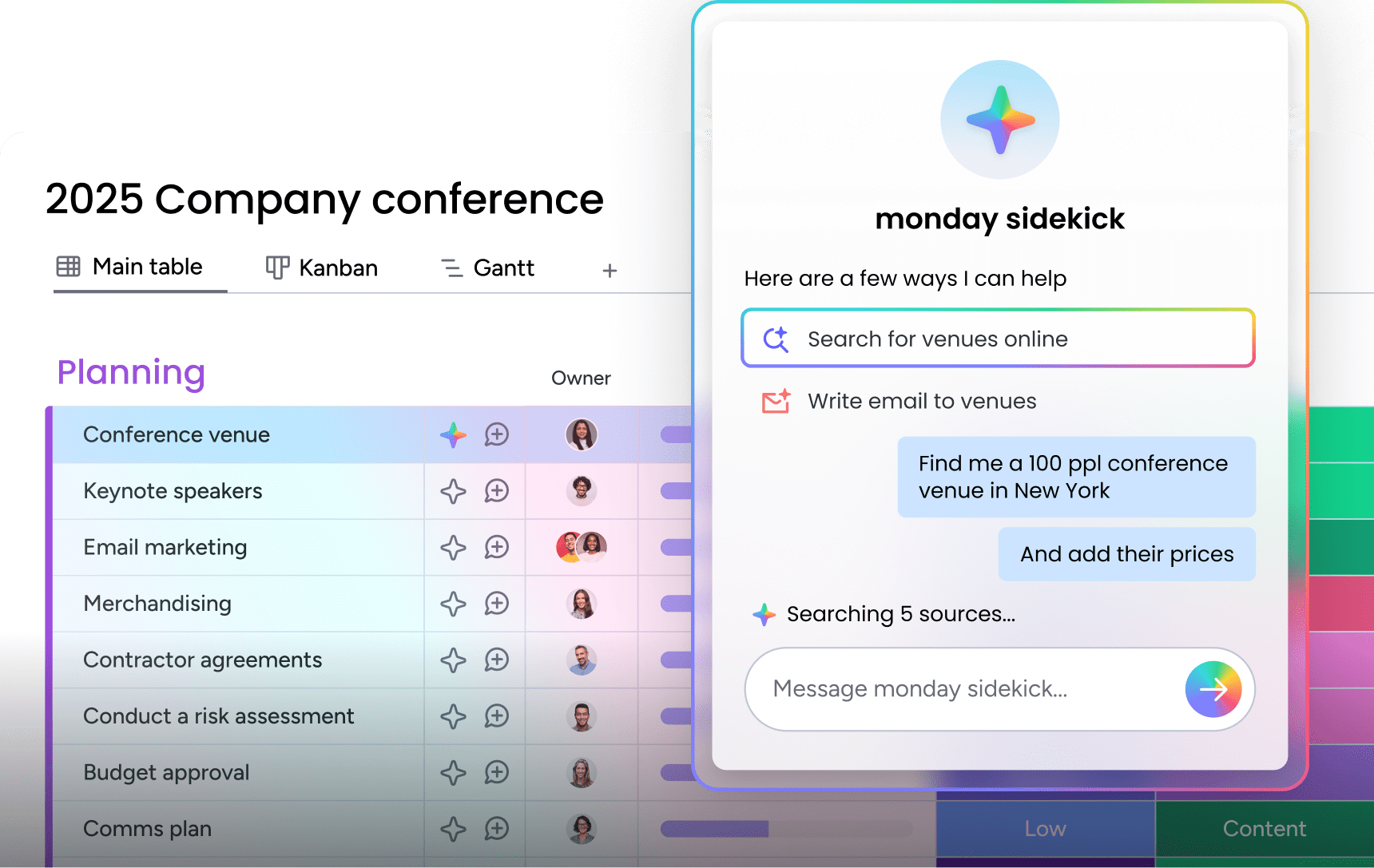
monday sidekick is built directly into the platform and already understands your deal history. Before a rep starts writing, it can summarize the timeline and generate a relevant openingbased on what has already been discussed, then once the proposal is sent, it keeps working by flagging prospect activity like extra time spent on pricing and suggesting targeted follow-ups or recommending calls when the document gets shared with additional stakeholders.
MCP integrations with ChatGPT, Claude, and Copilot
MCP (Model Context Protocol) integration lets reps work in their preferred AI tool without sacrificing pipeline accuracy. From ChatGPT, Claude, or Copilot, they can create proposals, update deal stages, and log next steps through natural language prompts, and every action syncs back to monday CRM automatically so the data stays accurate, the rep stays focused, and the proposal gets out faster.

“With monday CRM, we’re finally able to adapt the platform to our needs — not the other way around. It gives us the flexibility to work smarter, cut costs, save time, and scale with confidence.”
Samuel Lobao | Contract Administrator & Special Projects, Strategix
“Now we have a lot less data, but it’s quality data. That change allows us to use AI confidently, without second-guessing the outputs.”
Elizabeth Gerbel | CEO
“Without monday CRM, we’d be chasing updates and fixing errors. Now we’re focused on growing the program — not just keeping up with it."
Quentin Williams | Head of Dropship, Freedom Furniture
“There’s probably about a 70% increase in efficiency in regards to the admin tasks that were removed and automated, which is a huge win for us.“
Kyle Dorman | Department Manager - Operations, Ray White
"monday CRM helps us make sure the right people have immediate visibility into the information they need so we're not wasting time."
Luca Pope | Global Client Solutions Manager at Black Mountain
“In a couple of weeks, all of the team members were using monday CRM fully. The automations and the many integrations, make monday CRM the best CRM in the market right now.”
Nuno Godinho | CIO at Velv
“monday.com provides developmental flexibility, operational efficiency, and data transparency — all in one place. We became a company that moved from chasing data to leading with it.”
Hyunghan Lee | Team Lead, Sandbox Network
"monday.com brought every part of our business into one connected space. The harmony between work management and CRM has become our operating system — giving us the clarity and confidence to scale.”
Jennifer Chinburg | Executive Vice President of Corporate Development & Brand, Chinburg Properties
“We just weren’t getting value from our old CRM. With monday.com, it's a thousand times better. Our sales teams are more informed, more consistent, and far more connected."
James Arnold | Chief Operating Officer, CenversaTurn proposal management into a competitive advantage
Proposal management should feel like a connected extension of the sales process, with full visibility from first draft to signed contract. The best platform conforms to your sales process instead of forcing your team to work around it. When content is centralized, approvals are automated, and AI helps draft context-rich proposals, reps get meaningful time back.
Take a hard look at where your current process could improve. Identify the friction points, examine how well your platforms connect, and prioritize a system that keeps revenue work moving. monday CRM embeds proposals directly into your pipeline, so every update syncs automatically and your team stays focused on closing deals instead of chasing documents.
Try monday CRMFAQs
What is the purpose of proposal management software?
The purpose of proposal management software is to centralize how sales teams create, send, and track business proposals. It replaces scattered documents with a unified workflow, allowing teams to monitor buyer engagement and close deals faster.
What are the benefits of using proposal software?
The benefits of using proposal software include faster document creation, consistent brand messaging, and real-time tracking of buyer behavior. It also reduces manual admin work by automating approval routing and capturing e-signatures in one place.
How does CRM integrate with proposal management?
CRM integrates with proposal management by connecting deal data directly to your pitch documents. This bidirectional sync ensures that when a proposal is sent or signed, the pipeline stage updates automatically without requiring manual data entry.
What is the difference between CPQ and proposal management?
The difference between CPQ (Configure, Price, Quote) and proposal management lies in their focus. CPQ handles complex pricing rules and product configurations, while proposal management focuses on the creation, design, and tracking of the actual document sent to the buyer.
How does AI help with writing proposals?
AI helps with writing proposals by autonomously drafting sections based on CRM deal context, summarizing meeting notes, and extracting key information from past communications. This allows reps to generate highly relevant first drafts in minutes rather than hours.
Who uses proposal management software?
Proposal management software is used primarily by B2B sales teams, revenue operations (RevOps), and business owners. It is also heavily utilized by legal and finance teams who need to review and approve contracts before they reach the prospect.
