



What if your sales forecast could predict which deals will actually close — not just which ones your reps hope will close? AI demand forecasting analyzes engagement patterns, deal velocity, and stakeholder activity to deliver pipeline predictions your team can act on with confidence.
This guide shows you exactly how AI demand forecasting works, why it outperforms traditional methods, and how to implement it in your CRM. You’ll learn what data you need, the steps to follow, and how to build AI forecasting into your existing sales process with a platform like monday CRM.
Key takeaways
- AI demand forecasting analyzes individual deals by tracking engagement patterns, velocity, and stakeholder activity to deliver pipeline predictions based on reality rather than optimism.
- Continuous monitoring of warning signs gives sales teams weeks of lead time to intervene on at-risk deals instead of discovering problems at quarter-end.
- Forecast accuracy depends entirely on data quality, requiring complete deal records, consistent activity logging, and accurate close dates to generate reliable predictions.
- Pilot AI forecasting with a single team first, measure accuracy improvements over 2–3 quarters, then scale across the organization once you have proven results and internal champions.
- Built-in AI capabilities in platforms like monday CRM surface pipeline risks, generate deal summaries, and flag opportunities automatically without requiring complex configuration or IT involvement.
What is AI demand forecasting for sales teams?
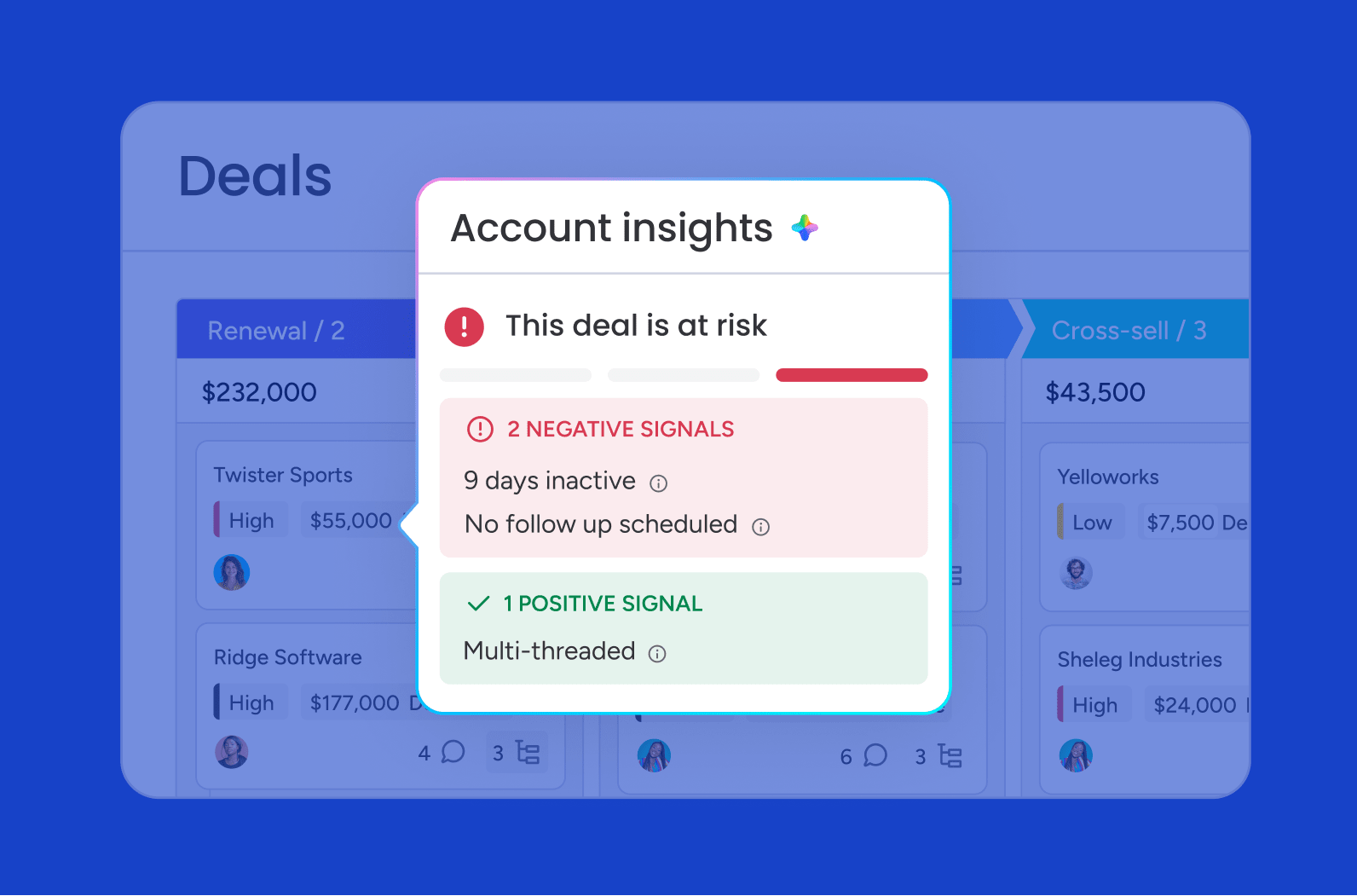
AI demand forecasting for sales uses predictive AI to forecast which deals will close, when they’ll close, and for how much. Rather than predicting product demand or inventory levels, it helps revenue teams forecast pipeline performance and future revenue.
Think of it like a GPS for your sales pipeline. Just as GPS shows you where you are and predicts when you’ll arrive, AI demand forecasting shows you the current state of your pipeline and predicts which deals will close and suggests course corrections when deals veer off track.
The key difference from traditional forecasting? AI models learn and adapt continuously. Instead of applying fixed rules like “deals in negotiation = 75% likely to close,” AI examines deal-specific factors:
- Engagement levels: How often stakeholders interact with your team
- Sales cycle velocity: Whether deals are moving faster or slower than similar ones
- Stakeholder involvement: Who’s engaged and who’s missing from conversations
- Historical patterns: What successful deals with similar characteristics looked like
For sales leaders, that means seeing pipeline health clearly, catching at-risk deals early, and making quota and resource calls with real confidence.
Sales vs. inventory demand forecasting: Unlike inventory demand forecasting, which predicts product demand, AI demand forecasting for sales predicts pipeline health, deal outcomes, and future revenue using CRM and customer engagement data.
AI demand forecasting vs. traditional methods
Traditional sales demand forecasting relies on manual processes, spreadsheets, and stage-based probabilities. AI-powered forecasting continuously evaluates live pipeline data instead.
| Aspect | Spreadsheet forecasting | Rule-based CRM forecasting | AI-powered forecasting |
|---|---|---|---|
| Data source | Manual exports, weekly updates | CRM stages, static probabilities | Real-time multi-source data |
| Time investment | Hours per week | Moderate ongoing effort | Minutes per week |
| Scalability | Breaks at 50+ deals | Limited by rule complexity | Handles large, complex pipelines |
| Insights | Historical reporting only | Basic alerts | Predictive recommendations |
| Adaptability | Manual adjustments | Quarterly rule updates | Continuous learning |
How AI demand forecasting works

Sales demand forecasting with AI follows a simple loop: collect pipeline data, identify patterns, and refine revenue predictions over time. The system pulls data from multiple sources, finds patterns in wins and losses, then predicts what’s coming next. Here’s the breakdown.
How AI collects and connects your sales data
AI systems pull data from your CRM continuously — deal stages, activity logs, email interactions, meeting notes, and customer engagement metrics. The AI also incorporates external signals like market conditions, seasonal patterns, and industry trends.
The magic happens when AI connects these data points. When a deal moves to negotiation and the CFO joins a meeting, AI recognizes this pattern from thousands of similar deals and adjusts the close probability based on what happened in those historical scenarios.
How machine learning spots patterns your team can’t see
Machine learning surfaces patterns hidden beneath the surface of your pipeline data. Machine learning might discover that deals with executive engagement in the first 30 days close significantly faster, or that certain email response patterns signal declining interest weeks before a deal officially stalls.
These models get smarter over time. Every closed deal, lost opportunity, and customer interaction teaches the system something new. Models often improve over time as they process more historical data and user feedback.
How AI recommends next steps
This is one of the clearest AI in sales examples. AI does more than predict outcomes; it explains why it made each prediction and suggests specific actions to improve results. If a deal shows signs of stalling, AI might recommend scheduling an executive briefing or adjusting the proposal scope, based on what worked in similar deals.
Essential data for AI demand forecasting
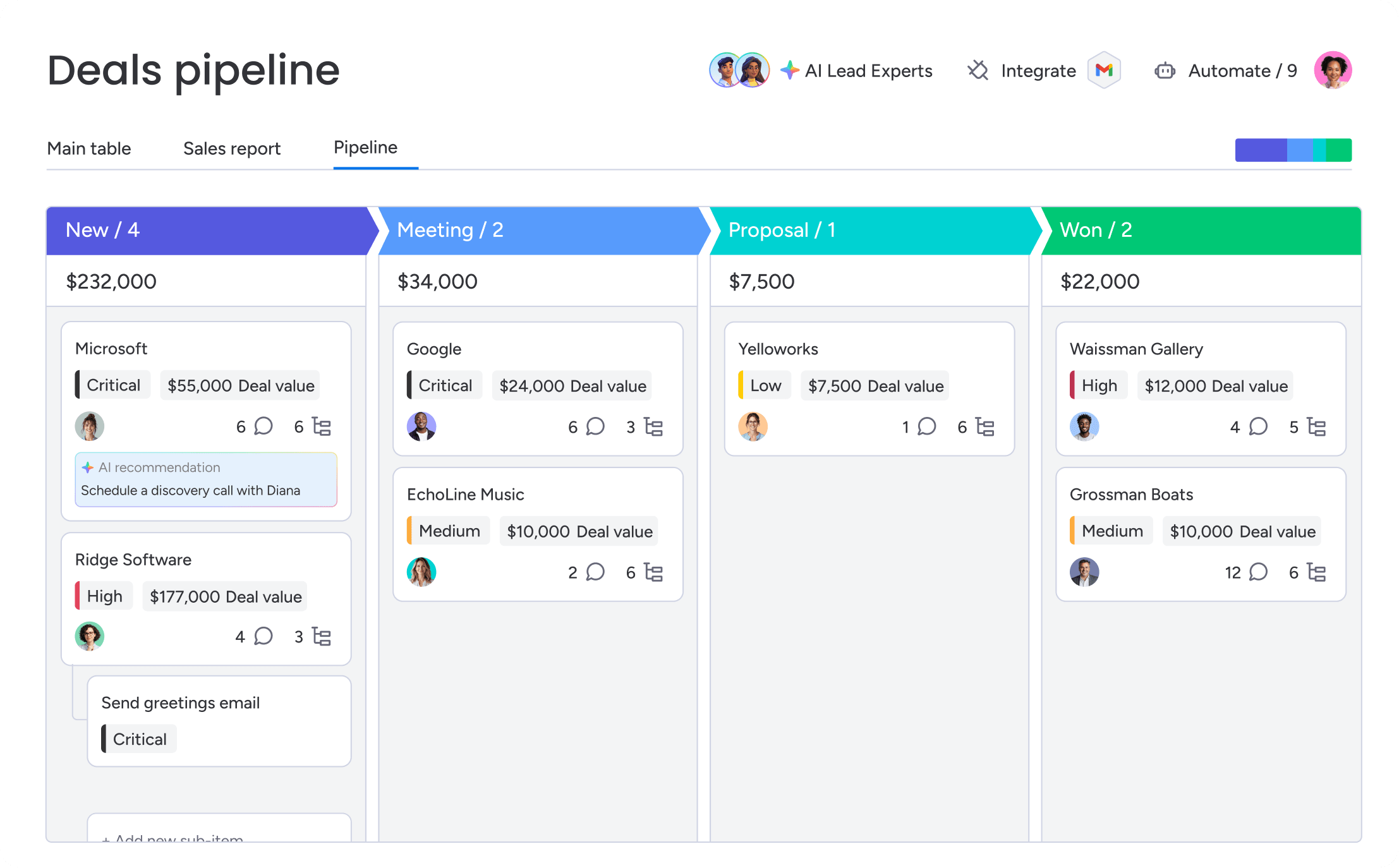
Your forecast is only as good as your data. Most sales teams already have what they need — as long as the data is complete, accurate, and easy to access. Unlike retail demand forecasting, which focuses on inventory and purchasing trends, AI demand forecasting for sales depends on CRM activity, customer engagement, and pipeline history.
1. Core CRM data
Your AI system needs complete deal information to predict accurately, including:
- Deal details: Stage, value, close date, products, and owner
- Account information: Company size, industry, location, and account health
- Contact records: Roles, engagement history, and decision-making authority
- Activity tracking: Emails, calls, meetings, and demo attendance
More complete data means better pattern recognition. Missing fields or inconsistent activity logs kill accuracy.
Learn more: AI account health agent
2. Communication and engagement data
AI forecasting becomes significantly more accurate when it can read communication patterns. Email frequency, response times, meeting attendance, and sentiment in written communication all provide signals about where a deal is really heading.
Track these signals:
- Email patterns: Declining response rates often predict stalling before it’s visible in the pipeline
- Meeting dynamics: Who attends, who speaks, and who makes decisions
- Content engagement: Which materials prospects view and share internally
- Response timing: How quickly stakeholders respond to proposals or questions
Revenue teams can centralize these signals automatically on a unified platform, capturing emails, meeting notes, and customer interactions in one place to give AI the complete context it needs for accurate predictions.
3. Historical performance data
AI learns from what your team has already done. The system needs access to win/loss history, average sales cycles by segment, seasonal patterns, and rep performance trends. This historical context helps AI understand what “normal” looks like for your business.
The system also needs to understand why deals were won or lost. When reps log loss reasons and competitive information, AI learns to recognize similar patterns in active deals.
Why sales teams need AI demand forecasting for revenue planning
Sales teams are under pressure to deliver predictable revenue while buyers get more complex. AI demand forecasting solves this by giving you confidence, catching risks early, and helping every level of the org make smarter calls.
Replacing gut-feel forecasting with data-backed confidence
Traditional forecasting relies heavily on rep judgment and manager intuition. A rep might call a deal “committed,” but that assessment often reflects hope more than reality. Managers adjust these estimates based on experience, but bias and emotion still influence the final number.
AI cuts through the subjectivity by reading objective signals:
- Engagement patterns: Is the prospect still actively involved?
- Stakeholder involvement: Are the right decision-makers in the conversation?
- Deal velocity: Is this deal moving at the pace of similar wins?
When AI flags that a “committed” deal has actually stalled based on declining activity, managers can intervene before it’s too late. And when the board asks about next quarter’s forecast, sales leaders can point to predictions backed by data and explain exactly why the numbers changed.
Catching pipeline risks weeks before they become problems

AI watches every deal for warning signs and catches risks weeks before they show up in pipeline reviews:
- Engagement drops: Champions stop responding or meeting frequency declines
- Missing stakeholders: Key decision-makers haven’t been engaged
- Velocity issues: Deals moving slower than similar successful opportunities
- Competitive threats: Signals that competitors have entered the evaluation
Catching risks early gives your team time to act before deals slip away. Instead of finding problems at quarter-end, teams can fix issues while there’s still time to save the deal.
Deploying coaching and resources where they’ll have the most impact
AI demand forecasting shows leaders exactly where to put resources for maximum impact. By predicting which deals will close and which need help, managers can coach where it matters most.
The system might reveal that certain reps consistently overestimate deal probabilities — a signal to provide targeted training on how to qualify sales leads. Or AI might show that deals in certain industries need technical resources earlier, so leaders can adjust their support model.
Supporting smarter planning across the entire organization
Accurate revenue demand forecasts help the entire business make smarter decisions. Finance can plan cash flow with confidence. HR can time hiring to match growth. Marketing can adjust lead generation targets based on conversion predictions.
AI also supports scenario planning. Leaders can model different outcomes:
- What if we add 2 reps?
- What if conversion rates improve by 10%?
- What if we enter a new market segment?
These insights guide strategic decisions with real impact predictions, not guesswork.
6 steps to implement AI demand forecasting in your CRM
Turning on AI demand forecasting for sales isn’t enough. You need clean data, clear processes, and team buy-in to make it work. Here’s how to get it right from day one.
Step 1: Audit your data quality
Before you turn on AI forecasting, check your CRM data for completeness, accuracy, and consistency. Focus on the data that matters most for forecasting: deal values, close dates, contact roles, and activity logging. Start with core fields and expand over time. Don’t try to perfect everything at once.
Step 2: Define your forecasting goals
What do you want AI forecasting to do for you? Common goals include:
- Improving forecast accuracy by a specific percentage
- Reducing time spent on forecast preparation
- Identifying at-risk deals earlier in the cycle
- Enabling more confident resource planning
Clear goals help you set up the AI system, measure success, and get your team on board.
Step 3: Configure your AI model
Work with your CRM provider to set up the AI model for your business. That means:
- Defining which data fields to analyze
- Setting risk thresholds and alert triggers
- Customizing probability calculations
- Establishing forecast categories
Teams using monday CRM benefit from pre-built AI capabilities that adapt to their sales process. The platform’s AI features analyze pipeline data, surface risks, and recommend actions without complex configuration.
Try monday CRM AI forecastingStep 4: Train your team on AI-driven workflows

AI forecasting only works if your team actually uses it. Train your team on:
- The importance of consistent data entry
- How AI predictions are generated
- What actions to take based on AI recommendations
Help managers understand how to interpret AI insights and coach based on patterns. Make AI insights part of your regular cadence. Include predictions in pipeline reviews, discuss risk alerts in one-on-ones, and celebrate wins when AI helps save deals.
Step 5: Monitor accuracy and refine your model
Track forecast accuracy by comparing AI predictions to what actually happens. Find patterns where AI struggles and figure out why. Most teams see big improvements in the first few quarters as the model learns their patterns.
Gather feedback from users regularly, asking which insights are most valuable and which recommendations don’t make sense in context. Use this input to refine your configuration and improve adoption across the team.
Step 6: Scale gradually across teams and segments
Start with one team or segment before rolling out broadly. This lets you refine processes, build success stories, and find champions who can help spread adoption. As you scale, keep data quality and consistent usage front and center. AI forecasting gets better as more teams contribute data and act on what they learn.
Why monday CRM for AI demand forecasting
monday CRM delivers AI-powered forecasting without the complexity of traditional enterprise systems. The platform combines real-time pipeline visibility, automated insights, and intelligent recommendations in a system your team will actually use.
- Built-in AI forecasting: monday CRM analyzes your pipeline automatically, surfacing risks and opportunities without manual configuration or data science expertise.
- Automated deal summaries: AI generates instant summaries of deal history, stakeholder engagement, and next steps so reps spend less time searching and more time selling.
- Smart risk alerts: The platform flags at-risk deals based on engagement patterns, velocity changes, and missing stakeholders — giving your team weeks of lead time to intervene.
- Unified data capture: Email integration, meeting notes, and activity tracking flow into one system, giving AI the full picture it needs for accurate predictions.
- Customizable dashboards: Build forecast dashboards that show exactly what matters to your team, from pipeline health to rep performance to quarterly projections.
- No-code automation: Set up workflows that trigger actions based on AI insights — like alerting managers when deals stall or routing hot leads to the right reps.
Unlike legacy CRMs that require IT teams and months of implementation, monday CRM gets your team up and running in days. The platform adapts to your sales process instead of forcing you to change how you work, and AI capabilities improve continuously as your team uses the system.

“With monday CRM, we’re finally able to adapt the platform to our needs — not the other way around. It gives us the flexibility to work smarter, cut costs, save time, and scale with confidence.”
Samuel Lobao | Contract Administrator & Special Projects, Strategix
“Now we have a lot less data, but it’s quality data. That change allows us to use AI confidently, without second-guessing the outputs.”
Elizabeth Gerbel | CEO
“Without monday CRM, we’d be chasing updates and fixing errors. Now we’re focused on growing the program — not just keeping up with it."
Quentin Williams | Head of Dropship, Freedom Furniture
“There’s probably about a 70% increase in efficiency in regards to the admin tasks that were removed and automated, which is a huge win for us.“
Kyle Dorman | Department Manager - Operations, Ray White
"monday CRM helps us make sure the right people have immediate visibility into the information they need so we're not wasting time."
Luca Pope | Global Client Solutions Manager at Black Mountain
“In a couple of weeks, all of the team members were using monday CRM fully. The automations and the many integrations, make monday CRM the best CRM in the market right now.”
Nuno Godinho | CIO at Velv
“monday.com provides developmental flexibility, operational efficiency, and data transparency — all in one place. We became a company that moved from chasing data to leading with it.”
Hyunghan Lee | Team Lead, Sandbox Network
"monday.com brought every part of our business into one connected space. The harmony between work management and CRM has become our operating system — giving us the clarity and confidence to scale.”
Jennifer Chinburg | Executive Vice President of Corporate Development & Brand, Chinburg Properties
“We just weren’t getting value from our old CRM. With monday.com, it's a thousand times better. Our sales teams are more informed, more consistent, and far more connected."
James Arnold | Chief Operating Officer, CenversaStart forecasting with confidence
AI demand forecasting gives sales teams a clearer picture of future pipeline health and revenue, replacing guesswork with data-backed predictions they can act on. The teams adopting it now gain a compounding advantage: sharper forecasts, earlier interventions, and smarter decisions across the organization.
monday CRM makes AI forecasting accessible for revenue teams without complex setup or IT involvement. Try it today and see how AI-powered insights fit into your existing sales process.
Try monday CRM AI forecastingFAQs
What is AI demand forecasting for sales teams?
AI demand forecasting for sales uses machine learning to analyze CRM activity, customer engagement, and historical pipeline performance to predict future revenue. Unlike inventory demand forecasting, it focuses on sales opportunities, deal health, and forecast accuracy.
How is AI demand forecasting different from traditional forecasting?
Traditional forecasting uses static rules and manual calculations, treating every deal at the same stage exactly the same. AI forecasting looks at each deal individually, weighing factors like engagement patterns, stakeholder involvement, and historical context to predict what will actually happen.
What data do you need for AI demand forecasting?
AI demand forecasting needs complete CRM data: deal details, account information, contact records, and activity tracking. Communication patterns, historical performance data, and consistent data entry make predictions significantly more accurate.
Can small sales teams benefit from AI demand forecasting?
Small sales teams often see the biggest improvement from AI forecasting. It automates manual analysis, delivers insights that usually require dedicated analysts, and helps small teams compete with larger organizations through sharper pipeline visibility and smarter resource use.
How long does it take to implement AI demand forecasting?
Timelines vary, but most teams can start using AI forecasts within 2–4 weeks. Initial setup includes checking data quality, configuring the model, and training your team. Forecast accuracy usually jumps in the first 2–3 quarters as the AI learns your patterns.
How accurate is AI demand forecasting compared to manual methods?
AI demand forecasting typically reaches significantly higher accuracy than manual methods, with reported ranges often in the 80–90% bracket versus 50–70% for traditional approaches, according to vendor benchmarks. Accuracy improves over time as the model learns from more data and teams refine their data quality and consistency.
