



Product teams are expected to move fast, stay aligned, and adapt plans as priorities shift — but static slides and text-heavy documents rarely keep up. When engineering roadmaps are hard to scan or update, teams lose a shared understanding of what matters most and decisions slow down.
Visual product roadmaps turn strategy into a clear, shared picture teams can align around at a glance.
In this guide, you’ll learn what a visual product roadmap is, why it matters for modern product and engineering teams, and how to build one step by step, with real-world examples, best practices, and templates you can apply right away.
Try monday devKey takeaways
- Visual product roadmaps give teams an at-a-glance view of product direction, goals, and key initiatives over time.
- Visual product roadmaps improve alignment and stakeholder communication by giving product, engineering, and leadership a shared source of truth they can understand in seconds.
- Strong roadmap visuals use consistent components — vision, themes, timeframes, owners, dependencies — and formats that fit each audience, from strategic to sprint‑level views.
- Treating the roadmap as a living artifact, supported by AI to summarize inputs, cluster feedback, and flag risks, keeps your product roadmap visualization accurate as things change.
- With monday dev, product and engineering teams can turn visual product roadmaps into live execution views that stay in sync with individual tasks.
What is a visual product roadmap?
A visual product roadmap is a graphical overview of how a product will evolve, bringing together goals, key initiatives, and timeframes in a format stakeholders can understand at a glance. It turns product strategy into a single, shareable view that helps teams align on where they are headed and why.
Unlike a backlog, a visual product roadmap is strategic and outcome‑oriented, emphasizing themes, goals, and major milestones rather than a detailed list of tasks or user stories.
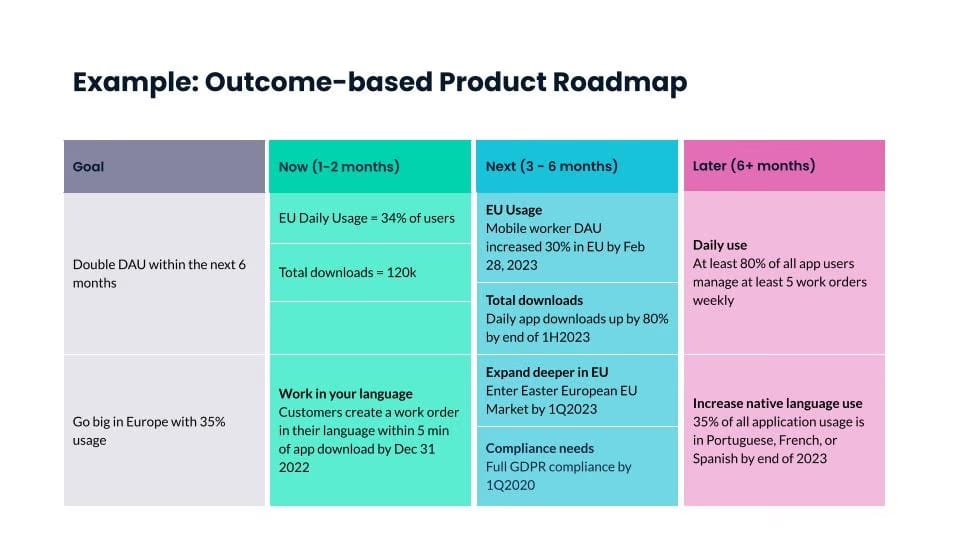
Visual product roadmaps can be timeline‑based (quarters, releases, key dates) or horizon‑based, such as now‑next‑later views that group work by priority and proximity instead of exact dates.
Visual product roadmaps vs. traditional methods
Visual product roadmaps replace “traditional” roadmapping methods such as static slide decks, spreadsheets, and text‑heavy documents, which are hard to keep current and even harder to read at a glance. Instead of one‑off files that quickly go stale, visual tools give teams an interactive, living view of strategy and delivery.
| Dimension | Traditional roadmaps | Visual product roadmaps |
|---|---|---|
| Clarity | Dense tables or bullet lists make it difficult to see priorities, timelines, and ownership quickly. | Clean, graphical layouts use lanes, colors, and labels so stakeholders can understand plans in seconds. |
| Adaptability | Updating static decks and sheets is slow, error‑prone, and often leads to multiple conflicting versions. | Cloud‑based visuals update in real time, making it easy to re‑prioritize and reflect changes without recreating slides. |
| Stakeholder engagement | Text‑heavy views are harder to present and rarely revisited, so stakeholders may disengage or miss key context. | Visual, interactive views invite questions, feedback, and ongoing use, improving buy‑in across teams. |
| Data freshness | Manually maintained files are frequently out of date, especially in fast‑moving Agile environments. | Connected to underlying data, visuals stay current as items move through discovery, delivery, and release. |
| Connection to execution | Roadmaps in isolated documents are often disconnected from day‑to‑day tools, so plans and execution drift apart. | Purpose‑built roadmap software links high‑level strategy directly to backlogs, boards, and metrics, keeping execution aligned. |
Benefits of visual product roadmaps
Visual product roadmaps offer several practical advantages beyond simple timelines, helping product organizations stay aligned, focused, and adaptable.
- Better alignment: Visual roadmaps give product, engineering, and leadership a shared, high‑level view of goals, initiatives, and timing, so everyone understands what matters most and how their work contributes to the broader strategy.
- More confident prioritization: By placing themes and initiatives on a single canvas, teams can compare options side by side, visualize trade‑offs, and sequence work based on impact, effort, and dependencies, rather than reacting to ad-hoc requests.
- Clearer stakeholder communication: Visual formats make complex plans easier to grasp, helping non‑technical stakeholders quickly see what’s planned, what’s moved, and why, reducing status meetings and improving buy‑in for roadmap decisions.
- Stronger execution focus: A clear roadmap view makes it easier to connect strategy to delivery, spotlight cross‑team dependencies, and adjust scope or timing before issues derail execution. This supports faster, more confident decision‑making when priorities shift.
- Greater agility and adaptability: Because visual product roadmaps emphasize outcomes and time horizons rather than fixed, detailed Gantt charts, Agile teams can update them frequently, respond to new data, and keep plans relevant as markets and customer needs evolve.
Essential components of visual product roadmaps
Visual product roadmaps work best when they capture both the strategic “why” and the execution‑ready “what” in a clear, scannable structure. The most effective ones include a consistent set of components that allow anyone to quickly understand priorities, timing, and ownership.
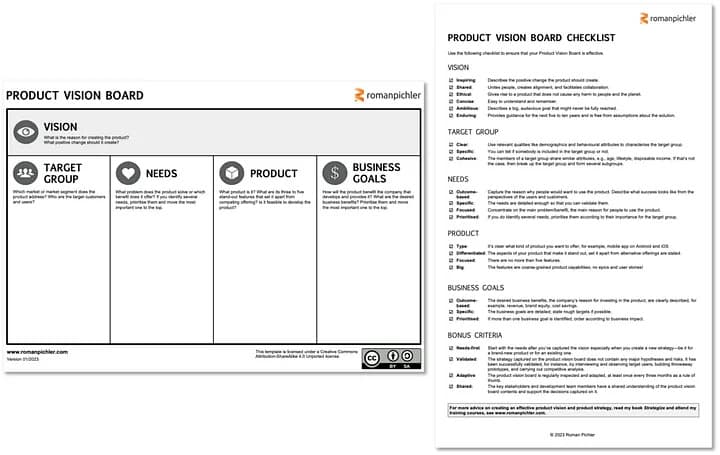
- Product vision and goals: A concise vision statement and a small set of measurable goals explain the product direction and why the roadmap items matter, turning the view into a shared source of truth rather than just a schedule.
- Initiatives and themes: High‑level themes or initiatives group related work into problem spaces such as onboarding, performance, or expansion, helping stakeholders see how individual features contribute to broader outcomes.
- Releases, features, or epics: Roadmap items are represented as epics, releases, or larger features, not granular tasks, so the view stays strategic while still being concrete enough to plan and communicate around.
- Timeframes or horizons: Items are mapped to quarters, releases, or horizons (such as now‑next‑later) to show sequencing and urgency without over‑committing to exact dates where uncertainty is high.
- Owners and status: Clear ownership (e.g., product area or team) and simple status indicators show who is responsible for each item and whether it is planned, in progress, or completed, which improves accountability and transparency.
- Dependencies: Visual cues for dependencies highlight where one initiative or feature relies on another, making it easier to spot risks, coordinate across teams, and have informed trade‑off discussions before issues cascade.
Visual components that make roadmaps easy to read
How information is visually encoded plays a major role in whether stakeholders can actually understand and use it. These visual components help reduce cognitive load and make product roadmaps easier to scan, interpret, and discuss at a glance:
- Color coding by priority or status: Using a consistent color scheme — for example, by strategic goal, priority, or status — lets stakeholders quickly scan the roadmap and understand focus areas and progress at a glance.
- Swimlanes by team, product area, or theme: Horizontal or vertical lanes separate initiatives by team, product module, customer segment, or theme, clarifying who owns what and how work is distributed.
- Icons and labels for clarity: Simple icons, tags, and concise labels add important context — such as risk level, customer segment, or platform — without overloading the roadmap with text.
- Legend and filters: A small legend explaining colors, icons, and lane meanings, combined with filters to show or hide specific items, helps every viewer “read” the roadmap correctly and focus on what matters to them.
7 types of visual product roadmaps
Visual product roadmaps come in several formats. Here are 7 examples you can adapt to your audience, product maturity, and planning horizon.
1. Visual strategic roadmap
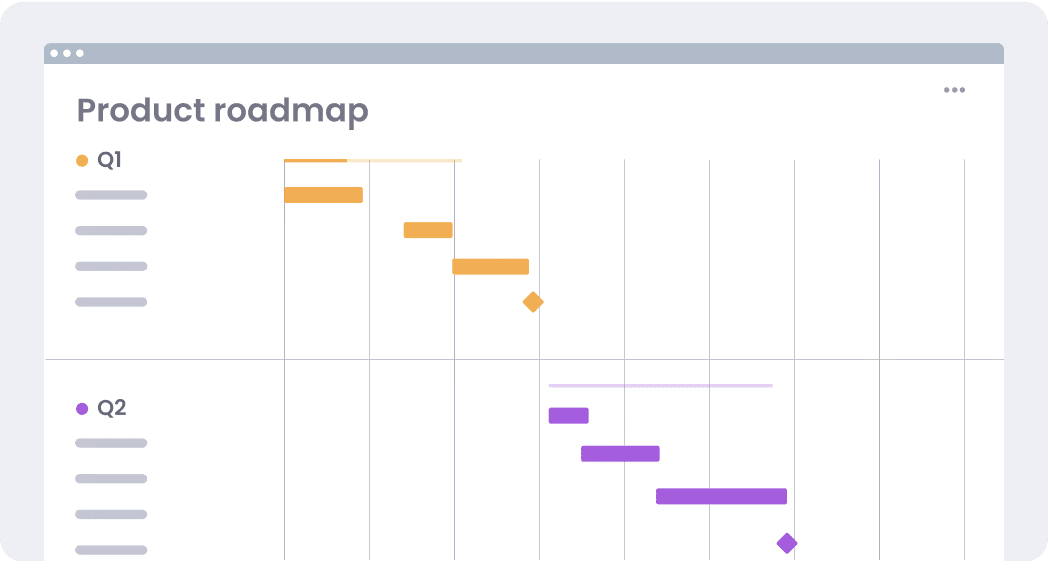
A visual strategic roadmap connects long‑term goals, outcomes, and major initiatives over multiple quarters or years, giving leadership a single product roadmap visualization of product direction and how strategic initiatives connect to company goals.
2. Theme‑based/outcome‑based roadmap
This roadmap groups work into themes or outcomes, such as “activation” or “market expansion,” rather than individual features. It makes it easier to tell a strategic story and to show examples of product roadmaps that are truly goal‑driven rather than feature‑driven.
3. Now‑next‑later roadmap
A now‑next‑later roadmap organizes initiatives into broad time horizons — what the team is doing now, what comes next, and what is planned for later — so you can communicate priorities clearly without over‑committing to precise dates in your product roadmap visualization.
4. Release / timeline roadmap
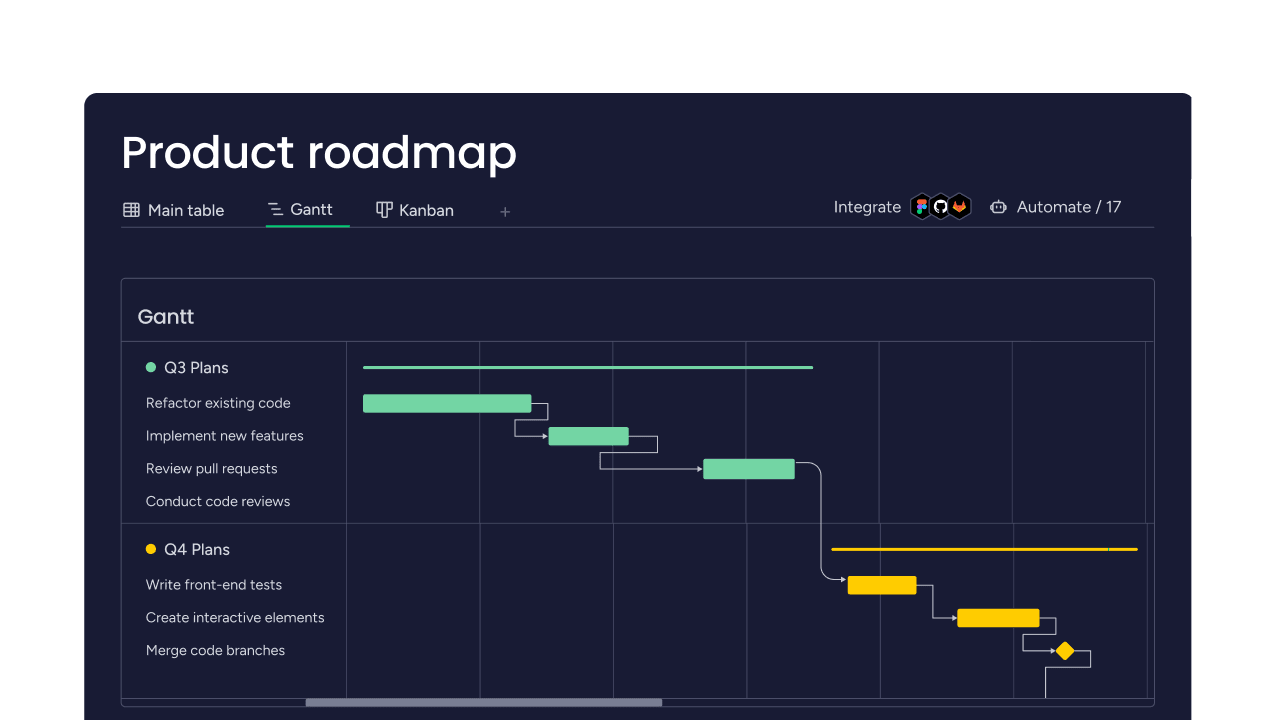
A release or timeline roadmap shows how features, epics, or projects line up across months or quarters, often with bars or milestones, providing stakeholders with a visual, chronological roadmap for upcoming launches and helping marketing, sales, and support prepare.
5. Feature roadmap
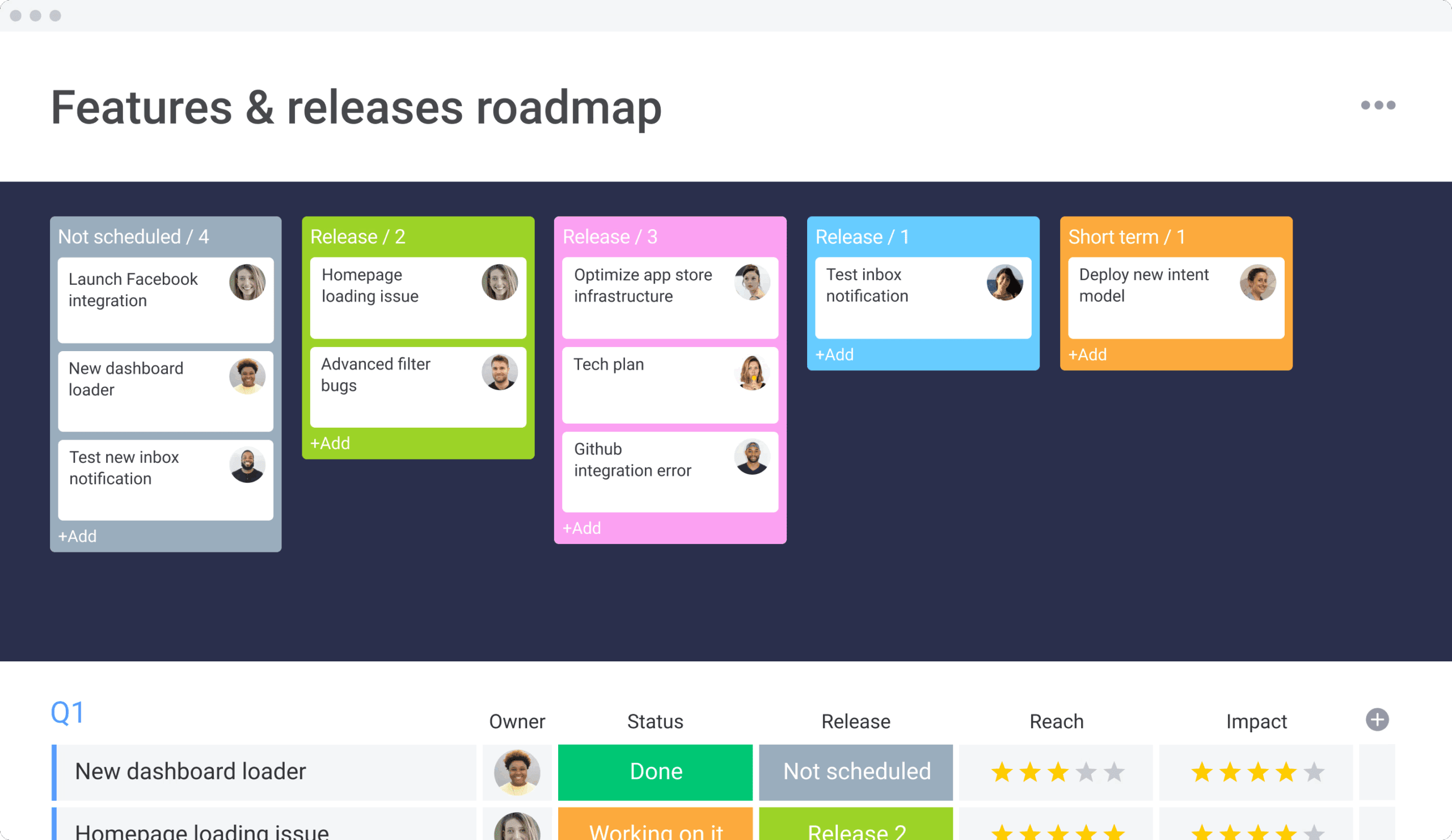
A feature roadmap highlights specific features and when they are likely to ship, providing a more granular example of a product roadmap that helps internal teams and sometimes customers see which capabilities are planned, in development, or recently released.
6. Sprint/visual project roadmap
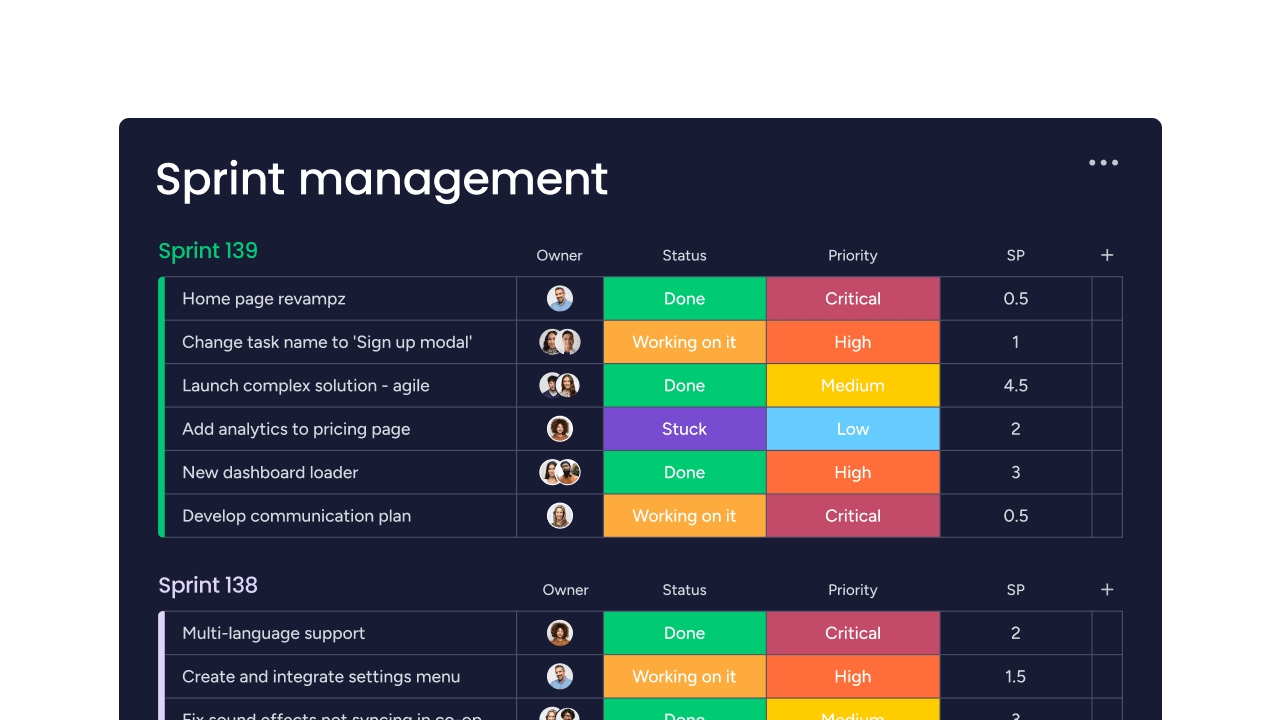
A sprint or visual project roadmap focuses on short‑term execution, mapping work across sprints or iterations so delivery teams can see what’s in scope, what’s moving, and how individual items contribute to higher‑level themes in the overall product roadmap visualization.
7. Portfolio roadmap
A portfolio roadmap aggregates multiple products, services, or teams into a single visual, showing how parallel initiatives relate to shared goals and budgets and giving executives an at‑a‑glance example of a product roadmap for cross‑product planning and resource allocation.
How to build a visual product roadmap in 7 steps
Building a strong visual product roadmap is easier when you break it into a few straightforward steps. This 7‑step process gives you a repeatable “recipe” you can reuse for any product roadmap visualization.
Step 1: Clarify vision, goals, and outcomes
Start by defining your product vision, target customers, and measurable outcomes, such as adoption, revenue, or retention. This makes every roadmap visual a direct expression of strategy instead of a disconnected list of features.
(Source)
Step 2: Collect and prioritize initiatives and features
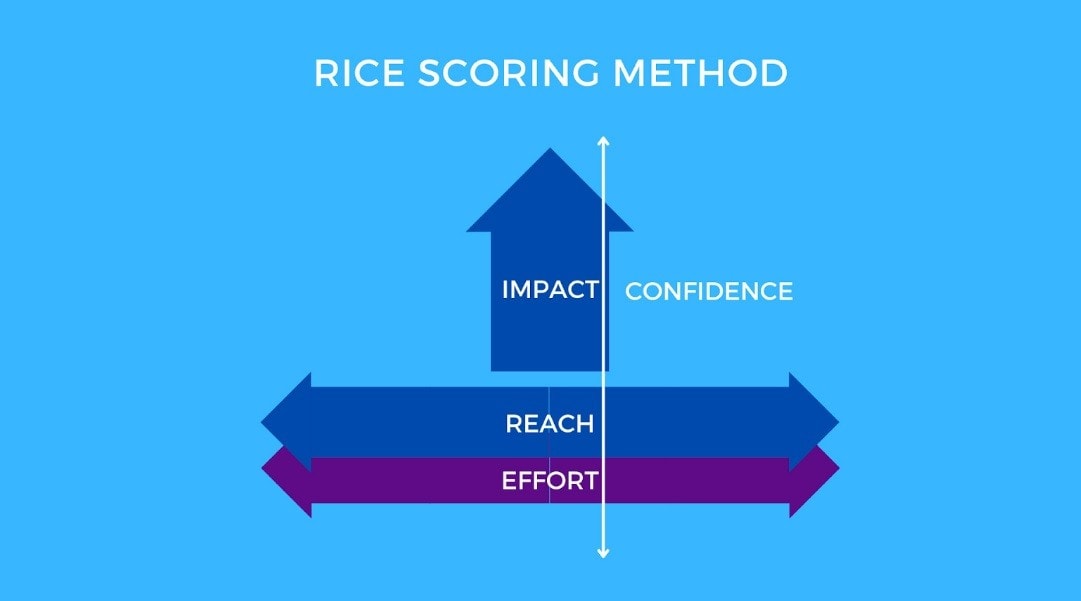
Gather potential initiatives and features from customer feedback, analytics, and stakeholder input, then prioritize them using a framework like MoSCoW or RICE so the highest‑impact work rises to the top. This step prevents your product roadmap from becoming a wishlist of unvetted ideas.
(Source)
Step 3: Choose the right visual format
Select the roadmap format that best fits your audience — timeline or release views for launch planning, now‑next‑later for high‑level prioritization, or portfolio roadmaps for leaders overseeing multiple products and teams. Different product roadmap visualizations can coexist as long as they’re grounded in the same strategy.
(Source)
Step 4: Map work to timeframes, owners, and dependencies
Place initiatives and features into timeframes or horizons, assign clear owners, and highlight key dependencies so it’s obvious who is responsible for what and where sequencing risks exist. This turns your roadmap visual into a practical planning tool instead of a static diagram.
Step 5: Validate with stakeholders and adjust
Review the roadmap with product, engineering, design, go‑to‑market, and leadership stakeholders, using their feedback to refine priorities, scope, and timing. Collaborative review surfaces hidden constraints early and builds buy‑in before you commit.
Step 6: Connect the roadmap to execution tools
Link roadmap items to epics, backlogs, and boards in your delivery tools so updates automatically flow back into your product roadmap visualization. This connection keeps the roadmap current and gives everyone a clear line of sight from strategic goals to day‑to‑day tasks.
Step 7: Set a regular cadence to revisit and refine
Schedule recurring roadmap reviews — monthly for tactical adjustments and quarterly for strategic resets — to reflect new learning, market changes, and performance data. Treat your roadmap visual as a living artifact that evolves with the product rather than a one‑off planning exercise.
Best practices for visual product roadmaps
Effective visual product roadmaps follow a few best practices that keep them strategic, realistic, and easy to understand. Use these guidelines to make sure your roadmap visual stays useful as plans evolve.
- Anchor everything in goals and strategy: Start from product and business objectives, then show how themes and initiatives on the roadmap support those goals so the product roadmap visualization never devolves into a feature‑only release schedule.
- Tailor the roadmap to your audience: Maintain separate roadmap views for executives, delivery teams, and customers, adjusting the level of detail, language, and time horizon so each group sees the information they need without noise.
- Use time horizons instead of rigid dates: When uncertainty is high, favor quarters, “now‑next‑later,” or other time horizons to communicate sequencing and intent while preserving flexibility, and reserve specific dates for near‑term, well‑understood work.
- Show progress, risks, and trade-offs transparently: Use clear status indicators, notes on major risks, and simple explanations of what was de-scoped or delayed so stakeholders understand the trade-offs behind roadmap changes, not just the end state.
- Keep the roadmap living with a clear cadence: Treat the roadmap as a living document by scheduling regular reviews, such as monthly tactical check‑ins and quarterly strategic resets, and communicating updates proactively to stakeholders.
Visual product roadmap: Do’s/Don’ts
Here’s a quick reference do’s/don’ts table for visual product roadmap best practices:
| Do | Don’t |
|---|---|
| Tie every item to a clear goal or outcome so the roadmap visual tells a strategic story. | Fill the roadmap with unvalidated feature ideas that aren’t linked to customer or business value. |
| Create different roadmap visualizations for execs, teams, and customers with the right level of detail. | Share a single, overly detailed view with everyone, as it leads to confusion and misaligned expectations. |
| Use quarters or horizons where dates are uncertain, and treat dates as targets, not promises. | Commit to precise dates too far ahead because you'll spend cycles re‑explaining every slip. |
| Update the roadmap regularly and explain changes, including trade‑offs and risks. | Let the roadmap go stale so it no longer matches what teams are actually building. |
AI-enhanced visual roadmap capabilities
AI‑enhanced visual roadmap capabilities help teams turn scattered inputs into a clear, living picture of product direction by summarizing information, spotting patterns, and highlighting risks before they escalate. Instead of manually tagging feedback and recalculating plans, AI quietly keeps your product roadmap visualization closer to reality.
- Group feedback into roadmap‑ready themes: AI can automatically categorize customer feedback, support tickets, and survey responses into themes, giving you an evidence‑based pool of roadmap candidates without hours of manual tagging.
- Summarize discovery and research into insights: Natural language capabilities compress long discovery notes, interviews, and research documents into concise summaries that highlight problems, patterns, and user needs you can directly tie to roadmap items.
- Detect risks and bottlenecks across initiatives: By looking across projects, dependencies, and progress data, AI can flag potential bottlenecks, overloaded teams, or ‘at‑risk’ releases so you can adjust your roadmap before delays become visible to customers.
- Forecast velocity and timelines more accurately: Machine‑learning models can use historical throughput, cycle times, and scope changes to suggest more realistic estimates for initiatives, improving confidence in your roadmap horizons.
How to select the right visual roadmap platform
Choosing the right visual roadmap platform matters as much as choosing the right roadmap format. The best tools make it easy to turn strategy into an interactive roadmap visual that stays in sync with day‑to‑day work.
- Integrations with dev tools and issue trackers: Look for 2‑way integrations with systems such as issue trackers, source control, analytics, and customer feedback tools so roadmap items stay connected to epics, tasks, and real usage data rather than living in a silo.
- Flexible views and visualizations: Strong platforms let you switch between Kanban, Gantt, timeline, board, and portfolio views, and customize filters, swimlanes, and color‑coding so each stakeholder can see a product roadmap visualization that matches how they think and plan.
- Collaboration and stakeholder access: Prioritize platforms that support real‑time editing, in‑context comments, mentions, and easy sharing with internal and external stakeholders, so feedback flows into the roadmap without long email threads or version confusion.
- AI‑powered insights and automation: Modern platforms increasingly include AI to cluster feedback, suggest priorities, flag risks, and automate status updates, helping teams keep roadmap visuals accurate without constant manual grooming.
- Security, governance, and scale: For larger organizations, ensure the platform offers role‑based access control, SSO, encryption, audit logs, and compliance certifications to protect sensitive roadmap information as adoption grows.
Build smarter visual product roadmaps with monday dev
Built on the monday.com Work OS, monday dev gives product and engineering teams one place to design visual product roadmaps, connect them to real work, and keep strategy, execution, and data aligned in real time.
Instead of juggling separate roadmap visuals, delivery boards, and status decks, teams can plan, build, and track everything on a single, flexible platform.
Multiple roadmap visuals — one source of truth
Supporting multiple roadmap views — such as timelines, Kanban boards, Gantt‑style charts, and high‑level portfolio dashboards — monday dev is built from the same underlying data. Teams can move seamlessly from a strategic visual product roadmap to day‑to‑day boards, without duplicating work or maintaining parallel documents.
Cross‑team alignment in a single workspace
Product, engineering, and leadership can collaborate on the same roadmap, with tailored views for each audience. Status, ownership, and dependencies update in real time across boards, helping everyone see how their work contributes to shared goals and reducing misalignment between planning and delivery.
AI‑powered planning and risk visibility
Built-in AI makes visual roadmaps smarter and easier to maintain. Teams can use AI capabilities to:
- Automatically categorize feedback and requests into themes that inform future roadmap discussions, rather than manually tagging every input.
- Summarize discovery notes, research docs, and meeting transcripts into concise insights directly on roadmap boards, so context is always one click away.
- Scan initiatives for potential bottlenecks and at‑risk projects, highlighting where dependencies or capacity issues might impact roadmap commitments.
- Use AI‑driven forecasts based on historical velocity to set more realistic horizons for epics and releases, grounding roadmap timelines in real delivery data.
From roadmap to execution, end‑to‑end
Once a visual product roadmap is defined, monday dev lets teams break high‑level initiatives into epics, stories, and tasks, all linked back to the original roadmap item. Portfolio dashboards then roll up progress, risks, and outcomes, so leaders can continuously compare the roadmap to what is actually shipping and adjust plans with confidence.
Ready to turn a static roadmap visual into a living product strategy your whole team can follow? See how monday dev helps product and engineering teams keep visual product roadmaps and execution perfectly in sync with a 14-day free trial.
Try monday devFAQs
How often should visual product roadmaps be updated?
Visual product roadmaps work best as living documents rather than one‑off plans. Many teams review them at least monthly, adjusting priorities, timelines, and themes as new information emerges, with deeper quarterly resets tied to strategy and budgeting cycles.
Can visual roadmaps integrate with existing development tools?
Yes. Modern roadmap platforms typically integrate with tools such as issue trackers, code repositories, and project management systems, so roadmap items sync with epics, tasks, and sprints in real time. This reduces manual updates and helps teams using monday dev or similar platforms keep strategy and execution aligned.
What’s the typical ROI of implementing visual product roadmaps?
The ROI usually shows up as faster alignment, fewer mis‑prioritized initiatives, and better use of engineering capacity. Teams can reduce wasted effort, bring features to market sooner, and make more confident trade‑off decisions because everyone sees how roadmap choices connect to business outcomes.
How do visual roadmaps handle confidential information?
Visual roadmaps can limit sensitive detail while still conveying direction. Teams often abstract proprietary features into themes, restrict access to internal views, and use role‑based permissions within their roadmap tools. Enterprise‑grade platforms also add security, audit logging, and data‑governance controls for confidential initiatives.
What’s the learning curve for teams new to visual roadmapping?
Most teams can grasp basic visual roadmaps quickly, especially when they mirror familiar timelines or Kanban‑style boards. The main learning curve is agreeing on shared conventions — how you name themes, use colors, and interpret statuses — plus building the habit of revisiting the roadmap regularly.
How do visual roadmaps support remote and distributed teams?
Visual roadmaps give distributed teams a shared, always‑available source of truth for priorities, goals, and progress. Online, collaborative views make it easier to align across time zones, run asynchronous check‑ins, and help new team members quickly understand what the team is working toward.
What’s the difference between a visual product roadmap and a backlog?
A visual product roadmap communicates the why and when of major product outcomes over months or quarters, tailored for stakeholders and leadership. A backlog is an ordered list of detailed tasks or user stories for delivery teams, focused on near‑term execution rather than high‑level strategy.

 Get started