


Sprint demos often determine whether a team is simply writing code or building the right product. They offer a recurring moment where progress becomes visible, questions get resolved, and teams can confirm they’re moving in the direction the business actually needs.
Without this shared touchpoint, expectations drift. Decisions take longer, feedback arrives too late, and teams end up revisiting work they thought was already settled. A strong sprint demo keeps everyone anchored to the same view of what “success” looks like.
At their best, demos are collaborative conversations. They connect engineering output to real user and business goals, spark useful discussions, and remind the team why their work matters.
The sections ahead walk through how to deliver sprint demos that create alignment, unlock better feedback, and contribute directly to faster, more predictable delivery.
Key takeaways
- Create regular feedback loops: sprint demos establish consistent feedback channels between development teams and stakeholders, preventing costly misalignments and keeping focus on building the right features.
- Focus on business outcomes: structure your demonstrations around user stories and business outcomes, not technical features; stakeholders prioritize solving problems over understanding code complexity.
- Encourage interaction: prepare realistic demo scenarios with actual data and encourage interactive discussions rather than one-way presentations to generate richer, actionable feedback.
- Ensure continuous transparency: platforms like monday dev connect stakeholders to sprint progress between demos and automatically capture feedback, making demonstrations more meaningful and follow-through seamless.
- Prioritize follow-up: build trust and maintain engagement by updating your product backlog based on stakeholder input immediately after every demo and communicating resulting decisions back to the participants.
Sprint demo definition
A sprint demo is a meeting where development teams show completed work to stakeholders and collect feedback. This happens at the end of each Scrum sprint, typically every one to four weeks, and focuses on demonstrating actual working software rather than slides or reports.
This session serves as a crucial showcase where the team presents what they have built to the individuals most invested in the outcome: product owners, business leaders, and sometimes even end users. On modern platforms like monday dev, this process is streamlined, as all completed work and stakeholder feedback can live in one transparent space.
The team presents what they have built to the people who care about it most: product owners, business leaders, and sometimes even end users.

The purpose of sprint demos in Agile
Sprint demos create a feedback loop between builders and business stakeholders. When you show working software regularly, stakeholders can course-correct early instead of waiting months to discover misalignments.
These sessions also drive product backlog refinement. Seeing actual features in action helps stakeholders make smarter decisions about what to build next.
Key components of successful sprint demos
Every effective sprint demo includes specific elements that work together to create value. Understanding these components helps you structure demonstrations that engage stakeholders and drive meaningful feedback:
- Working software: show real functionality, not mockups or slides.
- User scenarios: walk through actual workflows that solve real problems.
- Feedback collection: create space for questions and input.
- Next steps: connect today’s demo to tomorrow’s priorities.
Sprint demo vs daily standup meetings
Sprint demos and daily standups serve completely different purposes so keep that in mind. Daily standups coordinate the development team’s work each morning. On the other hand, sprint demos showcase completed work to stakeholders at sprint’s end.
The differences go beyond timing too: these two events are just some of the Scrum meetings that structure Agile workflows.
| Aspect | Sprint demo | Daily standup |
|---|---|---|
| Frequency | Every 2-4 weeks | Every day |
| Duration | 1-2 hours | !5 minutes |
| Audience | Team + stakeholders | Dev team only |
| Purpose | Show completed work | Coordinate daily work |
| Format | Demonstration + discussion | Quick status updates |
Sprint demo vs sprint review: clearing the confusion
“Sprint demo” and “sprint review” often get used interchangeably, but there’s a subtle difference. The sprint review is the official Scrum event. The demo is just one part of that larger meeting, as outlined in the Scrum guide.
A complete sprint review includes more than showing features. You’ll also discuss what went well, what challenges emerged, and how the product backlog should evolve based on what you learned.
Why sprint demos accelerate product success
Sprint demos are far more than just status updates; they are the engine of continuous product improvement in an Agile environment. By creating reliable, frequent checkpoints, they ensure development stays focused, motivated, and aligned with real business goals.
Stakeholder alignment and buy-in
Sprint demos turn stakeholders from distant observers into active participants. Instead of waiting months between updates, they see continuous progress and can influence direction while changes are still easy to make.
Flexible solutions like monday dev amplify this alignment by giving stakeholders visibility between demos. They can track sprint progress, review completed work, and prepare meaningful feedback before the demonstration even begins.
Rapid feedback cycles
Traditional development delays feedback until late in the process. Sprint demos flip this model by creating short feedback loops that catch issues early: McKinsey’s 2024 product team analysis found delivery predictability improved from 60% to 95% within three months when teams adopted regular demos and continuous integration practices.
When you demonstrate features while they’re still being developed, stakeholders can redirect efforts before significant time gets invested in the wrong direction.
Team recognition and motivation
Showing completed work gives your team regular wins. Developers see stakeholders react to their work, creating a direct connection between technical effort and business value.
This visibility matters. When engineers understand how their code impacts real users, they make smarter technical decisions and feel more invested in outcomes: McKinsey’s 2024 study on generative AI tools found product managers experienced a 100% uplift in employee experience when they had better visibility into user impact and faster feedback cycles.
Business value validation
Sprint demos prove whether features deliver expected value. Instead of guessing whether something will work, you show it and get immediate reactions.
This validation happens early enough to matter. If a feature misses the mark, you can pivot in the next sprint rather than continuing down an unproductive path: McKinsey’s 2024 research shows organizations that quarterly review their portfolios deprioritize 15-20% of capacity by stopping low-value work based on delivery evidence.
6 essential steps to run engaging sprint demos
Running a successful sprint demo requires meticulous planning and execution that transforms the session from a passive presentation into a dynamic, high-value feedback exchange. These six steps provide a framework to maximize stakeholder engagement and ensure that every demonstration directly accelerates product development.
Step 1: define clear demo objectives
Every sprint demo requires specific, defined objectives that extend beyond merely presenting completed work. Establishing clear objectives assists in the preparation of focused content and provides stakeholders with the necessary context for delivering constructive feedback.
Strong demo objectives connect technical work to business outcomes:
- Validate workflows: confirm features solve the intended problem.
- Gather design feedback: get input on user experience decisions.
- Show technical progress: demonstrate infrastructure improvements that enable future features.
- Align on priorities: use reactions to guide the next sprint’s focus.
Step 2: prepare compelling demo content
Preparation separates mediocre demos from memorable ones. Select your most impactful work and organize it into a story that resonates with stakeholder interests.
Create realistic demo data that shows features in context. Prepare user scenarios that highlight business value, not just technical capabilities. Advanced platforms like monday dev help by organizing completed work clearly, making it easy to identify the best content for demonstration.
Step 3: structure your agenda for impact
A well-structured agenda keeps demos focused and ensures important topics get covered. Balance demonstration time with discussion to maintain engagement:
- Opening (five minutes): review sprint goals and set context.
- Demonstration (60% of time): show features through user scenarios.
- Feedback (30% of time): collect stakeholder input.
- Next steps (5 minutes): discuss upcoming priorities.
Step 4: facilitate interactive demonstrations
Turn your demo from a presentation into a conversation. Ask stakeholders to suggest scenarios. Invite them to try features themselves. Create moments for questions throughout, not just at the end.
Interactive demos reveal insights that passive watching misses. When stakeholders engage directly with features, they provide richer, more actionable feedback.
Step 5: capture actionable feedback
Collecting feedback only matters if you can act on it. Use structured approaches to capture input during the demo:
- Prepare specific questions to guide stakeholder thinking
- Document feedback in real-time using collaborative platforms
- Assign owners to each piece of feedback for follow-up
- Categorize input by priority and sprint alignment
Step 6: execute post-demo follow-through
The real work happens after the demo ends. Update your product backlog based on feedback. Communicate decisions back to stakeholders. Show how their input shaped your next sprint backlog.
This follow-through builds trust. When stakeholders see their feedback implemented, they stay engaged and provide even richer input in future demos.
Sprint demo best practices that drive results
To maximize the impact of your sprint demos, shift the focus from a technical presentation to a strategic, audience-centric experience.
These best practices ensure your demonstrations are engaging, relevant, and directly contribute to achieving business outcomes:
- Know your audience inside out: different stakeholders care about different things (Executives focus on business impact; End users care about workflow improvements). Tailor your demonstration to match audience priorities and adjust technical depth based on who is in the room.
- Craft a compelling story arc: do not just list features — tell a story. Organize your demo around user journeys that showcase how completed work solves real problems. Solutions like monday dev support this approach by organizing work around user stories, making it natural to structure demonstrations as narratives.
- Spotlight business value over features: stakeholders care about outcomes, not outputs. Instead of explaining what you built, show how it helps achieve business goals. Connect every demonstrated feature to measurable impact: faster workflows, reduced errors, or improved user satisfaction.
- Foster two-way conversations: the best demos feel like discussions, not presentations. Create natural pause points for questions, ask stakeholders what they think, and encourage them to challenge assumptions. Two-way conversations surface concerns early and generate richer feedback.
- Master time management: balance comprehensive demonstration with meaningful discussion. Prepare realistic agendas that account for questions and technical hiccups. Know when to dive deep and when to move forward, adjusting based on stakeholder engagement.
How to solve common sprint demo challenges
Even really well-prepared teams unfortunately encounter obstacles that undermine the value of their sprint demos. Addressing issues like stakeholder disengagement, technical complexity, and partial work requires strategic planning and proactive communication.
Re-engaging disconnected stakeholders
When stakeholder attendance drops, it’s usually because previous demos didn’t deliver value. Maybe you focused too much on technical details. Perhaps feedback never led to visible changes.
Re-engagement starts with understanding why stakeholders disconnected. Have direct conversations about their needs. Then make visible changes to your demo approach. monday dev helps by maintaining stakeholder connection between demos through collaborative features and progress visibility.
Navigating remote demo technology
Remote demos add technical complexity. Prepare for connectivity issues. Test screen sharing in advance. Have backup plans for showing features if primary platforms fail.
Keep remote audiences engaged with shorter demonstration segments and more frequent interaction. Use polls, breakout rooms, or collaborative documents to maintain energy.
Showcasing partially complete work
Not every sprint ends with fully finished features. When showing incomplete work, frame it properly. Demonstrate working portions. Explain what remains. Focus on insights gained rather than apologizing for incompleteness.
Stakeholders often provide valuable feedback on partially complete work that shapes final implementation.
Coordinating multi-team demonstrations
Large products require multiple teams to demonstrate together. Many organizations use a Scrum of Scrums approach to align these teams effectively. This creates coordination challenges around timing, dependencies, and avoiding redundancy.
Designate demo leads for each team. Create unified agendas that highlight integration points and use consistent formats so stakeholders can follow progress across teams.
Sprint demo templates and automation platforms
Moving beyond basic execution, the most effective sprint demos rely on consistent frameworks and technology to save time and ensure follow-through. Utilizing structured templates and automation not only streamlines preparation but also guarantees that stakeholder feedback seamlessly transitions into the next development cycle.
Pre-demo preparation checklist
- Technical readiness: test demo environment and prepare backups.
- Content selection: choose impactful features and prepare scenarios.
- Stakeholder coordination: confirm attendance and share agenda.
- Feedback setup: prepare collection methods and assign note-takers.
Demo script framework
While demos should feel natural, a flexible script keeps you organized. Include key talking points, transition phrases, and specific questions for stakeholder engagement.
Treat scripts as guides, not rigid requirements. Adapt based on stakeholder interest and discussion flow.
Feedback collection systems
Digital platforms streamline feedback capture and organization. Look for systems that enable real-time collaboration and integrate with your development workflow.
Solutions like monday dev connect feedback directly to sprint planning, ensuring stakeholder input flows seamlessly into future work without manual transfer between systems.
Success metrics that matter
Track metrics that show whether demos achieve their purpose. These are among the Scrum metrics that help Agile teams drive continuous improvement. Focus on outcomes that connect to broader development goals:
- Attendance consistency: regular attendance shows stakeholders find value.
- Feedback quality: rich, specific feedback indicates engagement.
- Feature adoption: high adoption suggests demos validated user needs.
- Priority alignment: fewer scope conflicts show effective communication.
Completely transform your sprint demos with monday dev
Effective sprint demos rely on strong visibility, smooth collaboration, and a dependable way to turn feedback into action. With monday dev supporting these foundations, teams can walk into every demo more prepared, stakeholders stay better aligned, and follow-through becomes part of the workflow—not an afterthought.
Real-time sprint progress visibility
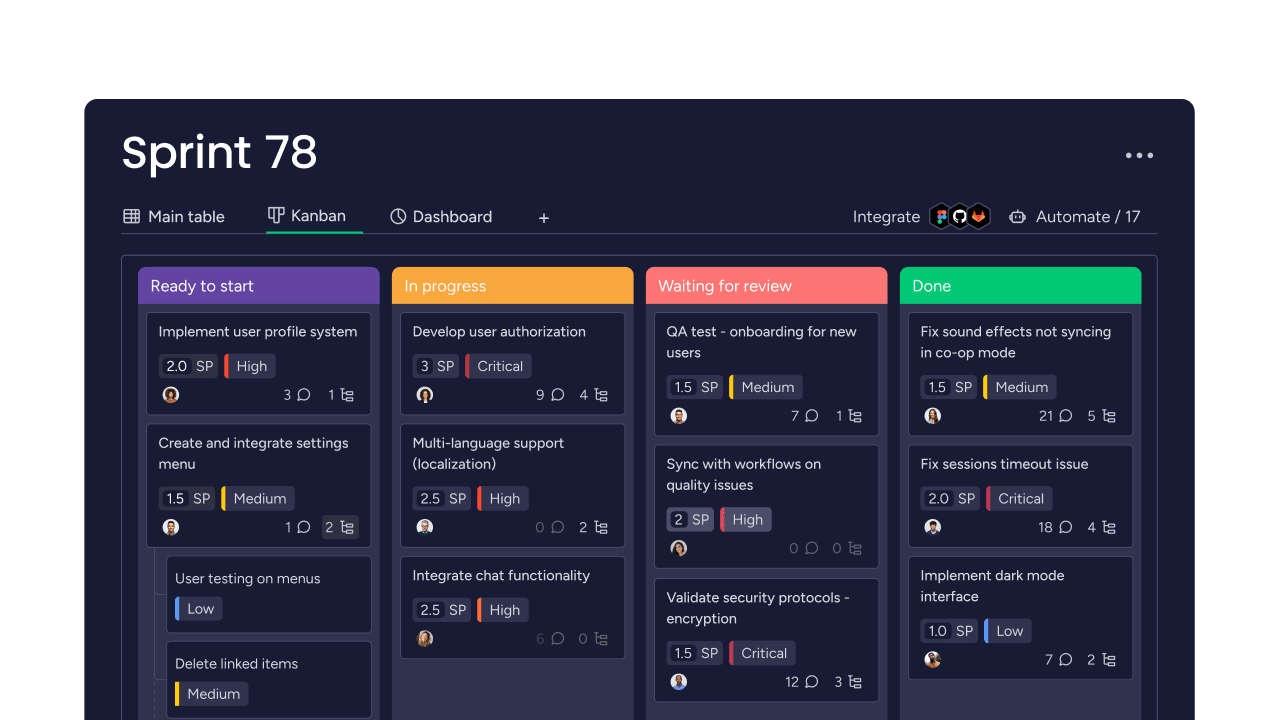
The sprint board in monday dev gives stakeholders transparent sprint tracking that makes demos more meaningful. They see what was planned versus completed using customizable status columns, understanding demonstrated features in context through visual progress indicators and burndown charts.
This visibility extends beyond demo day. Stakeholders can check progress anytime using the Dashboard view, arriving at demos already informed and ready to provide targeted feedback. The Timeline view shows how completed work fits into broader release plans, helping stakeholders understand both immediate progress and long-term direction.
Unified stakeholder collaboration
monday dev brings development teams and business stakeholders together in one workspace with role-based permissions and collaborative boards. Use @mentions to loop stakeholders into specific items, share updates through the Updates section, and maintain ongoing dialogue that makes sprint demos feel like natural checkpoints rather than isolated events.
When stakeholders stay connected to development work through real-time notifications and activity logs, they provide more thoughtful feedback and feel greater ownership of outcomes. The platform’s Guest access lets you include external stakeholders without compromising security.
Automated demo documentation
Capture demo outcomes automatically using monday dev’s built-in documentation features. The Meeting Notes template integrates directly with sprint items, documenting feedback, decisions, and action items without manual note-taking that distracts from stakeholder engagement.
monday dev’s automations can trigger follow-up tasks based on demo feedback—automatically creating backlog items when stakeholders request changes or assigning owners to action items. This automation ensures important insights don’t get lost and creates historical records accessible through the Activity Log for future reference.
Integrated feedback workflows
Feedback flows directly from demos into sprint planning through monday dev’s connected boards. Use the Feedback column type to capture stakeholder input, then convert comments into backlog items with a single click. The Priority column and custom labels help you categorize and organize feedback immediately.
Integration recipes connect demo outcomes to your workflow—automatically updating sprint priorities, triggering notifications to relevant team members, and creating dependencies between feedback items and upcoming sprints. This integration demonstrates responsiveness to stakeholder needs and ensures feedback leads to visible changes tracked through the platform’s reporting features.
Frequently asked questions
How do you demonstrate backend development work in a sprint demo?
Backend development work can be demonstrated through API responses, performance improvements, or the user-facing features it enables. Focus on business impact rather than technical implementation — show faster load times, improved reliability, or new capabilities that backend changes make possible.
What should teams do when key stakeholders miss the sprint demo?
When key stakeholders miss sprint demos, record the session and schedule a focused follow-up meeting. Share the recording along with a summary of demonstrated features and key decisions needed. This ensures critical feedback isn't lost due to scheduling conflicts.
How should development teams handle harsh criticism during sprint demos?
Teams should acknowledge harsh criticism during sprint demos without becoming defensive. Document the specific concerns, thank stakeholders for their honesty, and schedule follow-up discussions to explore solutions. This maintains demo momentum while ensuring concerns receive proper attention.
Should external contractors participate in sprint demonstrations?
External contractors should participate in sprint demonstrations when their work is being showcased or when they need context for upcoming work. Include them when their expertise adds value to discussions or when knowledge transfer between internal and external team members is important.
How do sprint demos work in scaled Agile frameworks like SAFe?
Sprint demos in scaled Agile frameworks often happen at multiple levels — team demos feed into system demos that showcase integrated functionality. Teams coordinate to avoid redundancy while ensuring stakeholders see both detailed progress and big-picture integration. Timing and content require careful planning across teams.
How long should a sprint demo be to keep remote teams engaged?
Remote sprint demos should run 60-90 minutes maximum to maintain engagement. Include breaks every 30 minutes and build in more interaction than in-person demos require. Shorter, focused sessions often work more effectively than trying to replicate lengthy in-person demonstrations online.

 Get started