



Scrum artifacts are the backbone of how teams make work visible, inspect progress, and adapt plans in real time. Each artifact illuminates a different part of your product’s journey — from upcoming ideas to work in progress and ready-to-ship items.
When these artifacts are well‑defined, consistently updated, and easy to read, they help Agile teams deliver better outcomes, sprint after sprint.
In this guide, you’ll learn what Scrum artifacts are, how the product backlog, sprint backlog, and increment work together, and how monday dev helps Agile teams manage them in one place.
Try monday devKey takeaways
- Scrum artifacts make work and value visible, helping Agile teams inspect progress and adapt based on evidence, not assumptions.
- The product backlog, sprint backlog, and increment — along with their commitments — clarify what to build, how to plan sprints, and when work is truly done.
- Extended artifacts like sprint goals, burndown charts, and roadmaps support Scrum by connecting day-to-day delivery to product strategy.
- AI and flow metrics such as cycle time, throughput, WIP, and aging work help teams keep artifacts accurate, focused, and value-driven.
- With monday dev, you can centralizes Scrum artifacts, metrics, and documentation so Agile teams can manage planning, delivery, and insight in one place.
What are Scrum artifacts?
Scrum artifacts are core elements of the Scrum framework that represent work or value and make key information transparent to everyone involved. They show what needs to be done (backlogs) and what has already been delivered (increments), so teams can inspect reality and adapt plans in line with the Agile methodology.
Scrum artifacts are essential tools that help teams visualize work, provide transparency, and enable continuous improvement.
They follow the Agile principle of “working software over comprehensive documentation,” which means creating only documents that help your team deliver value. By keeping these artifacts clear, updated, and accessible, teams can ensure that everyone is aligned and can track the sprint’s progress effectively.
The 3 core artifacts in Scrum
Each Scrum artifact — product backlog, sprint backlog, and increment — has its own commitment that sharpens focus and ensures teams can measure progress consistently.
- Product backlog → Product goal: An ordered, evolving list of everything that might improve the product, guided by a long-term product goal that gives the team clear direction
- Sprint backlog → Sprint goal: The plan for a single sprint, combining selected product backlog items with a sprint goal and a delivery plan so developers know what they aim to achieve
- Increment → Definition of Done: The sum of all completed work that meets the shared Definition of Done, representing usable value that could be released at the end of each sprint
Now that we’ve defined the 3 core Scrum artifacts, let’s look more closely at how each one works in practice, starting with the product backlog.
Product backlog deep dive
The product backlog is the foundation of effective Scrum planning because it captures everything the team might build and orders it by value and urgency. When teams manage this artifact well, they turn high‑level product goals into a clear, adaptable queue of work that can feed every sprint.
Purpose and characteristics of a product backlog
The product backlog is an emergent, ordered list of everything needed to improve the product, and it is the single source of work for the Scrum team. It is continuously refined and owned by the product owner, who ensures items are transparent, prioritized, and aligned with the product goal.
How the product backlog supports Agile development and product goals
A healthy product backlog gives Agile teams a clear, value‑based roadmap so they can focus on the most important work first. By frequently reordering items based on customer feedback, market changes, and strategy, the backlog keeps development adaptable while still pointing toward the long‑term product goal.
How to manage the product backlog
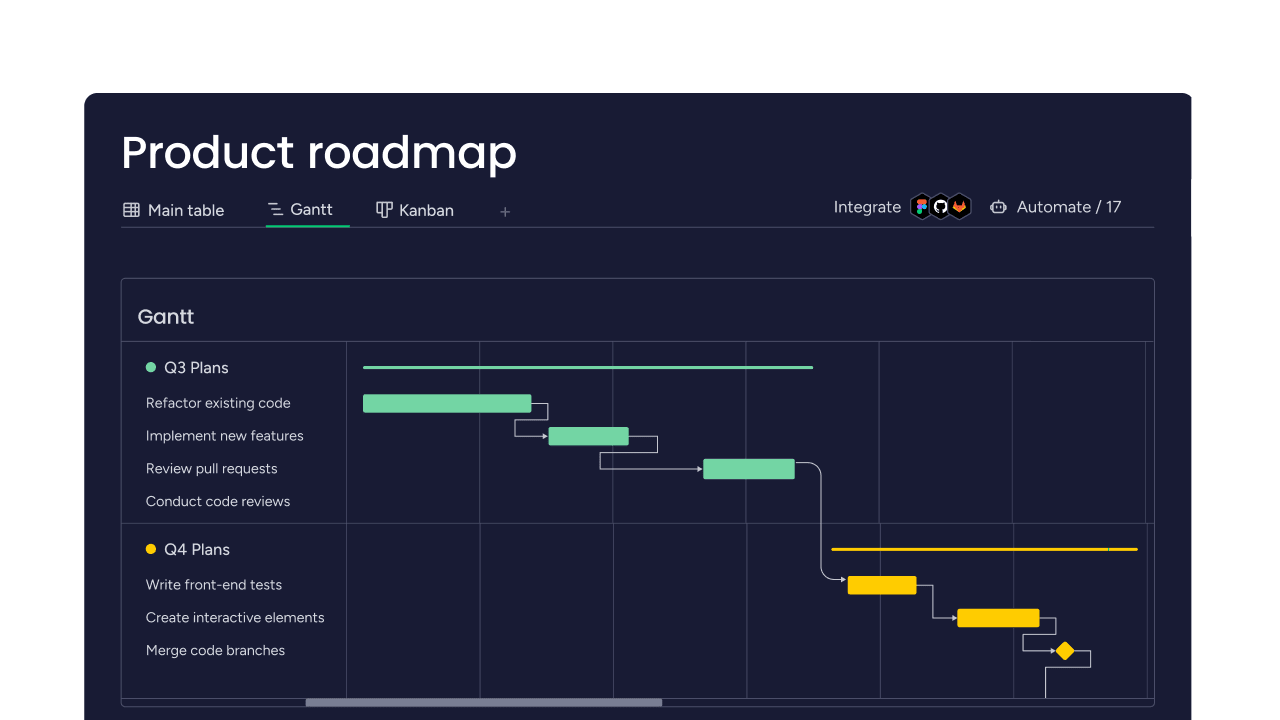
Teams can manage their product backlog on platforms like monday dev using a dedicated backlog board with customizable fields for value, effort, and status, as well as multiple views such as tables, boards, and timelines. Integrations and automations help funnel requests, bugs, and ideas into one place so the product owner can refine, prioritize, and plan upcoming sprints without losing context.
Sprint backlog essentials
The sprint backlog turns high‑level product ideas into a concrete, time‑boxed plan the team can actually deliver in the current sprint. It combines the sprint goal, selected product backlog items, and a delivery plan into one highly visible artifact.
What is the sprint backlog?
The sprint backlog is the plan for a single sprint, created by and for the developers. It includes the sprint goal, the product backlog items chosen for the sprint, and a plan for delivering a usable increment, and it is owned and updated by the developers throughout the sprint.
How the sprint backlog changes during the sprint
The sprint backlog is not a fixed contract. Developers update it as they learn more, discover new tasks, and complete work. At minimum, it should be reviewed and adjusted during each daily Scrum so the team can inspect progress toward the sprint goal, surface impediments, and adapt the plan.
Visualizing sprint backlog progress
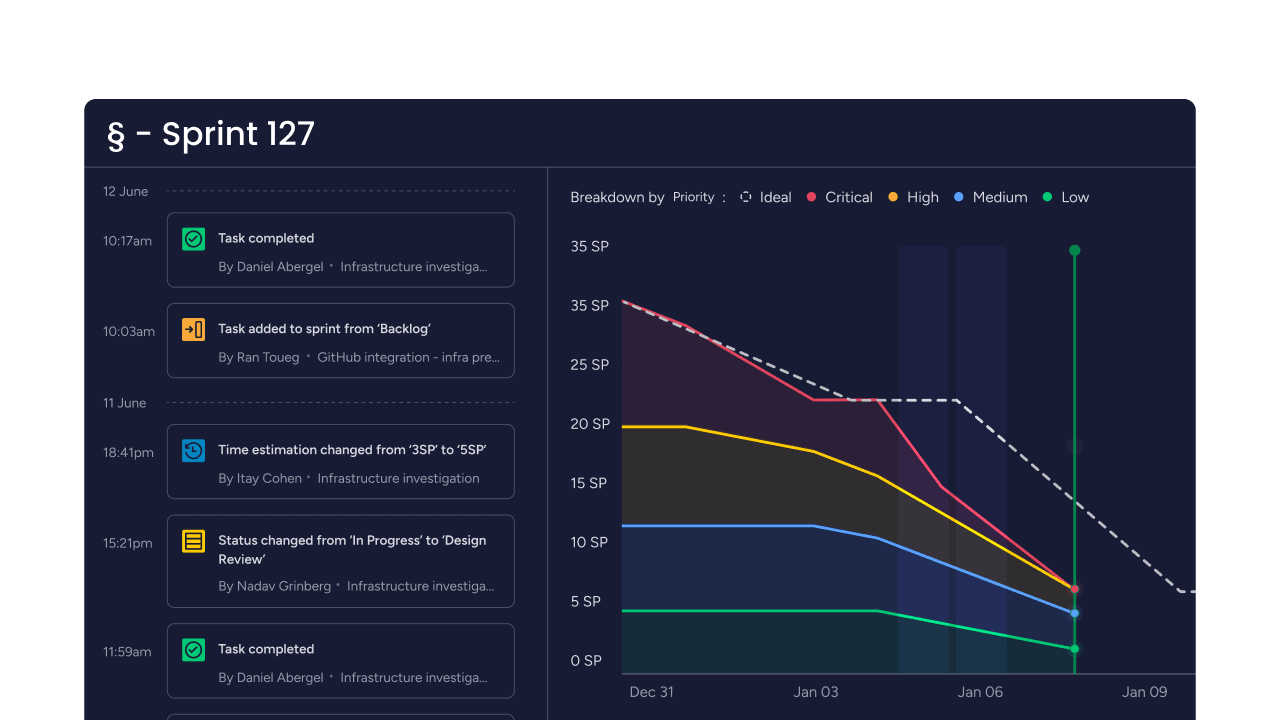
With platforms like monday dev, teams can represent the sprint backlog as a Scrum board where items move across columns such as “To do,” “In progress,” and “Done,” making ownership and status easy to see at a glance. Dashboards can pull from this board to show burndown and velocity charts, so stakeholders can track whether the sprint is on course without diving into every task.
The Increment and Definition of Done
The increment and Definition of Done (DoD) work together to show what is truly finished and ready for use in each sprint. When both are clear, the team and stakeholders share the same understanding of quality, scope, and release readiness.
What is the increment?
In Scrum, the increment is the sum of all completed work that meets the Definition of Done, including work completed in the current sprint and in all previous sprints. It must be usable and in a potentially releasable state at the end of each sprint, even if the product owner decides not to release it yet.
What is the Definition of Done?
The Definition of Done is the formal description of the quality standards work must meet to be considered finished and part of the increment. It creates transparency by giving everyone the same checklist for what “done” means, reducing hidden work, rework, and ambiguity about what can actually be released.

Artifact commitments and ownership
The Scrum Guide links each artifact to a specific commitment and primary owner, so teams always know who is responsible and what “good” looks like for that artifact.
| Scrum artifact | Commitment | Primary owner | What this means in practice |
|---|---|---|---|
| Product backlog | Product goal | Product owner | Sets a clear long‑term outcome for the product and keeps the backlog ordered toward that goal |
| Sprint backlog | Sprint goal | Developers | Defines the single objective for the sprint and guides developers’ day‑to‑day planning and adjustments |
| Increment | Definition of Done | Scrum team | Ensures every increment meets shared quality standards, guaranteeing transparency, usability, and potential releasability |
Extended artifacts in Agile development
Extended Scrum artifacts go beyond the 3 core artifacts to give teams more visibility into goals, progress, and support project management artifacts such as plans and metrics. These Agile development artifacts are not formally defined in the Scrum guide, but are widely used to make complex work easier to understand and manage.
Sprint goal (sprint vision)
The sprint goal (sometimes called sprint vision) is a short statement that explains the main outcome the team aims to achieve in a sprint. It serves as a north star for the sprint backlog, helping developers adapt their plans while still converging on a clear objective.
Burndown and burnup charts
Burndown charts visualize how much work remains in a sprint or release over time, making it easy to see whether the team is on track. Burnup charts show completed work versus the total scope (which can highlight scope changes as well as progress), and are often treated as supporting Agile artifacts in project management.
Product vision, roadmap, and other project artifacts
Artifacts like the product vision, product strategy, and product roadmap describe why the product exists and how it will evolve. Alongside logs, risk registers, and status dashboards, these project management artifacts give stakeholders a broader view of direction and risk while the core Scrum artifacts guide day‑to‑day delivery.
7 key benefits of Scrum artifacts
Scrum artifacts give teams more than just lists and charts — they act as information radiators that support transparency, empiricism, and better project management overall. When teams use these Agile development artifacts effectively, they make clearer decisions, achieve smoother flow, and strengthen alignment across the organization.
- Transparency and shared understanding: Scrum artifacts make work and value visible, so everyone inspects the same information and shares a common picture of goals, scope, and progress.
- Better inspection and adaptation cycles: Because artifacts are updated frequently and reviewed in Scrum events, teams can spot issues early, adjust plans, and continuously improve.
- Improved prioritization and business alignment: A well‑managed product backlog and related project management artifacts help teams focus on the highest‑value work and keep development aligned with business and customer outcomes.
- Predictability and flow: When backlogs and increments are clear, teams can forecast better, track their throughput with charts and dashboards, and maintain a more stable delivery flow.
- Easier stakeholder communication: Artifacts such as backlogs, roadmaps, and increments provide stakeholders concrete, visual evidence of what’s planned and what’s been delivered, reducing misunderstandings.
- Clear quality bar via Definition of Done: Tying the increment to a shared Definition of Done prevents hidden work and rework by making quality expectations explicit and consistent across the Scrum team.
- Stronger collaboration for distributed teams: For distributed Scrum teams, digital artifacts in platforms like monday dev keep everyone aligned asynchronously, with shared boards and dashboards that show the same up‑to‑date information to every location.
AI integration in artifact management
AI can turn Scrum artifacts from static lists into dynamic, insight‑rich assets that stay accurate with far less manual effort. In platforms like monday dev, AI is embedded directly into boards and workflows, so teams can improve their backlogs, sprints, and increments without changing how they already work.
Smarter backlog refinement and prioritization
AI can summarize user feedback, detect duplicates, and group similar items, so product owners spend less time cleaning the product backlog and more time deciding priorities. For example, AI tools in monday dev can summarize, categorize, and extract raw info into clear backlog items aligned with product goals.
Clearer, faster sprint planning
By analyzing historical data such as past velocity and cycle times, AI can suggest more realistic sprint scopes and highlight potential risks before planning concludes. AI‑powered insights can forecast potential bottlenecks and help teams choose sprint goals and sprint backlogs that align with real capacity.
Real‑time visibility into flow and risks
AI can monitor artifacts across boards to spot patterns, such as blocked items, aging work, or scope creep, and surface them in dashboards without manual reporting. For example, AI in monday dev can flag at‑risk milestones, suggest next steps, and keep Scrum artifacts up to date so the increment and Definition of Done reflect reality, not last week’s status.
Measuring artifact success with flow metrics
Scrum artifacts work best when they keep value flowing smoothly through your system, not just when they “look” organized. Flow metrics, such as cycle time, throughput, work in progress (WIP), and aging WIP, reveal whether your backlogs and boards are helping or hindering delivery.
- Cycle time measures how long it takes a work item to move from “in progress” to “done,” showing how quickly your system turns backlog items into increments. Rising cycle times can signal overloaded sprints, an unclear Definition of Done, or bottlenecks in your workflow.
- Throughput is the number of work items completed per time period (e.g., per week or per sprint) which helps you understand your actual delivery rate. When artifacts are clear and well‑prioritized, throughput tends to stabilize, making forecasts and sprint planning more reliable.
- Work in progress (WIP) tracks how many items are currently in progress, often visualized column‑by‑column on your Scrum or Kanban board. High WIP can indicate that the sprint backlog is overloaded or that work keeps starting without finishing, which usually slows flow and increases context switching.
- Aging work in progress shows how long current, unfinished items have been open, acting as an early warning for stuck work. Watching aging WIP helps teams swarm on blocked backlog items before they quietly derail the sprint or undermine the increment’s quality.
Tracking metrics in dashboards and boards
The most useful flow metrics live next to your artifacts, not in separate slide decks. For example, in monday dev, teams can use dashboards and reports to visualize cycle time, throughput, and WIP directly from their product and sprint backlog boards, so they can inspect and adapt in real time without manual reporting.
5 common artifact antipatterns (and how to avoid them)
Misused Scrum artifacts can quietly slow teams down and hide problems instead of exposing them. Spotting common antipatterns early helps teams keep their product and sprint backlogs, increments, and Definition of Done genuinely useful rather than just “administrative.”
1. Product backlog as a dumping ground
Every idea, request, or “nice‑to‑have” goes into the product backlog and rarely gets pruned, making refinement painful and priorities unclear. Over time, this massive list stops functioning as a strategic artifact and becomes a parking lot that nobody trusts.
How to avoid: Timebox regular backlog refinement, archive stale items, and enforce a clear “definition of ready” so only well‑understood, valuable work stays near the top.
2. Sprint backlog locked but not updated
The team treats the sprint backlog as a fixed contract from sprint planning and never updates it as they learn more. This breaks empiricism, because the backlog no longer reflects reality or progress toward the sprint goal.
How to avoid: Use the Daily Scrum to adjust tasks, re‑estimate when needed, and make new work visible so the sprint backlog always reflects the current plan for achieving the sprint goal.
3. Inflated Definition of Done vs. reality
Teams copy an ambitious Definition of Done (DoD) from elsewhere that they cannot actually meet, or different teams use different DoDs for the same product. As a result, “done” becomes fuzzy, increments are not truly releasable, and stakeholders lose confidence in reported progress.
How to avoid: Co‑create a realistic, shared DoD for each product, starting with a minimal standard you can always meet, and gradually raising the bar as capabilities improve.
4. Invisible increment (no clear releases)
Work is marked “done” on the board, but increments are rarely integrated, tested end‑to‑end, or released, so nobody sees the actual value delivered. This makes it hard to inspect the product, gather feedback, or decide what to do next based on real outcomes.
How to avoid: Establish a regular release cadence (or continuous delivery), ensure integration and testing are part of the DoD, and demo each increment to stakeholders in sprint reviews.
5. Artifacts scattered across tools and channels
Product and sprint backlogs, specs, and status updates live in different tools, spreadsheets, and chat threads, so no single artifact tells the whole story. Using a central platform keeps Scrum artifacts, discussions, and dashboards in one place, reduces duplication, and makes inspection and adaptation much easier.
How to avoid: Consolidate your Scrum artifacts into a single platform like monday dev, link related docs to backlog items, and use shared dashboards so everyone inspects the exact source of truth.
Try monday devHow monday dev transforms Scrum artifacts
Scrum artifacts are most effective when they live in one place, stay up to date, and connect directly to how your team plans, builds, and ships software. That’s precisely how monday dev works. The platform gives product and engineering teams a flexible workspace to manage product backlogs, sprint backlogs, and increments end‑to‑end.
Model the full lifecycle of Scrum artifacts
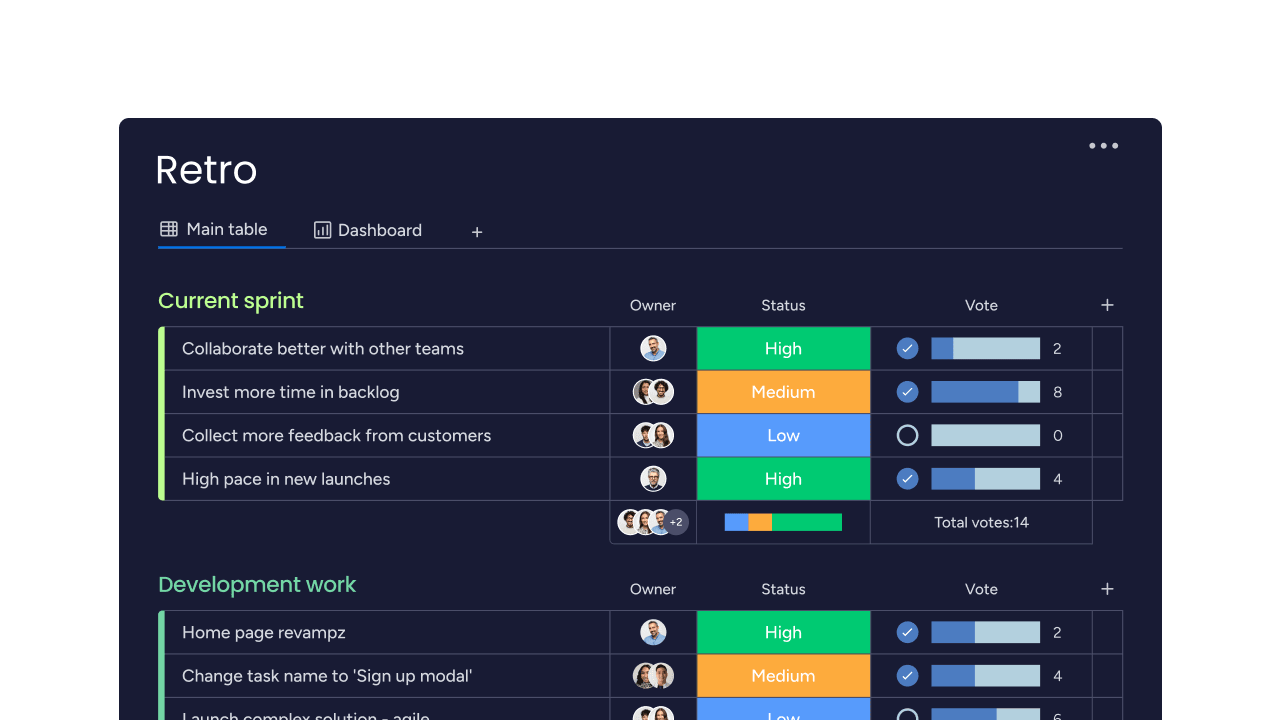
In monday dev, teams can manage a central product backlog, feed selected items into sprint backlog boards, and track increments through releases and retrospectives — all on connected boards. Linked items, status columns, and automations keep work flowing from idea to done without losing context between artifacts.
Support Scrum, Kanban, and hybrid workflows
With monday dev, teams can combine Scrum and Kanban boards, backlogs, and roadmap views, so each squad can work their way while leaders see a unified picture. You can visualize WIP limits, lead times, and cross‑team dependencies on shared dashboards, helping hybrid teams coordinate sprints and continuous flow work in a single platform.
Use AI to keep artifacts clean and insight‑rich
Built-in AI capabilities can summarize retro notes, categorize new backlog items, extract key details from feedback, and generate sprint summaries directly on your boards. AI‑powered insights and tools can also flag risky items or overloaded sprints, so your Scrum artifacts stay accurate and decision‑ready without extra manual reporting.

Experience how monday dev manages Scrum artifacts, sprints, and flow metrics in one flexible workspace with a free, 14-day trial.
Try monday devFAQs
How many artifacts are in Scrum?
Scrum formally defines 3 artifacts: the product backlog, the sprint backlog, and the increment. Many Agile teams also rely on extended artifacts such as sprint goals, burndown charts, and product visions to improve visibility and alignment. Using a platform like monday dev helps keep these artifacts and extensions connected in one place.
What is the most important Scrum artifact?
Different Scrum artifacts matter more in different contexts, so there is no single “official” most important artifact. Many practitioners highlight the increment as especially critical because it represents real, usable value delivered to customers. Others emphasize that without a clear backlog and sprint plan, teams struggle to deliver meaningful increments consistently.
Can we customize Scrum artifacts for our team?
Yes, teams can customize how Scrum artifacts look and how they are represented, as long as they preserve the 3 core artifacts and their purpose: transparency, inspection, and adaptation. For example, you might add custom fields, views, or reports. Using monday dev lets teams tailor boards and workflows around product and sprint backlogs while keeping core Scrum practices intact.
How often should artifacts be updated?
The product backlog is updated continuously as new ideas, feedback, and priorities emerge. The sprint backlog is updated throughout the sprint as the team learns more and adjusts its plan. The increment and ‘Definition of Done’ are reviewed at least once per sprint, often during the Sprint Review and Retrospective. Using monday dev centralizes these updates in real time.
What's the difference between Scrum artifacts and project documentation?
Scrum artifacts are living documents that show what the team is working on, what has been completed, and what value is being delivered. Project documentation is broader and may include specifications, diagrams, contracts, and reports that change less frequently. Using monday dev, teams can keep both active artifacts and supporting documents accessible in a single digital workspace
Do distributed teams need different artifact practices?
Distributed teams use the same core Scrum artifacts but rely more on digital tools, asynchronous updates, and strong shared visibility to keep everyone aligned. Clear ownership, consistent naming, and always‑on access become even more critical. Remote and hybrid teams using monday dev get shared boards, dashboards, and automations so their artifacts stay transparent across time zones.

 Try monday dev