



NetSuite CRM and Salesforce are both serious platforms with real strengths, but they’re built around fundamentally different assumptions about how revenue gets generated. One platform extends your financial and operational data, the other powers sales execution. That distinction matters more than any feature comparison. We’ll compare NetSuite CRM and Salesforce across what matters most to revenue leaders. You’ll also find a quick-verdict comparison table, a breakdown of which platform fits which business profile, and questions to help you reach a confident decision before signing anything.
If neither platform fits your team’s pace or budget, there’s a third option: a flexible, AI-first CRM that gets you up and running in days, without the implementation overhead NetSuite and Salesforce demand. The sections below help you make a confident decision, including how platforms like monday CRM offer faster deployment with built-in AI and no-code customization.
Key takeaways
- Your business model decides the winner: NetSuite CRM suits teams where finance and sales share data; Salesforce suits teams focused purely on closing deals faster.
- Implementation costs more than the license: Both platforms require months of setup, dedicated admin support, and ongoing developer or consultant involvement.
- Salesforce wins on sales features, NetSuite wins on financial visibility: Salesforce leads on AI, mobile, and pipeline management; NetSuite leads when orders, inventory, and revenue data need to live in one place.
- Customization approaches differ: Salesforce lets non-technical users build workflows without IT; NetSuite requires developer support for most changes, which slows revenue teams down.
- There’s a faster path: monday CRM deploys in days, not months — with built-in AI, no-code customization, and pipeline visibility your whole team will actually use.Try monday CRM
NetSuite CRM vs Salesforce: Quick verdict
The NetSuite CRM vs Salesforce decision hinges on one question: does your business run on ERP-led revenue operations or CRM-led sales operations? Your answer determines your data architecture, team workflows, and implementation timeline.
NetSuite CRM fits organizations where finance, operations, and sales teams need unified access to customer and transactional data within a single system. The platform runs as a module within NetSuite ERP. Customer records, inventory levels, billing data, and order management all live in one database:
- Sales reps can check inventory availability while creating quotes.
- Finance teams can view customer payment history alongside sales forecasts.
Salesforce excels when sales velocity, pipeline management, and customer engagement drive your business. The platform handles leads, opportunities, accounts, and complex sales processes with serious depth. Sales teams gain access to:
- Sophisticated lead routing and opportunity scoring
- Collaborative forecasting
- Sales cadence automation
NetSuite CRM vs Salesforce comparison table
Here’s how these platforms compare across what matters most. The table below shows the core differences.
| Dimension | NetSuite CRM | Salesforce |
|---|---|---|
| Primary use case | Unified ERP-CRM operations with quote-to-cash workflows | Sales-focused pipeline management and customer engagement |
| Ideal customer profile | Businesses needing integrated financial and customer data | Sales-led organizations prioritizing rep productivity |
| Deployment complexity | High, requires ERP implementation expertise | Moderate to high, varies by customization needs |
| Customization approach | SuiteCloud platform with developer-led scripting | Declarative tools (Flow Builder) plus Apex code |
| Pricing model | Bundled with ERP, per-user licensing, module add-ons | Tiered editions with per-user pricing and add-on costs |
| Implementation timeline | 3-6 months typical | 3–12 months depending on complexity and size of company |
| Integration ecosystem | Native ERP integration, limited third-party marketplace | Extensive AppExchange with 5,000+ integrations |
| AI capabilities | Integrated AI for analytics, automation, and predictive planning | Einstein AI for scoring, forecasting, and automation |
| Mobile experience | Functional but less intuitive | Robust mobile app with offline access |
| Reporting and analytics | Unified ERP-CRM reporting, steeper learning curve | Customizable dashboards, Einstein Analytics |
The core differences go deeper than feature lists. These distinctions help you avoid picking the wrong platform for how your team actually works. Here’s what separates them:
- Data architecture: NetSuite CRM operates on a unified ERP-CRM database where customer, financial, and operational data share a single source of truth. Salesforce uses a CRM-first architecture that requires integrations to connect with financial or operational systems.
- Customization model: NetSuite’s SuiteCloud platform enables deep customization through SuiteScript and SuiteFlow, but typically requires developer expertise. Salesforce offers both declarative tools and programmatic options, providing more flexibility for non-technical users.
- Pricing transparency: NetSuite pricing is bundled with ERP licensing and requires a sales consultation. Salesforce publishes tiered pricing, but total costs escalate quickly with add-ons like CPQ, Marketing Cloud, and Service Cloud.
Compare more: Sugar CRM vs Salesforce
What NetSuite CRM and Salesforce are built for

Each platform’s design philosophy explains where it wins and where it falls short. NetSuite CRM and Salesforce solve different problems. Their architecture determines what they do well and where they struggle.
NetSuite CRM: unified ERP and CRM data in one system
NetSuite CRM is built as a module within the NetSuite ERP platform, which means customer data, financial records, inventory, and order management all share a single database. This architecture removes the need for CRM-ERP integrations. You get real-time visibility into customer profitability, order status, and fulfillment.
This unified approach gives you:
- Real-time quoting: Sales reps can see inventory availability while creating quotes.
- Cross-functional visibility: Finance teams can view customer payment history alongside sales forecasts.
- Instant data synchronization:: Data flows between sales, finance, and operations without manual transfers.
This works best when finance, operations, and sales teams need the same customer and transactional data in one place.
Salesforce: deep CRM functionality for sales-led teams
Salesforce is purpose-built as a CRM platform, with deep functionality for managing leads, opportunities, accounts, and sales processes. Its architecture prioritizes sales team productivity, pipeline visibility, and customer relationship management. You get extensive customization options for complex sales workflows.
Salesforce’s CRM-first design includes:
- Lead routing and scoring: Sophisticated rules based on territory, product interest, or engagement signals
- Collaborative forecasting: Roll-up forecasts by team, territory, or product line
- Sales cadence automation: Structured outreach sequences to keep deals moving
- ERP integration via connectors: Connects to financial systems, but is not natively designed to manage operational data
The distinction between ERP-led and CRM-led platforms directly impacts data flow, team collaboration, and system complexity. Businesses with complex order-to-cash workflows benefit from NetSuite’s unified approach. Businesses focused on sales velocity and customer engagement benefit from Salesforce’s CRM-first design.
NetSuite CRM vs Salesforce CRM feature comparison
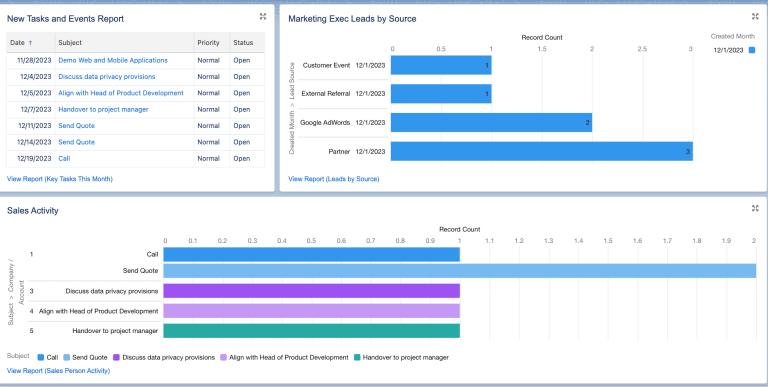
Here’s how each platform handles specific sales workflows. We’ll compare core CRM capabilities across both platforms, from lead management to mobile access.
Lead and contact management
Both platforms handle lead capture and contact management differently. Here’s what matters:
NetSuite CRM:
- Manages leads within its unified database, connecting records directly to quotes, orders, and customer accounts
- Provides visibility into the full customer lifecycle, from first contact through fulfillment
- Lead scoring and assignment capabilities are more basic compared to dedicated CRM platforms
Salesforce:
- Offers advanced lead management with sophisticated scoring models and automated assignment rules
- Includes duplicate detection and lead conversion workflows
- Allows sales teams to configure lead routing based on territory, product interest, or engagement signals
Bottom line: Salesforce provides stronger capabilities for high-volume lead management and sophisticated qualification workflows. NetSuite CRM excels at lead-to-revenue tracking where visibility into orders and fulfillment matters most.
Pipeline and opportunity management
How each platform handles opportunities determines what it’s built for. Here’s how they compare:
NetSuite CRM:
- Manages opportunities with direct links to quotes, orders, and fulfillment records
- Allows sales reps to generate quotes from opportunities with real-time pricing and inventory visibility
- Won opportunities convert directly into sales orders, keeping the quote-to-cash process seamless
Salesforce:
- Provides customizable sales stages and opportunity splits for team selling
- Includes collaborative forecasting and Einstein AI-powered opportunity scoring
- Sales managers can configure complex approval workflows and analyze win/loss patterns
Bottom line: Salesforce delivers more depth for complex sales cycles with multiple decision-makers. NetSuite CRM works best for quote-to-cash workflows where opportunity-to-order conversion must be seamless.
Marketing and campaign management
Marketing capability separates these platforms more than almost anything else.
NetSuite CRM includes basic campaign management for tracking marketing activities and associating leads with campaigns. Most organizations using NetSuite CRM rely on third-party marketing platforms for email automation and lead nurturing.
Salesforce integrates natively with Marketing Cloud for advanced marketing automation, lead nurturing, and multi-touch attribution. Salesforce wins for marketing-led organizations that need advanced automation and attribution.
Mobile CRM access
Field sales teams need strong mobile access.
NetSuite CRM provides mobile access through the NetSuite mobile app. The mobile experience is less intuitive than dedicated CRM mobile apps, and offline capabilities are limited.
Salesforce delivers a robust mobile app with offline access, customizable layouts, and mobile-specific workflows, giving it a distinct advantage in mobile CRM usability and offline functionality.
Reporting, dashboards, and forecasting
Revenue leaders need visibility into both sales performance and financial outcomes. How each platform handles reporting determines whether leadership trusts the data enough to act on it.
NetSuite CRM reporting is built on the same data model as its ERP, which creates a unified view that most CRM platforms can’t match:
- Revenue leaders can analyze customer profitability, order history, and revenue recognition in a single report. No data exports or integrations required.
- Sales managers can view pipeline alongside accounts receivable, inventory levels, and fulfillment status.
- NetSuite’s reporting offers deep, unified data but requires more initial training, while Salesforce’s dashboards are more intuitive for immediate sales insights.
Salesforce forecasting and analytics prioritize sales performance visibility:
- Collaborative forecasts can be rolled up by team, territory, or product line.
- Einstein Forecasting uses historical data and pipeline trends to predict revenue outcomes.
- Customizable dashboards provide real-time visibility into sales analytics.
- The trade-off: financial reporting requires integrations with ERP or accounting systems, creating potential data latency and reconciliation challenges.
The key distinction: NetSuite provides unified visibility across CRM and ERP, showing how pipeline translates to revenue, cash flow, and profitability. Salesforce requires integrations to connect CRM data with financial systems.
Customization, workflow automation, and no-code control
When revenue teams can adapt CRM workflows without IT, they respond faster to change. Can sales managers add pipeline stages today? Can RevOps build reports without engineering? Your platform choice determines the answer.
NetSuite customization is powerful but developer-dependent:
- The SuiteCloud platform enables custom workflows, scripts, and integrations through SuiteScript, SuiteFlow, and SuiteBuilder.
- The SuiteApp marketplace offers pre-built extensions for industry-specific needs.
- Most organizations rely on implementation partners or internal developers for significant customizations.
Salesforce customization is more accessible for non-technical users:
- Flow Builder handles automated processes; Lightning App Builder handles custom interfaces.
- The AppExchange marketplace offers 5,000+ pre-built applications and integrations.
- Non-technical users can build automations, custom objects, and reports without developer support.
Salesforce’s low-code tools are more accessible for non-technical users than NetSuite’s developer-heavy customization model. That matters when revenue teams need to move fast without waiting on IT.
Learn more: AI account sync agent
Integrations and how NetSuite and Salesforce work together
Many organizations use both Salesforce for CRM and NetSuite for ERP. Know your integration options before committing. They determine how data syncs and workflows connect.
Does NetSuite integrate with Salesforce?
Yes, NetSuite and Salesforce can integrate via native connectors, middleware platforms, or custom APIs. Many businesses sync customer and order data between the two systems to maintain sales-focused workflows while leveraging NetSuite’s financial and operational capabilities.
Here are your integration options and their trade-offs:
- Native connectors: Pre-built integrations offered by NetSuite or Salesforce partners provide faster setup but limited customization.
- Middleware platforms: Platforms like Celigo, Boomi, or MuleSoft offer more flexibility at higher cost and require ongoing maintenance.
- Custom APIs: Developer-built integrations for unique workflows provide maximum flexibility at the highest cost.
- iPaaS solutions: Integration platform as a service for cloud-to-cloud connectivity offers scalability with subscription-based pricing.
Plan for three things before integrating NetSuite and Salesforce:
- Data ownership: Define which system is the source of truth for customer data, order data, and financial data before implementation.
- Sync frequency: Determine how often data needs to update between systems to avoid stale records.
- Conflict resolution: Establish rules for handling duplicate records and mapping discrepancies.
Common integration challenges include duplicate records, data latency, and mapping discrepancies. Plan for them upfront to avoid downstream problems.
AI capabilities and revenue team adoption

AI capabilities separate CRM platforms more than ever. The real question isn’t what AI can do. It’s whether sales reps will actually use it day to day.
AI for lead scoring and follow-ups
Salesforce Einstein AI scores leads based on engagement signals, demographic fit, and historical conversion patterns. Einstein also recommends next-best actions and automates follow-up task creation.
NetSuite CRM offers more limited AI capabilities for lead prioritization, relying on manual scoring rules or third-party AI tools.
AI for deal summaries and email writing
Salesforce Einstein generates deal summaries, email drafts, and next-step recommendations based on opportunity data and communication history.
NetSuite CRM relies on manual summaries or third-party AI tools for deal intelligence and email generation.
Sales reps adopt AI when it’s easy to use, not when it has the most features. Sales reps adopt AI when it’s easy to use and integrates seamlessly into their existing workflows. Here’s how the two platforms compare on AI usability:
| AI capability | NetSuite CRM | Salesforce |
|---|---|---|
| Lead scoring | Manual rules or third-party tools | Einstein AI, automated and configurable |
| Next-best-action recommendations | Not available natively | Einstein recommendations |
| Deal summaries | Manual or third-party | Einstein-generated from opportunity data |
| Email drafting | Manual or third-party | Einstein-generated drafts |
| Setup required | Minimal (limited features) | Training and configuration needed |
Salesforce’s AI requires training and configuration to deliver value. NetSuite CRM’s AI is less prominent, with limited native AI features for daily sales workflows.
Pricing, implementation, and total cost
Both platforms cost more than the license fees suggest. Know the total cost of ownership before signing. It prevents budget surprises.
NetSuite CRM pricing
- Pricing is bundled with NetSuite ERP and is not publicly listed; a sales consultation is required.
- Per-user licensing applies, with additional costs for modules, customizations, and support.
- Total cost of ownership includes ERP licensing, implementation consulting, customization development, and ongoing support.
- Implementation typically takes 3-6 months before teams see full value.
Salesforce pricing
- Tiered pricing across Essentials, Professional, Enterprise, and Unlimited editions.
- Additional costs accumulate for add-ons like CPQ, Marketing Cloud, Service Cloud, and Einstein AI features.
- Per-user costs can escalate quickly for large teams — many organizations find that the features they need require higher-tier editions or paid add-ons.
- Implementation ranges from 3–12 months depending on your business size, with faster deployment possible for simpler configurations.
Best fit by team size and business model
Platform fit depends on organization size, team structure, and operational priorities. Here’s how each platform maps to different business profiles.
Small businesses
Small businesses typically lack the resources for complex CRM or ERP implementations. Here’s what matters:
- Salesforce: Essentials or Professional editions may be viable for sales-focused teams with straightforward needs, but customization and integration costs can strain budgets.
- NetSuite CRM: Generally too complex and expensive for small businesses.
Mid-market companies
Mid-market companies often need robust CRM capabilities but may not require full ERP integration:
- Salesforce is a strong fit for sales-led mid-market companies prioritizing pipeline visibility and rep productivity.
- NetSuite CRM is stronger for mid-market businesses with complex order-to-cash workflows that require unified financial and operational data.
CRM-led teams vs. ERP-led teams
| Team type | Primary priorities | Stronger platform |
|---|---|---|
| CRM-led teams | Sales velocity, pipeline visibility, customer engagement | Salesforce |
| ERP-led teams | Financial accuracy, order management, operational efficiency | NetSuite CRM |
monday CRM: A flexible alternative to NetSuite and Salesforce
NetSuite CRM and Salesforce both deliver powerful capabilities, but they come with months-long implementations, steep learning curves, and ongoing admin overhead. For revenue teams that need a CRM up and running quickly without sacrificing intelligence or flexibility, monday CRM offers a different path. You get AI-powered sales workflows, customizable pipelines, and cross-team visibility in days, not quarters.
The platform combines no-code customization with built-in AI that actually helps reps close deals faster. Sales teams can adapt workflows without waiting on IT, while leadership gets the pipeline visibility and forecasting accuracy they need to make confident decisions. If your team values speed to value and daily usability over enterprise complexity, monday CRM is worth evaluating alongside the traditional options.
AI agents that work alongside your sales team
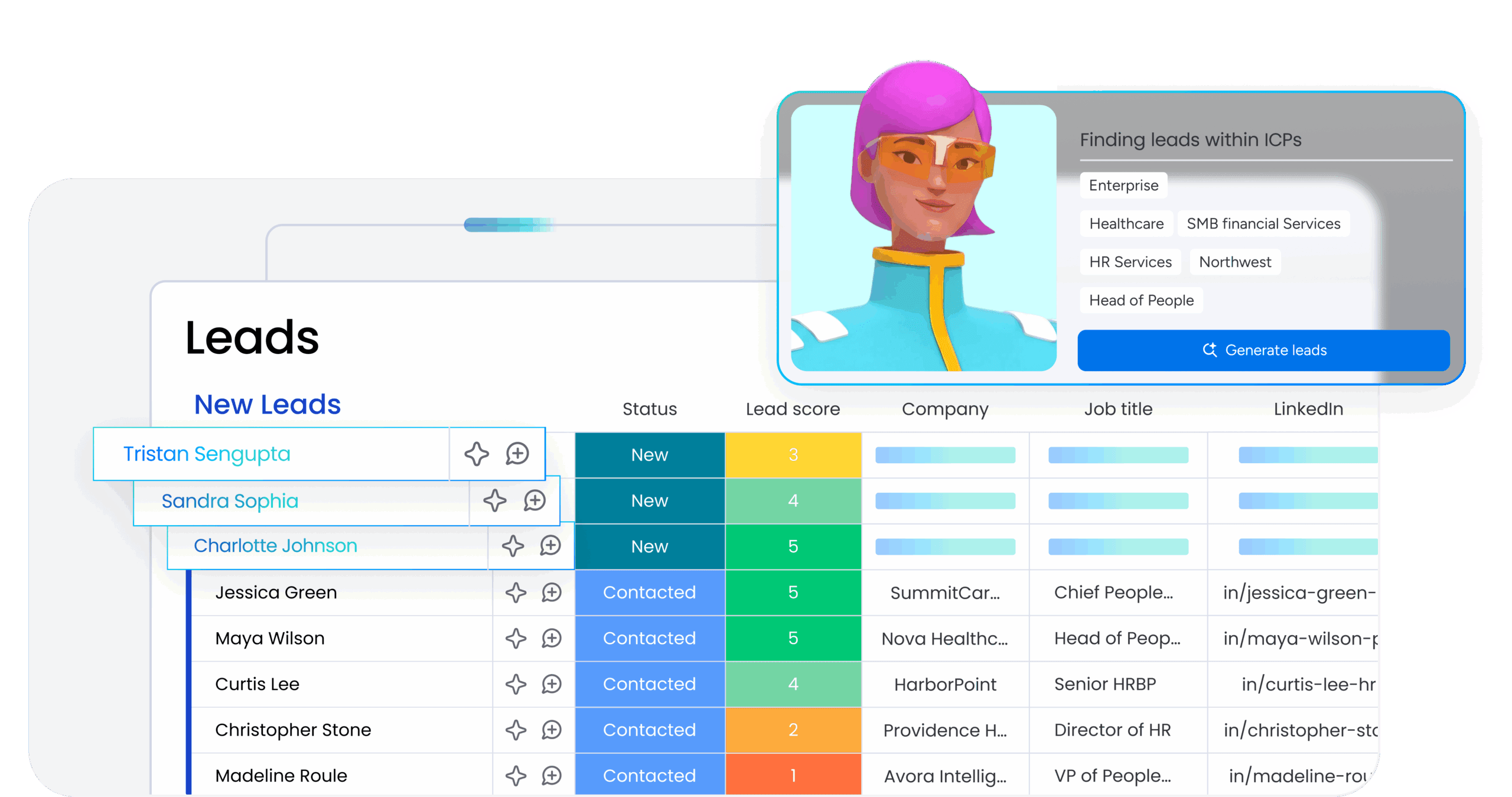
monday agents handle repetitive tasks like lead enrichment, follow-up reminders, and data entry so reps can focus on selling. The AI learns from your team’s patterns and suggests next-best actions based on deal stage, customer behavior, and historical win rates. Sales managers get AI-generated deal summaries and pipeline insights without manual reporting.
No-code pipeline customization that adapts to your process
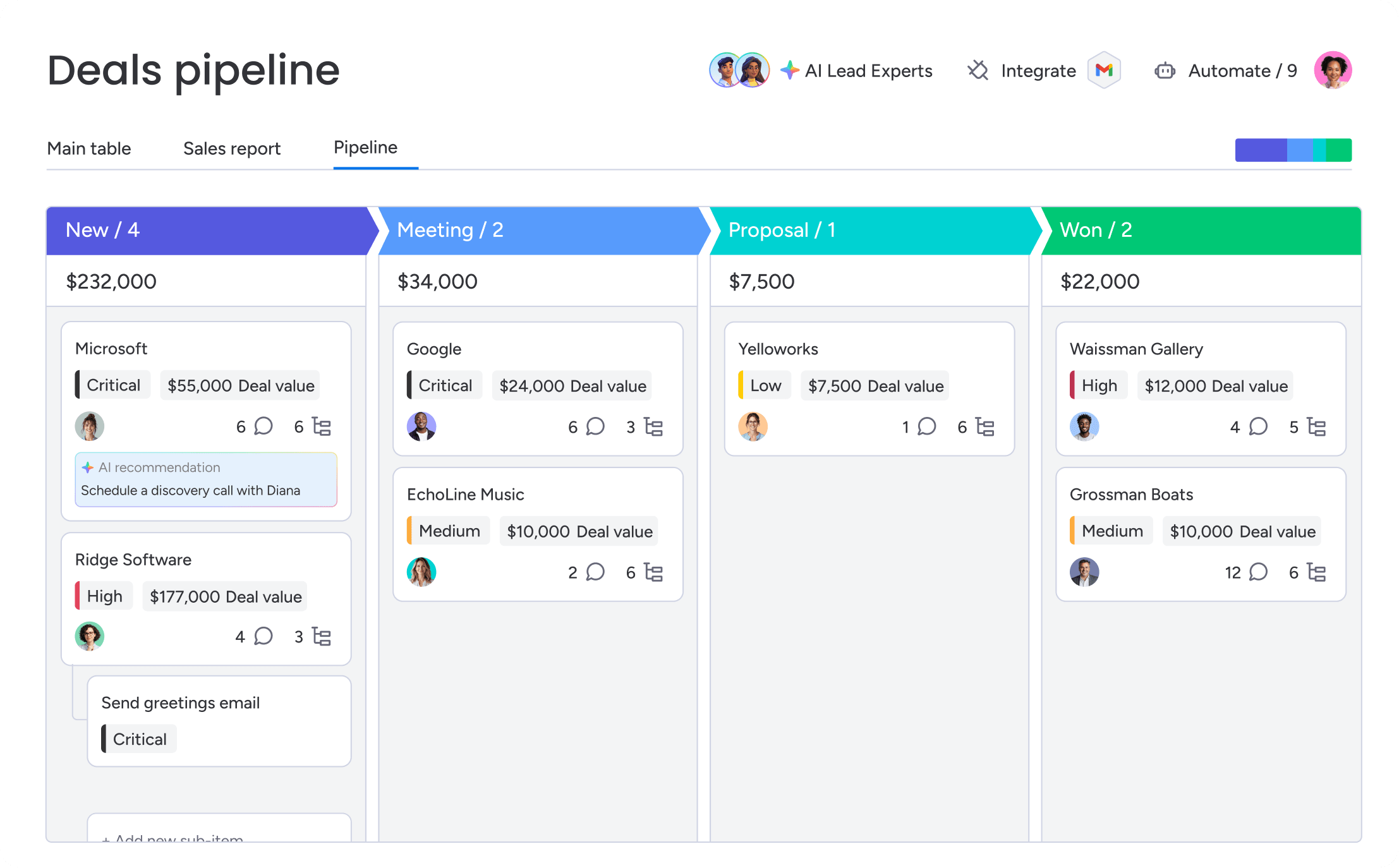
Revenue teams can build and modify sales workflows without developer support. Drag-and-drop automation lets you create custom deal stages, approval flows, and notification rules in minutes. When your sales process changes, your CRM adapts immediately instead of waiting weeks for IT to implement updates.
Built-in AI for email drafting and lead scoring
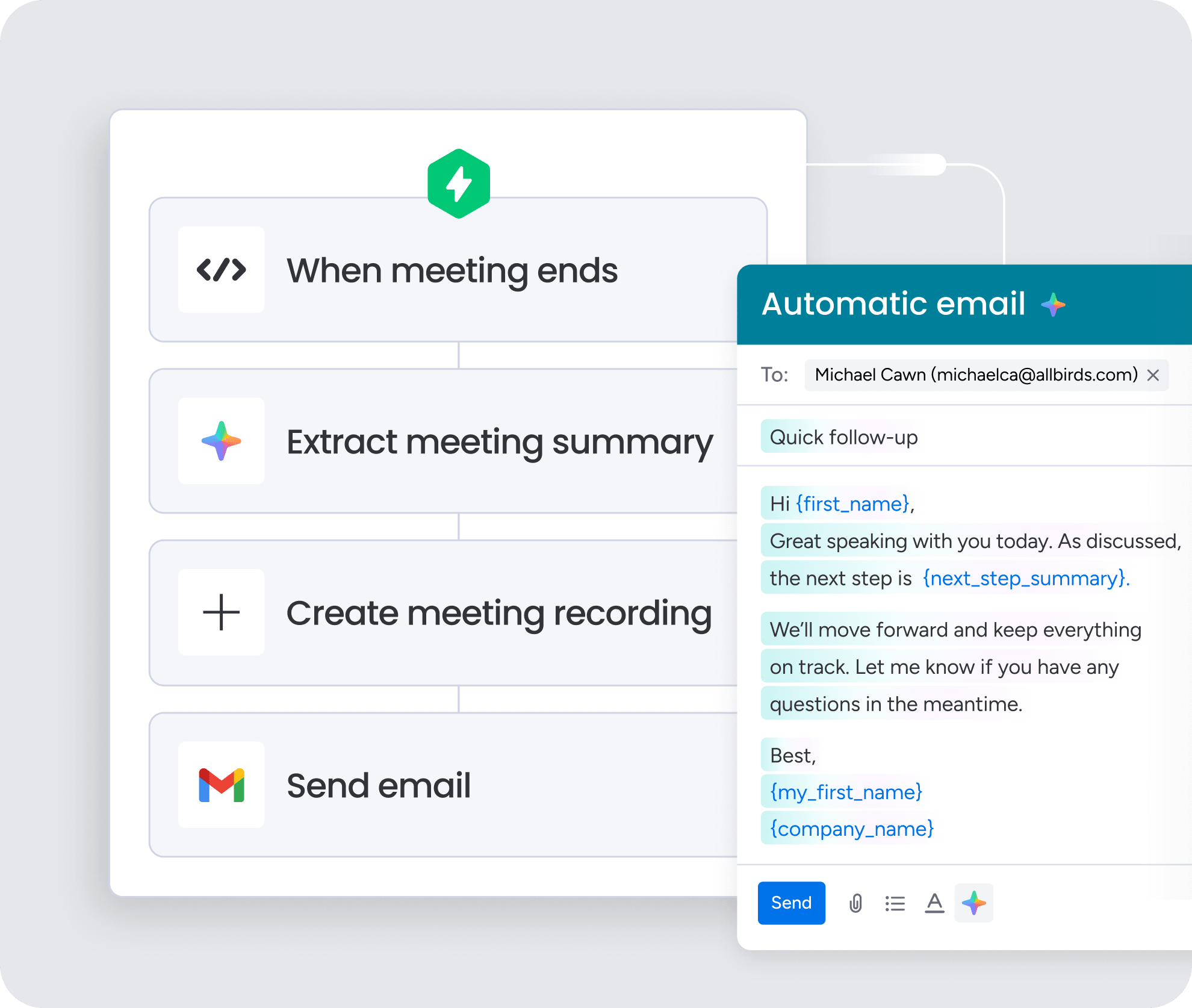
The platform uses AI to draft personalized emails based on deal context and customer history, cutting response time significantly. AI-powered lead scoring prioritizes prospects based on engagement signals and fit, so reps focus on the opportunities most likely to close. These features work out of the box, with no separate AI add-ons or complex configuration required.
Cross-team visibility without ERP integration overhead
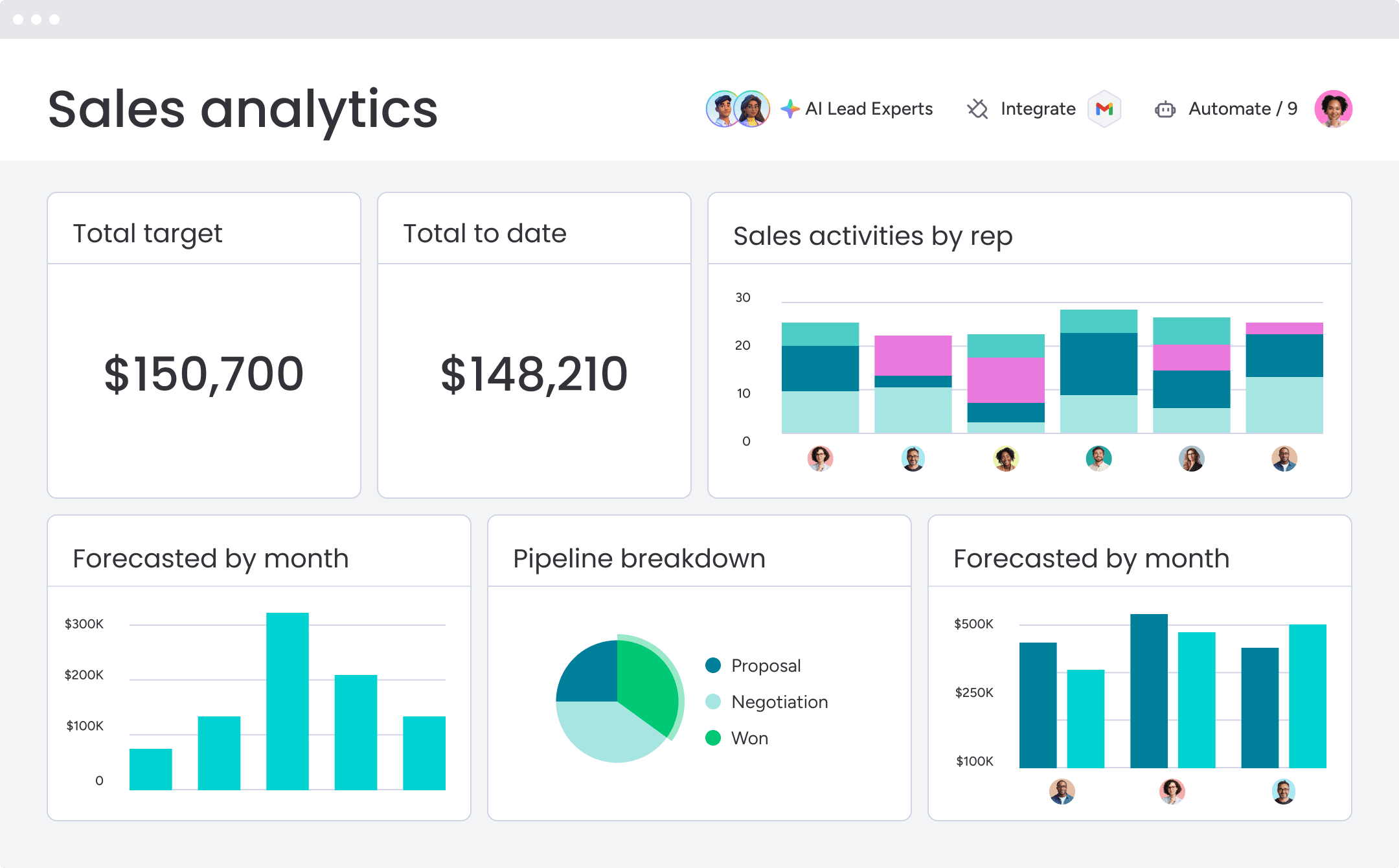
Sales, marketing, and customer success teams work from the same platform with real-time data visibility. You get unified customer views and pipeline reporting without the complexity of integrating separate CRM and ERP systems. Implementation takes weeks instead of months, and your team starts seeing value from day one.
7 questions to ask before choosing a CRM
These questions help revenue leaders make a decision. Each question covers a specific part of platform fit. Work through them before committing.
| Question | NetSuite CRM | Salesforce | monday CRM |
|---|---|---|---|
| Which system should own customer data? | Stronger fit when customer data should live alongside financial and operational data in a unified ERP-CRM system | Stronger fit when customer data should prioritize sales workflows and engagement tracking | Customer data lives in a flexible, centralized platform accessible to sales, marketing, and customer success teams without ERP integration overhead |
| How much customization will revenue teams need? | Requires developer involvement for significant customizations through SuiteScript and SuiteFlow | Offers low-code customization options through Flow Builder and Lightning for non-technical users | No-code customization lets revenue teams build and modify workflows without IT support using drag-and-drop automation |
| How fast does the CRM need to launch? | Implementations typically take 6–12 months due to ERP complexity | Timelines range from 3–9 months depending on customization needs | Deploys in days or weeks, with teams seeing value from day one without months-long implementation cycles |
| Which teams need customer visibility? | Advantageous when sales, finance, and operations all need access to customer data through unified architecture | Sufficient when visibility is primarily sales-focused | Sales, marketing, and customer success teams work from the same platform with real-time data visibility across all functions |
| How much admin support is available? | Requires dedicated admin resources; teams with limited IT resources may struggle with ongoing management | Requires dedicated admin resources; teams with limited IT resources may struggle with ongoing management | Minimal admin overhead required; revenue teams can manage workflows independently without dedicated IT support |
| Which AI workflows matter most? | Limited AI capabilities, relying on manual processes or third-party tools for most AI-driven workflows | Comprehensive AI suite through Einstein for lead scoring, forecasting, and automation | Built-in AI for lead enrichment, email drafting, lead scoring, and deal summaries—no separate add-ons or complex configuration required |
| What will sales reps use every day? | Interface is less intuitive for sales-focused users; mobile experience is functional but limited | Strong mobile capabilities and familiar interface support daily adoption | Intuitive interface designed for daily usability; reps adopt quickly without extensive training, with mobile access and customizable views |
Find the CRM your team will actually use
Your operational model determines whether NetSuite CRM or Salesforce fits better. NetSuite CRM delivers unified financial and customer data for organizations where finance and operations drive revenue decisions. Salesforce provides deep sales automation for organizations where sales velocity and customer engagement are the primary growth drivers.
For teams seeking faster adoption, lower complexity, and built-in AI without enterprise platform overhead, flexible alternatives, like monday CRM, can deploy quickly with no heavy IT involvement required.
Try monday CRMFAQs
Which is better for B2B companies, Salesforce or NetSuite?
The choice between Salesforce and NetSuite CRM for B2B companies depends on whether your business prioritizes CRM-led sales operations or ERP-led revenue operations. Salesforce is stronger for sales-focused teams that need deep pipeline management and automation. NetSuite CRM is stronger for businesses needing unified financial and customer data.
Who is the number one CRM provider globally?
Salesforce is the largest CRM provider by market share, serving over 150,000 customers globally. However, the best CRM depends on your business needs. NetSuite CRM excels in ERP integration, while other platforms offer easier adoption and faster implementation.
Does NetSuite have a good CRM system?
NetSuite CRM is a solid choice for businesses that need unified ERP and CRM data, particularly for quote-to-cash workflows and operational visibility. However, it lacks the depth of sales-focused features found in Salesforce and requires significant implementation investment.
Does NetSuite integrate with Salesforce successfully?
Yes, NetSuite integrates with Salesforce via native connectors, middleware platforms like Celigo or Boomi, or custom APIs. Many businesses use Salesforce for CRM and NetSuite for ERP, syncing customer and order data between the two systems.
Can NetSuite replace Salesforce for revenue teams?
NetSuite CRM can replace Salesforce for businesses that prioritize ERP-CRM integration and quote-to-cash workflows. However, Salesforce offers deeper sales automation, more intuitive interfaces, and stronger mobile capabilities, making it a stronger fit for sales-led organizations.
How does implementation time compare between platforms?
NetSuite CRM implementations typically take 6–12 months due to ERP complexity. Salesforce implementations range from 3–9 months depending on customization needs. Organizations seeking faster deployment often explore alternatives that can launch in weeks rather than months.
