


A strong onboarding experience happens when the company has a clear plan for what the employee needs to learn, who will support them, and how progress will be tracked over time. Without that structure, onboarding can quickly become inconsistent. One new employee gets a thoughtful first month with clear goals, helpful check-ins, and hands-on support. Another gets a calendar invite, a few scattered links, and a manager who is too busy to explain what comes next.
A training plan template helps prevent that. It gives HR teams, managers, and trainers a repeatable framework for organizing employee training, whether the goal is onboarding a new hire, teaching a new tool, preparing someone for a new role, or rolling out a process across a department.
With the right template, everyone involved knows what needs to happen. The employee understands what they’re expected to learn. The manager knows what to review. HR can track completion. Trainers can prepare the right materials. And the company can deliver a more consistent experience from day one.
In this guide, we’ll cover what a training plan template is, what it should include, how to build one, and how to adapt it for different roles. We’ll also show how monday.com’s AI Work Platform helps teams turn training plans into connected onboarding workflows with timelines, dashboards, automations, and progress tracking.
Key takeaways
- A training plan template gives HR teams, managers, and trainers a repeatable structure for employee onboarding, skills development, and role-specific training
- The best training plans include clear objectives, learning outcomes, owners, timelines, materials, progress tracking, and completion criteria
- Training templates save time, reduce confusion, and help companies deliver a more consistent onboarding experience across teams, roles, and locations
- A good training plan should be specific enough to guide the employee, but flexible enough to adapt to different learning styles, roles, and business needs
- monday.com AI Work Platform helps teams manage training plans in one shared workspace, with customizable templates, timelines, dashboards, automations, and connected onboarding workflows
What is a training plan template?
A training plan template is a structured document or workspace that outlines the details of a training program. It helps teams organize what needs to be taught, when it should happen, who is responsible, and how progress will be measured.
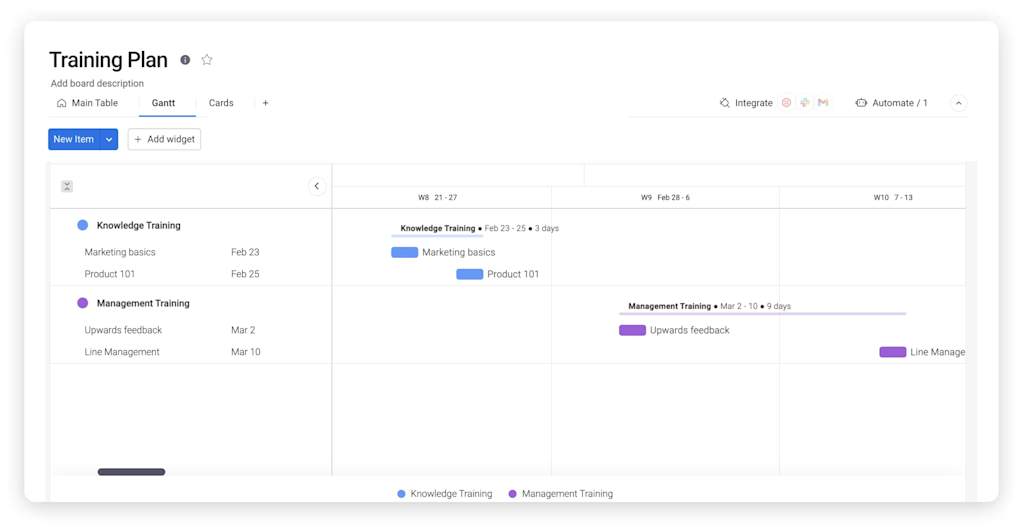
In employee onboarding, a training plan template might include orientation tasks, role-specific training, software setup, team introductions, compliance requirements, and 30/60/90-day milestones. For existing employees, it might focus on developing new skills, learning a new process, preparing for promotion, or completing a certification.
The point of the template is not to make training rigid. It’s to make training easier to repeat, track, and improve.
Instead of asking every manager to create their own onboarding checklist from scratch, a training plan template gives everyone a shared starting point. Pairing that starting point with AI-powered onboarding tools means the plan updates itself as each new hire progresses, instead of sitting static in a shared doc. Managers can still customize the plan for each employee, but the structure stays consistent.
A simple training plan template should answer practical questions like:
- Who is completing the training?
- What does this employee need to learn?
- Why is the training important?
- When should each step happen?
- Who owns each training task?
- What materials or tools are needed?
- How will progress be tracked?
- How will the company know the employee is ready?
For a new hire, those questions can make the difference between a confusing first month and a focused, confidence-building onboarding experience.
Learn more: Employee onboarding template
Why is a training plan template important?
A training plan template is important because onboarding and employee training involve more moving pieces than most teams realize.
A new employee may need to learn company policies, team processes, role expectations, software tools, communication norms, product knowledge, customer information, security requirements, and reporting structures. They may also need to meet stakeholders, shadow experienced team members, complete compliance training, and begin contributing to real work.
That is a lot to manage informally.
When training is scattered across emails, old documents, Slack messages, and the manager’s memory, important steps get missed. Employees may not know what they are responsible for. Managers may assume HR covered something. HR may assume the manager handled it. By the time gaps are noticed, the new employee may already feel behind.
A training plan template creates a shared source of truth. It shows what needs to happen and when. It also helps teams avoid treating onboarding as a one-week administrative process. Good training often extends through the first 30, 60, or 90 days, especially for roles that require product knowledge, technical skills, customer interaction, or cross-functional collaboration.
For HR teams, a template also makes training easier to scale. If your company hires one person a month, a loose checklist may be manageable. If your company hires ten, twenty, or fifty people across departments, you need a repeatable structure.
The template helps make sure every employee receives the same baseline support while still allowing room for role-specific learning.
What should a training plan template include?
A strong training plan template should include the information needed to guide the employee through training and give managers visibility into progress. It should be clear enough to follow, but not so detailed that it becomes hard to maintain.
| Training plan element | What it means | Example |
|---|---|---|
| Employee or trainee | The person completing the training | New sales representative, junior developer, marketing coordinator |
| Role or department | The employee’s job function or team | Customer support, engineering, operations, HR |
| Training objective | The purpose of the training | Learn the CRM workflow, complete onboarding, and prepare for a new role |
| Learning outcomes | What the employee should know or be able to do after training | Handle support tickets independently, build a report, and follow compliance steps |
| Training modules | The major topics or phases of the training | Company orientation, product training, systems training, and shadowing |
| Owner or trainer | The person responsible for each training step | Manager, HR partner, mentor, subject matter expert |
| Timeline | Start date, due date, duration, and milestones | Week one orientation, week two systems training, week four review |
| Materials and resources | Links, documents, videos, courses, or tools | Handbook, LMS course, product demo, SOP |
| Progress status | Where each training item stands | Not started, in progress, completed, blocked |
| Completion criteria | How success will be confirmed | Manager sign-off, quiz, certification, completed task, live demonstration |
| Feedback | Notes from the employee, trainer, or manager | Questions, blockers, improvement ideas, confidence level |
You do not need to include every possible field in every training plan. A simple onboarding plan for a small team may only need the basics. A technical training program or compliance-heavy onboarding process may need more detailed tracking.
The best approach is to start with the fields you know you will use. If the template becomes too complicated, people may stop updating it. If it is too basic, it may not give enough guidance. The right training plan template sits somewhere in the middle: practical, clear, and easy to maintain.
Training plan template vs. onboarding checklist
A training plan template and an onboarding checklist are related, but they are not exactly the same.
An onboarding checklist usually focuses on tasks that need to be completed when someone joins the company. These might include signing documents, setting up accounts, reviewing policies, meeting the team, and completing first-day orientation.
A training plan template goes deeper. It focuses on what the employee needs to learn in order to succeed in the role. It can include onboarding tasks, but it also covers skill development, role-specific knowledge, training owners, learning outcomes, and progress tracking.
For example, an onboarding checklist may say: “Set up CRM access.”
A training plan template would go further: “Complete CRM training, learn lead qualification stages, shadow one sales call, update three sample records, and receive manager sign-off.”
Both are useful, but they serve different purposes. The checklist helps you complete administrative onboarding. The training plan helps the employee become capable and confident in the role.
Who should use a training plan template?
A training plan template is useful for any team responsible for helping employees learn something important. It is most commonly used by HR teams and managers, but it can support many different groups across the business.
HR teams use training templates to standardize onboarding, compliance training, company orientation, and employee development programs. Managers use them to guide role-specific learning and track whether new hires are ramping up successfully. Trainers use them to organize sessions, materials, and follow-up activities. Mentors or buddies use them to support new employees during their first weeks. Department leaders use them to make sure training is consistent across teams.
Training plan templates are especially helpful when a company is growing quickly. As hiring increases, informal onboarding becomes harder to manage. A template helps preserve the quality of the experience even as more employees join at once.
They are also useful when training needs to be repeated. If every new customer support representative needs to learn the same ticketing system, escalation process, and customer tone guidelines, it makes sense to build a repeatable plan. If every new developer needs to learn the engineering workflow, code review standards, and release process, a template saves time and creates consistency.
Common types of training plan templates
Different training needs call for different template structures. A company onboarding a new employee may need a phased plan, while a manager training someone on a new tool may need only a short, task-based template.
| Type of training plan template | Best for | What it usually includes |
|---|---|---|
| Employee onboarding training plan | New hires | Orientation, tools, policies, team introductions, and role training |
| Role-specific training plan | Employees learning a specific job | Skills, systems, workflows, responsibilities, and manager sign-off |
| Compliance training plan | Regulated or policy-heavy teams | Required courses, deadlines, certifications, and completion tracking |
| Software training plan | Teams adopting new tools | Setup, tutorials, practice tasks, support resources |
| Upskilling or development plan | Existing employees | Skill goals, learning path, coaching, milestones |
| Leadership training plan | New or future managers | People management, decision-making, communication, and feedback |
| Department training plan | Team-wide process changes | New workflows, responsibilities, documentation, and rollout steps |
An employee onboarding training plan is usually the broadest. It may include company policies, HR forms, systems access, culture training, manager check-ins, and role-specific learning.
A role-specific training plan is narrower. It focuses on what the employee needs to do the job well. For a sales role, that might include product knowledge, CRM workflows, discovery calls, objection handling, and pipeline updates. A finance role might include approval processes, reporting tools, month-end close steps, and compliance requirements.
A compliance training plan is often more structured because deadlines and completion records matter. These plans are common in industries like healthcare, finance, legal, manufacturing, and security.
A software training plan is useful when a company introduces a new system or tool. It helps employees learn setup steps, core features, common workflows, and where to go for help.
An upskilling plan supports existing employees as they learn new skills. This is useful for internal mobility, career development, and succession planning.
How to create a training plan template
Creating a training plan template starts with one question: what should the employee be able to do by the end of the training?
That outcome should guide everything else.
If the goal is onboarding, the employee should understand the company, their role, the tools they will use, and the expectations for their first week. If the goal is software training, the employee should be able to use the tool in real work. If the goal is leadership development, the employee should be able to handle manager responsibilities with more confidence.
Once the goal is clear, build the template around the steps needed to achieve it.
Start by defining the audience. A new employee needs more context than someone who has worked at the company for years. A junior employee may need more explanation and practice. A senior employee may need more autonomy and a faster path to role-specific knowledge.
Next, break the training into phases. For onboarding, those phases might be preboarding, first day, first week, first month, and 90-day ramp. For a technical role, the phases might be foundational knowledge, hands-on practice, supervised work, and independent execution.
Then define the training tasks within each phase. Each task should be specific enough to assign and track. “Learn product” is too vague. “Watch product overview, complete product quiz, and shadow two customer calls” is more useful.
After that, assign owners. Every task should have someone responsible for making it happen. That might be HR, the hiring manager, a trainer, a mentor, or a subject matter expert.
Finally, decide how progress will be measured. Some tasks may only need a completed status. Others may need manager approval, a quiz score, a certification, or a practical demonstration.
A good training plan template should be reusable but not generic. It should give teams a strong foundation that they can customize by role, department, location, or level of experience.
Example: employee onboarding training plan template
An onboarding training plan should help a new hire move from “I’m new here” to “I understand my role and can contribute with confidence.” That usually takes more than a few days.
Here is an example of how a 30-day onboarding training plan template might be structured:
| Phase | Training focus | Example tasks | Owner | Success marker |
|---|---|---|---|---|
| Before day one | Prepare access and expectations | Send welcome email, set up tools, share first-week agenda | HR and manager | Employee has access and knows what to expect |
| Day one | Company and team orientation | Review company overview, meet manager, complete HR tasks | HR | Employee understands basic policies and schedule |
| Week one | Role and workflow basics | Review role expectations, learn tools, and meet key teammates | Manager | Employee can explain responsibilities and first priorities |
| Weeks two to three | Guided practice | Shadow work, complete practice tasks, review examples | Mentor or trainer | Employee completes basic tasks with support |
| Week four | Independent contribution | Own small tasks, join meetings, and receive manager feedback | Manager | An employee can complete starter work independently |
| 30-day review | Progress and next steps | Review wins, questions, blockers, and next goals | Manager | Employee and manager align on next milestones |
This type of plan gives the employee structure without overwhelming them. It also gives the manager a clear way to check progress.
A training plan template like this can be adapted for many roles. The phases may remain the same, while the tasks change by department.
Example: project management training plan template
A project management training plan is useful when someone is new to project management, joining a PMO, learning a new methodology, or moving into a more structured delivery role.
For example, imagine an experienced project manager who is joining a company that uses Agile and hybrid delivery methods. They may already understand timelines, stakeholders, and budgets, but they still need to learn how this company plans and tracks work.
| Training area | Learning outcome | Duration | Format | Owner |
|---|---|---|---|---|
| Company delivery model | Understand how projects move from intake to closeout | One week | Documentation and manager walkthrough | PMO lead |
| Agile fundamentals | Understand sprints, backlog management, standups, and retrospectives | Two weeks | Course and team shadowing | Agile coach |
| Tools and reporting | Learn project boards, dashboards, and the status reporting process | One week | Hands-on practice | Project operations manager |
| Stakeholder management | Understand approval paths and communication expectations | One week | Live project shadowing | Senior project manager |
| Final review | Run a small project or project phase with support | Two weeks | Supervised execution | Manager |
This training plan template works because it blends knowledge with practice. The employee is not just reading about the process. They are seeing how it works, trying it, and getting feedback.
Example: software developer training plan template
A software developer training plan should help new engineers understand the codebase, team workflows, tools, testing standards, and release process. It should also give them a safe way to start contributing.
For a junior front-end developer, the plan might look like this:
| Training area | Knowledge areas | Timeline | Progress marker | Owner |
|---|---|---|---|---|
| Engineering onboarding | Team structure, development workflow, code review process | Week one | Completes onboarding checklist | Engineering manager |
| Codebase introduction | Repository structure, local setup, core components | Weeks one to two | Runs the app locally and explains the structure | Mentor |
| Front-end standards | JavaScript, React, accessibility, design system | Weeks two to six | Builds a sample component | Senior developer |
| Testing and QA | Unit tests, bug reporting, and QA handoff | Weeks six to eight | Completes test assignment | QA lead |
| First production task | Pull request, review, deployment process | Weeks eight to 12 | Ships supervised ticket | Engineering manager |
Technical training plans work best when they combine reading, setup, shadowing, practice, and review. A new developer should not be expected to absorb everything from documentation alone.
Best practices for using a training plan template
A training plan template is only useful if people actually use it. The structure matters, but the habits around it matter just as much. Start with outcomes instead of activities. An activity tells the employee what to do. An outcome tells them what they should understand or be able to perform afterward. “Attend product training” is an activity. “Explain the product’s main use cases and customer pain points” is an outcome.
Keep the plan realistic. New employees are absorbing a lot at once, so avoid overloading the first few days. Spread training across the first month or quarter when possible.
Assign clear owners. If everyone is responsible for training, no one really owns it. Each task should have a person responsible for preparing, delivering, or reviewing it.
Build in feedback. Ask employees what was helpful, what was confusing, and what they wish they had known earlier. Use that feedback to improve the template over time.
Make the plan visible. If the training plan sits in a forgotten document, it will not guide the employee’s experience. Keep it somewhere managers, HR, trainers, and employees can all access and update.
Common mistakes to avoid
Even with a training plan template, training can fall short if the plan is too vague, too crowded, or disconnected from the actual job.
One common mistake is treating onboarding as a one-day event. New hires may complete paperwork and attend orientation on day one, but real onboarding takes longer. Employees need time to learn the role, build relationships, practice skills, and understand how work gets done.
Another mistake is using the same plan for every role without adapting it. A company-wide onboarding plan is useful, but role-specific training is what helps employees become productive. A sales hire, software developer, customer support representative, and finance analyst should not all have the same training path.
Some teams also forget to assign owners. A task like “complete systems training” is not enough if no one knows who is supposed to lead it or answer questions.
Another issue is missing progress tracking. If managers cannot see what has been completed, they may not notice when an employee is stuck. Progress tracking helps teams step in early.
Finally, many companies do not update their training templates after the first version. Processes change. Tools change. Teams change. A training plan template should be reviewed regularly so it reflects how the company actually works.
How monday.com’s AI Work Platform supports training plans
A training plan is only useful if it stays visible, current, and easy to follow. Static documents and spreadsheets can work for simple checklists, but they often fall short when multiple people need to collaborate, track progress, send reminders, and report on completion.
monday.com’s AI Work Platform helps teams manage training plans in one connected workspace. HR teams, managers, trainers, mentors, and employees can all work from the same plan, with clear owners, dates, statuses, files, updates, and progress tracking.
A team can use a training plan template in monday.com to map every step of onboarding or employee learning. Each training task can include an owner, due date, status, priority, resource link, and completion notes. Managers can see where employees are in the process without sending repeated check-in messages.
Timelines and dashboards give HR teams a broader view of training progress. They can see how many new hires are currently onboarding, which tasks are overdue, which departments need support, and where the process may be slowing down.
Automations can reduce manual follow-up. For example, monday.com can notify a trainer before a session, remind a manager to review a completed training task, or alert HR when an onboarding milestone is overdue.
AI-powered capabilities can support the process without taking it over. monday agents can help teams summarize updates, surface overdue tasks, and support repetitive coordination work. monday sidekick can help individuals find context and move work forward inside the platform. monday vibe can help teams build custom training apps inside monday.com using plain language, such as onboarding trackers, role-specific training boards, or certification workflows.
The result is a training process that is easier for employees to manage, update, and follow.
Get started with monday.comBenefits of using monday.com for employee training
monday.com helps teams move from static training checklists to connected training workflows. That matters because employee onboarding and training usually involve many people, many steps, and many handoffs.
| Training challenge | How monday.com helps |
|---|---|
| Training tasks live in scattered documents | Centralizes tasks, owners, dates, and resources in one workspace |
| Managers forget to follow up | Uses automations for reminders, updates, and review requests |
| Employees do not know what comes next | Gives new hires a clear view of training steps and expectations |
| HR lacks visibility into progress | Dashboards show completion, overdue items, and onboarding status |
| Training varies by department | Templates can be customized by role, team, or location |
| Feedback is hard to collect | Forms and updates help teams gather responses and improve training |
| Training materials get outdated | Connected docs and boards keep resources closer to the workflow |
For HR and people teams, this visibility is especially useful. It helps ensure that every employee has a consistent onboarding foundation while still allowing managers to adapt training to specific roles.
Related templates for HR teams
Training is only one part of the employee experience. HR teams often need connected workflows for recruiting, onboarding, engagement, and ongoing development. Using related templates together can help teams manage the full employee journey from candidate to fully ramped team member.
The employee onboarding template helps teams track every new hire as they move through company orientation, paperwork, training, introductions, and first-month milestones. It gives HR and managers a clear view of what is complete and what still needs attention.
The recruitment process template helps teams manage candidates, resumes, interviews, referrals, recruiter ownership, and applicant status in one place. When hiring and onboarding workflows are connected, teams can create a smoother handoff from accepted offer to first day.
The employee engagement survey template helps HR teams collect feedback about training, onboarding, management, culture, and employee experience. This feedback can be used to improve future training plans and identify where new employees may need more support.
Together, these templates help HR teams move from disconnected processes to a more connected employee experience.
How to measure whether training is working
A training plan template should not only list tasks. It should help you understand whether training is effective.
Completion is one signal, but it is not the only one. An employee may finish every task in the plan and still feel unsure about the role. That is why training should include both task tracking and feedback.
Managers can assess whether the employee is completing tasks on time, asking fewer repeated questions, applying what they have learned, and becoming more independent. HR teams can look at onboarding completion rates, time-to-productivity, employee feedback, and manager satisfaction.
You can also include checkpoints throughout the plan. A 7-day check-in may focus on access, introductions, and early questions. A 30-day check-in may focus on role clarity and confidence. A 60-day check-in may review progress against responsibilities. A 90-day review may look at performance, development needs, and next goals.
The goal is not to test employees at every step. The goal is to make sure the training plan is actually helping them succeed.
Build a stronger employee training plan with monday.com
A training plan template helps teams bring structure to employee learning. It gives managers a repeatable process, gives employees a clearer path, and gives HR teams better visibility into progress.
But training works best when the plan is connected to the rest of the employee experience. Onboarding, role-specific learning, manager check-ins, feedback, and progress tracking should not live in separate places.
monday.com’s AI Work Platform helps teams manage training as an active workflow, not a static document. With customizable templates, timelines, dashboards, automations, monday agents, monday sidekick, and monday vibe, teams can build training plans that are easier to follow, update, and scale.
Whether you are onboarding a new employee or building a repeatable training process for a growing team, monday.com provides the structure and visibility to support employees from day one.
Get started with monday.comFAQs about training plan templates
What is a training plan template?
A training plan template is a reusable structure for planning and tracking employee training. It usually includes the training objective, the learner, the timeline, the training topics, the owners, the materials, the progress status, and the completion criteria.
How do you write a training plan?
To write a training plan, start by defining the training goal and the employee or team being trained. Then identify the skills, knowledge, tools, and processes they need to learn. Break the training into phases or modules, assign owners, set dates, add resources, and define how progress will be measured.
What should be included in a training plan template?
A training plan template should include the employee or learner, training objective, learning outcomes, training topics, timeline, owner or trainer, resources, progress status, and completion criteria. Onboarding may also include first-day tasks, first-week goals, manager check-ins, and 30/60/90-day milestones.
Why is a training plan important for onboarding?
A training plan is important for onboarding because it gives new employees a clear path for learning the company, their role, tools, responsibilities, and expectations. It helps reduce confusion, supports faster ramp-up, and gives managers a structured way to track progress.
What are the steps in developing a training program?
The main steps are to define the training goals, assess employee needs, prepare learning materials, deliver the training, confirm understanding, and review performance after training. A training plan template helps organize each step so managers and trainers can follow a consistent process.
How do you track employee training progress?
You can track employee training progress by listing each training task, assigning an owner, adding due dates, updating completion statuses, and including manager sign-off where needed. Dashboards can also help HR teams see progress across multiple employees or departments.
How does monday.com help with training plans?
monday.com helps teams manage training plans with customizable templates, timelines, dashboards, automations, updates, docs, and AI-powered capabilities. HR teams and managers can track onboarding progress, assign training owners, send reminders, collect feedback, and keep training resources connected in one workspace.
 Get started