


Accurate payroll is essential for maintaining employee trust and keeping financial records organized. Whether you’re paying a small team or managing payroll across multiple departments, a reliable check stub template can help document earnings, deductions, taxes, and other payroll details consistently.
In this article, we’ll explain what a check stub template is, why businesses use them, and how monday.com can help teams manage payroll-related workflows more efficiently.
Key takeaways
- Check stub templates help businesses document employee earnings, deductions, taxes, and payment details consistently
- Digital check stubs have largely replaced paper records as direct deposit becomes the standard payroll method
- Using a template can improve payroll accuracy, reduce administrative work, and create a more consistent employee experience
- Different templates may be needed for full-time employees, hourly workers, and self-employed individuals
- monday.com’s AI Work Platform can help teams manage payroll-related workflows, approvals, requests, and documentation in one shared workspace
What is a check stub template?
When you think of a check stub, you’re likely to conjure up an image of a perforated bit of paper attached to a cheque, full of tiny numbers. It looks a little something like this:
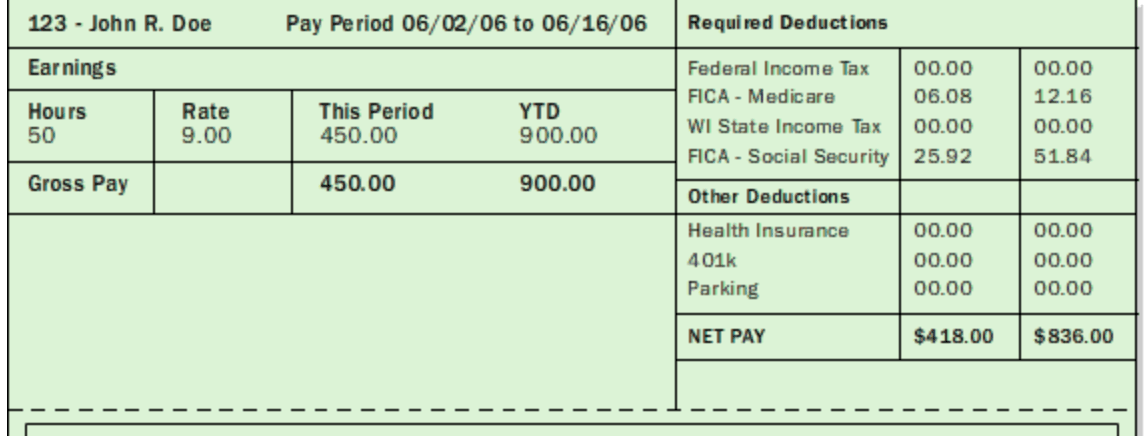
A check stub template is a simple and efficient way to create a check stub, which is a financial record of an employee’s payment details for the current pay period and year to date. The typical information listed in a check stub template includes wages, hours worked, deductions such as taxes or insurance, and other important details we’ll look at more closely in a bit.
Physical check stubs printed on standard check paper are becoming a thing of the past. Direct deposit has become the standard payment method for most organizations, meaning many paychecks are now issued and delivered electronically. Often, that means you can simply check your email on payday and see the check stub in your inbox.
Why use a check stub template?
A check stub is much more than a black and white piece of paper you hand to employees when payday rolls around. It’s an important part of the payroll process and essential to employee-employer relationships.
Using a check stub template helps ensure that this important document meets employee expectations, while simplifying payroll administration for employers.Here’s how:
- It encourages accuracy. Check stub templates help business owners avoid costly mistakes and ensure everyone on their team is rewarded for their hard work. Using a template with built-in formulas makes it easier to calculate wages, taxes, bonuses, and other factors that determine an employee’s earnings, reducing the risk of errors. An error-free paystub is equally important for business owners. For example, when tax season rolls around, they ensure W2 forms are completed with accurate information
- It saves time and boosts productivity. Creating payroll records manually for every employee and every pay period can quickly become time-consuming. Templates help standardize the process, reduce repetitive work, and make payroll administration easier to manage
- It provides consistency. Using a template helps ensure every aspect of your check stub is consistent every time. For example, each check stub sent to employees will have the same formatting and design. Consistency demonstrates professionalism and attention to detail
What are some examples of check stub templates?
Check stub templates come in many shapes and forms. Let’s get more familiar with different examples, so you can get a better idea of which one fits your unique needs.
Simple check stub template for full-time employees
If your business is small, your check stub won’t include many details. However, it should contain the basic required information. This includes company details, employee information, and payment details. Doing payroll properly is not only important for employee satisfaction and retention, but it’s a fundamental part of your tax planning. Failure to make paying for and tracking your labor costs easy is one of those things that can bring headaches come tax season.
In this case, a simple check stub template for full-time employees is just the right tool you need. Let’s explore what makes up each section of this check stub template in a bit more detail:
Company details
- Company name
- Company contact details like the address and phone number
Employee information
- Employee name and ID
- Employee address
- Social security number if applicable
Payment details:
It’s the most important part of the check stub. While the information may look different from one pay stub to another, you’ll typically find:
- Pay period and pay date
- Earnings: gross pay, net pay, hours worked, rate of pay
- Deductions: federal and state taxes, contributions, allowances
Here’s a basic sample pay stub to help you visualize this information.
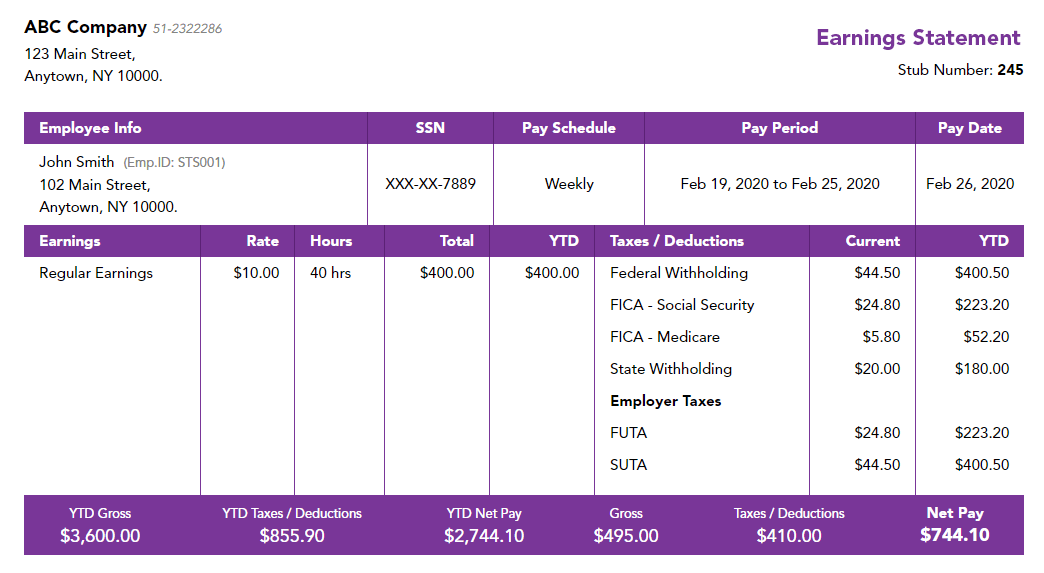
If you’re a bigger business, this check stub template will be even more detailed. Don’t forget to include all the necessary information. If you have any local taxes that need to be paid, you’ll need to add those in. The more thorough and descriptive you are, the better.
Self-employed check stub template
Almost 10 million Americans are currently self-employed. While being your own boss comes with many perks, you don’t get bi-weekly or monthly check stubs from your employer.
In this case, a check stub template designed for self-employed individuals comes in handy — it makes tax filing easier and helps you keep track of your earnings. Since you technically work for yourself, the company and employee information on your check stub would be one and the same.
Hourly wage check stub template
This check stub template is designed for hourly employees who work shifts. In addition to the required standard information, it provides an itemized list of hours worked, overtime pay, holiday pay, and the hourly rate for each shift.
How monday.com’s AI Work Platform supports payroll workflows
Creating a check stub is only one part of payroll administration. Teams may also need to manage payroll requests and approvals, employee documentation, reimbursement requests, and communication between HR and finance.
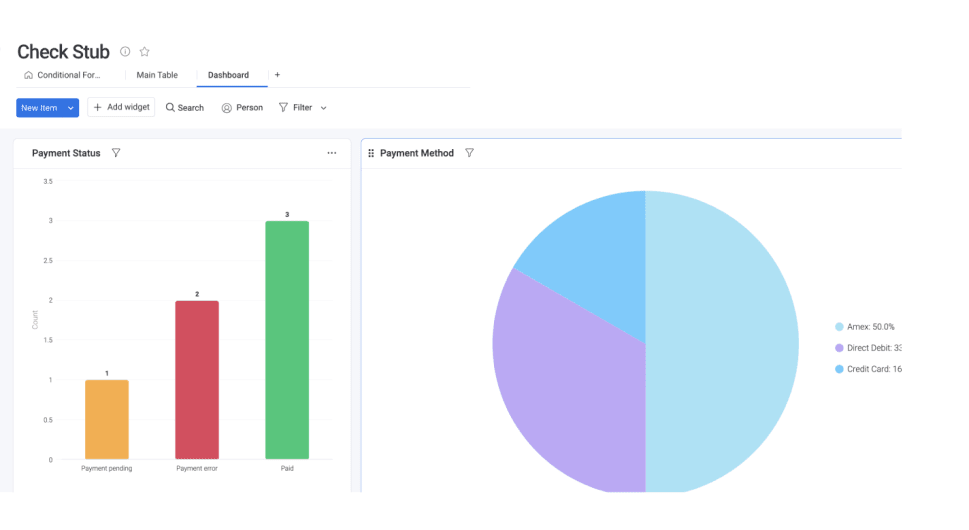
monday.com’s AI Work Platform helps teams organize those workflows in one shared workspace. With customizable boards, dashboards, automations, forms, and integrations, teams can track payroll-related processes and keep stakeholders aligned.
AI-powered capabilities can also help teams organize information, summarize updates, route requests, and support repetitive administrative processes while keeping people in control of final decisions.
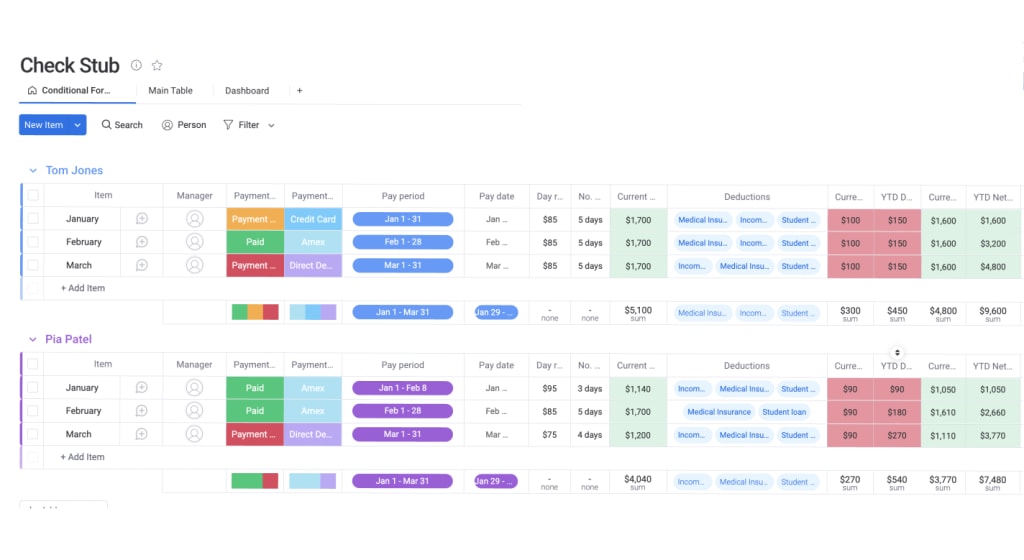
Like all our templates, the check stub template is visually appealing and easy to use. It makes the number-heavy information on the check stub easier to understand, eliminating confusion. Visual cues also help employees easily locate any information they’re looking for when they scan the page.
Related templates
Here are a couple of related templates that you might find useful for managing your workforce and payroll.
HR Requests Template
From vacation requests to payroll questions, the human resources department handles many responsibilities. Using monday.com’s intuitive HR Requests Template, you can easily manage all incoming requests in a centralized workflow.
You can sort requests by priority, assign them to the correct person, and track each one in real time until it’s completed, as shown here:
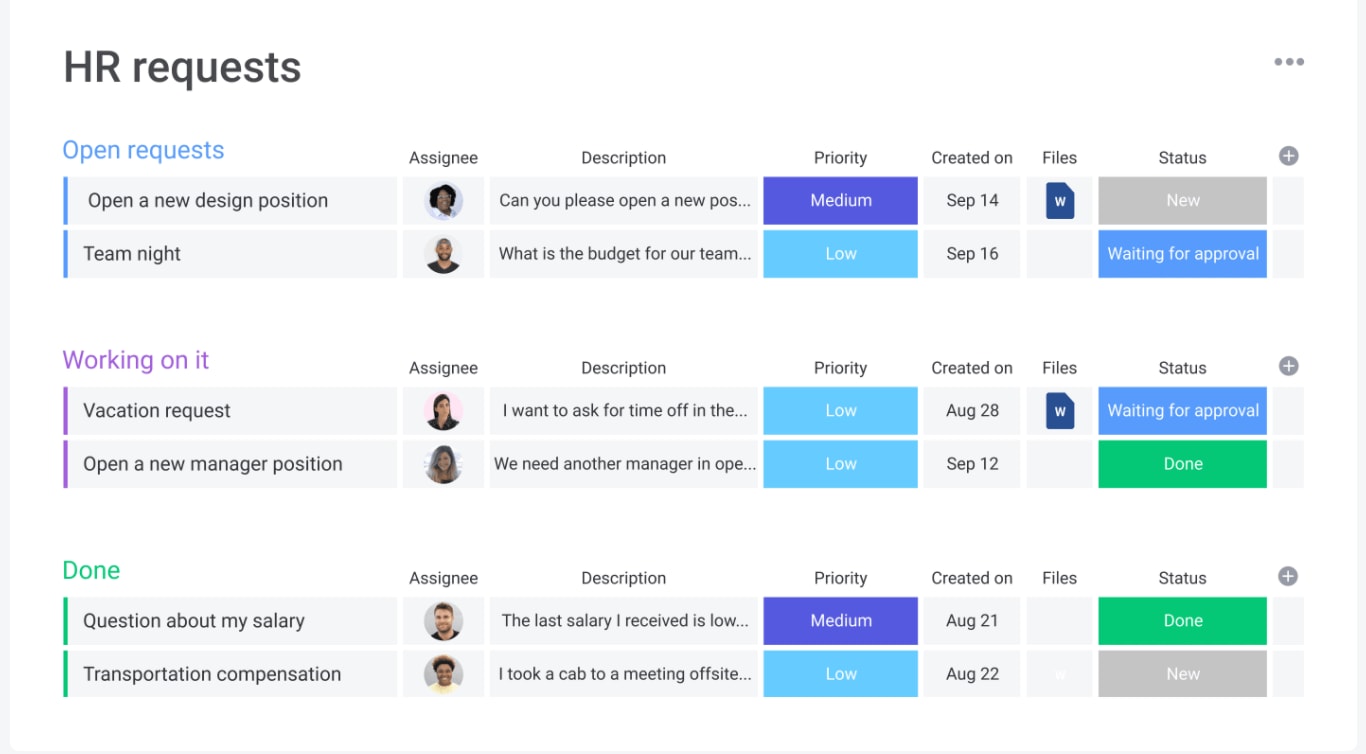
With monday.com’s AI Work Platform, you and your team can access all the necessary information, share documents, and provide feedback. This keeps the HR team on the same page, so things get done quickly and efficiently.
Finance Requests Template
Our Finance Requests Template helps your finance team easily collect and manage all incoming requests in a centralized location.
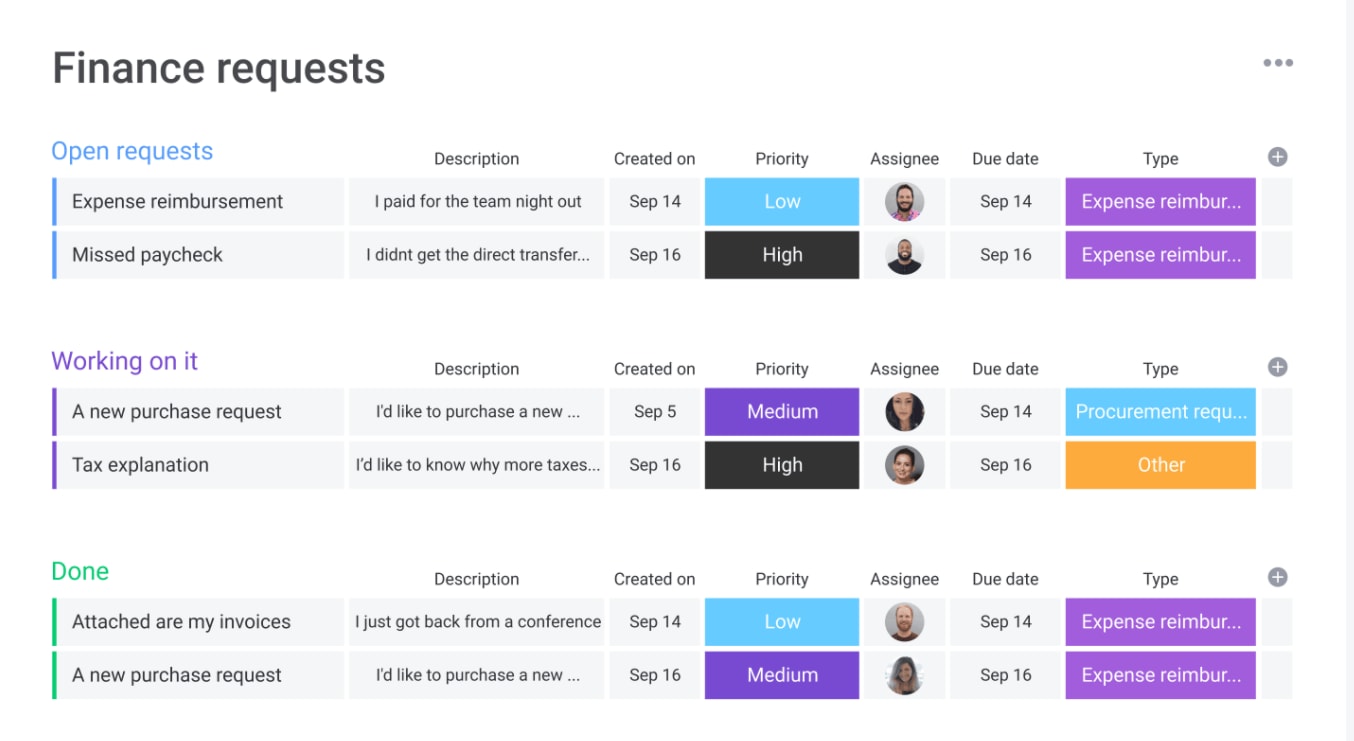
Automations can also help route requests to the appropriate approvers and keep employees informed without requiring manual follow-up.
The content in this article is provided for informational purposes only and, to the best of monday.com’s knowledge, the information provided in this article is accurate and up-to-date at the time of publication. That said, monday.com encourages readers to verify all information directly.
FAQs
Are employers legally required to provide a check stub?
Requirements vary by state and country. Some jurisdictions require employers to provide employees with a pay stub that details wages, deductions, taxes, and hours worked, while others have different recordkeeping requirements. Employers should review local labor laws to ensure compliance.
What information should be included on a check stub?
A check stub typically includes the employee's name, pay period, pay date, gross pay, net pay, hours worked (if applicable), tax withholdings, deductions, benefits contributions, and year-to-date earnings. Requirements may vary depending on local regulations.
How long should employers keep payroll records and check stubs?
Record retention requirements vary by jurisdiction, but many employers keep payroll records for several years to support tax filings, audits, and employment verification requests. It's a good idea to review applicable federal, state, and local regulations to determine the appropriate retention period.
What's the difference between a pay stub and a paycheck?
A paycheck is the actual payment an employee receives, while a pay stub is the record that explains how that payment was calculated. Even when employees are paid through direct deposit, employers often provide a digital pay stub showing earnings, taxes, and deductions.
Can employees use check stubs as proof of income?
Yes. Check stubs are commonly used as proof of income when applying for loans, mortgages, rental housing, or other financial services. Because they include earnings and employment information, they can help verify an individual's income history.
 Get started