


For many managers, scheduling still means juggling spreadsheets, emails, and last-minute changes that leave teams frustrated and shifts understaffed. Employee schedule templates replace that chaos with structure and order, offering a reliable way to organize shifts, track availability, and plan coverage while giving employees visibility into when and where they’re needed.
Effective scheduling directly influences productivity, morale, and customer satisfaction. In this guide, you’ll learn how to choose the right scheduling format for your team, customize templates for different workplace needs, and build a more flexible, connected system that adapts as work changes, including how monday.com’s AI Work Platform can take your scheduling from static to dynamic.
Key takeaways
- Save time and reduce conflicts: Use templates to eliminate repetitive scheduling work and maintain consistency across shifts.
- Choose the right format: Excel works best for detailed calculations, Google Sheets supports real-time collaboration, and PDFs simplify distribution.
- Adopt smarter scheduling: Platforms like monday.com’s AI Work Platform turn static schedules into dynamic systems with AI optimization, live updates, and automated shift management.
- Tailor to your industry: Use specialized templates that address healthcare compliance, retail peak periods, or manufacturing shift coordination.
- Ensure long-term success: Review existing scheduling processes, train managers on best practices, and gather regular feedback for continuous improvement.
What are employee schedule templates?
Employee schedule templates provide a simple, reliable way to organize work hours, shifts, and assignments.
Instead of rebuilding schedules from scratch each week, managers can use a consistent framework that shows who’s working, when, and where.
Most templates include essential details like employee names, dates, shift times, and work locations, with optional fields for roles, breaks, or specific responsibilities. This structure keeps scheduling quick and accurate, even for large or fast-moving teams.
Using a standard format also brings much-needed consistency for employees. With roughly 1 in 4 U.S. workers continuing to face schedule unpredictability, templates help create a more stable, transparent scheduling process that benefits everyone.
Types of employee schedule templates
Every workplace has unique scheduling needs. A small retail shop might focus on weekend coverage, while a hospital or manufacturing plant requires continuous shift coordination. Choosing the right template starts with understanding how your team operates day to day.
The options below highlight common scheduling formats, each designed to balance structure, flexibility, and visibility for different types of work environments.
Daily schedule templates
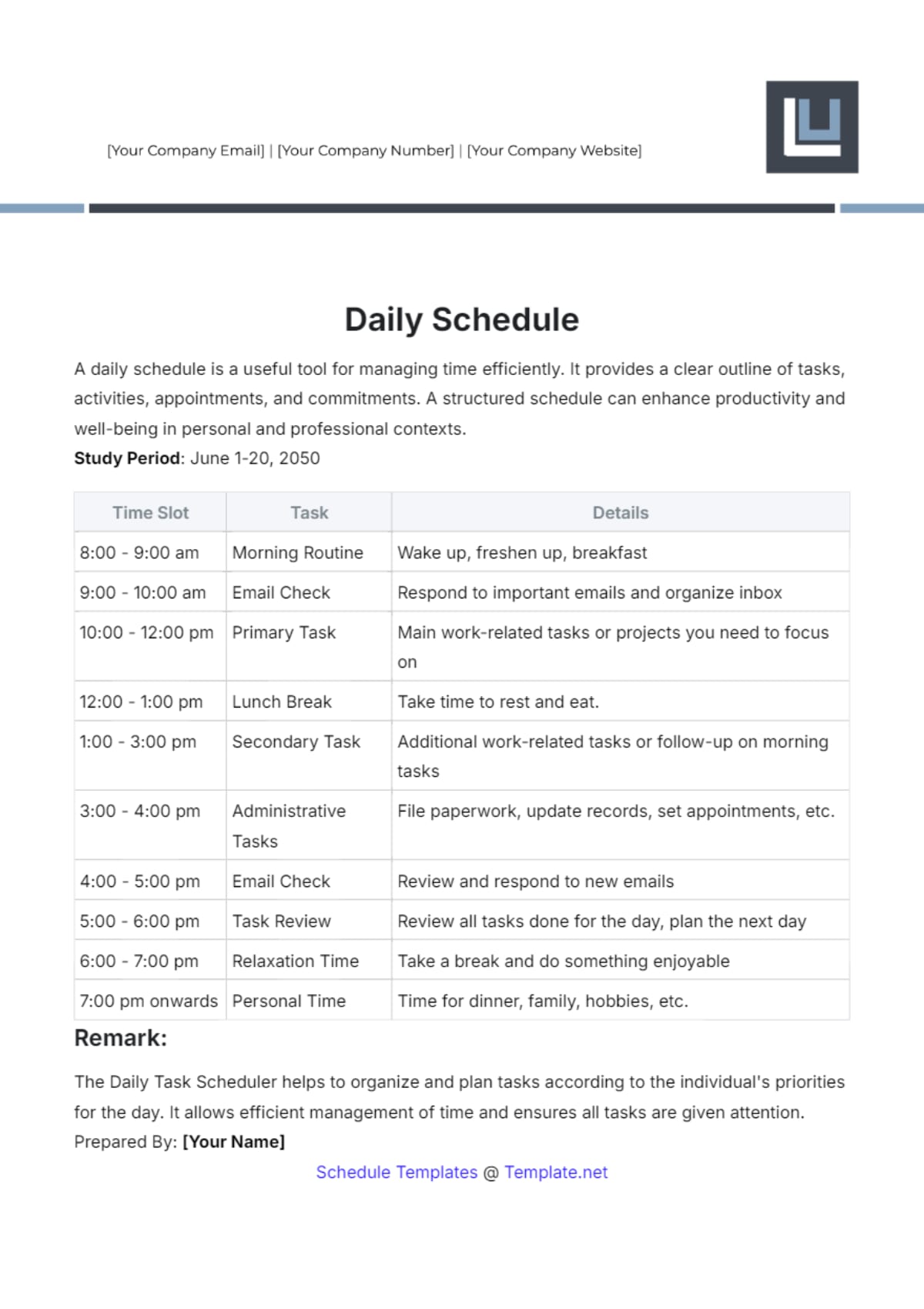
Daily schedule templates break down staffing requirements hour by hour, making them ideal for businesses with fluctuating demand throughout the day. Restaurants managing lunch and dinner rushes, event venues coordinating setup crews, and healthcare clinics adjusting for patient volume all benefit from a granular daily view.
A daily work schedule template complements weekly and monthly planning by providing the precision needed for same-day adjustments. When unexpected absences or demand spikes occur, a daily template makes it straightforward to reassign coverage without disrupting the broader schedule.
Weekly employee schedule templates
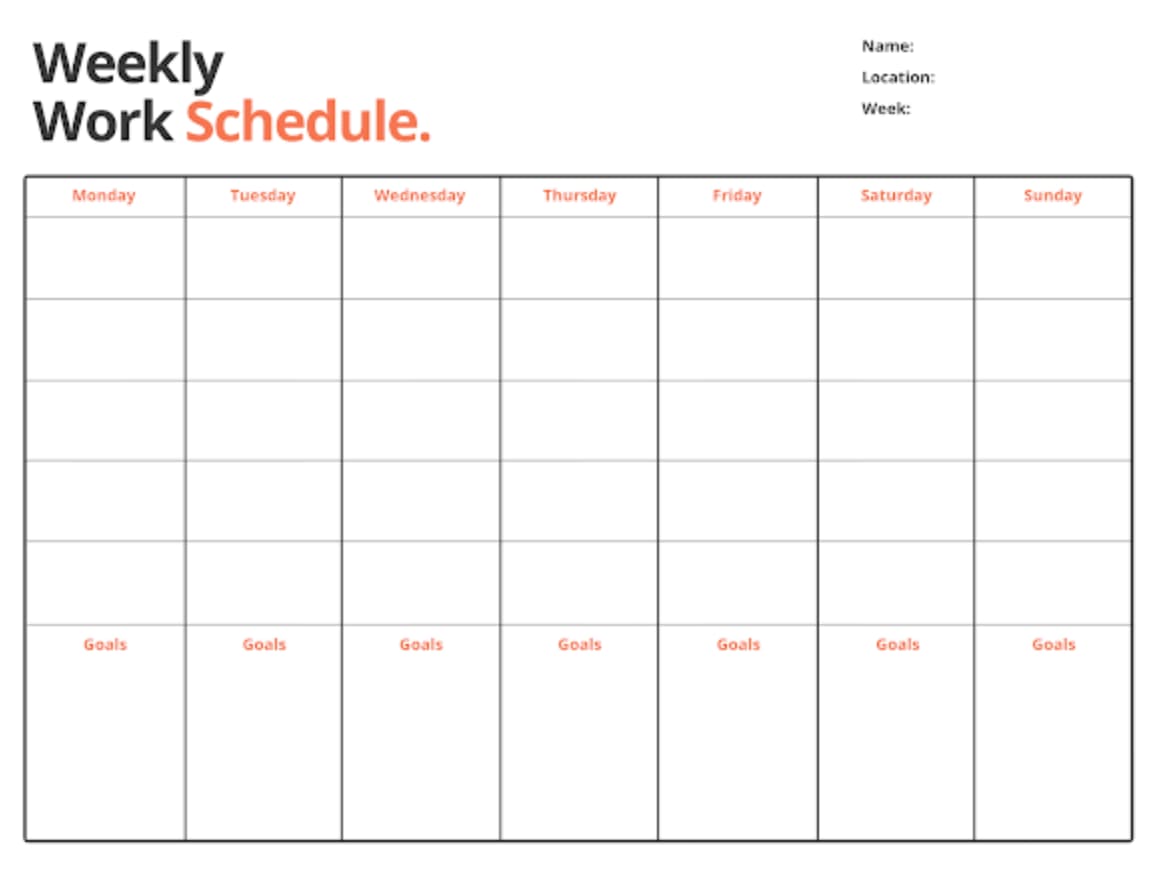
Weekly templates cover seven-day periods and work best for businesses with regular patterns. Using a weekly schedule template ensures a structured approach each week. Typically found in offices, retail stores, and restaurants, they’re vital when staffing needs stay relatively consistent week to week.
These templates also help make payroll processing simple since they align with standard pay periods: managers can spot overtime risks early and adjust schedules before costs escalate.
Monthly work schedule templates
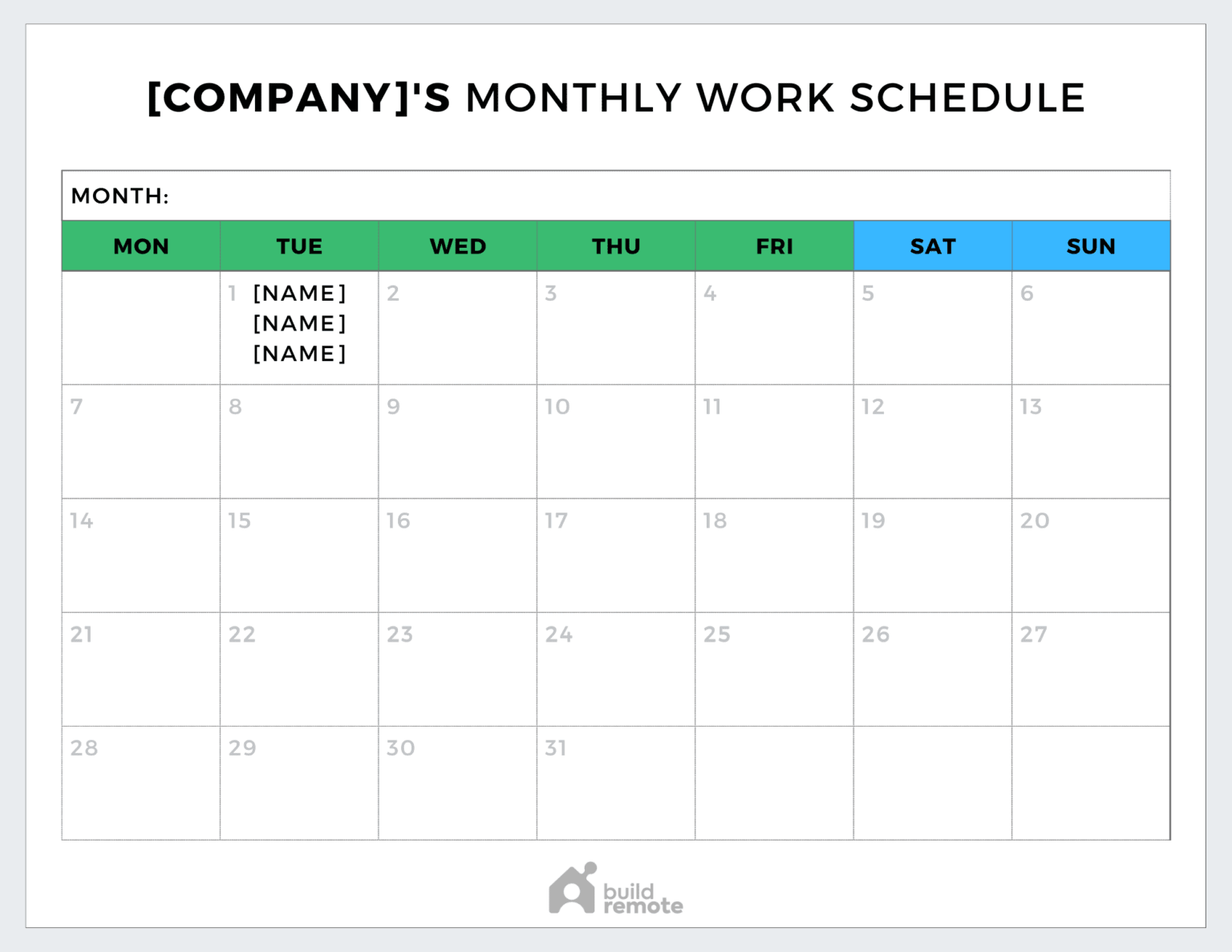
Monthly schedule templates give you a 30-day view of staffing patterns, making it easier to plan vacations, manage deadlines, and adjust for seasonal demand. This wider perspective helps teams anticipate challenges instead of reacting to them.
You can spot trends that shorter schedules often miss. Understanding these recurring patterns gives managers the foresight to act before issues arise:
- Recurring gaps such as specific days or shifts that consistently run short
- Peak activity periods for times of higher customer or patient volume
- Overlapping time-off requests like vacation clusters that affect coverage
For teams that prefer a visual overview, a monthly schedule template in Excel also provides a simple way to track and adjust staffing across the entire month.
Shift schedule templates
Shift templates handle operations that run beyond standard business hours. They focus on smooth handoffs between teams and maintaining service levels around the clock, making resource scheduling more efficient.
Each shift section includes start times, end times, and specific responsibilities. This prevents confusion during shift changes and ensures critical assignments get completed regardless of who’s working. For organizations running 24-hour operations — think hospitals, security firms, and manufacturing plants — shift templates become the backbone of daily operations, ensuring every hour of the day and night has proper coverage and accountability.
Rotating schedule templates
Rotating templates cycle employees through different shifts on a set pattern. This approach distributes less desirable shifts fairly across your team.
The rotation might be weekly, biweekly, or monthly depending on your needs. What matters is that everyone shares both the preferred and challenging time slots equally.
So what are the different types of work schedules? They range from daily and weekly formats for short-term precision, to monthly and rotating templates for long-term planning. The right choice depends on your team’s size, operating hours, and how frequently staffing needs change.
7 benefits of using staff schedule templates
Smart scheduling drives real business outcomes. When you implement structured templates, such as a workflow template, you’re building a foundation for operational excellence that impacts your bottom line.
1. Save hours on workforce planning
Templates eliminate repetitive scheduling work. Instead of starting fresh each period, you modify an existing structure that already contains your core information. Some teams take this further by pairing templates with AI workforce planning tools that forecast coverage needs automatically, instead of starting from a blank template each period. These time savings can compound quickly.
These time savings can compound quickly. If scheduling takes three hours weekly without templates, you could cut that to 30 minutes with a solid template system. That’s over 100 hours saved annually.
2. Eliminate scheduling conflicts
Scheduling conflicts often occur when teams lack visibility into the full picture. A shared template creates a single, reliable source of truth where everyone can view the schedule and understand coverage at a glance.
- Prevent double-bookings: Catch overlapping shifts before they cause disruption
- Spot coverage gaps early: Identify unfilled roles or time slots in seconds
- Maintain transparency across teams: Ensure everyone knows who’s scheduled and when
With platforms like monday.com’s AI Work Platform, this process becomes proactive. Automated conflict detection flags overlapping shifts or missing coverage instantly, allowing managers to resolve issues before they impact operations.
3. Boost team communication
How much time does your team spend asking “who’s working today?” Structured schedules reduce back-and-forth questions about coverage. Team members can check the schedule independently rather than interrupting managers for basic information.
This self-service approach frees managers to focus on strategic work while employees take ownership of their schedule awareness. When everyone has access to the same up-to-date schedule, miscommunications about shift start times, meeting conflicts, and coverage responsibilities drop significantly.
4. Ensure fair shift distribution
Templates make shift patterns visible over time. You can track who worked holidays last year, who regularly gets weekend shifts, and who hasn’t had a preferred time slot in months.
This transparency builds trust. Employees see that assignments follow a fair system rather than favoritism or random chance. Over time, equitable distribution also reduces burnout by ensuring no single person consistently handles the most demanding shifts.
5. Streamline compliance tracking
Accurate recordkeeping is essential for meeting labor law requirements around work hours, breaks, and overtime. Using a timesheet template ensures all this information is captured consistently and stored in the right format.
- Stay audit-ready: Maintain organized, time-stamped records for easy access
- Reduce risk: Minimize errors or missing data that can lead to compliance issues
- Save time: Keep audit-ready records on hand so hours and schedules are always verifiable
With documentation in place, managers can focus on running operations confidently, knowing their records meet legal and organizational standards. By building break-time tracking, overtime flagging, and mandatory rest periods directly into the template, managers create audit-ready records that demonstrate consistent adherence to regulations.
6. Improve employee satisfaction
Predictable schedules let employees plan their lives outside work. They can commit to family events, education, or second jobs knowing their primary schedule is stable.
Higher satisfaction translates to lower turnover, which is a key business metric since replacing employees costs money and disrupts operations. According to SHRM, employee replacement costs can range from 50% to 200% of an employee’s annual salary, making retention a critical financial priority.
7. Enable data-driven scheduling
Templates create historical data you can analyze. You’ll discover patterns like which shifts have higher call-offs or when you consistently need extra coverage.
These insights inform future scheduling decisions. Instead of guessing, you’re making choices based on actual operational data. AI-powered platforms take this further by automatically identifying patterns across months of scheduling data and surfacing recommendations you might miss.
Free work schedule templates by format
Choosing the right format for your work schedule template can make or break how smoothly scheduling runs. The right option depends on your team’s size, tech setup, and how often schedules change. A flexible format makes updates faster, sharing easier, and compliance tracking effortless.
Each template type below offers distinct advantages, whether you need the calculation power of Excel, the real-time collaboration of Google Sheets, or the automation and scalability of monday.com’s AI Work Platform.
| Format | Best for | Key features | Collaboration level |
|---|---|---|---|
| Excel | Small teams, offline access | Formulas, calculations | Limited sharing |
| Google Sheets | Remote teams, real-time updates | Cloud-based, simultaneous editing | High collaboration |
| Microsoft Word | Simple layouts, printing | Professional formatting | Basic sharing |
| Distribution, printing | Fixed format, universal access | View-only | |
| monday.com's AI Work Platform | Growing teams, AI-powered scheduling | Automations, AI optimization, customizable workflows, mobile access | Enterprise-level collaboration |
Excel employee schedule templates
Excel brings calculation power to scheduling. You can build formulas that automatically total hours, calculate overtime, and flag scheduling violations.
The offline capability means schedules remain accessible even without internet. However, sharing requires emailing files back and forth, which can create version control issues, so you may prefer a spreadsheet template offering real-time collaboration.
Google Sheets staff scheduling templates
Google Sheets templates live in the cloud, enabling real-time collaboration from any device. For a quick start, try a schedule template for Google Sheets to update schedules simultaneously without overwriting each other’s work.
Integration with other Google Workspace apps means schedules can sync with calendars and generate automatic email notifications when changes occur.
Microsoft Word schedule templates
Microsoft Word is ideal for creating professional schedules that are easy to share and display. Its formatting flexibility makes it a strong fit for teams that value presentation and simplicity over complex automation.
- Polished layouts: Design schedules that look professional for meetings or notice boards.
- Easy customization: Adjust fonts, colors, and layouts without technical skills.
- Printable and shareable: Distribute schedules quickly in hard copy or PDF format
Word schedule templates work best for smaller teams or workplaces where presentation and easy printing matter more than real-time updates or calculations.
Printable PDF schedule sheets
PDFs maintain exact formatting across all devices and printers. When you need schedules to look identical everywhere, PDF is the answer.
This format prevents accidental edits while ensuring everyone sees the same information. It’s ideal for final schedule distribution after all changes are complete.
monday.com’s AI Work Platform templates
The AI Work Platform brings structure and adaptability together with pre-built scheduling templates you can tailor to your team’s exact needs. These templates transform static schedules into dynamic systems that update automatically as work changes.
- Real-time automation: Notify team members of schedule updates instantly and track availability
- Visual scheduling: Use color-coded shifts and workload views to spot conflicts or gaps
- Scalable design: Start with simple scheduling and expand into full workforce management
Built-in AI Blocks can categorize shift data, detect scheduling conflicts, and even generate schedule suggestions from a plain-language description of your needs. With the platform, scheduling becomes a seamless part of daily operations, keeping every team member aligned, informed, and ready for what’s next.
Workplace schedule templates by industry
Different industries face unique scheduling challenges that generic templates can’t address. Understanding your industry’s specific needs helps you build templates that actually work in practice. Part-time staff typically need templates that track weekly hour limits and benefit eligibility thresholds, while full-time employees benefit from templates emphasizing shift preferences, overtime monitoring, and PTO accrual. Building separate sections or views for each employment type ensures accurate tracking across the board.
Here’s how scheduling requirements vary across major sectors:
Retail and restaurant staff templates
Retail and restaurant scheduling revolves around customer traffic patterns. You need templates that handle varying daily volumes and seasonal rushes.
- Peak period coverage: Lunch rushes and weekend shopping
- Split shifts: Employees may work morning and evening with breaks in between
- On-call scheduling: Extra staff ready to come in during unexpected busy periods
Platforms like the AI Work Platform help these types of businesses by analyzing historical patterns and suggesting optimal staffing levels for each time period. AI can review past sales data to predict when you’ll need additional coverage, removing the guesswork from peak-period planning.
Healthcare employee schedule templates
Healthcare scheduling balances patient care continuity with strict regulatory requirements. Your templates must track certifications, ensure proper skill mix, and maintain mandatory rest periods between shifts.
- License tracking: Ensuring only qualified staff work specific roles
- Handoff procedures: Detailed patient information transfer between shifts
- On-call rotations: Fair distribution of after-hours coverage responsibilities
Scheduling platforms can automatically enforce mandatory rest periods and certification requirements, flagging violations before they become compliance issues. This proactive approach reduces the risk of scheduling an uncertified staff member or violating rest-period regulations.
Manufacturing shift work templates
Manufacturing schedules coordinate human resources with equipment operation schedules. Templates must account for machine maintenance windows and production targets.
Your manufacturing templates need documentation of equipment status, safety protocols, and production goals for each shift, which you can support with a production schedule. This ensures smooth transitions and consistent output quality.
Office and remote team templates
Modern office environments blend in-person and remote work. This is where resource management software can help you schedule effectively across time zones and flexible arrangements.
Keep in mind that it’s important to focus on core collaboration hours when scheduling remote teams. Identify windows when everyone’s available for meetings while allowing flexibility outside those times.
Construction and field services templates
Construction and field services scheduling introduces variables that office-based industries rarely encounter. Weather delays can upend an entire week’s plan, multi-site coordination requires careful crew routing, and safety compliance demands that only properly certified workers operate specific equipment.
Effective field services templates should include columns for site location, required certifications, travel time between sites, and equipment assignments. Platforms with resource directories and capacity planning features simplify crew scheduling by matching available workers to job requirements based on skills, location, and availability.
7 steps to implement employee schedule templates
Rolling out new scheduling templates requires planning and patience. Follow these steps to ensure smooth adoption and maximum benefit from your new system.
Step 1: Assess your current scheduling process
Document how you currently create and distribute schedules. Time yourself doing typical scheduling activities. Note every pain point and inefficiency, from the hours spent building weekly schedules to the frequency of last-minute changes.
Ask your team what frustrates them about current schedules: their input reveals problems you might not see from a management perspective. Common issues include late schedule publication, difficulty swapping shifts, and inconsistent formatting that creates confusion.
Step 2: Choose the right template format
Match your template format to your team’s technical skills and collaboration needs. Don’t choose Google Sheets if half your team lacks internet access at home.
Consider future growth too. A format that works for ten employees might break down at 50. Plan for scalability from the start.
Step 3: Set up scheduling rules and policies
Before building your first schedule, define the rules that govern it. Establish overtime thresholds, minimum rest periods between shifts, mandatory break requirements, and shift-swap policies.
Documenting these rules upfront prevents compliance issues and ensures every schedule you create meets both legal requirements and company standards. When rules are built into the template itself, managers don’t have to remember every regulation manually.
Step 4: Customize for your team’s needs
Start with a basic template then add fields specific to your operation. Maybe you need to track certifications, equipment assignments, or client preferences.
Keep customization simple at first. You can always add complexity later as your team gets comfortable with the basic system.
Step 5: Integrate with existing systems
Your schedule doesn’t exist in a vacuum. Connect it to payroll, time tracking, and communication platforms so data flows seamlessly between systems. A shared work calendar can serve as the central point that keeps scheduling, meetings, and deadlines aligned across teams.
Platforms like monday.com’s AI Work Platform offer 200+ integrations including Slack, Microsoft Teams, and Google Drive, letting you build scheduling into the workflows your team already uses. Integration eliminates double data entry and keeps every connected system up to date automatically.
Step 6: Train managers on template use
Schedule dedicated training time for anyone who creates schedules, using a training plan template to structure each session. Cover both the technical how-to and the strategic thinking behind effective scheduling.
Create a reference guide managers can consult when questions arise. Include screenshots and step-by-step instructions for common activities.
Step 7: Gather feedback and optimize
Set a review date 1 month after implementation. Ask what’s working and what isn’t. Be ready to adjust based on real-world usage. Track metrics like time spent on scheduling, employee satisfaction with schedule fairness, and the number of last-minute changes per period.
Continue gathering feedback quarterly. Scheduling needs evolve as your team grows, seasonal patterns shift, and new roles emerge. Your templates should evolve right alongside them.
How monday.com's AI Work Platform transforms employee scheduling
Static templates provide structure, but growing businesses need dynamic scheduling that adapts to changing conditions. What if your scheduling system could anticipate problems before they happen?
monday.com’s AI Work Platform bridges this gap with intelligent features that automate routine scheduling while maintaining human oversight where it matters:
AI-powered schedule optimization
The platform’s AI Blocks analyze your scheduling patterns and suggest improvements, a feature that resonates with the 80% of Millennials who believe AI can help them do their jobs better. They spot when certain shifts consistently run short-staffed or when specific employees always call off particular days.
monday sidekick, the context-aware AI assistant, goes further by analyzing scheduling patterns across your entire organization, generating schedule drafts based on historical data, and answering scheduling questions in natural language. Need a quick coverage summary for next week? Just ask.
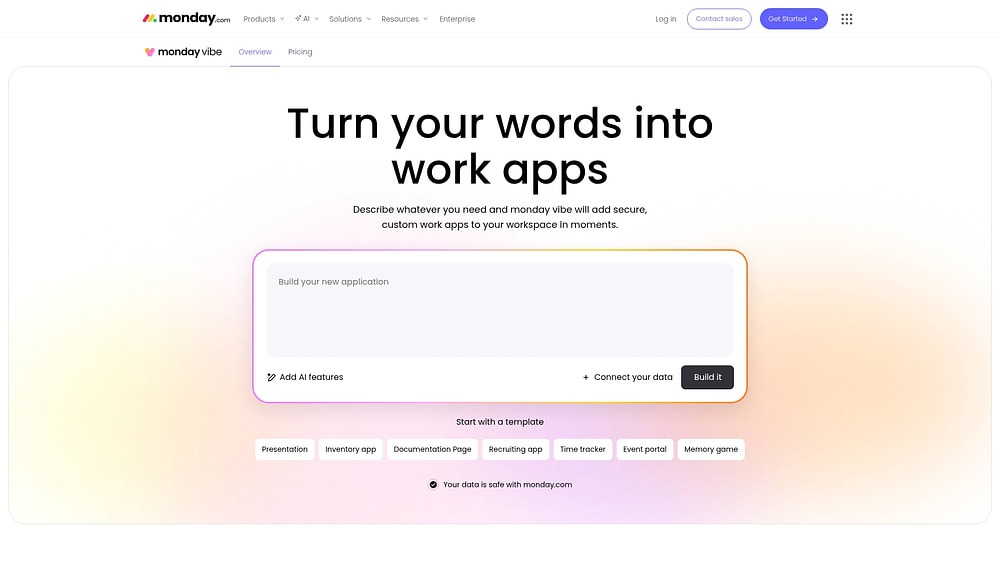
With monday vibe, managers can describe scheduling needs in plain words and receive custom scheduling apps. Whether you need a shift tracker, an availability collector, or a coverage dashboard, you describe it and the AI builds it.
monday agents add another layer of intelligence. The Project Analyzer proactively flags scheduling risks like understaffing trends before they become problems, while the Process Automator identifies repetitive scheduling workflows and suggests automations to handle them.
Learn more: AI close schedule agent
Real-time schedule updates and collaboration
Changes happen instantly across all devices when you update a schedule on the platform. Employees see modifications immediately on their phones while managers track acceptance rates from their desktops. No more outdated printouts or missed email notifications.
The collaboration features let employees request shift swaps directly on the platform. Managers approve or deny with one click, and the schedule updates automatically. This eliminates the phone tag and group chat confusion that typically accompanies shift trades.
Automated shift management
Automation recipes handle the repetitive parts of scheduling. Set up recurring shifts once, and they populate automatically each period. Create rules for sending shift reminders or alerting managers to coverage gaps. With 200+ automation recipes across 190 industries, there’s likely a pre-built recipe that matches your scheduling workflow.
Workload balancing and resource planning

The Workload widget shows each employee’s scheduled hours in an easy visual format. You instantly see who’s approaching overtime and who has capacity for more shifts.
This visibility extends beyond individual schedules to show department and company-wide resource allocation, so using employee management software ensures you’re filling shifts and optimizing your entire workforce. The resource directory organizes people and skills in one place, while the capacity manager helps balance workload across multiple projects. Dashboards with 10+ drag-and-drop widgets provide real-time scheduling insights that keep leaders informed at every level.
How monday.com’s AI Work Platform compares to static templates
While static templates provide a solid foundation for scheduling, they lack the intelligence and automation that modern teams need to stay agile. The comparison below highlights how monday.com’s AI Work Platform transforms basic scheduling into a dynamic, connected system that adapts to your team’s evolving needs.
| Capability | Static templates (Excel/Sheets) | The AI Work Platform |
|---|---|---|
| Schedule creation | Manual, from scratch each period | AI-assisted, auto-populating |
| Conflict detection | Visual scanning only | Automated, instant flagging |
| Shift swaps | Email/phone coordination | In-platform requests, one-click approval |
| Compliance tracking | Manual record-keeping | Built-in rules, automatic alerts |
| Team communication | Separate emails/messages | Integrated updates, mobile notifications |
| Reporting | Manual data compilation | Real-time dashboards, 10+ widgets |
| Integrations | Limited (copy-paste) | 200+ native integrations |
| AI capabilities | None | AI Blocks, sidekick, agents, vibe |
Build a scheduling system that grows with your team
Employee schedule templates provide a strong starting point for workforce planning—they’re accessible, customizable, and effective for straightforward scheduling needs. But as teams grow and operations become more complex, static templates show their limitations, making it essential to shift toward dynamic, AI-powered scheduling that adapts in real time.
The most effective scheduling strategy combines the simplicity of templates with intelligent automation. monday.com’s AI Work Platform bridges that gap, offering pre-built templates alongside AI optimization, real-time collaboration, and automated compliance tracking. Whether you’re scheduling a 5-person team or coordinating shifts across multiple locations, the right system ensures your scheduling evolves alongside your business.
Frequently asked questions
What is the best format for an employee schedule template?
The best format for an employee schedule template depends on your team's size and collaboration needs. Excel works well for small teams that need offline access and calculation features. Google Sheets suits remote teams needing real-time collaboration. PDFs are ideal for final distribution. For teams that need AI-powered scheduling, automation, and scalability, small business management software like monday.com's AI Work Platform provides a more dynamic solution.
How do I create an employee work schedule from scratch?
Creating an employee work schedule from scratch involves 7 key steps: assess your current scheduling process, choose the right format, set up scheduling rules and policies, customize the template for your team's needs, integrate with existing systems like payroll and communication platforms, train managers on template use, and gather ongoing feedback to optimize. Starting with a pre-built template and adapting it to your needs is faster than building one entirely from zero.
What is the difference between employee schedule templates and scheduling software?
The difference between employee schedule templates and scheduling software comes down to automation and adaptability. Templates are static documents you update manually, while a scheduling platform provides dynamic features like automatic conflict detection, shift swapping, and real-time updates. Templates suit straightforward needs, while platforms handle complex scheduling requirements with automation and AI-powered optimization.
How do I ensure employee schedule templates comply with labor laws?
Ensuring employee schedule templates comply with labor laws starts with building compliance checks directly into the template. Include fields for break times, maximum hours, and required rest periods. Add validation rules or color coding to flag potential violations before they occur. Reviewing templates against local and federal labor regulations regularly helps maintain compliance as laws evolve.
How do I choose the right schedule type for my business?
Choosing the right schedule type for your business depends on your operating hours, staffing patterns, and industry. Weekly templates suit consistent operations like offices and retail stores. Rotating schedules work for 24/7 coverage in healthcare or manufacturing. Daily templates handle variable-demand environments like restaurants and event venues. Monthly templates support strategic planning and seasonal adjustments. Match the template to how your team actually operates, and consider combining formats for comprehensive coverage.
Can monday.com's AI Work Platform replace employee schedule templates?
monday.com’s AI Work Platform doesn't replace employee schedule templates. Instead, it evolves them. The platform includes pre-built scheduling templates that go beyond static documents, with AI-assisted schedule generation, automated conflict detection, and real-time updates. You still get the familiar template structure, but with added intelligence that adapts as your team's needs change. It's an evolution from manual scheduling to a connected, automated system.

 Get started