


Project managers in tech face a familiar challenge: resources scattered across tools, teams, and timelines. When no one can see the full picture of who’s doing what, projects slow down, deadlines slip, and teams burn out. Spreadsheets can’t fix that.
The right resource management software can. It brings every project, person, and allocation into one place — showing real-time workloads, preventing capacity conflicts, and giving you the clarity to plan proactively instead of reactively.
It’s more than tracking tasks. It’s connecting strategy to execution, matching people to the right work, and automating the coordination that eats up hours of your week.
Let’s dig in to what separates powerful resource management platforms from basic tools that collapse the moment your team scales.
Key takeaways
Tech teams operate under constant pressure to balance capacity, deadlines, and shifting priorities. Before choosing any resource management platform, here are the key things you should keep in mind:
- Unified visibility: consolidate all resources, projects, and capacity data in one place so you can spot conflicts and plan with confidence.
- Real-time workload tracking: monitor team bandwidth at a glance to prevent burnout and rebalance assignments before deadlines slip.
- Intelligent resource allocation: match the right people to the right work using skills, availability, and historical workload patterns.
- Automated workflows: remove manual effort from status updates, approvals, and resource adjustments to save hours every week.
- Proven results with monday work management: gain reliable capacity insights, seamless dev-tool integration, and automated resource processes that scale with your team.
What makes project managers choose monday work management for resource management?

Project managers face project management challenges that traditional tools can’t solve: work scattered across multiple disconnected systems. This fragmentation creates blind spots in resource allocation, capacity planning, and project coordination that lead to missed deadlines and team burnout.
monday work management addresses this challenge by providing a single source of truth for all project resources, capacity planning, and team allocation. Instead of juggling spreadsheets, project boards, communication threads, and separate tracking tools, project managers gain unified visibility into their entire operation.
This single source of truth changes everything for project managers by delivering:
- Instant visibility: see who’s working on what across all projects without switching systems.
- Proactive capacity management: identify constraints before they become bottlenecks.
- Real-time resource reallocation: adjust assignments instantly based on changing priorities.
Playtech’s PMO department demonstrates this transformation. By consolidating their project management methodology into monday work management, they achieved 2× faster digital project delivery while increasing collaboration and transparency by 49%.
The platform’s professional interface and enterprise-grade capabilities make it the natural choice for project managers who need both power and usability.
monday work management top features for resource management
The six features outlined below don’t just work: they work together, giving you total command over who’s doing what, when they’re doing it, and how it all fits into the bigger picture. Each one tackles a real problem that your current spreadsheets and tracking tools leave unsolved.
Resource management and workload view
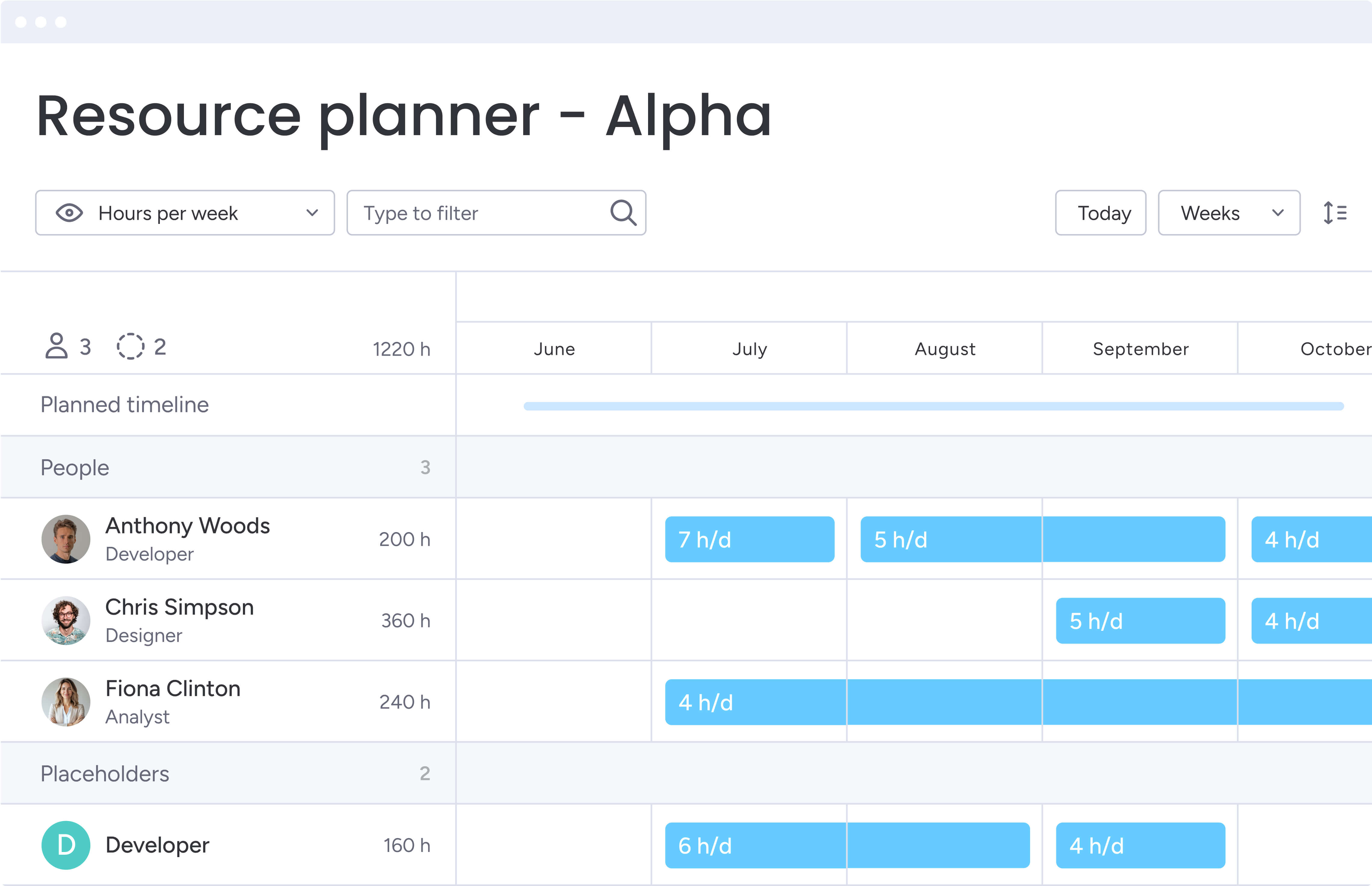
With Workload view, you’ll see exactly what’s on everyone’s plate, how many hours they have left, and where they’re maxed out — all in a visual layout that makes capacity planning actually make sense. Project managers can set daily or weekly capacity limits, track estimated versus actual hours, and identify overallocation instantly through color-coded indicators.
This feature eliminates guesswork from resource allocation and resource scheduling for project managers dealing with cross-functional teams and competing priorities. Key capabilities include:
- Visual capacity tracking: see bandwidth constraints immediately without spreadsheet calculations.
- Drag-and-drop rebalancing: adjust workloads with simple interface actions.
- Automatic overallocation alerts: system flags when team members are overbooked.
- Burnout prevention: proactive identification of unsustainable workload patterns
Portfolio management and multi-project visibility
Portfolio management connects projects across your organization into a unified view, giving project managers the leadership visibility needed to optimize dependencies, allocate resources strategically, and identify risks early. Customizable dashboards aggregate data from multiple projects to track portfolio performance and ensure alignment with strategic objectives.
This capability proves essential for project managers overseeing multiple development streams, product launches, or client deliverables simultaneously. Rather than context-switching between individual project boards, you gain comprehensive oversight that reveals:
- Resource conflicts: identify competing demands across projects before they impact delivery.
- Timeline dependencies: visualize how delays in one project affect others.
- Budget variances: track spending patterns across your entire portfolio.
- Risk indicators: AI-powered insights flag projects requiring immediate attention
For a real-life application example, McDonald’s Australia reduced project management timelines by 25% using monday work management’s portfolio capabilities to gain visibility across their operations, marketing, and PMO initiatives. The centralized view enabled faster decision-making and resource coordination across departments.
Gantt charts with dependencies and critical path
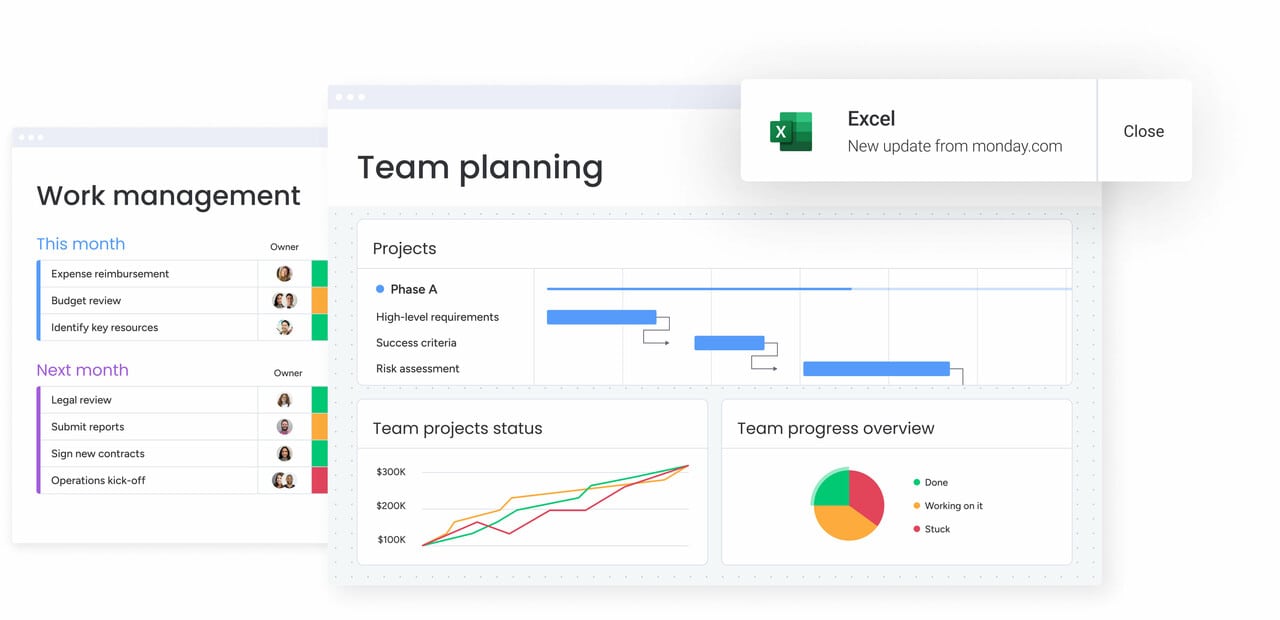
The Gantt chart functionality visualizes project timelines, task dependencies, and critical paths in an interactive format. Project managers can establish predecessor-successor relationships between tasks, set milestones, and overlay the critical path to identify which tasks directly impact project completion dates.
For project managers coordinating complex technical projects with interdependent workstreams, Gantt charts provide essential structure:
- Dependency mapping: establish clear relationships between tasks and deliverables.
- Critical path identification: focus resources on tasks that directly impact project completion.
- Baseline comparison: compare planned versus actual schedules to spot delays early.
- Impact visualization: see downstream effects when tasks slip or requirements change.
The visual representation simplifies stakeholder communication about project status and resource needs, making it easier to justify allocation decisions and timeline adjustments.
Time tracking and project budgeting
Built-in time tracking allows team members to log hours directly against tasks and projects, providing accurate data for resource utilization analysis and project budgeting. Project managers can compare estimated versus actual time spent, identify tasks that consistently exceed estimates, and use this data to improve future capacity planning.
This feature addresses critical needs for project managers who must justify resource allocation decisions with data:
- Precise utilization metrics: replace rough estimates with actual time data.
- Budget calculations: formula columns automatically update costs as time is logged.
- Forecasting improvement: historical data enhances future project planning accuracy.
- Stakeholder transparency: present clear cost breakdowns and resource justifications.
Automations for resource allocation workflows
The automation engine eliminates manual work in resource management through customizable, no-code automation rules. Project managers can automatically assign tasks based on team member availability, send notifications when resources are overallocated, trigger approval workflows when capacity thresholds are exceeded, and update project statuses based on resource allocation changes.
With 25,000+ automation actions per month on Pro plans, project managers can standardize resource management processes at scale:
- Automatic task assignment: route work based on availability, skills, or workload.
- Capacity notifications: alert stakeholders when allocation limits are reached.
- Approval workflows: trigger reviews when resource requests exceed thresholds.
- Status updates: keep project information current without manual intervention.
This reduces the over three hours per week that are typically spent on manual resource tracking, freeing time for strategic planning and stakeholder communication.
Integration with development tools
The sophisticated monday work management platform integrates with 200+ applications including Jira, GitHub, GitLab, Slack, Microsoft Teams, and Azure DevOps, enabling project managers to connect resource planning with the tools their technical teams already use. The Jira integration provides two-way syncing of issues, tasks, and project status, giving non-technical stakeholders visibility into development progress.
For project managers in tech, these integrations bridge the gap between project management and software development workflows:
- Development visibility: track technical progress without requiring team tool changes.
- Two-way synchronization: keep project data current across all systems.
- Stakeholder transparency: provide non-technical team members insight into development work.
- Workflow continuity: eliminate friction between project management and development processes.
How a project manager in tech benefits from monday work management
Project managers using monday work management experience measurable improvements across key performance areas. These benefits compound as teams scale and projects become more complex, creating sustainable competitive advantages for tech organizations.
Time savings and efficiency gains:
- Several hours saved weekly: eliminate manual resource tracking and status reporting.
- Automated workflows: handle repetitive allocation tasks without human intervention.
- Real-time dashboards: replace time-consuming manual report generation.
Cost optimization and ROI:
- 4× to 8× ROI: achieved through improved resource utilization and reduced waste.
- Project delay reduction: proactive capacity management prevents costly timeline slips.
- Tool consolidation: eliminate redundant software licenses and maintenance costs.
- Contractor optimization: prevent unnecessary hiring through better capacity planning.
Enhanced accuracy and compliance:
- Single source of truth: centralized data eliminates conflicting resource information.
- Complete audit trails: track all resource assignment changes for compliance.
- Retrospective analysis: support continuous improvement with historical data.
Productivity improvements:
- 25-30% capacity increase: teams deliver more projects with existing resources.
- Improved workload balance: prevent burnout while maximizing utilization.
- Reduced context-switching: minimize time lost moving between tools and systems.
Quality and delivery improvements:
- 23% increase in on-time delivery: better resource planning leads to realistic timelines.
- Proactive constraint identification: address bottlenecks before they impact delivery.
- Enhanced project planning: visibility enables more accurate scope and timeline estimates.
Visibility and tracking enhancements:
- Real-time utilization data: instant access to resource allocation across all projects.
- Portfolio-level insights: capacity trends and project health visible organization-wide.
- Stakeholder self-service: teams access current data without waiting for manual reports.
How to manage resources effectively with monday work management
Getting resource management right isn’t about just having a good tool, it’s about building a repeatable system that grows with your team. This six-step implementation framework helps project managers establish resource planning practices that scale with organizational growth and complexity.
Step 1: centralize all projects and resources in one workspace
Create a unified workspace that brings together all projects, team members, and resource data into a single, accessible location. This foundation step ensures everyone works from the same source of truth and eliminates the data fragmentation that causes resource conflicts.
Implementation actions:
- Import existing project information from spreadsheets, Jira, or other tools.
- Establish your resource directory with team member details, skills, and capacity.
- Migrate historical project data to maintain continuity and learning.
- Set up user permissions and access controls for different stakeholder groups.
Step 2: configure workload views and capacity limits
Set up the Workload view to visualize team capacity across projects and establish clear boundaries for resource allocation. This visual approach makes capacity planning intuitive and helps prevent overallocation before it impacts project delivery.
Configuration steps:
- Capacity limits: define daily or weekly limits for each team member.
- Measurement preferences: configure whether workloads are tracked in hours or percentages.
- Overallocation alerts: establish color-coded thresholds that flag when capacity is exceeded automatically.
- Capacity buffers: set up buffer allowances for unexpected work or shifting project needs.
Step 3: establish project templates with resource allocation rules
Build standardized project templates that include typical resource allocation patterns, approval workflows, and task structures. Templates ensure consistency across projects while reducing setup time and preventing common resource management mistakes.
Template components:
- Standard task structures: include estimated resource needs to ensure consistent project setup.
- Automation rules: assign tasks based on role, skills, or availability to streamline allocation.
- Approval workflows: route resource requests that exceed thresholds to the right stakeholders.
- Notification settings: alert teams about key resource events, capacity changes, or milestones.
Step 4: integrate with your development and communication tools
Connect monday work management with Jira, GitHub, Slack, and other tools your team uses daily to create seamless workflows that eliminate duplicate data entry. Integration ensures resource allocation data stays current automatically as work progresses.
Integration setup:
- Two-way syncing: configure connections between development tools and project boards.
- Slack notifications: set up alerts for resource-related updates and changes.
- Data mapping: establish consistent field matching between systems to keep information aligned.
- Workflow testing: test integration flows to ensure reliable, accurate data sync.
Step 5: create dashboards for different stakeholder views
Build role-specific dashboards that show relevant resource metrics to different audiences without overwhelming them with unnecessary information. Tailored views ensure each stakeholder group has the insights they need to make informed decisions.
Dashboard types:
- Executive dashboards: portfolio-level utilization and strategic resource allocation.
- Team lead dashboards: individual team workload and capacity management.
- Project-specific dashboards: resource allocation tracking against project plans.
- Individual contributor views: personal workload and upcoming assignments.
Step 6: implement continuous monitoring and optimization
Let AI do the heavy lifting by spotting patterns you’d miss — like which teams are consistently overbooked or where your capacity keeps falling short. Regular review and optimization ensure your resource management practices evolve with organizational needs and project complexity.
Optimization activities:
- Utilization review: review utilization reports to identify allocation improvement opportunities.
- Capacity adjustments: adjust capacity planning based on actual performance data.
- Template refinement: refine templates and automation rules based on lessons learned.
- Stakeholder feedback: conduct regular stakeholder feedback sessions to improve dashboard effectiveness.
Comparison: monday work management vs competing platforms
Let’s cut through the marketing hype and see how these platforms actually stack up for resource management. This comparison highlights key features across leading solutions, focusing on the specific needs of project managers in tech organizations.
| Feature | monday work management | Asana | Wrike | Jira |
|---|---|---|---|---|
| Workload view with capacity planning | ✓ Visual workload view with customizable capacity limits | ✓ Advanced plan only | ✓ Business plan and above | ✗ Requires third-party apps |
| Native time tracking | ✓ Built-in time tracking on all paid plans | ✗ Requires integrations | ✓ Business plan and above | ✗ Requires third-party apps |
| Portfolio management | ✓ Multi-project portfolio views with AI risk identification | ✓ Advanced plan only | ✓ Business plan and above | Limited portfolio features |
| Gantt charts with dependencies and critical path | ✓ Interactive Gantt with dependencies, baseline, critical path | ✓ Advanced plan only | ✓ All paid plans | ✓ Premium plan only |
| Resource-specific automations | ✓ 25,000 actions/month (Pro plan) | ✓ Limited automation rules | ✓ 200 actions/user/month | ✓ Automation available |
| Development tool integrations | ✓ Jira, GitHub, GitLab, Azure DevOps | ✓ Limited dev integrations | ✓ Jira, GitHub integrations | ✓ Native Atlassian ecosystem |
| Price per user/month | $12 (Standard, billed annually) | $13.49 (Starter, billed annually) | $10 (Team, billed annually) | $8.60 (Standard, billed annually) |
| Implementation time | Less than 4 months to full value | 2-4 weeks typical | 4-6 weeks typical | 4-8 weeks typical |
| G2 rating | 4.7/5 (12,000+ reviews) | 4.4/5 (12,000+ reviews) | 4.2/5 (3,800+ reviews) | 4.3/5 (6,000+ reviews) |
How Playtech's PMO transformed their project resource management
Playtech’s PMO offers a clear example of how monday work management solves real resource-management challenges inside complex technical environments. Their shift from manual tracking to automated, data-driven allocation created a scalable system other tech teams can model.
The challenge:
Playtech’s PMO was managing dozens of client projects entirely through spreadsheets, emails, and handwritten notes. Project managers had limited visibility into resource availability and often assigned work before projects were formally defined. Without a centralized record of discussions or commitments, accountability became unclear and scheduling conflicts were common. As clients demanded faster delivery and more frequent updates, this manual approach quickly became impossible to sustain.
The solution:
To regain control, the PMO adopted monday work management as their single, end-to-end project and resource management system. They created separate boards for early project discussions and active project execution, preventing accidental resource bookings. Customized templates standardized how resources were allocated across different project types. Integrating Jira added real-time visibility into development progress, allowing project managers to align waterfall planning with Agile execution.
The results:
Playtech’s transformation delivered measurable improvements across all key performance areas:
- 26% efficiency increase: the PMO operated significantly faster across all projects.
- 49% rise in collaboration and transparency: stakeholders gained shared visibility into project status.
- 23% improvement in meeting KPIs: project delivery performance strengthened across the board.
- 3 hours saved per person weekly: manual coordination and resource tracking time dropped sharply.
- Real-time cost clarity: teams monitored project budgets week-by-week with confidence.
- Automated resource-release alerts: unnecessary contractor spend was eliminated through timely notifications.
Ready to transform your resource management?
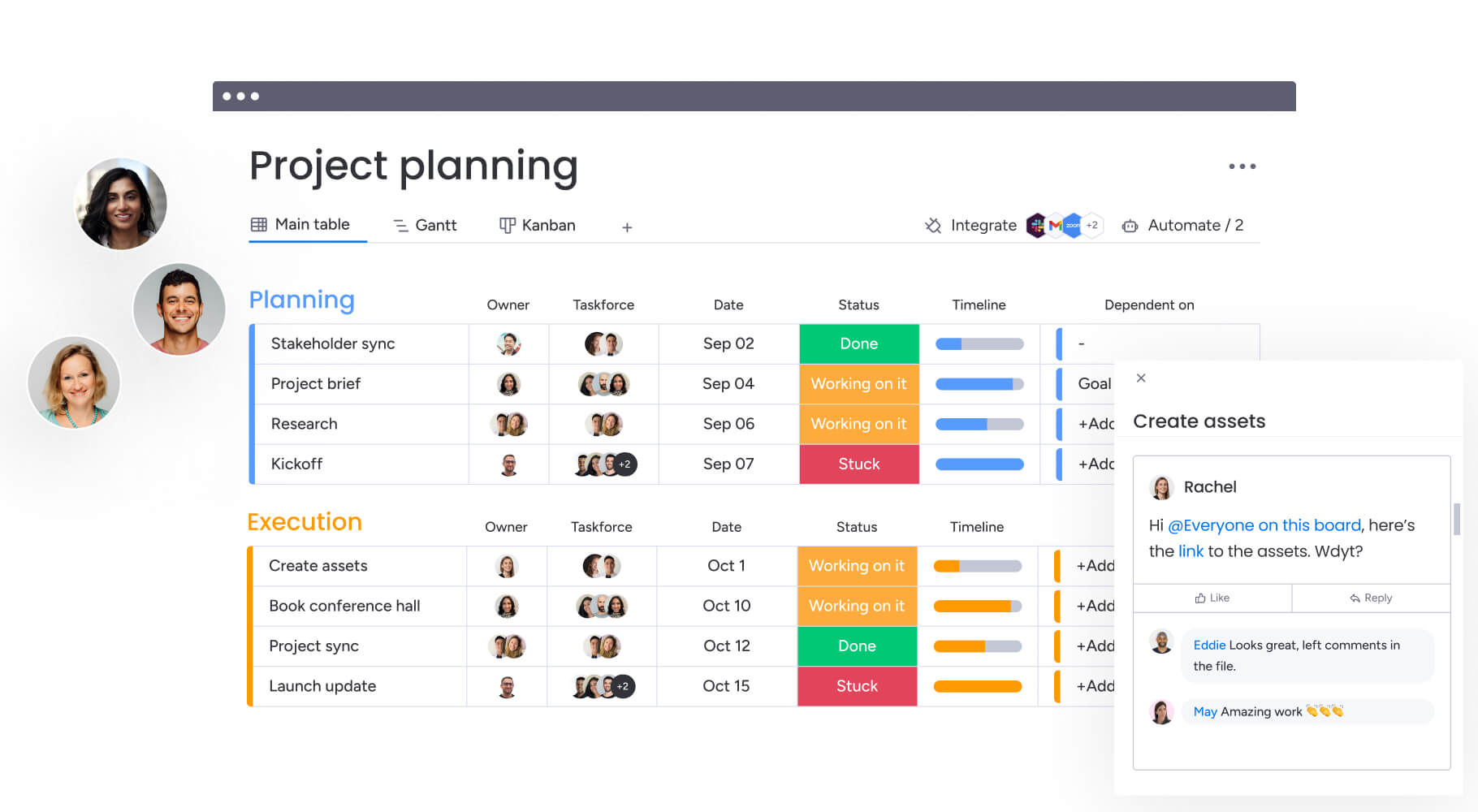
Tech project managers turn to monday work management when they’re tired of piecing together what’s happening across a dozen different tools and just want to see the full picture — who’s working on what, when it’s due, and whether they have the bandwidth to pull it off. The platform transforms resource management from reactive firefighting into proactive strategic planning that drives consistent project delivery.
With centralized workflows that bring all work into one place, you’ll spend less time tracking resources manually and more time delivering projects that drive business value. Real-time workload visibility, automated resource allocation, and seamless integration with your tech stack create the foundation for scalable project success.
Join 245,000+ customers worldwide who rely on monday work management for professional project and resource management. Experience the difference that unified visibility, intelligent automation, and enterprise-grade capabilities make for your team’s productivity and project outcomes.
The content in this article is provided for informational purposes only and, to the best of monday.com’s knowledge, the information provided in this article is accurate and up-to-date at the time of publication. That said, monday.com encourages readers to verify all information directly.
Try monday work managementFrequently asked questions
How does monday work management handle resource allocation for hybrid Agile and Waterfall projects?
monday work management supports both Agile and Waterfall methodologies within the same workspace, making it ideal for tech organizations using hybrid approaches. You can manage Agile sprints using Kanban boards and sprint planning views while simultaneously tracking Waterfall projects with Gantt charts and critical path analysis.
Can monday work management integrate with GitHub and other development tools used by tech teams?
Yes, monday work management integrates with GitHub, GitLab, Bitbucket, Azure DevOps, and other development platforms. These integrations enable two-way syncing of commits, pull requests, branches, and issues with project tasks in monday work management. This gives project managers visibility into technical work progress without requiring developers to duplicate updates across systems.
What is the typical implementation timeline for a tech company PMO?
Most tech companies achieve full value from monday work management in less than 4 months. Initial setup and team onboarding typically takes two to four weeks, with teams becoming comfortable with the platform within the first month. The intuitive interface requires minimal training — most users can navigate effectively after a brief orientation.
How does monday work management prevent resource conflicts and double-booking?
The platform prevents resource conflicts through real-time capacity tracking and visual workload indicators. When you assign a task, the system shows the team member's current allocation and flags if the assignment would exceed their capacity limits. Color-coded workload views make overallocation immediately visible, and automated notifications alert you when team members are overbooked.
Can I track resources across different time zones and distributed teams?
Yes, monday work management supports global teams with time zone-aware scheduling, capacity planning, and collaboration features. You can set individual time zones for each team member, and the system automatically adjusts task deadlines and capacity calculations accordingly. The platform displays working hours based on each person's location, making it easy to identify overlap windows for synchronous collaboration.
What security and compliance features does monday work management offer for enterprise tech companies?
monday work management provides enterprise-grade security including SOC 2 Type II certification, GDPR compliance, ISO 27001 certification, and HIPAA compliance options. Security features include IP restrictions, two-factor authentication, multiple SSO options, BYOK (Bring Your Your Own Key) encryption, and tenant-level encryption. Advanced admin controls enable granular permission management, audit logs track all resource allocation changes, and data residency options support compliance with regional data protection requirements.

 Get started