


Marketing teams at growing organizations face a familiar challenge: campaigns span multiple channels, creative assets flow through different approval cycles, and performance data lives in separate systems. When your marketing operation involves 50+ people coordinating across content, events, paid media, and creative production, fragmented workflows create bottlenecks that slow execution and obscure results.
Great marketing strategy software cuts through this mess by putting campaign plans, team resources, and results tracking under one roof. These solutions go beyond basic project management to provide the strategic alignment, automation capabilities, and real-time visibility that marketing leaders need to coordinate cross-functional teams and demonstrate measurable impact to executive leadership.
This helpful post will shine a light on what works for enterprise marketing teams, highlights the features that actually matter, and reveals how the right platform can turn chaotic processes into focused execution that ties daily work to business goals.
Key takeaways
Marketing software has come a long way from basic task lists. Today’s platforms connect the dots between your strategy, day-to-day work, and results measurement.
Here’s what matters most when evaluating solutions for your 50-100+ person marketing organization:
- Centralized visibility: the right platform unifies fragmented workflows across content, campaigns, events, and creative teams — eliminating the disconnected execution that scatters marketing impact.
- Resource optimization: advanced workload management prevents burnout and ensures balanced capacity across your entire marketing organization.
- Strategic alignment: connect every campaign and initiative to company OKRs, demonstrating measurable ROI to executive leadership.
- Operational efficiency: standardized templates and automation reduce manual work by up to 55%, letting teams focus on strategic initiatives.
- Enterprise readiness: look for platforms that balance deep customization with governance — enabling speed without sacrificing oversight.
What to look for in marketing strategy software

Marketing strategy software should help heads of marketing move from planning to execution without losing visibility along the way. At scale, strategy breaks down when campaign plans, team workloads, and performance data live in separate systems. The right platform brings these elements together, making it easier to see how daily work supports broader business goals.
Look for software that provides a clear line of sight from strategic initiatives to active campaigns and deliverables. This means being able to plan at a high level, track execution in real time, and adjust priorities as conditions change — without relying on manual status updates or disconnected reporting tools.
Effective marketing strategy software should also make resourcing part of the strategic conversation. Understanding whether your team has the capacity to deliver on priorities is just as important as defining the priorities themselves. Platforms that surface workload and capacity data help leaders make informed trade-offs before teams become overextended.
What makes heads of marketing choose monday work management?
Heads of marketing at tech companies face a fundamental challenge…: gaining centralized visibility while maintaining operational efficiency across 50-100+ person teams executing multi-channel campaigns. The core issues that create operational chaos include:
- Disconnected execution: siloed teams working without coordination.
- Process inefficiency: no standardization across departments.
- Limited visibility: lack of real-time insights into progress, capacity, and ROI.
Advanced solutions like monday work management delivers centralized visibility into all campaigns, performance, and team workloads through a unified platform that connects strategy to execution. Unlike project management tools that focus solely on task tracking, the platform provides the strategic alignment layer that heads of marketing need.
This layer links campaign execution to company OKRs, tracks budget adherence in real-time, and surfaces resource utilization metrics that prevent team burnout.
This visibility proves critical when overseeing content teams, creative teams, acquisition teams, events teams, and operations teams simultaneously. Each runs their own workflows but contributes to shared marketing goals. When teams reinvent workflows for every campaign and duplicate processes across departments, marketing impact becomes scattered and difficult to measure.
The platform eliminates this chaos through:
- Campaign templates: standardize go-to-market execution across all initiatives.
- Cross-board automations: connect creative briefs to campaign launches seamlessly.
- Workload management tools: show exactly where team capacity stands across all initiatives.
Top features for enterprise marketing operations
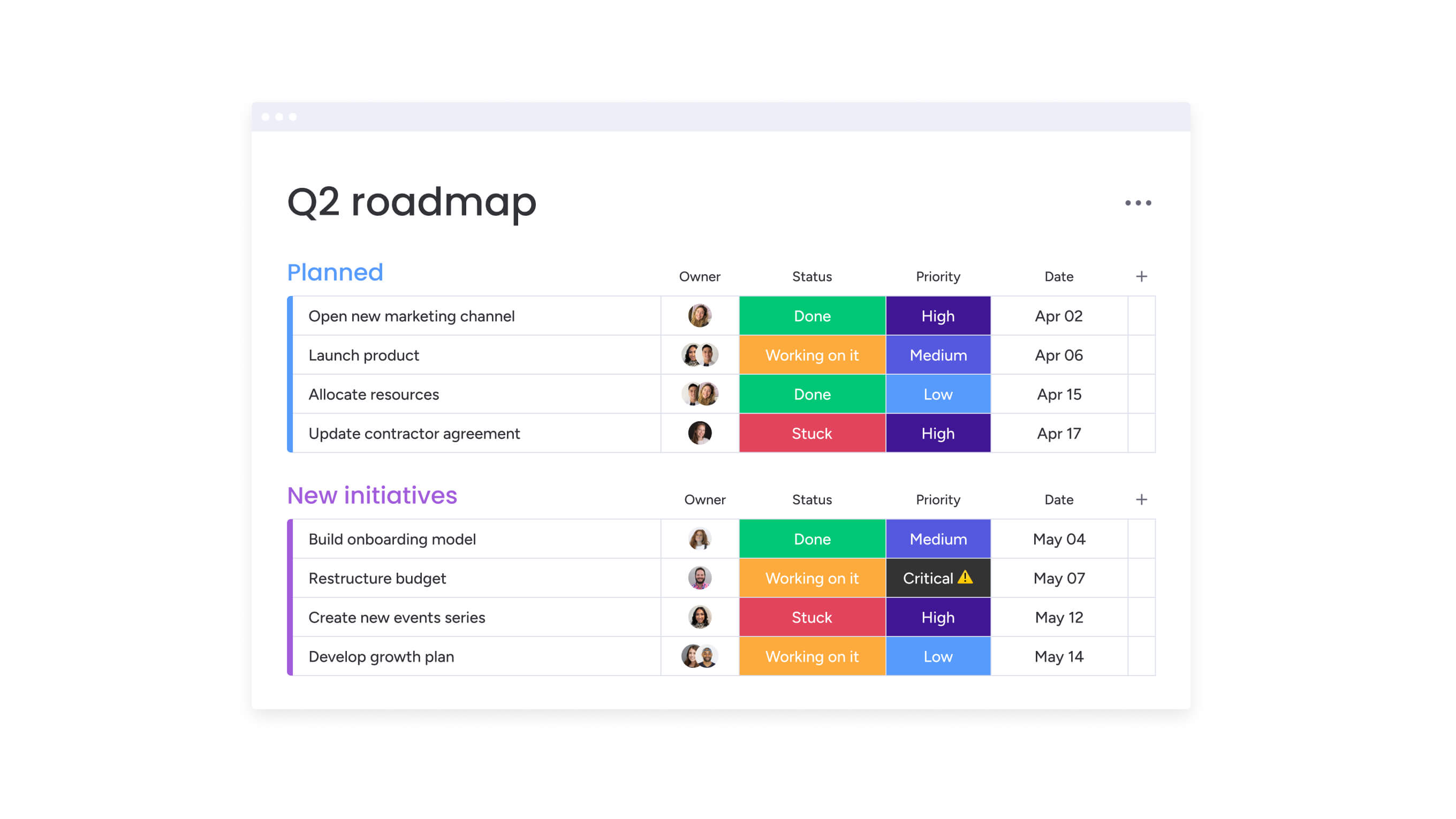
Marketing leaders need specific capabilities to manage complex operations at scale. The features we’ll dive into below directly address the challenges of disconnected execution, resource inefficiency, and strategic misalignment that plague large marketing organizations.
Campaign management capabilities
Campaign management provides a centralized digital workspace for planning, launching, and optimizing integrated campaigns across all marketing channels. The sophisticated platform uses customizable boards with calendar views, timeline views, and Gantt charts to visualize campaign schedules, dependencies, and milestones.
Key capabilities include:
- Status tracking: monitor campaigns from initial brief through execution to performance analysis.
- Automated notifications: keep every detail on track with intelligent alerts.
- Real-time dashboards: aggregate campaign performance metrics, budget tracking, and deliverable status across multiple concurrent campaigns.
For marketing leaders managing 24+ concurrent campaigns, these capabilities directly address disconnected execution and lack of visibility. When campaigns span multiple teams and regions, seeing all campaign elements, dependencies, and timelines in one place eliminates the email chains and status meetings that consume team productivity.
Resource management and capacity planning
Resource management provides real-time visibility into team capacity, workload distribution, and resource allocation across all marketing initiatives. The Workload view displays each team member’s assigned work items plotted against their available capacity…, with color-coded indicators showing who’s overloaded, optimally allocated, or has bandwidth for additional work.
Core features include:
- Resource directory: centralizes key data about talent across the organization — department, job roles, expertise, and availability.
- Strategic allocation: makes it easy to find the right person for each initiative.
- Capacity planning tools: ensure the right people work on the right priorities at the right time.
For heads of marketing managing 50-100+ person teams, these capabilities solve the critical pain point of poor resource utilization leading to burnout, misalignment, and missed deadlines. The Workload view provides capacity planning tools to allocate resources strategically, demonstrating team productivity and resource utilization metrics to executive leadership.
Marketing operations and OKR tracking
Marketing operations and OKR tracking connects strategic goals to daily execution through integrated goal-setting, progress tracking, and performance reporting capabilities. The Goals feature lets you set company-level and team-level objectives, break them into key results with measurable targets, and link specific campaigns and projects to each goal.
Strategic alignment features:
- Progress aggregation: dashboards show real-time advancement toward each objective with visual progress bars and trend charts.
- Risk management: custom automations trigger alerts when goals are at risk.
- Executive reporting: generate executive-ready summaries of marketing impact tied directly to business objectives.
This strategic alignment proves critical for heads of marketing who need to balance execution excellence with strategic leadership, ensuring every campaign and initiative advances measurable business outcomes.
Creative production workflows
Creative production workflows streamline the entire creative process from brief submission through asset delivery with automated request forms, approval workflows, and version control. Custom forms capture creative brief requirements with all necessary details — campaign objectives, target audience, deliverable specifications, deadlines, and brand guidelines.
Workflow automation includes:
- Intelligent routing: automated workflows route briefs to appropriate creative team members.
- Stage notifications: trigger notifications at each stage and manage approval cycles.
- File proofing: stakeholders review creative assets directly within the board, leaving timestamped comments on specific elements.
These workflows solve the pain point of inefficient processes where teams reinvent workflows for every project. Standardized creative request forms ensure all necessary information is captured upfront, eliminating the back-and-forth that delays projects.
How marketing teams benefit from monday work management
The intutitive platform delivers measurable improvements across key operational metrics that matter to marketing leadership. These benefits multiply as your team grows, giving you a real edge in how your marketing team works together.
Time and efficiency gains
Marketing teams using monday work management achieve significant time savings through automation and standardization. Organizations report saving thousands of hours monthly through automated workflows and standardized processes.
Specific improvements include:
- Reduced email volume: email exchanges decrease substantially through centralized communication.
- Eliminated spreadsheets: 100% removal of spreadsheets by centralizing data in one platform.
- Streamlined coordination: eliminate manual coordination, status updates, and information hunting.
Teams save hours by ditching the manual coordination, endless status updates, and constant information hunting that eat up their day. Teams can reallocate budget from operational costs to strategic initiatives and campaign execution.
Enhanced team productivity
Teams achieve significant productivity gains through improved coordination and reduced friction. Cross-team collaboration improves dramatically for end-to-end campaign planning and execution.
Productivity multipliers:
- Global collaboration: substantial increases by centralizing communication and workflows.
- Creative output: multiplies when streamlining creative production workflows.
- Process efficiency: eliminates disconnected execution and inefficient processes that force teams to reinvent workflows.
These productivity improvements come from eliminating disconnected execution and inefficient processes that force teams to reinvent workflows and duplicate effort.
Improved visibility and control
Real-time visibility into campaigns, resources, and performance enables faster decision-making and issue resolution. Dashboards surface key metrics instantly, eliminating the lag time between execution and reporting.
Enhanced control features:
- Real-time allocation: workload views show resource allocation in real-time, enabling proactive capacity management.
- Dependency tracking: timeline views and Gantt charts reveal dependencies and potential bottlenecks before they cause delays.
- Performance monitoring: instant access to campaign progress, capacity, and ROI across the entire marketing organization.
With this level of visibility, you’ll finally see exactly where projects stand, which teams have bandwidth, and how campaigns are performing — all in real time.
6 steps to implement marketing strategy software
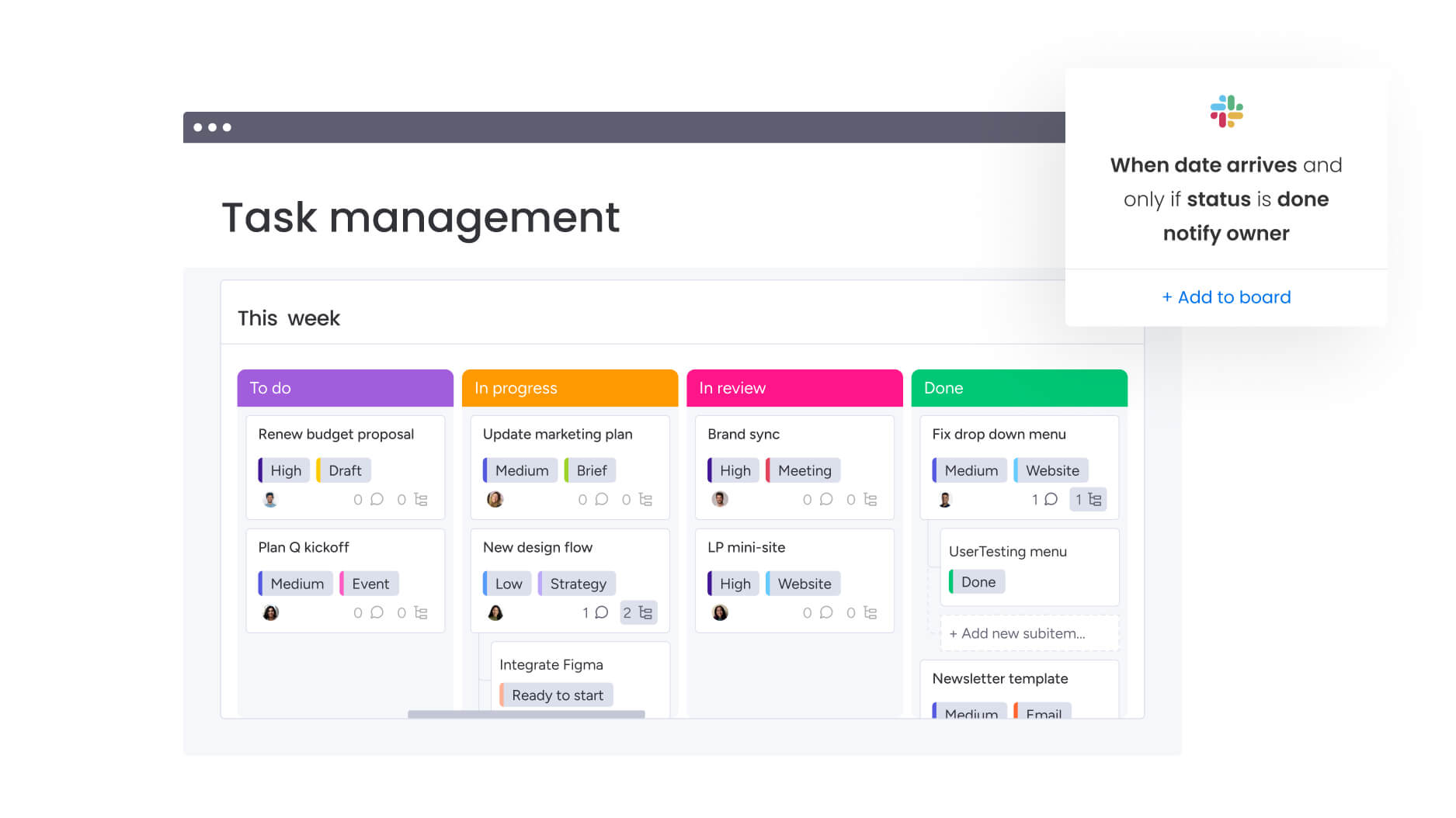
To implement successfully, you’ll need a plan that gets teams excited while keeping day-to-day work flowing. Follow these steps to ensure smooth adoption across your marketing organization and maximize the value of your investment.
Step 1: centralize your marketing operations
Start by bringing all those scattered tools and endless spreadsheets into monday work management. Create a workspace structure that mirrors your marketing organization — boards for campaign management, creative production, content calendar, event planning, and marketing operations.
Implementation actions:
- Import existing campaign data, team rosters, and process documentation to establish your single source of truth.
- Set up integrations with your essential martech stack tools to ensure data flows seamlessly between systems.
- Configure user permissions and access controls to maintain security while enabling collaboration.
Step 2: standardize workflows with templates
Build campaign templates that embed your proven go-to-market processes, ensuring every campaign follows the same high-quality workflow. Create templates for different campaign types with pre-configured columns for status, owner, deadline, budget, and deliverables.
Template configuration:
- Add automation recipes that trigger notifications, move items between stages, and create dependent tasks automatically.
- Include creative brief forms, approval workflows, and performance tracking structures in each template.
- Test templates with pilot campaigns before rolling out organization-wide.
Step 3: implement resource management
Set up the Workload view to visualize team capacity across all marketing initiatives. Configure each team member’s weekly capacity, then assign tasks with estimated effort to see real-time allocation.
Resource setup process:
- Create a resource directory board that captures each team member’s skills, expertise, department, and availability.
- Use workload data to identify overallocation before it causes burnout.
- Make data-driven decisions about hiring needs based on capacity analysis.
Step 4: connect campaigns to company OKRs
Establish your marketing goals and OKRs in the Goals feature, breaking company-level objectives into team-level key results with measurable targets. Link specific campaigns and projects to relevant goals, creating clear line-of-sight from daily execution to strategic objectives.
Goal alignment steps:
- Build executive dashboards that aggregate progress across all goal-linked work.
- Show real-time advancement toward each objective with visual progress indicators.
- Set up automated alerts when goals are at risk based on campaign performance or timeline delays.
Step 5: automate cross-functional workflows
Create cross-board automations that connect creative production, campaign execution, and performance tracking workflows. Set up automations where completed creative briefs trigger campaign setup tasks, approved assets populate campaign boards, and launched campaigns create performance tracking items.
Automation configuration:
- Configure notifications that alert stakeholders when their input is needed, when deadlines are approaching, or when issues require attention.
- Build integration automations that sync data between monday work management and your martech stack tools.
- Test automation sequences to ensure they work reliably across different scenarios.
Step 6: build real-time performance dashboards
Create dashboards that surface the metrics executive leadership cares about — campaign ROI, customer acquisition cost, content performance, budget adherence, team productivity, and time-to-launch. Use chart widgets to visualize trends over time, number widgets to highlight key metrics, and table widgets to show detailed breakdowns.
Dashboard development:
- Build different dashboard views for different audiences — executives, managers, and individual contributors.
- Share dashboards with stakeholders and set up automated reports that deliver updates on a regular schedule.
- Continuously refine dashboard metrics based on user feedback and changing business needs.
Comparison: monday work management vs competing platforms
If you’re weighing up software, including marketing planning software, it’s important to keep a look out for that features that matter most for large-scale marketing operations
In the table below we’ve complied a handy comparison of some of the leading platforms: focusing on the capabilities that are critical for heads of marketing managing 50-100+ person teams.
| Platform | Best For | Key Strength | Main Limitation |
|---|---|---|---|
| monday work management | Finance PMOs seeking intuitive, AI-powered portfolio management | Rapid implementation with enterprise capabilities | - |
| Smartsheet | Teams comfortable with spreadsheet interfaces | Familiar grid-based design | Resource management requires add-ons |
| Wrike | Organizations prioritizing workflow automation | Robust automation capabilities | Steeper learning curve |
| Microsoft Project | Microsoft-centric enterprises | Deep Office 365 integration | Limited workflow flexibility |
| Asana | Teams focused on collaboration | User-friendly interface | Portfolio features only in higher tiers |
Key differentiators:
- User experience: monday work management stands out through its combination of intuitive user experience, comprehensive feature set, and proven results at scale.
- Adoption rates: the platform’s visual, no-code interface drives high adoption rates, ensuring your team actually uses the platform rather than reverting to spreadsheets and email.
- Enterprise readiness: built-in features at all tiers rather than requiring premium upgrades for essential functionality.
How Genpact transformed their campaign operations
Genpact’s globally distributed marketing team manages 24+ ongoing large-scale marketing campaigns simultaneously, each with multiple cross-channel activations jointly managed by campaign managers and channel owners.
The team also relied heavily on spreadsheets saved across personal desktops, emails, and Microsoft SharePoint folders.
The challenge: no one knew who had the latest version of campaign information or where to find it. This made tracking and managing campaigns nearly impossible when multiple people were entering information at different times.
The solution: Genpact implemented monday work management to centralize their marketing operations and create a single source of truth for all campaign information. The team built workflow boards outlining the entire end-to-end activation process for each marketing channel, with columns tracking target dates versus actual timeframes to identify trends and bottlenecks.
Implementation highlights:
- Automated brief submission: the digital team formalized the campaign brief submission and approval process using monday.com forms.
- Intelligent routing: when new forms are submitted, automated notifications route requests to appropriate team members.
- Visible queue management: campaign managers can see exactly where their requests stand in the approval process.
The results speak volumes:
- 40% improvement in cross-team collaboration: for successful end-to-end campaign planning.
- 100% removal of spreadsheets: from marketing operations.
- 25% decrease in email exchanges: through centralized communication.
The platform enabled Genpact to move from reactive firefighting to proactive campaign management, with clear visibility into campaign status, bottlenecks, and resource allocation.
Turn marketing strategy into consistent execution with monday work management
Today’s marketing software does far more than track projects — it’s become the engine that powers high-performing marketing teams. The right platform unifies fragmented workflows, optimizes resource allocation, and connects every campaign to strategic business objectives.
If you’re leading a team of 50-100+ marketers, monday work management gives you the clear oversight and streamlined processes you need to amplify your team’s results. With its easy-to-use interface, robust features, and track record with enterprise teams, the platform stands out for marketing leaders serious about upgrading how their teams work.
Key benefits that drive results
- Operational efficiency: reduce manual work by up to 55% through standardized templates and automation.
- Strategic alignment: connect every campaign to company OKRs with measurable ROI tracking.
- Resource optimization: prevent burnout and ensure balanced capacity across your entire organization.
- Enterprise readiness: balance deep customization with governance for speed without sacrificing oversight.
Ready to see how monday work management can transform your marketing operations? Start building the unified platform that connects your strategy to execution.
The content in this article is provided for informational purposes only and, to the best of monday.com’s knowledge, the information provided in this article is accurate and up-to-date at the time of publication. That said, monday.com encourages readers to verify all information directly.
Frequently asked questions
How long does it take to implement monday work management for a 50-100+ person marketing team?
The time it takes to implement monday work management for a 50-100+ person marketing team is typically one to four weeks, depending on workflow complexity and integration requirements., depending on workflow complexity and integration requirements. The platform's intuitive interface and pre-built marketing templates accelerate setup significantly.
How does monday work management handle resource allocation across multiple concurrent campaigns?
The Workload view provides real-time visibility into team capacity and resource allocation across all marketing initiatives. You configure each team member's weekly capacity, then assign tasks with estimated effort to see current allocation. Color-coded indicators show who's overloaded, optimally allocated, or has bandwidth for additional work, enabling you to prevent burnout and make data-driven decisions about hiring needs.
Can monday work management integrate with our existing martech stack tools?
Yes, monday work management integrates with 200+ tools commonly used in marketing technology stacks, including CRM marketing solutions like HubSpot and Salesforce. Native integrations include Google Analytics, Slack, Microsoft Teams, and Adobe Creative Cloud. The platform also provides a robust API and Zapier integration for connecting with tools that don't have native integrations, enabling two-way data sync and automated workflows that span multiple tools.
How does monday work management differ from project management tools like Asana or Wrike?
While Asana and Wrike focus primarily on project and task management, monday work management provides a comprehensive work operating system designed for managing work at every level. The platform includes built-in Workload views and capacity planning at all tiers, marketing-specific features like campaign management templates and creative approval workflows, and cross-board automations that connect workflows across different teams more seamlessly than competitors.
What governance and security features does monday work management provide?
monday work management provides enterprise-grade security and governance features essential for large marketing organizations. Security capabilities include IP restrictions, two-factor authentication, multiple SSO options, and tenant-level encryption. Governance features include granular permissions at board, group, and item levels, admin controls for managing users and integrations across the organization, and audit logs tracking all changes for compliance and accountability.
How does monday work management support global marketing teams?
The platform is designed for globally distributed teams with 24/seven cloud-based accessibility, centralized communication that eliminates the need for synchronous meetings, and configurable notifications that ensure team members are alerted when their input is needed regardless of time zone differences. Multi-language support and time zone display features prevent confusion about deadlines while enabling seamless collaboration across regions.

 Get started