

Marketing leaders with packed event calendars know the struggle: you’re juggling dozens of annual events, wrangling cross-functional teams, and constantly proving ROI to the C-suite. The reality? The gap between your ambitious event strategy and what actually happens keeps getting wider. When events operate in silos from broader marketing campaigns, teams lose visibility into resource conflicts, miss strategic alignment opportunities, and struggle to demonstrate measurable business impact.
Event planning software isn’t just about logistics anymore. The best platforms now act as the nerve center of your marketing operation — directly connecting your events to campaign results, team resources, and business goals. These platforms eliminate the disconnected workflows that plague marketing operations by creating unified workspaces where events integrate seamlessly with content calendars, approval processes, and cross-departmental collaboration.
In this guide, we’ll show you what actually sets enterprise-grade event platforms apart from basic tools, with a focus on the features that matter most: campaign integration, resource management, and smart automation. We’ll examine how leading marketing teams use comprehensive work management platforms to scale their event operations, maintain strategic alignment, and deliver measurable results across complex event portfolios.
Key takeaways
Marketing leaders in services companies face a unique challenge: orchestrating dozens of events annually while managing campaigns, creative production, and cross-functional teams. The right event planning software transforms this complexity into streamlined execution.
Here’s what separates enterprise-ready platforms from basic event tools:
- Connect events to your marketing strategy: integrate event planning with campaigns, content calendars, and strategic goals so every event drives measurable business impact, not just attendance numbers.
- Gain real-time visibility across your entire event portfolio: track team workloads, event ROI, and campaign performance through unified dashboards that help you make confident decisions without manual reporting.
- Standardize workflows while maintaining flexibility: create templated processes for different event types that ensure consistent execution while allowing teams to customize based on specific requirements.
- Transform event planning with monday work management: centralize your entire marketing operation on one platform that connects event execution to broader campaigns, automates routine tasks, and provides AI-powered insights for proactive risk management.
- Optimize resources across simultaneous events: visualize team capacity, prevent overallocation, and make informed staffing decisions using real-time workload data that scales with your event portfolio.
What makes event planning software essential for marketing leaders?

Event planning software has evolved beyond simple logistics management. For marketing leaders overseeing 50-100+ person teams, these platforms now serve as operational command centers that connect event execution to broader business strategy.
The shift from spreadsheets to specialized software addresses three critical pain points that plague enterprise marketing operations:
- Disconnected tools: create version control nightmares and communication gaps.
- Manual coordination: leads to duplicated work and missed deadlines across departments.
- Limited ROI tracking: makes it difficult to justify budgets and demonstrate impact to executive leadership.
Modern event planning platforms solve these challenges by creating a single source of truth. Marketing teams gain visibility into how events contribute to pipeline generation, customer acquisition costs, and overall campaign performance.
Understanding the event planning lifecycle: the 5 C’s framework
We use what we call the five C’s framework to evaluate event planning tools: concept, Coordination, Control, Culmination, and Closeout. Each of these phases needs specific features to deliver both smooth execution and measurable outcomes.
Here’s how each phase maps to essential software capabilities:
- Concept phase: platforms should support ideation and strategic alignment.
- Coordination phase: requires robust collaboration features and task management.
- Control phase: demands real-time visibility through dashboards and automated reporting.
- Culmination phase: focuses on execution tools and attendee management.
- Closeout phase: emphasizes post-event analysis and ROI measurement.
Software that addresses all five phases ensures nothing falls through the cracks. Look for platforms that connect each phase through integrated workflows, allowing seamless transitions from planning to execution to analysis.
Core features marketing leaders need in event planning software
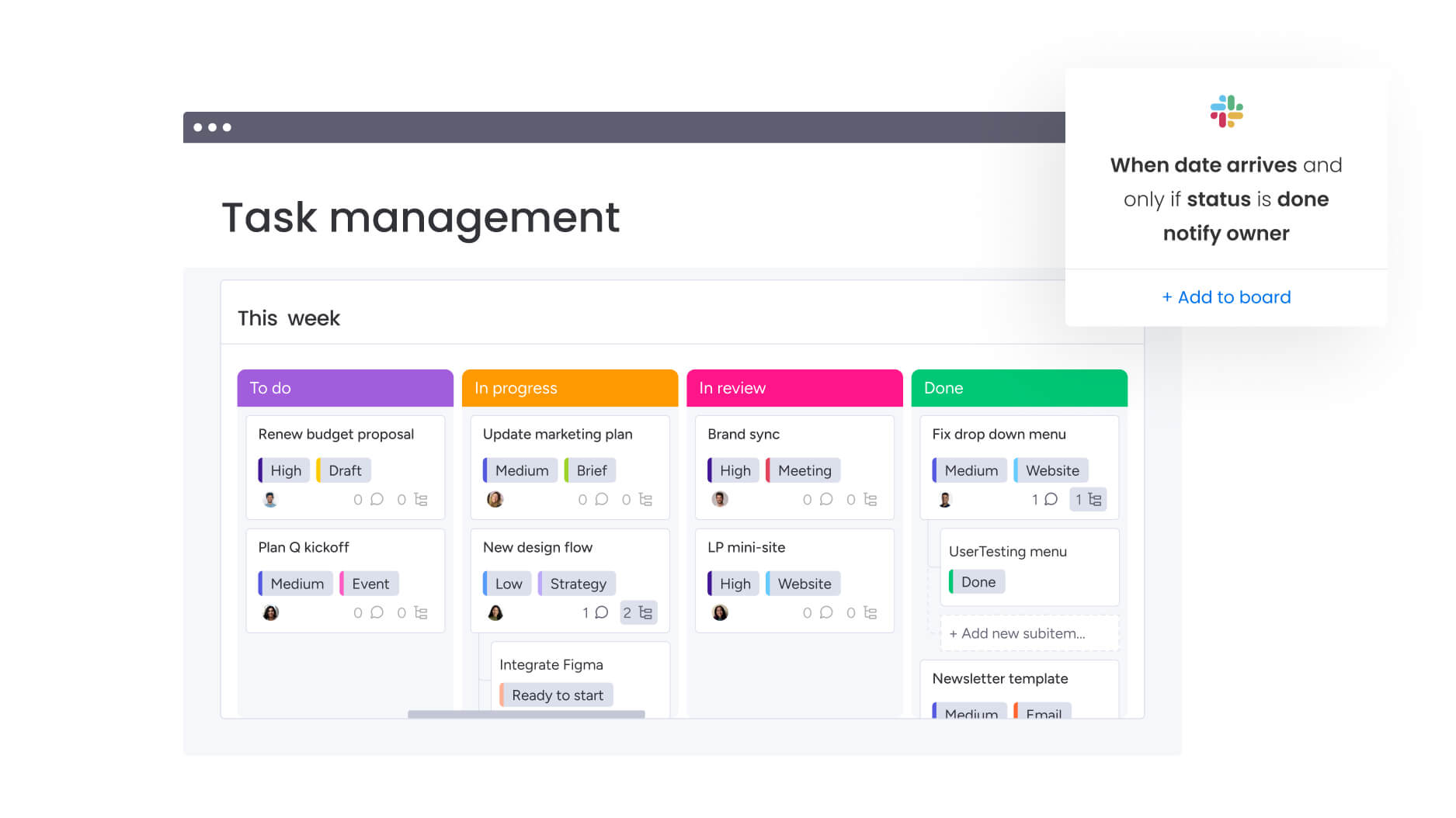
Enterprise marketing teams require specific capabilities that go beyond basic task management. These features directly address the operational challenges of managing complex event portfolios while maintaining strategic alignment across your organization.
Campaign and event integration capabilities
Your event planning software should treat events as core pieces of your marketing campaigns. That means you need to see your event timelines alongside your content calendar, email sequences, and social posts in one place.
The most effective platforms allow you to see dependencies between events and other marketing initiatives. When planning a product launch event, you need visibility into how it aligns with PR activities, digital campaigns, and sales enablement efforts.
Key integration features to evaluate include:
- Unified calendar views: see all marketing activities and events in one place.
- Cross-campaign dependencies: track how event delays impact other initiatives.
- Shared resource pools: manage creative assets and content across events and campaigns.
- Performance rollups: connect event metrics to overall campaign KPIs.
Resource management and workload balancing
Managing team capacity across multiple simultaneous events requires sophisticated resource management capabilities. The platform should provide real-time visibility into who’s working on what, their current utilization, and upcoming availability.
Effective resource management goes beyond simple task assignment. It involves understanding team members’ skills, tracking time spent on different event types, and identifying patterns that inform future planning. This data helps you make informed decisions about staffing, outsourcing, and timeline adjustments.
Essential resource management features include:
- Workload visualization: see team capacity across all events and campaigns at a glance.
- Skills-based allocation: match tasks to team members based on expertise and availability.
- Time tracking: monitor actual versus estimated effort for accurate future planning.
- Capacity forecasting: predict resource needs based on upcoming event pipeline.
Automation and workflow standardization
Automation handles the repetitive, manual aspects of event planning. With templated workflows and built-in triggers, your team can deliver consistent results without the endless manual updates and check-ins.
Consider the typical event approval process: stakeholder notifications, deadline reminders, and status updates consume hours weekly. Automation handles these tasks instantly, freeing your team to focus on strategic work like audience engagement and content creation.
High-impact automation capabilities:
- Template libraries: standardized workflows for different event types.
- Approval routing: automatic escalation and notification sequences.
- Status triggers: actions that fire based on timeline or completion milestones.
- Document generation: automated creation of briefs, reports, and follow-ups.
How monday work management transforms event planning at scale
Intuitive solutions such as monday work management addresse the specific needs of enterprise marketing teams by combining powerful event planning capabilities with broader work management functionality.
The intelligent platform’s approach focuses on three core pillars that directly solve the challenges marketing leaders face: leadership visibility, cross-team standardization, and resource optimization.
Leadership visibility for confident decision-making
AI-powered dashboards give you a bird’s-eye view of every event, campaign, and initiative in your portfolio. You can spot performance trends and potential issues in real time, allowing you to make informed decisions faster with instantly generated reports.
- AI-powered risk insights: scan project updates to surface potential issues before they impact delivery. The system analyzes patterns across hundreds of events, flagging resource conflicts, timeline risks, and budget concerns with recommended mitigation strategies. This proactive approach helps teams address problems before they escalate.
- Portfolio-level reporting: aggregate data from individual events into executive-ready summaries. These reports connect event performance to strategic objectives, demonstrating clear ROI and informing future investment decisions.
Standardization and alignment across teams
Our managed templates give you the best of both worlds: consistent execution with room to customize. You’ll get pre-built workflows, ready-to-use automation recipes, and approval paths that work whether you’re running ten events or a hundred.
- Cross-project dependencies: visualize connections between events and other marketing initiatives. This feature prevents scheduling conflicts, ensures resource availability, and maintains alignment with broader campaign timelines. Teams can see how changes to one event impact others, enabling proactive adjustments.
- Governance capabilities: maintain brand standards and compliance requirements without slowing execution. Role-based permissions, audit trails, and approval workflows ensure proper oversight while empowering teams to move quickly.
Resource optimization through intelligent planning
The resource directory centralizes information about team members’ skills, roles, and availability. This single source of truth enables smart task assignment based on expertise and current workload.
- Capacity management features: provide live visibility into resource utilization across all events and campaigns. Marketing leaders can identify overloaded team members, redistribute work, and make informed decisions about hiring or outsourcing needs.
- Resource planner: enables project-level allocation with drag-and-drop simplicity. Teams can assign resources to specific events, track time against budgets, and adjust allocations as priorities shift.
Comparison: monday work management vs specialized event platforms
When weighing up the best event planning software, understanding the differences between comprehensive work management platforms and specialized event-only platforms helps inform your decision.
This table highlights the capabilities and limitations of two of the most popular solutions on the market, compared to monday work management.
| Feature | monday work management | Cvent | Eventbrite |
|---|---|---|---|
| Campaign integration | Full marketing operations integration | Limited to events | Basic calendar only |
| Resource management | Enterprise workload and capacity planning | Separate module required | Not available |
| Automation depth | 200+ recipes for any workflow | Event-specific only | Limited options |
| Customization | No-code platform for any process | Technical configuration needed | Template-based |
| Cross-team collaboration | Unified workspace for all departments | Event team focus | Attendee communication |
| Strategic alignment | OKR tracking and portfolio management | Event-specific metrics | Sales and attendance only |
| Implementation time | 2-4 weeks | 3-6 months | Immediate for basics |
| Scalability | Unlimited events and users | Enterprise contracts | Per-event pricing |
Real-world success: how Genpact transformed event execution
Genpact’s globally distributed marketing department manages 24 ongoing campaigns simultaneously, each with multiple event activations. Before implementing monday work management, the team relied on spreadsheets saved across desktops, emails, and SharePoint folders.
This fragmentation made it impossible to track event timelines or identify bottlenecks.
The transformation process
The marketing team created a centralized GTM calendar with hierarchical views showing programs, campaigns, and event activations. They formalized their campaign brief process using automated forms and workflows, providing complete visibility into request status and turnaround times.
Adapting to change
When the pandemic forced rapid pivots to virtual events, Genpact quickly restructured their events board to track format changes, cancellations, and postponements. This agility enabled their CMO to make informed decisions about event strategy in real-time.
Results
The results speak to the platform’s impact:
- 40% improvement in cross-team collaboration for campaign and event execution.
- 100% elimination of spreadsheets from event management processes.
- 25% reduction in email exchanges through centralized communication.
The team now uses Workload features to ensure consistent delivery without overloading resources. This visibility allows them to flag capacity issues proactively and prioritize effectively across their global event portfolio.
Implementation roadmap: six steps to transform event planning

Moving to a new event planning platform doesn’t have to be painful. Here’s our six-step roadmap to get your team up and running quickly, with minimal disruption and maximum impact.
Step 1: centralize your event portfolio
Import existing event data from spreadsheets and disparate tools into a master calendar. Connect event planning boards to campaign workflows and content production schedules. This foundation establishes visibility across all marketing activities and reveals dependencies between initiatives.
Step 2: build standardized workflows
Create templated boards for different event types — conferences, webinars, product launches, and field marketing. Include all planning phases from initial concept through post-event analysis. Build in automation recipes for routine tasks like approval routing and status updates.
Step 3: configure resource management
Set up the workload view to visualize team capacity across events and campaigns. Define roles, skills, and availability for accurate resource planning. Implement time tracking to build historical data for future planning accuracy.
Step 4: connect to strategic objectives
Link event boards to company OKRs and marketing goals. Create dashboards showing how events contribute to pipeline generation, customer acquisition, and brand awareness. This connection demonstrates event impact and guides investment decisions.
Step 5: enable cross-functional collaboration
Create shared boards where legal, finance, and operations teams access relevant event information. Implement intake forms that route through appropriate approval workflows. Set up automated notifications to keep stakeholders informed without manual updates.
Step 6: establish continuous improvement
Use real-time analytics to monitor event performance and identify optimization opportunities. Conduct post-event reviews to capture lessons learned. Update templates and processes based on insights to improve future execution.
Level up your event planning with unified work management
Marketing leaders who centralize event planning on monday work management eliminate the disconnected workflows that prevent maximum impact. The platform’s combination of real-time visibility, intelligent automation, and cross-functional alignment enables teams to execute more events with greater efficiency and measurable results.
When you connect your events to your broader marketing strategy, you’ll finally know exactly where to invest your team’s time, how to prove the value of each event, and how to grow your program while maintaining a sustainable workload for your team.
The platform’s enterprise capabilities — from AI-powered risk insights to capacity management — provide the foundation for sustainable growth without proportional headcount increases.
The content in this article is provided for informational purposes only and, to the best of monday.com‘s knowledge, the information provided in this article is accurate and up-to-date at the time of publication. That said, monday.com encourages readers to verify all information directly.
Frequently asked questions
How does monday work management differ from standalone event planning software?
monday work management differs from standalone event planning software by providing a comprehensive work management platform that connects events to broader marketing operations. Unlike tools focused solely on registration and logistics, the platform integrates event planning with campaign management, resource planning, and strategic objectives, maintaining a single source of truth for your entire marketing operation.
What's the typical implementation timeline for a marketing team of 50-100 people?
Implementation typically takes two to four weeks for full adoption in marketing teams of 50-100 people. The platform's intuitive interface requires minimal training, and teams can start with pilot projects before expanding organization-wide.
Can the platform handle both virtual and in-person event formats?
Yes, monday work management supports all event formats including in-person, virtual, and hybrid events. Teams can create customized workflows for each format, manage virtual platform integrations, coordinate speaker sessions across time zones, and track engagement metrics for any event type.
How does the platform help track and report event ROI?
The platform provides customizable dashboards that connect event metrics to marketing KPIs and business objectives. Real-time reporting tracks campaign ROI, customer acquisition costs, and pipeline impact, with portfolio-level views that aggregate data across all events for executive reporting.
What integration capabilities exist for marketing technology stacks?
monday work management offers 200+ native integrations including HubSpot, Marketo, Salesforce, Mailchimp, Slack, Microsoft Teams, and Zoom. The platform's open API enables custom integrations with proprietary systems, ensuring seamless data flow between your event planning and existing marketing tools.
How does the platform ensure governance while maintaining team flexibility?
The platform balances governance and flexibility through managed templates that provide standardized starting points while allowing customization. Role-based permissions, audit trails, and approval workflows ensure compliance and oversight, while teams maintain the agility to adapt processes for specific event requirements.

 Get started