


Enterprise marketing teams manage dozens of events simultaneously across regions, departments, and formats. Product launches overlap with conference seasons, webinar campaigns run parallel to trade shows, and internal meetings compete for the same resources and stakeholders. When events operate in silos with different platforms, spreadsheets, and communication channels, coordination becomes reactive rather than strategic.
The right event management software turns this chaos into something you can actually manage — connecting your scattered events into a cohesive portfolio you control. These platforms connect event planning to broader marketing operations, provide real-time visibility across all initiatives, and enable teams to coordinate seamlessly regardless of event type or location.
We’ve evaluated the top event management platforms for enterprise teams, focusing on what actually matters: portfolio visibility, smart resource management, and insights that help you prevent problems before they happen. Explore our guide and you’ll be able to compare pricing and capabilities across top solutions, whilst we’ll also provide a framework for selecting the platform that aligns with your organizational scale.
Key takeaways
- Comprehensive platforms: connect event planning to broader business operations instead of managing scattered tools that create silos and coordination gaps.
- Prioritize portfolio-level visibility for leadership: executive dashboards and real-time reporting across all events enable data-driven decisions and strategic resource allocation.
- Leverage AI-powered insights to prevent issues: monday.com’s risk detection proactively hunts for risks across hundreds of projects, spotting potential issues before they can derail your timelines.
- Standardize workflows while maintaining flexibility: managed templates ensure consistency across teams and regions without sacrificing the customization needed for different event types.
- Focus on resource optimization to prevent burnout: capacity planning and workload visualization help assign the right people to the right projects based on skills and availability.
Understanding event management software for enterprise teams
Event event planning software is a digital platform that helps organizations plan, execute, and measure events — from conferences and webinars to product launches and internal meetings. For enterprise marketing teams managing dozens of concurrent events across regions, these platforms go beyond basic logistics to provide strategic portfolio management, cross-functional collaboration, and real-time visibility into every aspect of event execution.
The right event planning software transforms scattered spreadsheets and email chains into a unified system where teams coordinate seamlessly, leadership gains instant visibility, and every event ties back to measurable business outcomes.
What software is used for event management?

Event management platforms come in two flavors, each built for different organizational needs. Let’s break them down so you can pick what actually works for your team’s size and complexity.
Point solutions: focus exclusively on event-specific tasks:
- Registration and ticketing: platforms like Eventbrite and Cvent handle attendee management.
- Virtual event hosting: tools like Hopin and Zoom Events manage online experiences.
- Event marketing: solutions like Bizzabo focus on promotion and engagement.
Comprehensive platforms: connect events to broader business operations:
- Work management systems: platforms like monday.com integrate event planning with campaigns, resource management, and strategic goals.
- Project management tools: solutions that adapt to event workflows while supporting other initiatives.
- Enterprise collaboration platforms: systems that enable cross-functional coordination beyond just events.
For organizations managing 20+ events annually across multiple teams, event planning software delivers greater value by eliminating tool sprawl and connecting event execution to strategic priorities.
Best event management software for 2026
Your perfect platform match? It’ll depend on how big your team is, how complex your events get, and what other tools you can’t live without.
The following list provides a breakdown of the leading solutions for enterprise marketing teams, each with distinct strengths for different organizational priorities.
| Platform | Best For | Starting Price | Key Differentiator |
|---|---|---|---|
| monday work management | Complex portfolios across distributed teams | $12/user/month | AI-powered portfolio insights |
| Cvent | Large in-person conferences | Custom pricing | Comprehensive venue sourcing |
| Bizzabo | B2B attendee experience focus | $40-80/user/month | Advanced engagement analytics |
| Eventbrite | Public events with ticketing | Free tier available | Built-in marketplace discovery |
| Hopin | Virtual event engagement | $99/month | Interactive virtual experiences |
| Airtable | Complete customization control | $20/user/month | Flexible database functionality |
| Asana | Teams using Asana ecosystem | $10.99/user/month | Timeline and portfolio views |
monday.com
monday.com stands out for enterprise teams needing to connect event planning to broader marketing operations. The platform’s AI-powered risk insights scan hundreds of projects simultaneously, flagging potential issues before they impact timelines.
Best for: organizations managing complex event portfolios across distributed teams
Key strengths:
- Cross-project dependencies: link event milestones to campaign timelines.
- Resource directory: central hub for team skills, availability, and allocation.
- AI-powered portfolio reports: generate executive summaries instantly.
- Capacity manager: real-time visibility into team bandwidth across all events.
Pricing: starting at $12 per user/month (Standard plan)
Cvent
Cvent specializes in large-scale conference and trade show management with robust registration and venue sourcing capabilities.
Best for: organizations focused primarily on large in-person events
Key strengths:
- Comprehensive venue sourcing network.
- Advanced registration and badging systems.
- Detailed attendee tracking and reporting.
Pricing: custom pricing based on event volume
Bizzabo
Bizzabo emphasizes attendee engagement and experience management for both virtual and in-person events.
Best for: B2B companies prioritizing attendee experience metrics
Key strengths:
- Strong networking and matchmaking features.
- Detailed engagement analytics.
- Mobile app for attendee interaction.
Pricing: custom pricing starting around $40-80 per user/month
Eventbrite
Eventbrite excels at public event promotion and ticket sales, particularly for consumer-facing events.
Best for: organizations running public events with ticketing needs
Key strengths:
- Built-in marketplace for event discovery.
- Simple ticketing and payment processing.
- Basic email marketing tools.
Pricing: free for free events; paid plans based on ticket fees
Hopin
Hopin focuses on virtual and hybrid event experiences with interactive features for remote audiences.
Best for: companies prioritizing virtual event engagement
Key strengths:
- Virtual expo halls and networking lounges.
- Interactive polls and Q&A features.
- Stream to multiple platforms simultaneously.
Pricing: plans start at $99/month for small events
Airtable
Airtable offers flexible database functionality that teams can customize for event management workflows.
Best for: teams wanting complete customization control
Key strengths:
- Highly customizable fields and views.
- Strong automation capabilities.
- Extensive third-party integrations.
Pricing: free tier available; paid plans from $20 per user/month
Asana
Asana provides project management features that adapt well to event planning workflows.
Best for: teams already using Asana for other projects
Key strengths:
- Timeline and calendar views for event scheduling.
- Forms for intake requests.
- Portfolio views for multiple events.
Pricing: basic free tier; paid plans from $10.99 per user/month
How event management software supports the 5 C's of event marketing

Event pros swear by the five C’s framework: concept, Coordination, Control, Culmination, and Closeout. It’s not just theory — it’s a battle-tested roadmap for pulling off successful events. Comprehensive event management platforms support each phase through specific capabilities that reduce manual work and improve outcomes across the entire event lifecycle.
Step 1: concept – Strategic planning and ideation
The concept phase is where you nail down the essentials: what you’re trying to achieve, who needs to show up, and how you’ll know if it worked. Platforms support this foundational work through:
- Goal alignment features: link events to OKRs and business objectives.
- Template libraries: start with proven frameworks instead of blank slates.
- Budget planning tools: forecast costs and track against allocated resources.
Step 2: coordination – Cross-functional collaboration
Coordination involves bringing together marketing, sales, product, legal, and operations teams. Software enables seamless collaboration through:
- Shared workspaces: central hubs where all stakeholders access current information.
- Automated workflows: trigger approvals and handoffs without manual follow-up.
- Real-time updates: keep everyone aligned as plans evolve.
Step 3: control – Execution and risk management
The control phase focuses on maintaining quality and timeline adherence. Key platform capabilities include:
- Risk monitoring: AI-powered insights flag potential issues early.
- Dependency tracking: visualize how delays impact downstream activities.
- Resource management: prevent team overload through capacity planning.
Step 4: culmination – Event delivery
During the actual event, platforms provide real-time support through:
- Mobile access: manage on-site changes from any device.
- Real-time dashboards: track attendance, engagement, and logistics.
- Communication tools: coordinate staff and vendors instantly.
Step 5: closeout – Analysis and improvement
Post-event, software facilitates continuous improvement through:
- Automated reporting: generate stakeholder summaries without manual compilation.
- ROI calculation: connect event metrics to pipeline and revenue.
- Lesson capture: document improvements for future events.
Some frameworks also reference the four C’s, which add Culture as a consideration. This emphasizes how event management platforms must support organizational change management and adoption — critical factors when scaling across enterprise teams.
Key features to look for in enterprise event management software
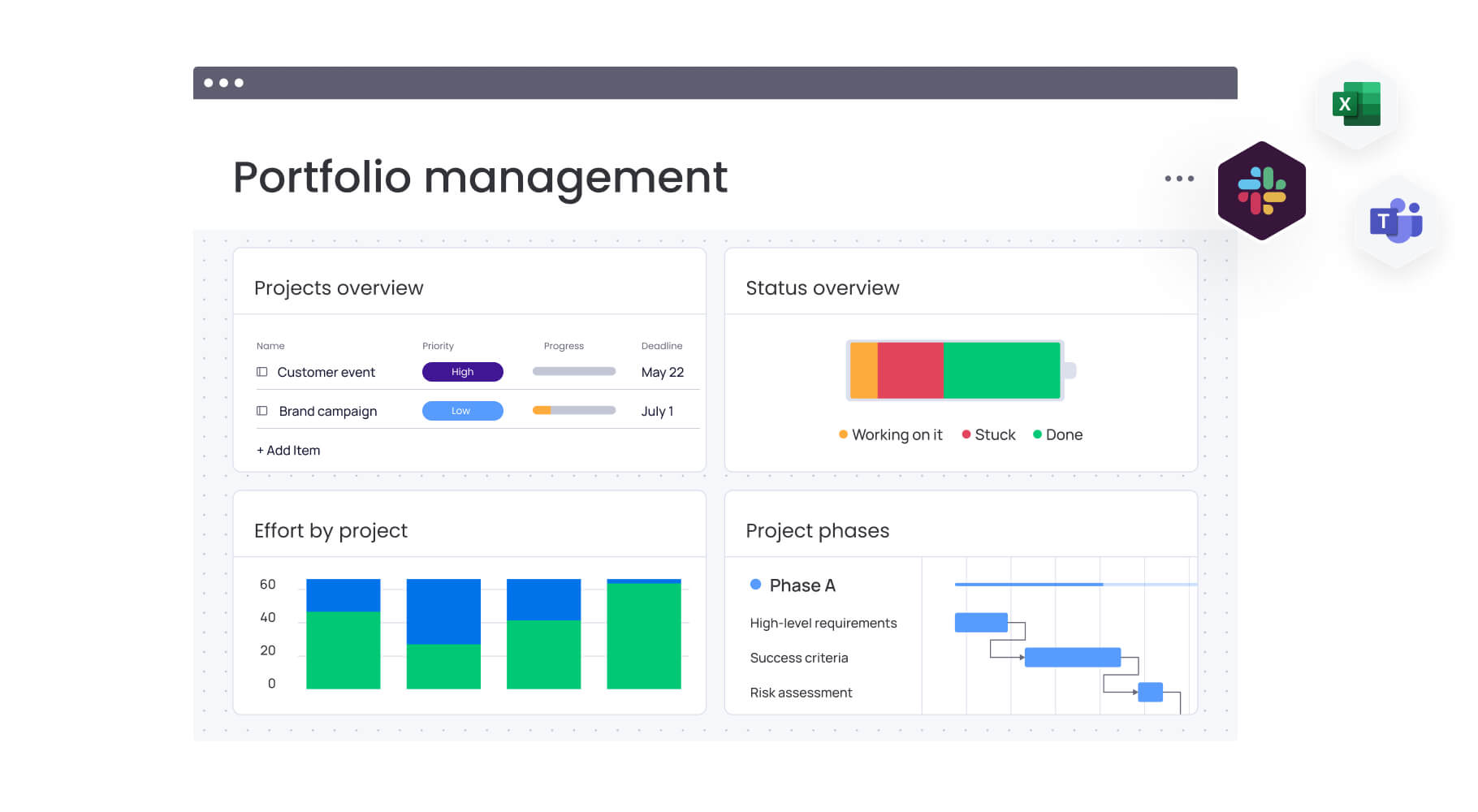
Enterprise teams need more than glorified to-do lists. You’re looking for features that solve real problems when managing dozens of events — and justify your investment to the folks controlling the budget.
Feature 1: portfolio-level visibility and reporting
Managing multiple concurrent events requires consolidated views across your entire portfolio. Look for platforms offering:
- Executive dashboards: real-time insights into budget utilization, timeline adherence, and resource allocation.
- Custom reporting: build views specific to your KPIs and stakeholder needs.
- Predictive analytics: identify trends and risks across your event portfolio.
monday.com’s out-of-the-box portfolio dashboards analyze hundreds of projects simultaneously, giving leadership instant visibility into progress and risks without manual report compilation.
Feature 2: workflow standardization and templates
Consistency drives efficiency when managing events across regions and teams. Essential standardization features include:
- Managed templates: centrally controlled workflows that update across all instances.
- Approval workflows: standardized review processes for budgets, creative, and contracts.
- Compliance tracking: ensure every event meets brand and regulatory requirements.
Feature 3: resource management and capacity planning
Preventing team burnout while maximizing productivity requires sophisticated resource capabilities:
- Workload visualization: see who’s overallocated before committing to new events.
- Skills-based assignment: match tasks to team members with the right expertise.
- Capacity forecasting: plan future events based on projected availability.
The resource directory and capacity manager in monday.com provide live views of team bandwidth, enabling proactive rebalancing before overload occurs.
Feature 4: integration ecosystem
Your event management platform must connect seamlessly with existing tools:
- CRM integration: sync attendee data with sales pipelines.
- Marketing automation: trigger campaigns based on event participation.
- Financial systems: track budgets and process payments.
- Communication platforms: coordinate through Slack, Teams, or email.
Feature 5: AI and automation capabilities
Intelligent automation transforms event management efficiency through:
- Risk detection: AI identifies potential issues by analyzing project updates.
- Task automation: eliminate repetitive work like status updates and reminders.
- Smart suggestions: AI recommends optimal resource allocation and timeline adjustments.
- Automated reporting: generate summaries and insights without manual effort.
Learn more: AI event management software
How to choose the right event management software for enterprise teams
Selecting event management software isn’t just a feature comparison — it’s a strategic decision that affects how your entire organization plans, executes, and measures events. The following steps provide a practical framework to evaluate platforms based on scale, adoption, and long-term impact, so you can choose software that supports today’s needs and tomorrow’s growth.
Step 1: assess your organizational complexity
When selecting event software, choose a platform that can grow with you. Your needs six months from now will look different than they do right now. The decision impacts not just the events team but also stakeholders across marketing, sales, finance, and operations. Start by understanding your unique requirements and constraints.
Consider these critical factors:
- Event volume and variety: how many events do you run annually? Do you manage conferences, webinars, roadshows, and internal meetings, or focus on one type? Platforms like monday.com excel when you need flexibility across diverse event formats.
- Team structure and size: distributed teams need stronger collaboration features than co-located groups. Enterprise platforms should support role-based permissions, guest access for vendors, and clear ownership assignment.
- Integration requirements: map your current tech stack and identify critical data flows. If event data must sync with Salesforce, feed marketing automation, or connect to financial systems, prioritize platforms with robust APIs and pre-built connectors.
- Scalability needs: consider your three-year growth trajectory. Will you double your event portfolio? Expand internationally? Add new event types? Choose platforms that scale without forcing migration.
Step 2: evaluate implementation and adoption factors
Beyond features, successful platform adoption depends on several organizational factors that determine long-term success. These considerations often prove more critical than initial feature comparisons.
Time to value: how quickly can teams become productive? Platforms with intuitive interfaces and pre-built templates accelerate adoption. monday.com typically achieves full adoption within two to four weeks, compared to two to three months for traditional enterprise tools.
Change management support: look for vendors providing training resources, implementation guidance, and ongoing support. The platform should feel like an enhancement to existing workflows, not a disruption.
Total cost of ownership: factor in licensing, implementation, training, and ongoing administration costs. Hidden expenses often exceed subscription fees in the first year.
Governance and security: enterprise platforms must meet your compliance requirements. Verify SOC two certification, GDPR compliance, and administrative controls for data access and permissions.
Step 3: make the final decision with stakeholder input
Involve stakeholders early in the evaluation process to ensure buy-in and identify potential roadblocks. Include representatives from key departments who will interact with or depend on the platform.
Essential stakeholder groups:
- Marketing operations: for workflow requirements and process optimization.
- IT: for security assessment and integration capabilities.
- Finance: for budget analysis and procurement processes.
- Legal: for contract review and compliance verification.
- End users: for usability feedback and adoption concerns.
Proof-of-concept testing: run pilots with your shortlisted platforms using real event workflows, not just demo scenarios. Measure success through specific metrics like time saved, error reduction, and user satisfaction scores.
This structured approach ensures your final selection aligns with both immediate needs and long-term strategic goals while maximizing adoption success across your organization.
Power enterprise event execution with monday.com
When your marketing team is drowning in events, monday.com delivers what you actually need: clear visibility, consistent processes, and smart insights that help you execute without losing your mind.
The platform brings together three critical capabilities that transform event operations from reactive coordination to proactive strategic execution.
- Leadership visibility comes through AI-powered insights that scan your entire portfolio, surfacing risks and opportunities in real time. Generate executive reports instantly, track ROI across all events, and make data-driven decisions about resource allocation and strategic priorities.
- Standardization and alignment ensure consistency without sacrificing flexibility. Managed templates propagate best practices across regions while allowing local customization. Cross-project dependencies connect events to campaigns and product launches, ensuring every activity supports strategic goals.
- Resource optimization prevents the burnout and conflicts that derail event execution. The resource directory centralizes team skills and availability, while the capacity manager provides real-time workload visibility. AI-powered suggestions help assign the right people to the right tasks based on expertise and bandwidth.
These capabilities integrate seamlessly into existing workflows. Teams continue working in familiar interfaces while gaining new layers of governance and intelligence. Automation eliminates manual coordination, dashboards replace status meetings, and AI flags issues before they impact delivery.
What do you get? Events that launch faster and hit harder, with results you can actually measure — without piling more work onto your already maxed-out marketing team.
The content in this article is provided for informational purposes only and, to the best of monday.com‘s knowledge, the information provided in this article is accurate and up-to-date at the time of publication. That said, monday.com encourages readers to verify all information directly.
Frequently asked questions
What is the difference between event management and event planning software?
Event planning software typically focuses on the logistics and coordination before an event, such as venue selection, vendor management, and timeline creation. Event management software encompasses the entire event lifecycle, including planning, execution, attendee management, and post-event analysis, providing comprehensive tools for strategic oversight and measurement.
Can event management software handle both virtual and in-person events?
Yes, most modern event management platforms support virtual, in-person, and hybrid events. They offer specific features for each format, such as streaming integration and virtual networking for online events, venue management for in-person gatherings, and unified registration systems that work across all formats.
How much does enterprise event management software typically cost?
Enterprise event management software pricing varies significantly based on features, user count, and event volume. Basic platforms start around $12-20 per user monthly, while comprehensive solutions range from $50-100+ per user. Most enterprise deployments involve custom pricing based on specific requirements and scale.
What integrations are most important for event management platforms?
Critical integrations for enterprise teams include CRM systems like Salesforce for lead tracking, marketing automation platforms for campaign coordination, communication tools like Slack or Microsoft Teams for collaboration, financial systems for budget management, and analytics platforms for ROI measurement.
How long does it take to implement event management software?
Implementation timelines vary by platform complexity and organizational readiness. Intuitive platforms like monday.com typically achieve adoption within two to four weeks, while traditional enterprise solutions may require two to three months. Success depends on having clear processes, dedicated champions, and vendor support.
What's the ROI of investing in event management software?
Organizations typically see ROI through reduced manual work (saving 20-40% of planning time), fewer errors and missed deadlines, improved resource utilization, faster event delivery, and enhanced ability to measure and demonstrate event impact on business goals. Many teams report positive ROI within four to six months of implementation.

 Get started