


Today’s AI workflow software does far more than check off tasks — it’s fundamentally reshaping how teams tackle their most challenging projects. Teams across departments need platforms that unify scattered tools, democratize AI capabilities, and provide the visibility required to deliver at scale.
The best AI workflow platforms create seamless handoffs between teams, flag potential issues before they become problems, and flex to fit your organization’s unique needs without requiring an IT degree.
For project managers (PMs) coordinating media workflows, creative campaigns, and cross-functional initiatives, this shift represents a fundamental change in operational capability. Instead of juggling multiple platforms and manual coordination, AI workflow software centralizes projects, automates routine decisions, and provides real-time visibility into resource allocation and project health.
Let’s dig into what makes the best AI workflow software stand out, how to evaluate platforms that actually meet enterprise needs, and the game-changing capabilities reshaping media project management. We’ll also explore essential features, implementation strategies, and real-world examples that demonstrate how the right platform bridges strategic goals with daily execution.
Key takeaways
When you search for the best AI workflow software, you’re looking for more than AI workflow automation — you need a platform that unifies fragmented workflows while making enterprise-grade AI accessible to everyone. The right solution bridges strategic goals and daily execution, standardizes processes without stifling team agility, and grows with your organizational maturity.
Here’s what sets the best platforms apart:
- AI democratization: enterprise-grade AI capabilities accessible through no-code building blocks — not just for technical users.
- Unified work management: connects scattered tools and teams in one platform, eliminating tool sprawl.
- Flexibility with control: rapid customization and iteration combined with standardization, governance, and centralized oversight.
- Proactive intelligence: AI-driven risk identification and resource optimization at scale.
What makes AI workflow software essential for today's organizations?
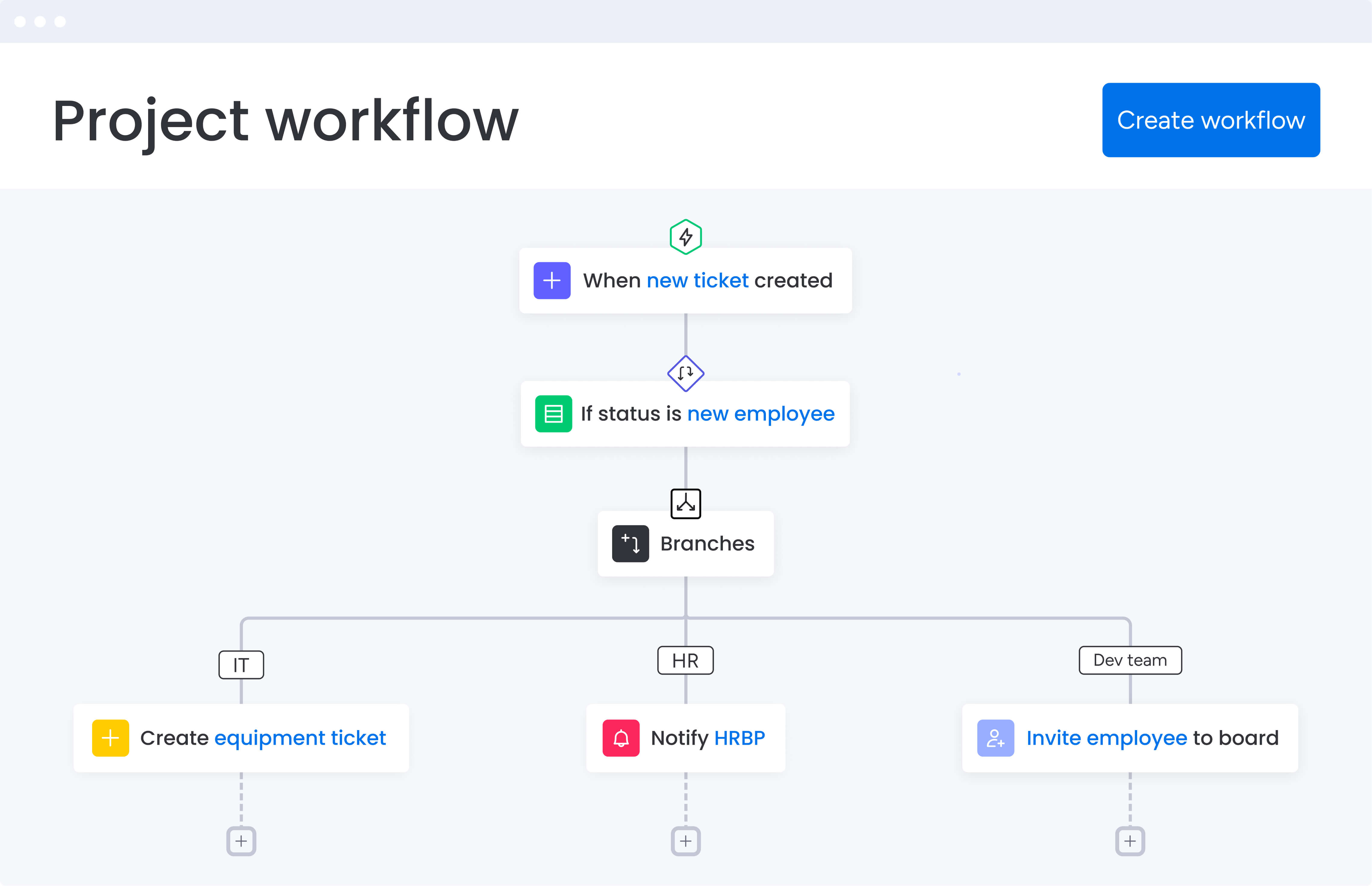
AI workflow software is completely changing how teams get work done. Traditional project management platforms just track project items. AI workflow platforms go further — they bring AI directly into your work systems to automate tedious processes, connect teams that were previously siloed, and surface insights that actually help mid-to-large organizations make better decisions.
For media project managers, this means finally escaping the chaos… of jumping between Slack conversations, buried emails, outdated spreadsheets, and disconnected creative tools. AI workflow software provides a single workspace where all projects, tasks, assets, and communications live together — with intelligence built in to surface risks, optimize resources, and align execution with strategic goals.
The transformation is already happening. According to a recent AI report, companies seeing productivity gains have found that generative AI has doubled employee output.
It’s important to keep in mind that AI workflow tools aren’t replacing your team either — they’re supercharging what your people can accomplish. When AI handles categorization, summarization, and risk detection, teams focus on creative problem-solving and strategic decisions.
Why project managers choose AI workflow software for unified media workflows
Media project managers fight an uphill battle every day: creative work gets lost between tools, nobody sees the complete picture, and problems only surface after they’ve already caused damage. You’re coordinating creative teams across multiple content streams, managing dependencies between departments, and trying to maintain visibility while everything moves at the speed of media production.
AI workflow software tackles these headaches head-on by providing a new operational framework. These three game-changing capabilities are essential for centralizing work, automating routine processes, and surfacing risks before they cause delays:
- Unified platform architecture: centralizes projects, resources, and data across all departments into one system.
- Intelligent automation: AI handles repetitive tasks like categorization, data extraction, and summarization without requiring technical expertise.
- Proactive management: AI-driven insights surface bottlenecks, resource constraints, and risks before they impact delivery.
Real media organizations are already seeing measurable results. SPH Media, managing over 40 media brands, now tracks hundreds of campaigns within monday work management with 130+ people collaborating seamlessly. The platform’s AI capabilities analyze incoming requests, assign labels, and streamline workflows — all while maintaining the flexibility to handle everything from digital content to print campaigns.
How to identify essential AI workflow features for media project management
To choose the right platform, you need to know exactly which features will make or break your media projects. These features below transform how PMs coordinate creative teams and deliver campaigns at scale.
AI-powered automation capabilities
The best platforms put powerful AI tools in everyone’s hands — not just your tech team — with drag-and-drop simplicity. These capabilities transform how project managers handle routine work and complex analysis:
- Categorize at scale: AI automatically sorts project requests by type, urgency, or sentiment.
- Extract information: pull key details from PDFs, documents, and images instantly.
- Summarize complex content: get actionable insights from lengthy briefs or meeting notes.
- Detect sentiment: identify emotional cues in feedback to prioritize responses.
For project managers coordinating media workflows, this means less time on administrative tasks and more focus on strategic project decisions. When an AI task manager handles the categorization of creative requests and extraction of brief requirements, you can concentrate on resource allocation and delivery optimization.
Cross-departmental workflow support
Media projects require seamless coordination between creative, technical, and business teams. Many AI collaboration tools provide the infrastructure for this collaboration through unified workspaces and connected processes.
A leading platform like monday work management enables this through customizable project views — Timeline for campaign planning, Kanban for content approval workflows, and Workload view for resource allocation. Different stakeholders get different perspectives on the same project data without maintaining separate systems.
Real-time visibility and dashboards
AI workflow software pulls everything together in one place, giving you immediate answers without the spreadsheet gymnastics. Customizable dashboards show project status, budget tracking, team workload, and milestone progress — all updating in real-time.
This visibility is transformative for project managers. Instead of requesting status updates from multiple team members and consolidating information manually, you share dashboards that show exactly where each project stands. Leadership gains instant visibility into progress and risks throughout the portfolio, while teams maintain alignment on execution.
Integration ecosystem
The best AI workflow platforms connect with 200+ applications, bringing information from design tools, communication platforms, and file storage systems directly into your project workspace. This connectivity ensures creative assets, feedback, approvals, and project updates all live in one accessible location.
For media organizations, this means connecting Adobe Creative Suite for asset management, Slack for team communication, and Google Drive for file storage — all synchronized within your workflow platform. The result is reduced coordination overhead and a single source of truth for project information.
Understanding how AI transforms media project workflows
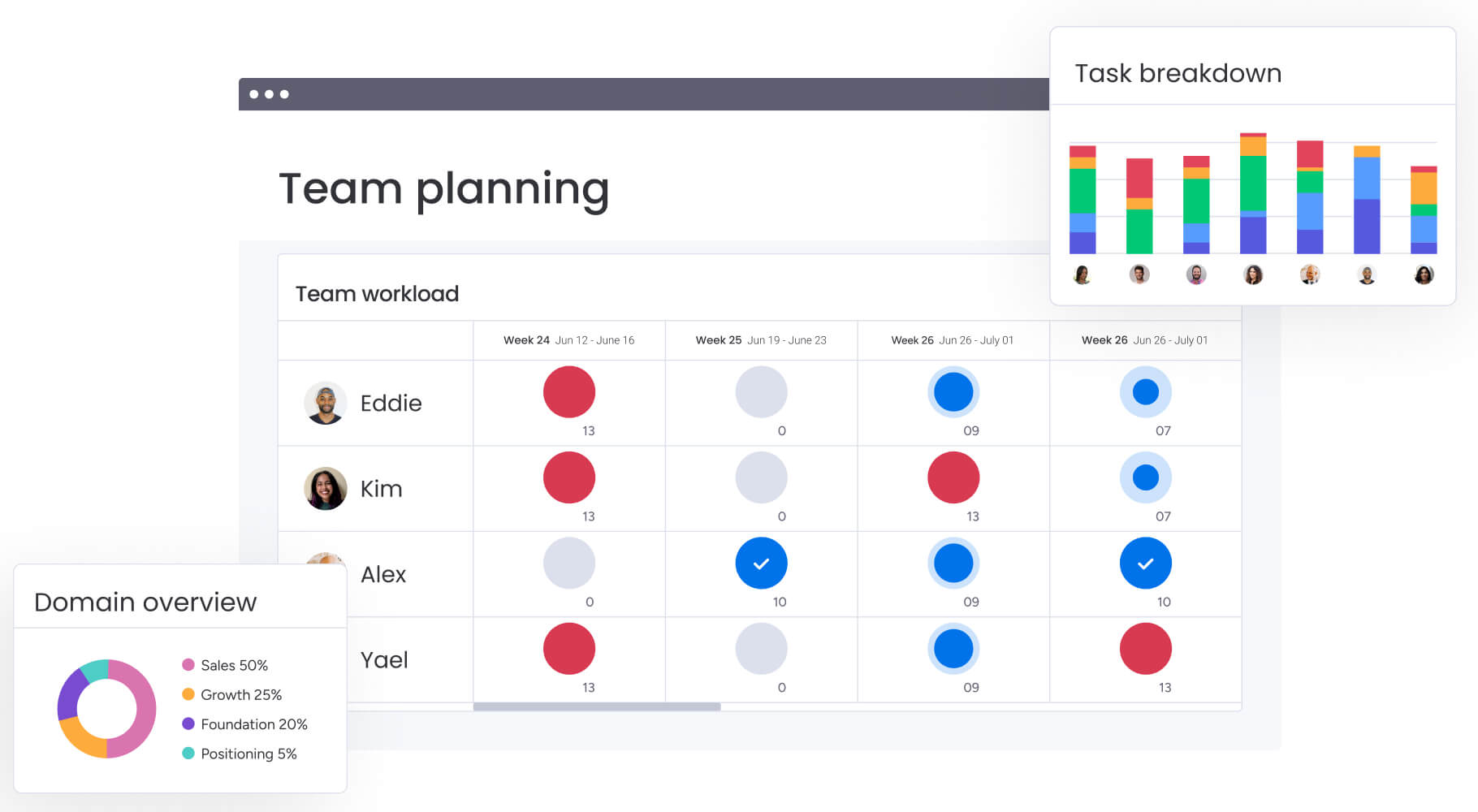
AI completely transforms a project manager’s day-to-day: you’ll assign the right people to the right work, spot problems before they blow up deadlines, and get approvals in hours instead of days. These transformations enable media teams to operate at scale while maintaining quality and meeting tight deadlines.
Intelligent resource allocation
AI workflow tools take the guesswork out of resource planning for media PMs. Instead of guessing whether your designers, editors, or producers have bandwidth for new work, AI analyzes current workloads, skills, and availability to recommend optimal assignments.
Intelligent solutions like monday work management have a resource directory that brings together key data about talent across the organization — department, job roles, and expertise. AI then matches tasks to the right people based on complexity, context, and capacity. This prevents burnout, improves delivery predictability, and helps you set realistic timelines with stakeholders.
Automated risk identification
One of the most powerful applications of AI in workflow management is proactive risk detection. AI-powered risk insights scan updates across your portfolio to surface potential issues before they impact delivery. The system analyzes patterns in project data, identifies delays or resource conflicts, and provides mitigation recommendations.
For project managers juggling multiple content projects with tight deadlines, this capability is game-changing. You receive alerts about at-risk projects with specific action items, allowing you to address issues before they escalate into crises.
Streamlined approval processes
Media production often slows down in review cycles. AI workflow software removes that friction by automating how content moves through approvals and keeping the right people in sync.
Key capabilities include:
- Intelligent routing: automatically assigns the next reviewer as content moves between stages
- Automated notifications: alerts stakeholders when approvals are needed or deadlines approach
- Centralized feedback: keeps comments, assets, and revisions in one place for full visibility
For media teams like SPH Media that leverages monday work management, this automation synchronized advertiser bookings with creative production, reduced delays between handoffs, and ensured every stakeholder had access to up-to-date assets and communication.
How to evaluate AI workflow software for your organization
Finding the perfect platform means looking beyond flashy features to what will actually work for your team today and scale with you tomorrow. These evaluation criteria help you identify solutions that balance enterprise requirements with team flexibility.
Evaluation criteria for enterprise teams
When evaluating AI workflow software, consider these essential factors that determine long-term success:
- AI accessibility: can all team members use AI capabilities without technical expertise?
- Cross-departmental support: does the platform unify workflows across different teams and functions?
- Integration depth: how well does it connect with your existing tech stack?
- Adoption ease: will teams actually use it, or will it become another abandoned tool?
- Enterprise security: does it meet your compliance and governance requirements?
The best platforms balance these requirements while maintaining flexibility for team-specific customization. Look for solutions that provide both standardization at scale and the ability to adapt workflows without heavy IT involvement.
Implementation and adoption considerations
Successful AI workflow adoption depends on more than just features. Organizations need to consider change management, training requirements, and the learning curve for different user groups. The most effective platforms offer intuitive interfaces that teams can start using immediately while gradually adopting more advanced capabilities.
Implementation timelines vary, but most media teams can be operational within two to four weeks. SPH Media worked with a local partner to quickly integrate their ad booking system and synchronize workflows into project boards, with support readily available throughout the process.
Security and compliance requirements
For enterprise organizations, security isn’t optional. AI workflow platforms must provide enterprise-grade security including:
- Access controls: IP restrictions and role-based permissions.
- Authentication: two-factor authentication and multiple SSO options.
- Data protection: tenant-level encryption and audit trails.
- Governance: auditable automations and integration flows.
Learning from real implementation success
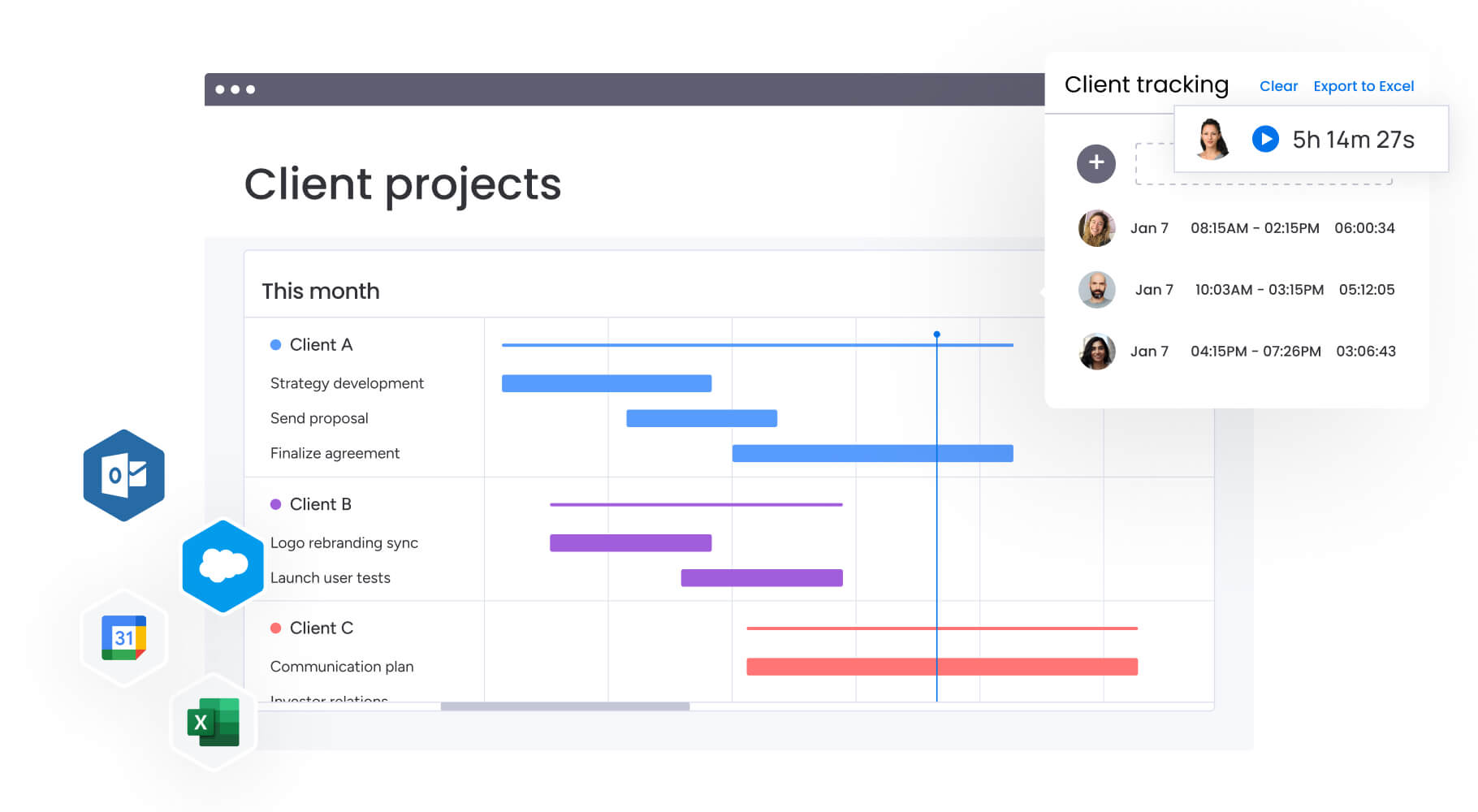
Understanding how certain organizations successfully implement AI project management tools provides valuable insights for your own transformation. SPH Media’s journey demonstrates the practical benefits and measurable outcomes possible with the right platform and approach.
The challenge: managing campaigns at scale
SPH Media, a leading media group in Singapore with over 40 media brands, faced significant challenges managing campaigns across multiple formats and channels. Their existing process relied heavily on manual work, and as the business expanded, managing campaigns became increasingly unsustainable.
The Content Lab needed a way to manage media campaigns efficiently without restricting growth and creativity, while maintaining coordination across their international award-winning content unit that serves more than 20,000 brands.
The solution: centralized AI-powered workflows
SPH Media implemented monday work management to create a centralized platform for campaign management. The solution provided both high-level and granular views of every project, with AI-powered automation synchronizing advertiser bookings with creative production processes.
The results: measurable transformation
The transformation delivered measurable results:
- Hundreds of campaigns tracked in one unified platform.
- 130+ people managing work collaboratively in one workspace.
- 40 brands reaching audiences across Asia with streamlined workflows.
- Increased productivity through templates and AI-powered workflows.
- Reduced risk of information silos and missed deadlines.
- Improved visibility enabling resource allocation and performance tracking.
Comparing leading AI workflow platforms
Understanding how different platforms stack up against each other helps you make an informed decision. This comparison examines capabilities that matter most for project managers coordinating creative teams across media organizations.
| Feature | monday work management | Asana | ClickUp |
|---|---|---|---|
| Media-specific templates | Content calendar, campaign management, creative requests | Marketing templates | Marketing templates |
| AI project planning | Included in paid plans | AI-powered recommendations | Available as add-on |
| Creative asset integration | Adobe Creative Suite, DAM systems | Limited creative tool integration | Basic file attachments |
| Resource capacity planning | Built-in Workload view | Timeline view only | Workload view available |
| Automation capabilities | No-code automation center | Basic automation | Extensive automation |
| Real-time collaboration | Comments, @mentions, updates | Comments and tasks | Chat, comments, docs |
| Implementation time | Less than 4 months | 2-4 weeks typical | Varies by complexity |
| Media industry customers | SPH Media, VML, M Booth | Various marketing teams | Various marketing teams |
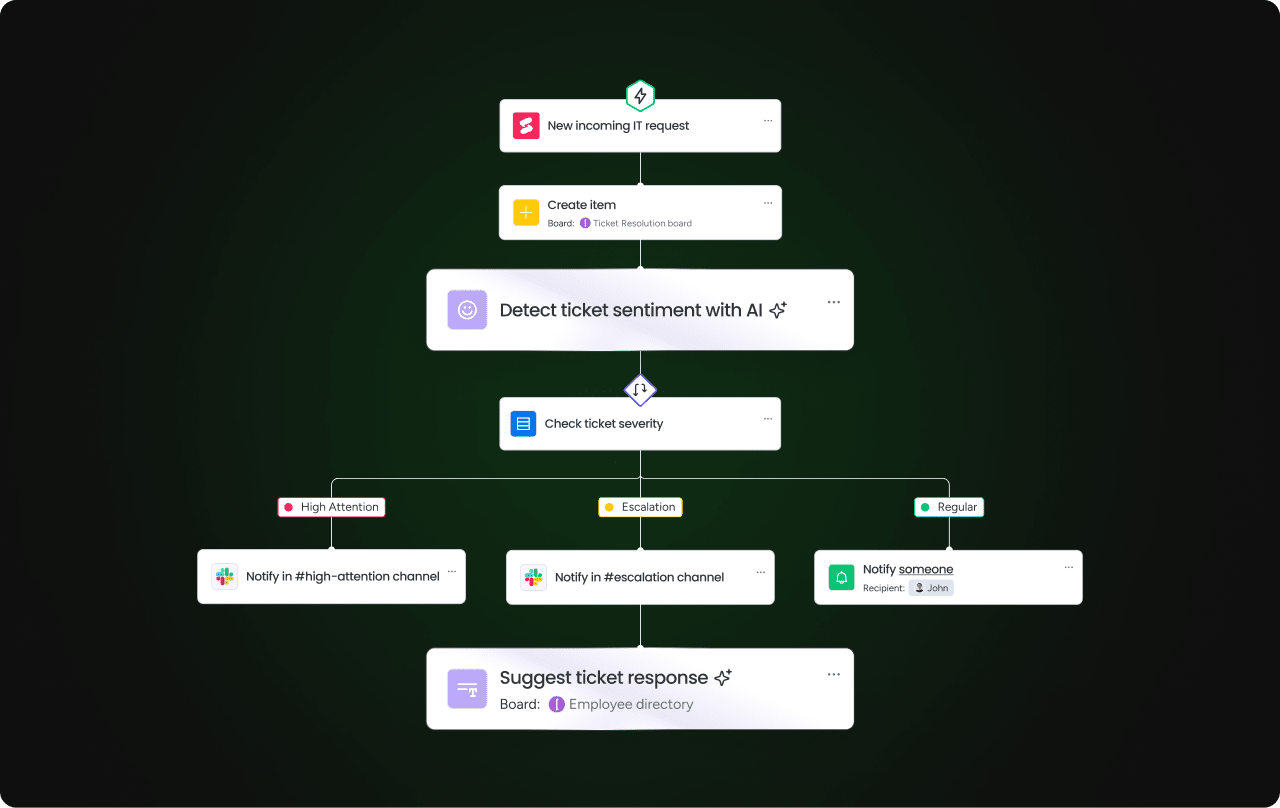
Transform your media workflows with intelligent automation
AI workflow software isn’t just another productivity tool — it’s a complete rethinking of how teams collaborate and deliver results. The right platform unifies fragmented workflows, democratizes AI capabilities, and provides the visibility needed to deliver at scale.
For project managers in media organizations, this means finally having a single workspace where creative, technical, and business teams collaborate seamlessly. With AI handling routine coordination and surfacing insights proactively, you focus on what matters: delivering exceptional content on time and within budget.
The evidence is compelling. Organizations like SPH Media have transformed their campaign delivery, managing hundreds of projects with 130+ team members collaborating in one unified platform. The combination of AI-powered automation, real-time visibility, and enterprise-grade security creates the foundation for sustainable growth and operational excellence.
monday work management brings these capabilities together in one platform. From AI-powered risk identification to automated resource allocation, it provides the infrastructure modern media teams need to thrive.
Join SPH Media, VML, and thousands of other organizations already transforming their workflows. Get started today.
The content in this article is provided for informational purposes only and, to the best of monday.com’s knowledge, the information provided in this article is accurate and up-to-date at the time of publication. That said, monday.com encourages readers to verify all information directly.
Frequently asked questions
What features should I look for in AI workflow software for cross-departmental teams?
When looking for AI workflow software for cross-departmental teams, you should seek features like unified workspaces that connect projects across departments, no-code AI capabilities accessible to all users, and customizable views for different stakeholders. that connect projects across departments, no-code AI capabilities accessible to all users, customizable views for different stakeholders, and real-time dashboards that provide visibility without manual reporting.
How does AI workflow software automate manual processes and increase visibility?
AI workflow software automates manual processes through intelligent categorization, data extraction, and task routing based on predefined rules and machine learning. It increases visibility by aggregating data from multiple projects into real-time dashboards, surfacing risks proactively, and providing instant insights into resource allocation and project health across your entire portfolio.
Which platforms offer both enterprise control and team flexibility?
monday work management uniquely balances enterprise control with team flexibility through managed templates that standardize workflows while allowing customization, role-based permissions that maintain governance without restricting innovation, and AI capabilities that teams can configure without IT involvement. This dual approach enables organizations to scale while maintaining agility.
How can AI help identify risks and optimize resources in real-time?
AI analyzes patterns across project data to identify potential delays, resource conflicts, and bottlenecks before they impact delivery. It monitors team capacity, suggests optimal resource allocation based on skills and availability, and provides proactive alerts when projects deviate from expected patterns, enabling managers to intervene early.
What is the typical adoption timeline for AI workflow software?
Most organizations can be operational within two to four weeks for basic functionality, with full adoption typically occurring within four months. The timeline depends on organization size, complexity of workflows, and change management approach. Platforms with intuitive interfaces and strong support resources tend to see faster adoption rates.
How does monday work management support media production workflows?
monday work management provides specialized features for media production including customizable creative request forms, visual timeline and calendar views for campaign planning, proofing and approval workflows with version control, and integration with Adobe Creative Suite and DAM systems. The platform's AI capabilities automate routine coordination tasks while maintaining visibility across multiple content streams.

 Get started