

That “perfect workflow” mapped out in a meeting often falls apart faster than expected. People improvise, steps get skipped, and suddenly the process looks nothing like the original plan. It’s not a discipline problem; it’s usually because the workflow lives somewhere separate from the work itself, so it quietly gets ignored.
The real issue isn’t that teams don’t want to follow processes. It’s that traditional workflows demand too much translation. Someone has to look at a document, figure out what it means for today’s work, then manually update everyone involved. That extra layer of effort adds up, and when deadlines hit, it’s the first thing to go.
What’s changing now is how workflows are built and used day to day. Instead of static documents, teams are shifting toward templates that actively guide work as it happens. In the sections below, we break down what makes workflow templates stick, why most fail, and how to build ones that teams genuinely rely on without constant follow-ups.
Key takeaways
- Workflow templates fail when they stay static: Processes documented outside daily work quickly get ignored, leading to inconsistency and missed deadlines.
- Dynamic templates drive real execution: Embedding workflows into active work environments ensures tasks move forward with automated handoffs, updates, and visibility.
- Flexibility is as important as structure: Effective templates provide clear guidance while allowing teams to adapt based on project needs without breaking the process.
- Adoption depends on usability and relevance: Templates built with team input, clear ownership, and minimal friction are far more likely to be used consistently.
- Integrated platforms improve workflow outcomes: Solutions like monday work management connect templates with real-time collaboration, automation, and tracking, keeping teams aligned and work on schedule.
What is a workflow template?
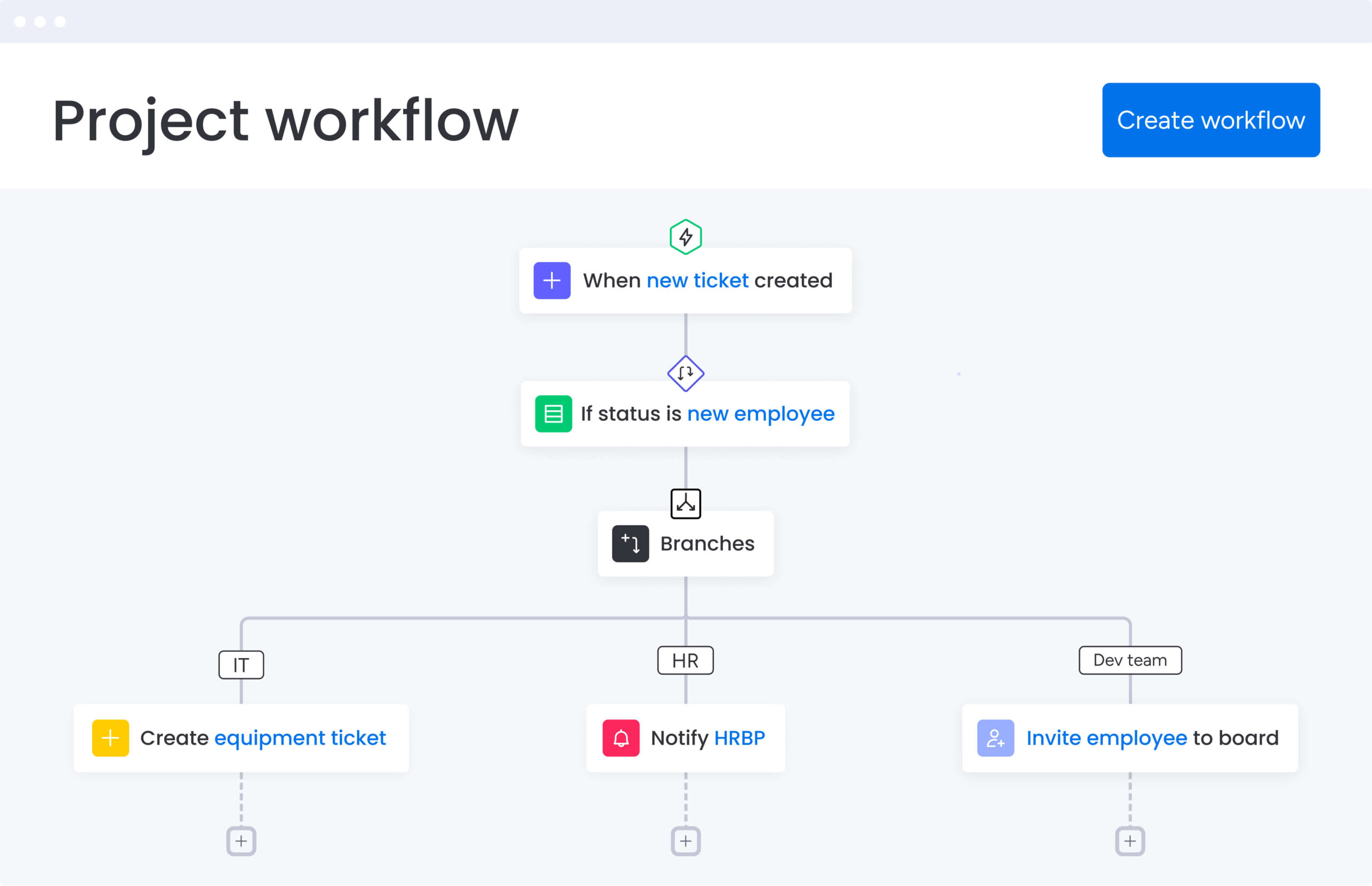
A workflow template gives you a repeatable way to get work done without starting from scratch every time. Instead of rebuilding tasks, timelines, and approvals for each project, it lays out a clear structure that teams can rely on. In addition, it captures what already works and turns it into a consistent approach across projects.
Take a product launch as an example. Rather than piecing everything together again, the template already includes research, design reviews, QA checks, and go-to-market steps.
Each stage comes with assigned owners and timelines, so nothing slips through the cracks. At the same time, teams still have room to adjust details based on the project.
Static documents vs dynamic workflows
Traditional workflow documents often sit in spreadsheets, PDFs, or internal wikis. While they explain how work should happen, they still rely on someone to interpret and track everything manually. As a result, they quickly become outdated or ignored.
Dynamic workflow templates work differently. They live inside your work platform, so assignments move forward automatically, updates happen in real time, and notifications reach the right people without delays. Because of this, teams spend less time managing work and more time actually doing it.
The table below shows how static and dynamic workflows compare in day-to-day use:
| Aspect | Static documents | Dynamic workflows |
|---|---|---|
| Execution | Manual tracking and interpretation | Automated progression based on triggers |
| Updates | Become outdated quickly | Real-time status visible to all |
| Context | Separate from daily work | Integrated into work environment |
| Accountability | Relies on manual checking | Assigns owners automatically |
Moving from static to dynamic turns templates into systems that actually push work forward. Teams using monday work management experience this firsthand when templates automatically notify the next person in line, update project timelines based on dependencies, and surface bottlenecks before they cause delays.
6 components of effective workflow templates
To build templates that teams actually use, you need structure without making things rigid. The goal is to guide work clearly while still allowing flexibility where it matters.
Every effective template includes a few essential elements:
- Work item definitions: Specific, actionable descriptions that eliminate ambiguity about deliverables.
- Role assignments: Designated owners for every decision point and task.
- Dependencies and sequencing: Logical order of operations with prerequisite relationships.
- Status tracking mechanisms: Visual indicators showing exact work state.
- Communication touchpoints: Built-in spaces for feedback and decisions.
- Flexibility parameters: Defined areas where teams can customize without breaking core methodology.
Dynamic workflow templates work differently. They live inside your work platform, so assignments move forward automatically, updates happen in real time, and notifications reach the right people without delays.
Why teams abandon workflow templates?
Even well-designed templates often go unused, not because they’re poorly structured, but because they don’t fit how teams actually work. The disconnect usually shows up in three ways: templates that ignore real workflows, structures that can’t bend when projects change, and systems that live outside the tools teams use daily.
Knowing why this happens makes it easier to build ones that teams actually follow without constant reminders or enforcement.
Templates created without team input
When templates are created from the top down, they often miss how work really happens. Managers may design clean processes on paper, but they don’t always reflect day-to-day execution. Because of this, teams quickly lose trust in them.
Common issues usually include:
- Missing critical substeps: Practitioners rely on specific actions that top-down templates often overlook.
- Unrealistic timelines: Estimated durations don’t match actual workloads or team capacity.
- Inefficient sequences: Steps that look logical on paper feel clunky in practice.
As a result, teams create their own shortcuts, and the official template gets ignored.
Rigid structures that can’t adapt
Work rarely follows a straight path. However, some templates try to lock every detail in place, leaving no room for changes. When priorities shift or requirements evolve, these templates become a burden.
If teams are forced to fill irrelevant fields or follow unnecessary steps, they’ll abandon the process entirely. Good templates, on the other hand, provide guidance while still allowing adjustments when needed.
Poor integration with daily work platforms
Switching between multiple platforms adds friction. When templates live outside the workspace, teams have to constantly check and translate them into actual tasks. Over time, this extra effort leads to delays and mistakes.
That’s why embedding templates directly into the workspace matters. With monday work management, the template and the work exist in the same place, so execution happens naturally rather than forced.
7 elements of workflow templates teams actually use

Templates that work solve problems for the people actually using them, not just their managers. When templates make work easier, teams use them without being forced. These seven elements separate templates teams love from ones they ignore.
1. Ownership and accountability
When ownership is unclear, critical items fall through the cracks. Strong templates assign a specific person to every decision point and deliverable, ensuring there is no confusion.
On monday work management, assignee columns and notifications make this ownership visible instantly. This way, everyone knows exactly what they are responsible for and when it is due.
2. Visual progress indicators
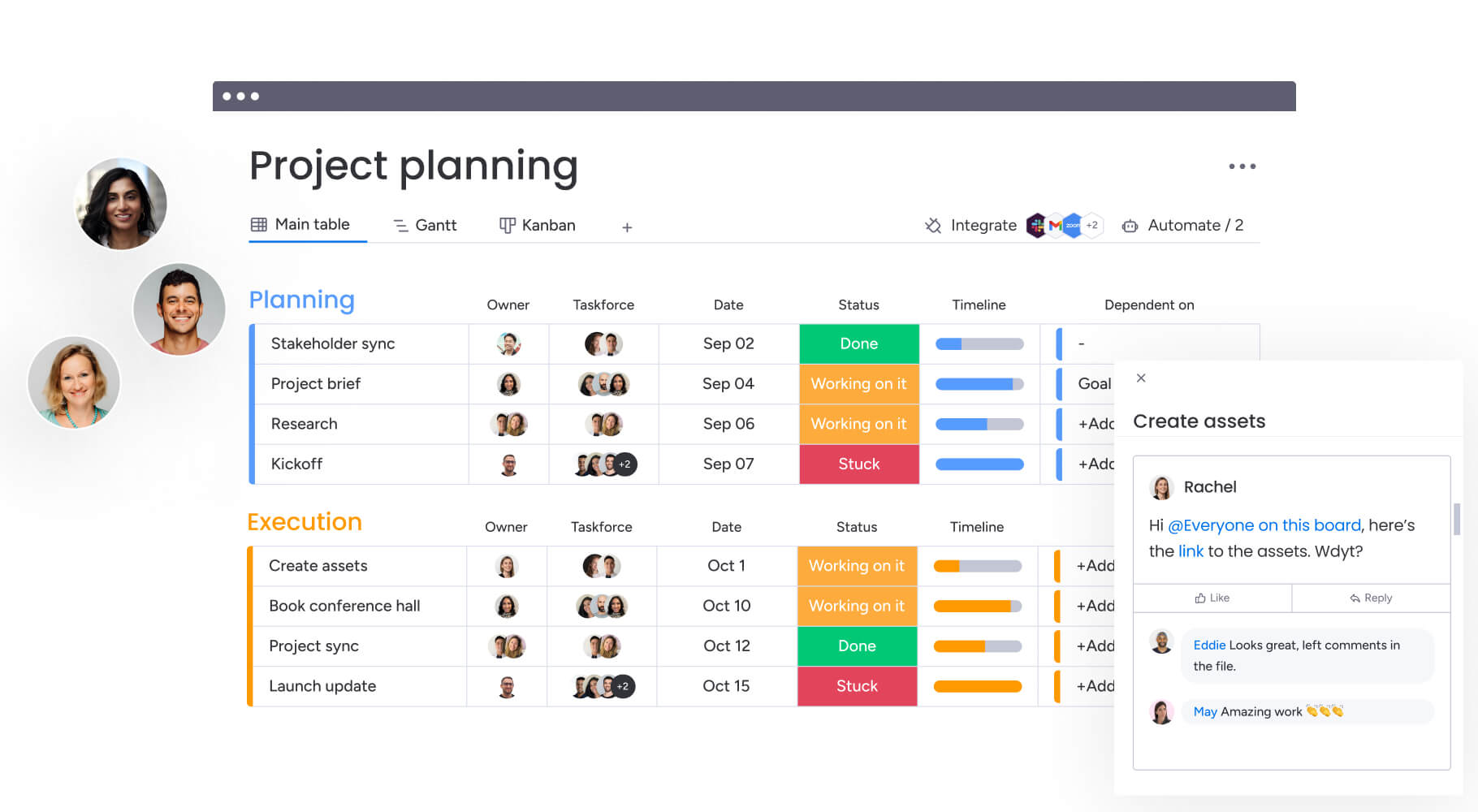
Progress needs to be easy to see. Status labels, progress bars, or Kanban boards give instant visibility into what’s moving and what’s stuck.
Additionally, these visual cues highlight bottlenecks early. Instead of waiting for updates, teams can spot issues as they happen and act quickly.
3. Built-in team communication
Keeping communication inside the workflow prevents information from getting lost. Updates, questions, and decisions stay connected to the task itself.
This also helps new team members get context faster. They can review past discussions without digging through emails or chat threads.
4. Automated repetitive actions
Manual admin work slows everything down. That’s why automation plays a big role in adoption.
Some practical automation examples include:
- Status changes notifying the next owner: Automatic alerts keep work moving without manual follow-ups.
- Deadline reminders triggered automatically: Time-based notifications ensure nothing falls behind schedule.
- Form submissions create new project boards instantly: Intake requests generate structured workflows without manual setup.
Because of this, teams spend less time on routine assignments and more time on meaningful work.
5. Flexible views and custom fields
Different roles need different perspectives. While some prefer visual boards, others rely on timelines or dashboards.
Templates that offer multiple views make it easier for everyone to work in a way that suits them. Custom fields also help capture details like priority, budget, or status without clutter.
6. Live dashboards and reporting
Templates shouldn’t just guide work, they should also generate insights. Built-in dashboards track performance, completion rates, and resource usage automatically.
As a result, teams don’t need separate reporting processes. They can see what’s working and where improvements are needed in real time.
7. Simple template duplication
Starting new projects should take seconds, not hours. Strong templates allow teams to duplicate entire workflows instantly without carrying over old data.
This consistency ensures every project begins with the same structure, which improves speed and reduces errors.
5 steps to build workflow templates from scratch
Building a useful template starts with understanding how work actually happens. Then, it’s about refining that process into something repeatable.
Step 1: document your current workflow process
Before creating anything, observe real workflows. Watch how tasks move across teams, including informal steps that aren’t documented.
To gather useful insights:
- Shadow team members through complete processes.
- Track where delays or handoff issues occur.
- Note realistic timelines for each stage.
- Identify areas where rework happens often.
This ensures your template reflects reality, not assumptions.
Step 2: identify patterns worth templating
Not every process needs a template. Instead, prioritize workflows that are frequent, complex, or high risk.
For example, recurring cross-team projects or compliance-heavy processes are strong candidates. This step helps deliver quick wins and builds momentum.
Step 3: design with flexibility first
Rigid templates don’t last. It’s better to separate required steps from optional ones so teams can adapt when needed.
Some ways to build flexibility include:
- Using timelines that adjust based on start dates.
- Adding branching paths based on project type.
- Showing conditional steps only when relevant.
This way, the structure stays intact while still allowing customization.
Step 4: test your workflow template with one team
Rolling out templates all at once rarely works. Instead, start with a pilot group that’s open to experimenting.
Run the template through real projects and observe how it performs. Pay attention to where people struggle or revert to old habits. This early feedback helps catch issues before scaling.
Step 5: refine based on real usage
Templates should evolve over time. Usage data reveals what’s working and what needs improvement.
For instance, if teams skip certain steps, they may be unnecessary or too complicated. Similarly, if they keep adding the same fields, those should be included in the main template. Continuous refinement keeps templates relevant and useful.
6 workflow template types every organization needs
Every team works a little differently. Still, certain workflows show up everywhere, no matter the industry. These six template types cover the processes that tend to break first when there’s no structure in place:
1. Project management workflow template
Projects rarely fail because of lack of effort; they fall apart due to poor coordination. This template brings clarity from the very beginning, covering scope, timelines, execution, and closure in one place. As a result, nothing important slips through the cracks.
Key elements to include:
- Milestone tracking with key deliverables.
- Dependency mapping through Gantt charts.
- Risk logs for proactive management.
- Resource allocation views.
Use these for product launches, marketing campaigns, and system rollouts. Visual timelines in monday work management adjust automatically when dates change, so everyone stays on the same page.
2. Request and approval workflow template
These templates make sure nothing moves forward without the right approvals. These templates structure request submission via forms, initial screening, routing to decision-makers, and final authorization.
Common applications include budget approvals, creative asset reviews, and IT ticket resolution. The value lies in audit trails where every decision is recorded, and work is gated until criteria are met.
3. Resource management workflow template
Resource templates focus on capacity planning and allocation, helping organizations visualize workloads and identify utilization issues.
Key resource management elements:
- Demand forecasting based on upcoming projects.
- Skill-based allocation matches expertise to needs.
- Workload balancing views prevent burnout.
Professional services firms and creative agencies rely on these templates, where human time is the primary inventory. Leaders make data-backed staffing decisions using monday work management’s Workload View.
4. Client project workflow template
Client work adds another layer of complexity. Not only does internal coordination matter, but communication with clients must stay clear and consistent. This template helps manage both sides without confusion.
Moreover, it usually includes onboarding steps, shared planning stages, approval loops, and final delivery checkpoints. Meanwhile, controlled access through dashboards or guest views keeps clients informed without exposing internal details.
That balance builds trust while keeping internal workflows efficient.
5. Business operations workflow template
Some workflows don’t end; they repeat continuously. Monthly reports, payroll cycles, and onboarding processes all need consistency more than creativity. This template focuses on reliability and speed.
Instead of manually restarting tasks each time, recurring workflows trigger automatically. Consequently, routine operations run smoothly without constant oversight.
In addition, built-in checks help maintain compliance, reducing the risk of errors over time.
6. Cross-department collaboration template
These templates bridge functional silos, mapping complex handoffs between teams. Examples include Sales handing closed deals to Customer Success or Product transferring new features to Marketing.
Key collaboration components include:
- Shared accountability structures defining joint ownership.
- Unified communication protocols prevent information loss.
- Definitions of “ready” states before work moves to the next department.
This prevents the “throw it over the wall” mentality and aligns diverse teams around shared outcomes.
This template brings clarity from the very beginning, covering scope, timelines, execution, and closure in one place. As a result, nothing important slips through the cracks.
Customizing workflow templates for different teams
No single template works perfectly across every team. Each function has its own pace, priorities, and way of working. That’s why adapting templates is just as important as creating them.
Adapting templates for marketing workflows
Marketing teams require workflows accommodating iterative creativity and strict brand governance. Templates must account for multiple feedback rounds, version control for assets, and channel-specific nuances.
Marketing-specific customizations often include:
- Visual proofing capabilities for creative review.
- Calendar views for publishing schedules.
- Integration with design software.
- Approval chains maintain brand standards.
The workflow must balance creative exploration with deadline adherence and guideline compliance.
Scaling templates for operations teams
Operations teams prioritize volume, speed, and error reduction. Customizing for ops involves building high-velocity templates capable of handling hundreds of tickets or orders simultaneously.
These templates rely heavily on automation to route items based on logic. For example, IT requests automatically route to the tech team based on ticket type. Interfaces are stripped to essential data points, maximizing processing speed and minimizing distraction.
Enterprise workflow template management
At a larger scale, consistency becomes harder to maintain. Different teams may start modifying templates in ways that break alignment. This is where centralized control becomes important.
Organizations often create master templates that teams can use but not completely alter. Meanwhile, permissions allow small adjustments without affecting the overall structure.
This approach keeps reporting consistent across the organization while still allowing flexibility at the team level.
How is AI changing workflow template creation?
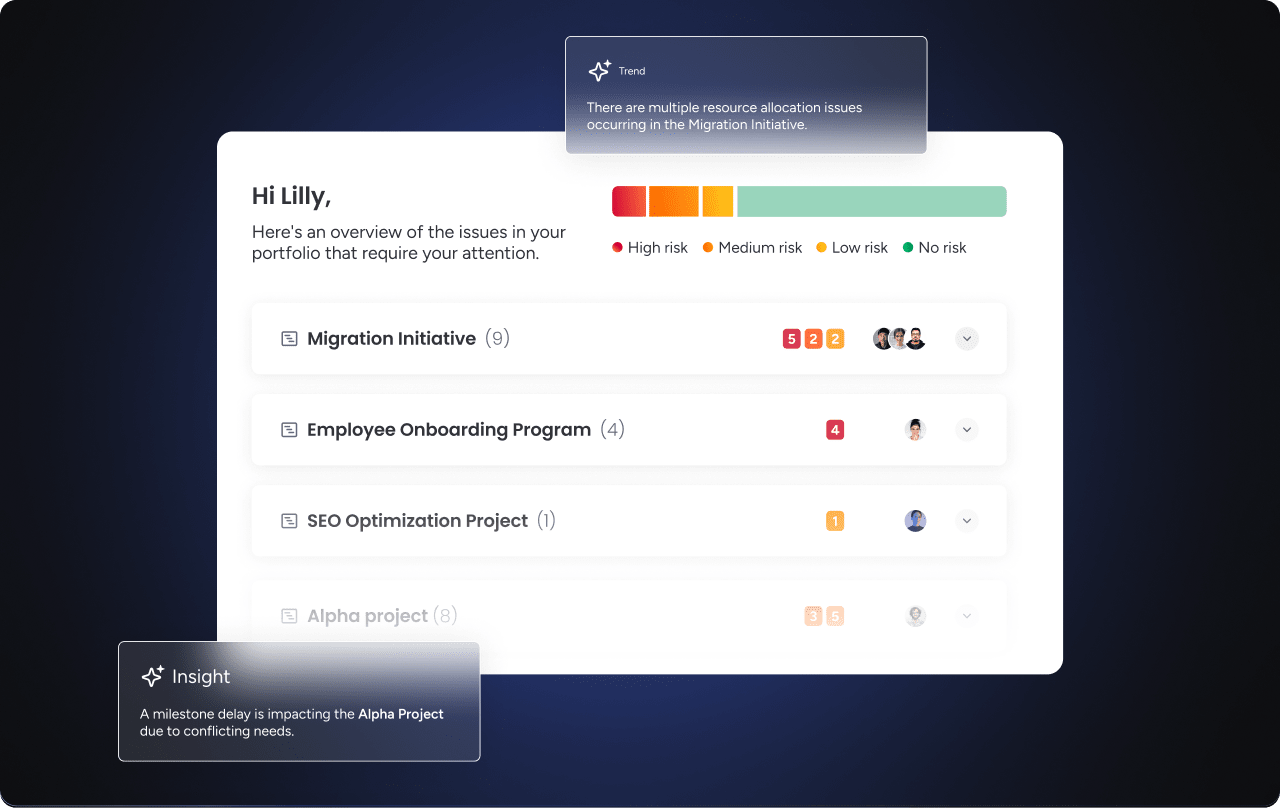
Artificial intelligence shifts template creation from manual design to automated, data-driven processes. AI fundamentally changes how organizations build and maintain operational frameworks, making template creation faster and more intelligent.
Automated template generation from existing processes
AI capabilities within platforms like monday work management analyze unstructured data, including project history and email threads, to identify recurring patterns and generate draft templates automatically.
Instead of starting blank, AI suggests workflow structures based on successful past deliveries. This includes:
- Recommending sequences based on historical patterns: AI analyzes past workflows to suggest optimal task order.
- Estimating durations from past project data: Historical completion times inform realistic timeline predictions.
- Identifying necessary columns for optimal tracking: System suggests fields based on what similar projects actually used.
This significantly accelerates setup phases and reduces the guesswork in template design.
Smart workflow templates that improve over time
AI transforms templates from static blueprints into adaptive systems. Smart templates monitor their own performance, analyzing completion rates and bottlenecks.
Over time, systems suggest optimizations like adjusting standard timelines consistently missed or recommending automation for frequently delayed steps. This creates feedback loops where templates evolve to match team velocity and working style.
Smarter workflow analysis across teams
Beyond individual workflows, AI looks at patterns across the entire organization. It can spot delays, or seasonal slowdowns that aren’t obvious day to day.
For instance, if approvals take longer during certain months, adjustments can be made in advance. Because of this, teams stay proactive instead of constantly reacting.
Rolling out workflow templates successfully
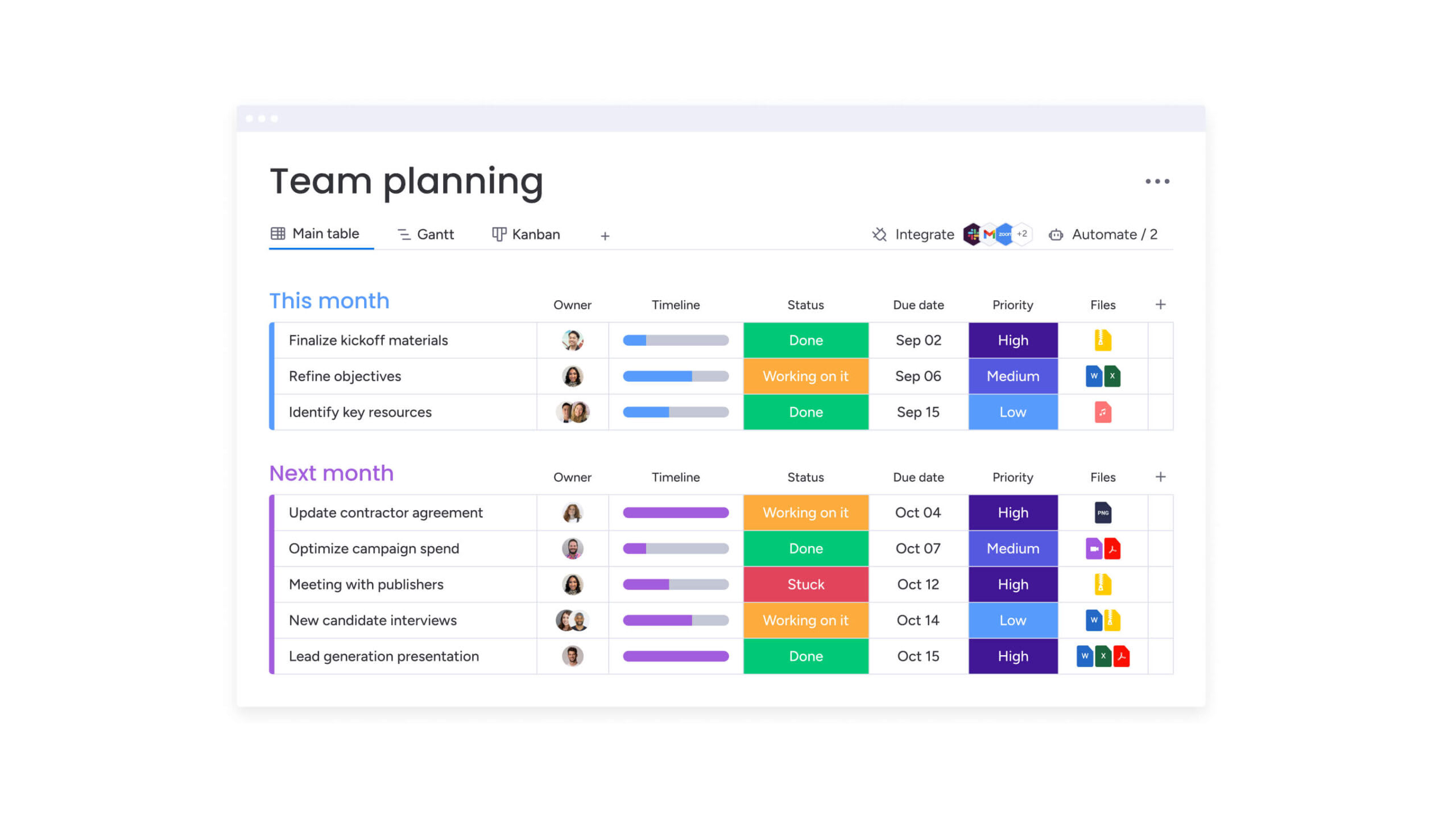
Even the best templates fail without proper rollout. Adoption depends less on the template itself and more on how it’s introduced and supported.
Securing leadership support
Adoption starts with executive alignment. Frame template initiatives in terms of business outcomes, including reduced time-to-market, improved client retention, or decreased compliance risk.
Present projections based on pilot results. When leadership understands standardized templates as levers for strategic execution, they provide necessary mandates and resources to drive organizational adoption.
Training teams on template best practices
Training must be practical and role-based. Avoid abstract theory in favor of hands-on sessions where teams apply templates to actual active projects.
Create specific tracks for different roles:
- Executors need to know how to update the status.
- Managers need to interpret dashboards.
- Administrators need to customize templates.
Ongoing support structures, including embedded videos or office hours, ensure users get help exactly when encountering blockers.
Tracking template adoption and ROI
Without measurement, it’s hard to know what’s working. Tracking usage rates, project timelines, and team feedback gives a clear picture of impact.
Over time, this data helps refine templates and prove their value. In short, what gets measured improves, and workflows are no exception.

“monday.com has been a life-changer. It gives us transparency, accountability, and a centralized place to manage projects across the globe".
Kendra Seier | Project Manager
“monday.com is the link that holds our business together — connecting our support office and stores with the visibility to move fast, stay consistent, and understand the impact on revenue.”
Duncan McHugh | Chief Operations OfficerSimplify and scale your workflows with monday work management
When workflows live outside the actual work, teams lose clarity, consistency, and momentum. Over time, this disconnect leads to missed handoffs, duplicated effort, and limited visibility into what’s really happening across projects. That’s where a connected approach makes a difference.
Bridging that gap, monday work management brings structure, automation, and collaboration into one shared workspace. Instead of managing work separately from the process, your workflows become part of how work gets done every day.
- Disconnected workflows create inefficiencies: Teams struggle with scattered information, manual tracking, and unclear ownership, which slows execution and increases errors.
- Lack of visibility impacts decision-making: Without real-time updates and reporting, it becomes harder to identify bottlenecks or measure progress accurately.
- Rigid or unused templates reduce adoption: When workflows are hard to follow or not embedded into daily work, teams often bypass them entirely.
- Automation and real-time collaboration improve execution: Built-in automations, live dashboards, and shared workspaces keep tasks moving and teams aligned without extra effort.
- Scalable templates support consistent growth: Standardized yet flexible workflows help teams maintain quality, onboard faster, and manage increasing complexity with ease.
In conclusion, bringing workflows into a unified platform allows teams to move faster, stay aligned, and connect everyday execution to larger business goals without adding unnecessary complexity.
Frequently asked questions
What is the difference between a workflow and a process?
A workflow is the specific sequence of activities and decisions needed to complete a particular type of work, while a process is the broader methodology governing how work gets done.
Can you create workflow templates in Excel?
Excel can store workflow documentation and lists but cannot create dynamic workflow templates with automation, real-time collaboration, or integrated communication features.
How do workflow templates save time?
Workflow templates eliminate the need to recreate project structures from scratch and provide pre-configured automation that handles routine actions automatically.
What makes a good workflow template?
Good workflow templates balance structure with flexibility, include clear ownership and automated routine actions, and connect directly with the platforms teams already use for daily work.
How often should workflow templates be updated?
Workflow templates should be reviewed quarterly and updated whenever teams consistently modify certain elements or when performance data suggests improvements.
Can AI create workflow templates automatically?
AI can analyze existing work patterns and suggest workflow template structures based on successful project data and industry best practices.

 Get started