



The deal closed. Your CRM says “won.” And then the real chaos begins. Suddenly, sales is pinging ops about inventory. Finance is waiting on an invoice that hasn’t been created yet. The customer is asking for a shipping update, and three different people are checking three different spreadsheets to find an answer. That gap between “closed-won” and “order shipped” is where revenue stalls, customers get frustrated, and teams start pointing fingers.
Sales order management software closes that gap. It captures orders the moment a deal closes, routes them to the right teams, tracks fulfillment, and keeps everyone working from the same record. This guide breaks down 15 platforms built for revenue teams, covering what each one actually does well, where it falls short, and how to pick the right fit for your sales cycle with solutions like monday CRM.
Try monday CRMWhat is sales order management software?
Sales order management software exists to fix broken handoffs. It captures, tracks, and fulfills customer orders the moment a sale closes. It’s the automatic connection between your sales and operations teams.
It routes orders, confirms inventory, generates invoices, and tracks payments. It keeps communication and data centralized and easy to find. Your CRM tracks relationships while your ERP manages finances, but neither one owns the full journey from order to cash. That disconnect is where deals stall and customers start asking, “Where’s my stuff?”
Who actually uses an order management system?
This goes way beyond the back office. Keeping revenue flowing after a deal closes involves every team that turns a “yes” into a paid invoice. When this process works, deals close faster and customers stay happy.
- Sales reps and account managers: Get real-time order status without bugging the ops team. Finally.
- RevOps leaders: See the entire order-to-cash cycle and spot bottlenecks before they slow you down.
- Operations and fulfillment teams: Receive and process orders instantly, without waiting for a forwarded email to start working.
- Finance and accounting teams: Match orders to invoices automatically and stop chasing data across different platforms.
- Sales directors and CROs: Forecast based on confirmed orders, not just pipeline deals, and report on revenue with confidence.
When this process works, teams get full order visibility without the cost and complexity of another standalone platform. One workspace means no more guesswork, just revenue that keeps moving.
15 best sales order management software platforms
These platforms don’t all do the same thing. Some are built for enterprise-level accounting, others for fast-moving ecommerce, and a few connect your sales and order workflows in one place. Picking the right one matters more than you think.
Here’s a quick cheat sheet to see where each platform fits in.
| Platform | Use case | Starting price |
|---|---|---|
| monday CRM | Revenue teams needing CRM and order workflow in one place | From $12/seat/month |
| NetSuite | Enterprise companies needing ERP and order management | Custom pricing |
| Zoho Inventory | SMBs managing multichannel inventory and orders | From $29/month |
| Microsoft Dynamics 365 | Enterprise organizations invested in the Microsoft ecosystem | Custom pricing |
| Salesforce Order Management | Enterprise Salesforce customers with complex order routing | Custom pricing |
| ShipStation | Ecommerce businesses with high shipping volumes | From $9.99/month |
| QuickBooks Commerce | Product-based SMBs using QuickBooks Online | From $50/month |
| Sage | Small to mid-sized businesses prioritizing accounting integration | From $25/month |
| SAP Business One | Mid-sized manufacturers needing production and order alignment | Custom pricing |
| Fishbowl | Manufacturers and distributors running QuickBooks or Xero | From $229/month |
| Brightpearl | Retail and wholesale businesses with multichannel fulfillment | Custom pricing |
| Odoo | Growing businesses needing modular ERP flexibility | From $31.10/user/month |
| inFlow Inventory | Product-based businesses needing end-to-end order workflows | From $89/month |
| Rootstock | Manufacturers on Salesforce needing native ERP integration | Custom pricing |
| Cin7 Core | Product businesses selling across multiple channels | From $349/month |
1. monday CRM
monday CRM puts deals, orders, and customer communication in one place. It’s built for the parts that usually fall apart: capturing order details, keeping approvals moving, and tracking every customer touchpoint.
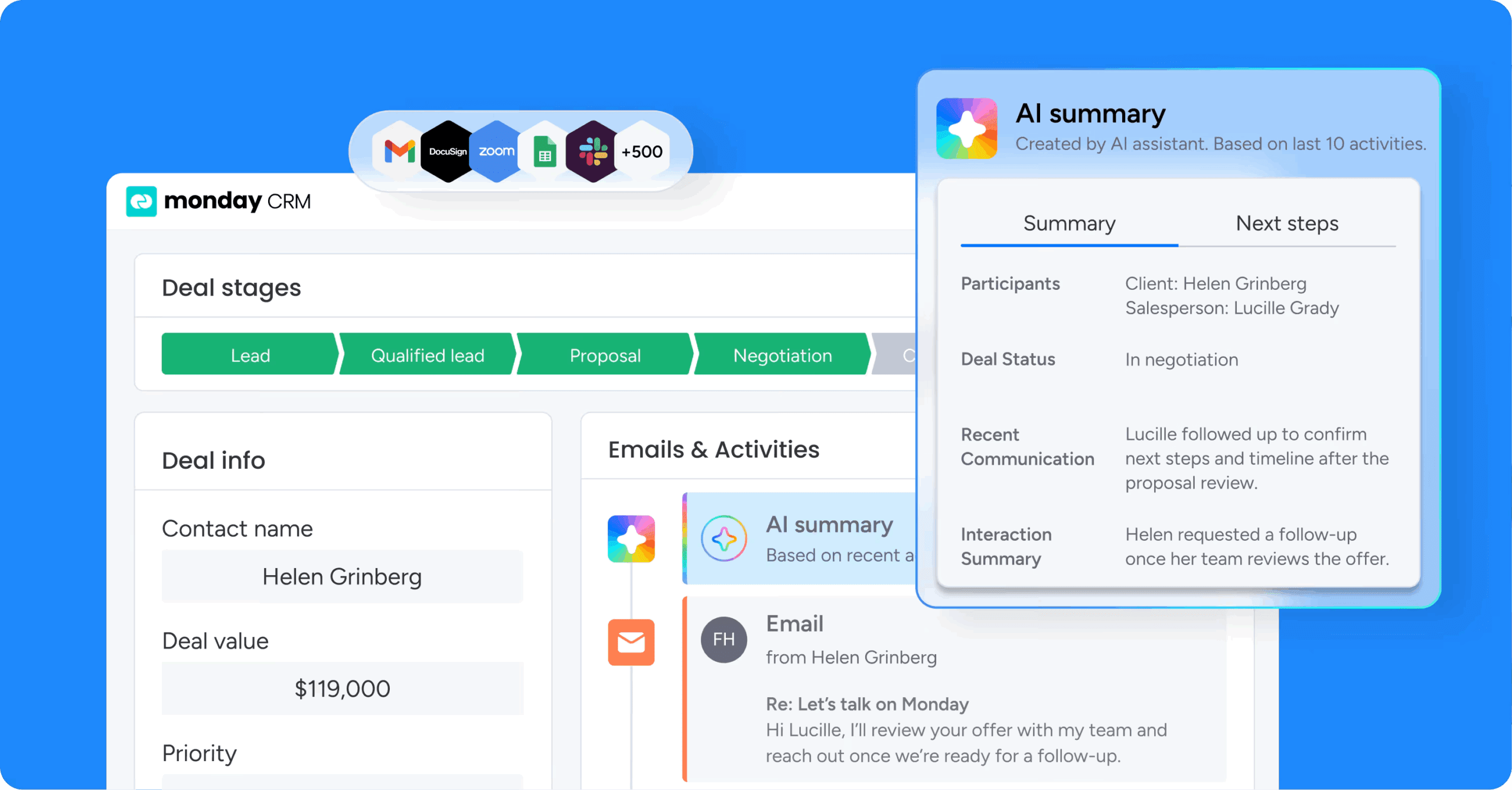
monday CRM gives RevOps and sales leaders the power to adapt workflows without heavy technical work, using boards, items, views, dashboards, and automations that flex with your process. When your order process changes every quarter, your team can’t afford to wait in an admin queue.
Example:
Best for mid-market revenue teams managing B2B orders who need deal tracking, order workflows, and customer communication in one platform.
Here’s how it works: your rep closes a deal, ops needs an approval, finance needs collection status, and the account manager needs the full history. monday CRM keeps all that context attached to the order, so handoffs feel like a relay, not a scavenger hunt.
Key features:
- No-code order workflows: Set up boards to track order stages, approvals, and next steps using statuses, dates, owners, and automations, the same building blocks your team already uses.
- Deal management with a visual pipeline: Track deals in a visual pipeline and tailor stages with drag-and-drop as your process evolves.
- Centralized account and contact management: The expanded item view keeps key account details, connected deals, and related work in one place. Reps and account managers always have the full picture.
- Emails & Activities timeline: Track every interaction — emails, meetings, and notes — in one timeline. When someone asks, “What did we promise on that call?” you have receipts.
- Mass email & tracking: Send individual and mass emails using auto-populating fields and templates. Track open rates and link clicks automatically.
Pricing:
- Basic: $12/seat/month
- Standard: $17/seat/month
- Pro: $28/seat/month
- Enterprise: Contact sales for a quote
- Plans start from 3 seats; teams with more than 40 seats can request a custom quote
- AI features are available on Standard, Pro, and Enterprise plans (credit-based usage)
Why it stands out:
- One platform for the entire customer journey: monday CRM supports lead management, deal management, post-sales onboarding, and collection tracking, so revenue teams keep control after “closed-won.”
- Built for cross-functional handoffs: Legal, finance, and account teams work from the same order record. Updates land in the activity timeline automatically.
- Flexible setup without the usual overhead: Revenue leaders adjust pipelines, dashboards, automations, and permissions as the business changes — no project required.
Advanced AI features:
- AI email assistant: Compose emails faster inside Emails & Activities, so follow-ups don’t stall when reps are juggling 20 active orders.
- AI Timeline Summary: Summarize the full Emails & Activities timeline (emails, calls, meetings, and notes) into a short recap. Useful for handoffs, deal reviews, renewals, and “I just inherited this account, help.”
- Autofill with AI for order intake: Apply Autofill with AI to compatible columns (Text, Date, Number, Dropdown, People, and Status) to reduce manual entry. For example, use Extract Info with AI to pull key fields from files like invoices or contracts and place them directly into board columns.
- AI-based routing: Use Assign person to fill a People Column based on context (like Emails & Activities), with roles and skills defined for eligible teammates.
Automations:
- Trigger-based order updates: Automations advance stages, assign owners, and notify stakeholders when an order hits a key milestone.
- Conditional label changes: Apply conditional label changes to standardize stages and reduce “creative” status updates that wreck reporting.
- AI automation blocks: On Pro and Enterprise plans, add AI automation blocks like Extract information, Summarize text, or Detect sentiment when you need AI to act as part of a larger workflow.
Integrations:
- Connected workflows across teams: Sales, legal, finance, and account work stay connected to the same customer record.
- AI assistants connected to your monday workspace: Connect external AI clients to create leads and deals, update pipeline stages, and log next steps from call notes.
Sales order management software features:
- Centralized order visibility: The expanded item view keeps account info, deal stage, activity history, and next steps together. Managers review orders without chasing updates.
- Sales forecasting: Track forecasts and projections. Compare forecast vs. actual sales. Drill down by month, sales rep, or other criteria.
- Sales analytics dashboards: Build dashboards with sales-specific widgets like the leaderboard, sales funnel, and sales pipeline widgets to spot pipeline strength, rep activity, and where deals slow down.
- Dedicated mobile experience: Deals and order follow-ups keep moving even when reps are on the road or stuck in meetings.
2. NetSuite
NetSuite is an enterprise-grade ERP with order management built directly into its core, connecting every order to your financials, inventory, and procurement in one unified system. NetSuite is a go-to for complex organizations that need serious operational depth. If your business runs across multiple subsidiaries, currencies, or fulfillment locations, NetSuite is designed to handle that complexity at scale.

Use case:
- Large organizations that need order management tightly connected to financial planning, multi-location inventory, and procurement workflows.
Key features:
- Full ERP integration: Order data flows directly into the general ledger, accounts receivable, and procurement workflows, no manual reconciliation required.
- Automatic location assignment: Rules-based routing assigns each order line to the optimal fulfillment location based on real-time stock availability and configurable strategies.
- Supply allocation: Aligns current and future supply (purchase orders, transfers, inbound shipments) to open demand, with exception alerts when fulfillment is at risk.
Pricing:
- Custom pricing: Quote-based only; pricing depends on modules, number of users, and implementation scope.
- Advanced capabilities such as warehouse management, configure-price-quote (CPQ), and SuiteBilling are available as paid add-ons and may increase total cost.
Considerations:
- Implementation timelines typically run 3 – 6 months and require dedicated admin resources to configure and maintain, making it a system best suited for teams with available IT support.
- Achieving optimal order routing and supply allocation results requires detailed configuration across locations, items, and fulfillment rules, which adds complexity for multi-channel or multi-subsidiary environments.
3. Zoho Inventory
Zoho Inventory consolidates multichannel order and inventory management into a single system, covering everything from order creation to delivery. Built for small and midsize businesses, it integrates tightly with other Zoho apps, like Zoho Books, and connects with major ecommerce platforms, making it a natural fit for teams already in the Zoho ecosystem.

Use case:
- Small businesses selling across multiple channels — web, retail, and wholesale — that need end-to-end order tracking without stitching together separate platforms.
Key features:
- Multichannel order capture: Pulls in orders automatically from ecommerce platforms like Shopify, Amazon, and eBay, while also supporting manual order creation for offline sales.
- Real-time inventory sync: Keeps stock levels updated across all sales channels simultaneously, reducing the risk of overselling.
- End-to-end order workflow: Converts sales orders to invoices or purchase orders, generates packages, manages shipments, and tracks delivery — all within one system.
Pricing:
- Free: $0/month, up to 50 orders/month, 1 user, 2 locations
- Standard: $29/month, up to 500 orders/month, 2 users, 2 locations
- Professional: $79/month, up to 3,000 orders/month, 2 users, 4 locations
- Premium: $129/month, up to 7,500 orders/month, 2 users, 6 locations
- Enterprise: $249/month, up to 15,000 orders/month, 7 users, 10 locations
Considerations:
- CRM-to-order workflow depth: Teams that need a deep, seamless connection between CRM activity and order management may find that linking Zoho Inventory with Zoho CRM requires extra configuration beyond the default setup.
- Plan-gated features: Key features are gated by plan. While the Customer Portal is available on the Standard plan, you’ll need to upgrade for serial/batch tracking and advanced automation, which can push costs up as your business grows.
4. Microsoft Dynamics 365
Microsoft Dynamics 365 brings ERP, CRM, and order management together in one unified platform built on Microsoft’s cloud infrastructure. It targets enterprise organizations already running Microsoft 365 and Azure, giving them a single system to connect sales, finance, and operations. For teams managing complex, multi-channel order flows, the depth of native integration across the Microsoft ecosystem is a genuine differentiator.

Use case:
Enterprise organizations standardized on Microsoft infrastructure that need sales, finance, and fulfillment data connected on one platform without stitching together separate systems.
Key features:
- Distributed Order Management (DOM): Uses mixed-integer programming to optimize fulfillment across multiple nodes, with configurable cost and distance objectives — a more sophisticated approach than standard rules-based routing.
- Omnichannel inventory visibility: The Inventory Visibility service aggregates supply and demand signals across systems, computing available-to-promise dates across channels with a time-series look-ahead of up to 180 days.
- Unified Pricing Management: Applies consistent pricing, discounts, and rebates across all channels, with direct alignment between CRM and SCM order pricing.
Pricing:
- Dynamics 365 Sales Professional: $65/user/month
- Dynamics 365 Sales Enterprise: $105/user/month
- Dynamics 365 Sales Premium: $150/user/month
Considerations:
- The platform’s breadth creates real complexity; smaller teams frequently find the configuration requirements and licensing structure over-engineered for straightforward order management needs.
- Total cost scales quickly when combining modules, add-ons like Intelligent Order Management, and the Commerce e-commerce add-on, making it harder to predict total spend without a detailed scoping exercise.
5. Salesforce Order Management
Salesforce Order Management orchestrates the full order lifecycle, from capture to fulfillment to post-sale service, directly within the Salesforce platform. It’s designed to cut the integration tax of stitching together separate order, service, and CRM systems, especially for enterprise teams. If your organization processes thousands of orders per minute across multiple fulfillment centers, this is built with that scale in mind.
Use case:
Enterprise customers with complex order routing requirements across multiple fulfillment centers who need order, service, and customer data unified in a single platform.
Key features:
- Native CRM and Service Cloud integration: Order data stays synchronized with customer records, giving service agents full order history and context in one console.
- Distributed Order Management (DOM): AI-driven routing optimizes fulfillment based on inventory location, shipping cost, and delivery speed, with support for split shipments and exception handling via prebuilt Flow automations.
- High-scale order processing: Handles up to 5,000 order ingestions per minute and supports up to 2,000 line items per order, making it resilient during peak-volume events.
Pricing:
- Order Management: Custom pricing, contact Salesforce for a quote.
- Can be purchased standalone, though it’s most powerful when integrated with other Salesforce products.
Considerations:
- While it can be purchased standalone, Salesforce Order Management delivers its biggest wins when connected to the rest of the Salesforce ecosystem. Evaluating it in isolation might not show its full potential.
- Pricing is quote-only for Order Management editions, which limits upfront cost transparency during the evaluation process.
6. ShipStation
ShipStation connects multichannel order data directly to shipping execution, cutting the gap between a confirmed order and a label out the door. Built for ecommerce merchants managing high shipment volumes, it automates carrier selection, batch label printing, and post-purchase tracking, all from a single dashboard. Over 130,000 companies rely on it to keep fulfillment moving without manual intervention.

Use case:
ShipStation is purpose-built for ecommerce businesses that need to move orders from confirmed to shipped as fast as possible, with minimal manual handling across multiple sales channels.
Key features:
- Multi-carrier rate shopping: Automatically compares carrier rates and selects the most cost-effective option for each shipment, cutting overspend on shipping.
- Batch label printing: Processes hundreds of shipping labels at once, turning a mountain of orders into a stack of ready-to-ship packages in minutes.
- Advanced warehouse workflows: Use barcode scanning to eliminate picking errors and Pick-to-Tote (on Premium plans) to accelerate fulfillment.
- Branded tracking and returns portal: Keeps customers informed with branded tracking pages and a self-serve returns portal, reducing inbound support requests after orders ship.
Pricing:
- Starter: from $14.99/month
- Standard: from $29.99/month
- Premium: from $349.99/month
- Free 30-day trial available across plans
Considerations:
- ShipStation focuses on post-confirmation fulfillment and does not manage the pre-shipment order workflow; quoting, approvals, and invoicing happen outside the platform.
- Key features like combine/split orders, API access, and advanced inventory are gated behind Standard and Premium plans, so smaller teams on Starter will hit limitations quickly.
7. QuickBooks Commerce
QuickBooks Commerce brings order and inventory management directly into QuickBooks Online, eliminating the need for a separate accounting bridge. Built for product-based small businesses selling across Amazon, eBay, and Shopify, it connects channel activity to your books through native, first-party integrations. If you’re already running on QuickBooks Online, this is the path of least resistance for getting orders and accounting in sync.
Use case:
Product-based small businesses already on QuickBooks Online that need basic sales order tracking and multi-channel accounting without adding a separate platform.
Key features:
- Native QBO sales orders: Create and manage sales orders directly inside QuickBooks Online, with the ability to convert them into invoices or purchase orders — keeping your audit trail intact without manual re-entry.
- Multi-channel commerce connectors: Connect Amazon, eBay, and Shopify to automatically import and categorize channel transactions (sales, fees, refunds, taxes) into the correct accounts via clearing account mapping.
- Open order reporting: Track open sales orders by item and by customer, with shipping fields and custom templates built into the native workflow.
Pricing:
- Simple Start: From $17.50/month (1 channel connection)
- Essentials: From $32.50/month (up to 3 channel connections)
- Plus: From $49.50/month (unlimited channel connections, full inventory tracking)
- Advanced: From $117.50/month (unlimited channels, advanced reporting)
Considerations:
- The standalone QuickBooks Commerce product was discontinued in 2023, so teams that relied on its deeper catalog or portal features will find those capabilities no longer available through Intuit.
- Multi-warehouse orchestration and granular pick/pack/ship workflows are not native in QuickBooks Online; businesses with complex fulfillment needs will likely require QuickBooks Desktop Enterprise or a third-party integration.
8. Sage
Sage connects order management directly to your financials, so nothing falls through the cracks between a confirmed order and a closed invoice. Built for small to mid-sized product businesses, it brings accounting and order tracking into one system to cut down on manual reconciliation. If tight financial controls matter as much as order visibility, Sage is worth a close look.
Use case:
- Best suited for small to mid-sized businesses that need order management and accounting tightly connected in a single system.
Key features:
- Integrated accounting: Order data flows directly into the general ledger and accounts receivable, keeping financials accurate without duplicate entry.
- Multi-currency support: Handles international orders and foreign exchange tracking to make cross-border sales manageable (Sage Intacct supports 200+ currencies).
- Job costing: Tracks profitability by order or project, giving finance and operations teams a granular view of where margin is made or lost.
Pricing:
- Sage 50 Pro: $124.42/month
- Sage 50 Premium: $169.33/month
- Sage 50 Quantum: $253.42/month (includes order process workflow)
Considerations:
- Order management features are less configurable than dedicated order management platforms, so teams with non-standard workflows may need workarounds.
- Mid-market plans (Intacct, X3) require partner-led implementation, which adds cost and timeline variability that’s difficult to predict upfront.
9. SAP Business One
SAP Business One delivers full ERP functionality to mid-sized businesses requiring more than a standalone sales platform. Manufacturers and distributors managing complex order cycles benefit from its unified approach: sales, inventory, production, and finance all live in one system. An order here isn’t just a transaction; it triggers a chain of operational events across the entire organization.

Use case:
Mid-sized manufacturers and distributors that need sales order management tightly connected to production planning, inventory control, and financial reporting across multiple entities.
Key features:
- End-to-end document flow: Move from quote to order to invoice without re-keying data. As documents progress, inventory and general ledger updates happen at the right moments, keeping your books clean and audit-ready.
- Batch and serial number tracking: Full traceability across sales and inventory documents supports regulated industries where proving the chain of custody is non-negotiable.
- Production and procurement alignment: Open sales orders feed directly into manufacturing schedules and can be consolidated into purchase orders by warehouse, keeping supply and demand in sync.
Pricing:
- License model: Named-user licensing with Professional and Limited license types (Financials, Logistics, CRM); a Starter Package option is also available.
- Pricing structure: Quote-based, sold and supported through certified SAP partners, contact SAP or an authorized partner for a custom quote.
Considerations:
- Implementation requires a certified SAP partner and carries significant upfront investment, making it a poor fit for teams that need to get operational quickly.
- Advanced availability-to-promise features and delivery schedule management are only available on the SAP HANA version, not the SQL Server edition — so the version you choose directly affects what order management capabilities you can access.
10. Fishbowl
Fishbowl Inventory (the one for manufacturing and warehouse ops, not restaurant marketing) connects sales orders directly to warehouse execution and accounting. Manufacturers and distributors who need more than a basic order form will find a platform built around QuickBooks and Xero integration, ensuring the financial impact of operations syncs with the general ledger. Trusted by over 6,000 businesses, it’s designed for teams whose order management challenges live on the warehouse floor rather than in the sales pipeline.
Use case:
- Small to midsize manufacturers and distributors running QuickBooks or Xero that need end-to-end order execution, from quote to shipment to invoice, without migrating to a full ERP.
Key features:
- Manufacturing order management: Links sales orders to production schedules and bills of materials, so fulfillment and manufacturing stay in sync.
- Barcode scanning for pick, pack, and ship: Warehouse teams use mobile devices on Android and iOS to batch pick and process orders faster, reducing manual handling errors.
- QuickBooks and Xero integration: Every sales order, shipment, and invoice maps directly to your accounting records, including COGS, inventory assets, and accounts receivable.
Pricing:
- Essentials: $229/month (billed annually, includes 2 users)
- Growth: $429/month (billed annually, includes 5 users)
- Scale: $729/month (billed annually, includes 10 users)
- Advanced: Custom pricing (contact sales)
- An implementation package is required for all plans, covering data migration and a 6–8 week training certification
Considerations:
- Fishbowl focuses on inventory and warehouse workflows, not sales pipeline management. Teams needing lead tracking, customer relationship management, or revenue performance reporting will find those capabilities absent.
- The required implementation package and staged feature rollouts (some listed as available in Q1 2026) mean meaningful upfront time and cost before the platform becomes fully operational.
11. Brightpearl
Brightpearl centralizes multichannel order management, inventory, and fulfillment automation into a single retail operating system. Mid-market retailers and wholesalers rely on it to connect orders from ecommerce platforms, marketplaces, and POS systems into one automated workflow. Over 5,000 brands process millions of orders monthly through the platform, avoiding the operational chaos that typically accompanies scaling across channels.

Use case:
- Retail and wholesale businesses selling across multiple channels that require automated, high-volume order orchestration from capture to fulfillment.
Key features:
- Multichannel order aggregation: Pulls orders from ecommerce platforms like Shopify and BigCommerce, marketplaces like Amazon and eBay, and POS systems into one centralized workflow.
- Automated fulfillment routing: Uses rules-based automation to route orders to the right warehouse, dropship vendor, or fulfillment partner, including FBA and 3PL integrations.
- Demand planning and backorder management: Uses historical order data to forecast inventory needs, auto-creates purchase orders for backorders, and triggers fulfillment automatically when stock arrives.
Pricing:
- Custom pricing: Quote-based, scoped to order volume, channel footprint, and required capabilities.
Considerations:
- Retail-specific by design; B2B service businesses or teams without physical inventory will find limited relevance here.
- Initial setup carries a learning curve, and smaller teams may find the implementation scope heavier than expected relative to simpler platforms.
12. Odoo
Odoo handles the full quote-to-cash cycle inside a single, modular ERP, covering sales orders, inventory, accounting, and shipping without stitching together separate platforms. With 15 million users globally and 50+ native apps, it gives growing businesses the flexibility to activate only what they need. The open-source core means deep customization is possible, though it does require developer involvement to get there.

Use case:
- Growing businesses that need flexible, modular ERP capabilities, spanning sales order management, inventory, and accounting without enterprise-level cost or complexity.
Key features:
- End-to-end order flow: Convert quotes to sales orders to invoices on a single screen, with e-signature, online prepayment, and branded PDF proposals built in.
- Logistics integration: Trigger deliveries automatically from confirmed orders, with support for dropshipping, multi-step fulfillment, and carrier connections (UPS, DHL, FedEx, and more).
- Ecommerce and marketplace sync: Online orders from the native ecommerce module and Amazon Connector flow directly into inventory and fulfillment — no manual re-entry required.
Pricing:
- One App Free: $0/month, one app, unlimited users on Odoo Online
- Standard: $31.10/user/month
- Custom: $61.00/user/month
- Odoo.sh hosting, implementation services, and in-app purchases (SMS, OCR, lead generation) are not included in subscription pricing
Considerations:
- External API access is required for connecting third-party systems like BI platforms or external CPQ tools and is only available on the Custom plan, which limits integration flexibility on lower tiers.
- Custom modules and many third-party add-ons require Odoo.sh or on-premise deployment, meaning teams on the Standard plan who need tailored workflows will likely need to upgrade and bring in developer support.
13. inFlow Inventory
inFlow Inventory connects order capture, fulfillment, and accounting into one inventory-first platform built for product-based businesses. Used by 50,000+ businesses across 90+ countries, it handles the full sales order lifecycle, from quote to shipment to payment, without requiring separate systems for each step. Its built-in B2B portal and native multi-carrier shipping make it a strong fit for wholesale and distribution teams managing straightforward order workflows.
Use case:
Small product-based businesses that need end-to-end sales order management, from order capture through pick, pack, ship, and invoicing, without stitching together multiple platforms.
Key features:
- End-to-end sales order workflow: Converts quotes into sales orders, then into pick/pack/ship workflows with real-time inventory availability, partial fulfillment support, and order prioritization by drag-and-drop.
- Native multi-carrier shipping: Rate shopping and label purchasing from 50+ carriers via EasyPost, with automatic tracking number insertion and customer notifications — all from inside the platform.
- B2B Showroom portal: Publishes live product catalogs with customer-specific pricing, accepts orders online, and syncs inventory availability in real time.
Pricing:
- Entrepreneur: From $89/month
- Contact sales for pricing for additional plans
- Note: A one-time onboarding fee of $499 is required; sales order volume is capped per plan, with overages charged at $0.20 per order
Considerations:
- Teams with high sales order volumes may see total costs rise quickly due to per-order overage fees and add-on pricing for features like API access and serial number tracking.
- Packing is not tracked as a discrete fulfillment step, and splitting orders into backorders is not supported for Shopify or WooCommerce imports — which can create friction for ecommerce-heavy workflows.
14. Rootstock
Rootstock connects sales order management directly to manufacturing operations, all within the Salesforce ecosystem. Natively built on Salesforce since 2008, it serves discrete manufacturers and wholesale distributors who need CRM and ERP data living in the same place. Teams already running on Salesforce eliminate the integration headache entirely.
Use case:
Manufacturers and distributors already on Salesforce who need sales orders, production schedules, and inventory data synchronized without a separate integration layer.
Key features:
- Quote-to-order automation: Converts Salesforce opportunities and quotes directly into sales orders, supporting stock, kitted, configured, and service-based products with no manual re-entry.
- Multi-site order management: Centralizes orders across multiple facilities with configurable pricing books, many-to-many order-to-invoice mapping, and real-time available-to-promise (ATP) visibility.
- Manufacturing execution linkage: Connects sales orders to production schedules and capacity planning, so teams can assess manufacturing impact at the quoting stage before committing to a delivery date.
Pricing:
- All tiers are quote-only, no list prices are published publicly.
- A Salesforce license is required in addition to Rootstock; this is a separate cost to factor into total cost of ownership.
Considerations:
- Rootstock requires an active Salesforce license to function, teams not already on Salesforce face a significant platform investment before the ERP capabilities become accessible.
- Some users note that heavy customizations can complicate upgrades and that certain ad hoc reporting scenarios have limitations within the platform.
15. Cin7 Core
Cin7 Core centralizes order management across every sales channel, like ecommerce, POS, B2B, and wholesale, into one connected platform. Small to medium-sized product businesses get inventory control, fulfillment workflows, and multi-channel order sync in a single system. With 8,500+ customers and 125+ million orders processed annually, the platform has proven scale behind its capabilities.

Use case:
Product businesses selling across multiple channels that need centralized inventory and order management without the complexity of a full ERP.
Key features:
- Multi-channel order sync: Aggregates orders from ecommerce, POS, and B2B channels into one view, with configurable consolidation and automatic routing to the nearest inventory location.
- Automated reorder points: Triggers purchase orders when inventory hits defined thresholds, reducing the risk of stockouts and manual oversight.
- Landed cost tracking: Calculates the true cost of each product, including shipping and duties, so margins stay accurate across every order.
Pricing:
- Standard: $349/month, 5 users, 2 integrations, 6,000 orders/year
- Pro: $599/month, 10 users, 4 integrations, 24,000 orders/year (includes MRP)
- Advanced: $999/month, 15 users, 6 integrations, 120,000 orders/year (includes Advanced WMS)
Considerations:
- Native EDI is not included in Cin7 Core, teams that need retailer EDI connectivity will need to work with third-party partners like SPS Commerce, which adds cost and configuration effort.
- Key capabilities like workflow automation, the B2B portal, and POS require paid add-ons, so the true cost scales as your operational needs grow.
7 must-have features in sales order management software
The wrong order management software will create problems where they didn’t exist before. To avoid trading one bottleneck for another, you need a platform that actually fits your workflow. Here are the 7 capabilities that make the difference between a tool that helps and one that hurts.
1. Automated order entry and processing
Manual order entry is a magnet for mistakes. One wrong SKU or a missed discount snowballs into shipping delays and angry customers. monday CRM’s AI blocks feature can extract key data from contracts and invoices, killing the copy-paste errors that slow teams down.
2. Real-time inventory and order tracking
Everyone needs the same answer to one question: where’s the order? Without it, reps are stuck on calls they can’t answer and finance is chasing ghosts. Real-time tracking means updates happen automatically, so the right people get the right info without anyone lifting a finger.
3. CRM and order management integration
The gap between ‘closed-won’ and ‘order shipped’ is where revenue disappears, as disconnected systems leave reps blind after the handoff and cripple renewal talks. monday CRM solves this by keeping deal data, order status, and customer history in one place, making the handoff seamless.
4. Customizable workflows and approvals
Your sales process is unique; your order workflow should be too. Rigid platforms force workarounds and push your team right back to spreadsheets. You need the power to set your own approval stages and conditional triggers, like requiring a manager’s sign-off for high-value orders. monday CRM lets teams build and tweak workflows instantly, no IT ticket required.
5. Multi-channel and split shipment handling
Selling across multiple channels shouldn’t mean managing multiple messes. Orders from direct sales, ecommerce, and partners all need to land in one clean system. Add split shipments to the mix, and most basic platforms just break. Your system needs to handle it all without dropping the ball.
6. AI-powered automation and insights
Forget chatbots. Real AI in order management is about proactive work, not just reactive answers. It flags exceptions and fixes issues before they become problems. monday CRM puts AI front and center to pull data from documents, draft personalized follow-up emails, and run custom workflows to keep orders moving.
7. Reporting dashboards and sales forecasting
Data is useless until it answers the right questions for the right people. Your CRO needs to see revenue health, while your sales director needs to track rep performance. Instead of waiting on IT for every report, monday CRM lets teams build their own dashboards. This gives leaders a live view from deal to delivery, turning guesswork into reliable forecasts.
Try monday CRMTop benefits of sales order management software for revenue teams
Forget saving a few minutes on data entry. This is about protecting revenue, ending cross-department chaos, and scaling without adding headcount.
A connected order management process stops the firefighting and gives you control. Here’s how.
- Get paid faster: Automation turns signed deals into cash in the bank, fast. Invoices go out and follow-ups trigger automatically, making your forecast suddenly reliable.
- Protect your margins: Manual data entry is where profit goes to die. Connecting order data directly from your CRM stops the errors, returns, and credit notes that eat your margin.
- End the guesswork: Give sales, finance, and fulfillment a single source of truth for every order. No more conflicting updates, just confident, real-time answers.
- Scale without the bloat: Process more orders without hiring more people. Automation handles the repetitive work so your team can focus on what actually matters.
How AI is taking over sales orders (and that's a good thing)
AI for order management isn’t just about helpful hints anymore. It’s about AI that spots a problem, makes a call, and fixes it before your team even knows there was an issue. For revenue leaders, that means less chaos and more control.
AI that fixes problems for you
This new kind of AI doesn’t wait for instructions. It sees an at-risk order, reroutes it, and notifies the account manager automatically. monday CRM automates these workflows, closing deals faster and keeping customers in the loop without manual effort.
With monday agents, you can take this even further. These AI agents work autonomously across your workspace, handling complex, multi-step workflows without human intervention. An agent can monitor order status, detect fulfillment delays, update stakeholders, and even trigger corrective actions, all while your team focuses on higher-value work.
From guesswork to real forecasting
Traditional forecasting is mostly guesswork based on how often reps update the pipeline. AI-driven forecasting analyzes actual order history and customer behavior to predict what’s coming next. monday CRM tracks forecasts against actuals, delivering a real-time view of the pipeline without the manual drag.
Automated communication that actually helps
Order confirmations and payment follow-ups are a massive time sink. monday CRM’s AI writes emails, summarizes conversation threads, and automates follow-ups. When AI handles the busywork, your team can focus on what they do best: selling.
When AI handles the heavy lifting, your team can step away from the busywork and focus on closing the next deal.
Try monday CRMCloud vs. on-premise: what's the real difference?
This isn’t just an IT decision, it’s a business one. Choose the wrong system, and you’re stuck with clunky hardware your team can’t manage or a platform that won’t be ready for months.
| Feature | Cloud-based platforms | On-premise systems |
|---|---|---|
| Deployment speed | Operational in weeks | Can take months to roll out |
| Maintenance | Handled by the vendor | Requires internal IT resources |
| Accessibility | Access live data from anywhere | Often requires VPNs or local access |
| Best for | Fast-moving revenue teams | Organizations with strict data rules |
Cloud-based platforms get you selling faster. Forget six-month rollouts; you can be operational in weeks. Your vendor handles all the maintenance and security, so your team can access live order data from anywhere. No VPNs, no servers, no IT tickets.
On-premise still has its place for teams with strict data rules or deep-rooted ERPs. But for most revenue teams, the real question isn’t about tech specs; it’s about momentum. monday CRM adapts and grows without being tied down by hardware, giving teams a system that works the way they do, not the other way around.
How to choose the right sales order management platform
The platform you pick shapes how sales, ops, and finance work together. Getting it right upfront matters more than getting it done fast.
- Map your current workflow and its bottlenecks: Identify every manual handoff, spreadsheet, and point where orders get stuck.
- Define must-have features vs. nice-to-haves: Create a non-negotiable list of 5–7 features that directly solve your bottlenecks.
- Evaluate integrations with your existing CRM and ERP: Look for deep, native integrations that connect your tools without clumsy workarounds.
- Assess implementation time and total cost of ownership: Factor in implementation, training, and admin time, not just the price tag.
- Test flexibility and no-code customization: During your trial, see if your team can change an approval rule without developer help.
- Run a pilot with real order data: Test the platform with your actual, messy orders to see if it solves problems or creates new ones.
Why monday CRM works for sales order management
Revenue teams need a platform that doesn’t just track deals but also manages what happens after the sale closes. monday CRM connects your entire order-to-cash workflow in one place, giving sales, ops, and finance teams full visibility without switching between systems. You get the flexibility to adapt workflows as your process evolves, without waiting on IT or dealing with rigid enterprise software.
Built for teams that need speed and control, monday CRM turns chaotic handoffs into smooth, automated workflows. Your reps close deals, ops processes orders, and finance tracks payments, all working from the same live data. No more guessing, just revenue that keeps moving.
AI-powered order intake and data extraction
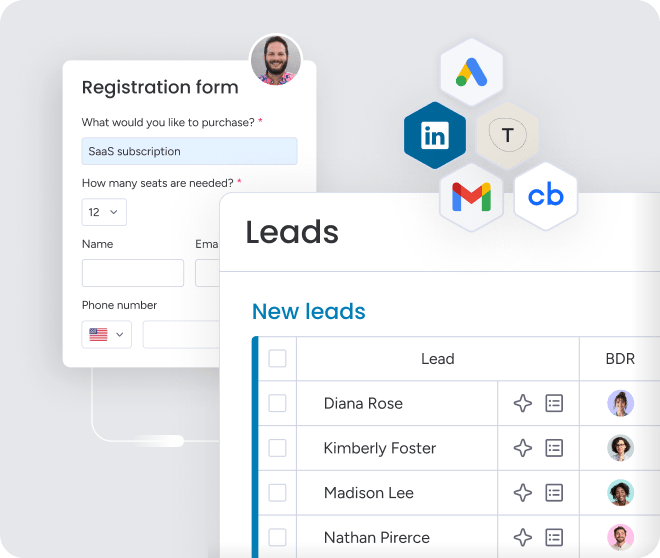
Stop copying and pasting order details from contracts and emails. Use AI to extract key information from invoices, purchase orders, and signed agreements, then auto-populate your order boards with the right data. This cuts manual entry errors and gets orders into your system faster, so fulfillment can start immediately.
Automated workflows that keep orders moving

Set up trigger-based automations that advance order stages, assign owners, and notify stakeholders the moment an order hits a key milestone. Conditional logic ensures approvals route to the right people based on order value or product type. Your team stops chasing updates and starts working from a system that moves orders forward automatically.
AI assistants that handle follow-ups and summaries
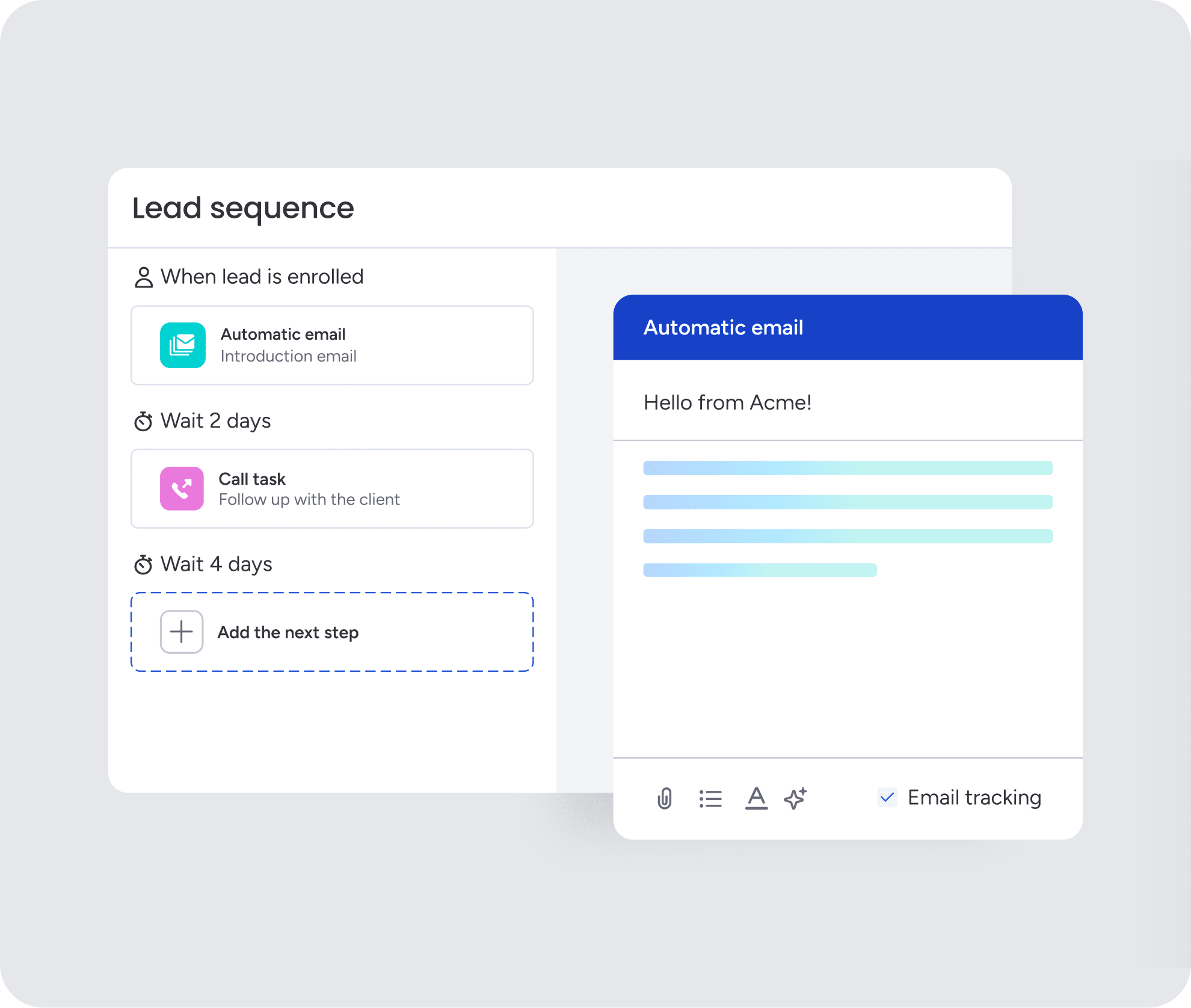
Let AI draft personalized follow-up emails, summarize full activity timelines, and route orders based on context like customer history or team availability. When a rep inherits an account or a manager needs a quick recap, AI delivers a clean summary in seconds. This keeps communication moving without the manual effort.
Real-time dashboards and sales forecasting
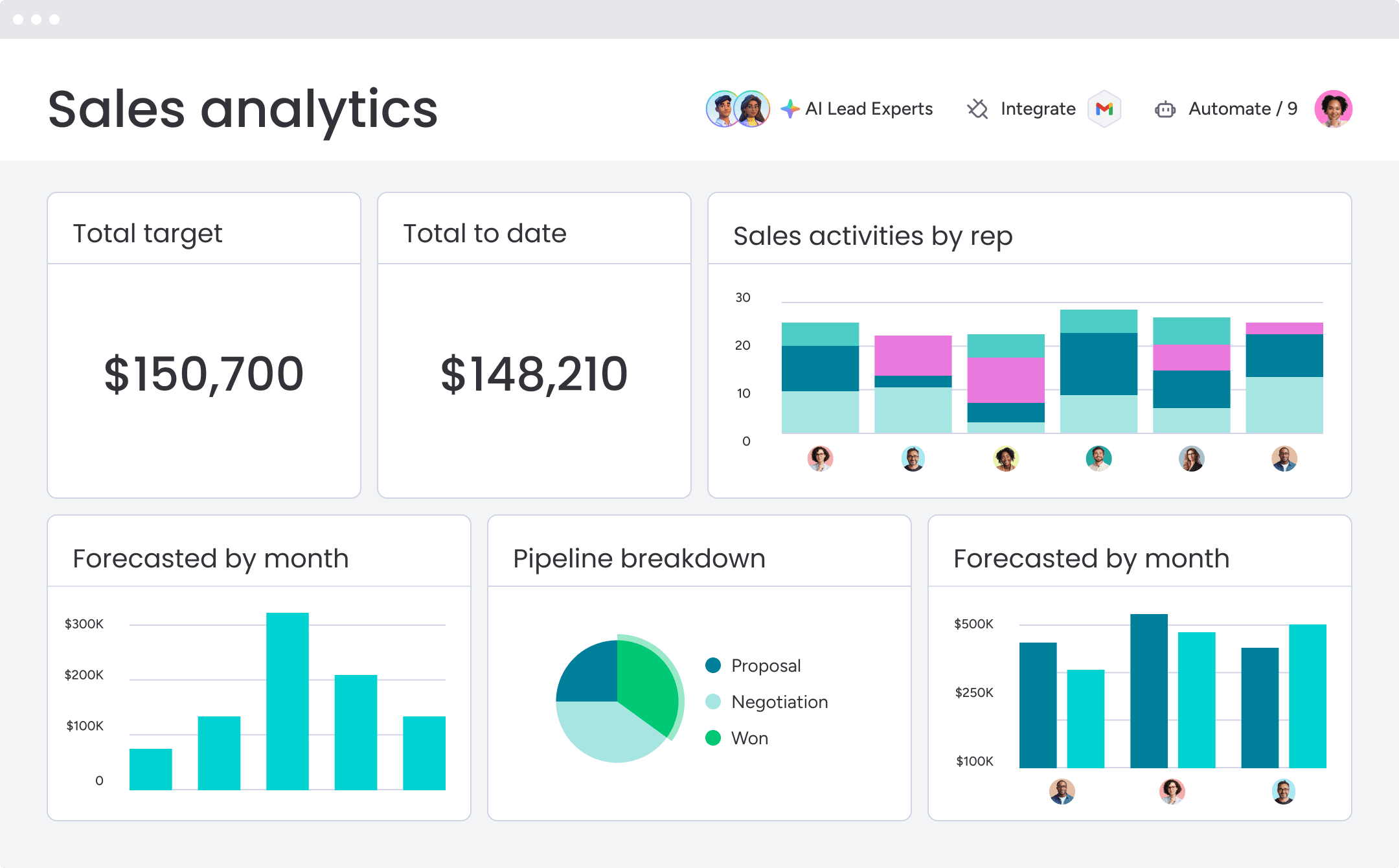
Build custom dashboards with widgets that track pipeline strength, rep performance, and forecast accuracy. Compare forecast vs. actual sales, drill down by month or sales rep, and spot where deals slow down. Leaders get a live view of revenue health without waiting on reports, turning guesswork into confident forecasts.

“With monday CRM, we’re finally able to adapt the platform to our needs — not the other way around. It gives us the flexibility to work smarter, cut costs, save time, and scale with confidence.”
Samuel Lobao | Contract Administrator & Special Projects, Strategix
“Now we have a lot less data, but it’s quality data. That change allows us to use AI confidently, without second-guessing the outputs.”
Elizabeth Gerbel | CEO
“Without monday CRM, we’d be chasing updates and fixing errors. Now we’re focused on growing the program — not just keeping up with it."
Quentin Williams | Head of Dropship, Freedom Furniture
“There’s probably about a 70% increase in efficiency in regards to the admin tasks that were removed and automated, which is a huge win for us.“
Kyle Dorman | Department Manager - Operations, Ray White
"monday CRM helps us make sure the right people have immediate visibility into the information they need so we're not wasting time."
Luca Pope | Global Client Solutions Manager at Black Mountain
“In a couple of weeks, all of the team members were using monday CRM fully. The automations and the many integrations, make monday CRM the best CRM in the market right now.”
Nuno Godinho | CIO at Velv
“monday.com provides developmental flexibility, operational efficiency, and data transparency — all in one place. We became a company that moved from chasing data to leading with it.”
Hyunghan Lee | Team Lead, Sandbox Network
"monday.com brought every part of our business into one connected space. The harmony between work management and CRM has become our operating system — giving us the clarity and confidence to scale.”
Jennifer Chinburg | Executive Vice President of Corporate Development & Brand, Chinburg Properties
“We just weren’t getting value from our old CRM. With monday.com, it's a thousand times better. Our sales teams are more informed, more consistent, and far more connected."
James Arnold | Chief Operating Officer, CenversaTaking control of your sales order process
Managing sales orders shouldn’t feel like a daily scramble. By connecting your sales, operations, and finance teams in one place, you eliminate the blind spots that slow down revenue. The right platform turns a chaotic handoff into a smooth, predictable workflow.
Focus on finding a solution that adapts to your unique sales cycle without requiring heavy IT support. When you automate the repetitive tasks and centralize your data, your team can finally focus on growth. monday CRM gives you that control, keeping deals, orders, and customer communication in one workspace so revenue keeps moving without the chaos.
Try monday CRMFAQs
How does sales order management software differ from a CRM?
Your CRM tracks relationships and deals. Sales order management software takes over after the deal closes, handling order fulfillment, inventory tracking, invoicing, and payment collection. The best platforms, like monday CRM, combine both capabilities in one place, so you don't lose visibility or control during the handoff from sales to ops.
Can small businesses benefit from sales order management software?
Absolutely. Small businesses often feel the pain of manual order processes more acutely because they don't have dedicated ops teams to absorb the chaos. Sales order management software automates repetitive tasks, reduces errors, and keeps everyone aligned without adding headcount. Platforms like monday CRM offer flexible pricing that scales with your team, making it accessible even for smaller revenue teams.
What integrations should I look for in sales order management software?
Focus on integrations that connect your existing workflow without creating new bottlenecks. Look for native connections to your CRM, accounting platforms like QuickBooks or Xero, payment processors like Stripe, and ecommerce platforms if you sell online. The goal is automatic data flow between systems, so orders, invoices, and payments sync without manual re-entry.
How long does it take to implement sales order management software?
It depends on the platform. Cloud-based solutions like monday CRM can be operational in weeks, with minimal IT involvement. Enterprise ERP systems like NetSuite or SAP Business One typically require 3–6 months and dedicated implementation resources. If speed matters, prioritize platforms with no-code setup and pre-built templates that let your team start working immediately.
What's the difference between cloud-based and on-premise sales order management software?
Cloud-based platforms are hosted by the vendor, accessible from anywhere, and maintained automatically. You get faster deployment, lower upfront costs, and no server management. On-premise systems run on your own infrastructure, giving you more control over data security but requiring internal IT resources for maintenance and updates. For most revenue teams, cloud-based platforms offer the speed and flexibility needed to keep deals moving.