



Your prospecting platform promised a full pipeline. Instead? Credits vanish, bounce rates climb, and your reps verify data instead of selling. It’s a frustrating pattern: the platform that was supposed to accelerate outreach becomes the bottleneck holding your team back. Swapping contact databases won’t fix your problem. The real challenge? Building a system that handles what happens after you get the contact. The nurturing, the handoffs, the follow-through that turns a name into a closed deal. Most prospecting platforms nail the first step, then leave you hanging.
This guide covers 13 Apollo alternatives based on what revenue teams actually need: data accuracy, honest pricing, and deep integration. We’ll show you how to match platforms to your sales motion, calculate true costs beyond the sticker price, and build a stack that grows with your team. A workflow-first architecture keeps deals moving from first touch to closed deal, which is exactly what teams get with monday CRM.
Try monday CRMWhat makes Apollo alternatives essential for revenue teams
Your prospecting tool should build your pipeline, not break your budget and workflows. But when bad data kills your sender score and confusing credits halt your outreach, you’ve got more problems than prospects. You need a system that connects the dots from first touch to closed deal, not one that dumps names into a spreadsheet.
Data accuracy challenges that kill pipeline momentum
Bad data kills pipelines quietly. One bad email list tanks your sender reputation through high bounce rates. Suddenly, even your good emails land in spam. Your outreach goes cold for months.
When your reps stop trusting the data, what happens? They become full-time data-checkers, wasting hours on LinkedIn. Or they give up and blast emails into the void. Either way, productivity and morale tank.
The impact on your team:
- Wasted time: Reps spend hours verifying info instead of selling.
- Lower morale: Constant bounces discourage outreach efforts.
- Poor results: Good leads get missed in the chaos.
Credit overages turn $49 plans into $150 monthly costs
That $49 plan looks like a steal. Then the surprise $150 bill lands on your desk. Credit-based pricing forces a terrible choice. Pay huge overage fees or stop prospecting mid-month while your competitors pull ahead. It’s designed for budget chaos.
This scarcity mindset kills effectiveness. Reps either hoard credits for the “perfect” lead and miss good opportunities, or they burn through them too fast on unqualified prospects.
Why credit models fail:
- Unpredictable costs: Bills fluctuate wildly based on activity.
- Stalled outreach: Reps stop working when credits run out.
- Bad habits: Scarcity drives poor decision-making.
Missing workflow features that revenue teams need
Finding a contact is easy. Closing the deal is the hard part. Prospecting tools leave you hanging right when the real work begins. Your team juggles spreadsheets and email threads to keep deals from falling through the cracks. Momentum dies fast.
A workflow-first approach flips the script. For example, you can use monday CRM to connect prospecting directly to deal management and automated follow-ups, which is especially effective when implementing account-based marketing strategies.
Instead of losing context during manual handoffs, every step lives in one place. First call to final signature.
13 best Apollo alternative platforms for sales automation
Your sales stack isn’t just a prospecting tool. It’s the engine for your entire revenue team. Finding the right platform mix can feel like a full-time job. The one-size-fits-all approach is officially dead. Winning teams build a stack that actually fits their sales motion.
Most tools fall into three camps: Data giants with massive contact lists, workflow builders that connect what you already use, and specialists that do one thing really well. Knowing which you need matters. Here’s a quick overview of the top Apollo alternatives.
| Platform | Primary strength | Best for | Starting price | Key differentiator |
|---|---|---|---|---|
| monday CRM | Workflow automation + data integration | Mid-market teams needing CRM + prospecting | $12/seat/month | Visual pipeline + AI blocks |
| Clay | Data enrichment + workflow building | Growth teams building complex sequences | $149/month | Waterfall enrichment |
| ZoomInfo | Enterprise contact database | Large sales orgs needing comprehensive data | Custom pricing | Intent data + technographics |
| Cognism | GDPR-compliant prospecting | European/regulated industry teams | Custom pricing | Compliance-first approach |
| Lusha | Chrome extension simplicity | Individual reps + small teams | $29/user/month | Browser-based prospecting |
| LeadIQ | Sales intelligence + tracking | Account-based sales teams | $45/user/month | Prospect tracking + alerts |
| Seamless.AI | Real-time data verification | Teams prioritizing data accuracy | $147/user/month | Live data verification |
| Hunter | Email finder + verification | Content marketers + outreach teams | $49/month | Email pattern recognition |
| RocketReach | Social media data mining | Recruiters + business development | $39/user/month | Social profile aggregation |
| Clearbit | API-first data enrichment | Product-led growth companies | Custom pricing | Real-time enrichment APIs |
| Snov.io | All-in-one outreach platform | SMBs wanting integrated solution | $39/user/month | Email finder + sender combo |
| Outreach | Sales engagement automation | Enterprise sales development | Custom pricing | Sequence sophistication |
| ListKit | List building + data cleaning | Agencies + consultants | $97/month | Custom list building |
What’s the right move? It comes down to your team’s biggest bottleneck. Data, workflows, or a specific task. Teams that want to run their entire sales motion in one place use monday CRM for workflow power without the old-school complexity.
1. monday CRM
monday CRM puts your process first, flipping the script on traditional sales platforms. You can bring in prospect data from wherever you trust it, then run lead management, deal progress, handoffs, and follow-through in one visual workspace. Want a CRM your team actually uses, instead of one they avoid until Friday afternoon? That’s the point.
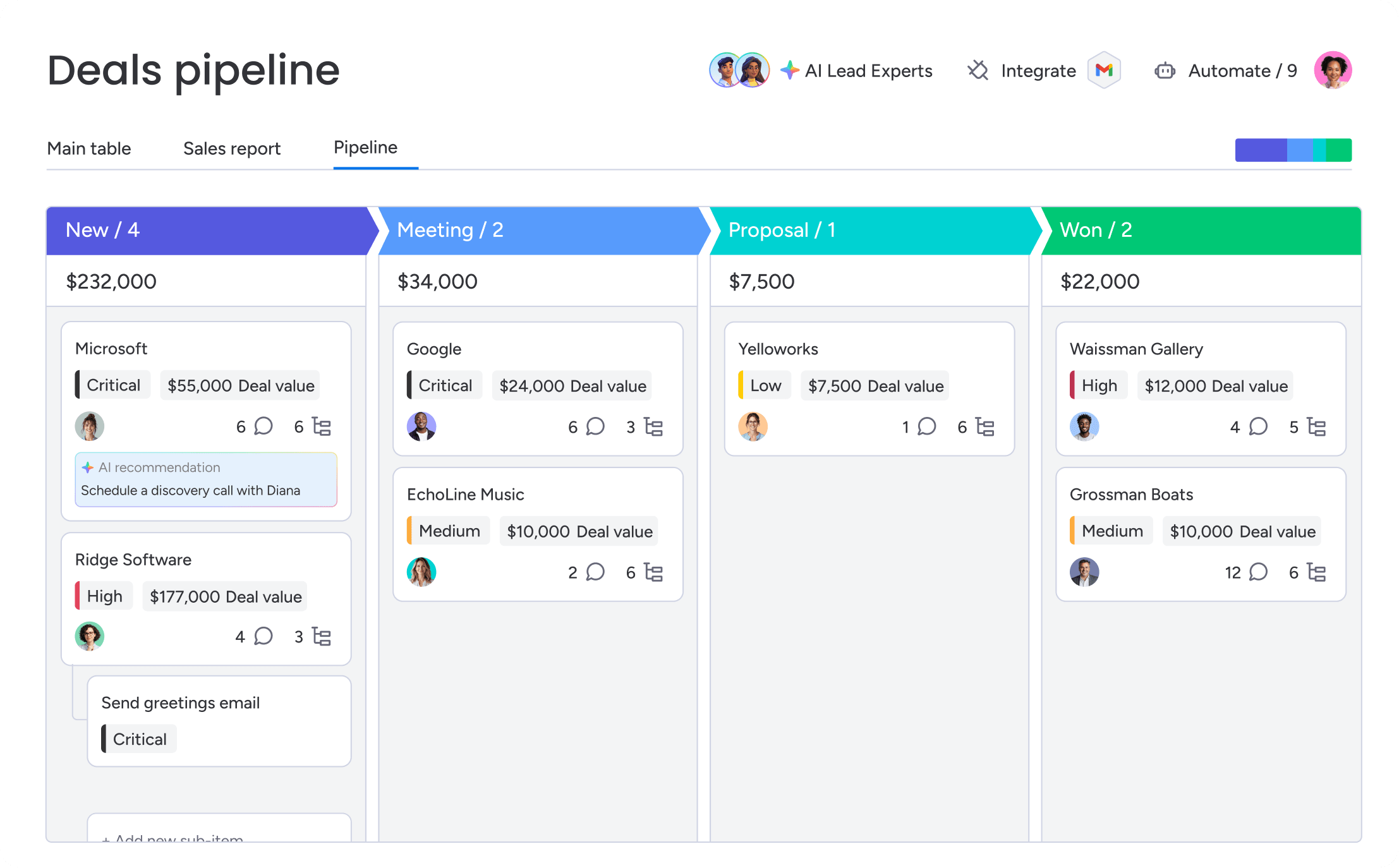
Revenue teams use monday CRM as their operational backbone: leads come in from website forms, social campaigns, or lists, and the team qualifies, assigns, and moves deals forward with everything tracked in one place. When a deal pulls in stakeholders like legal or finance, teams keep the full context attached to the record, so handoffs stay smooth. An SDR captures inbound leads, enriches key company details (including enrichment via Crunchbase’s database), and assigns each lead based on territory. Then an AE picks it up, sends a templated email with dynamic fields, tracks opens and link clicks, and keeps every touchpoint logged on the same timeline.
Key features:
Before you pick an Apollo alternative, you want to know what happens after you get the contact. monday CRM focuses on the day-to-day execution that keeps deals moving and leaders informed.
- Visual pipeline management: Customize your pipeline with drag-and-drop deal stages, so everyone sees where deals stand without digging.
- Lead management + outreach tracking: Send individual and mass emails using dynamic fields and templates, track opens and link clicks, and create custom-designed emails with the HTML email editor.
- Centralized communication tracking: Log and track emails, meetings, calls, and notes in one timeline, so reps and managers share the same customer history.
- Sales analytics: Use code-free dashboards with sales widgets like the Leaderboard widget and Sales funnel widget to track performance, activity, and pipeline movement.
- Post-sales workflows: Track onboarding progress, manage renewals, calculate billable hours, send quotes, and monitor collection tracking when the deal becomes a customer.
Pricing:
- Basic: $12/month per seat (billed annually)
- Standard: $17/month per seat (billed annually)
- Pro: $28/month per seat (billed annually)
- Ultimate: Contact sales for quote
- Annual billing provides 18% discount compared to monthly plans
- Minimum 3 seats required for paid plans
Advanced AI features:
AI in monday CRM is built for real sales work: writing, summarizing, organizing, and keeping context close to the deal. Your admins enable AI capabilities, and then reps use it right where they already work.
- AI Timeline Summary: Generate a short summary of the full Emails & Activities history (emails, calls, meetings, notes), so reps and managers get up to speed fast.
- AI email assistant: Compose emails inside Emails & Activities using AI, so reps spend less time staring at a blank draft.
- Autofill with AI (board columns): Apply AI to Text, Date, Number, Dropdown, People, and Status columns to speed up updates and standardize data.
- Use actions like Detect sentiment, Extract information, Summarize, Improve text, Translate, Writing assistant, Assign label, Assign person, or a Custom action that references board columns.
- Use Extract Info to pull details from files and images (including invoices or contracts) into board columns, so the team stops retyping.
Automations:
Automation matters most when it supports your exact sales motion. monday CRM gives revenue teams no-code ways to keep handoffs, follow-ups, and status changes consistent.
- Automate actions based on custom conditions: Keep your process consistent as deals move through stages.
- Conditional label change: Standardize deal and lead statuses automatically, so reporting reflects what’s happening.
- Automate email follow-ups: Build follow-up into the process, so reps don’t rely on memory (or sticky notes).
Why it stands out:
monday CRM is built on the monday.com Work OS, which means you can run sales and the workflows around sales without heavy technical setup. Revenue leaders get more visibility and control through centralized customer information, integrations, automations, AI, dashboards, and permissions. It’s also refreshingly adaptable. When your process changes (and it will), teams adjust boards, stages, and workflows without turning it into a quarter-long project.
Try monday CRM2. Clay
Clay transforms prospecting by combining 100+ data providers in waterfall sequences: if one source doesn’t find an email, it automatically tries the next until it hits gold. The platform specializes in AI-powered research and multi-provider orchestration, making it perfect for growth teams who need maximum data coverage without the usual vendor lock-in headaches.

Use case:
Clay serves growth teams building complex prospecting operations that need maximum data coverage and workflow flexibility beyond what single-provider platforms can deliver.
Key features:
- Waterfall enrichment: Stack multiple data providers in priority order and let Clay automatically query them in sequence, increasing contact coverage by 40-60% while controlling costs by only paying when providers successfully return data.
- AI research agents: Claygent conducts human-style web research with Navigator technology that can click, filter, and fill forms to gather intelligence that traditional data providers miss.
- Workflow automation: A visual workflow builder creates sophisticated prospecting sequences with conditional logic, data transformations, and multi-step enrichment flows without requiring engineering resources.
- Data quality controls: Automatically validate emails, phone numbers, and company data to keep your outreach lists clean and effective.
Pricing:
- Free: $0/month with 1,200 credits annually and unlimited users
- Starter: $149/month with 2,000 credits
- Growth: $349/month with 10,000 credits
- Enterprise: Custom pricing with unlimited API rows and dedicated support
Considerations:
- Steep learning curve for structuring tables, waterfalls, and credit usage efficiently.
- Credit-based billing can feel unpredictable without careful monitoring of usage analytics.
3. ZoomInfo
ZoomInfo delivers enterprise-grade contact and company intelligence with over 100 million business profiles and 14 million companies in its database. The platform combines deep data coverage with intent signals and technographic insights, making it a powerhouse for large sales organizations running complex, high-value deals.

Use case:
ZoomInfo excels at powering account-based selling strategies for enterprise teams who need comprehensive prospect intelligence and can justify premium pricing for data-driven competitive advantages.
Key features:
- Intent data tracking: Monitor which companies actively research solutions in your category based on content consumption, search behavior, and third-party signals to prioritize warm prospects over cold outreach
- Technographic insights: Identify what technology prospects currently use, enabling targeted positioning strategies and competitive displacement opportunities
- Organizational mapping: Access reporting structures, department sizes, and key decision-makers within target accounts to navigate complex enterprise sales cycles
Pricing:
- Custom pricing: Quote-based pricing starting around $15,000 annually for small teams
- Enterprise contracts: Pricing scales significantly for larger organizations with advanced feature requirements
- Annual commitment: Contracts are typically non-cancellable annual agreements
Considerations:
- High cost barrier may not justify ROI for smaller teams or lower-value deals
- Complex setup requirements including CRM configuration and export mapping can slow initial implementation
4. Cognism
Cognism delivers compliance-first B2B data and sales intelligence for revenue teams operating in regulated markets. The platform specializes in GDPR-compliant contact data and phone-verified mobile numbers, making it essential for European teams and organizations where data privacy violations carry serious consequences.

Use case:
Cognism serves revenue teams that need verified contact data with bulletproof compliance documentation to satisfy audit requirements and avoid regulatory penalties.
Key features:
- GDPR-compliant data collection: All contact information follows European data protection regulations with proper consent mechanisms and data subject rights management, extending to CCPA and other regional privacy laws
- Diamond data verification: Phone numbers undergo manual verification by research teams, achieving 98%+ accuracy rates to eliminate wrong-number calls that waste rep time and damage credibility
- Native CRM integrations: Bi-directional HubSpot sync and configurable field mappings for Salesforce, Dynamics, and Pipedrive automate data flow while maintaining compliance standards—see how AI SDR tools integrate with various CRMs.
Pricing:
- Custom pricing: Quote-based pricing starting around $12,000 annually for small teams
- Diamond data add-on: Premium verification features available as package upgrade
- Volume scaling: Costs increase based on user count and data access requirements
Considerations:
- Export limitations with typical caps of 25 records at a time and monthly user limits can constrain high-volume prospecting workflows
- Premium positioning and quote-only pricing may exceed budgets for smaller teams seeking basic contact data without compliance requirements
5. Lusha
Lusha transforms prospecting with a Chrome extension that surfaces contact information directly on LinkedIn profiles and company websites. The platform specializes in verified B2B data and automated prospecting workflows, making it ideal for sales teams who want to eliminate context-switching between research and data lookup.

Use case:
Lusha enables sales teams to discover and verify contact information instantly while browsing LinkedIn or company websites, then automatically sync that data to their CRM without manual entry.
Key features:
- Browser-based prospecting: Chrome extension displays emails and phone numbers directly on LinkedIn profiles and company websites, eliminating the need to switch between platforms.
- Automated list building: Subscribe to Search and AI Live Lists automatically add new ICP matches to prospect lists on a scheduled cadence, keeping pipelines fresh.
- CRM integration and sequencing: One-click contact export to Salesforce, HubSpot, or Pipedrive, plus built-in Engage sequences for immediate outreach with up to 1,000 emails per day.
Pricing:
- Free tier: Offers a handful of monthly credits to get you started (the exact number can vary by account).
- Paid plans: Credit-based, with self-serve tiers starting around $29/user/month. One credit reveals an email; ten credits reveal a phone number.
- Scale (Enterprise): Custom pricing with API access, advanced admin controls, and team-level credit management.
Considerations:
- Credit-based model can become expensive for teams requiring high volumes of phone number reveals (10 credits each).
- API access and advanced automation features are limited to Scale tier users only.
6. LeadIQ
LeadIQ focuses on the pre-game. It blends contact data with sales intelligence so you can track target accounts and spot buying signals before crafting your first message. The goal? Enter every conversation armed with context that makes it count.

Use case:
Eliminate data entry drudgery. LeadIQ pipes prospect data straight into your CRM and sales tools, bridging the gap between finding a lead and starting a conversation without the copy-paste routine. Your records stay clean, enriched, and ready for action.
Key features:
- Prospect tracking: Receive alerts when prospects change jobs, their company secures funding, or other trigger events emerge. Think of it as a lookout for sales opportunities.
- Account-based workflows: Build target account lists, track key players in one dashboard, and map out stakeholder relationships. Ideal for coordinating team plays on enterprise deals.
- CRM enrichment: Maintains fresh CRM data without manual upkeep. LeadIQ automatically updates records with the latest contact and company info in real time, preventing database decay.
Pricing:
- Free: $0 for 1 user with 50 credits, a Chrome extension, basic search, and CRM enrichment.
- Starter: Starts at $45/user/month.
- Pro: Starts at $89/user/month for more credits, integrations, and enrichment capabilities.
- Enterprise: Custom pricing for teams needing AI prospecting, governance controls, and advanced admin settings.
- Annual plans include a 25% discount, and a 30-day free trial is available.
Considerations:
- The extension works only in Chrome, which may not suit teams using other browsers.
- Certain HubSpot enrichment workflows require a separate Workato subscription, adding cost and complexity.
7. Seamless.AI
Seamless.AI delivers real-time contact verification that catches data changes the moment they happen. The platform targets revenue teams who can’t afford bounce rates or wrong numbers killing their outreach momentum. Built for teams where data accuracy directly impacts pipeline generation, it validates every email and phone number at the point of search.

Use case:
Perfect for sales teams dealing with reputation damage from high bounce rates and wasted time on outdated contact information.
Key features:
- Real-time verification: Contact information gets validated live during search, ensuring emails and phone numbers are current and reducing bounce rates that damage sender reputation
- AI-powered search: Natural language queries let reps find prospects using conversational descriptions rather than rigid filter combinations, interpreting intent even with imprecise search terms
- Chrome extension: Browser-based prospecting captures contact information from LinkedIn and company websites without leaving the research context
Pricing:
- Free plan: 50 credits per month
- Individual plans: Starting at $147/user/month with 250 credits
- Enterprise: Custom pricing for larger teams
- Annual billing discounts available
- “Switch and Save” program offers up to 50% off current provider costs
Considerations:
- Email automation is limited to email sends only; calls, LinkedIn steps, and other actions require manual execution.
- Data accuracy can vary despite real-time verification claims, with some users reporting inconsistent contact quality in reviews
8. Hunter
Hunter delivers email finding and verification through pattern recognition and domain analysis. The platform targets marketers, salespeople, and recruiters who need verified B2B emails without paying for phone numbers or company data they won’t use. With 6M+ users and transparent, publicly-sourced data, Hunter keeps outreach simple and compliant.

Use case:
Hunter works for teams that need email-focused prospecting with built-in verification, especially when you know someone’s name and company but lack their direct contact information.
Key features:
- Email pattern recognition: Analyzes company domain patterns to predict email formats, then verifies predicted addresses before returning results — finding emails that other providers miss.
- Domain search: Discovers all public email addresses associated with a company domain, perfect for building comprehensive account contact lists or finding alternative contacts.
- Sequences automation: Automates follow-ups with up to 5 emails, handles out-of-office detection, and sends from your own Gmail or Outlook inbox to protect deliverability.
Pricing:
Hunter offers two main pricing models: All-in-one Outreach plans for teams running campaigns, and a separate API/Data Platform model for bulk data needs.
The Outreach plans include:
- Free: $0/month (25 monthly searches, 500 recipients per sequence)
- Starter: $49/month or $34/month annually (2,000 searches, 3 email accounts)
- Growth: $149/month or $104/month annually (10,000 searches, 10 email accounts)
- Scale: $299/month or $209/month annually (25,000 searches, 20 email accounts)
- Enterprise: Custom pricing
- Annual billing saves you about 30%.
- Need more seats? Additional email accounts cost $10/month each on paid plans.
Considerations:
- Email-only outreach with no native multichannel steps like LinkedIn or phone integration.
- Credits-based pricing requires careful budgeting and can feel restrictive for high-volume teams.
9. RocketReach
RocketReach aggregates contact information from social media profiles, professional networks, and public sources, giving you coverage that extends beyond traditional business databases. The platform specializes in social-first contact discovery, making it a strong fit for teams targeting prospects with active social presences. With 26+ million users and coverage of 700+ million professionals, RocketReach combines data discovery with basic outreach automation.
Use case:
RocketReach works best for sales and recruiting teams who need to find contacts that maintain strong social media presences but aren’t well-represented in traditional B2B databases.
Key features:
- Social profile aggregation: Pulls contact information from LinkedIn, Twitter, Facebook, and other social networks, finding emails and phone numbers associated with social profiles.
- Bulk lookup with Chrome extension: Upload lists of names and companies for batch enrichment, plus browser-based lookup that surfaces contact information directly on social profiles and company websites.
- Autopilot automation: In-platform email sequences with AI-assisted templates, dynamic list generation, and reply/bounce-aware follow-ups that reduce manual outreach work.
Pricing:
- Individual plans: Publicly listed plans start around $39/user/month for 80 lookups, with higher tiers at ~$79/month for 200 lookups and ~$249/month for 700 lookups.
- Team plans: Billed annually from ~$83 to $207 per user/month.
- Discounts & overages: Annual billing offers discounts of 26-44%, while overage credits cost approximately $0.30-$0.45 each.
- Note: Pricing can vary, so it’s always smart to check their site for the latest details.
Considerations:
- Email-centric automation limits multi-channel outreach compared to full engagement platforms.
- Monthly credit limits reset and expire, with overage costs that can impact ROI for high-volume users.
10. Clearbit
Clearbit’s API-first data enrichment fuels automated workflows for PLG teams. Now owned by HubSpot, it offers powerful real-time intelligence with a native integration that feels like part of the HubSpot mothership. While this is a win for HubSpot users, it makes standalone access trickier for teams on other CRMs.

Use case:
Clearbit excels at enriching contact and company data in real-time as prospects interact with your product, enabling personalized experiences and intelligent routing based on firmographic insights.
Key features:
- Real-time enrichment APIs: Automatically enrich contact and company data as users sign up, submit forms, or engage with your product, enabling personalized experiences without manual data entry
- Reveal visitor identification: Identify companies visiting your website even when individuals don’t convert, allowing targeted outreach to anonymous traffic showing buying intent
- Audience and destination workflows: Build audiences from enrichment data, website activity, and CRM fields, then trigger automated actions in Slack, Salesforce, email, or ad platforms
Pricing:
- HubSpot integration: Credits-based pricing through HubSpot tiers with monthly included credits varying by plan
- Custom API pricing: Starts around $10,000 annually for basic enrichment, scaling significantly for high-volume usage
- Additional credits: Available for purchase when monthly allowances are exceeded
Considerations:
- HubSpot dependency: Now primarily sold as “Clearbit by HubSpot,” creating friction for teams using other CRMs or requiring standalone access.
- Delayed automation: “Real-time” isn’t always instant. Alerts can refresh every two hours, and some legacy HubSpot data syncs can take up to four hours—a potential lag for workflows that need to fire immediately.
11. Snov.io
Snov.io combines email discovery, verification, and multichannel outreach in one platform, targeting small to mid-market teams who want integrated prospecting without juggling multiple platforms. The platform’s visual workflow automation, which blends email and LinkedIn outreach, is a key draw. This all-in-one approach helps revenue teams consolidate their tools and scale outreach without the headache of managing separate systems.
Use case:
Perfect for SMB and agency teams who need end-to-end prospecting workflows with built-in email verification, multichannel sequences, and basic CRM functionality without complex integrations.
Key features:
- Email finder and verifier: Seven-tier verification system with domain search, LinkedIn integration, and bulk lookup capabilities to maintain sender reputation
- Visual sequence builder: Drag-and-drop automation with email and LinkedIn steps, conditional branching, and timezone-based scheduling
- Integrated CRM and deliverability: Built-in deal management, mailbox rotation, provider matching, and custom tracking domains for sending optimization
Pricing:
- Trial: Renewable with 50 credits, 100 recipients, 1 warm-up slot
- Starter: $39/user/month (monthly) or $29.25/user/month (annual) for 1,000 credits and 5,000 recipients per user
- Pro tiers: Scale from 5,000 to 200,000+ credits with unlimited warm-up slots
- LinkedIn Automation: $69/month add-on per LinkedIn account slot
- Annual billing offers approximately 25% savings across all tiers
Considerations:
- LinkedIn automation requires a separate $69/month add-on that’s not included in base plans.
- The pricing model combines per-user seats, credits, and recipient limits, which can make budgeting more complex than simpler flat-rate plans.
12. Outreach
Outreach delivers enterprise-grade sales engagement automation that transforms how revenue teams orchestrate multi-channel campaigns—compare more enterprise outreach platforms. The platform specializes in sophisticated sequence management and cross-object workflow automation, making it ideal for large sales development teams managing complex outreach at scale. With deep CRM integrations and AI-powered insights, Outreach coordinates email, phone, LinkedIn, and SMS touchpoints in unified workflows.
Use case:
Outreach excels at automating complex, multi-touch sequences across large enterprise sales teams while providing the governance and analytics needed to optimize outreach effectiveness and prevent prospect over-touching.
Key features:
- Advanced sequence automation: Build complex, multi-channel sequences with conditional logic, A/B testing, and dynamic personalization that adapts based on prospect behavior
- Cross-object workflow triggers: Create automations that react to opportunity and account changes, with branching conditions and advanced operators for enterprise-grade logic
- Enterprise governance and compliance: Manage sequence exclusivity, prevent duplicate touches across team members, and maintain SOC 2, ISO 27001/27701, and HIPAA compliance standards
Pricing:
- Custom enterprise pricing: Quote-based model starting around $100/user/month for enterprise teams
- AI features (Amplify): Consumption-based credits with $1.40 per credit overage charges
- Voice calling: $300/month for 10,000 global minutes with $40 per additional 1,000 minutes
- Professional services: Recommended for initial AI agent setup and advanced automation configuration
Considerations:
- Learning curve can be steep for new users, with some reviewers noting UI complexity
- Cost scales significantly at enterprise level, with AI features requiring separate consumption-based billing that can complicate budget planning
13. ListKit
ListKit offers a one-two punch for prospecting: a self-serve sales intelligence platform and a managed list-building service. It’s built for teams who want the option to either run their own searches with AI tools or hand off complex research to a human team, trading total automation for specialized, verified results.
Use case:
ListKit fits teams who want control through its self-serve platform or prefer a done-for-you service to nail hyper-specific targeting criteria without the ramp-up time.
Key features:
- AI Company Search: Use the self-serve platform to find and export contacts based on your own criteria and workflows.
- Managed List Building: Hand over your ideal customer profile, and ListKit’s research team builds a custom prospect list that matches your specs.
- Data Cleaning & Enrichment: Upload existing databases for verification, deduplication, and enrichment to fix messy data and fill in the blanks.
- Quality Guarantee: Lists come with accuracy guarantees and credits for any invalid contacts, so you don’t pay for bad data.
Pricing:
- Professional: $97/month for 500 contacts
- Scale: $253/month billed annually (120,000 credits)
- Ultimate: $508/month billed annually (600,000 credits)
- Enterprise: Custom pricing for larger volumes
- Additional credits available for purchase (1,000 Universal Credits = $10, 10,000 Verification Credits = $15)
- 15% discount available with annual billing
Considerations:
- The managed service offers less hands-on control, but the self-serve platform puts you in the driver’s seat.
- The done-for-you service has a higher per-contact cost than fully automated platforms, making it better for targeted, high-value lists rather than mass outreach.
Learn more: Data enrichment software
How to choose Apollo competitors based on your sales motion
Picking a sales platform based on a feature list is a recipe for disaster. Your sales motion dictates what you need, not a flashy demo. A high-velocity team has completely different needs than an enterprise team navigating nine-month sales cycles. Mismatch your platform to your process, and you’re just buying future headaches.
Before comparing tools, get honest about how your team actually sells. This framework maps platform needs to your sales reality, helping you choose a tool that genuinely works for your workflow.
| Sales motion | Primary need | Best platform fit | Why it works |
|---|---|---|---|
| Transactional (< 3 months) | High-volume prospecting | monday CRM + Lusha or Hunter | Find contacts, move deals. Fast. No fluff. |
| Consultative (3-6 months) | Multi-touch nurturing | monday CRM + Clay or ZoomInfo | Automate the busywork. Get rich data. Keep everyone in sync. |
| Enterprise (6+ months) | Account-based selling | monday CRM + Cognism or ZoomInfo | Map entire accounts. Stay compliant. Give leadership the real picture. |
What’s running the show: your data tool or your CRM? For simple, high-speed sales, a data-first approach can work. But if your sales cycle involves multiple handoffs and real collaboration, you need a workflow-first CRM. The data should serve the process, not the other way around.
Step 1: Evaluate data quality beyond marketing claims
Every data provider claims near-perfect accuracy. Don’t buy the hype. The only way to know for sure is to test it yourself before signing a massive contract and damaging your sender reputation.
Ready to see what’s real? Put two or three providers to the test. Grab 100 contacts from your ideal customer profile on each platform and track the results for 30 days.
Metrics to watch:
- Email bounce rate: Anything over 10% is a major red flag.
- Phone connect rate: If you can’t even get 25% on the phone, what are you paying for?
- Job title accuracy: Check 20 contacts on LinkedIn. Do the titles match, or are they just guessing?
- Company info accuracy: Verify company size and industry. Small details matter.
Step 2: Calculate true platform costs with hidden fees
That sticker price isn’t the final price. Hidden fees like credit overages, integration costs, and training time can inflate your bill by 30-50%. Don’t get caught by surprise. Build a real cost model to see the full picture. Your budget will thank you.
Make sure you account for:
- Base subscription: The easy part.
- Overage charges: Plan for these, especially with credit-based pricing.
- Integration costs: Getting your tech to talk to each other isn’t always free.
- Training time: Reps aren’t learning a new platform on their own time.
- The transition dip: Factor in a few weeks of lower productivity as the team adapts.
Step 3: Match automation features to team workflows
Sales isn’t just prospecting. It’s qualifying, nurturing, closing, and onboarding. A platform that only does the first part well forces you to duct-tape other tools together, which is exactly how deals fall through the cracks.
Before evaluating any platform, map your entire sales process. How do leads move from A to B? What triggers a handoff? Revenue teams find success using monday CRM to build automations that cover the whole journey, not just the first step. It adapts to your process, so you don’t have to break your workflow to fit the tool.
Step 4: Define integration requirements for your tech stack
Your sales team probably lives in a dozen different apps. If your new platform doesn’t play nicely with your existing tech stack, you’re just signing up for more manual data entry. And we all know how that ends: wasted time and bad data.
Does it connect to your core tools? Is the API accessible for custom work? Organizations achieve better results when they leverage monday CRM for its 200+ integrations. You can build a unified tech stack where everything talks to each other automatically, letting your team focus on selling, not copying and pasting.
Building your Apollo alternative stack
Choose a flexible platform that adapts to your needs. The smartest revenue teams build a specialized stack that actually works for them. While all-in-one solutions promise everything, they deliver mediocrity, leaving you with lukewarm prospecting and reports that tell you what happened last month.
The winning move is to combine a workflow-first CRM with specialized data providers. This gives you the flexibility to use tools that excel at their job and scale your capabilities as you grow. Here are three proven combinations for different teams.
All-in-one platforms look good in the demo, but the reality hits fast. You get decent features for everything, but master nothing your team actually needs to hit quota. A CRM-first approach flips the script. By putting your core workflows at the center, you can connect specialized tools for specific jobs. With a platform like monday CRM, the setup is straightforward. Native integrations and flexible APIs connect you to major data providers in hours, not weeks.
3 proven combinations for different team sizes
Small team stack (2-10 reps): monday CRM + Lusha + Hunter
This stack delivers fast prospecting and simple workflows without the enterprise price tag. Teams use monday CRM for clear deal management, Lusha for quick LinkedIn prospecting, and Hunter to verify emails for targeted lists. It’s everything a small team needs to get moving quickly.
Mid-market stack (10-50 reps): monday CRM + Clay + ZoomInfo
Mid-market teams need more data depth to support complex, account-based sales. Revenue teams find success using monday CRM for advanced automation, Clay for waterfall data enrichment, and ZoomInfo for comprehensive contact and intent data. This stack handles multi-threaded outreach and stakeholder mapping with ease.
Enterprise stack (50+ reps): monday CRM + Cognism + Outreach
Enterprise sales demand security, compliance, and powerful automation. Organizations achieve better results when they leverage monday CRM for its advanced permissions and audit logs, Cognism for GDPR-compliant data, and Outreach to run sophisticated, multi-channel sequences that support long sales cycles.
7-week implementation roadmap for an Apollo alternative
Switching from Apollo feels like a huge risk. A bad migration can wreck your quarter. This 7-week plan gives your team a better way to work without skipping a beat.
Step 1: Audit your current data and workflows (Weeks 1-2)
To build a more effective system, you first need to understand your current one. These first two weeks are all about discovery.
- Data deep dive: Pull every contact, company, and activity log from Apollo. What’s your real data quality? Identify the records worth keeping and the ones just collecting dust.
- Workflow mapping: Sit with your reps. How do they actually work, day-to-day? Map their prospecting, handoffs, and automations to find the real friction points.
- Get everyone on the same page: Show your findings to sales, ops, and leadership. What does a ‘win’ look like for this project? Agree on the metrics and timeline now to avoid surprises later.
Step 2: Configure and integrate your new stack (Weeks 3-4)
Your new stack comes to life here. A little thought now saves a ton of headaches down the road.
- Configure monday CRM: Design boards that mirror your actual sales process, from lead to close. Set up the custom fields you need and create dashboards that give every role the right view.
- Connect your data: Integrate your data providers like Clay or ZoomInfo. Set up rules to sync and enrich contacts automatically, so your team always has the freshest information.
- Automate the busywork: Build automations for lead assignments, follow-up reminders, and reporting. Give your team the right alerts without drowning them in notifications.
Step 3: Run a parallel pilot program (Weeks 5-6)
How does the new setup perform under pressure? A two-week parallel test with a small pilot team reveals the answer.
- Assemble your pilot crew: Pick 3-5 reps and a manager who will give you honest, unfiltered feedback. You want the champions and the skeptics.
- Run systems side-by-side: Have the pilot team work in both Apollo and the new stack. They’ll log every issue and point of friction, comparing everything from prospecting speed to data quality.
- Fix and improve on the fly: Use their feedback to crush critical bugs immediately and prioritize other improvements. This rapid iteration builds confidence and makes the final product even better.
Step 4: Execute the full cutover (Week 7)
The final push. A clean cutover is all about clear communication and a solid plan.
- Final prep and cutover: Run one last data export from Apollo and import it into monday CRM. Announce the timeline, disable Apollo access, and get the whole team live on the new platform.
- Support the team: Be ready with real-time support. Monitor system performance and user activity to catch any issues in the first 48 hours. Your team should feel supported, not stranded.
- Gather feedback and optimize: The work isn’t over at launch. Use the first week to gather feedback and make quick adjustments. This shows your team you’re listening and committed to making the platform work for them.
Why monday CRM powers the most successful Apollo replacements
Tired of your prospecting tool calling the shots? The smartest teams flip the script. They put their CRM at the center of their revenue engine and use data providers as fuel, not the other way around. This is the difference between just finding contacts and actually closing deals, faster and with fewer surprises.
While all-in-one tools can trap you in their ecosystem, a workflow-first approach gives you freedom. Revenue teams find success using monday CRM to act as the command center for their entire sales process, not just as another data source. Here are a few core monday CRM features that make it a strong Apollo alternative.
Get your team’s time back with automation

Your team is losing hours to admin work. Data entry, manual follow-ups, and chasing down updates don’t close deals. That’s why our automation engine handles the repetitive work, so your reps can focus on what they do best: selling. From assigning leads the moment they arrive to scheduling follow-ups based on deal stage, you can build any workflow you need with lead distribution software. When your process changes, your sales ops team can update it in minutes, not weeks, keeping your sales automation aligned with your evolving strategy.
Work smarter with AI that actually helps
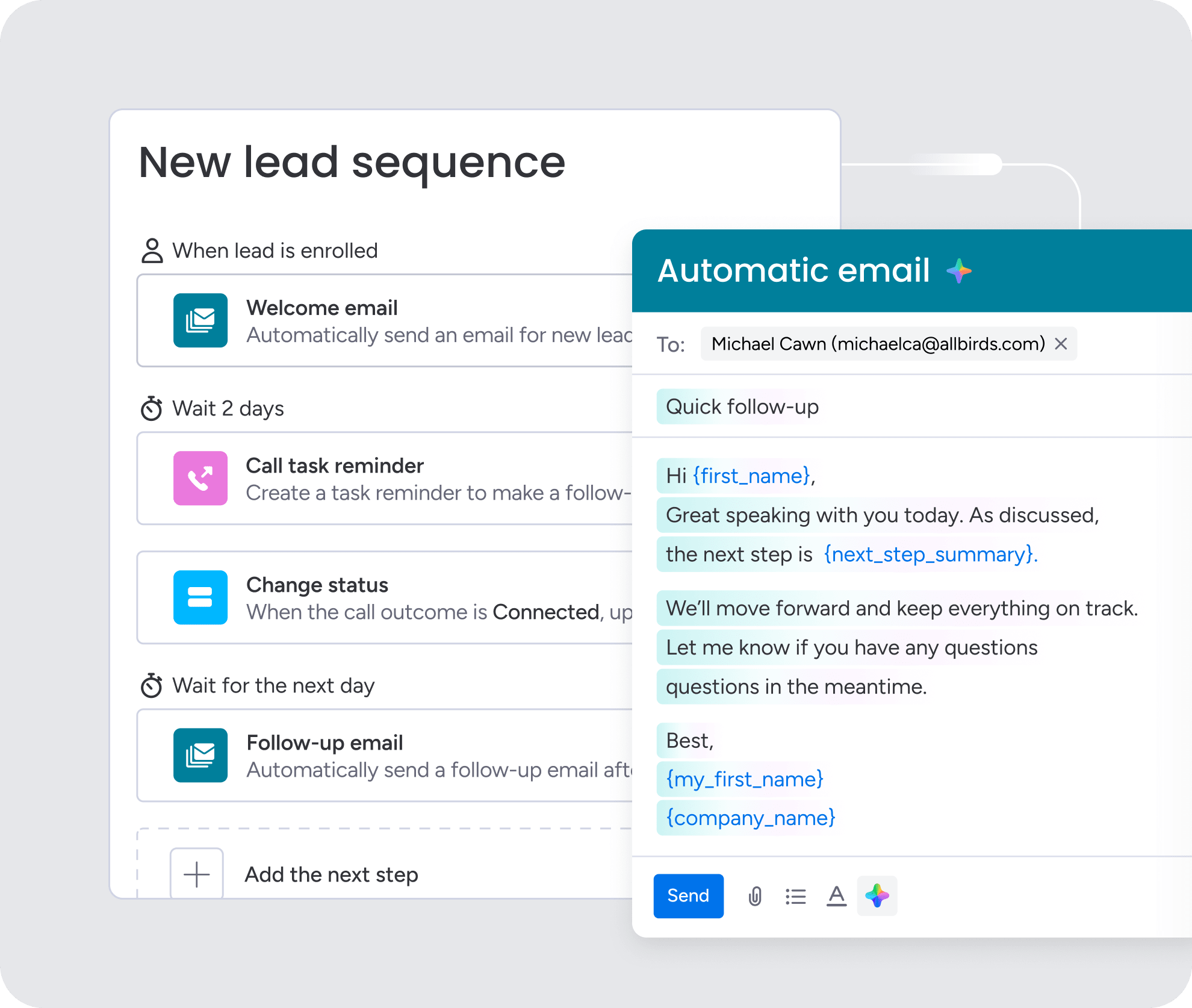
AI shouldn’t be a black box. Our AI features give your team superpowers: instantly summarize entire email threads and meeting notes to get the full story on any account, draft personalized emails in seconds using deal context, and spot at-risk deals by analyzing customer communication. It’s all designed to help your reps make faster, more informed decisions with their judgment still in the driver’s seat. See how AI SDR tools integrate seamlessly into your workflow.
Predictable pricing that makes sense
Credit-based pricing kills momentum by forcing reps to ration their prospecting or leading to surprise bills at the end of the month. monday CRM uses simple, per-seat pricing that scales with your team, not your activity, keeping your budget predictable and giving your team the confidence to prospect without limits and grow your pipeline.
Connect to the tools you already use
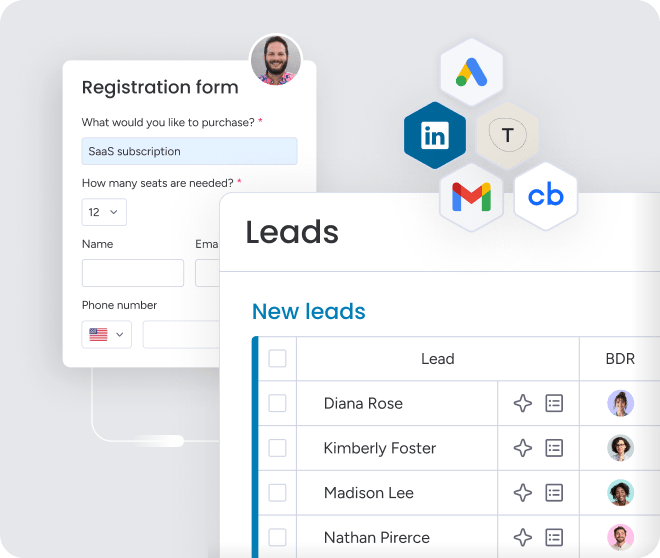
Your tech stack should work for you, not the other way around. monday CRM integrates with over 200 apps, including all the leading data providers, email platforms, and calendar systems, so you get to use the best tool for every job. Our native integrations mean data flows in real time, no custom code or clunky middleware needed, so enriched contact info, intent signals, and company data pop right into your account records, giving your team the best data without the constraints.

“With monday CRM, we’re finally able to adapt the platform to our needs — not the other way around. It gives us the flexibility to work smarter, cut costs, save time, and scale with confidence.”
Samuel Lobao | Contract Administrator & Special Projects, Strategix
“Now we have a lot less data, but it’s quality data. That change allows us to use AI confidently, without second-guessing the outputs.”
Elizabeth Gerbel | CEO
“Without monday CRM, we’d be chasing updates and fixing errors. Now we’re focused on growing the program — not just keeping up with it."
Quentin Williams | Head of Dropship, Freedom Furniture
“There’s probably about a 70% increase in efficiency in regards to the admin tasks that were removed and automated, which is a huge win for us.“
Kyle Dorman | Department Manager - Operations, Ray White
"monday CRM helps us make sure the right people have immediate visibility into the information they need so we're not wasting time."
Luca Pope | Global Client Solutions Manager at Black Mountain
“In a couple of weeks, all of the team members were using monday CRM fully. The automations and the many integrations, make monday CRM the best CRM in the market right now.”
Nuno Godinho | CIO at Velv
“monday.com provides developmental flexibility, operational efficiency, and data transparency — all in one place. We became a company that moved from chasing data to leading with it.”
Hyunghan Lee | Team Lead, Sandbox Network
"monday.com brought every part of our business into one connected space. The harmony between work management and CRM has become our operating system — giving us the clarity and confidence to scale.”
Jennifer Chinburg | Executive Vice President of Corporate Development & Brand, Chinburg Properties
“We just weren’t getting value from our old CRM. With monday.com, it's a thousand times better. Our sales teams are more informed, more consistent, and far more connected."
James Arnold | Chief Operating Officer, CenversaTransform your sales operations with workflow-first architecture
Your CRM should work for you, not the other way around. But too often, they become data graveyards where information goes to die. What if your platform stopped being a glorified spreadsheet and started running your workflows instead? When automation handles the busywork, your team gets back to what they do best: selling. Deal cycles get shorter, forecasts become something you can actually trust, and every opportunity moves forward with full context and accountability.
Revenue teams find success using monday CRM because it’s built for this. Instead of forcing a rigid process, our platform gives you flexible tools to design workflows that fit how your team wins. Connect sales with legal, finance, and account managers in one place for seamless handoffs and faster deals.
Try monday CRMFAQs
Which Apollo alternative has the highest email accuracy?
Email accuracy depends on real-time verification; platforms like Seamless.AI check data at the moment of search for high deliverability, while others like Cognism focus on manually verified phone numbers.
Can I combine multiple competitors in one stack?
Yes, and you probably should. Revenue teams find success using monday CRM as a central hub to unify reporting and workflows from specialized data providers like ZoomInfo or Clay.
How do I migrate my existing data?
Export your contacts and activity history from your old platform and import it into the new one. Most providers offer migration support to keep your data clean and complete.
What alternatives work best for GDPR compliance?
For strict GDPR compliance, look for platforms like Cognism that specialize in consent-based data collection and provide clear audit trails for teams operating in European markets.
Do any platforms offer truly unlimited searches?
Most don't; they use credit-based pricing that limits your team. Teams discover that monday CRM enables unlimited prospecting with simple seat-based pricing, so you pay for your people, not their hustle.
How much do alternatives really cost with all features?
The real cost is often 30-50% higher than the sticker price once you add credit overages, integration fees, and data cleanup. Always factor in these hidden costs to avoid budget surprises.