


Most software requests become problematic because the person with the idea has to wait weeks for a developer to build it. By the time the app is ready, the business need has shifted, the workaround has become permanent, and the original request is buried in a backlog somewhere.
Low-code and no-code development exist to close that gap. Both let teams build working applications without writing code from scratch, but each approach fits a different type of builder. Pick the right approach and platform, and you’ll ship this week instead of waiting in a queue.
Here’s what low-code and no-code actually mean, how they differ, what you can build with each, and how AI is reshaping what’s possible for non-technical builders. You’ll also learn how to choose the right platform for your team, including how AI-powered building on monday.com fits into the picture.
Try monday vibeKey takeaways
- No-code lets anyone build software, not just developers: The person who understands the problem best can now build the solution themselves, without writing a single line of code
- AI has reshaped no-code building: Describe what you need in plain language and AI generates a working app, with no visual configuration, no learning curve, and no waiting
- Low-code and no-code solve real business problems: From approval workflows and sales dashboards to customer portals, teams across every department are building apps that fit exactly how they work
- monday vibe turns a description into a deployed app: Type what you need, refine it through chat, and publish a secure, fully functional app directly inside your monday.com workspace
- Governance keeps building safe at scale: The best platforms give IT control over who can publish apps and how data is accessed, so more people can build without creating security risks
What is low-code development?
Low-code development uses visual interfaces and prebuilt components, but still lets developers write small amounts of custom code for advanced functionality. It’s the middle ground between traditional hand-coded development and fully visual, code-free building.
The idea is simple: use drag-and-drop interfaces for the repetitive, standard parts of app creation, and save coding for the exceptions that need custom logic. Technical teams ship faster without losing the flexibility they need for complex requirements.
Low-code platforms have a few things in common:
- Visual development environment: Drag-and-drop interfaces where you arrange components like forms, data tables, charts, and buttons on a canvas instead of writing every line of code from scratch
- Some coding required: When visual components aren’t enough for a specific business rule or integration, developers can extend functionality with scripting or custom logic
- Primary audience: Professional developers or technically skilled team members who want to accelerate their workflow without writing boilerplate code for every project
- Flexibility: Because developers can add code where needed, low-code supports more complex, customized applications with edge cases and unusual data structures

What is no-code development?
No-code development builds software entirely through visual interfaces, prebuilt components, and configuration, requiring zero programming knowledge. Anyone who can describe what they need can build a working application.
This changes who can create software. The person closest to the business problem (whether that’s an operations manager, sales lead, or HR director) can build the solution themselves without waiting for a developer or learning a programming language.
No-code platforms have evolved significantly across three distinct phases:
- Traditional no-code: Relied on drag-and-drop builders and form-based configuration
- Component-based no-code: Introduced richer visual libraries and template-driven building
- AI-powered no-code: You describe what you need in plain language, and AI generates it, an approach sometimes called “vibe coding,” letting you refine the app through chat without seeing a single line of code
A term you’ll encounter throughout this space is “citizen developer.” A citizen developer is a non-technical person who builds applications using low-code or no-code platforms, creating solutions for their team without needing formal programming training.
Learn more: Vibe coding for non-coders
What's the difference between low-code and no-code?
Choosing between low-code and no-code isn’t about which is “superior.” It’s about which fits your team’s skills, your application needs, and your timeline. The differences break down into five areas: who builds, how much customization you get, what types of applications each supports, the learning curve, and how they handle integration and scalability.
Learn more: Vibe coding vs low code
Who builds with each approach?
Knowing who uses each approach helps you match the right method to the right team. The answer shapes how many people in your organization can build the applications your teams need, and how fast.
- Low-code builders: Professional developers or technically proficient team members who want to speed up their work. For example, a developer might build a custom integration between a CRM and an external billing system. They’d write a small amount of code to handle specific data mapping, then rely on visual components for the standard interface
- No-code builders: Business team members, department leads, and individual contributors with no programming background. For example, a sales manager might build a deal tracking dashboard that pulls live data from their CRM workspace. They’d configure filters, charts, and status views, no code required
When building doesn’t require coding expertise, the focus shifts from “who can code this” to “who understands the problem best.” That shift alone can speed up how quickly your organization delivers working software.
How much customization each allows
Customization depth is one of the biggest practical differences between the two. Here’s how each handles it:
- Low-code customization: Developers can write custom code for edge cases, complex business logic, or unique UI requirements. If a platform’s visual components cover 80% of what you need, you can code the remaining 20%
- No-code customization: You customize within the boundaries of visual components and templates. For the vast majority of business applications – dashboards, workflow apps, “approval processes”, trackers, and portals – these boundaries are more than sufficient
- AI-powered no-code: AI is expanding these boundaries. When you can describe complex requirements in natural language, what’s possible without code keeps growing as AI improves
Seven benefits of low-code and no-code platforms
Despite their differences, low-code and no-code share a set of core benefits driving adoption across organizations of all sizes, a market projected to reach $58.2 billion by 2029 according to Gartner. The benefits center on business outcomes: faster delivery, more people building, and stronger alignment between the people who need applications and the people who create them.
1. Faster application delivery
Traditional software development can take months from initial request to deployed application. Low-code and no-code compress this timeline to days, hours, or even minutes.
Say a team needs an event registration portal for a conference in three weeks. Here’s how the two paths compare:
- Traditional development: The request enters a queue, gets scoped, assigned, built, tested, and deployed. That process could easily take longer than three weeks
- No-code development: A team member describes the portal they need, builds it the same day, and launches it before the week ends
2. More people can build software
When building software doesn’t need coding expertise, many more people can create solutions. The people closest to a business problem (the ones who understand the nuances and real requirements) can build the solution themselves. This demand for development capacity is only growing: the U.S. Bureau of Labor Statistics projects software developer employment to grow 15.8% from 2024 to 2034, underscoring why organizations can’t rely on traditional hiring alone to meet their software needs.
Instead of funneling every application through a central development team, departments can build their own within a governed platform. This frees developers to focus on the complex, high-value systems that actually need their expertise.
3. Lower development costs
Relying less on specialized development resources for every internal application cuts costs in a few concrete ways:
- Fewer contractor hours are needed for routine application builds
- Teams consolidate multiple point solutions, each with its own license fee, into custom apps on a single platform
- Maintenance costs drop because visual, component-based applications are easier to update than custom-coded software
4. Reduced IT backlog and shadow IT risk
The IT backlog is the queue of software requests waiting for IT to build. In most organizations, it continues to grow faster than teams can address it. When teams can’t get the applications they need through official channels, they turn to shadow IT. That means unauthorized applications, personal spreadsheets, and workarounds that live outside the organization’s security and governance framework.
Low-code and no-code solve both problems at once. Teams can build what they need within a governed platform, cutting the backlog while keeping visibility and control.
5. Rapid prototyping and experimentation
When building is fast and low-risk, teams can test ideas before committing serious resources. A marketing team can prototype a campaign performance tracker, test it for a week, gather feedback, and iterate, all without filing a development request.
6. Easier maintenance and updates
Visual, component-based applications are easier to update than custom-coded software. When business requirements change, a team member can modify the application directly. No need to submit a change request and wait for a developer to update the code, test it, and deploy it.
7. Stronger business and IT alignment
When business teams can build their own applications within a governed platform, the relationship between business and IT shifts from request-and-wait to true collaboration. IT sets the guardrails (security policies, data access rules, and publishing permissions), and business teams build within them.

What can you build with low-code and no-code?
The range of applications you can build with low-code and no-code has expanded a lot, especially as AI-powered building capabilities have matured. Here are the most common applications teams are building today, spanning every major business function.
- Internal workflow and approval apps: Automate processes that usually rely on email chains, spreadsheets, or manual tracking. These include purchase approval workflows, content review cycles, and “employee onboarding checklists”
- Dashboards and reporting apps: Pull data from one or more sources and display it visually to help with decisions. Examples include “executive overview dashboards”, OKR monitoring apps, and project health trackers
- Customer-facing portals and forms: Give external users a polished, branded experience while feeding data directly into internal workflows. Event registration portals, “client intake forms”, and customer resource pages fall into this category
- CRM extensions and sales apps: Fill the gaps between what a standard CRM offers and what your specific sales process needs. Sales commission calculators, deal flow analyzers, and account portfolio trackers are common examples
- Operations and supply chain trackers: Track logistics, inventory, vendor relationships, or operational metrics. Supply chain trackers, vendor management dashboards, and “time tracking apps” help keep operations running smoothly
How AI is changing no-code development
AI is fundamentally reshaping what “no-code” means, moving it from visual configuration to conversational creation. This shift, from configuring visual components to describing what you need, is expanding who can build software. The no-code AI platforms market alone is forecast to grow from $4.28 billion in 2024 to $44.15 billion by 2033, a 30.2% CAGR, according to Grand View Research.
From drag-and-drop to describe-and-build
The original no-code approach required you to learn a platform’s visual interface, understand its component library, and manually configure each element. You didn’t need to code, but you still had to learn the system.
AI-powered no-code removes this learning curve:
- Before AI: You’d select components, arrange layouts, and configure logic manually through a visual editor
- With AI: You describe what you want in plain language, and AI generates the application, an approach sometimes called “vibe coding”
Anyone who can describe a problem in plain language can now build a solution. If you can describe a problem clearly, you can build a solution.
Step 1: Describe your app in plain language
Describe what you need in plain language. Include who the app is for, what it does, and how it looks. The more specific your description, the better the output.
Step 2: Generate a working application
AI creates a working application based on your description. It selects the right components, connects to relevant data sources, and applies the design parameters you specified. No manual setup needed.
Step 3: Refine through conversation
Refine it through follow-up prompts or visual edits. Each change updates the application in real time. Ask for changes like “add a filter by region” or “switch the layout to a ‘Kanban view‘” and the app updates instantly.
Step 4: Publish to your workspace
Once the application meets your needs, publish it to your workspace. Your team can access and use it immediately. Permissions and visibility settings kick in the moment it goes live.
Try monday vibe
How to choose the right low-code or no-code platform
The platform you choose matters just as much as the approach you take. A powerful platform delivers the most value when it connects to your existing systems and fits your team’s workflow. Use these five criteria to evaluate your options before committing.
1. Start with your highest-impact applications. Identify the two to three applications your team needs most urgently and assess whether the platform can build them. Test the platform against real needs rather than evaluating feature lists in the abstract
2. Evaluate integration and data connectivity. A platform’s value grows significantly when it connects to the software your organization already uses. Check whether the platform offers prebuilt integrations with your existing email, calendar, communication, and data systems
3. Prioritize governance, permissions, and compliance. As more people build applications, governance becomes critical. Look for platforms that offer role-based permissions, audit trails, and enterprise-grade security certifications
4. Look for AI-assisted building capabilities. Evaluate whether the platform supports natural language prompts, AI-generated applications, and conversational refinement. These capabilities determine how many people on your team can build applications
5. Consider where the platform fits your existing workflows. A no-code platform delivers the most value when it’s embedded in the workspace where your team already operates, rather than existing as a separate destination
Build custom no-code apps on monday.com with monday vibe
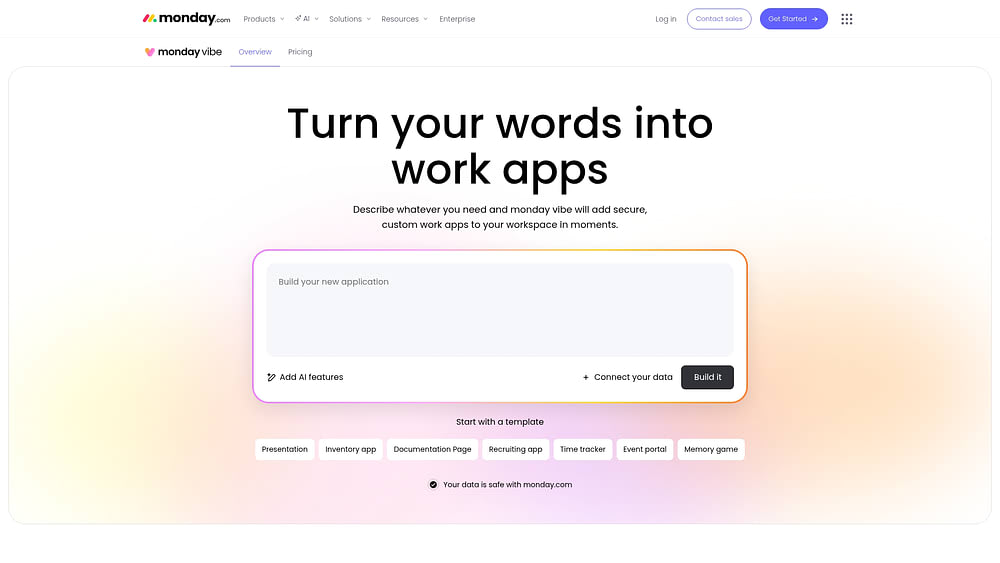
With monday vibe, teams turn natural language prompts into fully functional, secure business applications on monday.com, giving anyone the ability to create custom apps without writing code or learning a visual interface. You describe what you need, and monday vibe generates it directly within your workspace.
Here’s what the building experience looks like in practice:
- Natural language prompts: Describe your app in plain language and monday vibe generates it.
- Voice-to-app building: Describe what you need out loud and see it built; helpful when you’re moving fast or thinking through ideas away from your keyboard
- Conversational refinement: Iterate through follow-up chat messages, asking for changes like “add filters,” “switch to dark mode,” or “add a chart”
Because apps connect directly to existing boards on monday.com, teams work with live data from their CRM, project management, or operations workflows; decisions happen on current information, not stale exports. Multi-board apps can pull data from up to five boards for cross-functional dashboards and workflows. Email integration connects Gmail or Outlook to send formatted emails and turn conversations into actions directly from your app.
Apps built with monday vibe run directly on monday.com’s enterprise-grade infrastructure, with security and governance in place from day one:
- Teams share apps confidently, knowing every app is secure, scales with usage, and respects granular permissions
- Apps are private by default and visible only to their creator
- Account admins control who has permission to publish apps
- App visibility respects existing board permissions across your workspace
How to get the most out of low-code and no-code in your organization
Low-code and no-code have moved well past the “nice to have” stage. Organizations that adopt them thoughtfully – matching the right approach to the right team and the right problem – build faster, free up IT capacity, and give domain experts the ability to create solutions without waiting in a queue.
The shift toward AI-powered, prompt-first building makes this even more accessible. When anyone on your team can describe a problem and generate a working application in minutes, the gap between identifying a need and solving it shrinks to almost nothing.
The most impactful no-code experiences happen when app building is embedded in the same workspace where your team already manages projects, tracks customers, and runs operations. When your apps connect to live data, inherit existing permissions, and sit alongside the boards and dashboards your team uses every day, adoption happens naturally, and the value compounds over time.
Try monday vibeFAQs about low-code and no-code development
Is low-code or no-code a stronger fit for beginners with no programming experience?
No-code is the stronger fit for beginners because it requires zero programming knowledge. Everything is built through visual interfaces or natural language prompts. Low-code assumes some technical proficiency for the coding portions that handle advanced customization.
Can low-code and no-code platforms handle enterprise-scale applications?
Enterprise-grade no-code and low-code platforms can support large-scale applications, especially when built on infrastructure designed for organization-wide security, permissions, and compliance. Highly complex or unique systems with custom algorithms may still require traditional development.
When should a team choose low-code instead of no-code?
Choose low-code when your application requires custom algorithms, non-standard integrations, or deep customization that exceeds what visual components can provide. If you have developers available and need granular code-level control, low-code offers that flexibility while still accelerating development.
How do low-code and no-code platforms connect to existing business software?
Most platforms offer prebuilt integrations with common business applications like email, calendars, and communication platforms. Platforms with open APIs and extensive integration libraries provide the most flexibility for connecting to existing software across your organization.
Are no-code apps secure enough for enterprise operations?
Enterprise-grade no-code platforms built on robust infrastructure can meet enterprise security requirements. Look for platforms with role-based permissions, inherited access controls, admin oversight, and compliance certifications to ensure apps meet your organization's security standards.
 Get started