


When a lead developer is assigned to three separate projects with overlapping deadlines while a design team is overwhelmed by requests and marketing staff remain idle, the issue is rarely a lack of talent or an excessive workload. These inefficiencies are the direct result of a failure in resource scheduling.
It is defined as the systematic coordination of personnel, equipment, and materials against project timelines to transform potential bottlenecks into a streamlined execution. This process determines who is capable of performing specific tasks, when they are available, what dependencies exist, and which initiatives take strategic precedence.
This article explores the foundational steps for building a robust scheduling system, from inventory mapping and capacity analysis to the implementation of real time monitoring. By understanding how to align team availability with organizational priorities, leadership can ensure that assets are utilized effectively to drive consistent results.
Key takeaways
- Build a complete resource inventory before scheduling anything: catalog every team member’s skills, availability, and costs in one place so you can make smart assignment decisions based on real data.
- Cap team utilization at 80% to prevent burnout and delays: leave a 20% buffer for unexpected issues, admin work, and communication so minor problems don’t derail entire projects.
- Optimize assignments through AI powered scheduling: Utilize platforms like monday.com to analyze skills, availability, and project requirements to identify the best person for each task automatically.
- Establish clear priority frameworks before conflicts arise: define which projects get resources first based on revenue impact, strategic importance, or deadlines so decisions happen quickly when demand exceeds supply.
- Track real-time capacity across your entire organization: monitor who’s overloaded and who has bandwidth so you can redistribute work before bottlenecks form and projects fall behind.
What is resource scheduling in project management?
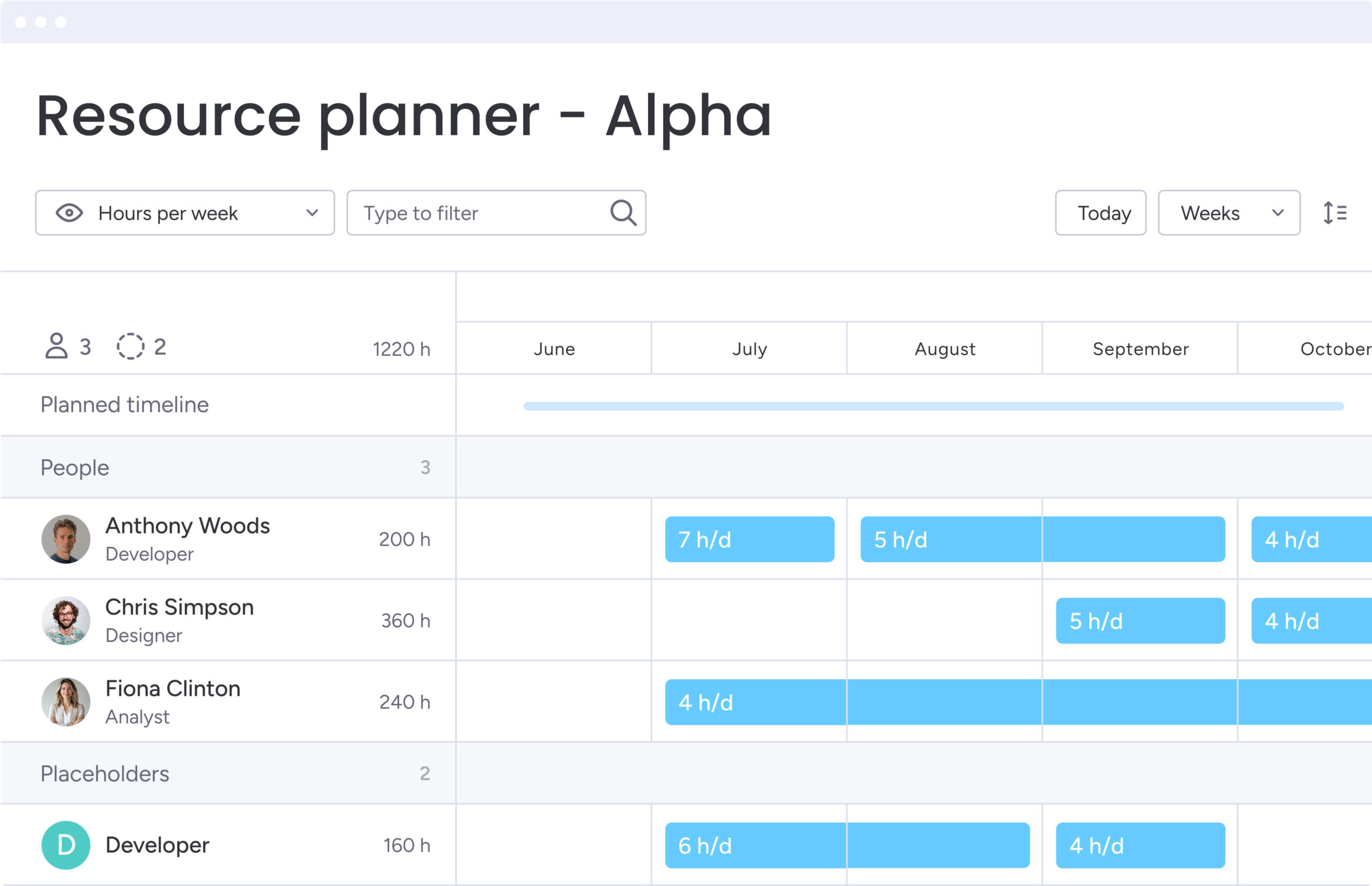
Resource scheduling coordinates people, equipment, and materials against project timelines so you deliver efficiently. While the task assignment tells you who does what, resource scheduling tells you who’s actually available, who has the right skills, what needs to happen first, and which projects win when priorities collide. It turns a static task list into a living plan that matches your team’s capacity with actual demand.
Core components of effective resource scheduling
A scheduling system that actually works needs four elements working together. Get these components right and you’ll build a foundation that grows with your business and flexes when priorities shift.
- Resource inventory: a comprehensive, centralized database of every available asset, including team members, contractors, rooms, and equipment, tagged with specific attributes like skills, costs, and location.
- Availability tracking: a real-time system that monitors working hours, time off, holidays, and existing workload commitments to determine true capacity at any given moment.
- Requirements mapping: the process of defining exactly what a project needs, such as specific certifications, time blocks, or equipment types, before attempting to assign resources.
- Conflict resolution: a set of predefined protocols and priority frameworks that determine which project receives resources when demand exceeds supply.
Why does resource scheduling drive strategic success?
Effective resource scheduling enables an organization to transition from reactive crisis management to proactive strategic planning. By optimizing the allocation of existing assets, businesses can maximize team output and achieve greater results without necessarily increasing headcount.
This disciplined approach provides the data necessary to approve new initiatives with confidence because leadership can verify that the team possesses the actual capacity to deliver.
Furthermore, it allows for the early identification of operational risks such as a critical expert being double-booked weeks in advance.

Understanding the impact of inefficient resource scheduling
Suboptimal resource scheduling initiates a ripple effect where inefficiency spreads, ultimately compromising both organizational profitability and employee well-being. The absence of a clear strategy frequently results in the overallocation of top performers, which leads to a decline in output quality and increased rates of burnout.
For example, when a lead developer is double-booked across two critical product launches, both projects typically experience significant delays. In such scenarios, the individual often disengages due to excessive stress while the organization misses vital market opportunities, leading to a measurable loss in revenue.
These scheduling failures create compounding consequences across the business over time. Identifying and addressing these risks is essential for maintaining a healthy workforce and protecting the long term financial stability of the organization.
- Project delays: missed dependencies stall progress, pushing delivery dates and eroding client trust.
- Resource burnout: chronic overallocation leads to fatigue, decreased productivity, and higher turnover rates among top performers.
- Budget overruns: inefficient allocation forces reliance on expensive rush work, overtime pay, or last-minute contractors to meet deadlines.
- Missed opportunities: without visibility into future capacity, organizations turn down viable work or fail to bid on new projects due to perceived resource constraints.
Resource planning vs resource scheduling
People use these terms interchangeably, but resource planning and resource scheduling differ. Resource planning is the big-picture strategy for long-term needs. Resource scheduling is the day-to-day execution of those plans.
| Feature | Resource planning | Resource scheduling |
|---|---|---|
| Scope | Strategic and long-term | Tactical and short-term |
| Focus | Capacity, budgeting, hiring | Assignment, timing, execution |
| Time horizon | Months to years | Days to weeks |
| Key question | "Do we have the resources to take this on?" | "Who works on this task next week?" |
| Outcome | Headcount approval, portfolio roadmap | Weekly schedules, task assignments |
When to use resource planning?
Use resource planning during annual budgets, org restructures, or when you’re deciding if a new project portfolio is realistic. It’s the foundation that ensures you have the right skills and enough hours to hit your goals.
Leaders use planning to identify skill gaps that require hiring or training and to allocate budgets for upcoming quarters.
When to focus on resource scheduling?
Resource scheduling takes over once projects are running. It turns high-level plans into specific daily and weekly assignments.
Teams rely on scheduling to manage immediate workflow, cover for unexpected absences, resolve conflicts between concurrent tasks, and ensure that the right people are working on the right priorities at the right time.
5 strategic benefits of resource scheduling software
Dedicated resource scheduling software gets you past the limits of spreadsheets. This technology provides several critical advantages for the business:
1. Maximize resource utilization across your portfolio
Software shows you allocation across your entire organization, spotting where resources sit idle. As a result, you can move idle talent to high-priority work, boosting revenue without hiring more people.
Teams using advanced platforms like monday.com gain instant insights through workload views that show exactly who has capacity and where effort should be redirected.
2. Prevent team burnout with balanced workloads
Workload tracking features visualize exactly how much work is on each team member’s plate. You’ll spot overallocation before burnout hits, giving you time to redistribute work and keep the pace sustainable.
Protecting your team from burnout improves retention and productivity.
3. Accelerate delivery through skills-based matching
You can tag resources with specific skills and experience levels. Match task requirements with the most qualified person and you’ll cut ramp-up time and errors.
The right expert completes tasks faster and delivers higher-quality work than someone merely available.
4. Make smarter capacity and hiring decisions
Historical data shows long-term patterns in demand versus supply. You’ll see which roles are overbooked and which sit idle, giving you the data to justify new hires, contractor budgets, or training programs.
5. Reduce project costs with optimized allocation
Smart scheduling cuts expensive overtime by evening out workload spikes. It also stops the costly delays that come from resource conflicts.
When you see resource costs clearly, you’ll build tighter project budgets and protect margins.
Essential groundwork for your resource schedule
Before you schedule anything, set up your data and rules. These make sure your schedule matches what’s actually happening in your business.
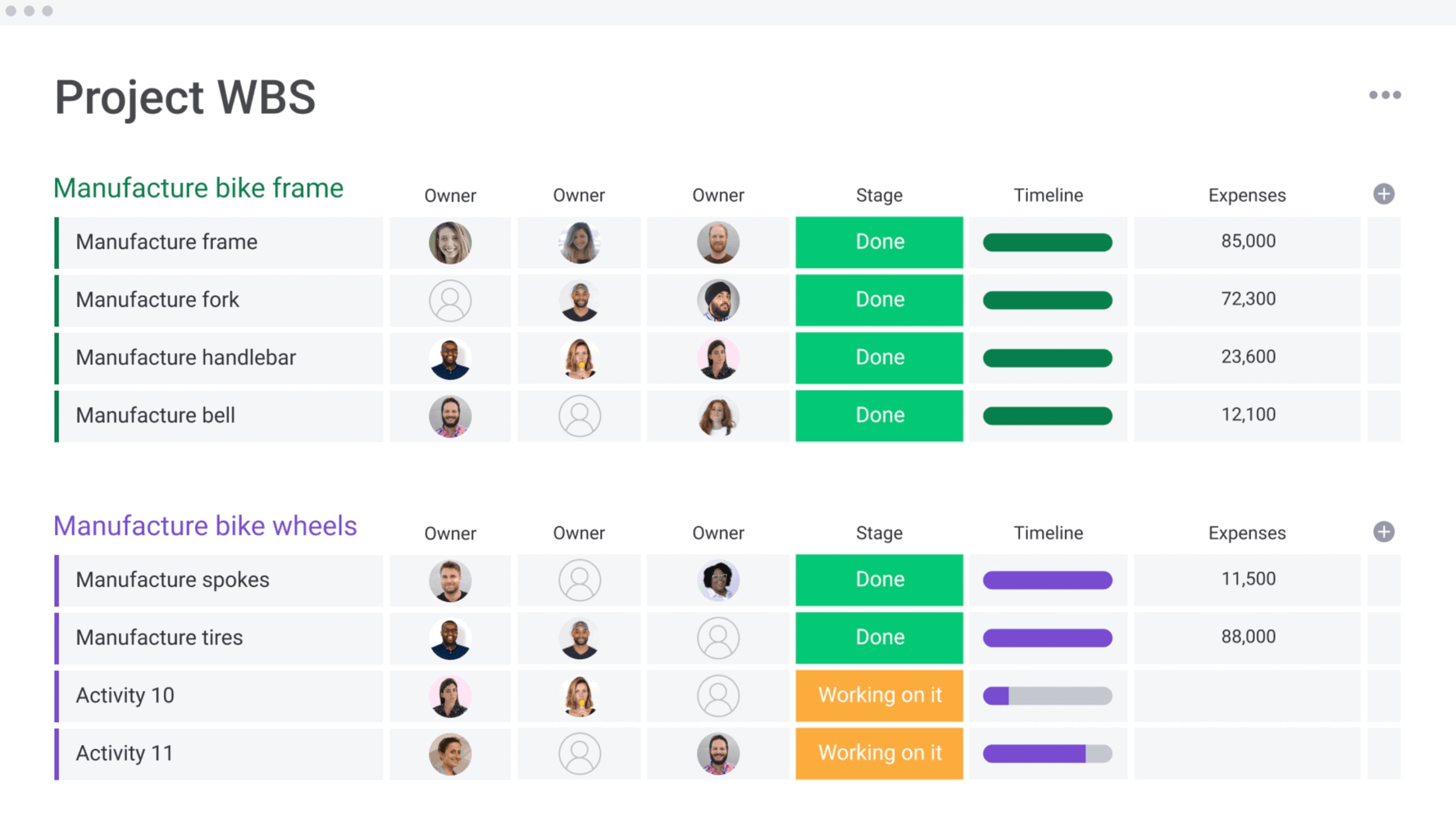
Step 1: map your complete resource inventory
A working schedule needs a complete list of every resource you have. This includes full-time employees, freelancers, specialized equipment, and facilities.
For each entry, track these details:
- Role and specific skills: the primary function and specialized capabilities of each resource.
- Cost rates and time zone: the financial impact and geographical availability for each entry.
- Standard availability and capacity: the baseline hours each resource can contribute per week.
Teams using solutions like monday.com keep this in one resource directory — one place for all allocation decisions.
Step 2: define project dependencies and requirements
Document what each project needs before you start scheduling. Figure out the skills each phase needs, how many hours it’ll take, and what order tasks happen in.
Understanding dependencies (knowing that a developer cannot start until a designer finishes) is crucial for preventing scheduling conflicts and realistic timeline creation.
Step 3: establish priority frameworks
When multiple projects need the same limited resources, conflicts are inevitable. Set up prioritization rules ahead of time so you can resolve standoffs quickly and objectively. Set up prioritization rules ahead of time so you can resolve standoffs fast.
Frameworks may prioritize based on:
- Client tier and revenue impact: the financial significance of the account to the organization.
- Strategic importance: how closely the project aligns with long term business goals.
- Regulatory or compliance requirements: the necessity of meeting fixed legal or safety deadlines.
With established rules in place, operations remain fluid because resources are automatically directed toward the most critical objectives.
4 resource scheduling methods for different scenarios
Different projects need different scheduling approaches. Pick the right method and your schedule will match how your team actually works.
1. Time-based scheduling for fixed deadlines
Use time-based scheduling when deadlines are fixed such as compliance updates or event launches. Work backward from the deadline and assign resources to meet the target date even if it is not the most efficient path.
When conflicts pop up, you add resources or approve overtime instead of pushing the date.
2. Skills-based matching for complex projects
For technical or specialized work, expertise drives the schedule. Quality and capability matter more than speed here.
Therefore, wait for the right expert instead of grabbing whoever’s free. This is common in R&D, specialized engineering, and high-stakes creative work.
3. Capacity-driven allocation for multiple teams
Balance workload across teams so work flows steadily without bottlenecks. It’s perfect for maintenance teams, support desks, or agencies handling a steady stream of similar requests.
Keep utilization around 80% so your team handles incoming work without burning out.
4. AI-optimized scheduling for dynamic environments
AI-optimized scheduling uses algorithms to analyze availability, skills, priorities, and dependencies all at once. It suggests the best way to distribute work for maximum efficiency across complex portfolios.
Teams using platforms like monday.com’s AI can automate assignments and adapt instantly when projects change—perfect for large, fast-moving organizations.
Learn more: AI capacity planning software

How to create a resource schedule in 6 steps?
Build a reliable resource schedule by moving from data preparation to real-time execution. A structured approach ensures your team is assigned effectively, deadlines are met, and workloads remain balanced. Follow these steps to manage resources with precision and visibility:
Step 1: build your resource directory
First, create a central database that houses every resource available to your team. Having all your data in one place makes it much easier to find the right person for the job at a moment’s notice. You should include fields for skills, weekly capacity, hourly cost, and time off while using standard terms for roles so your reports stay accurate.
Step 2: map all project requirements
Before you start any work, break each project down into the specific talent it requires. Document exactly what is needed for each task, such as a Senior React Developer for 20 hours during the week of October 10th. This turns a vague project scope into a concrete list of specific resource needs that you can actually schedule.
Step 3: analyze current capacity and availability
Check who is actually free before you start assigning tasks to the team. Deduct public holidays, approved leave, and administrative time from the total capacity to find your true numbers. This reveals the net available hours for project work and prevents the common mistake of scheduling 40 hours of tasks in a 40-hour work week.
Step 4: match resources using multiple criteria
Assigning work is about more than just who is free; it is about weighing skills, availability, and cost to find the right fit. You should put your expensive experts on critical tasks that specifically need their experience. Give junior team members the standard work to help them grow while protecting your overall project budget.
Step 5: construct your schedule with dependencies
Lay out your assignments on a clear timeline while respecting how different tasks connect to one another. If Task B needs Task A done first, do not schedule Task B until Task A is expected to wrap up. This gives you a clear visual roadmap of who is doing what and when the work will actually be finished.
Step 6: implement real-time monitoring systems
Your schedule will likely change the moment work starts, so set up dashboards to track actual progress against your original plan. Within solutions like monday.com, you can see resource utilization in real time. This allows you to spot delays or overallocation instantly and adjust the plan before your projects fall behind.
7 resource scheduling best practices from leading organizations
Successful organizations adopt specific habits that make their resource scheduling resilient and scalable. These practices represent patterns observed across high-performing teams managing complex portfolios.
1. Cap resources at 80% utilization
Scheduling resources at 100% capacity guarantees bottlenecks when the unexpected occurs. Leading teams cap planned utilization at 80%, leaving a 20% buffer for administrative tasks, communication, and unforeseen issues.
This slack ensures that a minor delay doesn’t derail the entire portfolio.
2. Maintain dynamic skills inventories
Skills inventories must evolve as the team grows. Organizations should review and update resource profiles quarterly to reflect new certifications, completed projects, and acquired skills.
As a result, resource managers are always aware of the full capabilities of their workforce.
3. Plan multiple scenarios in parallel
The best schedulers prepare for change. By modeling ‘best case,’ ‘worst case,’ and ‘likely’ scenarios, organizations can have contingency plans ready for predictable constraints like the use‑or‑lose deadline.
If a key project is delayed, they already know how to redeploy the freed-up resources without scrambling.
4. Create organization-wide visibility
Silos destroy scheduling efficiency. Providing transparency into resource allocation allows different departments to see when shared resources are busy.
This visibility prevents tug-of-war over talent and fosters a collaborative approach to capacity management.
5. Define escalation protocols
When conflicts cannot be resolved at the peer level, an escalation path prevents stagnation. Defined protocols dictate who makes the final call, whether it is a portfolio manager or a VP, based on the strategic value of the competing projects.
6. Use placeholders strategically
Planning often begins before specific individuals are identified. Using generic placeholders like “Senior Designer 1” allows for capacity planning and budget estimation to proceed.
These placeholders are swapped for actual team members as the start date approaches and availability is confirmed.
7. Automate repetitive scheduling tasks
Manual scheduling of recurring meetings and standard maintenance tasks wastes valuable management time. Automation rules can handle these predictable assignments, freeing up resource managers to focus on complex, high-value allocation decisions.
Learn more: AI scheduling software
Implement resource scheduling with monday.com
The comprehensive Work OS provided by monday.com unifies resource scheduling with project execution. This flexible platform moves beyond rigid, standalone solutions to ensure that high-level strategy connects directly to daily operational tasks.
Complete control over allocation is achieved through a dedicated Resource Planner and Capacity Manager. Within monday.com, managers gain a clear view of organizational health through several key features:
- Centralized workload visualization: managers view allocations by individual, team, or project and utilize drag-and-drop functionality to balance capacity.
- Unified resource directory: all skill and availability data is centralized to ensure every assignment is based on accurate, real-time information.
- Automated scheduling suggestions: AI capabilities within monday.com analyze project requirements against the resource pool to suggest the optimal fit for every task.
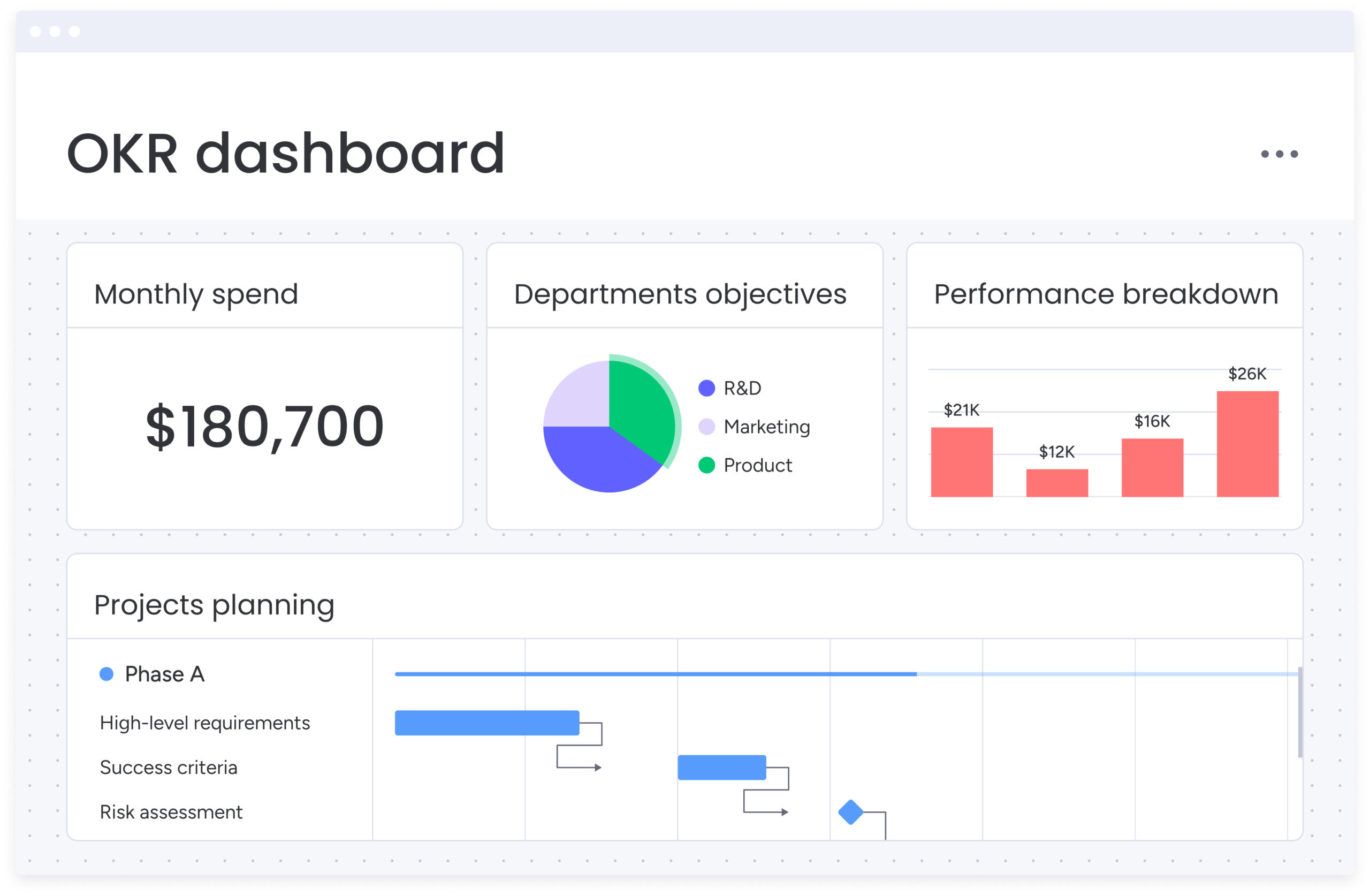
- Executive-level dashboards: high-level views aggregate data from hundreds of boards to highlight utilization trends and flag potential risks.
Complex scheduling decisions are further streamlined by these automated features, reducing administrative burdens while optimizing assignments for both speed and quality.
Furthermore, AI-driven insights within monday.com identify resource bottlenecks before they impact delivery, enabling a more proactive management approach.
The platform ensures that scheduling is integrated directly into the flow of work:
- Automated capacity triggers: notifications are sent automatically when capacity thresholds are reached or when assignments change.
- Ecosystem synchronization: integrations with platforms such as Jira, GitHub, and Salesforce ensure that data remains consistent across the entire technical stack.
- Predictable capacity planning: data-driven insights move organizations from reactive firefighting to a state of strategic confidence.
Operations are fundamentally transformed for organizations that adopt monday.com. By leveraging this platform, workloads remain balanced, capacity becomes predictable, and decisions are driven by data rather than guesswork.
Frequently asked questions
What is the difference between resource allocation and resource scheduling?
The difference between resource allocation and resource scheduling is that allocation is the strategic decision of designating resources to projects, while scheduling is the tactical process of assigning specific times and dates for that work. Allocation determines who gets what resources; scheduling determines when they use them. Allocation determines who gets what resources; scheduling determines when they use them.
How does resource scheduling reduce project delays?
Resource scheduling proactively identifies conflicts and bottlenecks before work begins. It ensures that the necessary skills and capacity are available exactly when dependencies require them, preventing the cascade of delays that occur when resources aren't properly coordinated.
Can AI improve resource scheduling accuracy?
AI analyzes vast amounts of data, including skills, availability, and historical performance, to suggest optimal assignments. It minimizes conflicts and maximizes efficiency more consistently than manual methods by processing multiple variables simultaneously.
What makes cloud-based resource scheduling more effective?
Cloud-based systems provide real-time visibility and access for distributed teams. They ensure that availability data is always current and that stakeholders can collaborate on schedules from any location, making them essential for hybrid and remote work environments.
How do you measure resource scheduling ROI?
ROI is measured by tracking improvements in billable utilization, reductions in overtime costs, decreased project delivery times, and the ability to take on more projects with the same headcount. These metrics directly connect scheduling efficiency to business outcomes.
When should you upgrade from spreadsheets to resource scheduling software?
An upgrade becomes necessary when managing multiple projects, resources, and dependencies leads to frequent conflicts, data errors, or excessive administrative time. If you're spending more time updating spreadsheets than executing work, it's time for dedicated software.

 Get started