


The brainstorm was brilliant, sticky notes covered the canvas, ideas connected in unexpected ways, and the team left energized. Then Monday arrived, and someone had to manually rebuild the entire plan in a project management system. Half the context got lost in translation.
That gap between visual thinking and actual execution is where most digital whiteboards fall short. Miro excels at capturing creative energy, but when it’s time to assign owners, track progress, and hit deadlines, teams often find themselves copying and pasting between disconnected systems. For organizations scaling complex workflows, a Miro alternative that bridges ideation and delivery can eliminate that friction entirely.
We’ve analyzed 15 platforms that go beyond the infinite canvas, comparing features, pricing, and use cases to help you find the right fit. Whether you need tighter integration with your existing tech stack, stronger security controls, or a direct path from whiteboard to workflow, you’ll find options that keep your ideas moving toward results.
Key takeaways
- Bridge the gap between ideation and execution: choose platforms that convert visual brainstorms directly into actionable workflows with clear owners, timelines, and dependencies, eliminating manual data transfer.
- Prioritize integration over isolation: select tools that connect seamlessly with your existing tech stack to prevent data silos and maintain context across your entire workflow.
- Demand enterprise-grade security from day one: ensure your platform meets compliance standards like SOC 2, ISO 27001, and HIPAA with granular permissions and SSO capabilities as your team scales.
- Focus on total cost of ownership, not just subscription fees: factor in training time, integration maintenance, and the hidden costs of managing disconnected systems when evaluating pricing.
- Leverage AI to automate operational friction: choose platforms where AI handles the heavy lifting (categorizing ideas, extracting action items, and transforming visual notes into structured plans) so your team can focus on strategy.
What makes Miro a popular choice for visual collaboration?
Miro has earned its reputation by effectively simulating the dynamic energy of an in-person workshop for distributed teams. Its digital canvas lets teams brainstorm and map ideas as if they’re standing around a real whiteboard, from any location. For organizations navigating the complexities of hybrid work, this capability has made it a go-to solution.
The platform removes friction from the start. Pre-built templates for sprint planning, user flows, and strategic mapping mean teams can jump in without setup delays. The interface is intuitive enough that anyone can contribute right away, regardless of technical skill. Ideas populate the board in real-time, maintaining the creative momentum essential for collaborative success.
Miro shines brightest during the early stages of a project, when possibilities are wide open and structure is still forming. It provides design, marketing, and strategy teams with a malleable environment to explore concepts before locking them into rigid plans. That flexibility is precisely why creative and strategy teams gravitate toward it, using the canvas as a space to think visually and iterate quickly before committing to execution.
Why do teams need more than digital whiteboards?
Great brainstorms feel electric. The board is populated with potential, the strategy looks clear, and the team feels unified. But here’s where things usually fall apart: turning those ideas into actual work.
Momentum dies in the handoff. Brilliant concepts remain trapped on a digital canvas, forcing teams to manually reconstruct them in a separate project management platform. This disconnection introduces significant operational risks:
- Error propagation: manual data transfer invites mistakes and inconsistencies.
- Context loss: the strategic reasoning, the “why”, is often left behind on the whiteboard.
- Tracking difficulties: measuring actual progress against the initial vision becomes an uphill battle.
Furthermore, scaling organizations require more than a freeform space; they demand security, governance, and structure that comprehensive project management platforms provide. When your whiteboard sits apart from your core systems, you’re stuck with data silos and compliance gaps. A truly integrated platform bridges this divide, seamlessly converting abstract ideas into executable workflows.
15 best Miro alternatives that transform ideas into work
Every successful project begins with an idea, yet digital whiteboards frequently become endpoints where concepts fail to progress. The most effective alternatives not only capture creativity but also establish a clear pathway to execution.
The following list highlights platforms that excel at converting visual concepts into actionable workflows, connecting your team’s creative output directly to timelines, resources, and measurable results.
The optimal choice depends on your team’s specific workflow requirements. Each option below offers a distinct approach to ensuring your strategic initiatives generate tangible impact rather than remaining static on a board.
1. monday work management
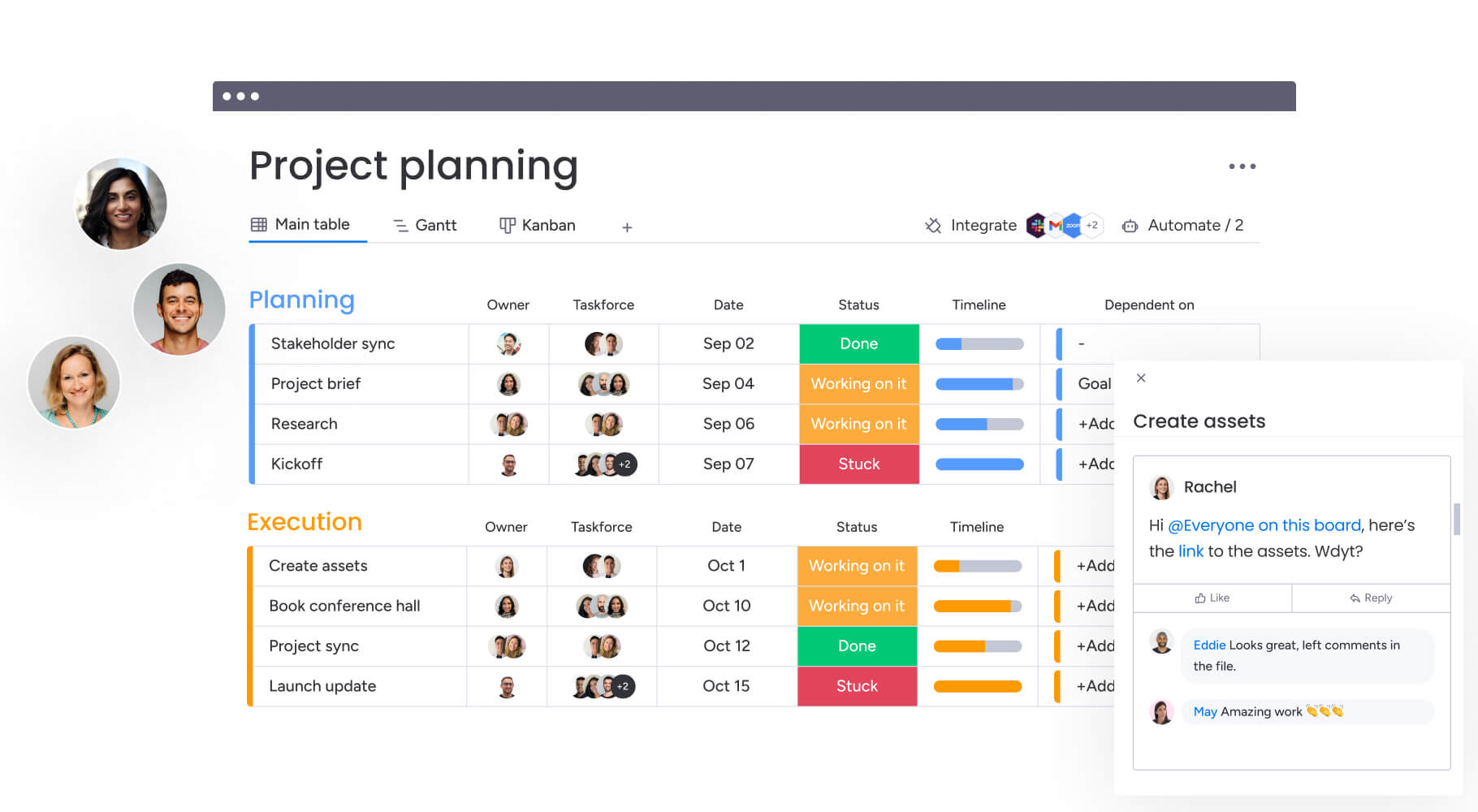
The gap between visual planning and the daily grind of execution disappears with monday work management. Instead of splitting ideas and execution across platforms, it keeps planning, ownership, and tracking in one place.
The common “post-workshop drop-off” is eliminated here. Plans stay live and update as work moves forward with no static screenshots.

Example:
Teams use monday work management to streamline execution by capturing critical decisions in collaborative workdocs and immediately managing delivery on connected boards complete with owners, timelines, dependencies, and real-time reporting through robust workflow management features.
Key features:
- Visual project boards and views: adapt the interface to the task at hand with Kanban, Gantt, Timeline, Calendar, and Workload views.
- Advanced project planning: manage dependencies, define milestones, and utilize baseline and critical path features on Gantt charts to ensure schedules hold.
- Dashboards and reporting: construct live, shareable dashboards that aggregate progress, budget, and workload across projects, giving leaders instant visibility.
- monday workdocs: collaborate on briefs and plans in real-time, embedding live boards and dashboards to maintain context.
- Goals and OKRs, plus portfolio management: align projects with high-level strategic objectives and manage portfolios for a macro view of organizational health.
- Requests and approvals with forms: standardize work intake through intuitive forms, routing approvals to the right stakeholders while keeping requests tied to delivery.
Pricing:
- Free: up to two seats with essential visual collaboration tools.
- Basic: $9/seat/month (billed annually) adds enhanced collaboration and basic automations.
- Standard: $12/seat/month (billed annually) includes 250 automation actions and integration support.
- Pro: $19/seat/month (billed annually) offers advanced permissions and 25,000 monthly automation actions.
- Enterprise: custom pricing for 250,000 monthly actions, portfolio management, and enterprise-grade security.
Advanced AI features:
- Categorize: automatically apply labels such as priority, type, or urgency at scale.
- Summarize: condense lengthy updates into actionable key points.
- Extract information with AI: pull structured data from unstructured sources like PDFs and images directly into board columns.
- Translate and detect sentiment: facilitate global collaboration and prioritize feedback based on tone.
- Writing assistant: draft and polish text directly within the platform.
- Assign person: automatically designate ownership based on roles and expertise.
- Digital Workforce (coming soon): tools like Project Analyzer will monitor projects in real-time to flag bottlenecks and offer proactive solutions.
- Product Power-ups (coming soon): features such as risk management and resource allocation will help teams identify potential issues across portfolios and optimize staffing based on skills and availability.
Automations:
- Approvals and reminders: automate approval flows and reminders to keep reviews on track without manual follow-up.
- Status-based notifications: alert relevant team members immediately when statuses change or deadlines loom.
- Portfolio-level consistency: enforce standard workflows across teams using templates and repeatable automation patterns.
Integrations:
- 200+ integrations: link directly with Microsoft Teams, Slack, Outlook, Gmail, Google Drive, Zoom, and Jira Cloud.
- Open API: develop custom integrations to match your organization’s specific data architecture.
Miro alternative features:
- Unified planning and delivery: centralize briefs, approvals, execution, and reporting in one location.
- Flexible execution views: transition smoothly from ideation to timeline-driven delivery via Kanban, Gantt, and other views.
- Executive visibility: pull data into dashboards and reports, no manual slide decks required.
Why it stands out:
- Market leadership: recognized as a Leader in the 2025 Gartner® Magic Quadrant™ for Collaborative Work Management and Adaptive Project Management and Reporting.
- Proven ROI: Forrester Total Economic Impact™ research highlights a 346% ROI and a payback period of under four months.
- Enterprise adoption: rated highest for User Adoption in Enterprises by G2, ensuring consistent engagement and trustworthy data.
2. FigJam
FigJam extends Figma, making whiteboarding part of your design flow instead of a separate step. It’s great for product teams moving from rough ideas to polished designs. AI facilitation and native Figma integration mean less switching, more creating.

Example:
Design teams that want planning and Figma workflows connected, with tools for remote workshops built in.
Key features:
- Agile workflow templates: templates for standups, sprints, and retros, with quick task creation in Asana and Jira.
- AI-powered facilitation: FigJam AI generates templates and summarizes notes. Jambot helps with brainstorming.
- Design-integrated collaboration: embed Figma files directly for real-time multi-cursor editing, voting, and guided walkthroughs.
Pricing:
- Starter (Free): drafts, templates, basic inspection, and 150 daily AI credits.
- Professional: Collab seat $3/month, Dev seat $12/month, Full seat $16/month; includes unlimited files.
- Organization: Collab $5/month, Dev $25/month, Full $55/month (billed annually); includes unlimited teams.
- Enterprise: Collab $5/month, Dev $35/month, Full $90/month (billed annually); offers custom work spaces.
- FigJam inclusion: FigJam is included with all seat types across every plan.
Considerations:
- Canvas-first limitations: it’s canvas-first, so you won’t get deep project management like portfolio resourcing or detailed dependency tracking.
- Table capacity constraints: tables are capped at 500 cells, which may limit the ability to manage large datasets on a single board.
3. Trello
Trello keeps it simple: boards and cards that work like moving sticky notes across a wall. It’s built for Kanban workflows and teams that want transparency without heavy admin. Used by 80% of Fortune 500 companies, Trello’s proven for straightforward organization.

Example:
Small to mid-sized teams looking for a visual task management solution that requires almost no setup time.
Key features:
- Visual Kanban boards: structure work into boards, lists, and cards that flow logically through stages.
- Butler automation: eliminate repetitive admin work with no-code rules, scheduled commands, and triggers.
- Multiple view options: adapt to different work styles with Board, Timeline, Calendar, Table, Dashboard, and Map views.
Pricing:
- Free: $0/month for up to ten collaborators, ten boards, and 250 automation runs.
- Standard: $5/user/month (billed annually) for unlimited boards and 1,000 automation runs.
- Premium: $10/user/month (billed annually) adds unlimited automation and advanced views.
- Enterprise: $17.50/user/month (billed annually) includes SSO and organization-wide controls.
Considerations:
- Dependency management requires workarounds: checklists are needed, as it is not a native feature.
- Performance may degrade on large boards: boards exceeding 1,000 open cards can impact scalability for massive projects.
4. Collaboard
Collaboard puts data sovereignty first, combining flexible canvas tools with strict security. Built for structured feedback and review cycles in banking, education, and government. Swiss-based IBV Informatik built it with European data residency and strict compliance in mind.

Example:
Organizations with complex approval workflows that require structured feedback collection and strict EU data sovereignty.
Key features:
- Integrated task management: assignable cards and Kanban boards are built directly into the whiteboard canvas.
- Secure hosting options: choose between Open Telekom Cloud or on-premises deployment for maximum security.
- Meeting integration: works seamlessly within Microsoft Teams, Webex, and Pexip calls.
Pricing:
- Free: basic whiteboard features.
- Basic: €3/month per user (annual billing).
- Advanced: €10/month per user (annual billing).
- Enterprise: custom pricing for SSO and self-hosting.
- Discounts of up to 50%: available for education and public sectors.
Considerations:
- Task assignment is locked behind paid plans: limiting workflow management for free guest users.
- The ecosystem of third-party integrations is smaller: compared to more mainstream competitors.
5. Creately
Creately treats diagrams like live data, not static images. The smart canvas links visuals to project data, so the same item shows up on your Kanban board, timeline, and prioritization matrix. That sync helps teams move from brainstorming to tracking without losing context.

Example:
Teams that need visual work management where ideation and execution are linked through data-synchronized views.
Key features:
- Multi-perspective frames: view the same items across Kanban, timeline, and grid layouts with real-time data sync.
- Creately VIZ: AI-powered tools for automated diagram generation and insight discovery.
- Two-way integrations: maintain live synchronization with Jira, Git, and Azure DevOps.
Pricing:
- Free: unlimited canvases with a 45-item limit per canvas.
- Personal: 1,000 items per canvas (pricing on request).
- Team: 1,500 items per canvas (pricing on request).
- Business: $89/month for unlimited users.
- Enterprise: custom pricing for SSO and on-premise options.
- 40% discount: available for annual billing.
Considerations:
- The integration library is narrower than some rivals: with key connections like Zapier still in development.
- Advanced governance features require enterprise plans: which may impact budget for smaller teams needing compliance tools.
6. Nuclino
Nuclino is where docs, projects, and visual ideas live together. It connects scattered info so you stop jumping between tools. By combining a unique graph view with a “cards-as-docs” philosophy, it offers a fast, intuitive workspace that connects free-form thinking with structured organization.

Example:
Teams building knowledge bases who want to link visual brainstorming directly to structured documentation without losing context.
Key features:
- Real-time editing: automatic version history and comments preserve the decision-making process.
- Diverse visualizations: switch between Kanban, table, list, and graph views to see how concepts connect.
- Integrated Canvas: embed whiteboards directly into documents for seamless visual and text-based collaboration.
Pricing:
- Free: 50 items, three canvases, and 2GB storage.
- Starter: $6/user/month (annual billing) for unlimited items.
- Business: $10/user/month (annual billing) includes AI Sidekick and SSO.
- Volume discounts: available for teams exceeding 100 users.
Considerations:
- The free plan’s 50-item limit: restrictive for growing projects.
- Simplified feature set: may not satisfy organizations needing complex resource allocation or heavy workflow automation.
7. Stormboard
The primary goal of Stormboard is to eliminate the “post-meeting void” where ideas usually disappear. It turns messy brainstorms into organized reports with real outcomes. The platform is particularly strong in syncing planning activities with development environments like Jira and Azure DevOps.
Example:
Organizations that run frequent agile planning workshops and need structured facilitation that integrates with development workflows.
Key features:
- Smart reporting: export session data into structured Word, Excel, or PowerPoint documents.
- Bi-directional sync: updates in Stormboard reflect immediately in Jira, Azure DevOps, and Rally.
- Intelligent templates: access over 250 templates, including specialized PI planning sections.
Pricing:
- Personal: free for basic use.
- Business: $8.33/month per user (billed annually).
- Enterprise: custom pricing with advanced security and single-tenant hosting.
- 25% discount: available for nonprofits.
Considerations:
- The mobile app offers a reduced feature set: compared to the desktop experience.
- Native video conferencing is absent: requiring reliance on external tools like Zoom or Teams.
8. Excalidraw
Excalidraw’s hand-drawn aesthetic prioritizes simplicity and speed. As a free, open-source solution, it enables immediate sketching without account registration. This straightforward approach has cultivated a substantial community, demonstrating that effective collaboration doesn’t necessarily require enterprise-grade tools.

Example:
Teams on a budget or open-source enthusiasts needing a quick, no-strings-attached whiteboarding tool.
Key features:
- Instant collaboration: real-time editing with unlimited users on the free tier.
- Local-first security: offline capability with end-to-end encryption for shared links.
- Versatile export: save work easily as PNG, SVG, PDF, or PPTX.
Pricing:
- Free: full features, unlimited collaborators.
- Plus: $6/month per user adds cloud storage and access management.
- Education: $3/month for students and teachers.
Considerations:
- Enterprise necessities are absent: lacks SSO and advanced security controls.
- Minimal project management integration: limited compared to fuller suites.
9. Zoom Whiteboard
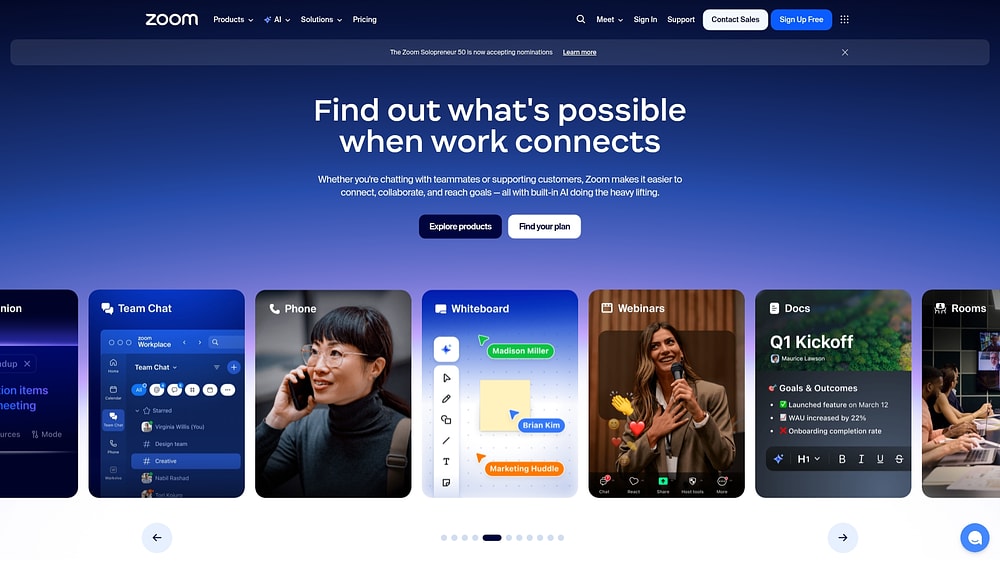
Zoom Whiteboard cuts friction by building the canvas right into your meetings. Brainstorm, plan, and execute without leaving the call. If you’re already on Zoom, it’s an easy shift from talking to visualizing.
Example:
Zoom-heavy organizations wanting whiteboarding capabilities embedded within their existing meeting workflows.
Key features:
- Native Kanban boards: track progress with task cards that link to Jira, Asana, and Azure DevOps.
- AI content generation: automatically create sticky notes, flowcharts, and tables to speed up sessions.
- Migration tools: import existing boards from Miro and Mural while preserving editability.
Pricing:
- Workplace Basic: free (three whiteboards).
- Workplace Pro/Business: contact for pricing (expanded capacities).
- Enterprise: contact for pricing (advanced features and templates).
- Whiteboard Plus add-on: unlocks premium features for lower tiers.
Considerations:
- Advanced features like Private Mode and custom templates require the Whiteboard Plus add-on: limiting access for users on lower-tier plans.
- The lack of extensive public APIs may limit custom integration opportunities: particularly for development teams needing deeper system connections.
10. Milanote
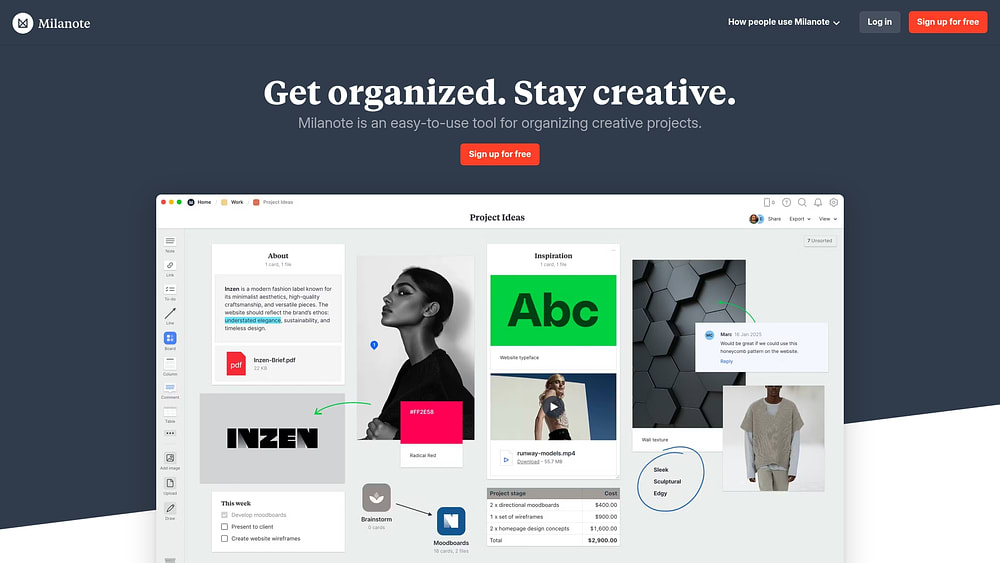
Standard whiteboards feel too rigid for designers and writers. Milanote gives you a flexible, mood-board style that fits how creatives actually think. It’s great for organizing visual assets, notes, and references — perfect for pros juggling lots of files and inspiration.
Example:
Creative teams that prioritize mood boarding and asset organization over rigid project tracking.
Key features:
- Visual boards: drag-and-drop interface for arranging images, links, and notes spatially.
- Web Clipper: highly-rated browser extension for instantly saving content to boards.
- Pexels integration: built-in access to a vast library of stock photography.
Pricing:
- Free: 100 cards and ten file uploads.
- Pro: $9.99/user/month (billed annually) for unlimited storage.
- Team: $49/month (billed annually) for up to ten people.
- Enterprise: custom pricing for larger teams.
Considerations:
- Lacks robust project management tools: dependencies and resource allocation are absent.
- Tasks do not sync across boards: which can complicate global visibility.
11. Klaxoon
Keeping participants awake and active during remote workshops is Klaxoon’s specialty. It’s built for engagement, with interactive tools that make training and meetings more lively. After Wrike acquired it, the path from workshop to execution got a lot clearer.

Example:
Organizations that conduct frequent training or workshops and need tools to boost participant engagement.
Key features:
- Interactive activities: quizzes, polls, and voting tools keep sessions lively.
- Template library: covers standard methodologies like Kanban, RACI, and agile rituals.
- Wrike integration: two-way sync converts workshop outputs into trackable tasks.
Pricing:
- Free: limited usage (one activity, 50 ideas).
- Starter: $24.90/month per host for unlimited activities.
- Enterprise: custom pricing for up to 1,000 participants and SSO.
Considerations:
- Its strong focus on workshops: means it offers fewer day-to-day project management features than broader platforms.
- Participant caps on lower tiers: may necessitate an upgrade to Enterprise for large events.
12. Microsoft Whiteboard
If you’re all-in on Microsoft 365, Microsoft Whiteboard cuts out the need for another vendor. It works natively with Teams, giving you a secure space to brainstorm during meetings. It uses OneDrive for storage, so it follows your existing governance and compliance policies automatically.

Example:
Microsoft 365 users seeking a whiteboarding solution that requires no additional vendor onboarding.
Key features:
- Meeting-first design: launch boards directly within Teams and guide participants with “Follow” mode.
- Copilot integration: AI assists in categorizing notes and summarizing sessions into Loop components.
- Enterprise compliance: built on OneDrive to ensure SOC, ISO, and HIPAA adherence.
Pricing:
- Free: basic features with a personal Microsoft account.
- Business Plans: range from $6 to $22/user/month (included in M365 subscriptions).
- Enterprise Plans: included in E3 ($36) and E5 ($57) subscriptions.
- Copilot: $18/user/month add-on required for AI features.
Considerations:
- External collaboration is restricted outside of active meetings: limiting flexibility for asynchronous work.
- It is primarily an ideation tool: requiring other apps like Planner for execution tracking.
13. Lucidchart
Most tools focus on freeform sketching. Lucidchart focuses on precision. It’s the go-to for technical diagramming, with extensive shape libraries and industry-standard notation. Software architects and engineers get the precision they need for complex system docs.

Example:
Technical teams needing professional-grade tools for system architecture and network documentation.
Key features:
- Collaborative precision: real-time editing with shape-specific comments.
- Technical libraries: comprehensive templates and notation standards for engineering.
- Data linking: overlay metrics and auto-generate diagrams from external data sources.
Pricing:
- Free: three documents with 60 shapes each.
- Individual: $9.00/month for unlimited documents.
- Team/Enterprise: custom pricing.
- Enterprise Shield: add-on for advanced governance.
Considerations:
- The free plan is quite limited: making it a trial rather than a long-term solution for serious work.
- Pricing for teams is not transparent: requiring sales contact.
14. Mural
Mural has carved out a niche as the facilitator’s choice for structured innovation. It handles complex design thinking with enterprise features, which is why consulting firms and big orgs love it. It connects tightly with Microsoft tools, making it a solid visual layer for strategic planning.

Example:
Innovation teams and consultants running structured design thinking workshops that need to sync with execution systems.
Key features:
- Two-way sync: convert sticky notes into work items in Jira, Azure DevOps, and Asana.
- LUMA frameworks: built-in methods for human-centered design facilitation.
- Enterprise security: SOC 2 Type 2, ISO 27001, and BYOK encryption.
Pricing:
- Free: three murals with unlimited members.
- Team+: $9.99/member/month (billed annually).
- Business: $17.99/member/month (billed annually) with SSO.
- Enterprise: custom pricing.
Considerations:
- It is a collaboration layer: not a full work management suite.
- The Business tier requires an annual commitment: limiting flexibility for teams preferring monthly billing.
15. Balsamiq
Balsamiq keeps teams focused on flow, not pixels. The low-fi, sketch-like look keeps stakeholders from getting hung up on design details early on. Perfect for product managers and UX designers who need quick alignment on structure.

Example:
Product teams needing rapid wireframing to validate concepts before investing in high-fidelity design.
Key features:
- Sketch aesthetic: components look hand-drawn to communicate “work in progress.”
- Real-time collaboration: unlimited users per project.
- Workflow integration: embeds wireframes into Jira, Confluence, and Slack.
Pricing:
- Business: per-project pricing (e.g., two projects, five projects) with unlimited users.
- Enterprise: annual billing with SSO.
- Desktop: $89/user (perpetual license, ending 2026).
Considerations:
- It is strictly for wireframing: and lacks broader project management features.
- The desktop version is being phased out: pushing users toward the Cloud version.
4 steps to choosing the right Miro alternative
Selecting a new platform extends beyond simply replacing your whiteboard tool. It involves choosing the system that will support your workflow from initial concept through to completion.
Those four steps will ensure your choice aligns with your team’s objectives.
Step 1: define your collaboration DNA
To begin with, you must map out how your teams actually work together. Determine whether you need a tool for quick brainstorms or a system to run your entire project delivery, as a simple canvas won’t suffice if you need to link plans to real-world execution.
Once you have established this, trace your process from the first idea to the final deliverable to identify exactly where visual collaboration must connect with your broader tech stack.
Step 2: look beyond the sticker price
In addition to functional needs, you must consider the total cost of ownership. The monthly fee is only a fraction of the actual expense; consequently, you must factor in training time, integration upkeep, and the administrative burden of managing multiple tools.
Furthermore, consider the hidden cost of disconnected work. When visual plans are separated from project management systems, you lose alignment and waste time on duplicate data entry — friction that a unified platform effectively eliminates.
Step 3: demand enterprise-grade security
As your organization grows, security is no longer an optional feature; it is a fundamental requirement. Your chosen platform must proactively safeguard your data and reputation through robust compliance features rather than basic security protocols.
Therefore, it is critical to verify that the platform meets your specific organizational standards before making a long-term commitment. Specifically, you need to confirm that the platform provides:
- Granular permissions: precise control over who can view, edit, and share specific assets.
- Compliance certifications: verified adherence to global standards such as SOC 2, ISO 27001, and HIPAA.
- Identity management: seamless integration with existing providers like Okta or Azure AD to ensure secure access.
Step 4: insist on seamless integration
Finally, remember that an isolated platform inevitably creates operational bottlenecks. Your visual workspace should function as a connected node within your broader tech stack, linking effortlessly with communication tools and core business systems to maintain a single source of truth.
To achieve this, scrutinize the API capabilities and pre-built connectors. Ask detailed questions about data synchronization frequency and custom mapping options. The objective is a unified digital environment, not another data silo.
How does AI make visual collaboration actually productive?
Artificial intelligence is shifting visual collaboration from a passive brainstorming activity to an active driver of execution. It converts creative sessions into structured workflows by automatically extracting insights and action items.
Imagine a digital whiteboard that doesn’t just store ideas but actively organizes them into a plan.
During a session, AI serves as an intelligent facilitator. It identifies patterns, groups related concepts, and suggests connections that might otherwise go unnoticed. This ensures that valuable ideas aren’t lost in the noise.
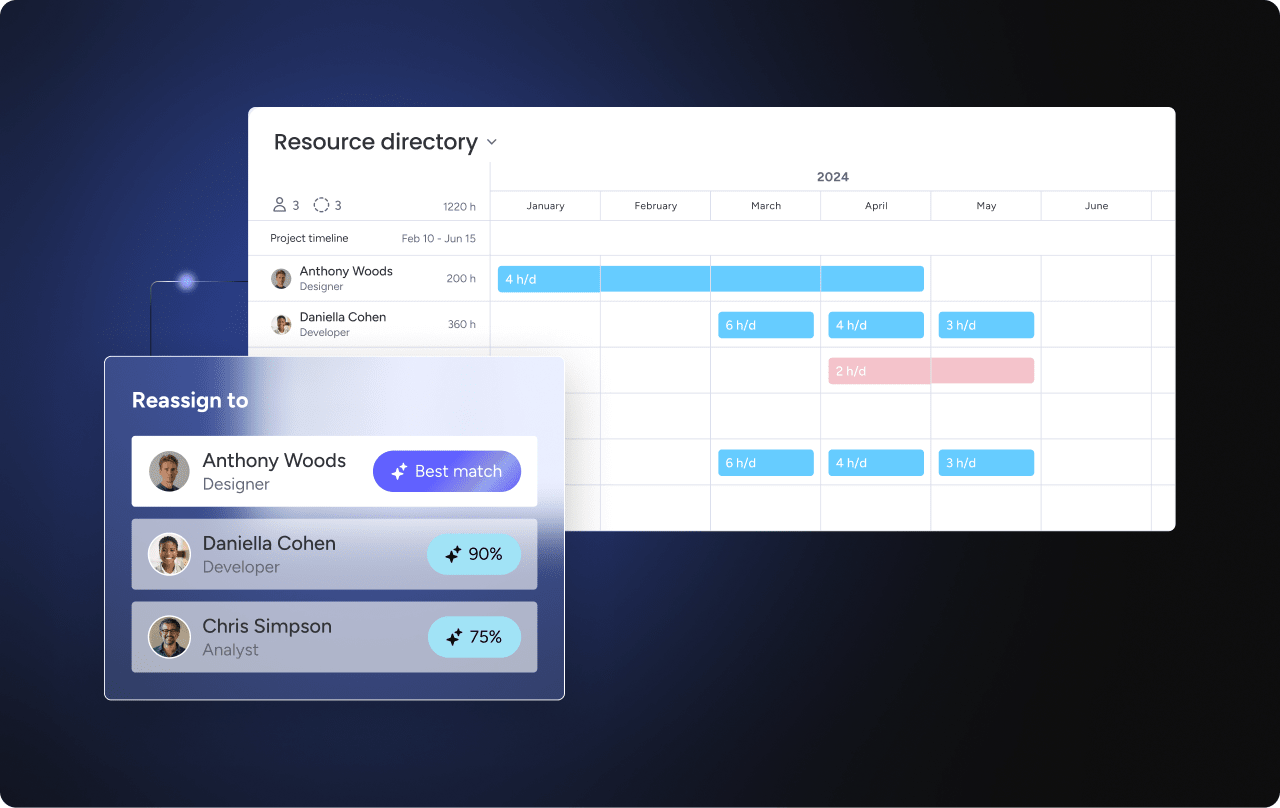
The true value lies in bridging the gap to execution. Teams using modern solutions like monday work management experience this as AI transforms visual notes into structured project plans, complete with workflows and assignments. This automation handles the operational heavy lifting, freeing the team to focus on strategy and creative problem-solving.
Turn visual ideas into completed projects
Momentum frequently diminishes when teams must manually transfer plans from a visual canvas to a work management tool. This friction point is where strategy often stalls.
However, a unified platform eliminates this disconnect. With platforms like monday work management, teams can map out strategies visually and convert them directly into actionable workflows. Creative energy transitions seamlessly into execution, with clear ownership and timelines established.
This approach creates a continuous path from initial concept to final deliverable. Because leaders maintain visibility and teams remain aligned, they can transform vision into reality without the inefficiency of constant context switching.

“monday.com has been a life-changer. It gives us transparency, accountability, and a centralized place to manage projects across the globe".
Kendra Seier | Project Manager
“monday.com is the link that holds our business together — connecting our support office and stores with the visibility to move fast, stay consistent, and understand the impact on revenue.”
Duncan McHugh | Chief Operations OfficerBridging the gap between strategy and execution
Digital whiteboards excel at facilitating creativity, but they often leave teams without a clear path to implementation. The separation between ideation and work tracking creates silos that impede progress.
By selecting a platform that integrates visual planning with comprehensive project management, organizations gain the control necessary to scale effectively. Teams can transition seamlessly from brainstorming to timeline execution, ensuring every initiative is supported by a structured plan.
Evaluate your current tool stack to identify friction points. Seek a solution that not only captures ideas but also facilitates their execution.
Frequently asked questions
What is the best free alternative to Miro?
Excalidraw is widely considered the best free alternative, offering a robust, open-source whiteboarding experience. While free tools are great for quick ideation, they typically lack the security and integration features required for enterprise workflows.
Which Miro alternative handles large teams without performance issues?
For large-scale deployment, monday work management is built to handle high user counts without lag. It ensures real-time responsiveness and enterprise-grade security, even with hundreds of concurrent users.
Can I migrate my existing Miro boards to these alternatives?
Direct migration is often complex due to differing data structures. Many teams find it more effective to use the transition as an opportunity to redesign and optimize their workflows on a more integrated platform.
What's the most affordable paid Miro alternative for growing teams?
Affordability depends on the scope of use. A unified platform like monday work management often delivers a lower total cost of ownership by consolidating project management, automation, and visual collaboration into a single subscription.
Do any Miro alternatives include built-in project management features?
Yes, but few offer the depth of monday work management. It links visual collaboration directly to task assignment, tracking, and automation, effectively turning ideas into executable plans.
Which alternative offers the strongest mobile collaboration experience?
Enterprise-focused platforms generally offer the most robust mobile apps. To ensure a good fit, test the app for feature parity and offline capabilities to support your team's specific mobile workflows.

 Get started