


An event management calendar is the difference between a team that runs events smoothly and one that scrambles through every deadline. When you’re coordinating venues, vendors, speakers, marketing timelines, and attendee communications for multiple events at once, a basic shared calendar simply can’t keep up. When event timelines break down, the consequences hit fast: double-booked venues, missed vendor deadlines, promotional emails that go out too late, and low attendance from poor communication. These are all symptoms of scattered planning across disconnected spreadsheets and calendar apps.
This article covers what an event management calendar actually is, why teams need one, who benefits most, how to build one for your team, and what features to look for when choosing event calendar software. Whether you’re running a single annual conference or managing a portfolio of monthly webinars and trade shows, the right calendar setup changes how your team plans, communicates, and executes. Platforms like monday.com bring scheduling, task tracking, and team coordination into one connected workspace built for event teams.
Key takeaways
- Beyond basic scheduling: An event management calendar connects tasks, owners, deadlines, and milestones to a shared timeline, giving teams visibility that a standard calendar app can’t provide.
- Cross-functional coordination: Marketing, HR, operations, and external vendors all benefit from a single source of truth for event timelines and responsibilities.
- Automation reduces manual work: Trigger-based workflows handle routine reminders, status updates, and notifications so teams spend less time on follow-up and more time on execution.
- Role-specific value: From marketing teams managing product launches to agencies juggling multiple client events, an event management calendar adapts to different planning needs.
- Features that matter: The right event calendar software combines multiple views, task tracking, integrations, dashboards, and AI capabilities in a single connected workspace.
What is an event management calendar?
An event management calendar is a centralized scheduling and coordination platform that maps all event-related activities, milestones, vendors, and stakeholders onto a shared timeline.
Event calendars go beyond showing when something is happening; they show what needs to happen before, during, and after each event, and who is responsible for every piece.
A standard calendar app tells you that your product launch is on March 15. An event management calendar tells you that venue confirmation is due by January 20, the catering deposit is due by February 1, the promotional email sequence needs to start February 15, speaker slides are due March 1, and AV setup begins March 14. Each of those items has an owner, a status, and a deadline that the entire team can see.
Most event planning follows three distinct phases, and a solid event calendar management system covers all of them:
- Pre-event planning: Budget approvals, vendor outreach, venue booking, speaker coordination, marketing asset creation, registration setup, and promotional scheduling.
- Event day execution: Run-of-show logistics, staff assignments, vendor check-ins, AV coordination, attendee check-in management, and real-time problem-solving.
- Post-event follow-up: Attendee thank-you communications, survey distribution, vendor invoicing, performance reporting, and retrospective documentation.
An event management calendar tracks all of this in one place: deadlines, vendor calls, budget milestones, attendee registration windows, promotional send dates, and internal review checkpoints. Instead of stitching together information from email threads, spreadsheets, and chat messages, your team works from a single, real-time view of everything that needs to happen. For a deeper look at how these calendars connect events to business outcomes, see our guide on event management calendar basics.
Why teams need an event management calendar
Managing events without a dedicated calendar creates coordination problems that compound quickly. Teams working from separate spreadsheets, personal calendars, and email threads face siloed schedules, last-minute vendor confusion, missed promotional windows, and attendee communication gaps that hurt registration numbers. Here’s where a purpose-built events calendar delivers value.
Centralized visibility
Everyone on the team sees the same timeline. When the venue confirms a date change, that update appears for marketing, operations, and leadership simultaneously. No more “I didn’t see that email” moments that derail schedules.
Deadline tracking with automated reminders
Instead of relying on someone to remember to follow up, an event scheduling calendar sends automated reminders when deadlines approach. A notification fires 3 days before the catering order is due. A status update triggers when a speaker confirms their session. The calendar does the follow-up work so your team doesn’t have to.
Cross-functional coordination
Events touch multiple teams. Marketing needs to align promotional timelines with registration deadlines. HR needs to coordinate internal speakers with external logistics. Operations needs to sync venue setup with AV vendors. An event management calendar connects all of these functions in one view, eliminating the back-and-forth that slows everything down.
Hybrid event support
With event organizers now allocating 37% of budgets to hybrid events and 35% to virtual formats, according to Zoom research, calendar coordination has become more complex. Multi-timezone scheduling, parallel in-person and virtual session tracking, and attendee segmentation by format all require a calendar that handles more than simple date-and-time entries.
Automation for routine workflows

Fifty percent of meeting professionals plan to use AI across the full event lifecycle in 2026, according to the American Express Global Business Travel 2026 Meetings & Events Forecast. Trigger-based workflows reduce manual follow-up significantly. When a task status changes to “Confirmed,” the platform automatically notifies the venue contact via email. When a deadline is 3 days away, a Slack reminder goes to the owner. These automations turn a static calendar into an active coordination system.
The pattern is straightforward: teams that centralize their event planning on a dedicated calendar spend less time chasing updates and more time executing. And as event programs grow in scale and complexity, that gap between organized and scrambling only widens.
Who benefits from an event management calendar
Event coordination isn’t confined to one department. Across most organizations, several teams manage events regularly, and each has distinct planning needs that a shared event calendar management system can address. Here’s how different roles put an event management calendar to work.
Marketing teams
Marketing teams run product launches, trade shows, webinars, and campaign-aligned events that require tight coordination between content, design, demand generation, and external vendors. An event management calendar keeps promotional milestones, registration deadlines, and asset delivery dates visible to everyone involved, so nothing slips between the cracks when multiple campaigns are running simultaneously. Teams planning virtual sessions can also use a webinar plan template to structure their process from promotion to post-event follow-up.
HR and people teams
HR teams coordinate employee onboarding sessions, town halls, training calendars, benefits enrollment events, and company-wide gatherings. These events often recur on set schedules and involve cross-departmental speakers or facilitators. A centralized calendar helps HR teams plan around organizational calendars, avoid scheduling conflicts, and track attendance across recurring programs.
Operations and admin teams
Operations teams handle the logistics that make events physically possible: venue bookings, vendor timelines, catering orders, AV setup, and supply coordination. When managing multiple events across different locations, an event management calendar provides the timeline view needed to spot conflicts, track vendor commitments, and keep every logistical detail on schedule.
Project managers
Project managers align event milestones with broader project timelines and resource allocation. They need to see how an upcoming conference fits alongside product release schedules, quarterly reviews, and team capacity. An event management calendar integrates event deadlines into the larger project landscape so nothing gets double-booked or under-resourced. See how a dedicated project management calendar can connect event milestones with the full scope of a team’s work.
Event agencies and planners
Agencies managing multiple client events simultaneously need client-specific views, the ability to prevent double-booking across accounts, and a way to share relevant timelines with clients without exposing internal workflows. An event management calendar with flexible permissions and filtered views makes multi-client event coordination manageable at scale.
A well-built event management calendar adapts to all of these users without requiring separate platforms for each team. The key is choosing a system flexible enough to support different workflows while keeping everyone connected to the same source of truth.
How to build an event management calendar for your team

Moving from a basic shared calendar to a functional event management system doesn’t require a massive overhaul. It does require structure. Here’s the process for building an event management calendar that actually works for your team.
Step 1: Define your event types and frequency
Start by listing every type of event your team manages: recurring internal meetings, one-off product launches, hybrid conferences, webinars, trade shows, training sessions, and client-facing workshops. Note how frequently each occurs and how much lead time they typically require. This inventory becomes the foundation for your calendar structure and helps you determine which events need detailed planning timelines versus simple date markers. Using an event planning template can give your team a ready-made structure for the most common event types, so you’re not building every planning framework from scratch.
Step 2: Map out key phases for each event
Every event follows a planning arc. Break each event type into its core phases: pre-event planning (vendor outreach, budget approval, promotion), event-day execution (logistics, staffing, AV), and post-event follow-up (surveys, invoicing, retrospectives). Set these phases as timeline anchors on your event scheduling calendar so the team can see the full lifecycle, not just the event date itself.
Step 3: Assign owners and deadlines to each item
Every item on the calendar needs a responsible person and a due date. “Book the venue” isn’t a useful calendar entry. “Sarah confirms venue contract by February 10” is. Assigning ownership drives accountability and makes it immediately visible when something is falling behind. This is where event calendar management shifts from passive scheduling to active coordination.
Step 4: Connect your calendar to your communication platforms
An event management calendar that lives in isolation creates the same visibility problems you’re trying to solve. Integrate it with Slack, email, Microsoft Teams, or whatever communication channels your team uses daily. When a deadline changes or a task status updates, the right people should know about it without having to check the calendar manually.
Step 5: Set up automations for routine coordination
Manual follow-up is the biggest time drain in event planning. Set trigger-based rules that handle it automatically: send a reminder to the catering vendor 5 days before the order deadline, notify the AV team when the venue confirms, update the project status when all pre-event items are marked complete. These automations keep the event management calendar working for your team even when nobody is actively watching it.
Step 6: Review and adjust on a regular cadence
An event management calendar is a living document. Build in a weekly review to spot scheduling conflicts, realign resources before problems escalate, and update timelines based on new information. Events rarely go exactly according to plan, and the teams that adjust early are the ones that execute smoothly on event day.
Once these steps are in place, your calendar becomes more than a schedule. It becomes the operational backbone of your event program. Platforms like monday.com turn this structure into a connected workspace where scheduling, task tracking, and team coordination happen in one place. The next question is what features to look for in the platform that powers it.
Get startedWhat to look for in event calendar software
Not all calendar platforms are built for event complexity. A personal calendar app handles time slots and reminders. Event calendar software connects scheduling to project tracking, communication, and automation so your team can coordinate at scale. For a broader comparison of available tools, this roundup of the best event management software covers the key options and how they differ. Here’s what to look for when evaluating your options.
- Multiple calendar views: Day, week, month, and timeline views let teams zoom in on daily logistics or zoom out to a quarterly overview. The ability to switch between views based on the planning horizon is essential for teams managing events of different sizes and timelines. If you’re evaluating options, this guide to finding the best calendar app is a helpful starting point.
- Task and milestone tracking: The ability to attach tasks, owners, and deadlines directly to calendar events turns a passive schedule into an active coordination system. Every event milestone should connect to the people and work items responsible for hitting it.
- Automation: Trigger-based workflows that fire reminders, notifications, or status updates without manual intervention. Automation is what separates a calendar that requires constant maintenance from one that actively coordinates your team.
- Integration with existing platforms: Sync with Google Calendar, Outlook, Slack, and Microsoft Teams so the event calendar connects to where teams already work. The right calendar event software fits into your existing workflow instead of creating another destination to check.
- Collaboration features: Shared access, comments, file attachments, and real-time updates keep the whole team aligned. Event planning is inherently collaborative, and the platform should support that without forcing people into separate communication channels.
- Dashboards and reporting: Visibility into budget status, task completion, and event performance in one place. Dashboards eliminate the need to manually assemble reports and give stakeholders a real-time view of where things stand.
- Forms and registration: The ability to collect attendee information, vendor details, or internal RSVPs directly within the platform keeps data connected to the event board instead of scattered across separate form builders. Purpose-built AI calendar scheduling software takes this further by automatically finding conflict-free windows across every stakeholder’s calendar before a single email goes out
- AI capabilities: Intelligent scheduling suggestions, automated task generation, and AI agents that handle routine coordination are raising the bar for what event calendar software can do. Teams managing high-volume event programs increasingly rely on these capabilities to scale without adding headcount.
Learn more: AI event management software
How monday.com simplifies event management
monday.com’s AI Work Platform brings all of the features listed above into one connected workspace built for teams that manage events at any scale. Instead of stitching together a calendar app, a spreadsheet, a form builder, and a messaging platform, your team works from a single board that connects scheduling, tasks, communication, and reporting.
The platform combines traditional event coordination tools with AI-powered capabilities that handle routine workflows autonomously. Teams get the visibility and structure they need to plan complex events while AI agents and automations reduce the manual follow-up that typically consumes hours each week. Here’s how the key features apply to event management.
AI agents for autonomous event coordination
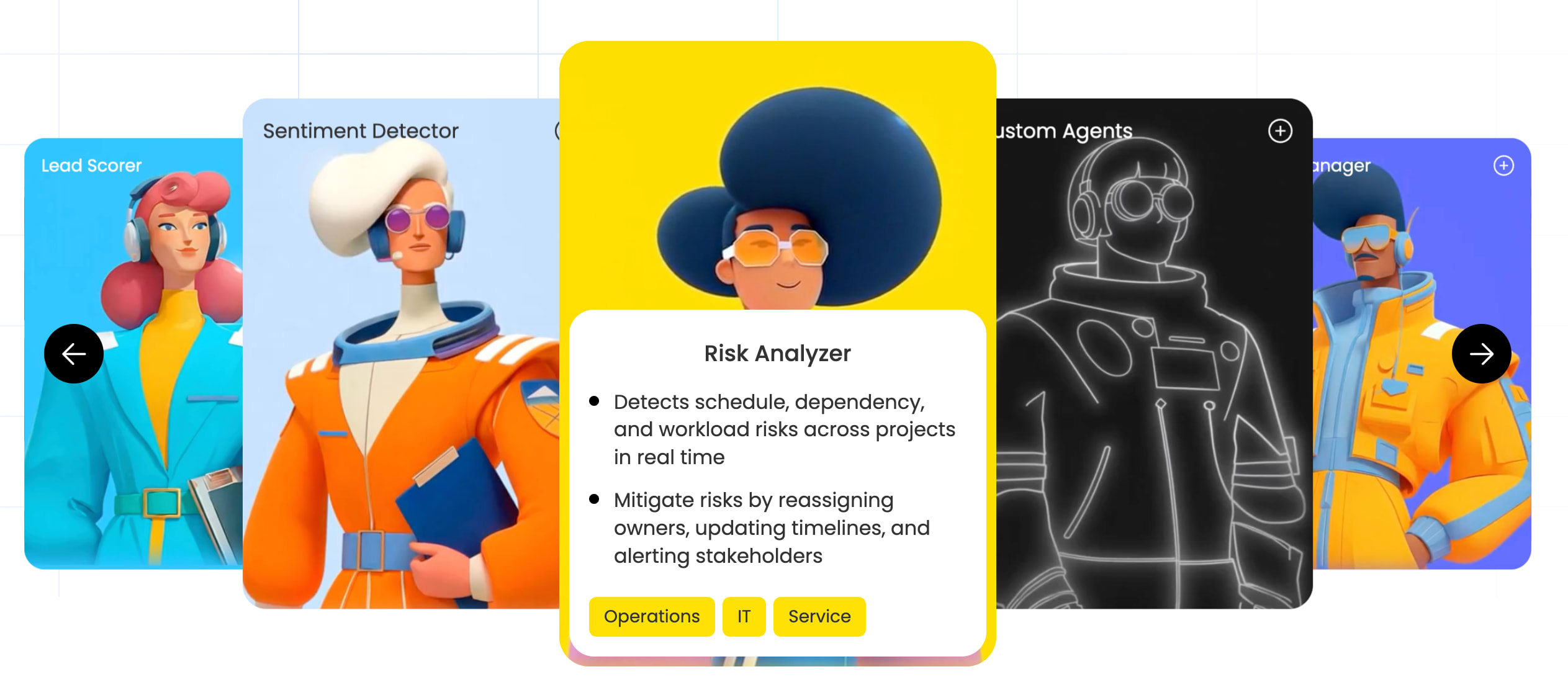
AI agents handle specific workflows autonomously within the guardrails your team sets. The RSVP Manager Agent tracks event attendance, sends follow-up communications, and updates your board with response data in real time. Instead of manually chasing RSVPs or updating spreadsheets, the agent handles it end-to-end. Teams managing multiple events simultaneously can deploy agents across different boards, letting AI handle the repetitive coordination while your team focuses on strategic decisions and execution.
Automations that eliminate manual follow-up
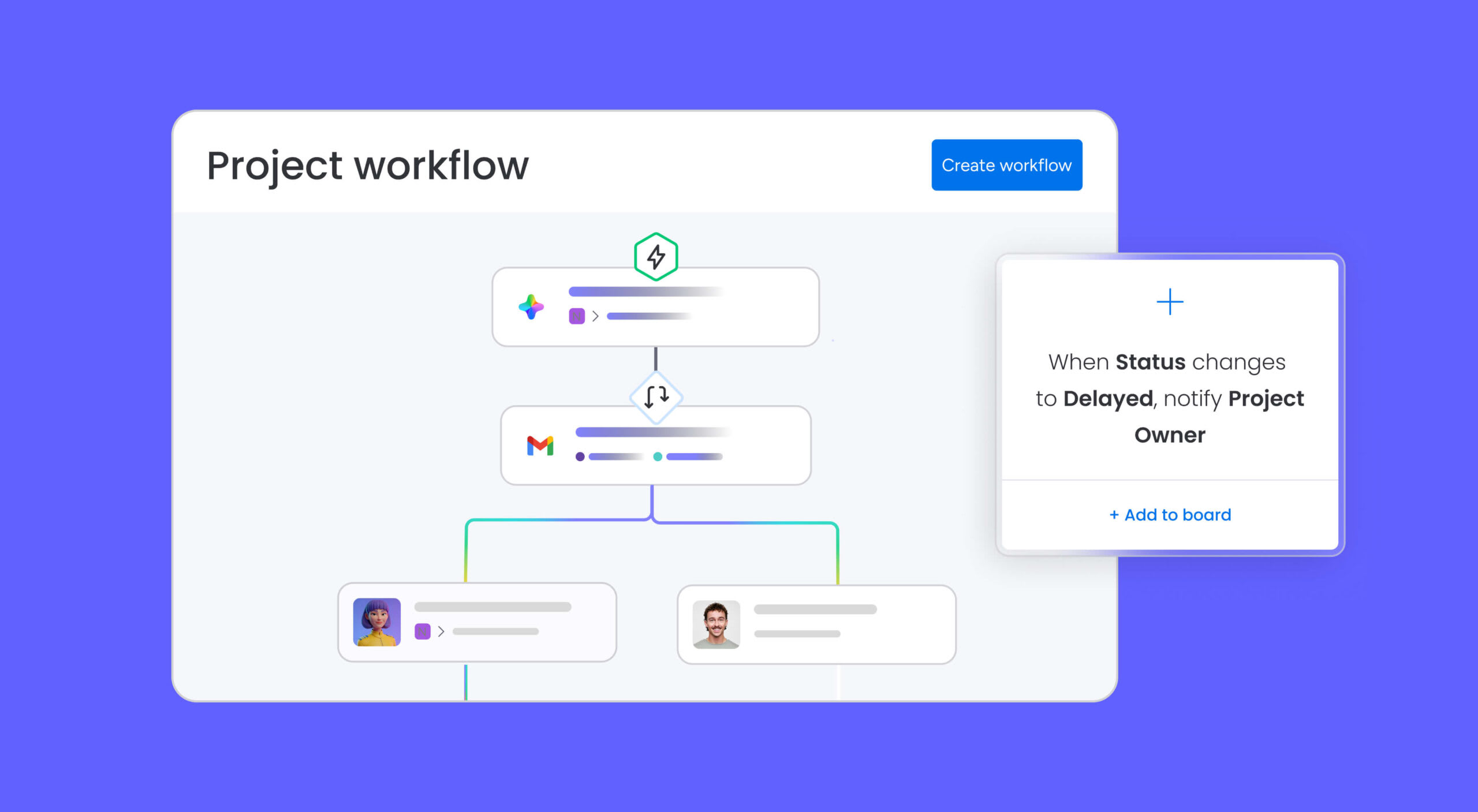
Set trigger-based rules that handle routine coordination automatically. When a task status changes to “Confirmed,” an email notification goes to the venue contact. When a deadline is 3 days away, a Slack reminder reaches the task owner. When all pre-event items are marked complete, the board status updates to “Ready for launch.” These automations keep events moving without requiring someone to manually track every deadline and send every reminder.
monday vibe for custom event portals
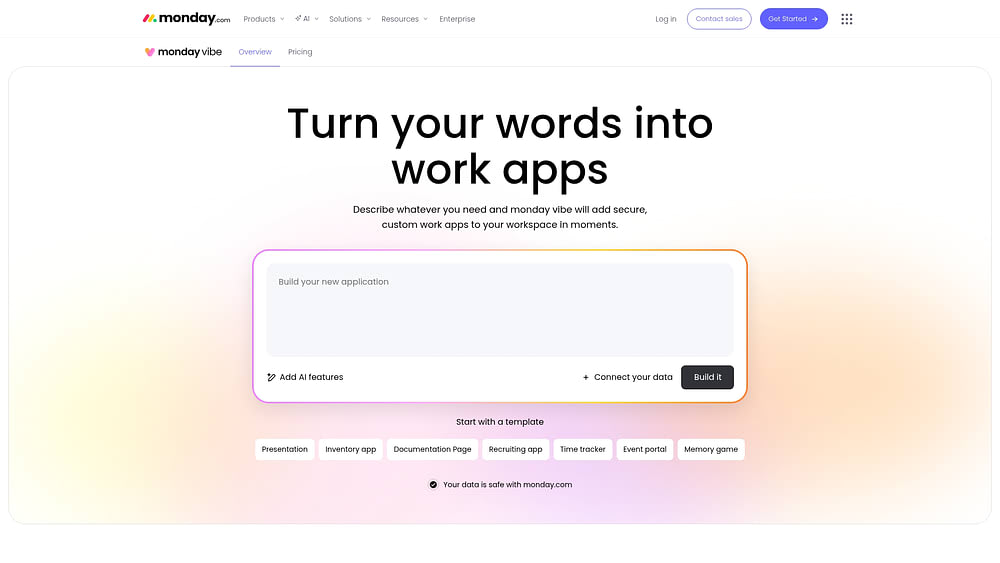
Build custom event portals using an AI-powered no-code app builder. Create attendee-facing registration pages, internal event hubs, or vendor coordination dashboards without writing a line of code. Each portal pulls data directly from your event board, keeping everything connected. Teams can launch branded event experiences that integrate with the same workspace where all the planning happens, eliminating the need for separate registration platforms or external tools.
Dashboards for real-time event visibility

Get real-time visibility into event status, budget, task completion, and team workload across all active events. Dashboards pull data from your event boards into a single view so leadership can track progress without requesting status updates. Your team spends less time reporting and more time executing. Customizable widgets let you surface the metrics that matter most, whether that’s registration numbers, vendor payment status, or task completion rates across your event portfolio.
Here’s how event management with generic platforms compares to using monday.com’s AI Work Platform:
| Task | Without a dedicated platform | With monday.com's AI Work Platform |
|---|---|---|
| Scheduling and tracking | Spreadsheets + shared calendar app | Calendar view + Timeline view on one board |
| Team notifications | Manual emails and messages | Automations triggered by status changes or dates |
| Attendee management | Separate form builder + manual entry | WorkForms feed directly into the event board |
| Reporting | Manual report assembly | Live dashboards updated in real time |
Building stronger events starts with stronger coordination
Event management has grown too complex for generic calendar apps. Teams that centralize scheduling, tasks, and communication on a single event management calendar run tighter events, hit fewer surprises, and spend less time chasing status updates across disconnected platforms.
AI agents, hybrid event coordination, and real-time dashboards are raising the bar for what event calendars can do. Teams that adopt these capabilities now position themselves to handle the growing scale and pace of event programs without adding overhead or headcount. Platforms like monday.com bring all of these capabilities together in one connected workspace, giving teams the tools they need to coordinate events at any scale.
Get startedFAQs
What is an event management calendar?
An event management calendar is a centralized planning platform that organizes all tasks, deadlines, stakeholders, and milestones related to running an event or a portfolio of events on a shared timeline. Unlike a standard calendar, it connects scheduling to task ownership, automation, and team communication so everyone knows what needs to happen and when. It covers the full event lifecycle: pre-event planning, event-day execution, and post-event follow-up.
What's the difference between event calendar software and a standard calendar app?
Standard calendar apps show you when events are scheduled. Event calendar software goes further by attaching tasks, deadlines, owners, and workflows to each event. It also supports multi-user collaboration, integration with project management platforms, and automation for routine coordination. The result is a system that actively coordinates your team rather than passively displaying dates.
How do I build an event management calendar?
Start by listing all event types your team manages and their typical planning timelines. Map out the key phases for each: pre-event tasks, event-day logistics, and post-event follow-up. Assign owners and deadlines to every item, connect the calendar to your existing communication channels like Slack or email, and set up automations to handle routine reminders and status updates. Most teams find a work management platform like monday.com's AI Work Platform more effective than building a manual system in a spreadsheet.
Who should use event calendar management software?
Any team that plans or coordinates events benefits from event calendar management software. Marketing teams running campaigns and trade shows, HR teams managing onboarding and training sessions, operations teams coordinating vendors and logistics, project managers aligning event milestones with broader timelines, and event agencies handling multiple client events all use these platforms. The software scales to fit both small internal events and large multi-day conferences.
What features should I look for in event calendar software?
Look for multiple calendar and timeline views, task and deadline tracking, automation for routine notifications, integrations with platforms your team already uses (Google Calendar, Outlook, Slack), collaboration features like shared access and real-time updates, and dashboards for at-a-glance reporting. AI capabilities, including intelligent scheduling and RSVP management agents, are increasingly valuable for teams managing high-volume event programs.
How does monday.com's AI Work Platform help with event management?
The AI Work Platform provides Calendar view, Timeline view, and automations that connect scheduling to task management in one workspace. Teams use it to track event milestones, automate vendor and stakeholder notifications, collect registrations via WorkForms, monitor event status on live dashboards, and coordinate hybrid or multi-location events. AI agents, including the RSVP Manager Agent, handle routine coordination automatically so teams can focus on execution rather than follow-up.

 Get started