


Modern work moves fast, and the pressure to manage competing priorities has never been higher. Many teams spend their days reacting to what feels urgent rather than focusing on what truly matters. The Eisenhower matrix helps break that cycle by organizing tasks according to urgency and importance, turning long task lists into actionable plans. By categorizing tasks into four quadrants, it helps you decide what to focus on, delegate, schedule, or eliminate altogether. This structure brings balance to busy schedules and precision to complex workloads, allowing you to make decisions with intention instead of instinct.
Through practical examples and customizable templates, this guide shows you how to apply the Eisenhower matrix to both personal and team workflows. The goal is to create a sustainable system that connects everyday actions to long-term outcomes, helping you stay focused, productive, and confident in how you spend your time. For teams looking to turn static templates into live systems that link goals to boards, deadlines, and ownership, monday.com’s AI Work Platform offers a connected workspace that keeps priorities aligned as work evolves.
Key takeaways
- Focus on impact: The Eisenhower matrix organizes tasks by urgency and importance, helping you prioritize meaningful work over busy work.
- Protect time for progress: Quadrant 2 (important but not urgent) drives long-term results; schedule regular time blocks for this strategic work.
- Connect priorities with execution: monday.com’s AI Work Platform turns static templates into live systems that link goals to boards, deadlines, and team ownership.
- Challenge false urgency: Many tasks feel critical but aren’t; pause and ask what happens if you wait 24 hours before acting.
- Refine your matrix regularly: Review daily in fast-paced roles or weekly in steady ones, and remove Quadrant 4 distractions to free time for work that matters.
What is an Eisenhower matrix template?
An Eisenhower matrix template is a reusable 2×2 grid that sorts tasks by urgency and importance. This means you can quickly decide what needs immediate attention, similar to an action priority matrix, versus what can wait, delegate, or disappear entirely.
President Dwight D. Eisenhower developed this method to handle his overwhelming presidential workload. The matrix goes by several names. You may also see it called the Eisenhower Box, the urgent-important matrix, or an Eisenhower matrix worksheet, but all versions use the same 2×2 structure. Today, the same framework helps you transform scattered task lists into a time management matrix that yields focused action plans.
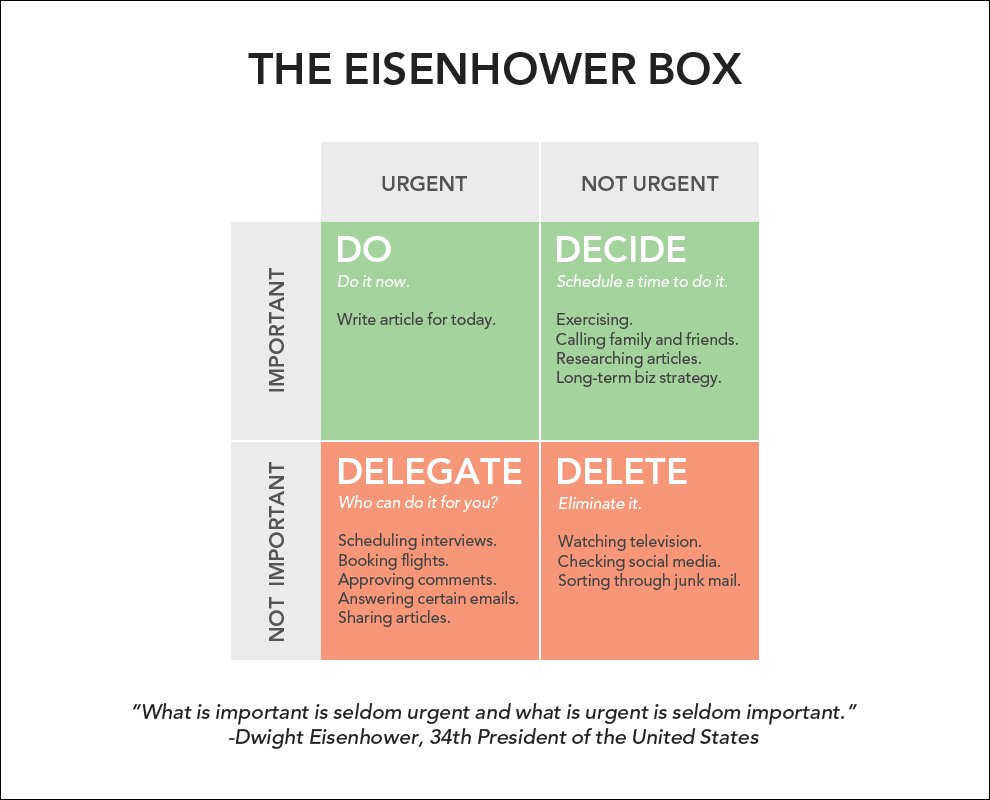
The four quadrants explained
Each quadrant represents a different type of work and requires a specific approach.
Understanding these categories helps you make faster, smarter decisions about where to spend your time.
- Quadrant 1 (Do first): Urgent and important tasks requiring immediate action.
- Quadrant 2 (Schedule): Important but not urgent work that builds long-term success.
- Quadrant 3 (Delegate): Urgent but not important tasks others can handle.
- Quadrant 4 (Eliminate): Neither urgent nor important activities that waste time.
To put the quadrants into a bit more perspective, Quadrant 1 includes the fires you must handle right away, such as a server outage or a client emergency. Once those immediate issues are under control, Quadrant 2 is where you shift focus to strategic work like planning next quarter’s initiatives or developing team capabilities.
In contrast, Quadrant 3 captures the interruptions that appear urgent but don’t contribute to meaningful progress. These might include last-minute meeting requests or approvals that could easily wait. Finally, Quadrant 4 represents true time drains, where effort is spent on activities that add little value, from endless email threads to unnecessary fine-tuning.
Understanding urgent vs important tasks
Urgent means it demands attention right now. Important means it matters for your goals. Most people confuse these two concepts when exploring time management systems, which leads to constant firefighting while strategic work gets pushed aside.
A ringing phone might demand your attention, but preparing your team’s quarterly review delivers lasting impact. The same goes for addressing a customer complaint versus improving the process that caused it in the first place.
Once you recognize the difference between what’s urgent and what’s truly important, it becomes easier to shift from constant reaction to deliberate, high-value work.
Free Eisenhower matrix template downloads
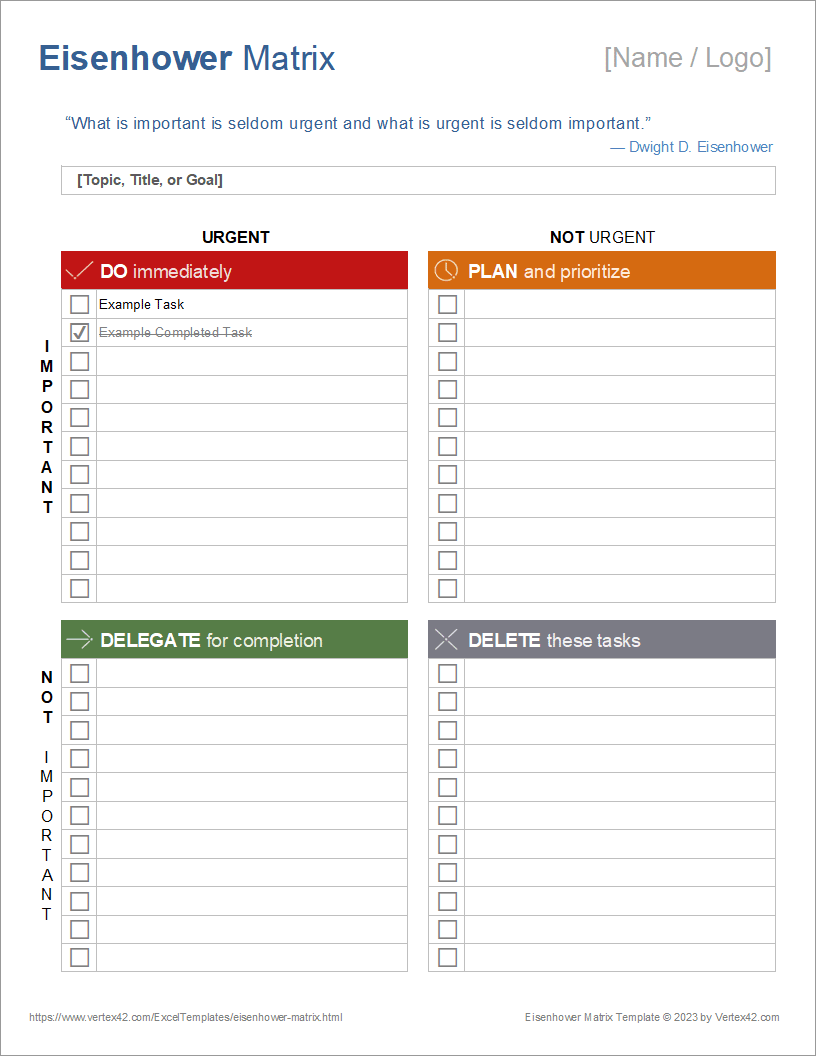
Every person and team approaches prioritizing differently. Some prefer the focus of pen and paper, while others rely on digital platforms that update in real time. The key is finding a format that feels natural and supports how you already work, so prioritizing becomes intuitive rather than another task to manage.
The templates below offer flexible options for different preferences and workflows, whether you want a printable layout for focused planning sessions or a digital version that connects directly to your team’s projects.
Eisenhower matrix template PDF
PDF templates give you consistency across devices. You can fill them digitally or print them for handwritten planning. They work perfectly for weekly planning sessions or when you need a physical reference during meetings.
PDFs also look professional when sharing priorities with your team or manager. Save completed versions to track how your focus areas shift over time. This creates a valuable record of your evolving priorities and forms a helpful decision matrix for future reference.
Printable Eisenhower matrix worksheets
Physical worksheets engage different parts of your brain. Research shows that writing by hand produces higher levels of electrical activity in brain regions tied to memory and sensory processing, which often leads to deeper processing and stronger retention of your priorities. You can highlight, draw arrows, and make notes in ways that feel more natural than clicking and typing.
Whether you call it a printable template or an Eisenhower matrix worksheet, the physical format excels during team planning sessions. Gather around a conference table, give everyone their own sheet, then compare matrices to align on shared priorities. The tactile experience creates more direct engagement than staring at screens. If you also need to map team skills effectively, a resource matrix can be useful in your planning.
Eisenhower matrix template in Excel and Google Sheets
Eisenhower matrix templates in Excel and Google Sheets are popular because spreadsheets let you sort, filter, and customize without design software. To build one, merge cells into a 2×2 grid, label each quadrant (Do First, Schedule, Delegate, Eliminate), and assign a color to each priority level (red for Q1, green for Q2, yellow for Q3, and gray for Q4).
Google Sheets adds the advantage of real-time collaboration, so multiple teammates can update the same matrix simultaneously. Excel offers stronger formula support for teams that want conditional formatting or automatic task scoring.
If you want a version that updates automatically as project status changes without rebuilding formulas each week, monday.com’s AI Work Platform offers a live, connected alternative. You can start from a workflow template and have your Eisenhower matrix reflect real-time progress across every project.
Digital Eisenhower box templates
Digital templates make it simple to adapt as priorities evolve. They can be updated instantly, shared across teams, and integrated into your existing platforms, keeping your focus areas accurate and aligned with current goals.
A platform like monday.com’s AI Work Platform enhances this approach by connecting prioritization directly to execution through a living workflow template that evolves with your projects. It helps teams move seamlessly from planning to action through features such as:
- Task linking: Connect items from your Eisenhower matrix to active project boards, timelines, and team ownership.
- Automated updates: Trigger reminders, status changes, and notifications to maintain alignment as priorities shift.
- Shared dashboards: Visualize progress and ensure every team member understands what matters most.
This structure turns a simple prioritization framework into a connected workspace that keeps work organized, transparent, and consistently focused on high-impact goals.
How to use your Eisenhower matrix template
Effective prioritization template usage requires more than just filling in boxes: you need a repeatable process that helps you think strategically about your time and energy.
Step 1: Brain dump all tasks
Firstly, empty your mind onto paper or screen. List every project, responsibility, and nagging task that’s taking up mental space. Include work items, personal commitments that affect work hours, and anything causing stress.
Set a timer for 15 minutes to encourage thorough thinking. Don’t filter or judge, just capture everything. This comprehensive list becomes your raw material when you prioritize tasks effectively.
Step 2: Assess urgency and importance
Now evaluate each item systematically. For urgency, ask yourself these questions:
- What’s the deadline? Items due today or tomorrow are urgent.
- Who’s waiting? External stakeholders create more urgency than internal ones.
- What happens if I delay? Real consequences indicate true urgency.
For importance, consider different criteria:
- Goal alignment: does this directly support your key objectives?
- Long-term impact: will this matter in six months?
- Value creation: does this produce meaningful results?
If your tasks involve potential pitfalls, a risk matrix can help you evaluate negative outcomes.
How do you know if a task is truly urgent, or just feels that way? The answer often comes down to consequences. If nothing meaningful changes by waiting 24 hours, the urgency is likely manufactured.
Step 3: Sort tasks into quadrants
Place each task where it belongs based on your assessment. Start with obvious items — true crises go in Quadrant 1, while time-wasters land in Quadrant 4.
Ambiguous tasks require deeper thinking, so a decision making template can guide your sorting process. That “urgent” request from a colleague might actually be their poor planning, making it a Quadrant 3 item for delegation. What feels important because it’s familiar might actually be Quadrant 4 busywork.
Step 4: Execute based on priority
Take action according to each quadrant’s strategy. Handle Quadrant 1 immediately but aim to prevent future crises through planning. Schedule dedicated blocks for Quadrant 2 work since this is where real progress happens.
Find the right people for Quadrant 3 tasks. Delegate with instructions and deadlines. For Quadrant 4, simply stop doing these things. Delete them from your list and reclaim that time.
The magic happens when you shift more time to Quadrant 2, one of the most powerful time management techniques. With intuitive platforms like monday.com’s AI Work Platform, you can protect this time by scheduling recurring blocks for strategic planning, relationship building, and skill development, which prevents many Quadrant 1 emergencies from ever occurring.
Digital vs printable Eisenhower matrix templates
The format you use can shape how effectively you prioritize. Some teams thrive in digital environments where collaboration and real-time updates come easily, while others find focus in stepping away from screens to plan on paper. The right choice depends on how you prefer to think, share, and adapt as priorities shift.
The table below outlines the key differences between digital and printable Eisenhower matrix templates, helping you choose the format that fits your workflow and supports the way your team works best.
| Feature | Digital templates | Print templates |
|---|---|---|
| Reusability | Edit and reuse indefinitely | Need fresh copies each time |
| Team sharing | Instant updates for everyone | Must scan or photograph |
| Accessibility | Requires device and internet | Always available on paper |
| Customization | Automate and integrate easily | Limited to manual changes |
| Integration | Connects with work platforms | Standalone planning document |
5 benefits of Eisenhower matrix templates
Regular use of prioritization templates creates compound benefits. What starts as more structured work management evolves into strategic thinking and improved team performance.
1. Eliminate decision fatigue
Every decision drains mental energy. For example, one study found that surgeons were 33 percent less likely to schedule an operation toward the end of their shift compared to earlier in the day. Without a framework, you waste cognitive resources weighing these options repeatedly.
When prioritization becomes systematic, your brain can focus on execution and problem-solving. You stop second-guessing decisions because the framework makes the right choice obvious. Pairing the Eisenhower matrix with dedicated prioritization platforms accelerates this effect by removing manual sorting from the equation entirely.
2. Focus on high-impact work
Most people spend their days in reactive mode, bouncing between Quadrants 1 and 3. The matrix reveals this pattern visually, making it impossible to ignore how little time goes to important strategic work.
This awareness naturally shifts your focus. You start protecting time for Quadrant 2 activities that drive real progress, which is key, as employees who understand how their work contributes to success are twice as likely to feel motivated. The AI Work Platform helps by letting you block calendar time directly from your prioritized task list.
3. Delegate more effectively
What tasks should you actually delegate? Quadrant 3 answers that question directly. These tasks need doing but don’t require your specific expertise. The framework gives you permission to hand them off without guilt.
Categorization also helps when explaining delegation decisions. Team members understand why certain work comes their way when they see the full priority picture.
4. Prevent task overload
How often do you say yes to requests without considering their true value? The matrix forces you to evaluate new commitments against existing priorities.
Quadrant 4 elimination creates breathing room without extending work hours. You discover time you didn’t know existed by cutting activities that add no value.
5. Align team priorities
Shared frameworks create shared language. When everyone uses the same prioritization method, discussions about workload and resources become more productive.
Teams using monday.com’s AI Work Platform can share their matrices transparently. This visibility reduces conflicts about resource allocation and helps managers balance workloads effectively, which is critical when there’s a significant perception gap between leadership (92% of whom believe their organization fosters shared ownership) and individual contributors (76%).
Eisenhower matrix example: What a filled-in matrix looks like
Theory is useful, but seeing a completed matrix makes the framework concrete. Imagine a marketing manager starting the week with 15 items on their list. After sorting each one by urgency and importance, the matrix looks like this:
| Urgent | Not urgent | |
|---|---|---|
| Important | Q1 — Do first: Client presentation due tomorrow; critical website bug reported by a customer | Q2 — Schedule: Q3 campaign strategy; team training plan; process documentation |
| Not important | Q3 — Delegate: Reply to vendor request for information; update shared project status report | Q4 — Eliminate: Reorganizing old email folders; attending a non-essential weekly standup |
What does your current task list actually reveal about how you spend your time? For most managers, the exercise surfaces a pattern: the majority of “urgent” items are actually Q3. They need attention, but not yours. Meanwhile, the work with the highest long-term value (Q2) sits unscheduled because nothing external is forcing a deadline.
The real takeaway isn’t the sorting itself. It’s recognizing that protecting Q2 time is the single highest-leverage habit you can build. On monday.com’s AI Work Platform, each of these tasks can live on a board with its quadrant status as a column, so the whole team sees the same priority picture.
Learn more: AI Chief of Staff agent
Best practices for using your Eisenhower matrix
The matrix itself is simple. Making it stick requires a few disciplined habits that turn occasional prioritization into an ongoing system. These practices work whether you’re running a printable worksheet or a digital board.
- Limit tasks per quadrant: Cap each quadrant at 10 items. More than that signals the matrix needs refining, not expanding. If your Q1 consistently holds 15+ items, you’re either mislabeling urgency or missing delegation opportunities.
- Color-code by quadrant: Assign a consistent color to each of the four quadrants across all your templates and digital boards. Red for Q1, green for Q2, yellow for Q3, and gray for Q4 is a common system. This builds visual muscle memory and speeds up sorting. You’ll start recognizing which quadrant a task belongs to before you’ve consciously evaluated it.
- Keep personal and professional separate: Mixing personal commitments into a work matrix muddies both. Run two matrices, one for work priorities and one for personal, and review them at different intervals (daily for work, weekly for personal).
- Process Q4 first: When was the last time you looked at your task list and removed something entirely? Counter-intuitively, eliminating Quadrant 4 items before acting on Quadrant 1 frees mental bandwidth immediately. Removing noise makes the real priorities more obvious and prevents low-value tasks from lingering week after week.
When your team runs priorities on monday.com’s AI Work Platform, these practices become part of the workflow rather than a separate habit to remember. Color-coded statuses, task limits per group, and automated Q4 archiving keep the matrix disciplined without manual upkeep.
Common Eisenhower matrix mistakes and how to avoid them
Using the Eisenhower matrix regularly does more than organize your task list. It reshapes how you think about work. Over time, consistent prioritization builds stronger habits, reduces stress, and strengthens collaboration. What begins as a simple framework for sorting tasks often grows into a structured mindset that improves focus, decision-making, and team alignment.
The strategies below show how to handle the three most common failure modes so your matrix stays accurate and actionable.
1. Everything feels urgent
In fast-paced environments, it can feel like every request demands immediate attention. This mindset overloads Quadrant 1 and leaves no time for the strategic work that lives in Quadrant 2.
To regain control, try these simple checks:
- Question the urgency: Ask what actually happens if you wait 24 hours before responding.
- Look for intent: Many “urgent” requests come from a desire for quick closure rather than real necessity.
- Apply the tomorrow test: If a task can wait until tomorrow without serious impact, it’s not truly urgent.
Recognizing false urgency helps you protect time for the work that drives lasting results.
2. Neglecting Quadrant 2
Important but not urgent work rarely demands attention on its own. No one sends reminders to plan next quarter’s strategy or invest in skill development, which makes Quadrant 2 the easiest area to overlook.
To stay consistent:
- Schedule strategic time: Treat Quadrant 2 work like a client meeting that can’t be moved or cancelled.
- Build accountability: Use a platform like monday.com’s AI Work Platform to automate recurring time blocks for long-term initiatives and track progress over time.
- Protect the calendar: When planning your week, prioritize these sessions before filling in reactive tasks.
Making space for Quadrant 2 ensures you’re building progress intentionally, not just managing the day-to-day.
3. Static task placement
Priorities shift as projects evolve and new information emerges. Yet many people create their matrix once and never update it, an approach that quickly becomes irrelevant.
Set a recurring reminder to review your matrix. Daily reviews work for dynamic roles, while weekly updates suit more stable positions. During each review, ask if yesterday’s priorities still make sense today.
Create a dynamic Eisenhower matrix with monday.com's AI Work Platform
A static matrix can help you organize priorities for the day, but it can’t adapt as work evolves. monday.com’s AI Work Platform, which scores 9.1 for Ease of Use on G2, brings the Eisenhower framework to life by transforming it into a flexible, intelligent system that updates in real time.
Instead of managing a one-time snapshot, you can create an evolving view of your priorities that stays aligned with ongoing projects, shifting deadlines, and team collaboration. The features below show how the AI Work Platform turns a traditional matrix into a connected workspace that supports smarter decisions, automated prioritization, and shared accountability across your entire team.
Visual board templates
Traditional matrices show four boxes. The AI Work Platform creates interactive boards where tasks move between quadrants as priorities shift. Color coding, status updates, and progress bars bring your matrix to life.
Switch between views instantly and view your matrix as a classic grid, timeline, or Kanban board. This flexibility supports different thinking styles and work contexts without losing the core prioritization framework.
Automated task prioritization
Manually sorting tasks takes time and focus that could be spent on meaningful work. monday.com’s AI Work Platform uses automation and AI to keep your Eisenhower matrix accurate and up to date with minimal effort.
- Intelligent suggestions: AI analyzes deadlines, dependencies, and past patterns to recommend the right quadrant for each task.
- Smart automation rules: As deadlines approach, tasks can automatically move to “urgent,” while completed items shift to “done.”
- Continuous accuracy: Automated updates ensure your matrix always reflects current priorities without manual maintenance.
AI Blocks extend this further with pre-built AI functions that categorize incoming work by priority, summarize project status, and trigger the right next step without manual configuration. These blocks turn your Eisenhower matrix from a planning exercise into a living system that responds to new information as it arrives.
Powerful AI features
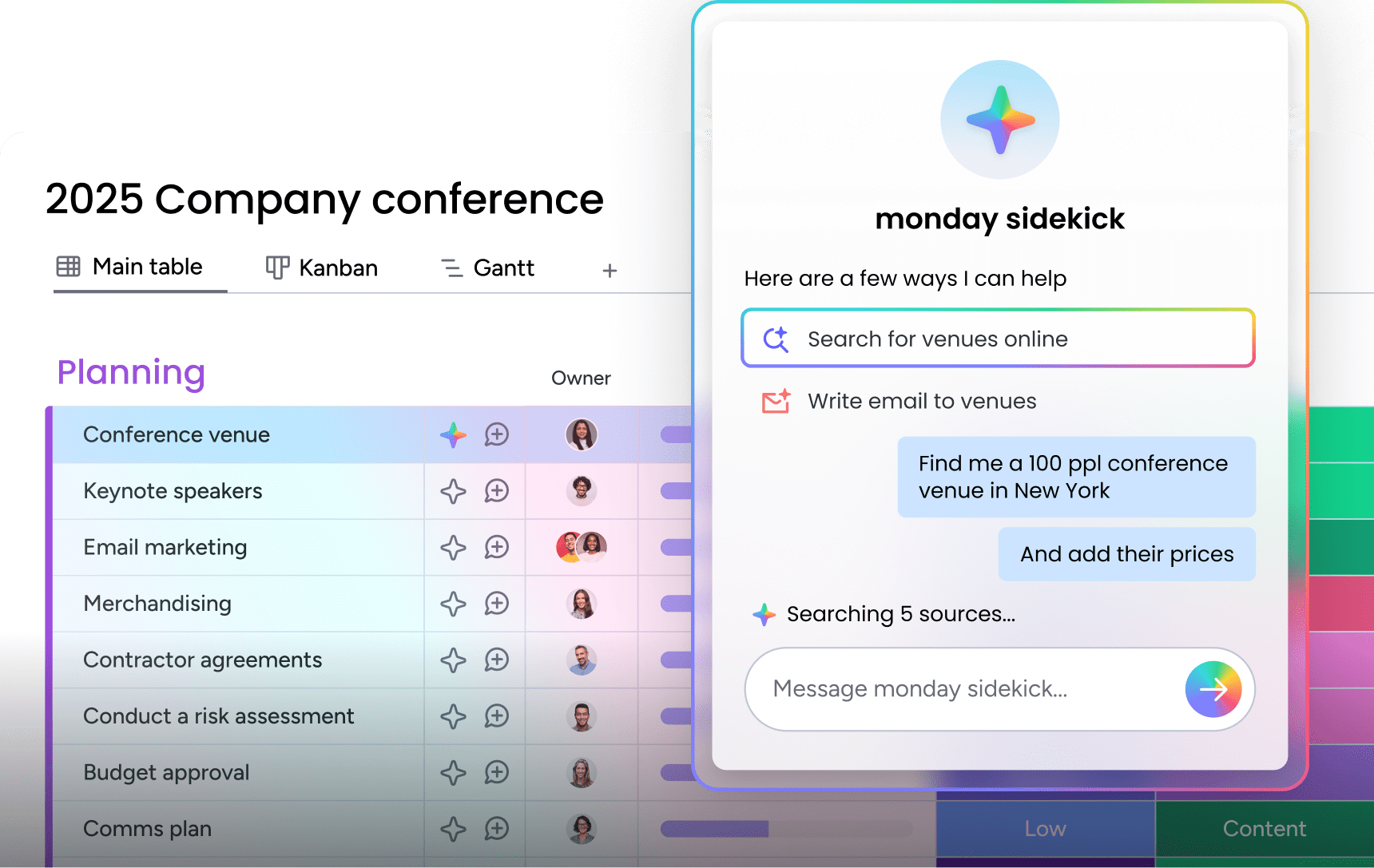
monday sidekick is a context-aware AI assistant embedded in your workspace. It understands your organization’s data, workflows, and project history. Ask it which items belong in Q1 and it returns a grounded recommendation based on actual deadlines and dependencies, not guesswork.
For teams managing complex workloads, monday agents, including the purpose-built Project Analyzer, monitor priorities around the clock. The agent surfaces risks and escalations before they become Quadrant 1 fires, so you can spend more time in Quadrant 2 where the real strategic value lives.
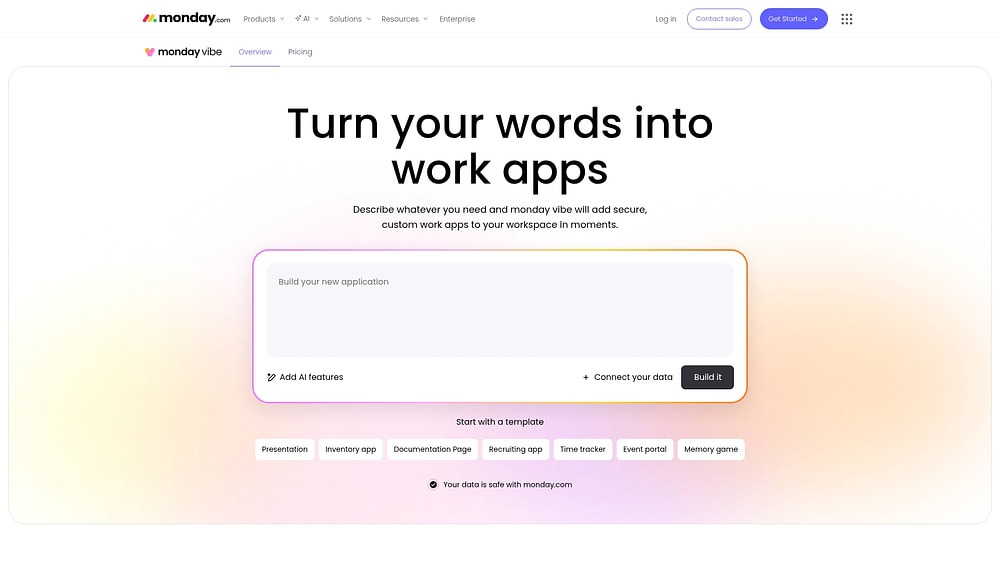
monday vibe takes this a step further: type a prompt like “build me a priority tracker that separates team and personal tasks” and the AI app builder generates a fully functional, custom board. No technical setup required. It’s the fastest way to go from “I need a structured matrix” to “I have a working system.”
If your team uses AI clients like Claude or Microsoft Copilot, monday MCP connects them directly to your boards. Query your priorities in natural language, generate reports, or update task status without leaving your AI environment.
200+ integrations to link workflows

Your Eisenhower matrix works best when it connects to the platforms your team already uses. The AI Work Platform integrates with over 200 platforms, ensuring your priorities stay consistent across every workflow.
- Seamless connections: Link your matrix to platforms like Jira, Google Calendar, Slack, and more.
- Automated updates: When a task changes in one system, it syncs everywhere to maintain alignment.
- Eliminate duplicate work: Updates flow automatically, reducing manual data entry and keeping information accurate.
- Unified visibility: All priorities stay connected in one workspace, creating a single source of truth for what matters most.
These integrations turn your Eisenhower matrix into a connected workspace that reflects real-time progress across your entire organization.
Team collaboration features
Individual prioritization only goes so far. Real productivity comes from aligned teams working toward shared goals. The AI Work Platform enables multiple team members to maintain connected matrices that update in real time.
Comment threads, file attachments, and activity logs create context around priority decisions. When priorities change, automated notifications ensure everyone adjusts their focus accordingly. No more working from outdated priority lists or conflicting directions.
Turn prioritization into action with the right framework
The Eisenhower matrix gives you a clear, repeatable way to separate what matters from what doesn’t. By organizing tasks into four quadrants based on urgency and importance, you can shift from reactive firefighting to intentional, high-impact work. Whether you start with a printable worksheet or a digital template, the key is building a habit that protects time for strategic priorities while eliminating distractions that drain focus.
For teams ready to move beyond static templates, monday.com’s AI Work Platform connects your Eisenhower matrix to live workflows, automated updates, and shared visibility across projects. It turns prioritization into a dynamic system that evolves with your work, keeping everyone aligned on what needs attention now and what drives long-term success. Start organizing your priorities with clarity, consistency, and the tools that support smarter decisions every day.
Frequently asked questions
Does Excel have an Eisenhower matrix template?
Excel doesn't include a built-in Eisenhower matrix template, but it's easy to create one. You can merge cells to form a simple 2x2 grid, label each quadrant for urgency and importance, and customize colors or borders to match your workflow. Alternatively, you can download ready-made templates online to save setup time and start prioritizing right away.
How do you create an Eisenhower matrix in Google Sheets?
To create an Eisenhower matrix in Google Sheets, start by merging cells to form a 2x2 grid. Add borders to define each quadrant, then label them according to priority: urgent and important, important but not urgent, urgent but not important, and neither urgent nor important. Finally, list your tasks in the relevant sections to visualize what needs attention first.
What is the Eisenhower matrix 1-3-5 rule?
The 1-3-5 rule is a personal productivity guideline that pairs well with the Eisenhower matrix: plan each day around 1 major task (Quadrant 1 or high-priority Q2), 3 medium tasks, and 5 smaller ones. It doesn't replace the four-quadrant system but works alongside it to prevent overloading your daily agenda.
What is the difference between the Eisenhower matrix and a priority matrix?
The Eisenhower matrix is a specific type of priority matrix that uses urgency and importance as its two axes. A priority matrix is a broader term for any 2x2 grid that compares two variables to rank work. Other variants use effort vs. impact, cost vs. benefit, or risk vs. value as their axes. If you need a framework beyond urgency and importance, a priority matrix template can be adapted to different evaluation criteria.
How often should you update your Eisenhower matrix?
Update your Eisenhower matrix daily if you work in a fast-changing environment, or weekly for more stable roles. You should also undertake additional reviews whenever major new projects or priorities emerge.
Can teams share the same Eisenhower matrix template?
Teams can effectively share Eisenhower matrix templates when working on joint projects or similar functions, using platforms like monday.com's AI Work Platform to maintain synchronized priorities and transparent workload distribution.

 Get started