


Project teams juggle client demands, internal deadlines, and cross-departmental coordination daily. When work spans multiple platforms, critical updates get buried in email threads, manual handoffs create bottlenecks, and project visibility disappears into spreadsheet silos. The result? Teams spend more time managing their tools than delivering value to clients.
The right workflow automation software tackles this mess head-on: putting everything in one place, automating repetitive busywork, and connecting your team with smarter processes that actually work. The best workflow automation software transcends basic task management to provide real-time visibility, seamless client collaboration, and measurable efficiency gains. Teams that choose the right platform don’t just work faster — they deliver projects quicker, make more strategic use of their resources, and keep stakeholders genuinely happy with the results.
Let’s look at what really sets powerful workflow automation platforms apart from basic project management tools. We’ll also explore essential features like no-code automation, client portals, and resource management capabilities, plus show you how leading service organizations achieve measurable results through centralized workflow automation.
Key takeaways
Before we explore the platforms and features shaping service-delivery automation, here are the core points every project manager needs to know:
- Centralized control: bring all client work, updates, and communication into one unified workspace to eliminate fragmentation.
- Automation that scales: replace manual handoffs with no-code workflows that keep projects moving without constant oversight.
- Client transparency: give customers real-time access to timelines and deliverables through secure client portals.
- Smarter resourcing: use visual workload and capacity data to deploy teams efficiently across multiple engagements.
- Proven results with monday work management: leverage 200+ automations and workload tools to drive measurable gains like Playtech’s 26% efficiency lift.
What makes project managers choose monday work management for workflow automation?

Project managers (PMs) in services face a fundamental challenge: work fragmentation across multiple tools and platforms. When client projects, team workflows, and stakeholder communications live in one unified platform, you gain the visibility and control needed for efficient service delivery with enterprise workflow management software.
Managing multiple client engagements simultaneously becomes manageable when centralized workflows connect every aspect of your work. This allows you to manage every engagement from a single source of truth, where you can find critical updates instantly. Project managers gain a single source of truth where work flows automatically, ensuring every detail is tracked and accounted for.
The platform’s proven impact speaks volumes: Playtech’s PMO department achieved a 26% increase in efficiency and saved three hours per person weekly after implementing monday work management. This transformation happened because PMa could finally see all their work in one place, automate manual updates, and coordinate seamlessly across teams and clients.
monday work management top features for workflow automation
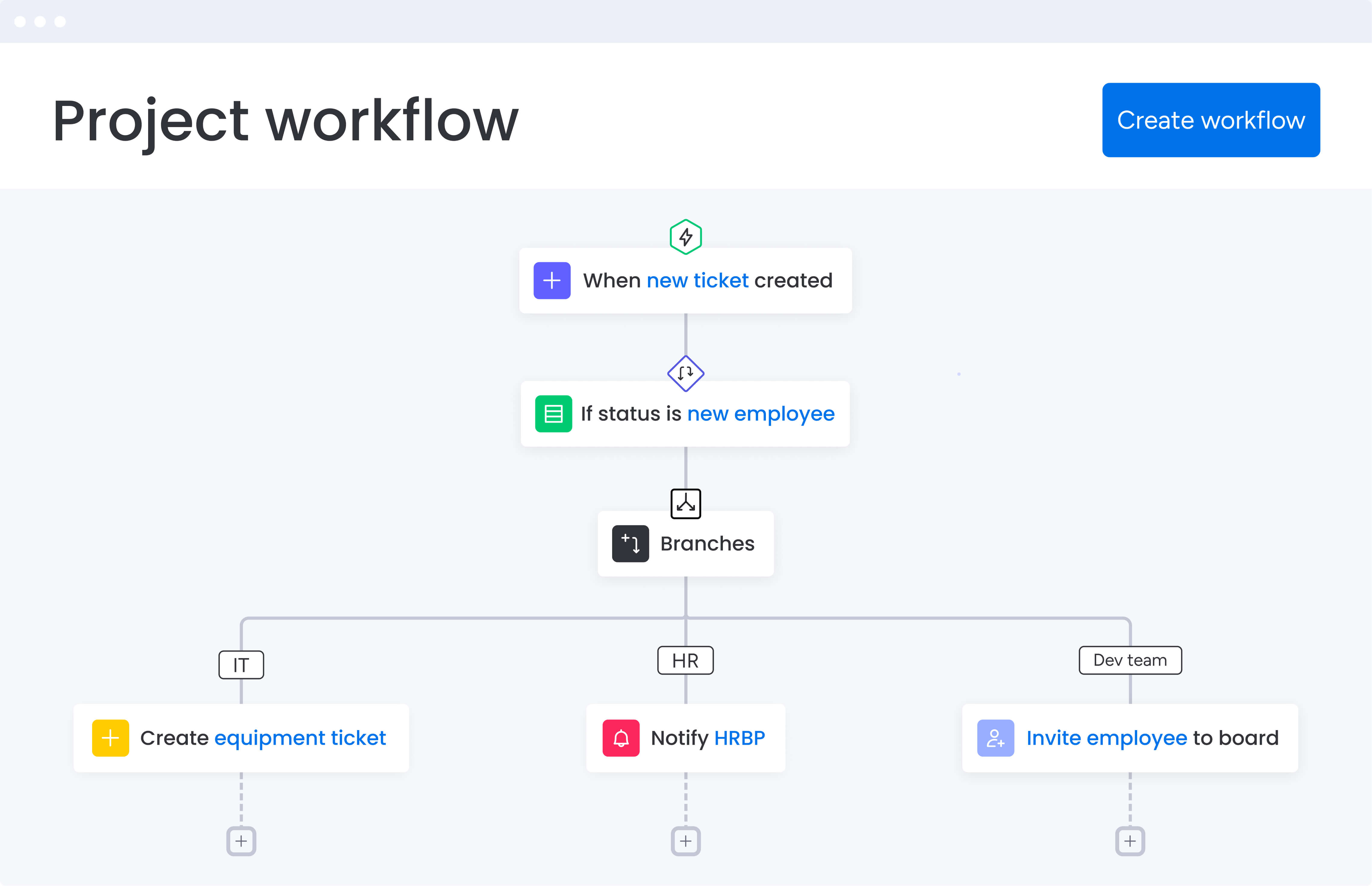
The following features demonstrate how monday work management addresses the specific challenges project managers face when coordinating complex service delivery workflows. Each capability directly impacts your ability to maintain visibility, reduce manual work, and deliver exceptional client results.
Automated workflows
You’ll get 200+ ready-made automation recipes that wipe out the repetitive manual work bogging down your client delivery process. These no-code workflow automation software solutions trigger actions based on status changes, deadlines, or custom conditions you define.
For you as a service PM, this means your client projects keep moving forward: even when you’re juggling a dozen different engagements. Key automation capabilities include:
- Status notifications: automatically alert stakeholders when deliverables are ready.
- Escalation triggers: send overdue items to team leads without manual intervention.
- Dashboard updates: refresh client-facing dashboards when milestones complete.
- Resource alerts: notify managers when external resources can be released.
This slashes the admin work that eats up hours of your day — time you could spend on actual client strategy.
Real-time dashboards and reporting
Build dashboards that pull everything you need from across projects and workflows—so you can instantly see how your portfolio’s performing, where your resources are going, and which projects need attention. Pre-built widgets display critical metrics without requiring manual report generation.
This real-time visibility proves essential for services Project Managers who need to quickly assess capacity, identify bottlenecks, and provide accurate updates to stakeholders. Instead of spending hours compiling status reports, share live dashboards that automatically reflect current project states.
For a real-world result example Genpact’s global marketing team achieved a 40% improvement in cross-team collaboration after implementing monday work management and utilizing this feature.
Client portal and external collaboration
The platform enables project managers to invite external clients and stakeholders directly into project boards with controlled permissions. Clients can view progress, approve deliverables, and provide feedback without needing full platform access.
For services teams, this external collaboration capability transforms client relationships. Project Managers eliminate endless email chains and status meeting requests by giving clients self-service access to real-time project information. With workflow automation, clients see exactly where their projects stand and when deliverables will be ready.
Resource management and workload view
The Workload view provides visual capacity planning that shows exactly how work is distributed across your services team. Project Managers can see who is overallocated, who has available capacity, and how to balance workloads across multiple client projects.
This tackles your biggest challenge as a services PM: getting the right people on the right projects when you need them — without the guesswork. With visual workload management, you make informed staffing decisions and ensure no team member becomes a bottleneck.
How project managers in services benefit from monday work management
The platform delivers measurable improvements across key performance areas that matter to services organizations. These benefits directly address the operational challenges that impact both team productivity and client satisfaction.
- Time savings: automate status updates, approval workflows, and client notifications to reclaim two to three hours per day previously spent on administrative work.
- Cost efficiency: reduce tool sprawl by consolidating project management, resource planning, and client collaboration into one platform.
- Improved accuracy: standardized workflows and automated data collection ensure consistent project execution and reliable reporting.
- Faster delivery: streamlined workflows and automated handoffs accelerate project timelines significantly.
- Enhanced visibility: real-time dashboards provide instant insights into project health and resource utilization across your entire services portfolio.
- Client satisfaction: automated client updates and self-service project portals improve communication and reduce status meetings.
How to automate service delivery workflows with monday work management
To get workflow automation right, start with what’s already working, then strategically add efficiency where you need it most. This step-by-step framework ensures smooth adoption and measurable results within your first month of implementation.
Step 1: audit your current tool stack and workflows
Document all the tools your services team currently uses and map out your existing workflows from client intake through project delivery. Create a comprehensive inventory that includes:
- Tool assessment: list every platform, spreadsheet, and system currently in use.
- Workflow mapping: document how work moves between team members and departments.
- Pain point identification: highlight repetitive tasks, manual handoffs, and areas where work gets lost between systems.
Step 2: set up your centralized workspace
Create your main workspace and establish boards for different workflow types. These might include client projects, resource planning, intake requests, and portfolio oversight. Use the template library to accelerate setup with pre-built service delivery workflows.
Focus on creating boards that mirror your current processes while eliminating redundancies. Start with three to four core board types before expanding to specialized workflows.
Step 3: configure automated workflows for common processes
Implement automation recipes for your most frequent workflows. Start with client onboarding sequences, approval processes, status update notifications, and resource allocation alerts. Begin with three to five high-impact automations before expanding.
Prioritize automations that save the most time or eliminate the highest-risk manual processes. Test each automation thoroughly before rolling out to the entire team.
Step 4: integrate your essential tools
Connect monday work management with your existing tech stack including communication tools, time tracking systems, billing platforms, and any industry-specific applications your services team relies on.
Focus on integrations that eliminate duplicate data entry or provide critical visibility across platforms. Common integrations include email, calendar, and financial systems.
Step 5: invite your team and clients
Add internal team members with appropriate permissions and create client-facing boards where external stakeholders can track progress. Set up role-based access to ensure clients see only their relevant projects.
Start with a pilot group of internal users before expanding to external stakeholders. This allows you to refine processes and address any issues before client exposure.
Step 6: monitor, measure, and optimize
Use dashboards to track workflow performance, identify bottlenecks, and measure time savings. Gather team feedback and continuously refine your automations and processes based on real usage data.
Establish baseline metrics before implementation to accurately measure improvement. Review performance monthly and adjust workflows based on actual usage patterns.
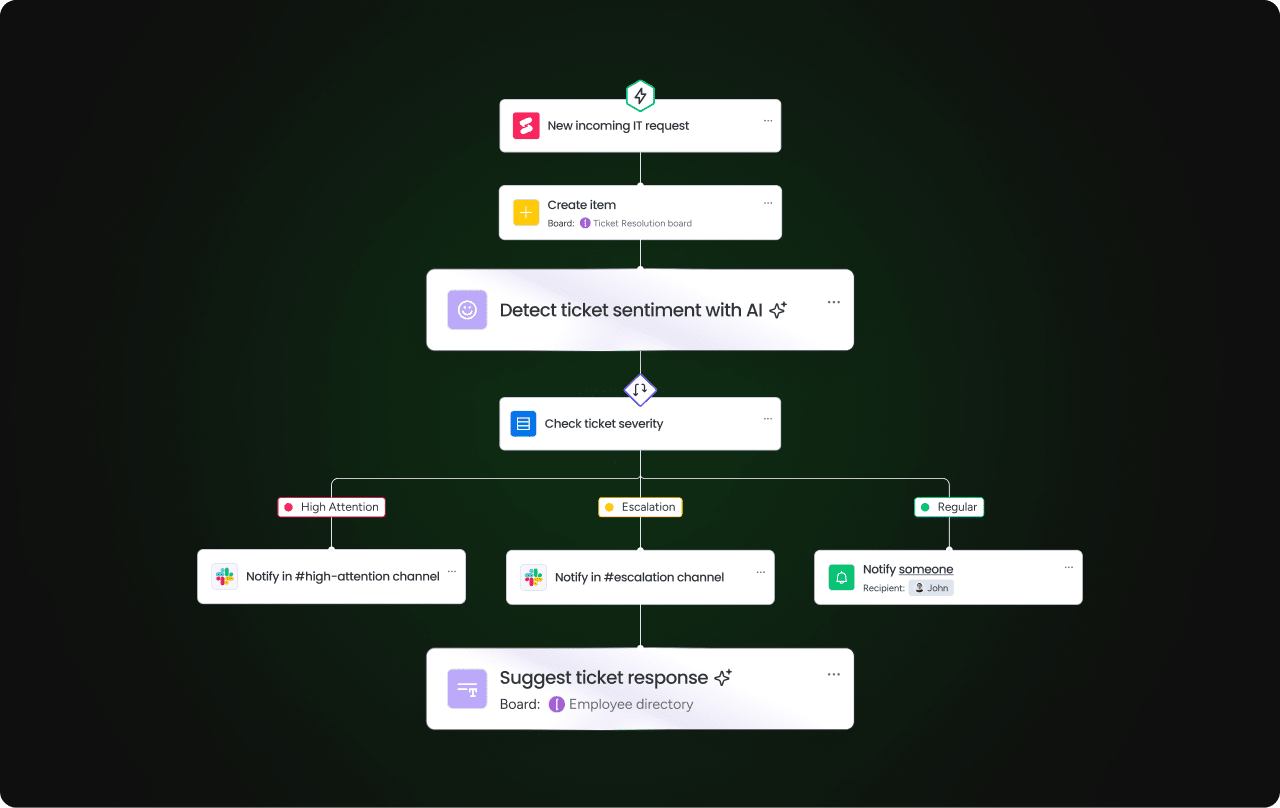
Platform comparison: monday work management vs competing solutions
When debating which workflow automation platform to choose, it’s important to compare features that directly impact project delivery speed, client satisfaction, and resource optimization.
This comparison highlights the key capabilities that matter most for PMs managing multiple client engagements.
| Feature | monday work management | Asana | Smartsheet |
|---|---|---|---|
| Pre-built automation recipes | 200+ | 50+ | Limited |
| Client portal capabilities | Native | Third-party only | Limited |
| Resource management | Built-in workload view | Premium only | Separate tool required |
| Visual workflow builder | Drag-and-drop, no-code | Limited customization | Formula-based |
| Real-time dashboards | Unlimited custom dashboards | Limited in lower tiers | Additional cost |
| External stakeholder access | Included in all plans | Premium feature | Limited |
| Implementation time | 2-4 weeks | 4-6 weeks | 6-8 weeks |
| Price per user/month | From $9 | From $10.99 | From $9 |
Customer success story: how Playtech's PMO transformed their project delivery
This real-world example demonstrates how monday work management addresses the specific challenges services organizations face when scaling project delivery across multiple clients and stakeholders.
The challenge
When Yossi Shamir joined Playtech eleven years ago, project managers relied on spreadsheets, email, and notepads to manage countless client projects. As the gaming industry underwent digital transformation, clients began demanding more frequent updates and faster results. The PMO team struggled to keep up while managing projects across the traditional constraints of scope, schedule, and cost.
The scattered tools created significant inefficiencies:
- Resource booking issues: project managers had no clear way to track preliminary project discussions, often booking resources for projects that weren’t yet fully defined
- Visibility gaps: there was no centralized view of running projects, making it difficult to manage timelines or coordinate with external stakeholders
- Communication breakdowns: critical project information lived in email threads and individual spreadsheets, creating coordination challenges
The solution
Playtech’s PMO implemented monday work management to create a unified platform for managing projects from initiation to closure. They established separate boards for different project phases including preliminary discussions, management approvals, project budgeting, and active project portfolios.
The team built customized project templates that could be quickly duplicated and adjusted for each new client engagement. They integrated Jira to provide visibility into technical development progress. Custom automations were configured to notify relevant stakeholders about project issues and automatically alert managers when external resources could be released.
The results
The transformation delivered impressive outcomes across multiple performance metrics:
- 26% increase in efficiency across the PMO department.
- 49% increase in collaboration and transparency with stakeholders.
- 23% increase in meeting KPIs through improved process consistency.
- Over three hours saved per person per week through workflow automation.
Transform your service delivery with centralized workflow automation
Project managers in services no longer need to accept scattered tools and manual processes as the cost of doing business. The evidence is clear: organizations that centralize their workflows see immediate improvements in efficiency, client satisfaction, and team coordination.
Solutions like monday work management provide the unified platform you need to eliminate work fragmentation, automate repetitive tasks, and gain the visibility required for exceptional service delivery. With proven results like Playtech’s 26% efficiency increase and three hours saved per person weekly, the platform delivers measurable ROI that justifies implementation.
Join thousands of customers who trust monday work management to streamline their operations. Experience centralized workflow automation that transforms how your services team delivers value to clients while reducing administrative burden on your PMs.
The content in this article is provided for informational purposes only and, to the best of monday.com’s knowledge, the information provided in this article is accurate and up-to-date at the time of publication. That said, monday.com encourages readers to verify all information directly.
Frequently asked questions
How quickly can our services team implement monday work management?
Most services teams achieve full implementation within 2-4 weeks. The platform's intuitive interface requires minimal training, with many Project Managers becoming proficient within days. The availability of pre-built templates for common service delivery workflows accelerates adoption.
Can monday work management handle client-specific workflow customizations?
Yes, the platform is designed for flexibility while maintaining standardization. Project Managers can create master templates for standard service delivery processes, then customize individual client boards to accommodate specific requirements, approval chains, or reporting needs.
How does monday work management integrate with existing billing and time tracking systems?
The platform offers 200+ native integrations and an open API for custom connections. Common integrations for services teams include time tracking tools like Toggl and Harvest, billing systems like QuickBooks, and project accounting platforms.
What is the learning curve for non-technical Project Managers?
The learning curve is minimal due to the platform's visual, intuitive interface. Non-technical Project Managers can build automated workflows using drag-and-drop tools without any coding knowledge. The 200+ pre-built automation recipes cover common scenarios.
How do we measure workflow automation success in our services organization?
monday work management provides built-in analytics and custom dashboards to track key metrics like time saved per project, reduction in manual tasks, faster project turnaround times, and improved resource utilization rates.
Can workflow automation tools scale as our services business grows?
The platform is built for scalability, supporting everything from small service teams to enterprise organizations managing hundreds of concurrent client projects. The flexible pricing and unlimited customization ensure it grows with your business.

 Get started