


Marketing teams at enterprise organizations face a fundamental challenge: coordinating complex campaigns across 50-100+ people while proving measurable ROI to leadership. When creative requests disappear into email threads, teams duplicate efforts across silos, and nobody knows who’s working on what, even the most strategic campaigns struggle to deliver impact. The answer isn’t cramming in more status meetings or building another master spreadsheet — it’s implementing workflow automation that turns your scattered marketing efforts into a synchronized machine.
The best workflow automation software addresses this complexity through centralized visibility, intelligent resource management, and automated processes that scale with your organization. When VML saved 7,000 hours per account monthly and Canva tripled their creative output, they demonstrated what happens when marketing teams move from manual coordination to systematic automation. These platforms don’t just organize work — they connect campaign planning to performance tracking, link creative production to distribution schedules, and provide real-time insights that drive strategic decisions.
In this guide, we’ll break down why workflow automation matters for your enterprise marketing team, which features actually move the needle, and how to build systems that both streamline operations and drive growth strategy. We’ll examine proven features, implementation strategies, and measurement approaches that help marketing leaders build scalable operations while maintaining the agility to adapt as priorities shift.
Key takeaways
For enterprise marketing leaders, the right workflow automation platform is the key to connecting strategy with execution. It provides the operational backbone to coordinate large teams, prove campaign value, and drive measurable business growth. Here’s what you need to know:
- Connect marketing work to business results: track campaign ROI and team performance in real-time dashboards so leadership sees exactly how marketing drives revenue growth.
- Stop recreating processes for every campaign: build standardized workflows and templates that teams can customize, eliminating the need to start from scratch each time.
- Get complete visibility across 100+ person teams: see who’s working on what, spot bottlenecks before they cause delays, and balance workloads to prevent burnout.
- Transform operations with monday work management: use AI-powered insights, cross-project dependencies, and enterprise templates to coordinate complex marketing portfolios at scale.
- Implement systematically for faster results: start with pilot teams, prove value through measurable outcomes, then scale organization-wide using proven workflows and governance structures.
What makes heads of marketing choose workflow automation?
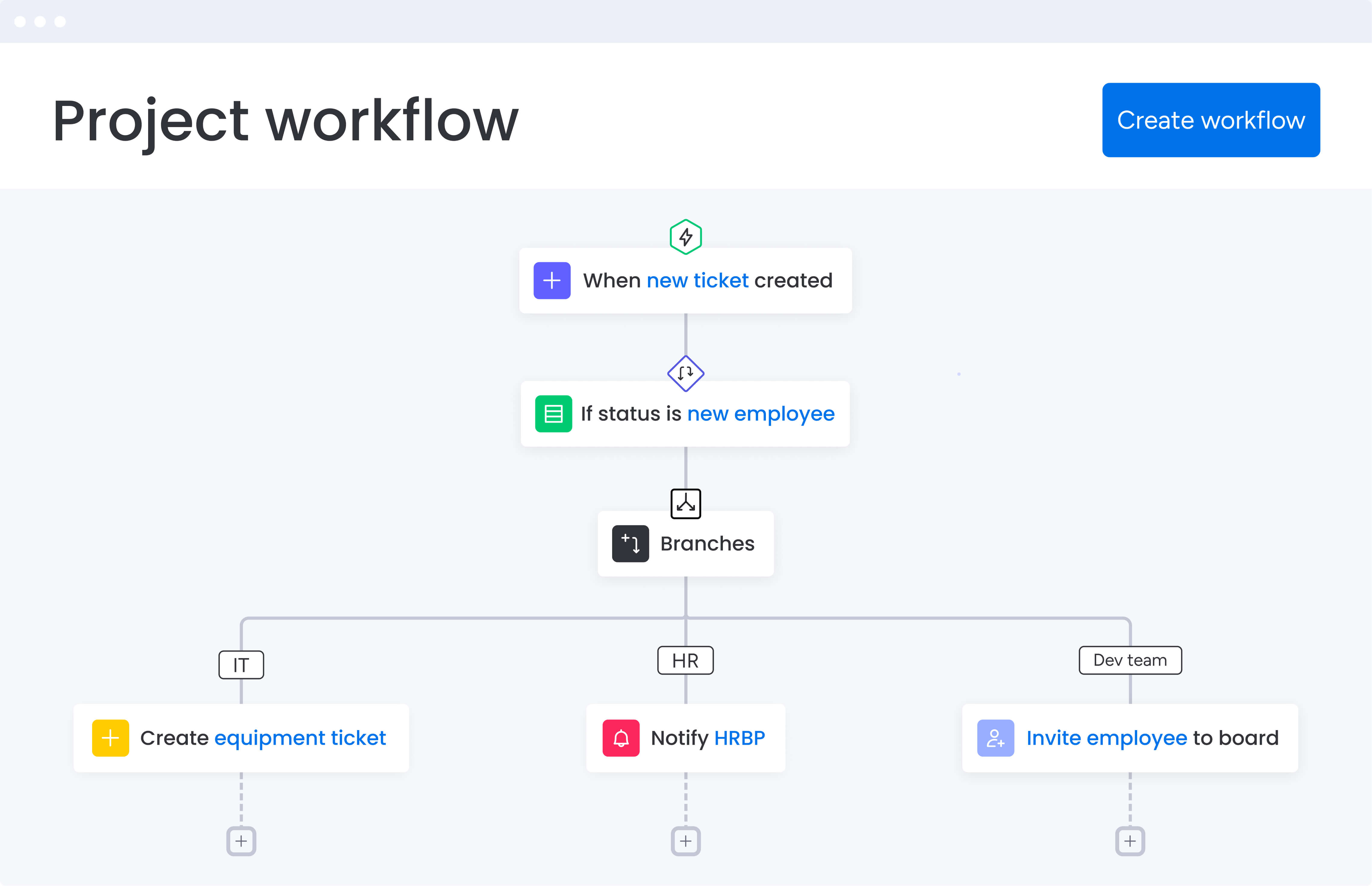
Heads of marketing at enterprise tech companies face a unique challenge: coordinating 50-100+ people across content, creative, acquisition, events, and operations teams while proving ROI to executive leadership. Without the right workflow management software, this complexity creates disconnected execution, duplicative processes, and scattered marketing impact.
The solution lies in workflow automation software that transforms fragmented work into aligned, high-impact marketing operations. When VML saved 7,000 hours per account monthly and Canva tripled their creative output, they demonstrated what’s possible when teams move from manual coordination to intelligent automation. Research shows that campaign creation and execution speed increases 15-fold with agentic AI implementation, driven by faster innovation cycles and process optimization.
The real cost of disconnected marketing operations
Marketing departments without unified workflow automation face a snowball of problems that only gets worse. Your teams waste time reinventing processes for every campaign. Creative requests vanish into email black holes. And suddenly, nobody can answer the basic questions: who’s handling what? When will this be ready?
These inefficiencies create three critical problems:
- Resource waste: teams duplicate efforts across silos while other projects sit idle.
- Missed opportunities: slow execution means campaigns launch late or miss market moments.
- Leadership disconnect: without real-time visibility, directors can’t report accurate ROI or justify budgets.
The impact extends beyond operational metrics. When FARFETCH implemented workflow automation, they didn’t just save $118K monthly — they fundamentally changed how marketing operates at scale.
Core features that transform marketing workflow automation
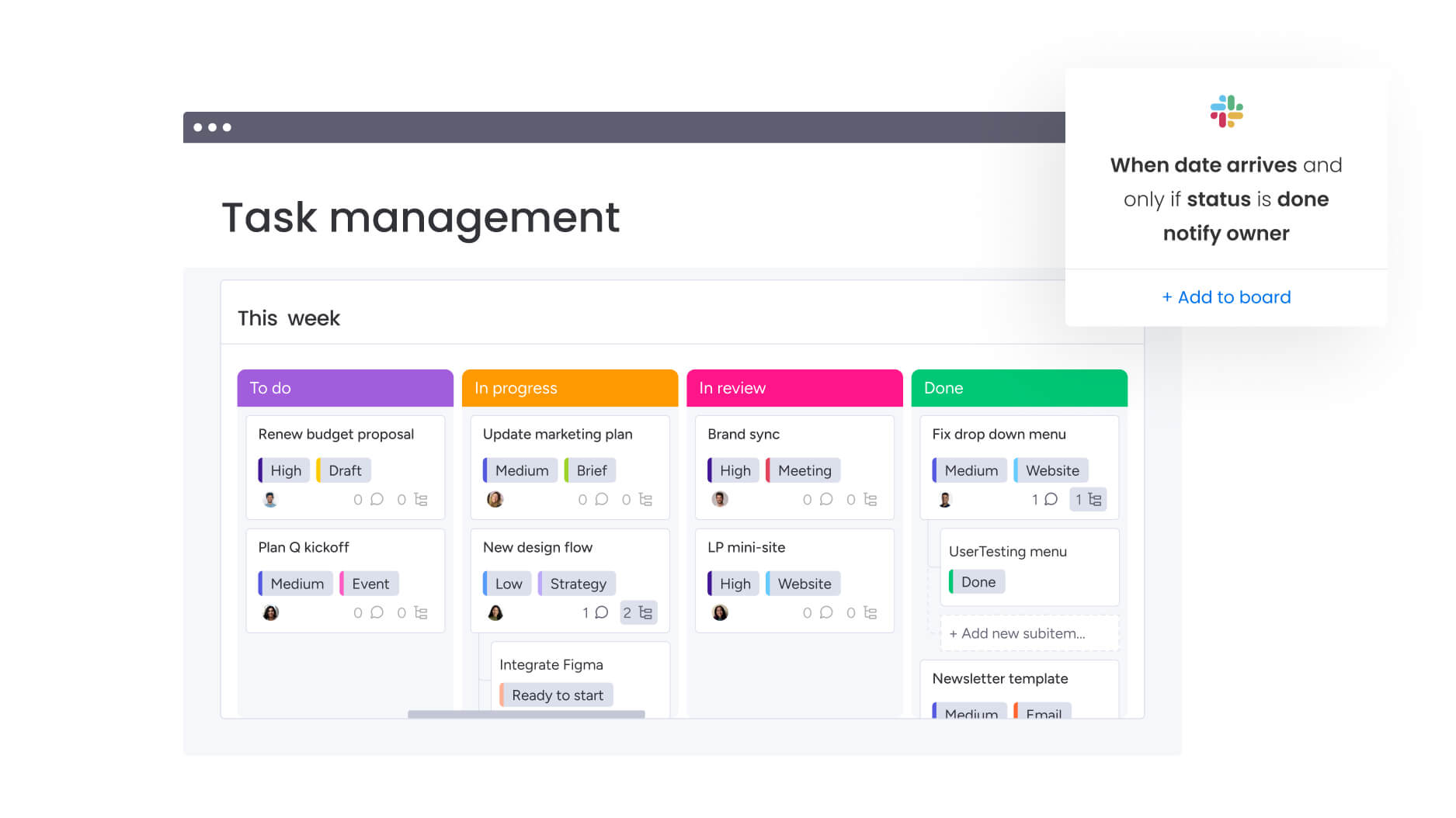
Workflow automation platforms deliver five essential capabilities that address the complex needs of enterprise marketing teams. These features work together to create seamless operations from campaign conception through performance analysis.
Campaign management and execution
Solid campaign management turns multi-channel chaos into something you can actually navigate. Instead of drowning in spreadsheets, endless email chains, and “quick update” meetings, your team gets one central hub where campaigns move smoothly from planning to execution — with everyone seeing exactly what’s happening.
The transformation happens through connected workflows that link every campaign element:
- Creative briefs connect to production timelines.
- Content calendars sync with distribution schedules.
- Performance metrics flow back to inform future planning.
This interconnected approach eliminates the gaps where work typically falls through. For heads of marketing overseeing complex portfolios, this centralization solves the fundamental challenge of disconnected execution. Teams know exactly what’s happening, when it’s due, and who owns each piece — without constant check-ins or status updates.
Real-time dashboards and reporting
As a marketing leader, you need immediate answers to the questions that keep you up at night: which campaigns are actually driving ROI? Where are we getting stuck? Is my team at capacity or drowning? Real-time dashboards cut through the noise and show you exactly what’s happening — when it’s happening.
Forget static reports that someone has to manually update every week. These live dashboards pull real-time data directly from your active projects, refreshing automatically as your team makes progress. Marketing directors can filter by campaign, team, timeline, or any custom metric to uncover insights that drive decisions.
The value extends beyond visibility:
- Increased accountability: when teams see their impact in real-time.
- Proactive risk management: leaders spot risks early and reallocate resources before deadlines slip.
- Optimization opportunities: real-time insights enable continuous improvement rather than reactive fixes.
FARFETCH’s $118K monthly savings came partly from this ability to optimize in real-time rather than react after problems emerge.
Resource management and workload balancing
Understanding team capacity transforms how marketing departments operate. Resource management capabilities show exactly who’s available, what skills they have, and how work is distributed across the team.
The workload view prevents the common scenario where some team members burn out while others have bandwidth. Marketing leaders can see capacity across projects, spot overallocation before it becomes a problem, and shift resources to maintain momentum on priority initiatives. Marketing leaders can see capacity across projects, spot overallocation before it becomes a problem, and shift resources to maintain momentum on priority initiatives.
This visibility matters especially for departments with 100+ people:
- Without it: resource planning becomes guesswork.
- With it: leaders make confident decisions about taking on new initiatives, meeting aggressive timelines, and maintaining sustainable workloads that keep top talent engaged.
Marketing automation and workflow standardization
Standardization isn’t about locking your team into rigid processes. It’s about saving them from recreating the same campaign structure for the fifteenth time this quarter. Good workflow automation gives you consistent, quality processes that still flex when your campaigns need something different.
Marketing teams build templates for common campaigns:
- Product launches with pre-configured tasks and timelines.
- Event promotions including approval stages and automation rules.
- Content series with distribution schedules and performance tracking.
When a new campaign starts, teams adapt the template rather than starting from scratch.
Automation extends beyond templates:
- Approval notifications trigger automatically.
- Status updates flow to stakeholders without manual intervention.
- Routine tasks like file organization and deadline reminders handle themselves.
Genpact eliminated spreadsheets entirely and reduced email exchanges by 25% through this systematic approach.
Cross-functional collaboration capabilities
Marketing doesn’t operate in isolation. Success requires coordination with legal for compliance, product for messaging accuracy, and finance for budget approval. Workflow automation platforms break down these silos through shared workspaces and connected processes.
Collaborative features go beyond basic communication:
- Legal teams can review and approve content within the same system where creative teams produce it.
- Product teams can update messaging guidelines that automatically flow to relevant campaigns.
- Finance can track budget utilization in real-time without requesting reports.
ThoughtWorks achieved 73% improvement in global team collaboration by creating these connections. Their 55% reduction in email and 41% decrease in conference calls show what happens when collaboration moves from scattered channels into unified workflows.
How monday work management powers marketing transformation
Transforming your marketing operations takes more than a feature checklist — you need a platform that scales seamlessly from ten campaigns to 100 while remaining intuitive for your teams. monday work management delivers both through purpose-built capabilities for enterprise marketing teams.
Built for marketing complexity at scale
Enterprise marketing operates across multiple dimensions simultaneously. Campaigns span regions. Teams coordinate across time zones. Budgets flow through various approval chains. monday work management handles this complexity through:
- Managed templates: standardize workflows across hundreds of campaigns while maintaining flexibility for customization.
- Cross-project dependencies: link related initiatives to see how delays in one area impact the broader portfolio.
- Portfolio dashboards: monitor performance across 1,000+ projects simultaneously with AI-powered insights.
These capabilities transform how marketing leaders operate. Instead of chasing updates or building reports manually, they gain instant visibility into everything from campaign ROI to team capacity.
AI that amplifies marketing intelligence
The AI in monday work management goes beyond basic task automation — it spots patterns your team would never have time to find. It scans your entire marketing operation, flagging when a campaign is likely to miss its deadline, suggesting resource shifts when teams are overloaded, and predicting which projects might hit budget issues before they happen. McKinsey research demonstrates that AI-driven personalization can enhance customer satisfaction by 15 to 20%, increase revenue by five to eight percent, and reduce the cost to serve by up to 30%.
Key AI capabilities include:
- AI Blocks: categorize feedback at scale, extract insights from reports, and summarize complex data into actionable recommendations.
- Risk identification: AI scans project updates to flag potential delays or budget overruns before they impact delivery.
- Smart resource allocation: match people to projects based on skills, availability, and past performance.
When marketing teams leverage these AI capabilities, they move from reactive to proactive management. Issues surface before they become crises. Opportunities emerge from data patterns. Decisions happen faster with greater confidence.
Rapid implementation with proven results
Enterprise platforms often take months to implement. monday work management delivers value in weeks through intuitive design and pre-built marketing templates. Teams start with proven workflows, then customize as they learn the platform.
The results speak through customer outcomes:
- VML: 7,000 hours saved per account monthly with 2x faster delivery.
- Canva: 3x increase in creative output.
- FARFETCH: 6x ROI with $118K saved monthly.
- Genpact: 40% improvement in cross-team collaboration.
These aren’t incremental improvements. They represent fundamental shifts in how marketing organizations operate, deliver, and demonstrate value.
Implementation roadmap for marketing workflow automation
Successful workflow automation implementation requires a systematic approach that builds momentum while minimizing disruption. This five-step roadmap guides marketing leaders through the transformation from planning to optimization.
Step 1: audit current marketing operations
Start by mapping existing workflows across all marketing functions. Document where work originates, how it flows between teams, and where bottlenecks consistently appear. Identify which processes are standardized versus those recreated for each campaign.
Pay special attention to handoff points between teams. These transitions often hide inefficiencies:
- Creative briefs that lack critical information.
- Approval processes that stall in email.
- Resource conflicts that surface too late to resolve smoothly.
Step 2: design your automation architecture
Create a blueprint for how automated workflows will connect across your marketing organization. Start with high-impact, repeatable processes like campaign planning, creative requests, and approval workflows.
Define clear ownership for each workflow component:
- Establish trigger points: which automations activate based on status changes, deadline approaches, or completion milestones.
- Map dependencies: how workflows connect across teams and projects.
- Plan for scale: design architecture that works for ten campaigns and 100 campaigns.
Step 3: build and test with pilot teams
Launch with a focused pilot rather than organization-wide rollout. Select a team running a mix of campaign types to test various workflows. Build their core processes in the platform, incorporating feedback as you refine the approach.
Document what works and what needs adjustment:
- Process effectiveness: which workflows reduce time and effort.
- User adoption: how quickly teams embrace new processes.
- Integration points: where the platform connects with existing tools.
Use pilot results to demonstrate value to stakeholders and build momentum for broader adoption. Success stories from early adopters become powerful change management assets.
Step 4: scale with standardization
Expand systematically by department or campaign type. Use templates proven during the pilot phase as starting points for new teams. Maintain consistency in naming conventions, status definitions, and automation rules to ensure organization-wide clarity.
Create governance structures that balance standardization with flexibility:
- Core processes: consistent workflows for reporting and collaboration.
- Customization freedom: ability to adapt workflows to specific team needs.
- Quality controls: regular reviews to ensure standards are maintained.
Step 5: optimize through continuous improvement
Workflow automation isn’t set-and-forget. Regular optimization ensures processes evolve with your organization. Review automation performance monthly. Gather feedback from teams about friction points. Analyze data to identify new automation opportunities.
Use platform analytics to spot trends:
- Timeline analysis: which workflows consistently run late?
- Bottleneck identification: where do approvals stall?
- Resource allocation: what tasks consume disproportionate time?
These insights drive iterative improvements that compound over time.
Measuring workflow automation success
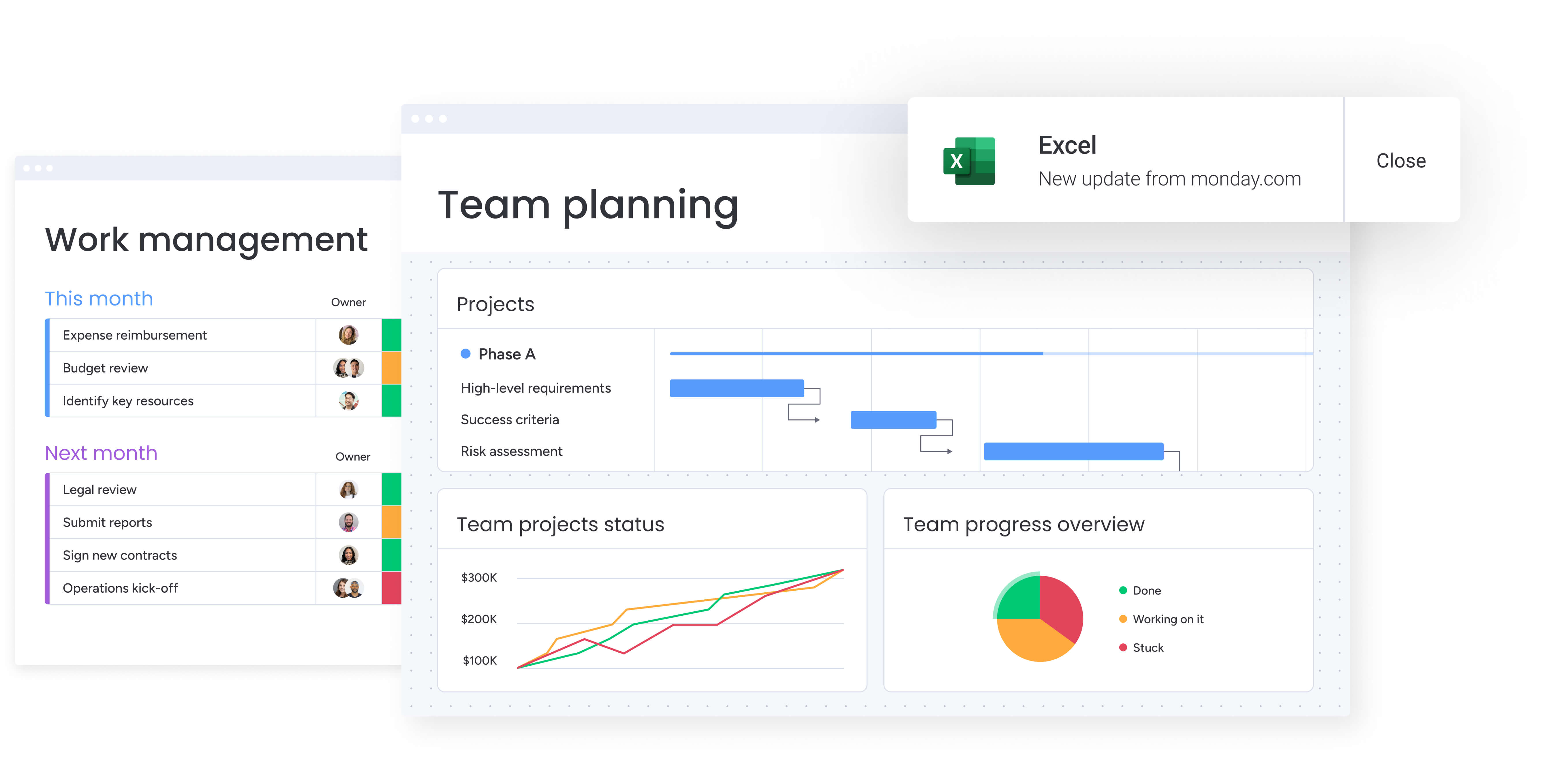
To prove your workflow automation is working, you need to track two things: the day-to-day efficiency gains and the bigger strategic wins. The metrics that matter will both show your leadership team the ROI and help you spot where to fine-tune your processes.
Key performance indicators for marketing automation
Track metrics that demonstrate both operational efficiency and strategic impact. Operational metrics show immediate improvements in how work flows. Strategic metrics connect those improvements to business outcomes.
Essential operational metrics include:
- Time to launch: days from campaign conception to market.
- Approval velocity: hours from submission to approval.
- Resource utilization: percentage of capacity deployed on strategic work.
- Process standardization: percentage of campaigns using templates.
Strategic metrics that matter to leadership:
- Campaign ROI: revenue generated versus resources invested.
- Marketing-attributed pipeline: value of opportunities created.
- Cost per acquisition: total spend to acquire each customer.
- Brand lift metrics: awareness and perception improvements.
Building dashboards that drive decisions
Effective dashboards do more than display data — they answer specific questions and prompt action. Design separate views for different audiences. Executives need portfolio-level insights. Team leads need operational details. Individual contributors need task-level clarity.
Structure dashboards around decision points:
- Red metrics: what action should someone take when performance drops?
- Trend identification: who needs notification when patterns emerge?
- Automated responses: how do insights trigger appropriate workflow adjustments?
Update frequencies should match decision cycles:
- Daily metrics for operational management.
- Weekly rollups for team planning.
- Monthly summaries for strategic review.
- Real-time alerts for critical issues that need immediate attention.
The content in this article is provided for informational purposes only and, to the best of monday.com‘s knowledge, the information provided in this article is accurate and up-to-date at the time of publication. That said, monday.com encourages readers to verify all information directly.
Frequently asked questions
What's the typical ROI timeline for marketing workflow automation?
The typical ROI timeline for marketing workflow automation is three to six months, with many organizations seeing initial improvements within weeks. A Forrester Total Economic Impact study documented that organizations deploying enterprise workflow automation achieved a 248% three-year ROI, with benefits of $55.93 million over three years versus costs of $16.08 million, while FARFETCH achieved 6x ROI almost immediately.
How does workflow automation software handle creative approval processes?
Workflow automation software handles creative approval processes through automated routing, deadline tracking, and stakeholder notifications. The system moves creative assets through defined approval stages, sends alerts when reviews are needed, and maintains version control throughout the process.
Can workflow automation integrate with existing marketing technology stacks?
Yes, workflow automation integrates with existing marketing technology stacks through native connectors and APIs. Most platforms connect with CRM systems, creative tools, analytics platforms, and communication channels to create unified workflows without replacing current investments.
What's the difference between workflow automation and marketing automation?
Workflow automation focuses on internal process management, team coordination, and project execution, while marketing automation handles external customer interactions like email campaigns and lead nurturing. Organizations typically need both for complete marketing operations.
How long does implementation take for a 100+ person marketing team?
Implementation for a 100+ person marketing team typically takes two to four weeks for initial setup and basic adoption. Teams become fully comfortable within one to two months, with the intuitive interface and pre-built templates accelerating the learning curve significantly.
What security features should enterprise marketing teams prioritize?
Enterprise marketing teams should prioritize role-based access controls, audit trails, data encryption, and compliance certifications like SOC two and GDPR. Integration security, IP restrictions, and multi-factor authentication provide additional protection for sensitive marketing data and creative assets.

 Get started