


Marketing teams managing 50–100+ people across content, creative, acquisition, and events face constant coordination pressure. Campaigns move across departments, timelines change quickly, and ownership is often unclear. At the same time, leaders are expected to prove ROI with data spread across multiple systems.
Workflow automation helps bring structure to this complexity by unifying how work moves through the organization. Centralized planning, automated handoffs, and real-time visibility reduce manual coordination and eliminate guesswork. Teams gain clearer accountability while maintaining the flexibility required for creative execution.
This guide shines a light on which workflow automation capabilities actually deliver results for enterprise marketing teams. It covers proven ROI outcomes, key features that matter at scale, and a practical framework for selecting tools that support long-term growth. The goal is simple: replace operational chaos with consistent, measurable campaign execution.
Key takeaways
Enterprise marketing operations succeed or fail based on how well teams manage complexity at scale. The insights below summarize what matters most when evaluating and implementing workflow automation for large, services-focused marketing organizations.
- Workflow automation replaces operational chaos with structured execution: centralizing campaigns, approvals, and reporting eliminates silos and enables consistent delivery across 50–100+ team members.
- Real-time visibility is critical for proving marketing ROI: unified dashboards that track performance, budgets, and capacity allow marketing leaders to confidently report impact to executive leadership.
- Automation drives measurable efficiency gains: standardized workflows and no-code automations save thousands of hours by removing manual coordination and repetitive administrative tasks.
- Scalable resource management prevents burnout while maintaining speed: workload visibility and capacity planning help teams balance demand across content, creative, acquisition, and events functions.
- Enterprise platforms like monday work management illustrate the product category’s value: modern marketing workflow solutions combine automation, integrations, and governance to support complex, regulated, and fast-moving service organizations.
What makes heads of marketing choose workflow automation software?
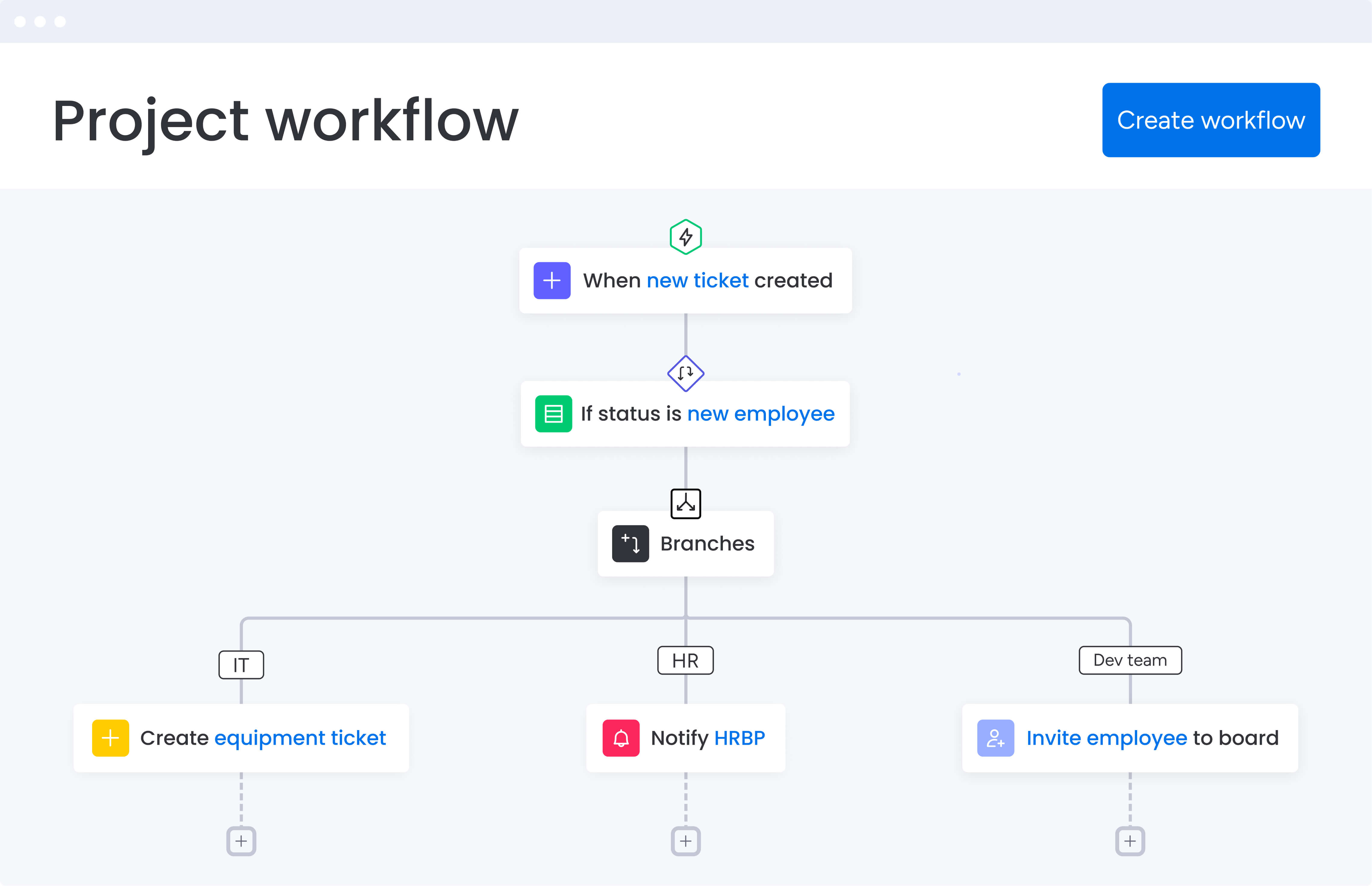
Heads of marketing in services companies face a distinct operational challenge. Managing 50–100+ team members across content, creative, acquisition, events, and operations requires constant coordination, clear ownership, and reliable visibility. At the same time, leadership teams expect consistent performance reporting and measurable ROI across every campaign.
Workflow automation software helps unify these disconnected efforts into a single, structured system. By centralizing planning, execution, and reporting, marketing organizations gain clearer alignment across regions, teams, and initiatives. The result is more predictable delivery, stronger accountability, and measurable business impact.
When teams operate across multiple geographies and campaign types, automation addresses the core blockers that prevent execution at scale. The right platform creates immediate operational clarity in the following ways:
- Eliminates operational chaos: enterprise workflow management delivers centralized visibility and strategic alignment by connecting siloed teams and scattered impact into one unified view.
- Drives efficiency through standardization: the platform provides operational efficiency through automation and templates while ensuring effective use of budget and team resources, making it the best workflow automation software for marketing teams.
- Enables confident leadership reporting: marketing leaders get enterprise workflow software that track metrics like campaign ROI, CAC, MQL-to-Customer rates, budget adherence, and team productivity in one centralized system.
This visibility enables confident reporting to executive leadership while maintaining alignment with company goals. Marketing leaders need more than basic project management; they need enterprise-grade platforms, like enterprise workflow management software, that scale with complex, cross-functional operations.
Top workflow automation features for marketing teams
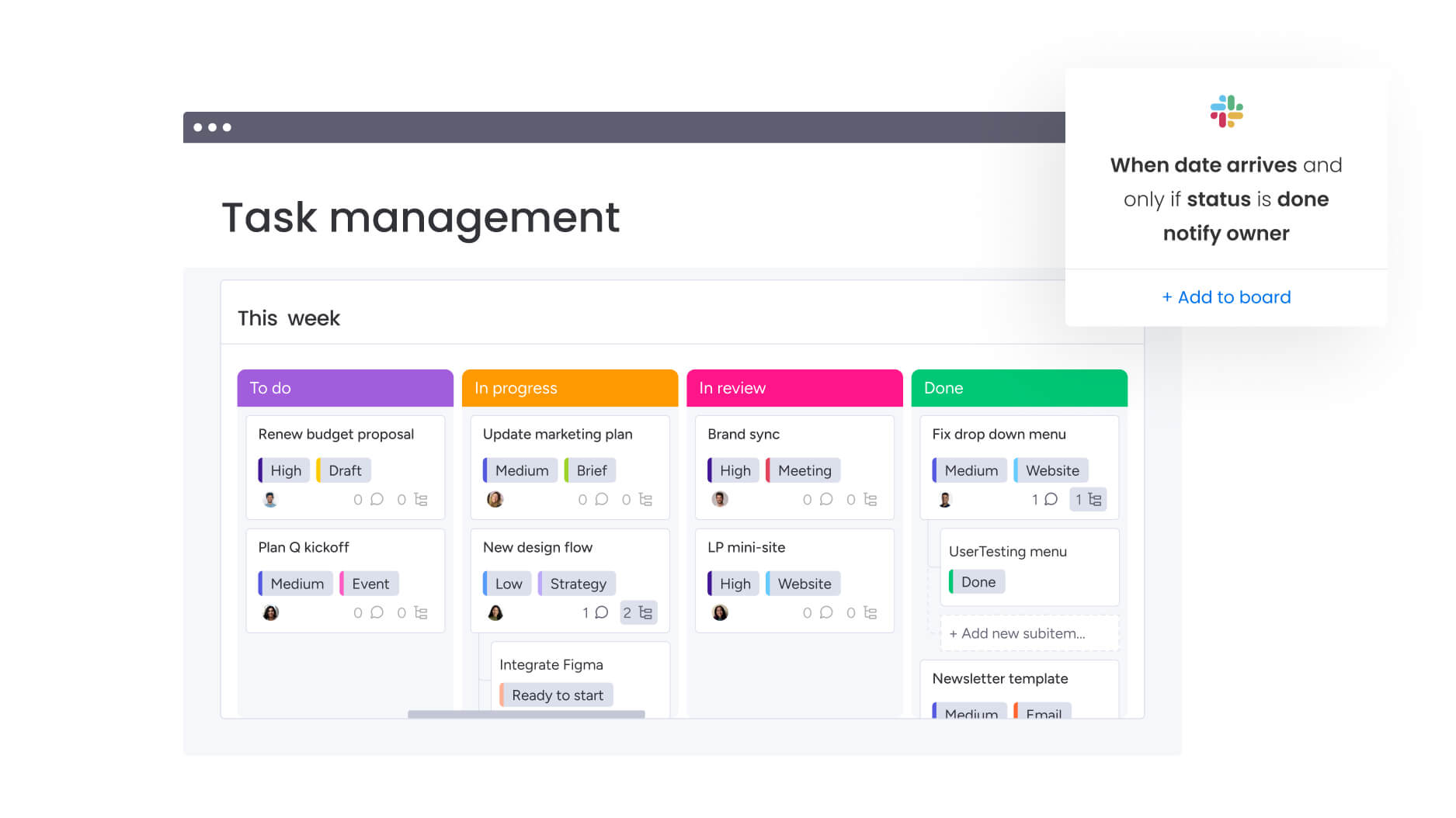
The most effective workflow platforms share a core set of capabilities that fundamentally change how marketing organizations operate. These features support current needs while remaining flexible enough to scale as teams, channels, and campaign volume grow.
Campaign management and planning
Robust campaign management capabilities allow teams to plan, execute, and track initiatives across regions and channels from one centralized platform. Customizable boards support full campaign life cycles, with dependencies, timelines, and milestones visualized through Gantt charts, calendars, and Kanban views.
For heads of marketing managing large-scale campaigns across multiple channels, these features eliminate the chaos of scattered spreadsheets and email threads with the support of workflow management software.
With a centralized platform, you can achieve several key outcomes. These features directly address the chaos of scattered spreadsheets and email threads:
- Data-driven resource allocation: make informed decisions about prioritization based on real-time campaign status.
- Standardized processes with flexibility: adapt workflows for different campaign types without sacrificing consistency.
- Cross-channel coordination: whether launching products or activating events, maintain alignment across all marketing activities.
Resource management and workload planning
Resource management capabilities provide real-time insight into who is over capacity, who has availability, and which skills exist across the organization. Workload views surface imbalances early, allowing leaders to rebalance priorities before delays occur.
This approach removes guesswork from capacity planning and helps teams maintain momentum without burnout. Strategic advantages include:
- Capacity planning alignment: the platform enables strategic capacity planning that aligns with business goals, timelines, and budgets.
- Talent optimization: resource directories bring together key data about talent across the organization including department, job roles, and expertise.
- Executive reporting: demonstrate effective use of team resources to executive leadership with concrete data.
Automation and workflow standardization
No-code workflow automation capabilities reduce manual effort across marketing operations by triggering actions based on defined conditions. These include routing approvals, updating statuses, notifying stakeholders, and sending deadline reminders without manual follow-up.
For organizations where teams repeatedly recreate processes, automation delivers immediate efficiency gains while preserving flexibility. Implementation benefits include:
- Consistent execution: ensure standardized processes without sacrificing creativity.
- Faster campaign launches: pre-built automation templates for common marketing scenarios help teams get started quickly.
- Improved delivery rates: build complex multi-step automations without writing code, reducing time-to-launch for campaigns.
Real-time dashboards and reporting
Custom dashboards consolidate data from campaigns, projects, and teams into real-time views of performance. This eliminates hours of manual reporting and provides immediate insight into progress, risks, and outcomes.
Key metrics commonly tracked include:
- Campaign performance: ROI, conversion rates, engagement metrics.
- Resource utilization: team capacity, workload distribution, productivity rates.
- Budget tracking: spend vs. allocation, cost per campaign, budget adherence.
- Content volume: production rates, approval times, asset performance.
These dashboards enable clear, confident reporting to executive stakeholders and help teams stay aligned as priorities shift.
Cross-functional collaboration capabilities
Workflow automation supports seamless collaboration between marketing and teams such as legal, product, finance, and sales. Shared briefs, connected workflows, and centralized planning ensure work moves forward with clarity rather than bottlenecks.
With integrations across 200+ platforms, organizations can connect CRM systems, marketing automation platforms, analytics solutions, and creative software. Key collaboration benefits include:
Collaboration advantages:
- Unified stakeholder visibility: by maintaining communication threads within the context of specific work items, all stakeholders have visibility into relevant campaigns and initiatives.
- Reduced miscommunication: cross-functional collaboration tools ensure ownership and accelerate decision-making.
- Shared workspace benefits: bring all relevant stakeholders into a shared workspace that breaks down silos.
Creative production and approval workflows
Creative production workflows streamline the entire process from intake through final approval. Customizable forms standardize creative request intake, ensuring all necessary information is captured upfront, which eliminates back-and-forth clarification and speeds up production timelines.
Approval workflows support inline feedback, version control, and automated notifications that keep work moving forward. Production improvements include:
- Faster time-to-market: centralized creative workflows reduce campaign launch times.
- Higher asset quality: structured feedback loops improve final deliverables.
- Better resource planning: transparency into creative team capacity and turnaround times enables more accurate planning and resource allocation.
How marketing teams benefit from workflow automation
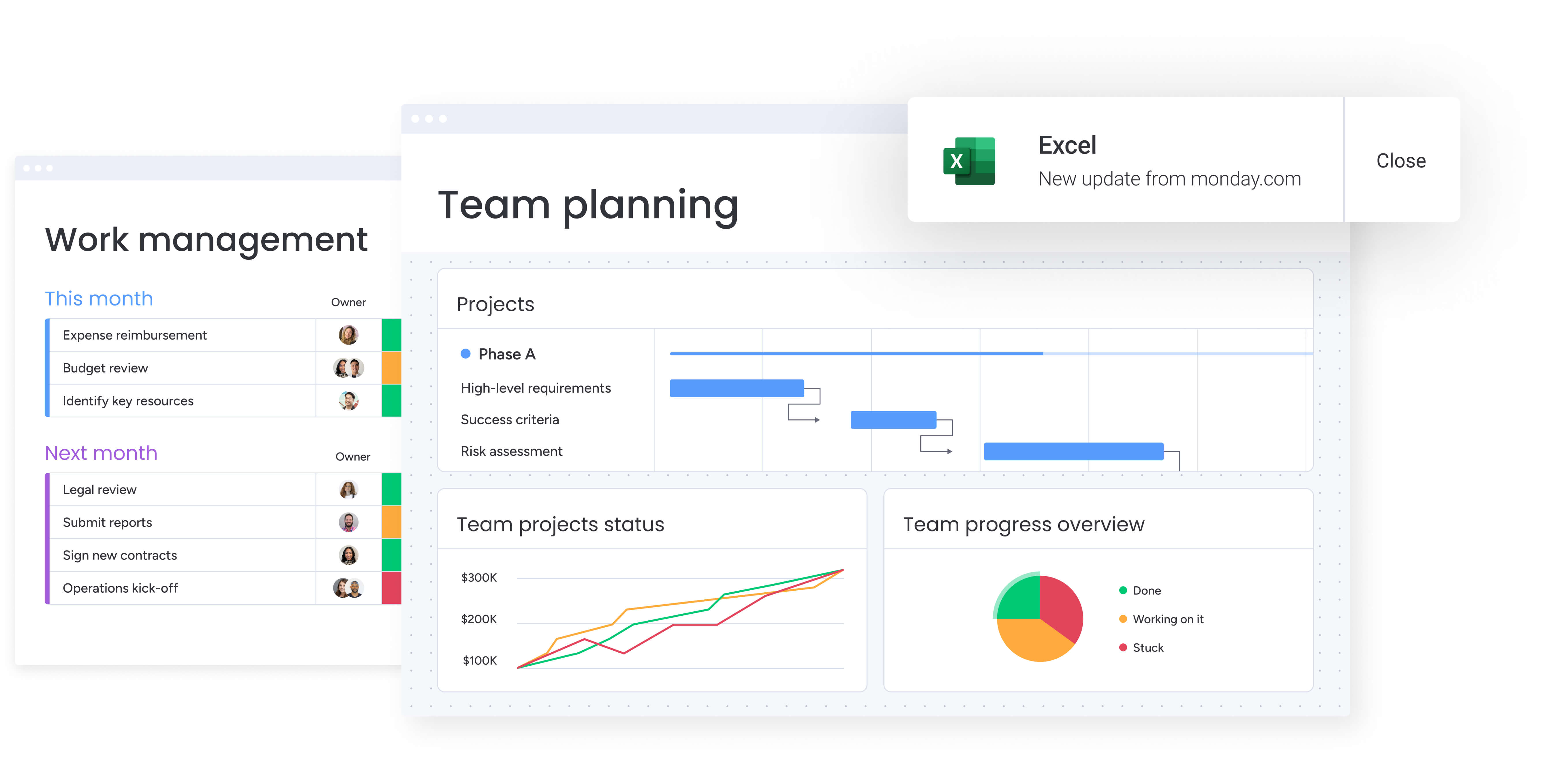 Marketing teams that implement structured workflow automation see measurable improvements across multiple operational areas. These benefits compound over time as processes become standardized, collaboration improves, and teams gain confidence working within a shared system.
As organizations scale, automation supports consistent execution while maintaining flexibility. The result is stronger alignment across teams, clearer reporting, and faster delivery across campaigns and channels.
Time savings across operations
Marketing teams using workflow automation consistently report significant time savings that allow them to redirect effort toward higher-value initiatives. When VML adopted monday work management, the organization saved 7,000 hours per account each month. FARFETCH reports saving 3,500 hours monthly, while ThoughtWorks reduced email communication by 55% and conference calls by 41%.
These gains reduce administrative overhead across campaign planning, approvals, and reporting. Automated workflows manage status updates, approval routing, and notifications, allowing teams to focus on strategic planning and creative execution rather than coordination.
Cost efficiency and ROI
Workflow automation delivers measurable ROI through operational efficiency gains that directly impact the bottom line. FARFETCH achieved 6x ROI with $118K saved per month. McDonald’s saved 1,224 hours per month, equivalent to adding seven full-time employees, translating to 615% ROI.
Cost savings come from multiple sources:
- Reduced manual work: automation eliminates repetitive tasks.
- Improved resource utilization: better allocation prevents overstaffing.
- Faster time-to-market: streamlined workflows reduce campaign cycle times.
- Decreased tool sprawl: consolidated platforms reduce software costs.
Improved visibility and tracking
Centralized dashboards provide real-time visibility into marketing performance and operational health. Marketing leaders can track campaign ROI, customer acquisition cost, MQL-to-customer conversion rates, team productivity, and resource utilization within a single reporting environment.
This visibility replaces manual reporting with a reliable source of truth. Instead of compiling updates from disconnected systems, leadership teams gain immediate insight into progress, risks, and alignment with strategic objectives.
Enhanced team productivity
Teams experience dramatic productivity gains through automation and streamlined collaboration that compound across the organization. Genpact improved cross-team collaboration by 40%, while ThoughtWorks improved global team collaboration by 73% and achieved 62% improvement in assets and approvals.
Productivity improvements result from:
- Standardized processes: consistent workflows reduce confusion.
- Clear ownership: defined responsibilities prevent delays.
- Automated handoffs: work moves seamlessly between teams.
- Reduced context switching: everything happens in one platform.
How to implement marketing workflow automation
Successful workflow automation requires a structured approach that aligns people, processes, and systems. The six-step framework below guides marketing leaders from initial assessment through continuous optimization, creating a foundation for scalable operations.
Step 1: audit current marketing operations
Begin by documenting existing workflows across campaign planning, creative production, event coordination, and cross-functional collaboration. Identify where work becomes disconnected, visibility is limited, or manual processes slow execution.
Prioritize workflows that impact multiple teams or consume disproportionate time. This assessment establishes clear direction for where automation will deliver the most value.
Step 2: design your workflow structure
Create a hierarchical structure that reflects your marketing organization, with boards for programs, campaigns, and activations. Design your resource directory to capture team member skills, availability, and capacity.
Establish naming conventions and status definitions that will be used consistently across all marketing initiatives. This ensures data accuracy for reporting and creates a common language across teams.
Step 3: build standardized templates
Develop templates for common marketing scenarios such as campaign launches, event planning, creative requests, and content production. Include all necessary fields, dependencies, and approval steps in each template.
Configure automation recipes that trigger notifications, move items through workflows, and update related boards automatically. Test templates with pilot teams before rolling out organization-wide to ensure they meet real-world needs.
Step 4: implement integrations
Connect your workflow platform with CRM systems, marketing automation platforms, analytics solutions, and collaboration software using native integrations or APIs. Ensure data flows consistently to maintain reporting accuracy.
Dashboards should pull from multiple sources to present a comprehensive view of marketing performance. This integration reduces manual data entry and reporting delays.
Step 5: roll out with structured training
Adopt a phased rollout strategy, starting with early adopters who can support broader adoption. Training should focus on solving team-specific challenges rather than generic platform usage.
Providing prebuilt structures allows teams to visualize how their work will function before migration. This approach increases confidence and reduces resistance to change.
Step 6: monitor and optimize continuously
Track adoption, usage patterns, and workflow performance across teams. Collect feedback to identify friction points and opportunities for improvement.
As teams mature, continue refining automations and integrations to further streamline operations. Ongoing optimization ensures workflows evolve alongside business priorities.
Comparison: leading workflow automation platforms for marketing
When evaluating workflow automation software, understanding key differences helps you make an informed decision based on your specific needs. This comparison highlights the most important capabilities for marketing teams managing complex, cross-functional workflows.
| Feature | monday work management | Asana | Wrike |
|---|---|---|---|
| Campaign management | Customizable boards with 15+ views, subitems for campaign hierarchy, dependencies | Project views with custom fields, timeline view | Project views with Gantt charts, custom workflows |
| Resource management | Workload view, resource directory, capacity planning at project level | Workload view (Business tier+), basic resource allocation | Resource management (Business tier+), workload charts |
| Automation capabilities | No-code automation builder, 200+ automation recipes, multi-step workflows | Rules-based automation (Premium tier+), limited to single actions | Automation engine (Business tier+), approval workflows |
| Real-time dashboards | Customizable dashboards with 10+ widget types, real-time updates, cross-board data | Portfolios and reporting (Business tier+), limited customization | Custom dashboards (Business tier+), analytics |
| Integrations | 200+ native integrations, open API, Zapier support | 200+ integrations, API access | 400+ integrations, API access |
| Implementation time | Two weeks to one month for enterprise teams | Two to four weeks typical | Four to eight weeks typical |
Transform your marketing operations with workflow automation
Workflow automation replaces fragmented execution with connected, consistent processes. When teams gain visibility, accountability, and automation at scale, marketing shifts from reactive coordination to strategic execution.
Organizations that adopt enterprise-grade workflow platforms experience compounding benefits over time, including sustained efficiency gains, improved ROI, and stronger alignment with leadership priorities. These outcomes support growth without increasing operational complexity.
Achieving these results depends on selecting a platform designed for scale and following a structured implementation plan. Many organizations begin seeing measurable improvements within weeks, with benefits increasing as adoption deepens.
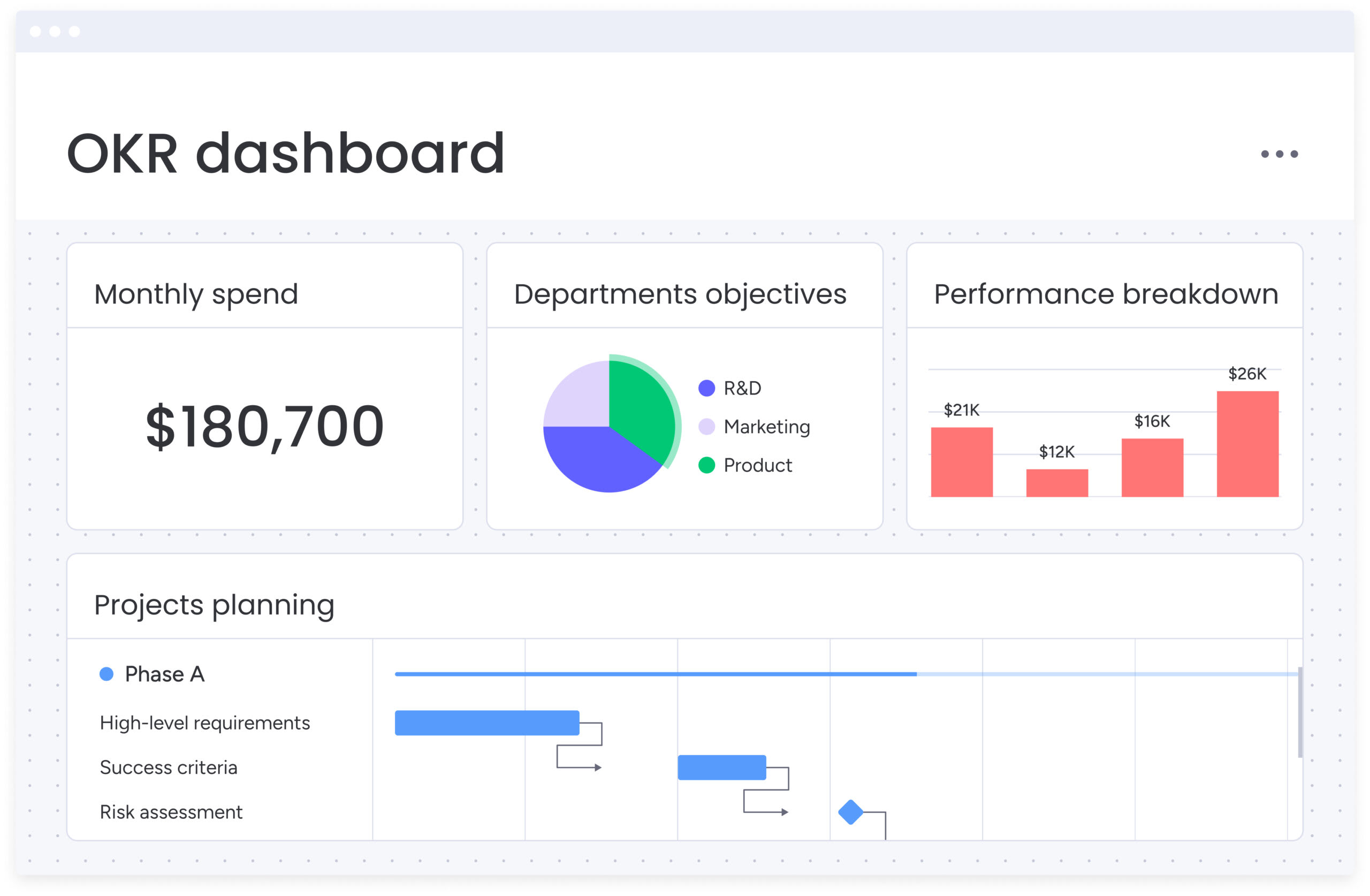
Transform your marketing operations with monday work management
Modern marketing operations require systems that connect planning, execution, and measurement without sacrificing flexibility. Platforms like monday work management bring visibility, standardization, and resource optimization together in a single digital workspace.
With capabilities such as AI-powered risk detection, standardized templates, and enterprise-level capacity planning, monday work management supports complex marketing portfolios across content, creative, acquisition, events, and operations. These features provide leadership with real-time insight into progress, risks, and performance.
Organizations including VML, FARFETCH, and McDonald’s rely on monday work management to streamline operations, eliminate manual work, and scale execution with confidence. Teams gain clarity, automation, and reporting that align marketing outcomes with business goals.
Frequently asked questions
How long does implementation take for a marketing team of 50-100+ people?
Implementation timelines for enterprise marketing teams typically range from two weeks to one month, depending on the complexity of existing workflows and the number of integrations required. The platform's intuitive interface enables rapid adoption. Teams become comfortable with the system within two weeks to a month. Dedicated onboarding support, implementation packages, and change management services ensure successful rollout across large marketing organizations.
Can workflow automation software track campaign ROI and marketing metrics?
Yes, workflow automation platforms provide customizable dashboards that track campaign ROI, customer acquisition cost, MQL-to-Customer conversion rates, and other key marketing metrics. You can create custom fields to capture relevant data points, then build dashboards that aggregate this information across multiple campaigns and time periods. The platform integrates with analytics tools, CRMs, and marketing automation platforms to pull data from multiple sources into unified reporting views.
How does workflow automation differ from marketing automation platforms?
Workflow automation software manages internal marketing operations: campaign planning, creative production, approvals, and resource allocation. Marketing automation platforms handle customer-facing activities like email campaigns and lead nurturing. Most marketing teams use both: workflow automation as the operational backbone, and marketing automation for campaign execution.
What integrations are essential for services industry marketing teams?
Essential integrations for services industry marketing teams typically include CRM systems like Salesforce or HubSpot, marketing automation platforms such as Marketo or Pardot, analytics tools including Google Analytics and Tableau, communication platforms like Slack and Microsoft Teams, file storage solutions such as Google Drive or Dropbox, and creative tools from Adobe Creative Cloud. Platforms with 200+ native integrations and open APIs ensure seamless data flow between systems.
How do you ensure adoption across multiple marketing departments?
Successful adoption across multiple marketing departments requires a structured rollout approach. Start with a phased implementation plan that introduces the platform to teams in logical sequence. Build out base structures and templates so teams can visualize how their work will function before full migration. Provide hands-on training that demonstrates how the platform solves specific pain points for each department. Use internal and external support resources throughout the year to address questions and optimize workflows.
Does workflow automation support event coordination and creative production?
Yes, comprehensive workflow automation platforms provide robust capabilities for both event coordination and creative production workflows. For event management, you can track venue selection, vendor management, attendee registration, promotional activities, and budget tracking. For creative production, you can build intake forms for creative requests, establish approval workflows with version control, manage asset libraries, and track creative team capacity and turnaround times.

 Get started