


Marketing teams manage dozens of campaigns at once, coordinating across departments while overseeing creative workflows that often span weeks or months. When execution depends on manual updates and disconnected systems, even well-planned campaigns struggle to stay on schedule, remain within budget, and deliver expected results. In most cases, the challenge is not strategy or creativity, it is execution at scale.
Workflow automation software helps bring structure to this complexity. Rather than focusing only on repetitive task automation, modern platforms connect teams, surface real-time performance insights, and support smarter resource allocation across marketing operations. The right solution balances depth and usability, enabling teams to standardize processes while preserving the flexibility required for creative work.
This guide evaluates leading workflow automation platforms for marketing teams based on automation depth, implementation speed, and scalability. It examines what separates enterprise-ready solutions from basic task management platforms, highlights how high-performing marketing teams achieve measurable results, and outlines practical implementation strategies designed to deliver ROI within the first quarter.
Key takeaways
Building a high-performing marketing department requires more than just creative talent; it requires a structured environment where strategy and execution stay in sync. The right workflow automation transforms scattered efforts into a streamlined engine, providing the visibility and speed necessary to meet modern campaign demands. The following takeaways highlight how the right platform choices impact long-term operational success.
- Strategic execution enabler: modern workflow automation moves beyond simple task management to help marketing teams manage complexity through automated decisions and improved visibility.
- Speed to value: the most effective solutions prioritize fast adoption and pre-built workflows to deliver measurable ROI within the first three to six months.
- Unified marketing workspaces: connecting creative, content, and operations teams within a single environment reduces silos while improving accountability and delivery speed.
- Enterprise marketing execution: platforms like monday work management provide no-code automation and marketing-specific templates that enable faster delivery and significant time savings.
- Integration and consolidation: long-term operational efficiency depends on an integration strategy that consolidates tools and enables deep, two-way data flow across the existing tech stack.
What is the best workflow automation software?
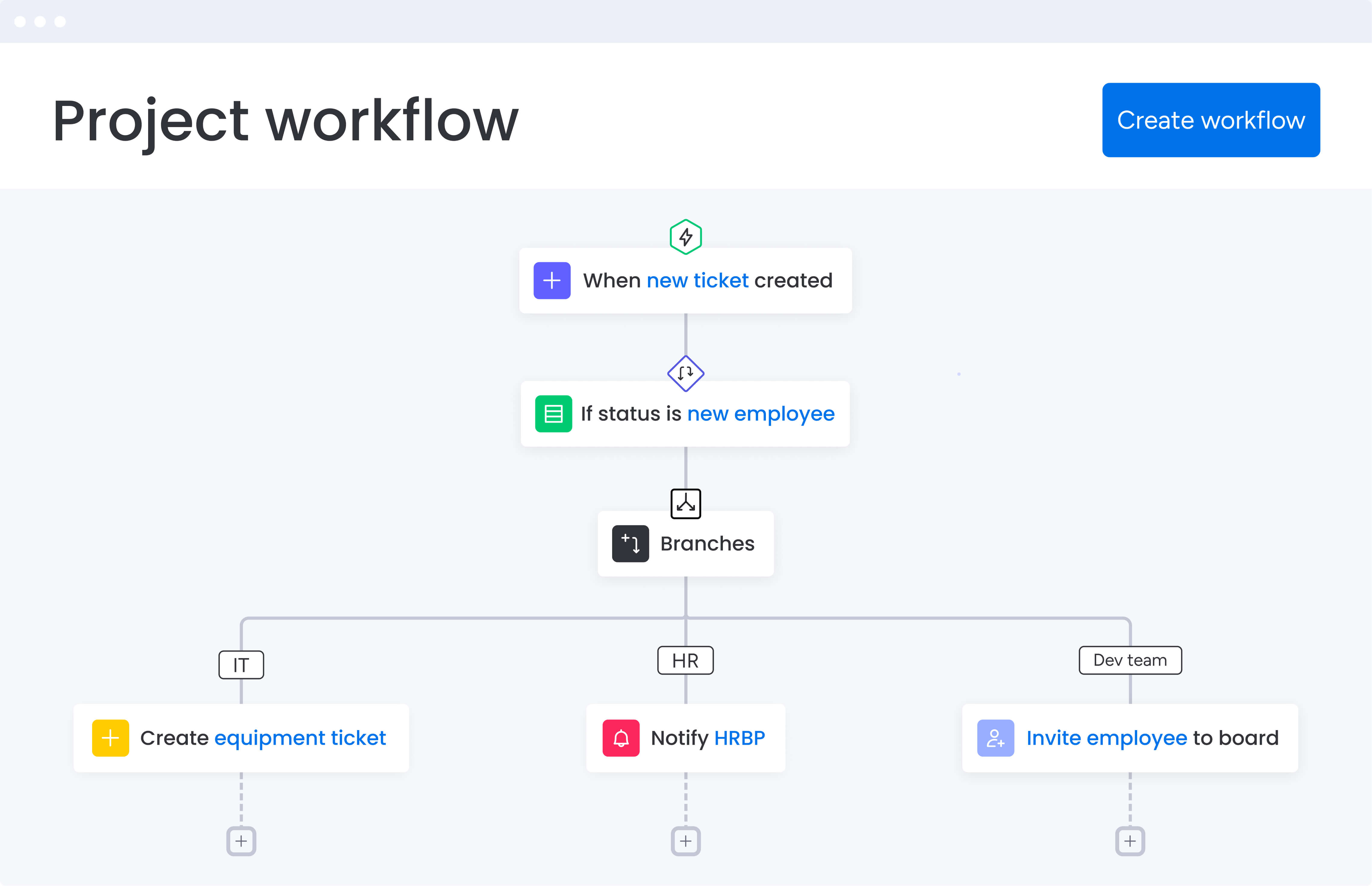
There is no one-size-fits-all solution when it comes to workflow automation. The right platform depends on your team’s size, operational complexity, and the outcomes you are trying to achieve. For mid-to-large marketing teams running multichannel campaigns, the priority is software that brings consistency to execution while remaining flexible when priorities shift.
When evaluating workflow automation platforms, several factors clearly separate enterprise-ready solutions from basic task automation. These considerations are especially important for organizations looking for flexible workflow management software that can scale without creating friction.
Key evaluation criteria for workflow automation software:
- Automation depth over breadth: platforms should support decision-making, resource allocation, and risk identification, not just repetitive process automation.
- Adoption speed and user satisfaction: if teams do not see measurable value within the first quarter, long-term adoption is unlikely.
- Governance with flexibility: organizations should not have to choose between rigid enterprise platforms and flexible team-based solutions.
- Integration as consolidation: each additional system increases complexity, making it critical to prioritize platforms that replace multiple tools while connecting to essential systems.
Top workflow automation platforms for marketing teams
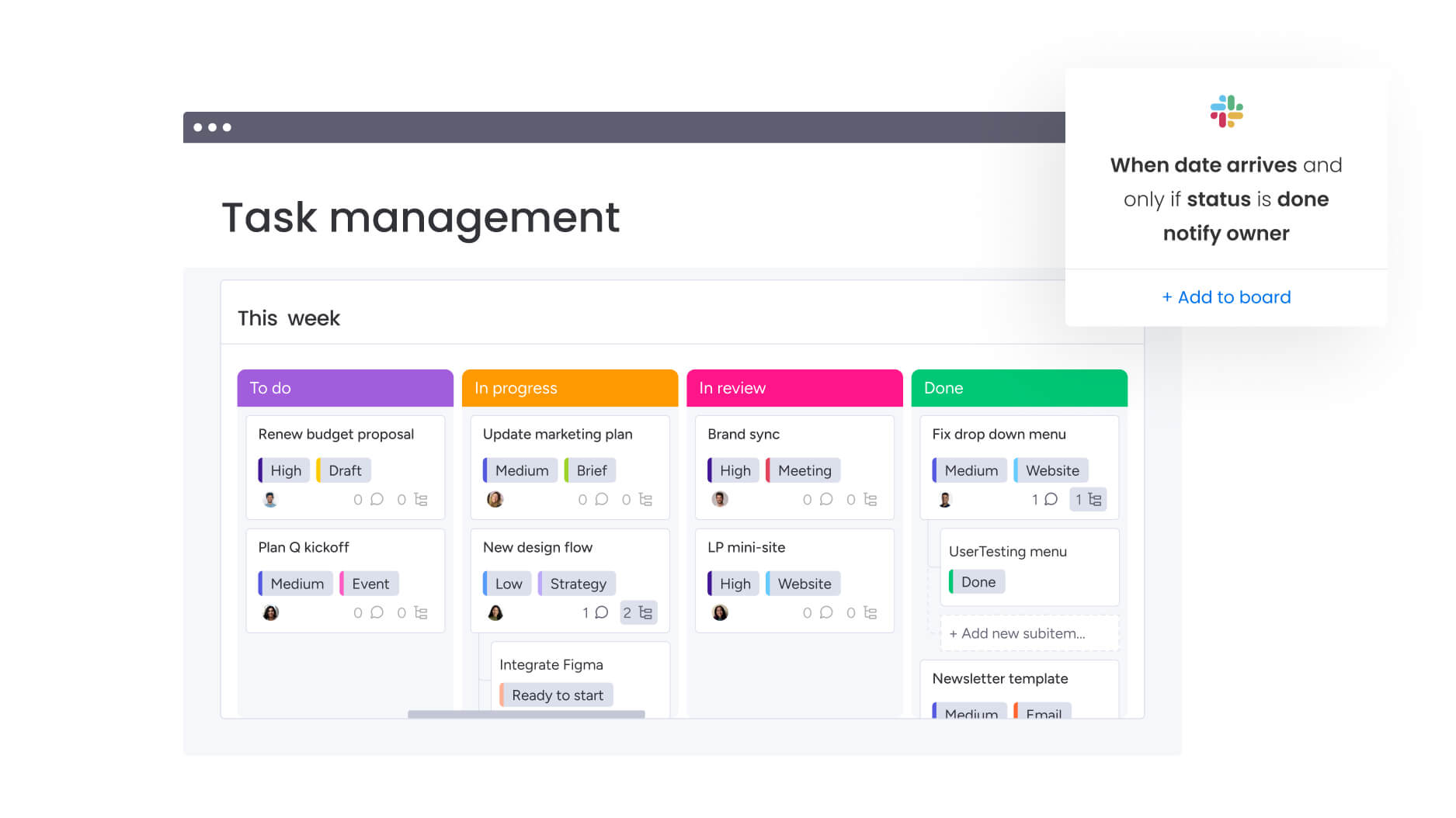
Selecting the right platform requires understanding how each solution addresses marketing-specific challenges, which is essential when choosing robust workflow management software for your team. The following comparison highlights the key strengths and limitations of leading workflow automation software, helping you identify which aligns best with your team’s needs and growth trajectory.
| Platform | Best for | Key strengths | Implementation time | Notable limitations |
|---|---|---|---|---|
| monday work management | Enterprise marketing teams | AI-powered automation, marketing templates, cross-functional visibility | two to four weeks | Higher cost than basic tools |
| Asana | Simple task management | User-friendly interface, basic templates | one to two weeks | Limited advanced automation |
| Wrike | Project-focused teams | Robust project features, approval workflows | six to eight weeks | Steep learning curve |
| Smartsheet | Excel-familiar teams | Spreadsheet interface, familiar views | two to three weeks | Limited scalability |
| ClickUp | Customization-focused teams | Extensive features, high flexibility | four to six weeks | Complex setup requirements |
monday work management
monday work management stands out for marketing teams that need to unify fragmented operations across content, creative, acquisition, and events. The platform delivers both the flexibility teams want and the governance enterprises require, showcasing its strengths as workflow management software.
Key strengths for marketing automation:
- No-code automation builder: empower your team to create and modify workflows instantly, independent of IT support.
- AI-powered capabilities: proactively identify risks across hundreds of campaigns simultaneously.
- Marketing-specific templates: pre-built workflows for campaign management, creative requests, and event coordination.
- Cross-functional visibility: connect marketing operations with sales, product, and finance teams.
Marketing teams using monday work management report significant results. VML saves 7,000 hours per account monthly with 2x faster delivery. The platform’s sub-four-month payback period means teams see ROI in their first quarter, not their first year.
Asana
Asana provides solid project management capabilities with marketing-focused features available in higher tiers. The platform works well for teams prioritizing simple task management over complex automation.
Marketing capabilities:
- Basic marketing templates: pre-built workflows for campaign planning.
- Workload management: resource allocation views (Business tier and above).
- Timeline and calendar views: visual campaign scheduling.
- Creative request forms: streamlined intake processes.
While Asana handles basic automation through rules and custom fields, it lacks the depth of AI-powered insights and cross-portfolio visibility that enterprise marketing teams need for complex campaign orchestration.
Wrike
Wrike offers robust project management with marketing-specific features, though the learning curve can slow initial adoption. The platform includes marketing project templates and custom workflows, but requires more setup time than competitors.
Platform highlights:
- Marketing project templates: built-in approval workflows.
- Resource management features: capacity planning (Business tier required).
- Custom request forms: automated routing capabilities.
- Proofing and approval tools: creative asset management.
Implementation typically takes six to eight weeks for teams of 100+, compared to two to four weeks for more intuitive platforms. This extended timeline can delay value realization for fast-moving marketing teams.
Smartsheet
Smartsheet brings spreadsheet familiarity to workflow automation, which appeals to teams comfortable with Excel-based planning. However, this approach can limit scalability for complex marketing operations.
Core features:
- Multiple view options: grid, card, Gantt, and calendar views.
- Automated workflows: basic approval processes.
- Resource management: capacity tracking (requires add-on purchase).
- Dashboard creation: campaign performance tracking.
The spreadsheet foundation makes initial adoption easier, but can become cumbersome as marketing operations scale. Teams often find themselves outgrowing the platform as campaign complexity increases.
ClickUp
ClickUp positions itself as an all-in-one solution with extensive customization options. While feature-rich, this complexity can overwhelm marketing teams seeking quick implementation and well-defined workflows.
Marketing features:
- Multiple view options: timeline, calendar, and board views.
- Goal tracking: oKR management capabilities.
- Native time tracking: built-in workload management.
- Automation recipes: pre-configured marketing workflows.
The platform’s extensive feature set requires significant configuration time. Marketing teams report that while ClickUp offers flexibility, achieving optimal setup for complex campaigns can take considerable effort.
Which tool is used to automate workflows in digital marketing?
Digital marketing workflow automation extends beyond single-channel campaign tools to encompass the entire marketing ecosystem, from creative production to performance tracking. Tools like HubSpot or Marketo handle your email automation just fine, but they can’t solve the bigger challenge: getting your entire marketing team working together smoothly across functions and channels.
High-performing marketing teams need platforms that connect creative, content, acquisition, events, and operations teams in one workspace. This unified approach eliminates the silos that slow campaign execution and reduce visibility into performance.
Essential automation capabilities for digital marketing include:
- Campaign orchestration: coordinate multi-channel campaigns with automated handoffs between teams.
- Creative production workflows: streamline brief submission, review cycles, and approval processes.
- Resource allocation: automatically assign work based on capacity and expertise.
- Performance tracking: connect campaign data to dashboards for real-time optimization.
For example, monday work management’s marketing-specific automations handle everything from creative brief routing to campaign performance alerts. When a creative asset moves to final review, the platform automatically notifies stakeholders, updates campaign timelines, and adjusts team capacity, all without manual intervention.
How monday work management transforms marketing workflow automation

Marketing teams face unique challenges that generic automation tools can’t fully address. monday work management provides purpose-built solutions that connect strategy to execution while maintaining the flexibility marketing teams need. The following capabilities demonstrate how the platform addresses the most common marketing workflow challenges.
Step 1: eliminate silos between creative and campaign teams
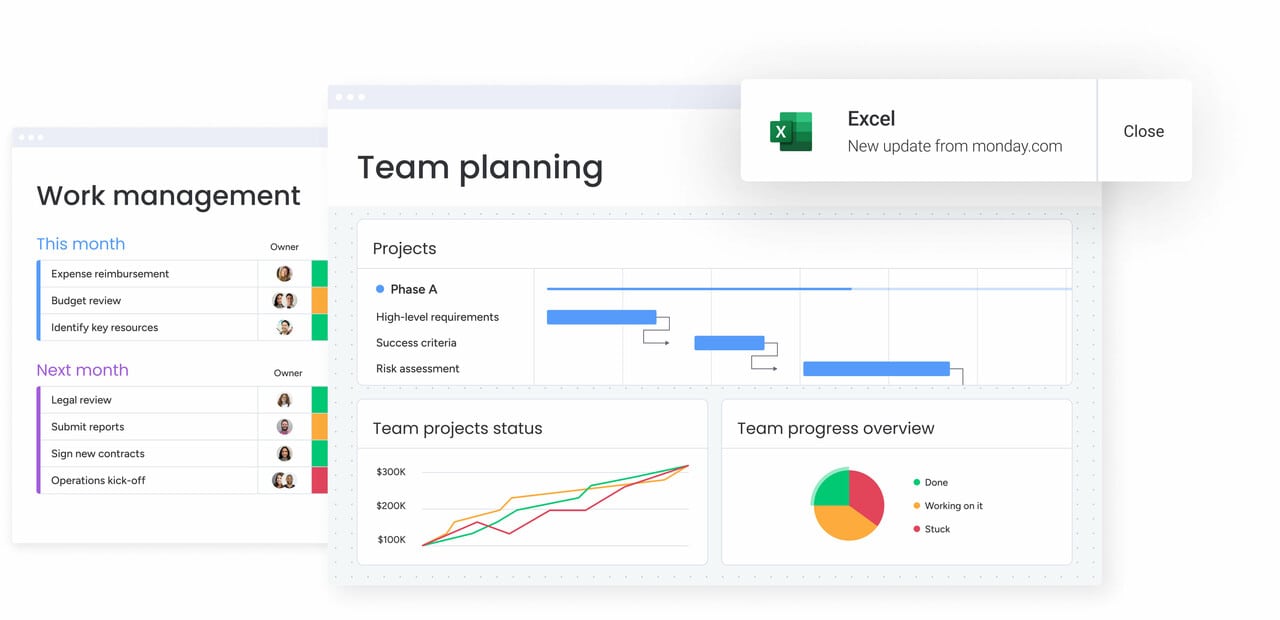
A shared digital workspace enables creative, content, acquisition, and operations teams to collaborate on common objectives. Connected workflows ensure updates cascade automatically when dependencies change, providing clarity around ownership and progress for every campaign component.
With visibility across teams, creative teams understand campaign timelines and priorities, while campaign managers track asset status without manual follow-ups. This alignment reduces duplicated work, improves collaboration, and accelerates delivery.
Step 2: achieve real-time visibility into campaign ROI
Custom dashboards and automated reporting provide instant access to performance metrics including ROI, customer acquisition cost, and conversion rates. Marketing leaders track campaign performance across channels without waiting for manual report compilation.
Integration with analytics tools and CRM systems ensures performance data flows automatically into dashboards. This real-time visibility enables teams to identify underperforming campaigns early, reallocate budget to high-performing initiatives, and demonstrate marketing impact with confidence.
Step 3: standardize processes while maintaining creative flexibility
Pre-built templates and automation recipes establish consistent workflows for campaign planning, creative briefs, and asset management. These standardized processes ensure data accuracy and reliable reporting while allowing teams to customize workflows for specific campaign types.
The no-code customization capabilities let marketing teams adapt templates without IT support. This balance between standardization and flexibility prevents teams from reinventing workflows while preserving the creative autonomy that drives innovation.
Which software is renowned for its workflow automation features?
Industry recognition provides valuable validation when selecting workflow automation software. The most renowned platforms consistently earn high marks for user adoption, speed to value, and measurable business impact. Understanding these accolades helps teams identify platforms with proven track records rather than relying solely on marketing claims.
monday work management’s industry accolades include:
- G2 Leader: highest User Adoption for Enterprises.
- Forrester recognition: sub-four-month payback period.
- Gartner Magic Quadrant: leader in Marketing Work Management 2024.
These aren’t just fancy logos to slap on a website. G2 awards come straight from verified users, and Forrester dug into actual customer data to validate the ROI. Why does this matter? Because it’s real people seeing real results, not just marketing hype.
What sets recognized platforms apart:
- Adoption metrics: teams actually use the platform daily, ensuring data accuracy.
- Time to value: organizations see measurable results within months.
- User satisfaction: high ratings across ease of use, support quality, and feature depth.
- Scalability proof: successful deployments from 50 to 1,000+ users.
When evaluating platforms, look beyond feature lists to these proven indicators of success. Recognition from analyst firms and user communities signals that a platform delivers on its promises at scale.
Implementation best practices for marketing workflow automation
Successfully implementing workflow automation requires more than selecting the right platform. These proven practices help marketing teams achieve faster adoption and stronger results. Following a structured approach ensures your team maximizes value while minimizing disruption to ongoing campaigns.
Step 1: start with high-impact workflows
Initial implementation should focus on workflows that deliver immediate value. Campaign planning, creative brief management, and approval workflows often provide quick wins that build confidence and momentum.
Priority workflows include:
- Campaign planning workflows: standardize brief creation and approvals.
- Creative request management: streamline asset intake and feedback cycles.
- Approval processes: automate review stages and stakeholder notifications.
Addressing the most time-intensive or error-prone workflows first helps teams recognize value early and supports broader adoption.
Step 2: build with templates, customize with purpose
Leverage pre-built marketing templates as your foundation, then customize them to match your specific needs. This approach accelerates deployment while ensuring workflows align with your unique processes.
Template customization strategy:
- Start with proven frameworks: use campaign management and content calendar templates.
- Adapt automation rules: modify triggers and notifications for your team’s workflow.
- Customize approval stages: align review processes with your brand guidelines.
Templates for campaign management, content calendars, and creative production provide proven starting points. Customize automation rules, approval stages, and notification triggers to match your team’s working style.
Step 3: connect your marketing tech stack strategically
Integration decisions determine whether automation simplifies or complicates operations. Identifying core systems first allows teams to configure data synchronization that eliminates manual updates and context switching.
Integration priorities:
- Core systems first: CRM, analytics platforms, and creative tools.
- Communication tools: Slack, Microsoft Teams for notifications.
- File management: Google Drive, Dropbox for asset storage.
- Reporting platforms: connect data sources for automated dashboards.
Prioritize integrations that eliminate the most frequent context switches. For example, connecting Slack for team communication and Google Drive for asset management can save hours weekly by keeping work in one platform.
Step 4: measure and optimize continuously
Tracking adoption and performance from the outset ensures automation continues to deliver value as teams scale. Dashboards help identify which workflows drive efficiency and where manual steps remain.
Key metrics to track:
- Adoption rates: daily active users and feature utilization.
- Time savings: hours saved through automation.
- Process efficiency: cycle time improvements for campaigns.
- User satisfaction: team feedback and support ticket volume.
Regular optimization ensures your automation evolves with your team’s needs. What works for a 50-person marketing team may need adjustment as you scale to 100+ team members.
The content in this article is provided for informational purposes only and, to the best of monday.com‘s knowledge, the information provided in this article is accurate and up-to-date at the time of publication. That said, monday.com encourages readers to verify all information directly.
Frequently asked questions
What is the best free workflow automation software?
The best free workflow automation software depends on your team size and the complexity of your needs. While platforms like Trello and Asana offer free tiers, they typically limit users, features, and automation capabilities. For marketing teams serious about automation, free versions rarely provide the depth needed for campaign orchestration, resource management, and cross-functional coordination. Most enterprise teams find that investing in a comprehensive platform delivers ROI through time savings and improved execution that far exceeds the subscription cost.
How do I choose the right workflow automation tool for my team?
Choosing the right workflow automation tool starts with assessing your team's specific needs, current pain points, and growth trajectory. Evaluate platforms based on adoption speed, integration capabilities, and scalability rather than just feature counts. Request trials of your top choices and test them with real workflows, not hypothetical scenarios. Pay special attention to how quickly team members adapt to the interface and whether the platform can grow with your organization.
Can workflow automation software integrate with existing tools?
Yes, most enterprise workflow automation platforms offer extensive integration capabilities through native connectors, APIs, and automation tools like Zapier. The key is choosing a platform that integrates deeply with your core systems rather than offering surface-level connections. Look for two-way data synchronization, automated trigger actions across platforms, and the ability to build custom integrations for proprietary tools.
What's the typical ROI timeline for workflow automation implementation?
The typical ROI timeline varies by platform and implementation approach, but leading solutions deliver measurable returns within three to six months. Organizations using platforms with fast adoption rates and pre-built templates often see initial time savings within weeks. Full ROI, including reduced operational costs and improved delivery speed, typically materializes within the first quarter of implementation for well-executed deployments.
How much training do teams need for workflow automation platforms?
Training requirements depend on the platform's intuitiveness and your team's technical comfort level. User-friendly platforms with visual interfaces typically require one to two weeks for basic proficiency, with teams becoming fully comfortable within a month. More complex enterprise platforms may require four to six weeks of training plus ongoing support. The best platforms offer self-service resources, guided onboarding, and responsive support to accelerate adoption.
What security features should I look for in workflow automation software?
Essential security features include SOC two compliance, GDPR adherence, role-based access controls, and audit trails for all automation activities. Enterprise platforms should offer single sign-on (SSO), data encryption at rest and in transit, and granular permission settings. For marketing teams handling sensitive campaign data and customer information, ensure the platform provides IP restrictions, two-factor authentication, and regular security audits.

 Get started