


Services organizations are drowning in resource allocation chaos. Project managers (PMs) juggle multiple client deliverables across scattered spreadsheets, email chains, and disconnected platforms while trying to answer fundamental questions: who’s available for the next project? Are we overcommitting our best people? Which initiatives are at risk of missing deadlines due to capacity constraints?
The best resource management software transforms this fragmented approach into unified execution. Instead of manually tracking capacity across multiple tools, these platforms provide real-time visibility into team workloads, intelligent resource allocation, and automated workflows that prevent bottlenecks before they impact delivery.
In fact, organizations like Playtech even report 26% efficiency gains and saving three hours per person weekly when they consolidate resource management into a single, intelligent system.
This guide examines what separates effective resource management platforms from basic project tracking platforms. We’ll explore the key features that drive measurable results, compare leading solutions for services organizations, and show how teams achieve faster delivery and higher client satisfaction.
Key takeaways
Resource management in services organizations relies on clarity, coordination, and real-time visibility. These essential points highlight what the best platforms deliver.
- Unified execution: replace scattered spreadsheets and emails with a single view of all projects, teams, and client work.
- Capacity clarity: prevent burnout by seeing team workload instantly and reallocating before issues escalate.
- Automation efficiency: remove manual coordination by automating assignments, notifications, and approvals.
- Portfolio insight: monitor delivery performance, utilization, and risks across all client projects in real time.
- Proven scalability: achieve measurable efficiency gains through visual workload management and automated workflows in monday work management.
What makes project managers choose resource management software?

PMs in services organizations face a unique challenge: you’re juggling multiple client projects, each with different timelines, budgets, and team requirements. Meanwhile, work lives across spreadsheets, emails, and various project platforms — making it nearly impossible to see who’s working on what or identify conflicts before they derail delivery.
Resource management software solves this by creating a single source of truth for all project work. Instead of manually updating capacity spreadsheets or chasing status updates, you get real-time visibility into team workloads, project dependencies, and resource allocation across your entire portfolio.
The numbers tell the story. As we alluded to above, Playtech’s PMO team saw 26% efficiency gains and saved three hours per person weekly after moving to monday work management. Why? They finally connected resource planning, project execution, and financial tracking in one place instead of three.
Top features that drive resource management success
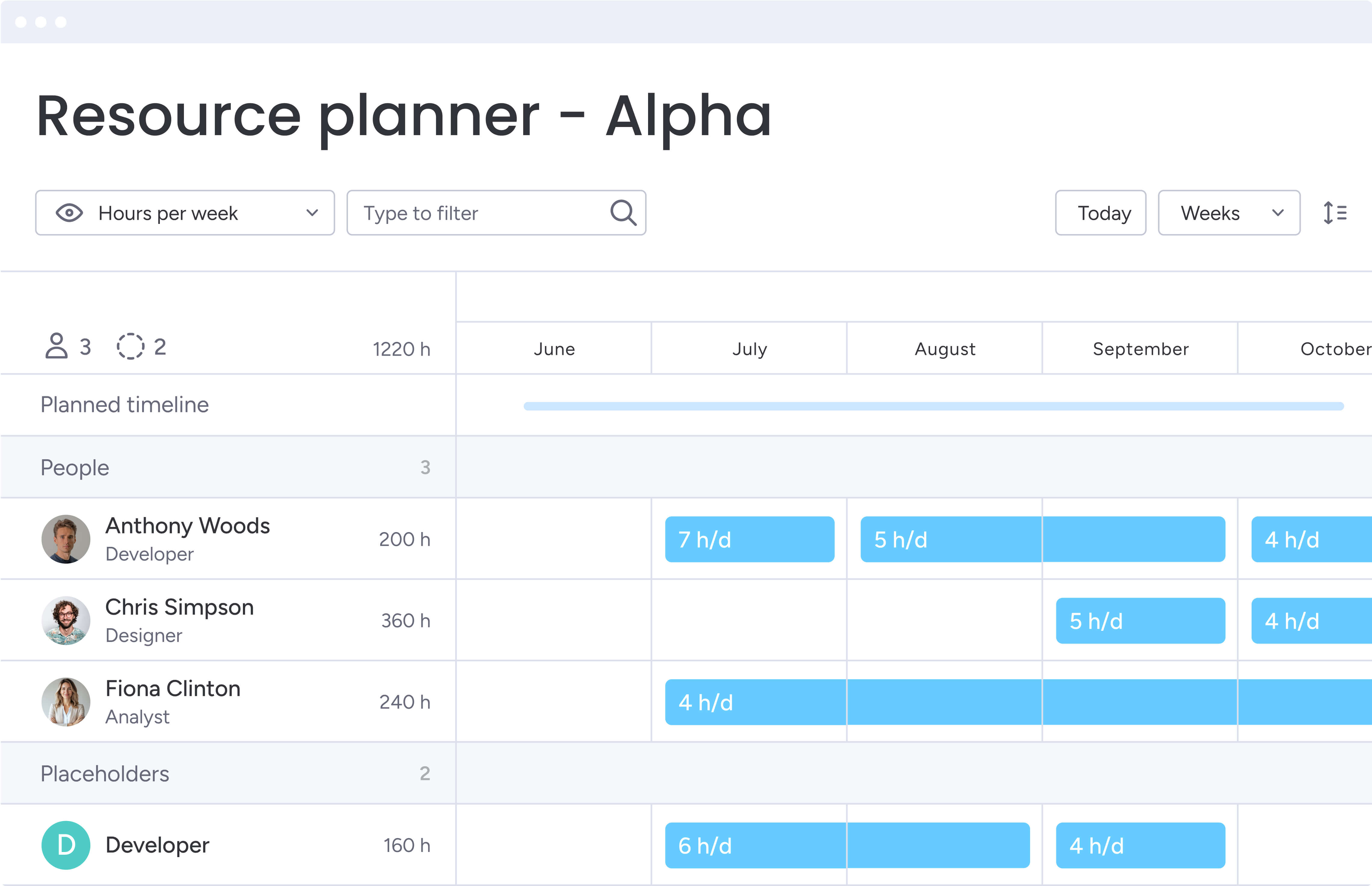
Today’s resource management platforms do the heavy lifting that used to consume your day. Instead of chasing updates or guessing who’s available, you get real-time answers about team capacity and project health — so you can make decisions in minutes, not meetings.
Visual workload management
Ever wish you could spot overbooked team members before they burn out? Visual workload views make it simple. Color-coded bars show you exactly who’s maxed out, who can take on more, and who’s right at their limit—all calculated automatically from your team’s assignments and time estimates.
This visual approach eliminates the guesswork in capacity planning: you can spot overallocation risks immediately and rebalance work before burnout occurs.
For example, Country Road Group’s PMO team achieved 25% increased efficiency after implementing visual workload management, with their Head of Real Estate noting how it eliminated spreadsheet dependency and identified resource gaps instantly.
Intelligent resource allocation
Resource allocation goes beyond simple assignment. The best platforms let you match people to projects based on skills, roles, availability, and even past performance.
Key capabilities include:
- Drag and drop resources: move team members between projects visually.
- Set allocation percentages: define how much time someone dedicates to each project.
- View capacity trends: see availability across daily, weekly, or monthly timeframes.
This capability is particularly valuable for services organizations managing complex delivery schedules. Genpact’s global marketing team saw 40% improvement in cross-team collaboration after implementing intelligent allocation workflows, ensuring the right expertise was applied to each client project.
Portfolio management and visibility
When you’re juggling dozens of client projects, you need the big picture. Portfolio dashboards pull everything together, showing you how all your projects align with business goals through customizable views that track:
- Progress toward goals: track how projects contribute to business objectives.
- Budget utilization: monitor spending across all client work.
- Risk indicators: identify projects that need intervention.
For services organizations managing dozens of concurrent projects, this portfolio-level visibility is essential. It enables strategic resource planning and helps communicate status to stakeholders without manual report compilation.
Automation that scales
Stop playing email tag with your team. With the right automation, your platform does the chasing for you, triggering actions exactly when they’re needed:
- Auto-assign tasks: route work to available team members based on skills.
- Status notifications: alert managers when capacity thresholds are reached.
- Approval workflows: move projects through review stages automatically.
- Risk escalation: flag issues that require management attention.
Falkbuilt demonstrates the power of automation, saving 40,000+ human actions monthly. This freed their team to focus on strategic work rather than administrative coordination.
Real-time dashboards and reporting
Forget compiling weekly status reports. Real-time dashboards show you exactly what’s happening across your entire portfolio, with tailored views for everyone who needs them:
- Executive summaries: high-level portfolio status for leadership.
- Team views: detailed work assignments and deadlines.
- Client reports: progress updates with relevant metrics.
These dashboards update automatically as work progresses, eliminating manual report generation. One services organization saved $250k annually and reduced meetings by 50% through improved visibility and automated reporting.
Seamless integration ecosystem
Your resource management system should talk to everything else in your tech stack. Look for platforms that connect seamlessly with:
- Financial systems: QuickBooks for budget tracking.
- CRM platforms: Salesforce for client data.
- Communication tools: Slack and Microsoft Teams.
- Development platforms: Jira for technical projects.
This connectivity ensures data flows seamlessly between systems. TIG Freight achieved 27% faster speed to market by integrating their CRM with resource management workflows, creating a unified operational view.
How project managers benefit from unified resource management
A unified resource management platform delivers value quickly. It reduces administrative load, strengthens delivery consistency, and gives clients greater confidence in your team’s ability to execute.
Time savings and efficiency gains
Project managers typically reclaim more than three hours each week that was previously lost to manual allocation and reporting. Automated workflows handle routine coordination, and real-time dashboards replace status meetings. Playtech’s PMO saw these same time savings across the entire department.
Enhanced visibility and control
Live portfolio dashboards surface project health, capacity constraints, and emerging risks. This allows PMs to address issues before they affect delivery, improving client satisfaction and protecting project profitability.
Improved team productivity
Automated task assignments and clear ownership keep work moving without constant oversight. McDonald’s Australia reduced project timelines by 25 percent, and Seer Interactive removed more than 600,000 manual actions by automating repetitive steps.
Stronger collaboration
Centralized communication and shared project views help teams understand dependencies, stay aligned, and collaborate more effectively. Genpact recorded a 40 percent improvement in cross-team collaboration after consolidating work into one system.
Higher quality outcomes
Standardized templates and consistent workflows ensure deliverables meet quality expectations across every project.
Try monday work management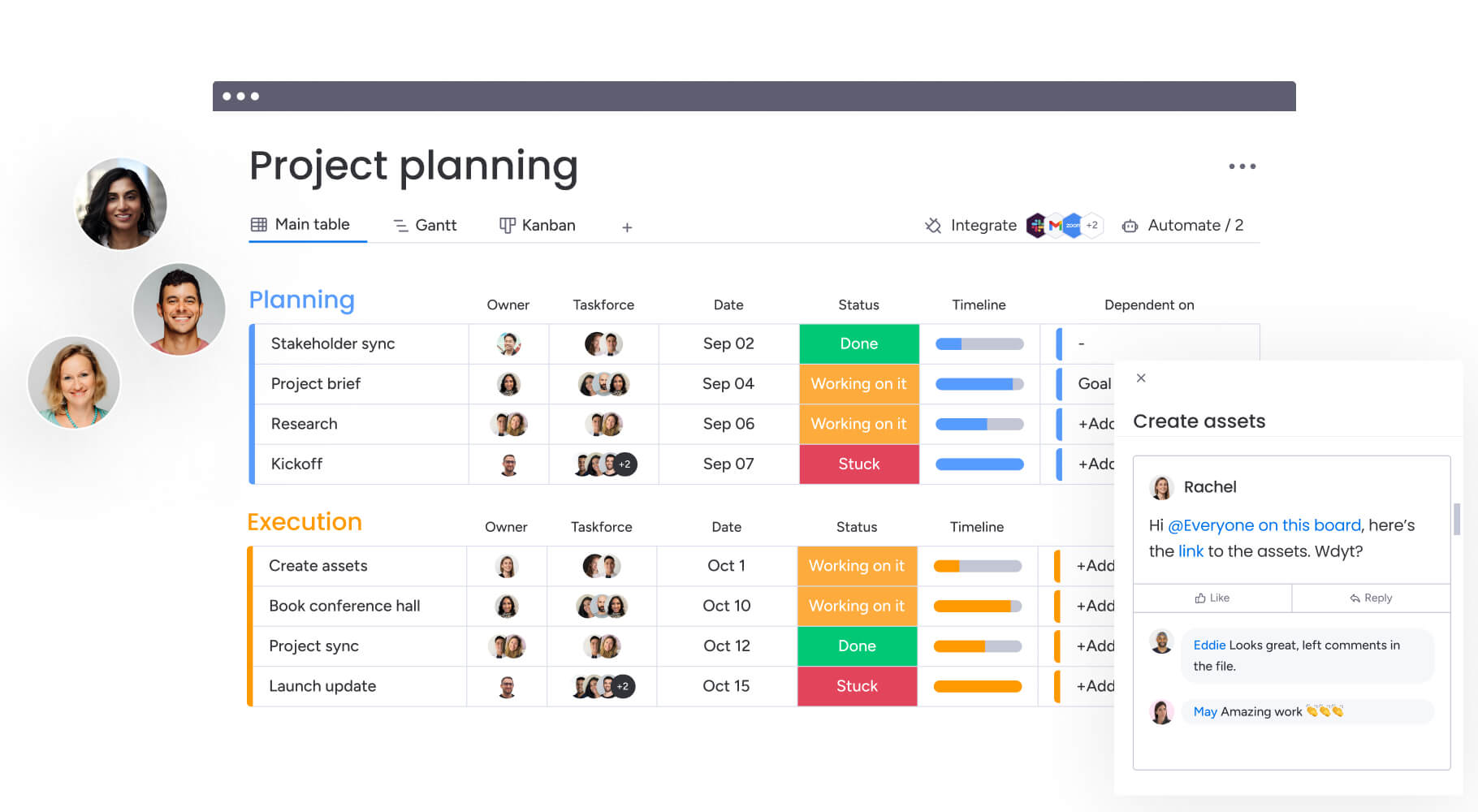
6 steps to optimize resource management
Want to get your team up and running quickly? Follow these six steps that have helped services teams like yours start seeing results within 90 days.
Step 1: centralize your project data
Start by importing existing projects, team information, and resource allocations into your new platform. Use import tools to bring in spreadsheets and connect existing systems through integrations. This creates your single source of truth for all resource visibility.
Step 2: configure capacity views
Set up workload views that display team capacity across all projects. Configure working hours, time-off schedules, and allocation percentages. Customize the view to show daily, weekly, or monthly capacity based on your planning needs.
Step 3: build project templates
Create reusable templates for common service delivery scenarios. Include standard phases, tasks, resource requirements, and approval workflows. Templates ensure consistency while allowing customization for specific client needs.
Step 4: Implement automation workflows
Configure automation recipes that handle routine coordination:
- Assignment notifications: alert team members to new tasks.
- Overallocation warnings: flag when resources exceed capacity.
- Status updates: automatically update project progress.
These automations eliminate manual work and ensure nothing falls through the cracks.
Step 5: create portfolio dashboards
Build executive dashboards that aggregate key metrics across your portfolio. Include widgets for:
- Utilization rates: track billable vs. non-billable time.
- Project profitability: monitor margins by client or project type.
- Delivery performance: measure on-time completion rates.
Configure these dashboards to update automatically, providing leadership with real-time insights.
Step 6: enable stakeholder access
Set up automated reporting and appropriate permissions for clients and leadership. Configure what external stakeholders can see, improving transparency while protecting sensitive operational details. This reduces status meeting overhead and builds client confidence.
Comparison: resource management platforms for services organizations
Different platforms offer varying strengths for resource management. Understanding these differences helps project managers choose the solution that best fits their organization’s specific needs and existing technology stack.
| Feature | monday work management | Float | Resource Guru | Smartsheet |
|---|---|---|---|---|
| Visual workload management | Built-in workload view with automatic calculations | Drag-and-drop scheduling interface | Heatmap availability views | Resource views (requires add-on) |
| Project management integration | Native project and resource management combined | Requires separate PM tool | Requires separate PM tool | Spreadsheet-based PM |
| Real-time capacity planning | Automatic capacity calculations with live updates | Real-time scheduling updates | Availability tracking | Manual capacity tracking |
| Automation capabilities | 200+ automation recipes | Limited automations | Basic automations | Workflow automation |
| Portfolio visibility | Multi-project dashboards with drill-down | Project-level only | Resource-level only | Portfolio reporting |
| Client collaboration | Guest access and client portals | Internal teams only | Internal teams only | Limited sharing options |
| Integration ecosystem | 200+ native integrations | 50+ integrations | 30+ integrations | 80+ integrations |
| Implementation time | Less than 4 months to ROI | 2-4 weeks | 1-2 weeks | 4-8 weeks |
| User adoption | Highest adoption rates (G2) | Moderate adoption | Good for small teams | Learning curve for non-spreadsheet users |
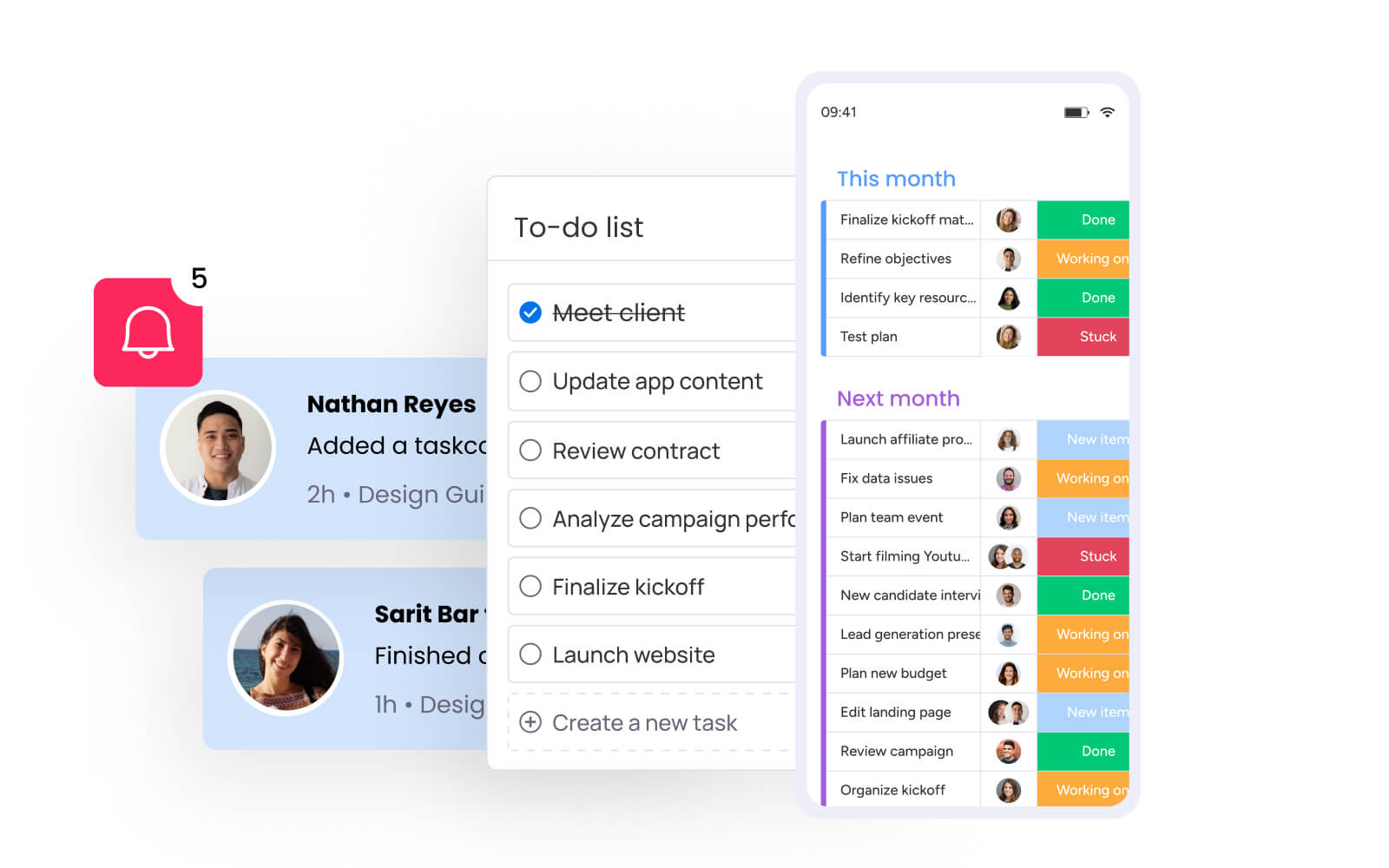
How Playtech transformed project delivery
Playtech’s transformation demonstrates how resource management software can revolutionize operations for global services organizations. Their journey from fragmented spreadsheets to unified project execution provides a blueprint for similar organizations facing resource allocation challenges.
The challenge
Playtech’s project managers previously relied on spreadsheets, email, and notepads to manage projects across 60 global licensees. This fragmented approach created several challenges:
- Premature resource booking: projects weren’t properly tracked in early stages.
- Manual cost calculations: financial tracking required work across multiple spreadsheets.
- Limited stakeholder visibility: external partners couldn’t see project progress.
The solution
The PMO department implemented monday work management to centralize all project work. They created separate boards for project opportunities and active projects, preventing premature resource allocation. A Management Approval board connects to project budgeting with formula columns that automatically calculate costs. Custom templates allow quick workflow duplication while maintaining flexibility.
The results
The transformation delivered measurable results:
- 26% efficiency increase: across the entire PMO department.
- 49% better collaboration: improved transparency with all stakeholders.
- 23% higher KPI achievement: better project delivery performance.
- 3 hours saved weekly: per person on coordination and reporting.
Transform your resource management today
The reality is: spreadsheets don’t cut it anymore for managing client projects. When deadlines and budgets are on the line, you need instant answers about team capacity and project status: not another round of email check-ins.
With monday work management, the capabilities PMs need most: are all tied together: visual workload management that prevents burnout, automated workflows that eliminate manual coordination, and portfolio-level visibility that keeps stakeholders aligned.
With proven results like Playtech’s 26% efficiency gain and less than four-month payback periods, the platform delivers measurable impact for services organizations.
The key to successful resource management isn’t just having the right features — it’s having a platform teams actually use. High adoption rates, intuitive design, and seamless integration with existing tools ensure your investment delivers value from day one.
Ready to transform how your team manages resources and delivers client work? Start with a foundation that scales with your organization’s growth and complexity.
Try monday work managementThe content in this article is provided for informational purposes only and, to the best of monday.com’s knowledge, the information provided in this article is accurate and up-to-date at the time of publication. That said, monday.com encourages readers to verify all information directly.
Frequently asked questions
How quickly can services organizations implement resource management software?
When it comes to how quickly services organizations can implement resource management software, most teams see value within the first month. The Total Economic Impact™ Forrester study reports less than four months to full payback. Most teams become comfortable with platforms like monday work management within two to four weeks, with enterprise implementations involving complex workflows taking two to three months for complete rollout.
Can resource management software handle both employees and contractors?
Resource management platforms support both internal employees and external contractors. You can add contractors as guests with limited permissions, track their availability alongside employees, and manage tasks within the same workflows. The platform's flexible user management lets you control what external resources can see and edit while maintaining security.
How does resource management software integrate with existing project tools?
Modern resource management platforms offer extensive integration capabilities. monday work management provides 200+ native integrations including Jira, Microsoft Teams, Slack, and Google Workspace. Two-way sync ensures data flows seamlessly between systems. For custom systems, open APIs enable tailored integrations that connect to proprietary platforms or financial systems.
What's the difference between resource management software and basic project management tools?
Resource management software combines project tracking with advanced capabilities like workload balancing, capacity forecasting, and portfolio analytics. Basic project management tools typically focus only on task tracking and timelines. Resource management platforms provide the additional layers needed by services organizations: multi-project resource allocation, financial tracking, and client collaboration portals.
Can clients access the platform for project visibility?
Resource management platforms support controlled client access through guest permissions and dedicated portals. Project managers configure exactly what clients can view and interact with, providing transparency without exposing internal operations. This reduces status update requests and improves client satisfaction through proactive communication.
How does the software prevent team burnout?
Visual workload views immediately highlight when team members exceed capacity, displaying overallocation in red. Automated notifications alert managers to overbooked resources, while capacity planning features help distribute work evenly. Real-time visibility into workload distribution enables proactive management that protects team health while maintaining delivery commitments.

 Get started