


Media teams move fast. New briefs land daily, creative assets bounce between tools, and deadlines tighten even as expectations rise. When resources are scattered across spreadsheets, chat threads, and siloed platforms, momentum disappears — and project managers end up spending more time chasing information than leading delivery.
The right resource management software gives media teams the structure they’ve been missing. It connects creative workflows, clarifies capacity, and turns resource planning from reactive guesswork into confident, data-driven decision-making. With a unified system in place, project managers gain the visibility and control needed to keep campaigns moving, protect creative bandwidth, and scale output without scaling headcount.
Below we will explore in detail what matters most when choosing resource management software for media teams — and why the leading platforms are reshaping how creative organizations plan, produce, and deliver work.
Key takeaways
Choosing the right resource management platform comes down to a few essentials that have the biggest impact on how smoothly your creative operation runs. These are the points that matter most when evaluating your options.
- Unified workflows: centralise briefs, assets, and timelines so every project runs from a single source of truth.
- Workload visibility: prevent burnout by identifying overallocation early and balancing capacity with confidence.
- AI-driven planning: anticipate bottlenecks and assign resources more intelligently using data-backed insights.
- Automated handoffs: reduce delays by routing work, updates, and approvals without manual intervention.
- Smarter scaling: handle more campaigns with the same team through structured processes in monday work management.
Why monday work management stands out for media resource management
Media projects move through complex, multi-stakeholder workflows that generic project tools simply aren’t built to handle. Producers, creatives, editors, and clients all work in different systems, at different speeds, and with different requirements — which means project managers need a platform designed specifically to unify that complexity.
monday work management brings those moving parts together, giving media teams a single place to coordinate resources, track capacity, automate handoffs, and integrate the creative tools they already rely on.
The following capabilities show the solution supports the real workflows media teams depend on, and why it has become a preferred choice for organisations managing high-volume creative production.
Centralized workflows replace tool chaos
Media teams typically juggle up to ten different platforms for a single campaign. This fragmentation creates blind spots where projects stall and deadlines slip. Here’s how scattered workflows impact productivity:
- Creative briefs: live in Google Docs without version control.
- Asset storage: scattered across Dropbox, Google Drive, and local drives.
- Feedback loops: happen in email threads that get lost or overlooked.
- Timeline tracking: exists in disconnected spreadsheets with no real-time updates.
monday work management consolidates these scattered workflows into one unified workspace. Teams manage creative briefs, track production stages, coordinate reviews, and monitor budgets without switching tabs. The platform’s flexibility means you can mirror your existing creative process while gaining complete visibility across every project phase.
For a real-life example, when SPH Media’s Content Lab managed campaigns across 40+ media brands, their workflows were scattered across multiple tools. By centralizing on monday work management, they now track hundreds of campaigns with 130+ people working in one unified system.
Visual workload management for media teams
Resource allocation in media isn’t just about availability. It’s about matching the right skills to the right projects at the right time. A video editor might be available but already stretched across three projects. A designer could have capacity but lack the specific motion graphics expertise you need.
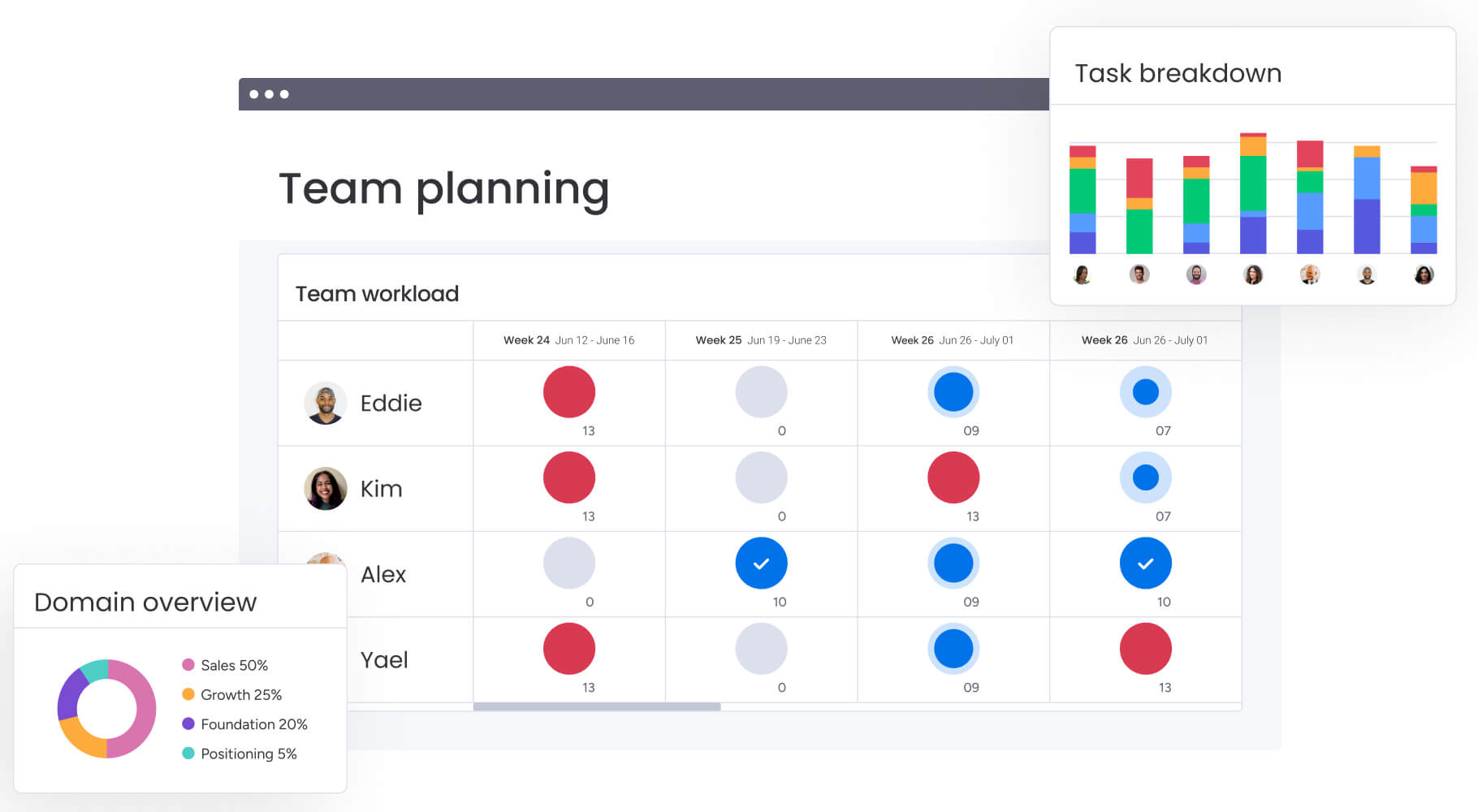
The Workload View in monday work management shows exactly who’s working on what, their current capacity, and upcoming availability. Project managers can:
- Spot overallocation: before it becomes burnout.
- Redistribute work: to balance team loads effectively.
- Make confident decisions: based on real-time data rather than guesswork.
This visual approach to capacity planning helps media teams maintain sustainable workloads while meeting aggressive deadlines. You can see at a glance when your lead designer is approaching capacity. It also shows when your video team has bandwidth for that urgent client request.
Seamless creative tool integration
Media teams live in specialized creative platforms, and forcing them to abandon their preferred workflows kills adoption. Your designers need Adobe Creative Cloud, editors work in Premiere Pro, and everyone collaborates through Slack. Any resource management platform must fit into this existing ecosystem.
monday work management integrates with 200+ tools that media teams already use:
- Adobe Creative Cloud: files sync directly to project boards.
- Frame.io: reviews happen within the platform.
- Slack: notifications keep everyone informed without leaving their workflow.
The platform acts as a central nervous system connecting your creative stack. When a designer uploads assets to Adobe Creative Cloud, they automatically appear in the project timeline. When feedback comes through Frame.io, it triggers the next production phase. Everything connects without manual updates or duplicate data entry.
AI-powered resource optimization for 2026
By 2026, we won’t just be scheduling resources: AI will help us get ahead of problems before they happen. monday work management’s AI capabilities analyze historical project data to predict resource needs, identify potential bottlenecks before they occur, and suggest optimal team assignments based on skills, availability, and past performance.
The AI Blocks feature delivers intelligent automation:
- Categorize requests: incoming creative requests at scale.
- Automatic assignment: to the right team members.
- Generate project plans: with suggested phases and timelines.
For media teams handling dozens of concurrent projects, AI-powered risk identification flags potential issues across your entire portfolio. It might notice that three campaigns are scheduled to need the same video editor during the same week, or that a project’s timeline doesn’t account for typical revision cycles.
monday work management top features for media resource management
Understanding the specific features that drive media project success helps project managers evaluate platforms effectively. Let’s take a closer look at how these features address the unique challenges of creative workflows, from capacity planning to cross-departmental collaboration.
Real-time capacity planning
Capacity planning in media requires more than simple availability tracking. You need to understand team bandwidth across multiple projects, account for different skill sets, and adjust for the unpredictable nature of creative work.
monday work management’s capacity planning features provide live visibility into resource allocation across your entire portfolio:
- Workload tracking: not just who’s available, but their current workload percentage.
- Skill-based availability: match specific expertise to project requirements.
- Scenario simulation: understand the impact of new projects before committing to deadlines.
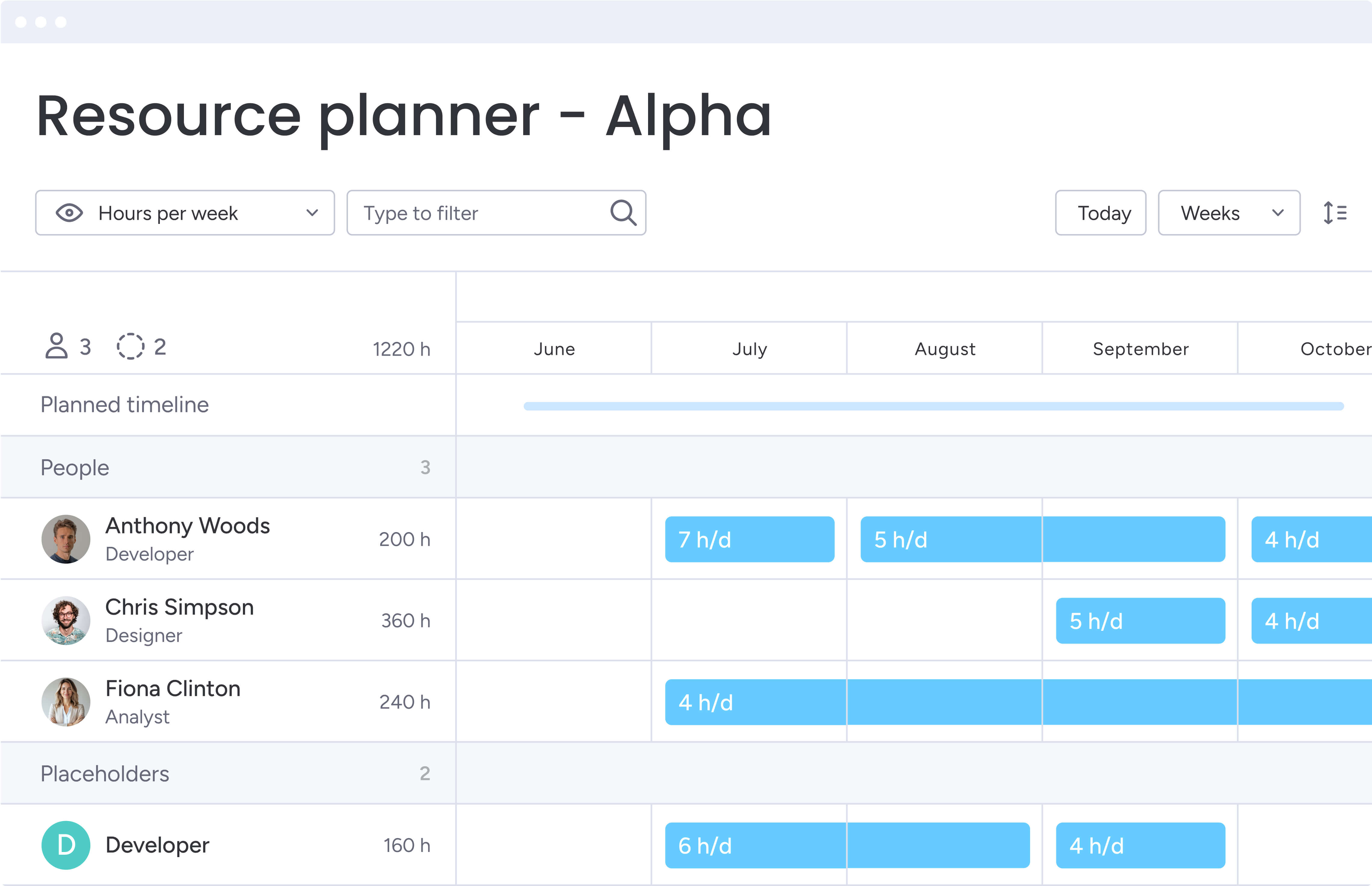
The Resource Planner integrates directly into your workflows, letting you plan, assign, and adjust resources at the project level without guesswork. You can set work schedules, account for time zones across distributed teams, and even use placeholders for roles you haven’t filled yet.
Creative review and approval workflows
Creative review cycles can become black holes where projects disappear for days. Without structured approval workflows, feedback gets lost in email threads, stakeholders provide conflicting direction, and revision rounds multiply unnecessarily.
The platform’s automated approval workflows route creative assets to the right reviewers in the right order:
- Multi-stage approvals: initial concepts go to creative directors before reaching clients.
- Contextual feedback: track feedback directly on assets.
- Version control: maintain clear asset history and prevent confusion.
These structured workflows reduce revision cycles and keep projects moving forward with defined accountability at every stage.
Portfolio management and project tracking
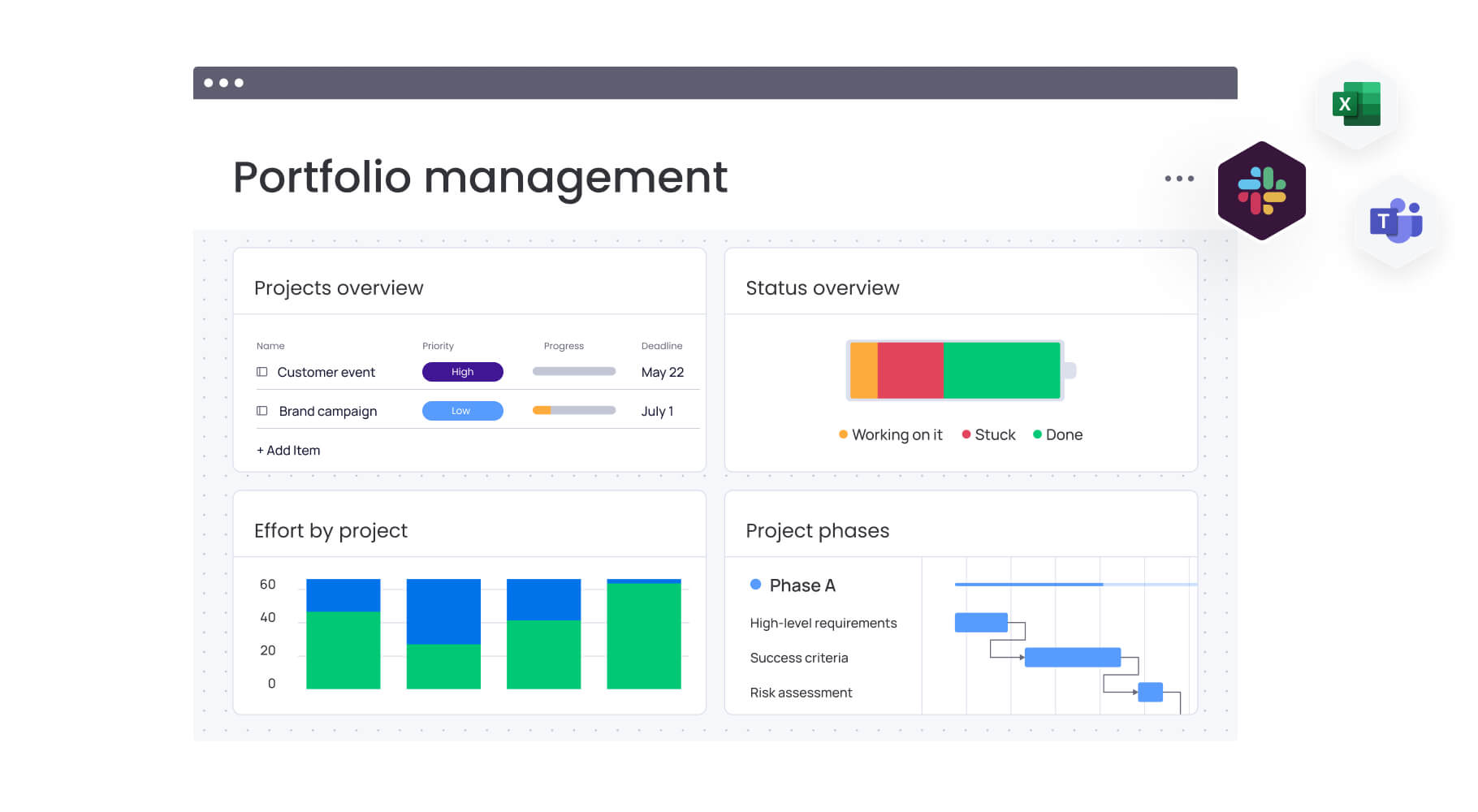
Media organizations juggle multiple campaigns, each with dozens of moving parts. Portfolio management features in monday work management aggregate all your projects into high-level views where you can track progress, identify risks, and allocate resources strategically.
The Portfolio Manager provides instant visibility into project health across your entire media operation:
- Campaign tracking: see which campaigns are on track and which need attention.
- Resource allocation: identify where resources might be stretched too thin.
- Strategic oversight: maintain both high-level visibility and tactical control.
Cross-department collaboration tools
Media projects require seamless coordination between creative, content, sales, and ad operations teams. Each department has different priorities, workflows, and communication styles, making collaboration challenging.
monday work management bridges these departmental silos with:
- Shared workspaces: transparent visibility across departments.
- Automated handoffs: when creative completes an asset, it automatically triggers the next step.
- Communication channels: orchestration happens without endless meetings or status emails.
Budget and time tracking
Every media project lives or dies by its budget. Tracking costs across freelancers, production expenses, and internal resources requires meticulous attention to detail.
Time tracking features in monday work management monitor how long projects actually take versus estimates, building a database of realistic timelines for future planning:
- Real-time budget tracking: automatic calculations showing burn rate and remaining budget.
- Cost analysis: connect time tracking to resource costs for accurate profitability analysis.
- Financial visibility: make informed decisions about resource allocation and project scope.
Automation and AI features
Automation in monday work management eliminates the repetitive tasks that consume project managers’ days:
- Work assignment: based on project type and team availability.
- Deadline reminders: automated notifications for approaching deadlines.
- Escalation rules: blocked items automatically escalate to supervisors.
AI Blocks take automation further by adding intelligence to your workflows. They can categorize creative requests by urgency and type, extract key information from briefs, summarize lengthy feedback into actionable items, and even detect sentiment in client communications to flag potential issues early.
Integration with 200+ creative tools
The platform’s extensive integration ecosystem ensures it fits seamlessly into your existing creative workflow. Beyond the headline integrations with Adobe Creative Cloud and Slack, monday work management connects with specialized media tools:
- Video hosting: Wistia integration for seamless video management.
- Asset management: Brandfolder for centralized brand asset control.
- Marketing automation: HubSpot for campaign performance tracking.
These integrations do more than sync data. They actually connect your workflows in real time. When a video uploads to Vimeo, it can trigger review workflows. When a campaign launches in Mailchimp, performance data flows back to your project dashboard.
How a project manager in media benefits from monday work management
Project managers in media face unique challenges that require specialized solutions. Understanding the specific benefits of comprehensive resource management helps demonstrate the platform’s value for creative teams and stakeholders.
Eliminate creative bottlenecks
Creative bottlenecks kill momentum and destroy deadlines. When feedback takes days to consolidate, when assets get stuck in approval limbo, or when team members wait for unclear direction, projects grind to a halt.
monday work management eliminates these bottlenecks through:
- Structured workflows: clear ownership means everyone knows their responsibilities.
- Automated handoffs: nothing sits idle waiting for manual updates.
- Real-time visibility: shows exactly where projects stand and what’s blocking progress.
You’ll spot and fix bottlenecks before they derail your deadlines, keeping projects moving forward even when creative work gets complicated.
Reduce project overruns
Project overruns in media often stem from poor resource planning and scope creep. Without visibility into team capacity and project requirements, managers overcommit and under-deliver.
The platform’s resource management capabilities help project managers make realistic commitments:
- Capacity-based planning: decisions based on actual capacity and historical performance.
- AI-powered insights: flag risks early for proactive adjustments.
- Standardized templates: consistent project setup reduces variables that lead to overruns.
Improve team utilization rates
Optimal team utilization in media means keeping creatives productive without burning them out. Too low, and you’re wasting talent. Too high, and quality suffers while turnover increases.
monday’s workload tools help you hit that productivity sweet spot — keeping your team at 70–80% capacity — by providing:
- Visual capacity planning: shows when team members approach overload.
- Proactive redistribution: enables workload balancing before problems occur.
- Skills-based allocation: ensures people work on projects that match their expertise.
Accelerate client delivery times
Speed matters in media. Clients expect rapid turnarounds, and the ability to deliver quickly often determines who wins the next project.
monday work management accelerates delivery through:
- Parallel workflows: teams work simultaneously with clear dependencies.
- Automated approvals: eliminate waiting time for manual sign-offs.
- Real-time collaboration: reduces back-and-forth that typically slows projects.
Scale operations without adding headcount
Growth in media doesn’t always mean hiring more people. Often, it means doing more with your existing team through improved efficiency and resource optimization.
monday work management enables this scaling through:
- Automation: handles routine tasks that previously required manual coordination.
- Standardization: templates reduce setup time for new projects.
- AI-powered allocation: ensures optimal use of existing talent.
Organizations can handle significantly more projects with the same team size by eliminating inefficiencies and maximizing resource utilization.
Gain complete visibility across multiple projects
Managing multiple media projects simultaneously requires superhuman memory, or excellent software. Project managers need to know the status of every campaign, the capacity of every team member, and the health of every timeline.
The platform’s portfolio management capabilities provide this complete visibility:
- Customizable dashboards: see all projects in one view.
- Drill-down capability: access specific details when needed.
- Executive reporting: generate reports with a few clicks.
This visibility transforms project management from reactive firefighting to proactive optimization.
Try monday work managementHow to manage media resources effectively with monday work management
Successfully implementing resource management software requires a structured approach that addresses your unique workflows while building team adoption. These six steps ensure smooth implementation and maximum value from your investment.
Step 1: audit your current media workflow
Before implementing any resource management platform, you need to understand your current state. This comprehensive audit reveals the gaps, redundancies, and inefficiencies that your resource management platform needs to address.
Document how projects flow through your organization:
- Project lifecycle: from initial brief to final delivery.
- Tool inventory: every platform currently in use.
- Handoff points: between teams and departments.
- Approval stages: that projects must pass through.
Map out your team structure, including full-time employees, regular freelancers, and vendor relationships. Note which tools are non-negotiable (like Adobe Creative Cloud) and which could be replaced.
Pay special attention to where projects typically get stuck. Is it creative review? Client approval? Resource allocation? These bottlenecks become your priority areas for improvement.
Step 2: map your creative process requirements
Every media organization has unique workflows shaped by their clients, culture, and creative approach. Your resource management platform must accommodate these unique requirements while providing structure and standardization.
Define your standard project types and their typical workflows:
- Campaign types: social media campaigns vs. video production projects.
- Role requirements: who’s involved in each project type.
- Timeline expectations: typical duration and milestones.
- Deliverable standards: what constitutes project completion.
This mapping becomes the blueprint for your platform configuration. Consider how you want to handle exceptions and edge cases. Media projects rarely follow the script perfectly, so your platform needs flexibility to accommodate changes without breaking the overall structure.
Step 3: configure your resource management platform
With requirements mapped, begin configuring monday work management to match your workflows. This configuration phase transforms the platform from a generic tool to your customized command center.
Start with one project type as a pilot:
- Board creation: mirror your creative process.
- Automation rules: set up common handoffs.
- Approval stages: configure critical checkpoints.
- Integration connections: connect to essential tools.
Build your resource directory with all team members, their skills, roles, and availability. Configure workload views to match your capacity planning needs. Create dashboard widgets that surface the metrics that matter most to your operation.
Step 4: run a pilot with one project team
Rather than rolling out to everyone at once, start with a pilot team running a real project. Choose a team that’s tech-savvy and open to change, but working on a project that represents your typical workflow.
This pilot reveals configuration gaps, training needs, and adoption challenges in a controlled environment:
- Active feedback collection: uncovers what’s working, what’s confusing, what’s missing.
- Configuration refinement: use feedback to improve setup before broader rollout.
- Champion development: the pilot team becomes your advocates for organization-wide adoption.
Step 5: roll out across all media projects
Once your pilot succeeds and you’ve fine-tuned your setup, start bringing more teams on board. Rolling out in phases means you can fix small issues before they become company-wide headaches.
Provide comprehensive training that focuses on value, not just features:
- Role-specific training: why each feature matters for their specific role.
- Custom documentation: specific to your workflows, not generic platform guides.
- Phased implementation: add one team or project type at a time.
Set clear expectations about the transition period and provide extra support during the first few weeks.
Step 6: measure and optimize resource allocation
After you’re up and running, set up monthly check-ins to see what’s working and where your team’s time could be better spent. Keep tweaking your approach, and you’ll get more from your platform every month.
Track key performance metrics:
- Project delivery time: compare to baseline measurements.
- Resource utilization rates: identify optimization opportunities.
- Project profitability: understand true project costs.
Use the platform’s AI-powered insights to identify optimization opportunities. Maybe certain project types consistently require more resources than estimated. Perhaps some team members are consistently underutilized while others are overloaded. These insights drive continuous improvement in your resource management approach.
Comparison table: monday work management vs competing platforms for media teams
When you take the time to look at resource management platforms for media teams, remember that specific capabilities matter more than generic features. This comparison focuses on the functionalities that directly impact media project delivery and creative team productivity.
| Feature | monday work management | Wrike | Asana |
|---|---|---|---|
| Visual workload management | ✓ Workload view with capacity planning | ✓ Limited workload view | ✓ Basic workload view |
| Creative tool integrations | 200+ including Adobe Creative Cloud | Limited creative integrations | Basic creative integrations |
| AI-powered automation | ✓ AI risk identification & task generation | Limited AI features | Basic automation |
| Implementation time | Less than 4 months | 3-6 months | 2-4 months |
| Price per user/month | Starting at $9 | Starting at $9.80 | Starting at $10.99 |
| G2 rating | 4.7/5 | 4.2/5 | 4.3/5 |
How SPH Media transformed their media campaign delivery

Real-world implementation demonstrates how monday work management addresses the complex challenges facing media organizations. SPH Media’s transformation illustrates the practical benefits of centralized resource management for large-scale media operations.
The challenge
SPH Media’s Content Lab faced a complex challenge managing campaigns across 40+ media brands. Their workflows were scattered across multiple disconnected tools, creating information silos between creative, content, sales, and ad operations teams.
The operational challenges included:
- Manual processes: dominated workflow from campaign tracking to reporting.
- Scaling difficulties: increasingly difficult to maintain quality standards.
- Visibility gaps: project managers spent hours gathering status updates.
- Isolated teams: creative teams worked without visibility into broader objectives.
- Resource allocation: happened through spreadsheets and memory, leading to overloaded team members.
The solution
SPH Media implemented monday work management as their centralized platform for campaign management. The comprehensive solution addressed their specific workflow requirements while providing scalability for future growth.
Key implementation features included:
- Customizable production boards: matched their specific workflow requirements.
- Automated reporting: eliminated manual data compilation.
- Timeline views: provided visual project tracking across all campaigns.
- API capabilities: enabled automatic synchronization between ad bookings and creative production.
- Integration support: teams continued using familiar software while gaining centralized visibility.
The results
The transformation delivered measurable impact across SPH Media’s operation. They now track hundreds of campaigns in one unified platform, with complete visibility from conception to delivery.
Quantifiable improvements include:
- Unified system: 130+ people managing work collaboratively.
- Broken silos: previously hampered efficiency across departments.
- Scalable platform: supports 40 brands reaching audiences across Asia.
- Adaptive workflows: can adapt as needed without starting from scratch.
With ready-made functionality providing a foundation that grows and evolves with their changing needs, SPH Media demonstrates how monday work management scales with ambitious media operations.
Ready to kickstart your new era of media project management?
Resource management in media demands more than basic scheduling tools. It requires a platform that understands creative workflows, connects disparate teams, and scales with your ambitions. monday work management delivers that capability through unified workspaces, AI-powered insights, and seamless integrations with your creative stack.
We’ve seen it time and again: teams on monday eliminate creative bottlenecks, finish projects on budget, and deliver to clients faster than ever. With real-time capacity planning, automated workflows, and comprehensive portfolio visibility, project managers gain the tools they need to orchestrate complex campaigns while maintaining team productivity and satisfaction.
Join thousands of teams who trust monday work management to centralize their workflows and accelerate delivery. Experience real-time resource management and visual project tracking that transforms how media teams work.
The content in this article is provided for informational purposes only and, to the best of monday.com’s knowledge, the information provided in this article is accurate and up-to-date at the time of publication. That said, monday.com encourages readers to verify all information directly.
Try monday work managementFrequently asked questions
What is the difference between resource management software and project management software?
Resource management software focuses on allocating people, skills, equipment, and budgets across multiple projects. Project management software, by contrast, focuses on task planning, timelines, and day-to-day execution. monday work management combines both capabilities, giving media teams visibility into project progress and real-time resource capacity from a single platform.
How much does resource management software cost for media teams?
Pricing varies by platform, but monday work management starts at $9 per user/month for the Basic plan. The Standard plan ($12 per user/month) adds timeline views and integrations, while Enterprise pricing is customised for organisations that need advanced security, governance, and tailored workflows.
Can resource management software integrate with Adobe Creative Cloud?
Yes, monday work management integrates seamlessly with Adobe Creative Cloud, along with 200+ other tools commonly used by media teams including Slack, Frame.io, Google Drive, Microsoft Teams, and Zoom. These integrations enable creative teams to work within their preferred tools while maintaining centralized project visibility.
How do you manage freelancers in resource management platforms?
monday work management allows you to add external collaborators including freelancers and vendors with customizable permission levels. You can assign specific tasks, track their hours, manage deliverables, and control what project information they can access — all without giving them full system access.
What is the typical ROI timeline for resource management software?
According to Forrester's Total Economic Impact study, organizations using monday work management see a payback period of less than four months. Media teams specifically report time savings of 1.6 hours per person per week, with some achieving significantly faster project delivery within the first year of implementation.
How does AI improve resource allocation in media projects?
monday work management's AI capabilities analyze historical project data to identify risks, suggest optimal resource allocation, and automatically categorize project requests. The AI can flag potential bottlenecks before they occur, recommend task assignments based on team capacity and skills, and generate detailed project plans with suggested phases and timelines.

 Get started